Achieving Developer Nirvana With 
Codename: BlueMix 
By: Ryan Baxter 
@ryanjbaxter 
http://ryanjbaxter.com
Not The Band 
1
Definition 
nirvana 
/nərˈvänə,nir-/ 
In the Buddhist tradition, nirvana is described as the 
extinguishing of the fires that cause suffering. 
2
Does This Sound Like Dev Nirvana? 
 Install runtime, container, and all libraries 
 Install needed services (databases, mobile, etc) 
 Bind the services to the application, ports/ips/firewalls 
 Setup dynamic routing and load-balancer 
 Setup four layers of built-in High-Availability 
 Setup streaming logging aggregation 
 Setup application performance monitoring 
 Scale the application up to X instances 
 Then repeat for dev, test, and production 
3
What Is BlueMix? 
 A platform for running virtually any application in the cloud 
without having to worry about the hardware, software, and 
networking needed to do so. 
 This definition is usually what we refer to as a platform-as-a- 
service or PaaS 
 BlueMix is similar to other platforms you may have heard 
of 
 Heroku, Google App Engine, OpenShift, Pivotal One 
4
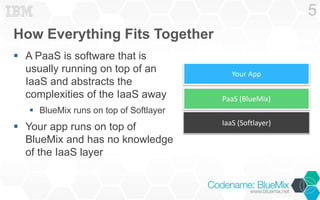
How Everything Fits Together 
 A PaaS is software that is 
usually running on top of an 
IaaS and abstracts the 
complexities of the IaaS away 
 BlueMix runs on top of Softlayer 
 Your app runs on top of 
BlueMix and has no knowledge 
of the IaaS layer 
5 
Your App 
PaaS (BlueMix) 
IaaS (Softlayer)
Why Not Just Use IaaS? 
 It might be just as easy to get started at the IaaS layer if 
you use a prebuild image 
 Over time though the maintenance of this image 
increases the cost 
 OS updates, security updates, new versions of libraries, DNS and 
networking changes, configuration and maintenance of other 
services like DBs, etc 
 At the PaaS layer all of this cost disappears! The platform 
takes care of it for you! 
6
Benefits Of Using BlueMix 
 Save time by just worrying about the code and not the 
infrastructure 
 Quickly get your app in the hands of your users – 
deploying your app is a matter of running a single 
command 
 Easily add functionality to your application using IBM and 
partner provided services 
 Use the languages, runtimes, and frameworks that you 
are most familiar with 
 SoftLayer 
7
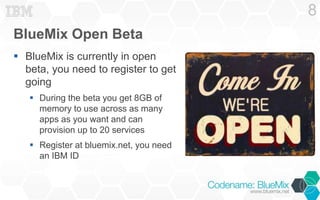
BlueMix Open Beta 
 BlueMix is currently in open 
beta, you need to register to get 
going 
 During the beta you get 8GB of 
memory to use across as many 
apps as you want and can 
provision up to 20 services 
 Register at bluemix.net, you need 
an IBM ID 
8
Lets Deploy An App! 
App to enable anyone to ask questions for a session…but 
we can make it even easier. 
9
Cloud Foundry And BlueMix 
 BlueMix is built upon an open 
source project called Cloud Foundry 
 IBM contributes to the project and is a 
founding member of the Cloud Foundry 
Foundation 
 All tools, documentation, and 
samples for Cloud Foundry are 
relevant and can be used with 
BlueMix 
 Buildpacks, Services, CLI, Scaling, 
etc are Cloud Foundry concepts 
10
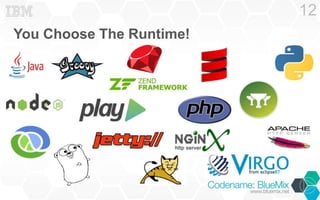
Runtimes And Buildpacks 
 One of the benefits of BlueMix is that it supports virtually 
any runtime you may want to use 
 This is accomplished a psuedo-standard called 
buildpacks 
 BlueMix has 4 built in buildpacks 
 Java Liberty, Node.js, Sinatra, and Ruby On Rails 
 If you are pushing an application using one of these languages 
you do not need to specify a buildpack to use, BlueMix installs it 
for you 
 Other runtimes are supported via community buildpacks 
11
You Choose The Runtime! 
12
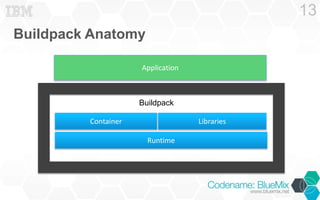
Buildpack Anatomy 
13 
Application 
Buildpack 
Container Libraries 
Runtime
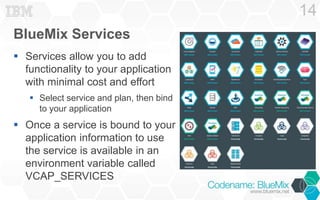
BlueMix Services 
 Services allow you to add 
functionality to your application 
with minimal cost and effort 
 Select service and plan, then bind 
to your application 
 Once a service is bound to your 
application information to use 
the service is available in an 
environment variable called 
VCAP_SERVICES 
14
The Cloud Foundry Command Line (CLI) 
 The command line will most likely be your tool of choice 
when doing anything with BlueMix 
 Anything you will want to do in BlueMix can be accomplished 
using the CLI 
 Pushing An Application, stopping, starting, restarting, 
deleting 
 Create, bind, and unbind services 
 View and tail application logs 
 Documentation: 
http://docs.cloudfoundry.org/devguide/installcf/whats-new-v6. 
html 
15
Pushing An Application 
 You can push an application 
using the cf push command 
 What you push depends on the 
runtime you will use, for Java you 
may push a war or jar, for Node.js 
you will push the app directory 
 cf push will push everything in 
the current directory unless you 
specify the –p option 
16
Manifest Files 
 cf push commands can become very verbose 
 cf push appName –p myapp.war –b 
https://github.com/ryanjbaxter/mybuildpack -i 5 
–m 512M --no-start 
 To avoid having to type this you can use a manifest file 
 When using a manifest file you just execute cf push and the CLI 
will look for manifest.mf in the current directory 
 Manifest Generator: http://cfmanigen.ng.bluemix.net 
17
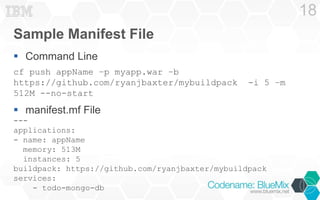
Sample Manifest File 
 Command Line 
cf push appName –p myapp.war –b 
https://github.com/ryanjbaxter/mybuildpack -i 5 –m 
512M --no-start 
 manifest.mf File 
--- 
applications: 
- name: appName 
memory: 513M 
instances: 5 
buildpack: https://github.com/ryanjbaxter/mybuildpack 
services: 
- todo-mongo-db 
18
Logging 
 Logging is the first step in figuring out what is wrong 
 You application’s logs will be written to stderr.log and 
stdout.log 
 Logs can be viewed in the BlueMix UI by selecting your 
applications runtime 
 Logs can be tailed from the command line – very useful! 
 cf logs appName 
 cf logs appName --recent – shows you the most recent 
logs 
19
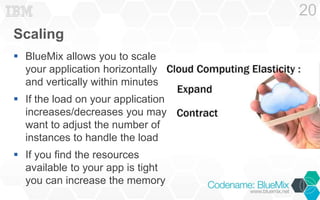
Scaling 
 BlueMix allows you to scale 
your application horizontally 
and vertically within minutes 
 If the load on your application 
increases/decreases you may 
want to adjust the number of 
instances to handle the load 
 If you find the resources 
available to your app is tight 
you can increase the memory 
20
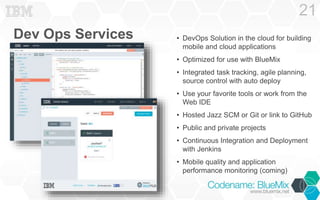
Dev Ops Services 
21 
• DevOps Solution in the cloud for building 
mobile and cloud applications 
• Optimized for use with BlueMix 
• Integrated task tracking, agile planning, 
source control with auto deploy 
• Use your favorite tools or work from the 
Web IDE 
• Hosted Jazz SCM or Git or link to GitHub 
• Public and private projects 
• Continuous Integration and Deployment 
with Jenkins 
• Mobile quality and application 
performance monitoring (coming)
Resources 
 Documentation: 
https://www.ng.bluemix.net/docs/index.jsp 
 developerWorks: http://developer.ibm.com/bluemix 
 Sample Apps & Tutorials: 
https://www.ibmdw.net/bluemix/docs/articles/, 
https://www.ibmdw.net/bluemix/docs/sample-code/ 
 Developer Forum: 
https://www.ibmdw.net/answers/?community=bluemix 
 Blog: https://www.ibmdw.net/bluemix/blog/ 
 Twitter: #BlueMix, @IBMBlueMix 
23
Resources From Today 
 Slides: http://www.slideshare.net/RyanBaxter/dev-nirvanabluemix 
 Code: https://github.com/CodenameBlueMix/session-questions 
24
Thank you. 
Join the beta at: www.bluemix.net
Backup
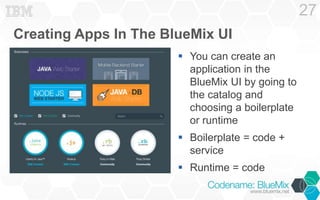
Creating Apps In The BlueMix UI 
 You can create an 
application in the 
BlueMix UI by going to 
the catalog and 
choosing a boilerplate 
or runtime 
 Boilerplate = code + 
service 
 Runtime = code 
27
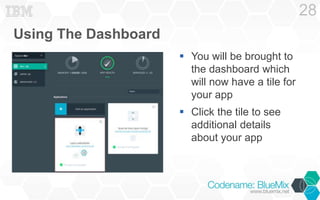
Using The Dashboard 
 You will be brought to 
the dashboard which 
will now have a tile for 
your app 
 Click the tile to see 
additional details 
about your app 
28
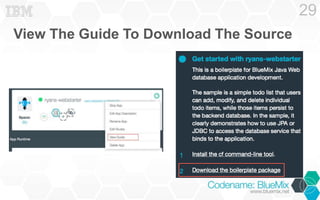
View The Guide To Download The Source 
29
Updating The Source 
 Downloading the source code may be good for learning 
but you are most likely not going to use any of it 
 In fact it is not even necessary to create an app in the UI first 
 You will want to download and install the Cloud Foundry 
Command Line tool in order to upload / create your 
application 
 Follow the documentation here: 
http://www.ng.bluemix.net/docs/BuildingWeb.jsp#install-cf 
30

Developer Nirvana with IBM Bluemix™

  • 1.
    Achieving Developer NirvanaWith Codename: BlueMix By: Ryan Baxter @ryanjbaxter http://ryanjbaxter.com
  • 2.
  • 3.
    Definition nirvana /nərˈvänə,nir-/ In the Buddhist tradition, nirvana is described as the extinguishing of the fires that cause suffering. 2
  • 4.
    Does This SoundLike Dev Nirvana?  Install runtime, container, and all libraries  Install needed services (databases, mobile, etc)  Bind the services to the application, ports/ips/firewalls  Setup dynamic routing and load-balancer  Setup four layers of built-in High-Availability  Setup streaming logging aggregation  Setup application performance monitoring  Scale the application up to X instances  Then repeat for dev, test, and production 3
  • 5.
    What Is BlueMix?  A platform for running virtually any application in the cloud without having to worry about the hardware, software, and networking needed to do so.  This definition is usually what we refer to as a platform-as-a- service or PaaS  BlueMix is similar to other platforms you may have heard of  Heroku, Google App Engine, OpenShift, Pivotal One 4
  • 6.
    How Everything FitsTogether  A PaaS is software that is usually running on top of an IaaS and abstracts the complexities of the IaaS away  BlueMix runs on top of Softlayer  Your app runs on top of BlueMix and has no knowledge of the IaaS layer 5 Your App PaaS (BlueMix) IaaS (Softlayer)
  • 7.
    Why Not JustUse IaaS?  It might be just as easy to get started at the IaaS layer if you use a prebuild image  Over time though the maintenance of this image increases the cost  OS updates, security updates, new versions of libraries, DNS and networking changes, configuration and maintenance of other services like DBs, etc  At the PaaS layer all of this cost disappears! The platform takes care of it for you! 6
  • 8.
    Benefits Of UsingBlueMix  Save time by just worrying about the code and not the infrastructure  Quickly get your app in the hands of your users – deploying your app is a matter of running a single command  Easily add functionality to your application using IBM and partner provided services  Use the languages, runtimes, and frameworks that you are most familiar with  SoftLayer 7
  • 9.
    BlueMix Open Beta  BlueMix is currently in open beta, you need to register to get going  During the beta you get 8GB of memory to use across as many apps as you want and can provision up to 20 services  Register at bluemix.net, you need an IBM ID 8
  • 10.
    Lets Deploy AnApp! App to enable anyone to ask questions for a session…but we can make it even easier. 9
  • 11.
    Cloud Foundry AndBlueMix  BlueMix is built upon an open source project called Cloud Foundry  IBM contributes to the project and is a founding member of the Cloud Foundry Foundation  All tools, documentation, and samples for Cloud Foundry are relevant and can be used with BlueMix  Buildpacks, Services, CLI, Scaling, etc are Cloud Foundry concepts 10
  • 12.
    Runtimes And Buildpacks  One of the benefits of BlueMix is that it supports virtually any runtime you may want to use  This is accomplished a psuedo-standard called buildpacks  BlueMix has 4 built in buildpacks  Java Liberty, Node.js, Sinatra, and Ruby On Rails  If you are pushing an application using one of these languages you do not need to specify a buildpack to use, BlueMix installs it for you  Other runtimes are supported via community buildpacks 11
  • 13.
    You Choose TheRuntime! 12
  • 14.
    Buildpack Anatomy 13 Application Buildpack Container Libraries Runtime
  • 15.
    BlueMix Services Services allow you to add functionality to your application with minimal cost and effort  Select service and plan, then bind to your application  Once a service is bound to your application information to use the service is available in an environment variable called VCAP_SERVICES 14
  • 16.
    The Cloud FoundryCommand Line (CLI)  The command line will most likely be your tool of choice when doing anything with BlueMix  Anything you will want to do in BlueMix can be accomplished using the CLI  Pushing An Application, stopping, starting, restarting, deleting  Create, bind, and unbind services  View and tail application logs  Documentation: http://docs.cloudfoundry.org/devguide/installcf/whats-new-v6. html 15
  • 17.
    Pushing An Application  You can push an application using the cf push command  What you push depends on the runtime you will use, for Java you may push a war or jar, for Node.js you will push the app directory  cf push will push everything in the current directory unless you specify the –p option 16
  • 18.
    Manifest Files cf push commands can become very verbose  cf push appName –p myapp.war –b https://github.com/ryanjbaxter/mybuildpack -i 5 –m 512M --no-start  To avoid having to type this you can use a manifest file  When using a manifest file you just execute cf push and the CLI will look for manifest.mf in the current directory  Manifest Generator: http://cfmanigen.ng.bluemix.net 17
  • 19.
    Sample Manifest File  Command Line cf push appName –p myapp.war –b https://github.com/ryanjbaxter/mybuildpack -i 5 –m 512M --no-start  manifest.mf File --- applications: - name: appName memory: 513M instances: 5 buildpack: https://github.com/ryanjbaxter/mybuildpack services: - todo-mongo-db 18
  • 20.
    Logging  Loggingis the first step in figuring out what is wrong  You application’s logs will be written to stderr.log and stdout.log  Logs can be viewed in the BlueMix UI by selecting your applications runtime  Logs can be tailed from the command line – very useful!  cf logs appName  cf logs appName --recent – shows you the most recent logs 19
  • 21.
    Scaling  BlueMixallows you to scale your application horizontally and vertically within minutes  If the load on your application increases/decreases you may want to adjust the number of instances to handle the load  If you find the resources available to your app is tight you can increase the memory 20
  • 22.
    Dev Ops Services 21 • DevOps Solution in the cloud for building mobile and cloud applications • Optimized for use with BlueMix • Integrated task tracking, agile planning, source control with auto deploy • Use your favorite tools or work from the Web IDE • Hosted Jazz SCM or Git or link to GitHub • Public and private projects • Continuous Integration and Deployment with Jenkins • Mobile quality and application performance monitoring (coming)
  • 23.
    Resources  Documentation: https://www.ng.bluemix.net/docs/index.jsp  developerWorks: http://developer.ibm.com/bluemix  Sample Apps & Tutorials: https://www.ibmdw.net/bluemix/docs/articles/, https://www.ibmdw.net/bluemix/docs/sample-code/  Developer Forum: https://www.ibmdw.net/answers/?community=bluemix  Blog: https://www.ibmdw.net/bluemix/blog/  Twitter: #BlueMix, @IBMBlueMix 23
  • 24.
    Resources From Today  Slides: http://www.slideshare.net/RyanBaxter/dev-nirvanabluemix  Code: https://github.com/CodenameBlueMix/session-questions 24
  • 25.
    Thank you. Jointhe beta at: www.bluemix.net
  • 26.
  • 27.
    Creating Apps InThe BlueMix UI  You can create an application in the BlueMix UI by going to the catalog and choosing a boilerplate or runtime  Boilerplate = code + service  Runtime = code 27
  • 28.
    Using The Dashboard  You will be brought to the dashboard which will now have a tile for your app  Click the tile to see additional details about your app 28
  • 29.
    View The GuideTo Download The Source 29
  • 30.
    Updating The Source  Downloading the source code may be good for learning but you are most likely not going to use any of it  In fact it is not even necessary to create an app in the UI first  You will want to download and install the Cloud Foundry Command Line tool in order to upload / create your application  Follow the documentation here: http://www.ng.bluemix.net/docs/BuildingWeb.jsp#install-cf 30