My first Drupal module!
Why not?
About @ Gajendra Sharma

• Started as PHP developer with
custom CMS
•“You need Linux” they said
•I know Drupal since version 5.x
Email: gajen.ksharma@gmail
Skype: gajendrakumarsharma1688
LinkedIn: www.linkedin.com/in/gajendrasharma
Drupal
•  Available from drupal.org.
•  Runs on every machine with
PHP, supported database
and web server.
•  Very customizable
(themes, modules).
•  Good documented.
•  No limits.
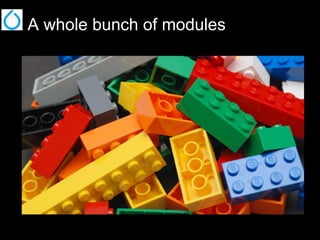
A whole bunch of modules
Which one to use?
Missing a module?
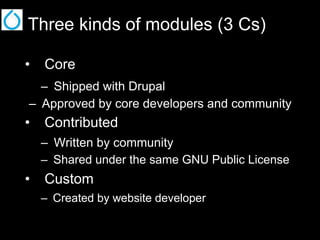
Three kinds of modules (3 Cs)
•  Core
–  Shipped with Drupal
–  Approved by core developers and community

•  Contributed
–  Written by community
–  Shared under the same GNU Public License

•  Custom
–  Created by website developer
Where to?

Drupal
Core Modules Core Themes
Contributed
Modules

Contributed Themes

Custom Module

Custom Theme

/sites/[all|mysite.com]/custom
Module name
•  Should be a UNIQUE “short name”
•  Used in all file and function names
•  Must start with a letter
•  Only lower-case letters and underscores

•  We will use name: “dc_stat”
–  For display current node/user stats
Create a folder + module file
•  Module name “dc_stats”.
•  Create empty folder:
–  /sites/*/modules/custom/dc_stats/

•  Create new file “dc_stats.module” with
opening PHP tag and NO closing tag!!
•  Create new file “dc_stats.info” for

meta information.
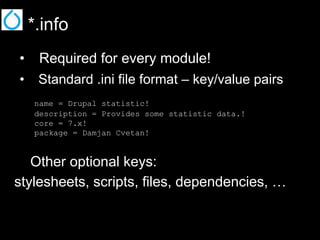
*.info
•  Required for every module!
•  Standard .ini file format – key/value pairs
name = Drupal statistic!
description = Provides some statistic data.!
core = 7.x!
package = Damjan Cvetan!

Other optional keys:
stylesheets, scripts, files, dependencies, …
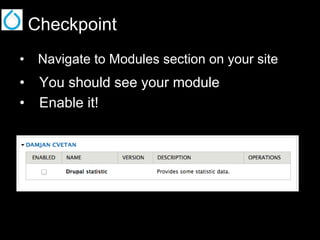
Checkpoint
•  Navigate to Modules section on your site

•  You should see your module
•  Enable it!
Coding standards
•  Use an indent of 2 spaces, no tabs!

• 
• 
• 
• 

UNIX line ending (n)
Omit closing “?>” PHP tag
Constants should be all-uppercase
Comments are your friends!
Half way there
Hook(s)
hook – [hoo k], noun Ÿ a
curved or angular piece of
metal or other hard
substance for catching,
pulling, holding, or
suspending something.

•  Fundamental to Drupal
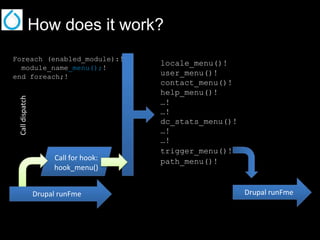
How does it work?

Call dispatch

Foreach (enabled_module):!
module_name_menu();!
end foreach;!

Call for hook:
hook_menu()
Drupal runFme

locale_menu()!
user_menu()!
contact_menu()!
help_menu()!
…!
…!
dc_stats_menu()!
…!
…!
trigger_menu()!
path_menu()!

Drupal runFme
Hooks line up!
•  hook_help() – Provides
available documentation.
•  hook_menu() – For paths registration
in order to define how URL request
are handled.
•  hook_init() – Run at the beginning of
page request.
•  hook_cron() – Called whenever a cron
run happens.
•  More at http://api.drupal.org/
API.drupal.org
•  Drupal developer’s documentation.
•  Doc for Drupal 4.6+.
•  Describes function calls, their
parameters and return values.
•  You can see the code and “who” is
calling this code within Drupal.
•  http://api.drupal.org
Let’s code
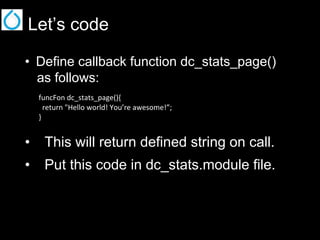
•  Define callback function dc_stats_page()
as follows:
funcFon dc_stats_page(){
return "Hello world! You’re awesome!”;
}

•  This will return defined string on call.
•  Put this code in dc_stats.module file.
Hey Drupal! Come in!
•  Register path with hook_menu().
•  We will use basic return array structure.
funcFon dc_stats_menu(){
$items['dc/stats-page'] = array(
'Ftle' => 'Stats info page',
'page callback' => 'dc_stats_page',
'access arguments' => array('access content'),
'type' => MENU_CALLBACK,
);
return $items;
}

Visit URL: /dc/stats-page to see if it works.
(You might need to clear cache first.)
Get some real data
funcFon dc_stats_page(){
drupal_set_Ftle("Drupal staFsFcs");
$node_count = $db_node_count;
$user_count = $db_users_count;
$header = array("InformaFon", "Value");
$rows[] = array('Number of nodes:', $node_count);
$rows[] = array('Number of users:', $user_count);
return theme_table(array( 'header' => $header,
'rows' => $rows,

…
…
)); // return
}
Happy ending
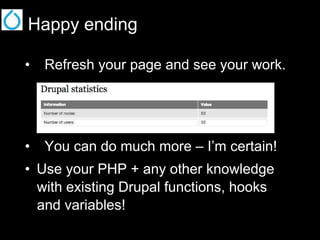
•  Refresh your page and see your work.

•  You can do much more – I’m certain!
•  Use your PHP + any other knowledge
with existing Drupal functions, hooks
and variables!
Links to consider
•  http://api.drupal.org
http://drupalcontrib.org/
•  http://buildamodule.com/
•  http://drupal.org/project/devel
–  A suit of modules containing fun for
module developers and themers.
Books
•  Drupal 7 Development by Example

•  Beginning Drupal 7
•  Drupal 7 Module Development
•  …
•  …
Q&A

Gajendra sharma Drupal Module development

  • 1.
    My first Drupalmodule! Why not?
  • 2.
    About @ GajendraSharma • Started as PHP developer with custom CMS •“You need Linux” they said •I know Drupal since version 5.x Email: gajen.ksharma@gmail Skype: gajendrakumarsharma1688 LinkedIn: www.linkedin.com/in/gajendrasharma
  • 3.
    Drupal •  Available fromdrupal.org. •  Runs on every machine with PHP, supported database and web server. •  Very customizable (themes, modules). •  Good documented. •  No limits.
  • 4.
    A whole bunchof modules
  • 5.
  • 6.
  • 7.
    Three kinds ofmodules (3 Cs) •  Core –  Shipped with Drupal –  Approved by core developers and community •  Contributed –  Written by community –  Shared under the same GNU Public License •  Custom –  Created by website developer
  • 8.
    Where to? Drupal Core ModulesCore Themes Contributed Modules Contributed Themes Custom Module Custom Theme /sites/[all|mysite.com]/custom
  • 9.
    Module name •  Shouldbe a UNIQUE “short name” •  Used in all file and function names •  Must start with a letter •  Only lower-case letters and underscores •  We will use name: “dc_stat” –  For display current node/user stats
  • 10.
    Create a folder+ module file •  Module name “dc_stats”. •  Create empty folder: –  /sites/*/modules/custom/dc_stats/ •  Create new file “dc_stats.module” with opening PHP tag and NO closing tag!! •  Create new file “dc_stats.info” for meta information.
  • 11.
    *.info •  Required forevery module! •  Standard .ini file format – key/value pairs name = Drupal statistic! description = Provides some statistic data.! core = 7.x! package = Damjan Cvetan! Other optional keys: stylesheets, scripts, files, dependencies, …
  • 12.
    Checkpoint •  Navigate toModules section on your site •  You should see your module •  Enable it!
  • 13.
    Coding standards •  Usean indent of 2 spaces, no tabs! •  •  •  •  UNIX line ending (n) Omit closing “?>” PHP tag Constants should be all-uppercase Comments are your friends!
  • 14.
    Half way there Hook(s) hook– [hoo k], noun Ÿ a curved or angular piece of metal or other hard substance for catching, pulling, holding, or suspending something. •  Fundamental to Drupal
  • 15.
    How does itwork? Call dispatch Foreach (enabled_module):! module_name_menu();! end foreach;! Call for hook: hook_menu() Drupal runFme locale_menu()! user_menu()! contact_menu()! help_menu()! …! …! dc_stats_menu()! …! …! trigger_menu()! path_menu()! Drupal runFme
  • 16.
    Hooks line up! • hook_help() – Provides available documentation. •  hook_menu() – For paths registration in order to define how URL request are handled. •  hook_init() – Run at the beginning of page request. •  hook_cron() – Called whenever a cron run happens. •  More at http://api.drupal.org/
  • 17.
    API.drupal.org •  Drupal developer’sdocumentation. •  Doc for Drupal 4.6+. •  Describes function calls, their parameters and return values. •  You can see the code and “who” is calling this code within Drupal. •  http://api.drupal.org
  • 18.
    Let’s code •  Definecallback function dc_stats_page() as follows: funcFon dc_stats_page(){ return "Hello world! You’re awesome!”; } •  This will return defined string on call. •  Put this code in dc_stats.module file.
  • 19.
    Hey Drupal! Comein! •  Register path with hook_menu(). •  We will use basic return array structure. funcFon dc_stats_menu(){ $items['dc/stats-page'] = array( 'Ftle' => 'Stats info page', 'page callback' => 'dc_stats_page', 'access arguments' => array('access content'), 'type' => MENU_CALLBACK, ); return $items; } Visit URL: /dc/stats-page to see if it works. (You might need to clear cache first.)
  • 20.
    Get some realdata funcFon dc_stats_page(){ drupal_set_Ftle("Drupal staFsFcs"); $node_count = $db_node_count; $user_count = $db_users_count; $header = array("InformaFon", "Value"); $rows[] = array('Number of nodes:', $node_count); $rows[] = array('Number of users:', $user_count); return theme_table(array( 'header' => $header, 'rows' => $rows, … … )); // return }
  • 21.
    Happy ending •  Refreshyour page and see your work. •  You can do much more – I’m certain! •  Use your PHP + any other knowledge with existing Drupal functions, hooks and variables!
  • 22.
    Links to consider • http://api.drupal.org http://drupalcontrib.org/ •  http://buildamodule.com/ •  http://drupal.org/project/devel –  A suit of modules containing fun for module developers and themers.
  • 23.
    Books •  Drupal 7Development by Example •  Beginning Drupal 7 •  Drupal 7 Module Development •  … •  …
  • 24.