business challenge
An introduction to service
design and a selection of
service design tools
Designmethods
fordeveloping
services
Page 2
Aboutthis
document
Contents
About this document
3	 About design and why
work with a designer
4	 Using design to develop
great services
The double diamond
design process
6	 The double 	
diamond overview
8	 What to do at each phase
Tools and methods
11	 Discover phase
16	 Define phase
19	 Develop phase
22	 Deliver phase
This is a brief introduction to why
design methods can be useful
when developing services.
If you’re new to service design:
You can use it to familiarise
yourself with a typical process
that designers use when
developing products and services.
It will give you an idea of what to
expect from working with a designer.
If you’re a designer:
You may be familiar with all of
this already, but you may find this
document useful when explaining
common service design methods
to others that are new to them.
Designmethodsfordevelopingservices
Keeping Connected Business Challenge
About this document The double diamond design process Tools and methods
Page 3
About design
Design is what links creativity and innovation.	
It shapes ideas to become practical and attractive
propositions for users or customers. Design may be
described as creativity deployed to a specific end.	
— The Cox Review
Design has many different definitions, but at its heart
it is about the process of translating ideas into reality,
making abstract thoughts tangible and concrete.
Whether it’s for a new service, a piece of graphics
or an innovative product, a number of key attributes
underpin every design-led project. These
fundamentals should inform the responses to the
Keeping Connected Business Challenge, ensuring
design-led solutions that enhance independent
living and quality of life for older adults.
Why work with a designer?
User understanding
Designers look to understand the needs and desires
of the people who will use a product or service by
spending time with them. This approach ensures
solutions are both fit for purpose and desirable to
the people who will use them. By focusing on human
stories and insights designers build empathy for users,
and ensure ideas being developed are relevant.
Prototyping
Designers work iteratively to test their ideas
and improve them throughout the entire
development process. Making an idea tangible
from an early stage through cheap mock-ups
helps save resources and can minimise risk.
Prototyping can be applied to both products and
services, and allows real world feedback from
users that ensure better, more relevant outcomes.
It can be quick and cheap and allows a solution to
be iterated and improved before it is rolled out.
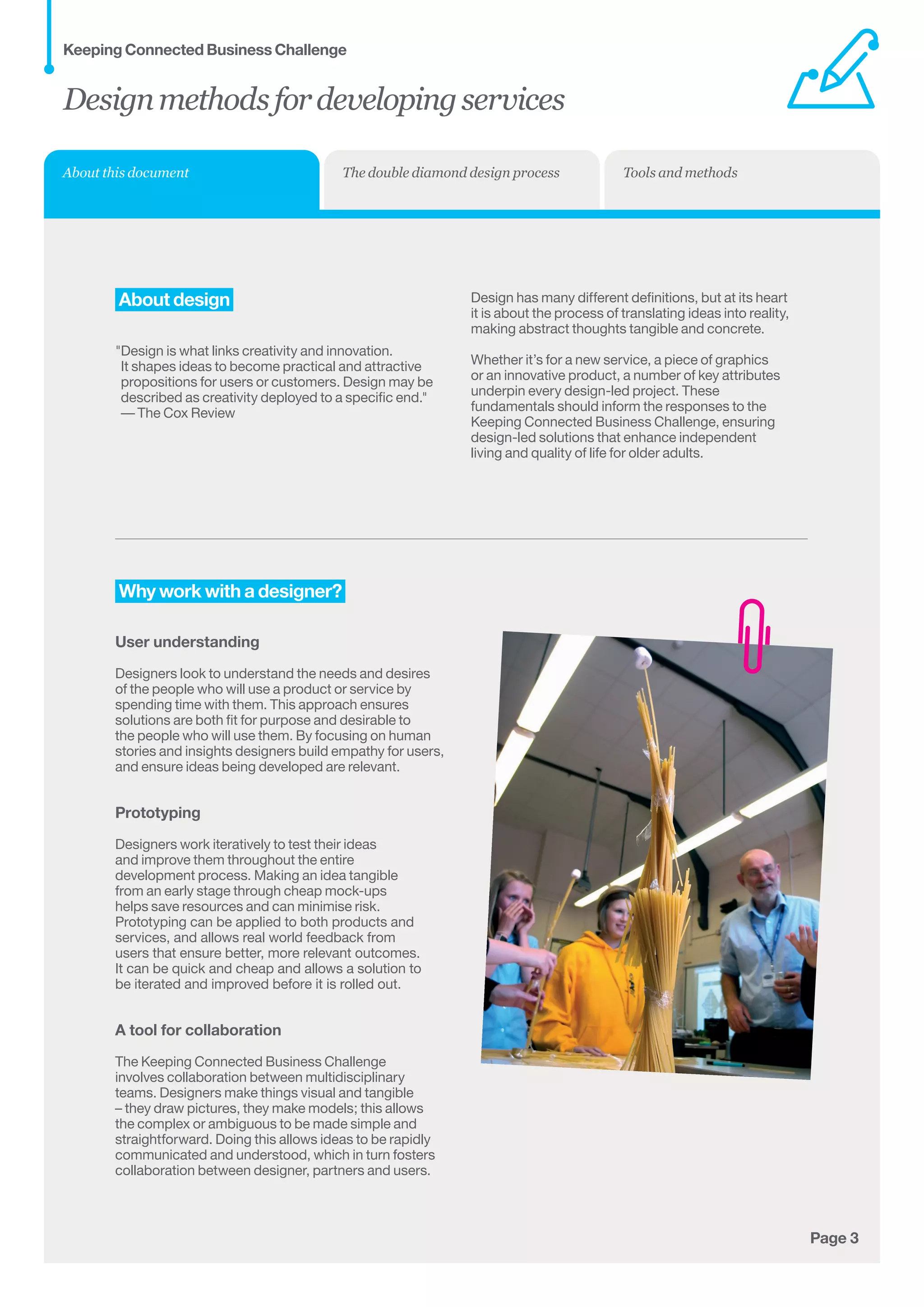
A tool for collaboration
The Keeping Connected Business Challenge
involves collaboration between multidisciplinary
teams. Designers make things visual and tangible
– they draw pictures, they make models; this allows
the complex or ambiguous to be made simple and
straightforward. Doing this allows ideas to be rapidly
communicated and understood, which in turn fosters
collaboration between designer, partners and users.
Designmethodsfordevelopingservices
Keeping Connected Business Challenge
About this document The double diamond design process Tools and methods
Page 4
Using design to develop
great services
Service design is all about making the services
we use usable, easy and desirable.
Services are all around us - buses, shops, libraries,
dentists, restaurants and the post office help us get to
work, get our food, or keep in contact with each other.
A service happens over time and is made
up of touchpoints – the people, information,
products and spaces that we encounter.
For instance a menu, a chair or a waitress are all
touchpoints that make up a restaurant service.
Service design is the process of creating these
touchpoints and defining how they interact with each
other and with the user. To design a great service it
is important to have service users in mind: are they
staff, suppliers or customers? Using design tools
and methods can deliver an in-depth understanding
of user behaviours, their likes and their needs,
which can enable new solutions to be developed.
Service design can be used to re-design an existing
service to make it work better for users, or it can
be used to create an entirely new service.
Designmethodsfordevelopingservices
Keeping Connected Business Challenge
About this document The double diamond design process Tools and methods
Page 5
Thedouble
diamonddesign
process
Designmethodsfordevelopingservices
Keeping Connected Business Challenge
The double diamond design process Tools and methodsAbout this document
Page 6
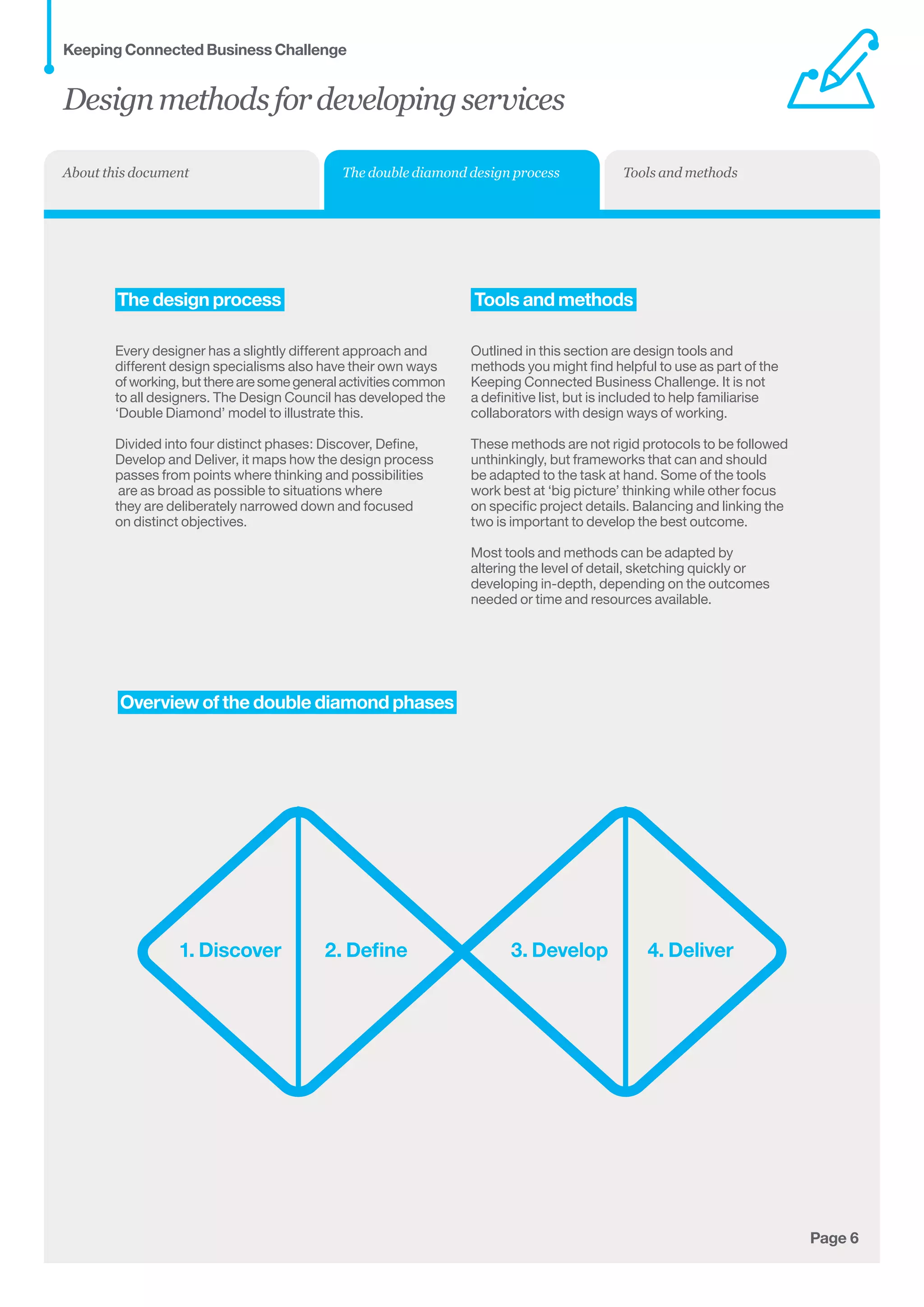
	Overview of the double diamond phases
1. Discover 2. Define 3. Develop 4. Deliver
	The design process
Every designer has a slightly different approach and
different design specialisms also have their own ways	
of working, but there are some general activities common	
to all designers. The Design Council has developed the
‘Double Diamond’ model to illustrate this.
Divided into four distinct phases: Discover, Define,
Develop and Deliver, it maps how the design process
passes from points where thinking and possibilities	
are as broad as possible to situations where 	
they are deliberately narrowed down and focused 	
on distinct objectives.
Tools and methods
Outlined in this section are design tools and
methods you might find helpful to use as part of the
Keeping Connected Business Challenge. It is not
a definitive list, but is included to help familiarise
collaborators with design ways of working.
These methods are not rigid protocols to be followed
unthinkingly, but frameworks that can and should
be adapted to the task at hand. Some of the tools
work best at ‘big picture’ thinking while other focus
on specific project details. Balancing and linking the
two is important to develop the best outcome.
Most tools and methods can be adapted by
altering the level of detail, sketching quickly or
developing in-depth, depending on the outcomes
needed or time and resources available.
Designmethodsfordevelopingservices
Keeping Connected Business Challenge
The double diamond design process Tools and methodsAbout this document
Tools and methodsAbout this document
Page 7
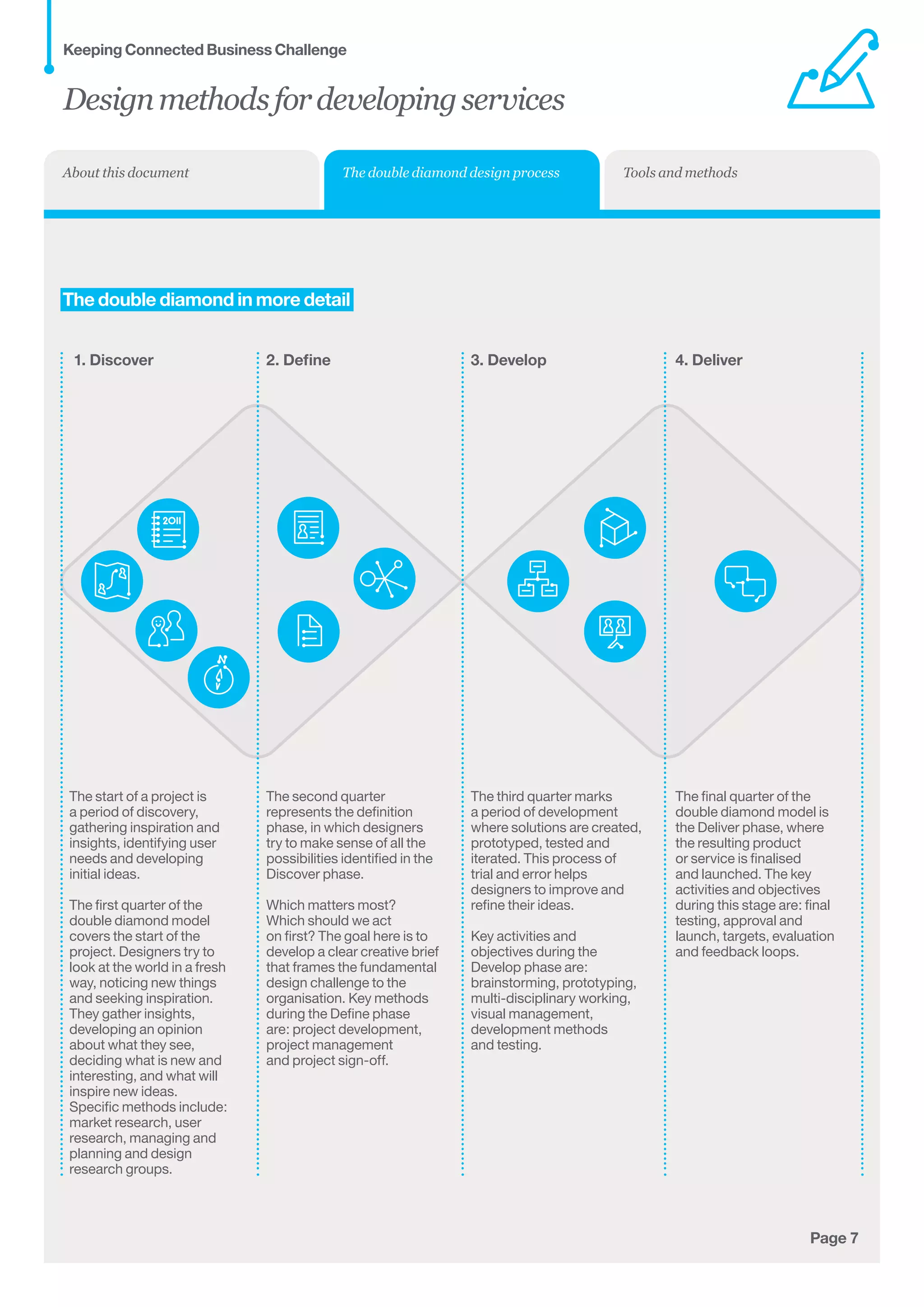
	The double diamond in more detail
The start of a project is 	
a period of discovery, 	
gathering inspiration and
insights, identifying user
needs and developing
initial ideas.
The first quarter of the 	
double diamond model
covers the start of the
project. Designers try to 	
look at the world in a fresh
way, noticing new things 	
and seeking inspiration. 	
They gather insights,
developing an opinion 	
about what they see,
deciding what is new and
interesting, and what will
inspire new ideas. 	
Specific methods include:
market research, user
research, managing and
planning and design
research groups.
1. Discover
The second quarter
represents the definition
phase, in which designers
try to make sense of all the
possibilities identified in the
Discover phase. 	
Which matters most? 	
Which should we act 	
on first? The goal here is to
develop a clear creative brief
that frames the fundamental
design challenge to the
organisation. Key methods
during the Define phase
are: project development,
project management
and project sign-off.
2. Define
The third quarter marks
a period of development
where solutions are created,
prototyped, tested and
iterated. This process of 	
trial and error helps
designers to improve and
refine their ideas. 	
Key activities and 	
objectives during the
Develop phase are:
brainstorming, prototyping,
multi-disciplinary working,
visual management,
development methods
and testing.
3. Develop
The final quarter of the
double diamond model is
the Deliver phase, where
the resulting product
or service is finalised
and launched. The key
activities and objectives
during this stage are: final
testing, approval and
launch, targets, evaluation
and feedback loops.
4. Deliver
Designmethodsfordevelopingservices
Keeping Connected Business Challenge
The double diamond design process
Page 8
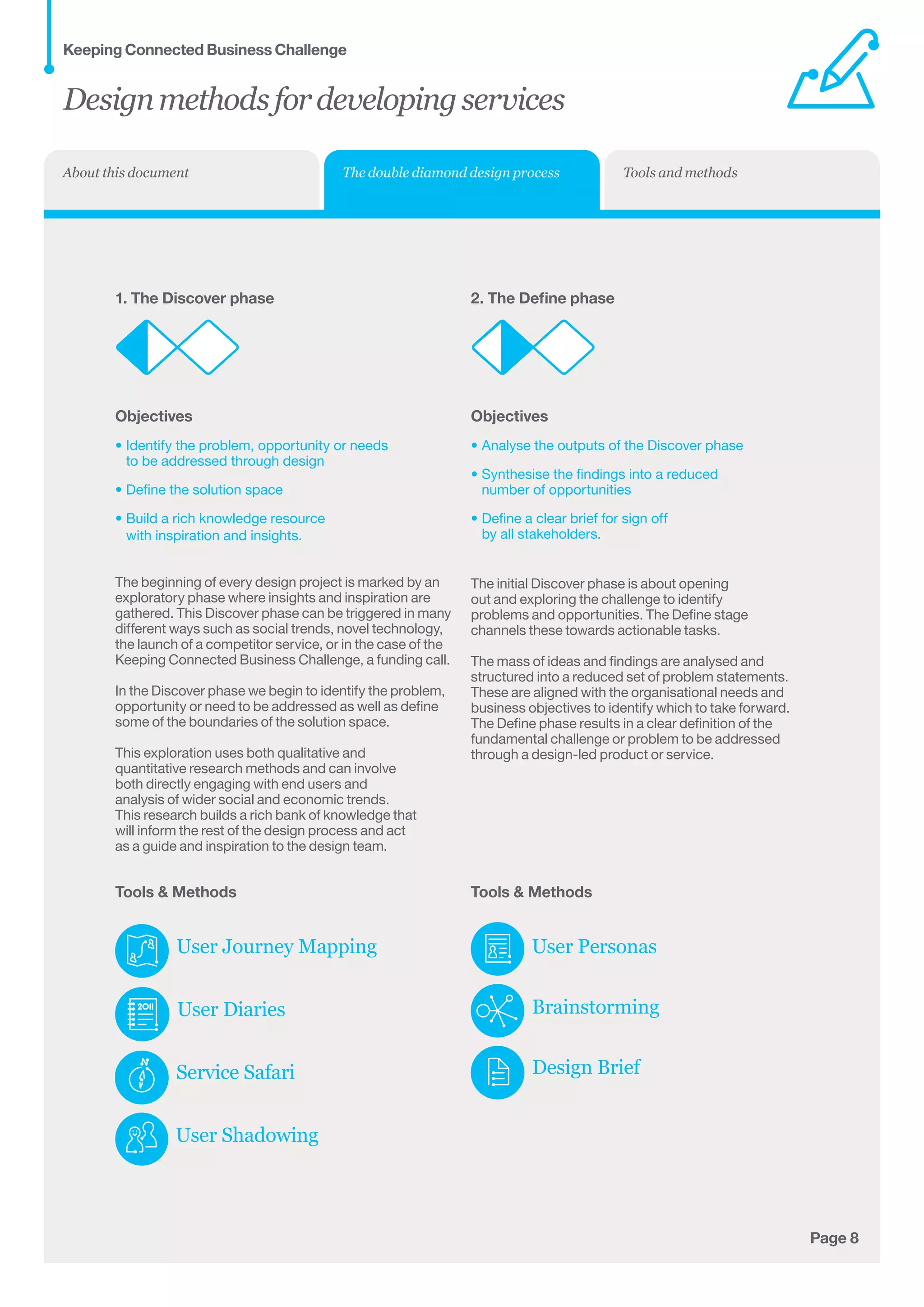
1. The Discover phase
Objectives
•	Identify the problem, opportunity or needs
to be addressed through design
•	Define the solution space
•	Build a rich knowledge resource
with inspiration and insights.
The beginning of every design project is marked by an
exploratory phase where insights and inspiration are
gathered. This Discover phase can be triggered in many
different ways such as social trends, novel technology,
the launch of a competitor service, or in the case of the
Keeping Connected Business Challenge, a funding call.
In the Discover phase we begin to identify the problem,
opportunity or need to be addressed as well as define
some of the boundaries of the solution space.
This exploration uses both qualitative and
quantitative research methods and can involve
both directly engaging with end users and
analysis of wider social and economic trends.
This research builds a rich bank of knowledge that
will inform the rest of the design process and act
as a guide and inspiration to the design team.
2. The Define phase
Objectives
•	Analyse the outputs of the Discover phase
•	Synthesise the findings into a reduced 	
number of opportunities
•	Define a clear brief for sign off 	
by all stakeholders.
The initial Discover phase is about opening
out and exploring the challenge to identify
problems and opportunities. The Define stage
channels these towards actionable tasks.
The mass of ideas and findings are analysed and
structured into a reduced set of problem statements.
These are aligned with the organisational needs and
business objectives to identify which to take forward.
The Define phase results in a clear definition of the
fundamental challenge or problem to be addressed
through a design-led product or service.
Tools  Methods
User Personas
Brainstorming
Design Brief
Tools  Methods
User Journey Mapping
User Diaries
Service Safari
User Shadowing
Designmethodsfordevelopingservices
Keeping Connected Business Challenge
The double diamond design process Tools and methodsAbout this document
Page 9
3. The Develop phase
Objectives
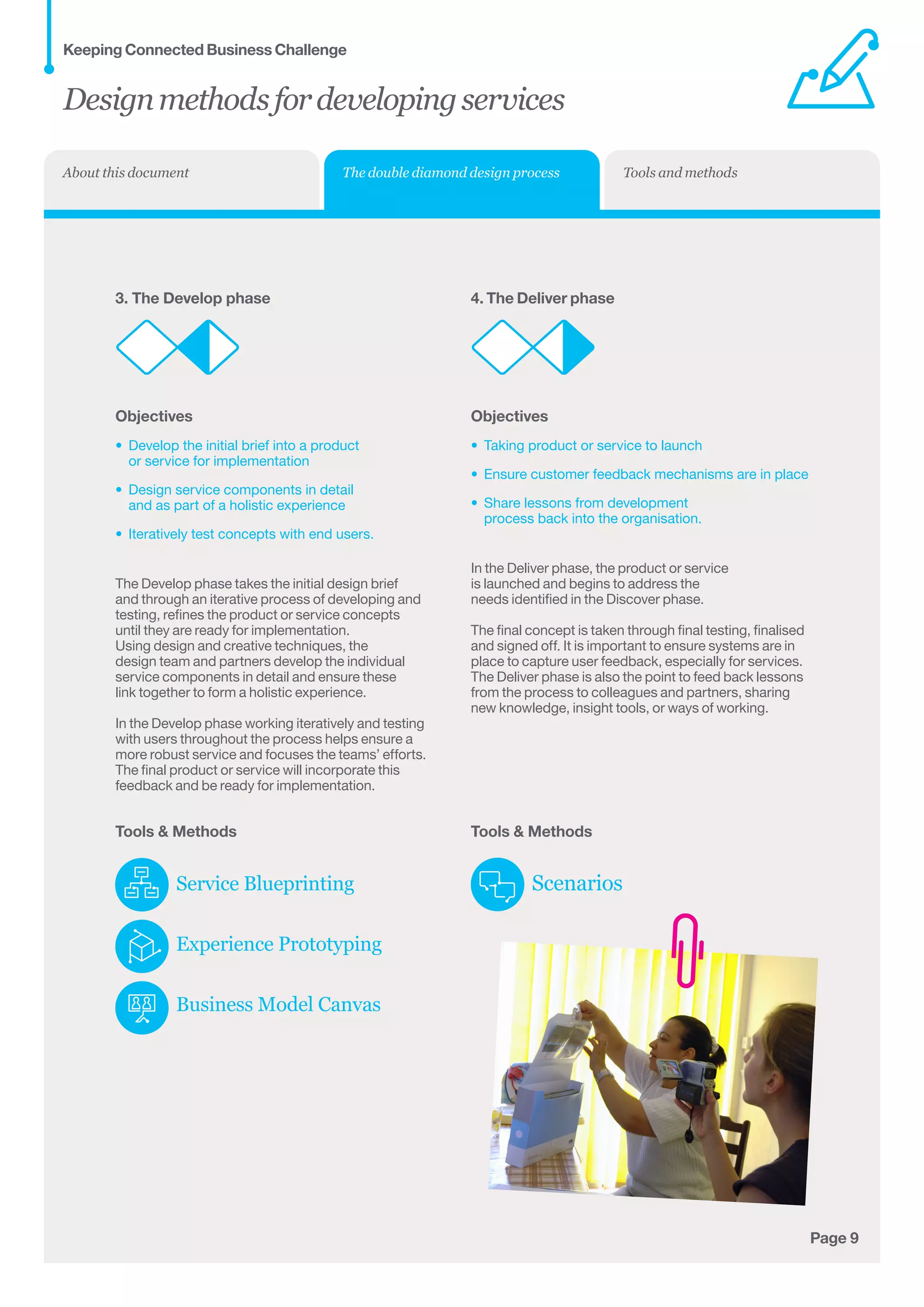
•	 Develop the initial brief into a product 	
or service for implementation
•	 Design service components in detail 	
and as part of a holistic experience
•	 Iteratively test concepts with end users.
The Develop phase takes the initial design brief
and through an iterative process of developing and
testing, refines the product or service concepts
until they are ready for implementation.
Using design and creative techniques, the
design team and partners develop the individual
service components in detail and ensure these
link together to form a holistic experience.
In the Develop phase working iteratively and testing
with users throughout the process helps ensure a
more robust service and focuses the teams’ efforts.
The final product or service will incorporate this
feedback and be ready for implementation.
Tools  Methods
Service Blueprinting
Experience Prototyping
Business Model Canvas
4. The Deliver phase
Objectives
•	 Taking product or service to launch
•	 Ensure customer feedback mechanisms are in place
•	 Share lessons from development
process back into the organisation.
In the Deliver phase, the product or service
is launched and begins to address the
needs identified in the Discover phase.
The final concept is taken through final testing, finalised
and signed off. It is important to ensure systems are in
place to capture user feedback, especially for services.
The Deliver phase is also the point to feed back lessons
from the process to colleagues and partners, sharing
new knowledge, insight tools, or ways of working.
Tools  Methods
Scenarios
Designmethodsfordevelopingservices
Keeping Connected Business Challenge
The double diamond design process Tools and methodsAbout this document
Page 10
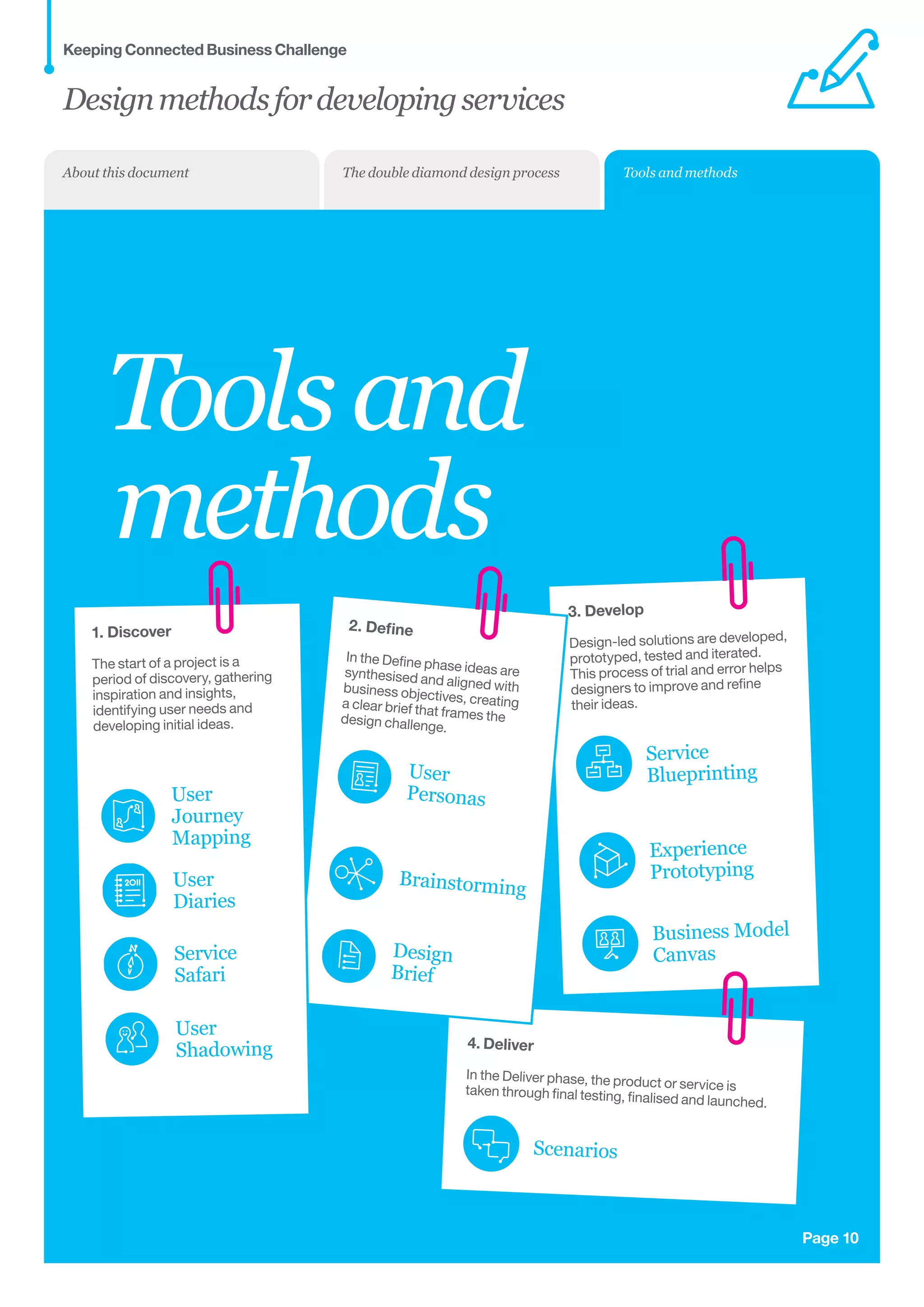
Toolsand
methods
3. Develop
Design-led solutions are developed,
prototyped, tested and iterated.
This process of trial and error helps
designers to improve and refine 	
their ideas.
4. Deliver
In the Deliver phase, the product or service istaken through final testing, finalised and launched.
1. Discover
The start of a project is a
period of discovery, gathering
inspiration and insights,
identifying user needs and
developing initial ideas.
2. Define
In the Define phase ideas aresynthesised and aligned withbusiness objectives, creating	a clear brief that frames thedesign challenge.
User
Journey
Mapping
User
Diaries
Service
Safari
User
Shadowing
Brainstorming
Design
Brief
Service
Blueprinting
Experience
Prototyping
Business Model
Canvas
Scenarios
User
Personas
Designmethodsfordevelopingservices
Keeping Connected Business Challenge
Tools and methodsThe double diamond design processAbout this document
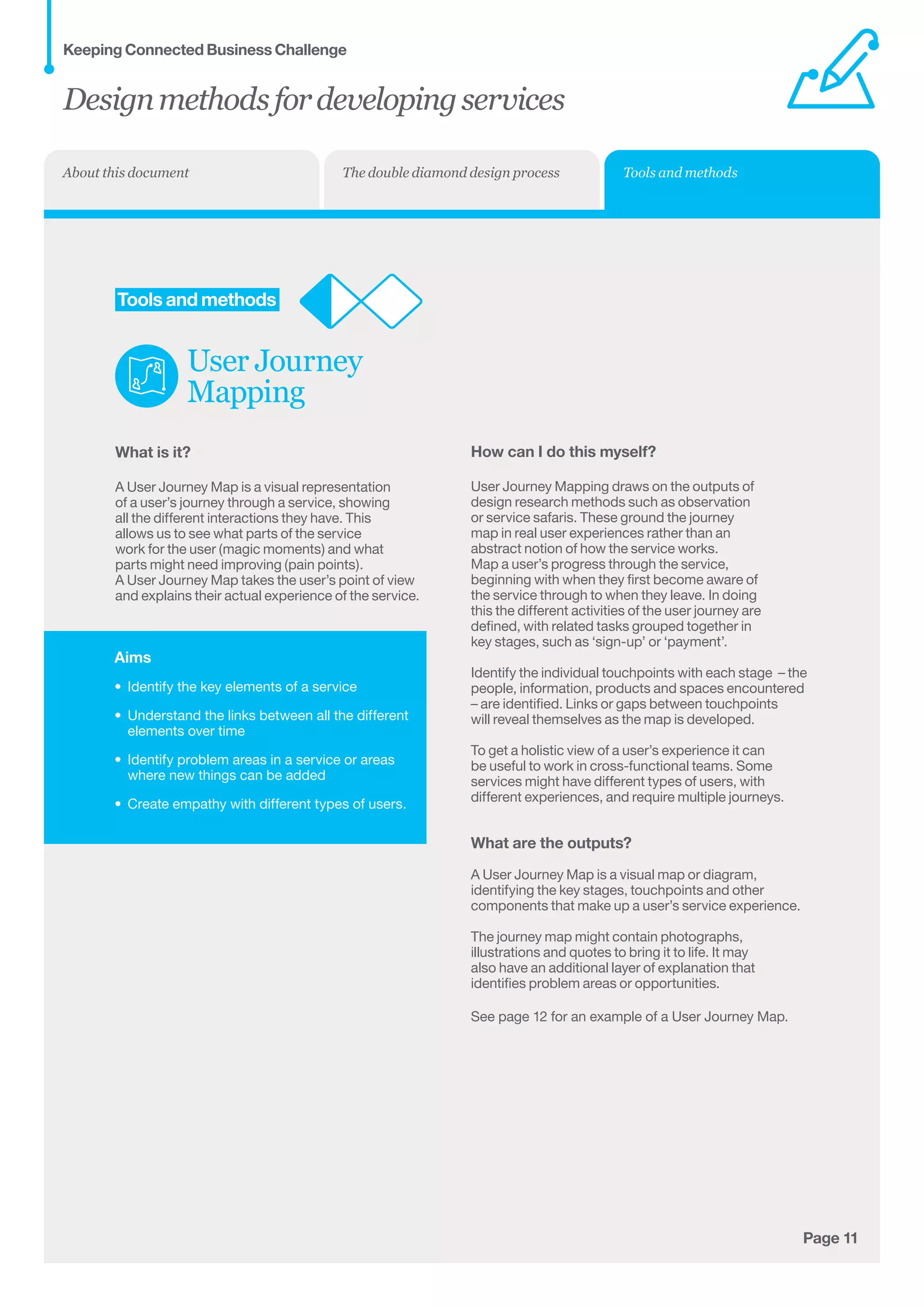
Aims
•	 Identify the key elements of a service
•	 Understand the links between all the different
elements over time
•	 Identify problem areas in a service or areas
where new things can be added
•	 Create empathy with different types of users.
Page 11
	Tools and methods
User Journey
Mapping
What is it?
A User Journey Map is a visual representation
of a user’s journey through a service, showing
all the different interactions they have. This
allows us to see what parts of the service
work for the user (magic moments) and what
parts might need improving (pain points).
A User Journey Map takes the user’s point of view
and explains their actual experience of the service.
How can I do this myself?
User Journey Mapping draws on the outputs of
design research methods such as observation
or service safaris. These ground the journey
map in real user experiences rather than an
abstract notion of how the service works.
Map a user’s progress through the service,
beginning with when they first become aware of
the service through to when they leave. In doing
this the different activities of the user journey are
defined, with related tasks grouped together in
key stages, such as ‘sign-up’ or ‘payment’.
Identify the individual touchpoints with each stage  – the
people, information, products and spaces encountered
– are identified. Links or gaps between touchpoints
will reveal themselves as the map is developed.
To get a holistic view of a user’s experience it can
be useful to work in cross-functional teams. Some
services might have different types of users, with
different experiences, and require multiple journeys.
What are the outputs?
A User Journey Map is a visual map or diagram,
identifying the key stages, touchpoints and other
components that make up a user’s service experience.
The journey map might contain photographs,
illustrations and quotes to bring it to life. It may
also have an additional layer of explanation that
identifies problem areas or opportunities.
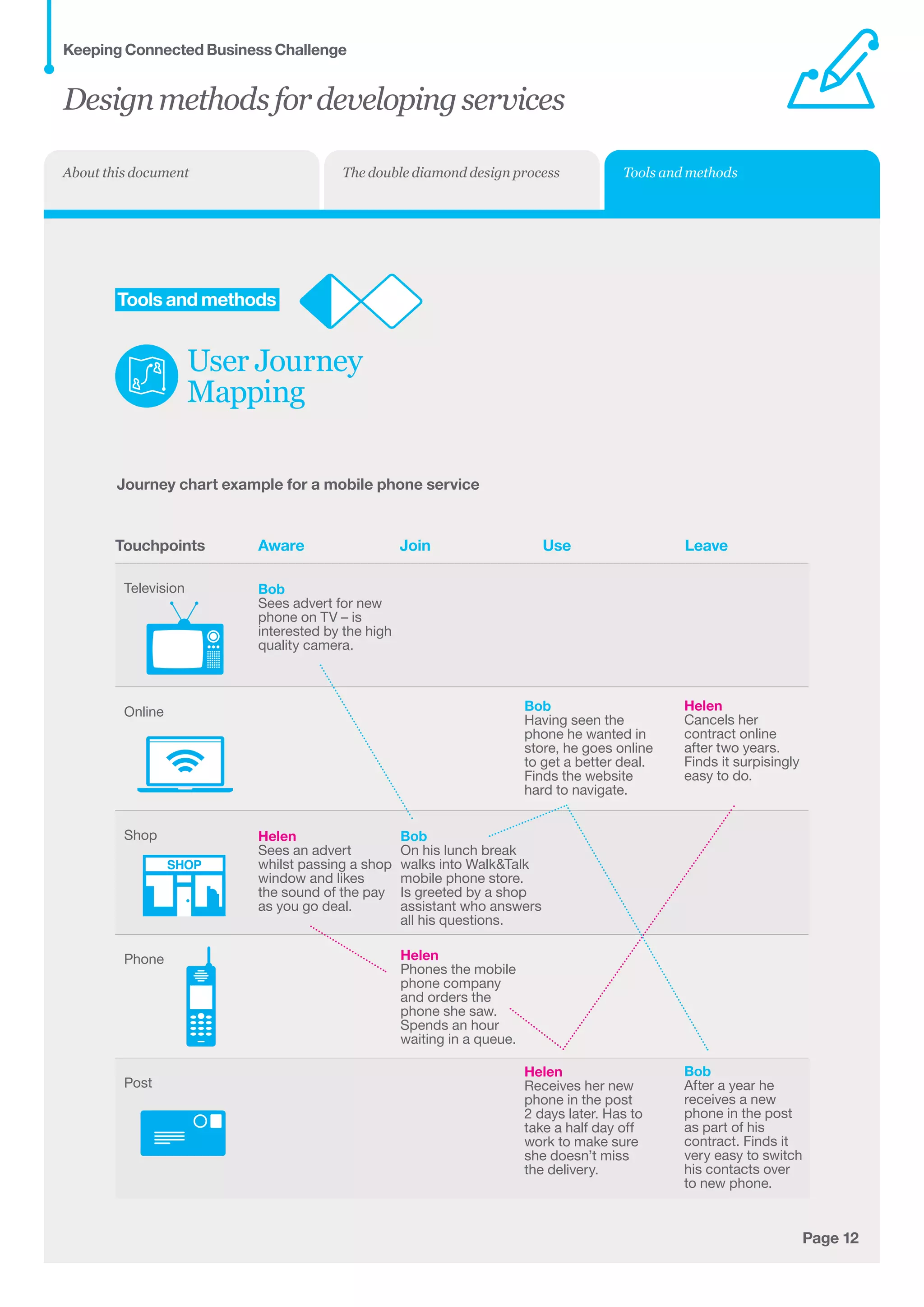
See page 12 for an example of a User Journey Map.
Designmethodsfordevelopingservices
Keeping Connected Business Challenge
Tools and methodsThe double diamond design processAbout this document
Page 12
	Tools and methods
User Journey
Mapping
Journey chart example for a mobile phone service
AwareTouchpoints Join Use Leave
Bob
Sees advert for new
phone on TV – is
interested by the high
quality camera.
Bob
On his lunch break
walks into WalkTalk
mobile phone store.
Is greeted by a shop
assistant who answers
all his questions.
Bob
Having seen the
phone he wanted in
store, he goes online
to get a better deal.
Finds the website
hard to navigate.
Bob
After a year he
receives a new
phone in the post
as part of his
contract. Finds it
very easy to switch
his contacts over
to new phone.
Helen
Sees an advert 	
whilst passing a shop
window and likes
the sound of the pay
as you go deal.
Helen
Phones the mobile
phone company
and orders the
phone she saw.
Spends an hour
waiting in a queue.
Helen
Receives her new
phone in the post
2 days later. Has to
take a half day off
work to make sure
she doesn’t miss
the delivery.
Helen
Cancels her
contract online
after two years.
Finds it surpisingly
easy to do.
Television
Online
Shop
Phone
Post
SHOP
Designmethodsfordevelopingservices
Keeping Connected Business Challenge
Tools and methodsThe double diamond design processAbout this document
Aims
•	 Gather information about real user needs
•	 Get understanding and empathy about other
people’s experiences
•	 Get a sense of a user’s life over a longer
period of time.
Page 13
	Tools and methods
User Diary
What is it?
User Diaries are a method for gathering in-depth
qualitative information from users by giving them a
way of recording away from researchers. It allows
people to tell about their own lives in their own time, and
explain what they do over a number of days or weeks.
User Diaries can be realised in many different
formats but usually consist of some personal
background information and a ‘diary’ style
format for capturing information over time.
This basic information can be supplemented with
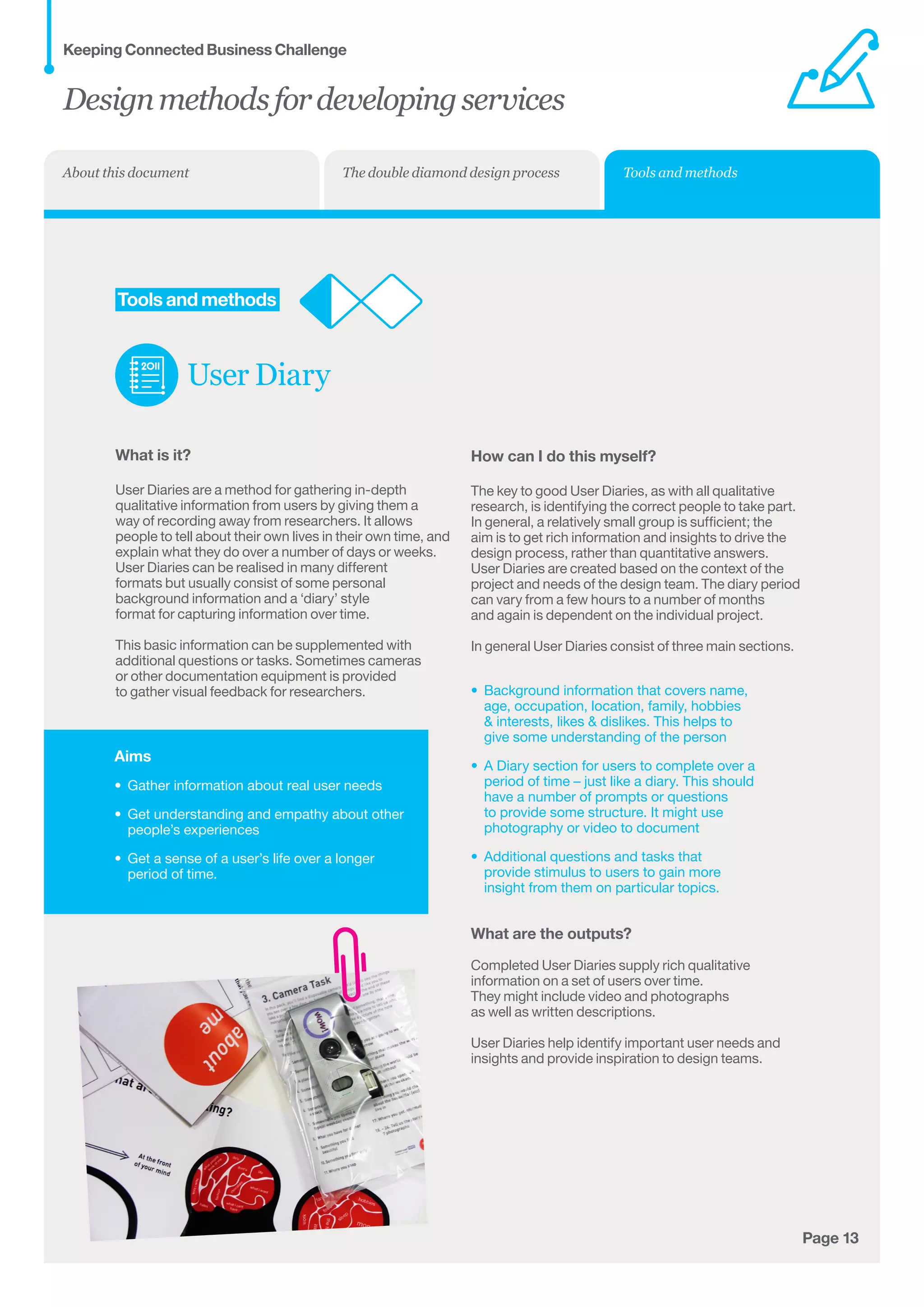
additional questions or tasks. Sometimes cameras
or other documentation equipment is provided
to gather visual feedback for researchers.
How can I do this myself?
The key to good User Diaries, as with all qualitative
research, is identifying the correct people to take part.
In general, a relatively small group is sufficient; the
aim is to get rich information and insights to drive the
design process, rather than quantitative answers.
User Diaries are created based on the context of the
project and needs of the design team. The diary period
can vary from a few hours to a number of months
and again is dependent on the individual project.
In general User Diaries consist of three main sections.
•	 Background information that covers name,	
age, occupation, location, family, hobbies	
 interests, likes  dislikes. This helps to	
give some understanding of the person
•	 A Diary section for users to complete over a 	
period of time – just like a diary. This should	
have a number of prompts or questions	
to provide some structure. It might use	
photography or video to document
•	 Additional questions and tasks that 	
provide stimulus to users to gain more	
insight from them on particular topics.
What are the outputs?
Completed User Diaries supply rich qualitative
information on a set of users over time.
They might include video and photographs
as well as written descriptions.
User Diaries help identify important user needs and
insights and provide inspiration to design teams.
Designmethodsfordevelopingservices
Keeping Connected Business Challenge
Tools and methodsThe double diamond design processAbout this document
Aims
•	 Gather information about a service in the	
real world
•	 Identify what makes for a good service
experience across many different 	
service types.
Page 14
	Tools and methods
Service Safari
What is it?
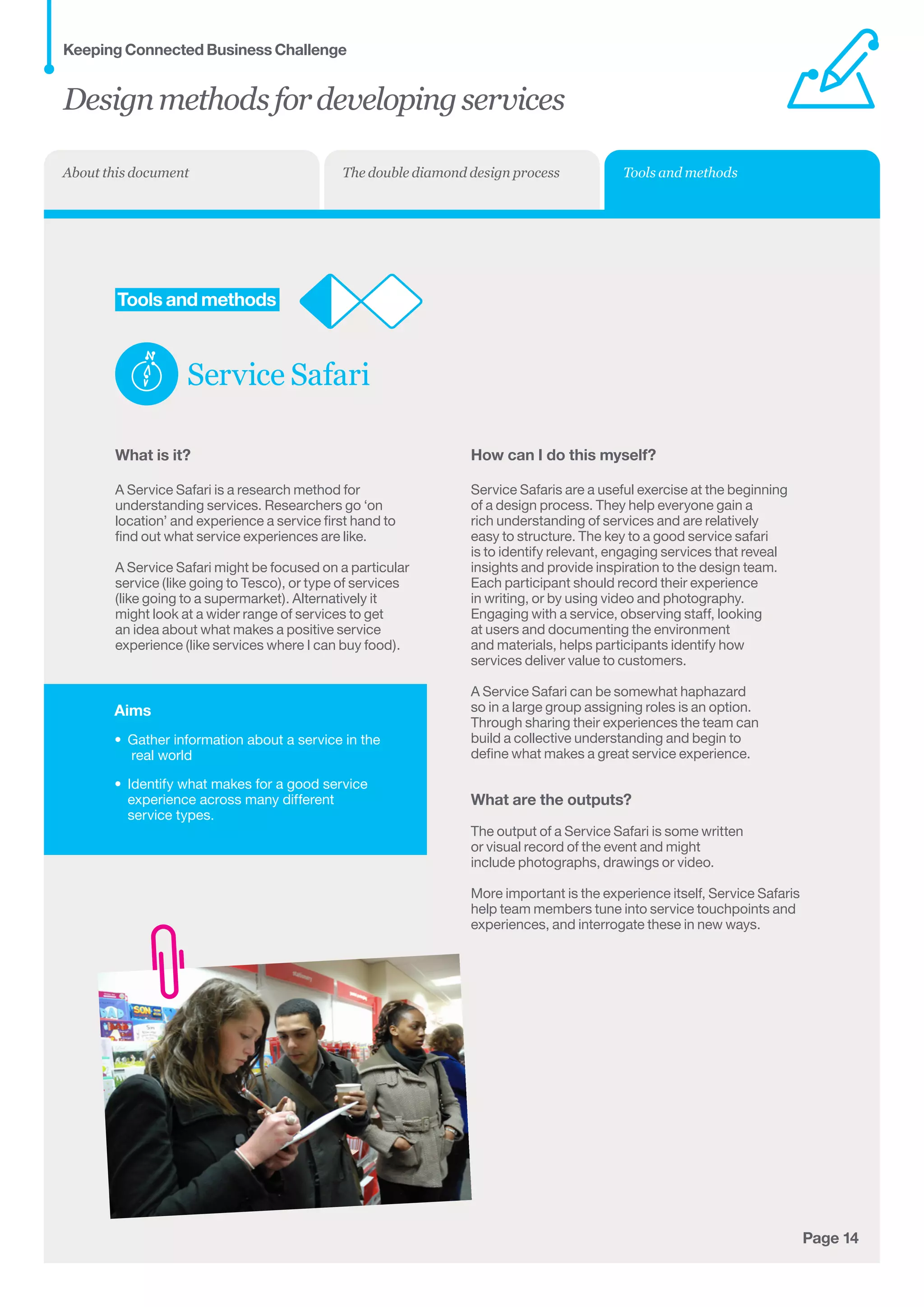
A Service Safari is a research method for
understanding services. Researchers go ‘on
location’ and experience a service first hand to
find out what service experiences are like.
A Service Safari might be focused on a particular
service (like going to Tesco), or type of services
(like going to a supermarket). Alternatively it
might look at a wider range of services to get
an idea about what makes a positive service
experience (like services where I can buy food).
How can I do this myself?
Service Safaris are a useful exercise at the beginning
of a design process. They help everyone gain a
rich understanding of services and are relatively
easy to structure. The key to a good service safari
is to identify relevant, engaging services that reveal
insights and provide inspiration to the design team.
Each participant should record their experience
in writing, or by using video and photography.
Engaging with a service, observing staff, looking
at users and documenting the environment
and materials, helps participants identify how
services deliver value to customers.
A Service Safari can be somewhat haphazard
so in a large group assigning roles is an option.
Through sharing their experiences the team can
build a collective understanding and begin to
define what makes a great service experience.
What are the outputs?
The output of a Service Safari is some written
or visual record of the event and might
include photographs, drawings or video.
More important is the experience itself, Service Safaris
help team members tune into service touchpoints and
experiences, and interrogate these in new ways.
Designmethodsfordevelopingservices
Keeping Connected Business Challenge
Tools and methodsThe double diamond design processAbout this document
Aims
•	 Gather information about real user needs
•	 Get understanding and empathy about 	
other people’s experiences
•	 Understand the different parts of a service
such as staging, interactions and touchpoints
•	 Identifying barriers and opportunities for
service innovation.
Page 15
	Tools and methods
User
Shadowing
What is it?
Shadowing is a research method for understanding
how people interact with the world around them
(including services). It involves observing a user
directly to identify and understand their needs.
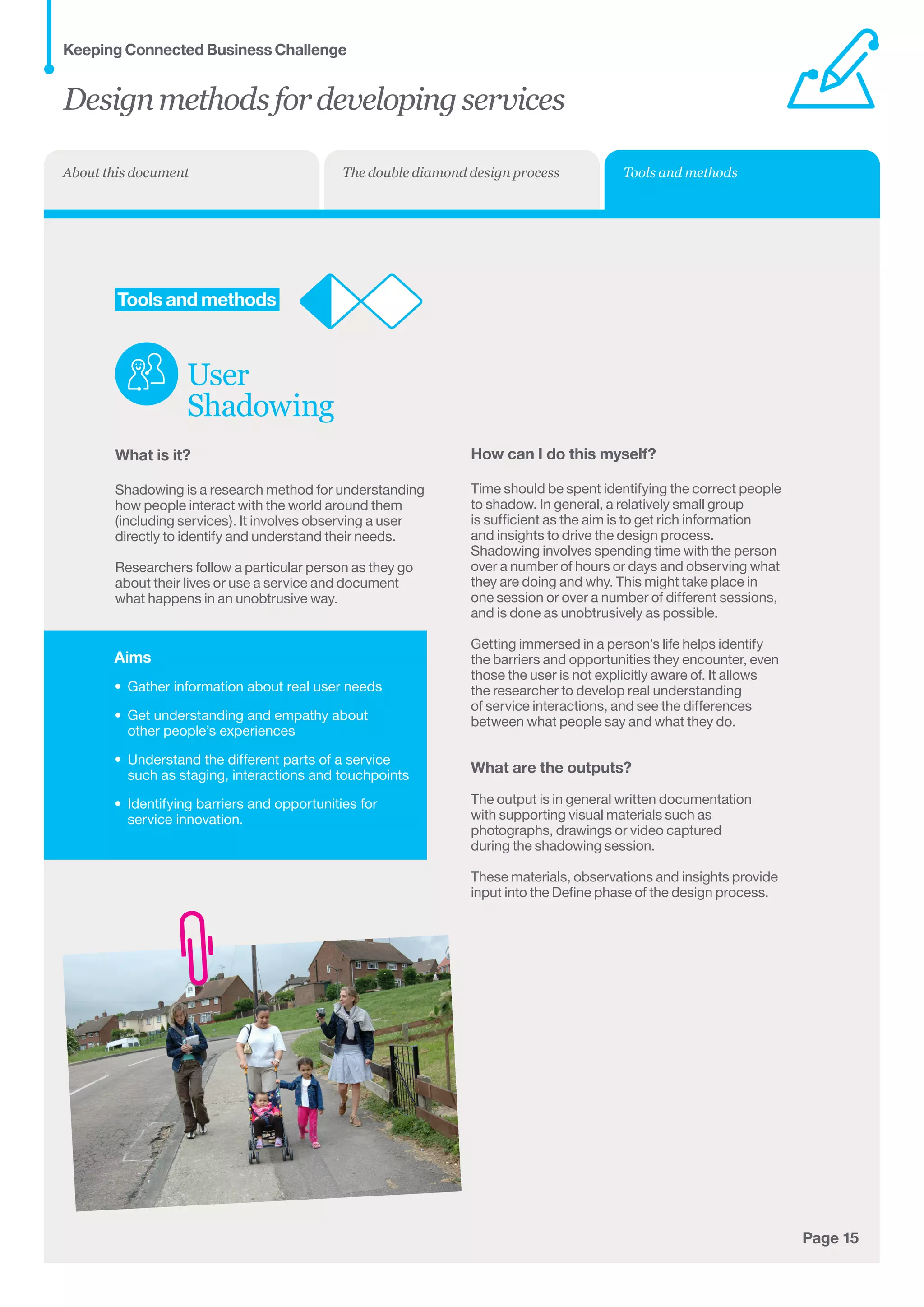
Researchers follow a particular person as they go
about their lives or use a service and document
what happens in an unobtrusive way.
How can I do this myself?
Time should be spent identifying the correct people
to shadow. In general, a relatively small group
is sufficient as the aim is to get rich information
and insights to drive the design process.
Shadowing involves spending time with the person
over a number of hours or days and observing what
they are doing and why. This might take place in
one session or over a number of different sessions,
and is done as unobtrusively as possible.
Getting immersed in a person’s life helps identify
the barriers and opportunities they encounter, even
those the user is not explicitly aware of. It allows
the researcher to develop real understanding
of service interactions, and see the differences
between what people say and what they do.
What are the outputs?
The output is in general written documentation
with supporting visual materials such as
photographs, drawings or video captured
during the shadowing session.
These materials, observations and insights provide
input into the Define phase of the design process.
Designmethodsfordevelopingservices
Keeping Connected Business Challenge
Tools and methodsThe double diamond design processAbout this document
Aims
•	 Package user research into an easy to
understand format
•	 Maintain focus on the needs of users during
the Develop stage
•	 Test and evaluate ideas and service
concepts against these needs.
Page 16
	Tools and methods
User Personas
What is it?
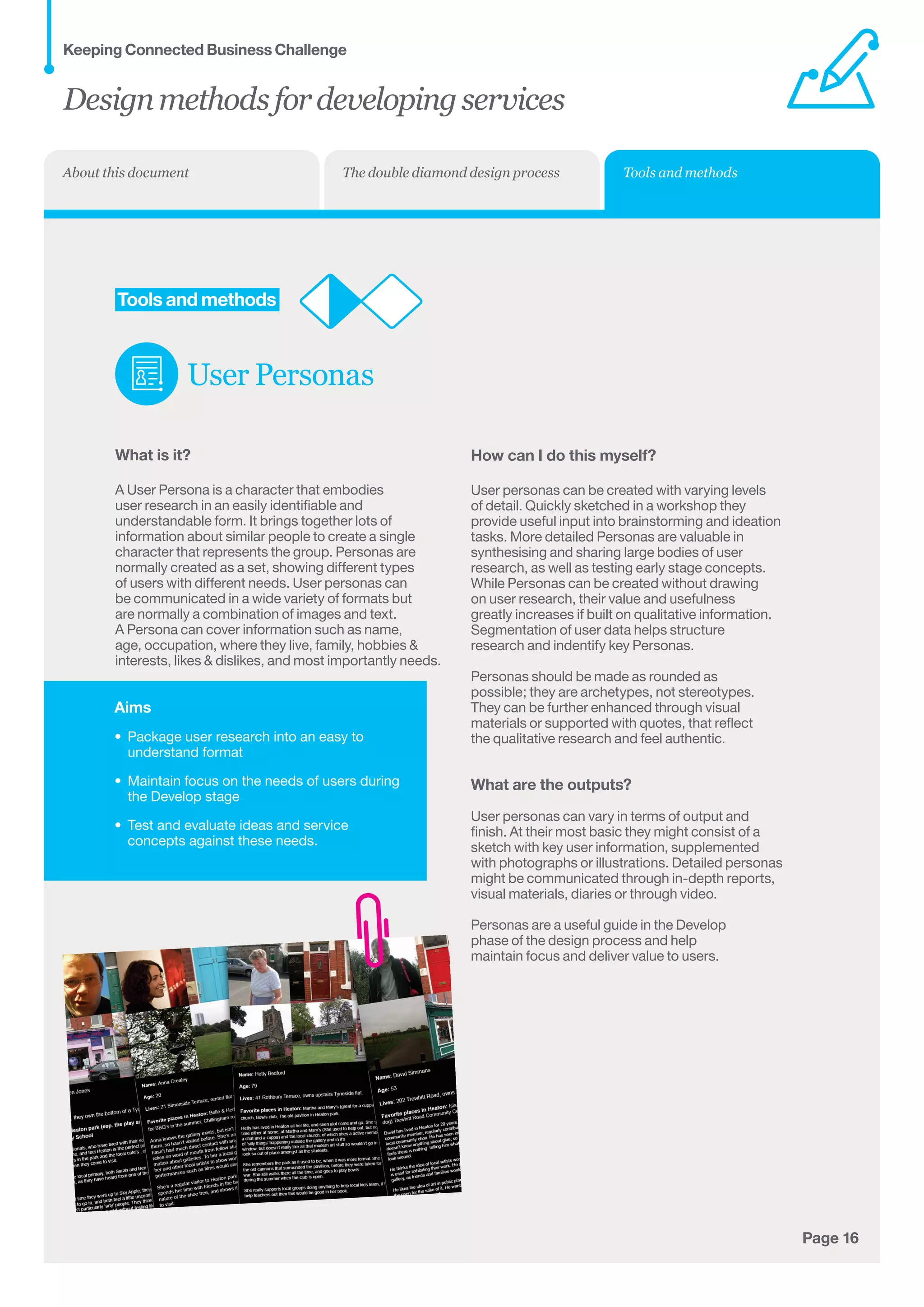
A User Persona is a character that embodies 	
user research in an easily identifiable and	
understandable form. It brings together lots of 	
information about similar people to create a single	
character that represents the group. Personas are	
normally created as a set, showing different types
of users with different needs. User personas can
be communicated in a wide variety of formats but
are normally a combination of images and text.
A Persona can cover information such as name,
age, occupation, where they live, family, hobbies 
interests, likes  dislikes, and most importantly needs.
How can I do this myself?
User personas can be created with varying levels
of detail. Quickly sketched in a workshop they
provide useful input into brainstorming and ideation
tasks. More detailed Personas are valuable in
synthesising and sharing large bodies of user
research, as well as testing early stage concepts.
While Personas can be created without drawing
on user research, their value and usefulness
greatly increases if built on qualitative information.
Segmentation of user data helps structure
research and indentify key Personas.
Personas should be made as rounded as
possible; they are archetypes, not stereotypes.
They can be further enhanced through visual
materials or supported with quotes, that reflect
the qualitative research and feel authentic.
What are the outputs?
User personas can vary in terms of output and
finish. At their most basic they might consist of a
sketch with key user information, supplemented
with photographs or illustrations. Detailed personas
might be communicated through in-depth reports,
visual materials, diaries or through video.
Personas are a useful guide in the Develop
phase of the design process and help
maintain focus and deliver value to users.
Designmethodsfordevelopingservices
Keeping Connected Business Challenge
Tools and methodsThe double diamond design processAbout this document
Aims
•	 Generate a large number of potential ideas
•	 Identify key ideas to develop further
•	 Create a shared understanding of potential
opportunities around a topic or theme.
Page 17
	Tools and methods
Brainstorming
What is it?
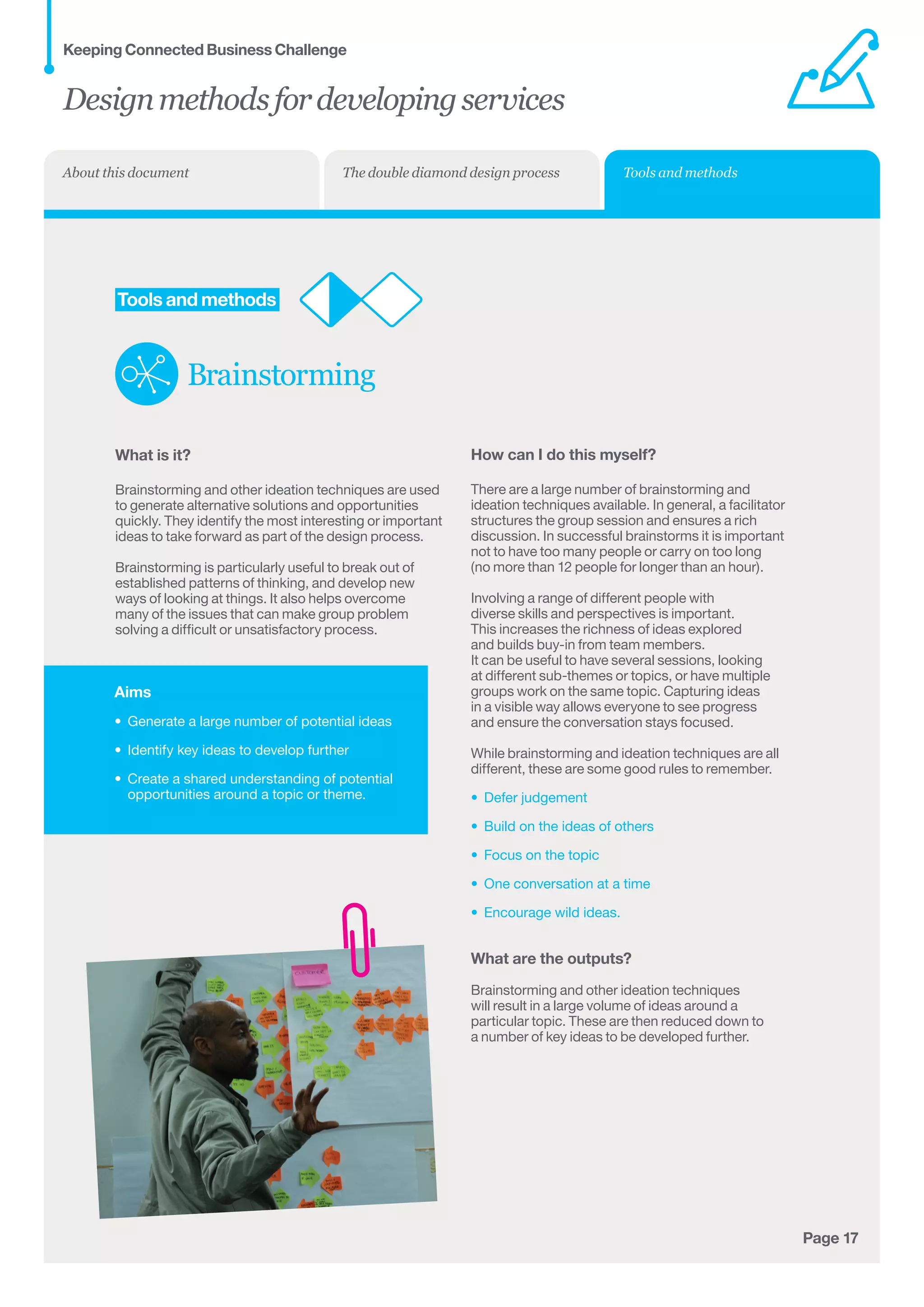
Brainstorming and other ideation techniques are used
to generate alternative solutions and opportunities
quickly. They identify the most interesting or important
ideas to take forward as part of the design process.
Brainstorming is particularly useful to break out of
established patterns of thinking, and develop new
ways of looking at things. It also helps overcome
many of the issues that can make group problem
solving a difficult or unsatisfactory process.
How can I do this myself?
There are a large number of brainstorming and
ideation techniques available. In general, a facilitator
structures the group session and ensures a rich
discussion. In successful brainstorms it is important
not to have too many people or carry on too long
(no more than 12 people for longer than an hour).
Involving a range of different people with
diverse skills and perspectives is important.
This increases the richness of ideas explored
and builds buy-in from team members.
It can be useful to have several sessions, looking
at different sub-themes or topics, or have multiple
groups work on the same topic. Capturing ideas
in a visible way allows everyone to see progress
and ensure the conversation stays focused.
While brainstorming and ideation techniques are all
different, these are some good rules to remember.
•	 Defer judgement
•	 Build on the ideas of others
•	 Focus on the topic
•	 One conversation at a time
•	 Encourage wild ideas.
What are the outputs?
Brainstorming and other ideation techniques
will result in a large volume of ideas around a
particular topic. These are then reduced down to
a number of key ideas to be developed further.
Designmethodsfordevelopingservices
Keeping Connected Business Challenge
Tools and methodsThe double diamond design processAbout this document
Aims
•	 Define the problem or challenge to 	
be addressed
•	 Provide a reference point for designing 	
in the Develop phase
•	 Provide a plan for the Develop phase.
Page 18
	Tools and methods
Design Brief
What is it?
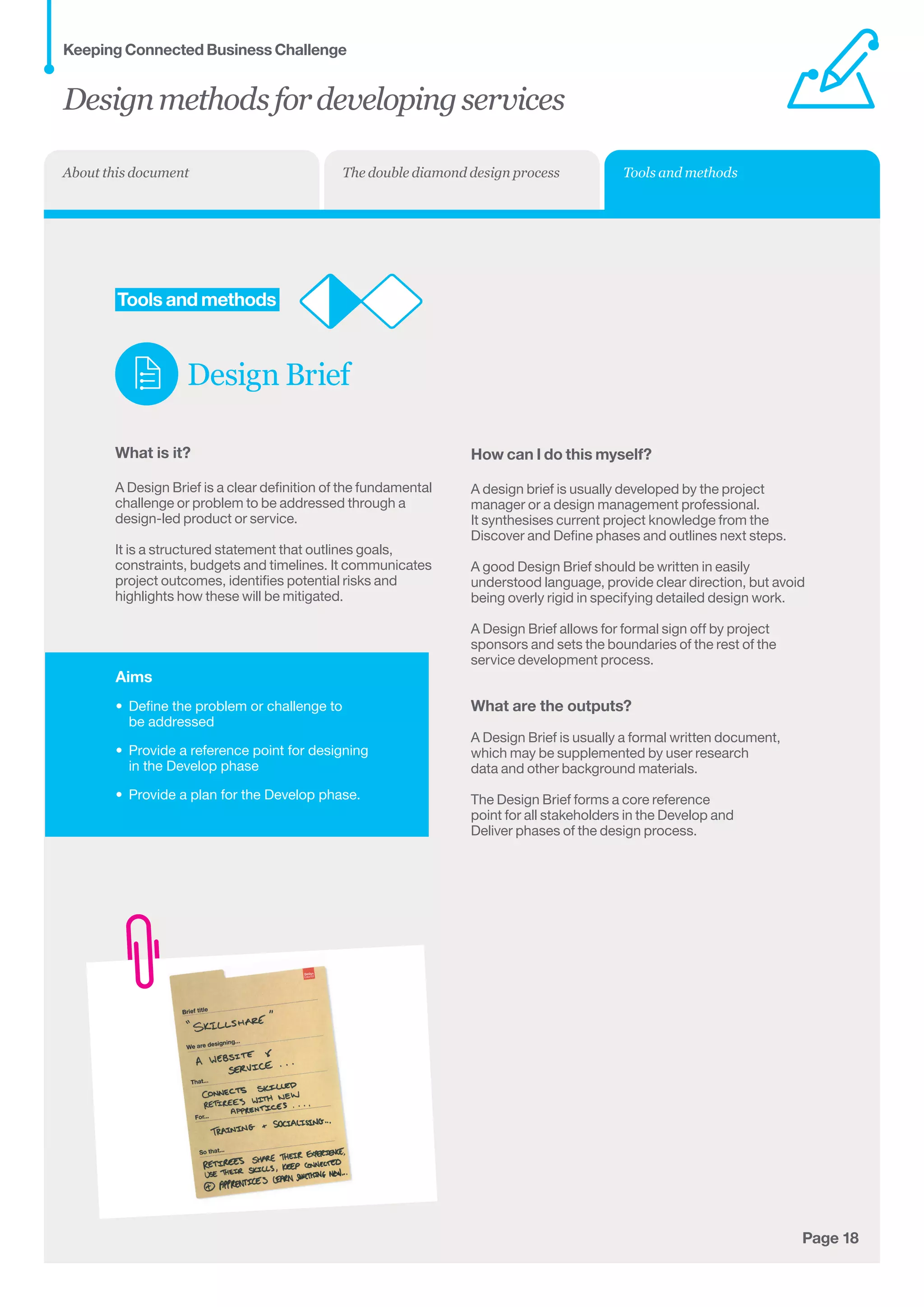
A Design Brief is a clear definition of the fundamental
challenge or problem to be addressed through a
design-led product or service.
It is a structured statement that outlines goals,
constraints, budgets and timelines. It communicates
project outcomes, identifies potential risks and
highlights how these will be mitigated.
How can I do this myself?
A design brief is usually developed by the project
manager or a design management professional.
It synthesises current project knowledge from the
Discover and Define phases and outlines next steps.
A good Design Brief should be written in easily
understood language, provide clear direction, but avoid
being overly rigid in specifying detailed design work.
A Design Brief allows for formal sign off by project
sponsors and sets the boundaries of the rest of the
service development process.
What are the outputs?
A Design Brief is usually a formal written document,
which may be supplemented by user research
data and other background materials.
The Design Brief forms a core reference
point for all stakeholders in the Develop and
Deliver phases of the design process.
Designmethodsfordevelopingservices
Keeping Connected Business Challenge
Tools and methodsThe double diamond design processAbout this document
Aims
•	 Design and problem solve the complete
service experience
•	 Provide guidance when identifying areas	
to prototype
•	 Communicate the service to the people
delivering it, as well as to users 	
during testing.
Page 19
	Tools and methods
Service
Blueprint
What is it?
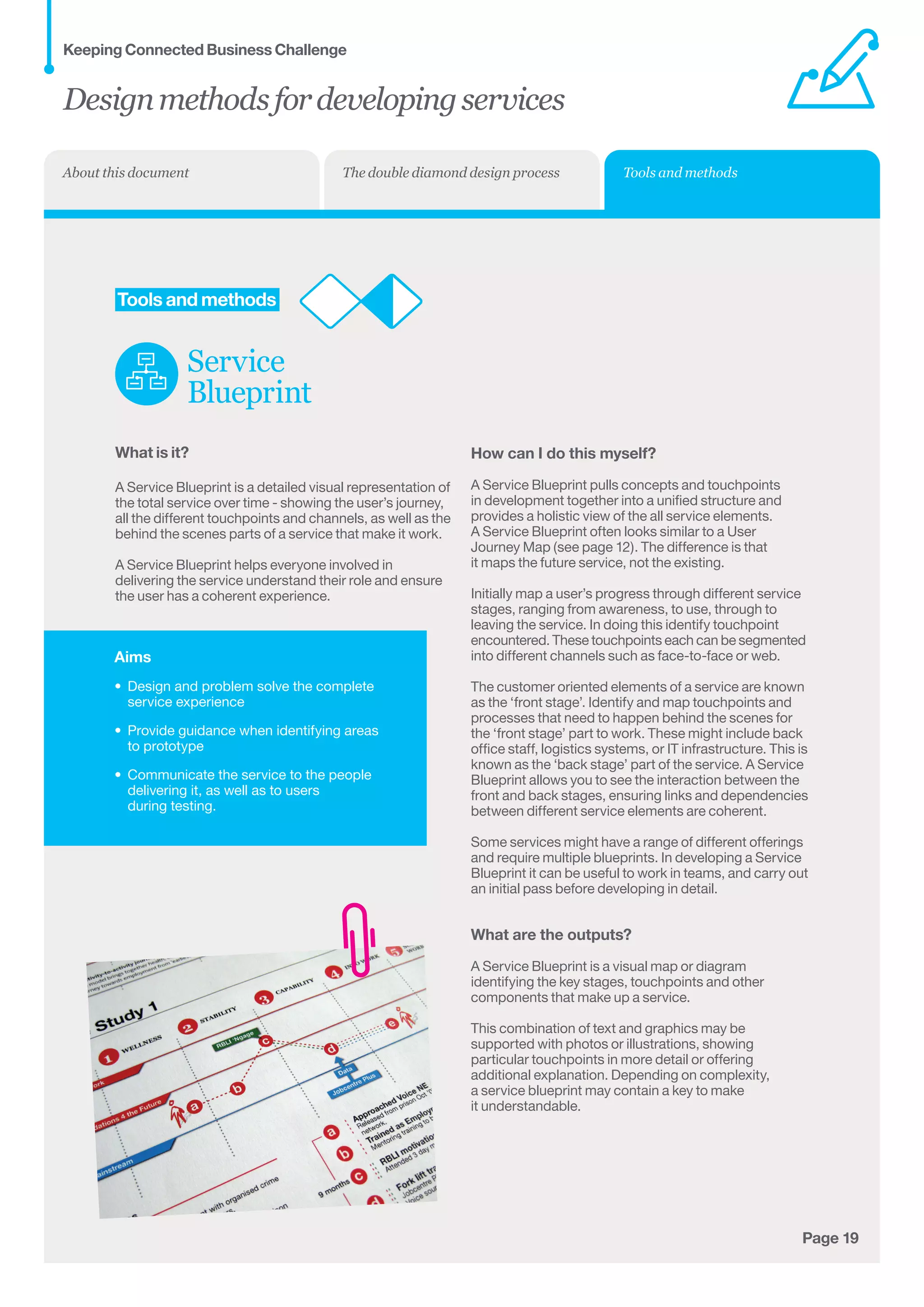
A Service Blueprint is a detailed visual representation of
the total service over time - showing the user’s journey,
all the different touchpoints and channels, as well as the
behind the scenes parts of a service that make it work.
A Service Blueprint helps everyone involved in
delivering the service understand their role and ensure
the user has a coherent experience.
How can I do this myself?
A Service Blueprint pulls concepts and touchpoints
in development together into a unified structure and
provides a holistic view of the all service elements.
A Service Blueprint often looks similar to a User
Journey Map (see page 12). The difference is that
it maps the future service, not the existing.
Initially map a user’s progress through different service
stages, ranging from awareness, to use, through to
leaving the service. In doing this identify touchpoint
encountered. These touchpoints each can be segmented	
into different channels such as face-to-face or web.
The customer oriented elements of a service are known
as the ‘front stage’. Identify and map touchpoints and
processes that need to happen behind the scenes for
the ‘front stage’ part to work. These might include back
office staff, logistics systems, or IT infrastructure. This is
known as the ‘back stage’ part of the service. A Service
Blueprint allows you to see the interaction between the
front and back stages, ensuring links and dependencies
between different service elements are coherent.
Some services might have a range of different offerings
and require multiple blueprints. In developing a Service
Blueprint it can be useful to work in teams, and carry out
an initial pass before developing in detail.
What are the outputs?
A Service Blueprint is a visual map or diagram
identifying the key stages, touchpoints and other
components that make up a service.
This combination of text and graphics may be
supported with photos or illustrations, showing
particular touchpoints in more detail or offering
additional explanation. Depending on complexity,	
a service blueprint may contain a key to make 	
it understandable.
Designmethodsfordevelopingservices
Keeping Connected Business Challenge
Tools and methodsThe double diamond design processAbout this document
Aims
•	 Design and test specific touchpoints 	
or interactions
•	 Find out whether parts of the service meet	
users’ needs and how they can be improved
•	 Communicate the benefits and experiences 	
the service will deliver to stakeholders, 	
including decision-makers, frontline staff,
partners and users
•	 Gather feedback from potential users.
Page 20
	Tools and methods
Experience
Prototyping
What is it?
Experience Prototyping is a way of testing new
service ideas or designs for specific touchpoints.
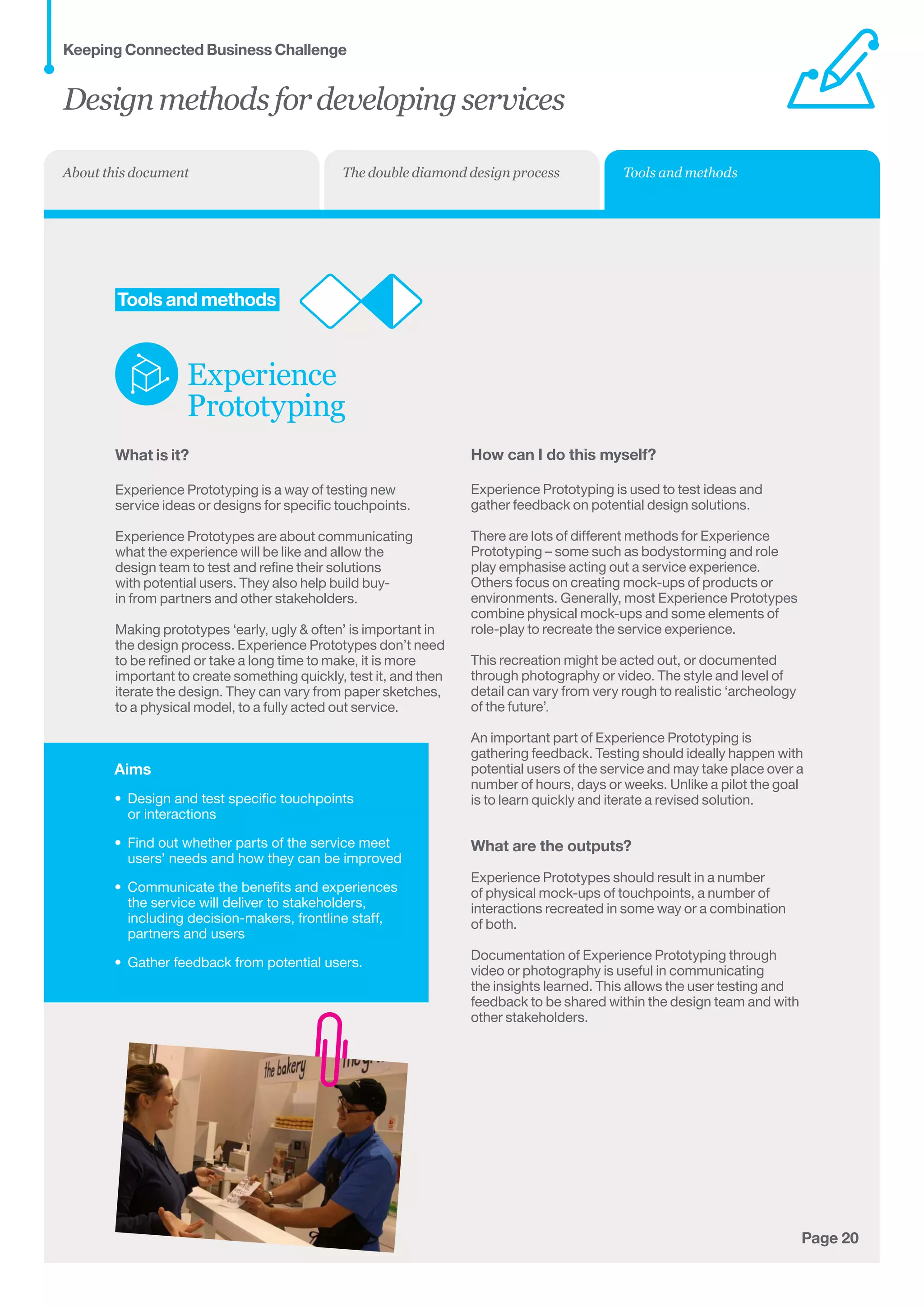
Experience Prototypes are about communicating
what the experience will be like and allow the
design team to test and refine their solutions
with potential users. They also help build buy-
in from partners and other stakeholders.
Making prototypes ‘early, ugly  often’ is important in
the design process. Experience Prototypes don’t need
to be refined or take a long time to make, it is more
important to create something quickly, test it, and then
iterate the design. They can vary from paper sketches,
to a physical model, to a fully acted out service.
How can I do this myself?
Experience Prototyping is used to test ideas and
gather feedback on potential design solutions.
There are lots of different methods for Experience
Prototyping – some such as bodystorming and role
play emphasise acting out a service experience.
Others focus on creating mock-ups of products or
environments. Generally, most Experience Prototypes
combine physical mock-ups and some elements of
role-play to recreate the service experience.
This recreation might be acted out, or documented
through photography or video. The style and level of
detail can vary from very rough to realistic ‘archeology
of the future’.
An important part of Experience Prototyping is
gathering feedback. Testing should ideally happen with
potential users of the service and may take place over a
number of hours, days or weeks. Unlike a pilot the goal
is to learn quickly and iterate a revised solution.
What are the outputs?
Experience Prototypes should result in a number
of physical mock-ups of touchpoints, a number of
interactions recreated in some way or a combination 	
of both.
Documentation of Experience Prototyping through
video or photography is useful in communicating
the insights learned. This allows the user testing and
feedback to be shared within the design team and with
other stakeholders.
Designmethodsfordevelopingservices
Keeping Connected Business Challenge
Tools and methodsThe double diamond design processAbout this document
Aims
•	 Design and test specific touchpoints 	
or interactions
•	 Find out whether parts of the service meet
users’ needs and how they can be improved
•	 Communicate the benefits and
experiences the service will deliver to
stakeholders, including decision-makers,
frontline staff, partners and users
•	 Gather feedback from potential users.
Page 21
Customer
Relationships
Key
Activities
	Tools and methods
Business
Model Canvas
What is it?
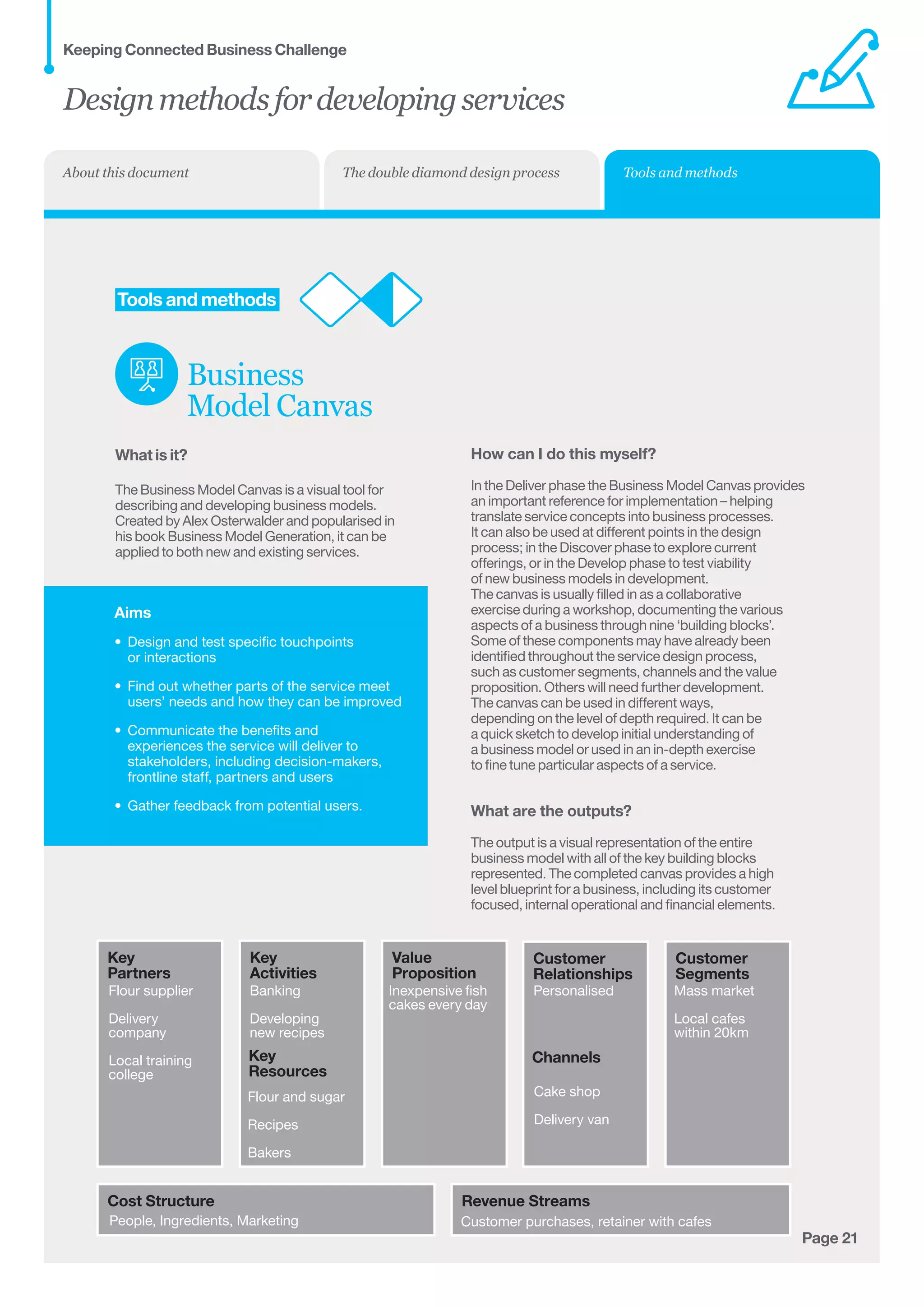
The Business Model Canvas is a visual tool for
describing and developing business models.
Created by Alex Osterwalder and popularised in
his book Business Model Generation, it can be
applied to both new and existing services.
Key
Partners
Cost Structure Revenue Streams
Key
Resources
Value
Proposition
Channels
Customer
Segments
Flour supplier
Delivery
company
Local training
college
People, Ingredients, Marketing Customer purchases, retainer with cafes
PersonalisedInexpensive fish
cakes every day
Cake shop
Delivery van
Mass market
Local cafes
within 20km
Flour and sugar
Recipes
Bakers
Banking
Developing
new recipes
How can I do this myself?
In the Deliver phase the Business Model Canvas provides
an important reference for implementation – helping
translate service concepts into business processes.
It can also be used at different points in the design
process; in the Discover phase to explore current
offerings, or in the Develop phase to test viability
of new business models in development.
The canvas is usually filled in as a collaborative
exercise during a workshop, documenting the various
aspects of a business through nine ‘building blocks’.
Some of these components may have already been
identified throughout the service design process,
such as customer segments, channels and the value
proposition. Others will need further development.
The canvas can be used in different ways,
depending on the level of depth required. It can be
a quick sketch to develop initial understanding of
a business model or used in an in-depth exercise
to fine tune particular aspects of a service.
What are the outputs?
The output is a visual representation of the entire
business model with all of the key building blocks
represented. The completed canvas provides a high
level blueprint for a business, including its customer
focused, internal operational and financial elements.
Designmethodsfordevelopingservices
Keeping Connected Business Challenge
Tools and methodsThe double diamond design processAbout this document
Aims
•	 Create shared understanding of a
potential future service or situation
•	 Describing a use case of a particular
service in development
•	 Creating a future vision based on important
drivers to support decision-making.
Page 22
	Tools and methods
Design
Scenarios
What is it?
Design scenarios are stories of a future situation	
or service.
By creating a concrete story about a potential future,
or set of futures, Design Scenarios help create shared
understanding and enable meaningful discussion.
While Scenarios are used as a tool across strategy
and management disciplines, within service
design they are mostly used as communications
tools and emphasise storytelling and narrative.
How can I do this myself?
Design Scenarios can be used in a number
of different ways and at different times
of the service design process.
Scenarios can be used in the Deliver phase to
communicate preferred outcomes to stakeholders,
helping them understand and buy into the service
vision. They can also be used as inspiration in the
Discover phase of projects – creating imagined 	
futures to inspire and inform decision-making. 	
In the Develop phase they are used to communicate 	
to partners and test ‘use cases’ in a wider context.
Design Scenarios are best developed by small teams,
drawing on a range of inputs and expertise to make
them as robust as possible. Creating a story through
the scenario (perhaps using a previously developed
persona) helps to make it accessible and engaging.
What are the outputs?
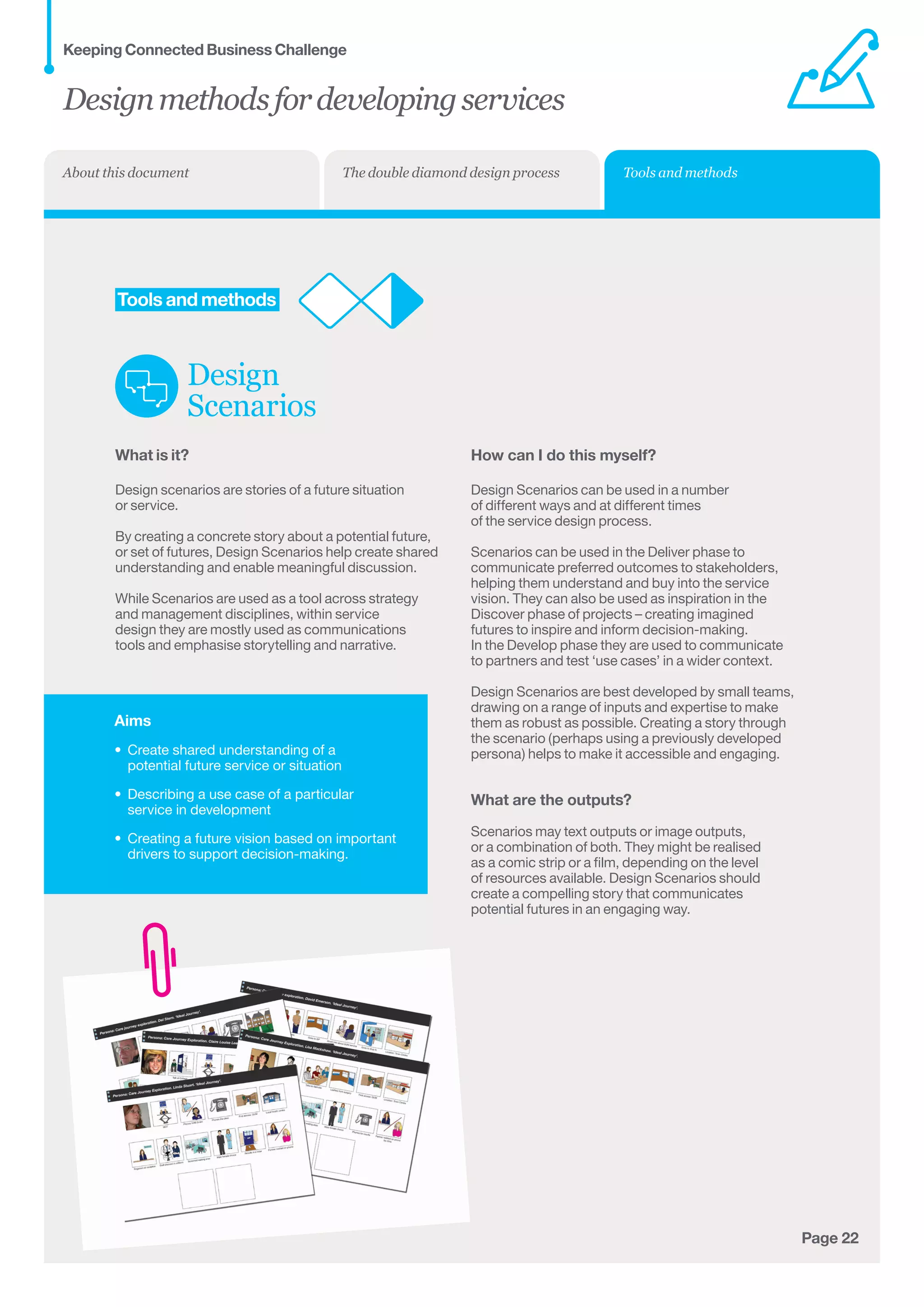
Scenarios may text outputs or image outputs,
or a combination of both. They might be realised
as a comic strip or a film, depending on the level
of resources available. Design Scenarios should
create a compelling story that communicates
potential futures in an engaging way.
Designmethodsfordevelopingservices
Keeping Connected Business Challenge
Tools and methodsThe double diamond design processAbout this document
Page 23Page 23
Find out more about the challenge 
The following documents provide
information about the challenge:  
•  Call for entries – the key document, information
about everything you need to know about entering
the Keeping Connected Business Challenge
•  Food for thought – Some material to provoke, inspire
and stimulate thinking about ‘keeping connected’
•  How we got here – find out about how we got
here and our Keeping Connected schools project
•  Design methods for developing services
– an introduction to service design and
a selection of service design tools        
 
Ursula Davies, Programme Manager,
Design Council
ursula.davies@designcouncil.org.uk
0207 420 5222
Kelly Wilson, Assistant Programme Manager,
Design Council
kelly.wilson@designcouncil.org.uk
0207 420 5248
 Find out more about the Technology 
 Strategy Board and Design Council  
The Keeping Connected Business Challenge
is part of the Independence Matters
programme, a joint initiative run by
the Technology Strategy Board and the Design Council.
The Technology Strategy Board is the UK’s
national innovation agency.  Its goal is to
accelerate economic growth by stimulating
and supporting business-led innovation.
www.innovateuk.org
The Design Council is a registered charity whose
role is to place good design at the heart of social
and economic renewal. We provide evidence and
demonstrate how design can help build a stronger
economy and improve everyday life through practical
projects with industry, public services and education. 	
www.designcouncil.org.uk
Designmethodsfordevelopingservices
Keeping Connected Business Challenge

Design methods for developing services

  • 1.
    business challenge An introductionto service design and a selection of service design tools Designmethods fordeveloping services
  • 2.
    Page 2 Aboutthis document Contents About thisdocument 3 About design and why work with a designer 4 Using design to develop great services The double diamond design process 6 The double diamond overview 8 What to do at each phase Tools and methods 11 Discover phase 16 Define phase 19 Develop phase 22 Deliver phase This is a brief introduction to why design methods can be useful when developing services. If you’re new to service design: You can use it to familiarise yourself with a typical process that designers use when developing products and services. It will give you an idea of what to expect from working with a designer. If you’re a designer: You may be familiar with all of this already, but you may find this document useful when explaining common service design methods to others that are new to them. Designmethodsfordevelopingservices Keeping Connected Business Challenge About this document The double diamond design process Tools and methods
  • 3.
    Page 3 About design Designis what links creativity and innovation. It shapes ideas to become practical and attractive propositions for users or customers. Design may be described as creativity deployed to a specific end. — The Cox Review Design has many different definitions, but at its heart it is about the process of translating ideas into reality, making abstract thoughts tangible and concrete. Whether it’s for a new service, a piece of graphics or an innovative product, a number of key attributes underpin every design-led project. These fundamentals should inform the responses to the Keeping Connected Business Challenge, ensuring design-led solutions that enhance independent living and quality of life for older adults. Why work with a designer? User understanding Designers look to understand the needs and desires of the people who will use a product or service by spending time with them. This approach ensures solutions are both fit for purpose and desirable to the people who will use them. By focusing on human stories and insights designers build empathy for users, and ensure ideas being developed are relevant. Prototyping Designers work iteratively to test their ideas and improve them throughout the entire development process. Making an idea tangible from an early stage through cheap mock-ups helps save resources and can minimise risk. Prototyping can be applied to both products and services, and allows real world feedback from users that ensure better, more relevant outcomes. It can be quick and cheap and allows a solution to be iterated and improved before it is rolled out. A tool for collaboration The Keeping Connected Business Challenge involves collaboration between multidisciplinary teams. Designers make things visual and tangible – they draw pictures, they make models; this allows the complex or ambiguous to be made simple and straightforward. Doing this allows ideas to be rapidly communicated and understood, which in turn fosters collaboration between designer, partners and users. Designmethodsfordevelopingservices Keeping Connected Business Challenge About this document The double diamond design process Tools and methods
  • 4.
    Page 4 Using designto develop great services Service design is all about making the services we use usable, easy and desirable. Services are all around us - buses, shops, libraries, dentists, restaurants and the post office help us get to work, get our food, or keep in contact with each other. A service happens over time and is made up of touchpoints – the people, information, products and spaces that we encounter. For instance a menu, a chair or a waitress are all touchpoints that make up a restaurant service. Service design is the process of creating these touchpoints and defining how they interact with each other and with the user. To design a great service it is important to have service users in mind: are they staff, suppliers or customers? Using design tools and methods can deliver an in-depth understanding of user behaviours, their likes and their needs, which can enable new solutions to be developed. Service design can be used to re-design an existing service to make it work better for users, or it can be used to create an entirely new service. Designmethodsfordevelopingservices Keeping Connected Business Challenge About this document The double diamond design process Tools and methods
  • 5.
    Page 5 Thedouble diamonddesign process Designmethodsfordevelopingservices Keeping ConnectedBusiness Challenge The double diamond design process Tools and methodsAbout this document
  • 6.
    Page 6 Overview ofthe double diamond phases 1. Discover 2. Define 3. Develop 4. Deliver The design process Every designer has a slightly different approach and different design specialisms also have their own ways of working, but there are some general activities common to all designers. The Design Council has developed the ‘Double Diamond’ model to illustrate this. Divided into four distinct phases: Discover, Define, Develop and Deliver, it maps how the design process passes from points where thinking and possibilities are as broad as possible to situations where they are deliberately narrowed down and focused on distinct objectives. Tools and methods Outlined in this section are design tools and methods you might find helpful to use as part of the Keeping Connected Business Challenge. It is not a definitive list, but is included to help familiarise collaborators with design ways of working. These methods are not rigid protocols to be followed unthinkingly, but frameworks that can and should be adapted to the task at hand. Some of the tools work best at ‘big picture’ thinking while other focus on specific project details. Balancing and linking the two is important to develop the best outcome. Most tools and methods can be adapted by altering the level of detail, sketching quickly or developing in-depth, depending on the outcomes needed or time and resources available. Designmethodsfordevelopingservices Keeping Connected Business Challenge The double diamond design process Tools and methodsAbout this document
  • 7.
    Tools and methodsAboutthis document Page 7 The double diamond in more detail The start of a project is a period of discovery, gathering inspiration and insights, identifying user needs and developing initial ideas. The first quarter of the double diamond model covers the start of the project. Designers try to look at the world in a fresh way, noticing new things and seeking inspiration. They gather insights, developing an opinion about what they see, deciding what is new and interesting, and what will inspire new ideas. Specific methods include: market research, user research, managing and planning and design research groups. 1. Discover The second quarter represents the definition phase, in which designers try to make sense of all the possibilities identified in the Discover phase. Which matters most? Which should we act on first? The goal here is to develop a clear creative brief that frames the fundamental design challenge to the organisation. Key methods during the Define phase are: project development, project management and project sign-off. 2. Define The third quarter marks a period of development where solutions are created, prototyped, tested and iterated. This process of trial and error helps designers to improve and refine their ideas. Key activities and objectives during the Develop phase are: brainstorming, prototyping, multi-disciplinary working, visual management, development methods and testing. 3. Develop The final quarter of the double diamond model is the Deliver phase, where the resulting product or service is finalised and launched. The key activities and objectives during this stage are: final testing, approval and launch, targets, evaluation and feedback loops. 4. Deliver Designmethodsfordevelopingservices Keeping Connected Business Challenge The double diamond design process
  • 8.
    Page 8 1. TheDiscover phase Objectives • Identify the problem, opportunity or needs to be addressed through design • Define the solution space • Build a rich knowledge resource with inspiration and insights. The beginning of every design project is marked by an exploratory phase where insights and inspiration are gathered. This Discover phase can be triggered in many different ways such as social trends, novel technology, the launch of a competitor service, or in the case of the Keeping Connected Business Challenge, a funding call. In the Discover phase we begin to identify the problem, opportunity or need to be addressed as well as define some of the boundaries of the solution space. This exploration uses both qualitative and quantitative research methods and can involve both directly engaging with end users and analysis of wider social and economic trends. This research builds a rich bank of knowledge that will inform the rest of the design process and act as a guide and inspiration to the design team. 2. The Define phase Objectives • Analyse the outputs of the Discover phase • Synthesise the findings into a reduced number of opportunities • Define a clear brief for sign off by all stakeholders. The initial Discover phase is about opening out and exploring the challenge to identify problems and opportunities. The Define stage channels these towards actionable tasks. The mass of ideas and findings are analysed and structured into a reduced set of problem statements. These are aligned with the organisational needs and business objectives to identify which to take forward. The Define phase results in a clear definition of the fundamental challenge or problem to be addressed through a design-led product or service. Tools Methods User Personas Brainstorming Design Brief Tools Methods User Journey Mapping User Diaries Service Safari User Shadowing Designmethodsfordevelopingservices Keeping Connected Business Challenge The double diamond design process Tools and methodsAbout this document
  • 9.
    Page 9 3. TheDevelop phase Objectives • Develop the initial brief into a product or service for implementation • Design service components in detail and as part of a holistic experience • Iteratively test concepts with end users. The Develop phase takes the initial design brief and through an iterative process of developing and testing, refines the product or service concepts until they are ready for implementation. Using design and creative techniques, the design team and partners develop the individual service components in detail and ensure these link together to form a holistic experience. In the Develop phase working iteratively and testing with users throughout the process helps ensure a more robust service and focuses the teams’ efforts. The final product or service will incorporate this feedback and be ready for implementation. Tools Methods Service Blueprinting Experience Prototyping Business Model Canvas 4. The Deliver phase Objectives • Taking product or service to launch • Ensure customer feedback mechanisms are in place • Share lessons from development process back into the organisation. In the Deliver phase, the product or service is launched and begins to address the needs identified in the Discover phase. The final concept is taken through final testing, finalised and signed off. It is important to ensure systems are in place to capture user feedback, especially for services. The Deliver phase is also the point to feed back lessons from the process to colleagues and partners, sharing new knowledge, insight tools, or ways of working. Tools Methods Scenarios Designmethodsfordevelopingservices Keeping Connected Business Challenge The double diamond design process Tools and methodsAbout this document
  • 10.
    Page 10 Toolsand methods 3. Develop Design-ledsolutions are developed, prototyped, tested and iterated. This process of trial and error helps designers to improve and refine their ideas. 4. Deliver In the Deliver phase, the product or service istaken through final testing, finalised and launched. 1. Discover The start of a project is a period of discovery, gathering inspiration and insights, identifying user needs and developing initial ideas. 2. Define In the Define phase ideas aresynthesised and aligned withbusiness objectives, creating a clear brief that frames thedesign challenge. User Journey Mapping User Diaries Service Safari User Shadowing Brainstorming Design Brief Service Blueprinting Experience Prototyping Business Model Canvas Scenarios User Personas Designmethodsfordevelopingservices Keeping Connected Business Challenge Tools and methodsThe double diamond design processAbout this document
  • 11.
    Aims • Identify thekey elements of a service • Understand the links between all the different elements over time • Identify problem areas in a service or areas where new things can be added • Create empathy with different types of users. Page 11 Tools and methods User Journey Mapping What is it? A User Journey Map is a visual representation of a user’s journey through a service, showing all the different interactions they have. This allows us to see what parts of the service work for the user (magic moments) and what parts might need improving (pain points). A User Journey Map takes the user’s point of view and explains their actual experience of the service. How can I do this myself? User Journey Mapping draws on the outputs of design research methods such as observation or service safaris. These ground the journey map in real user experiences rather than an abstract notion of how the service works. Map a user’s progress through the service, beginning with when they first become aware of the service through to when they leave. In doing this the different activities of the user journey are defined, with related tasks grouped together in key stages, such as ‘sign-up’ or ‘payment’. Identify the individual touchpoints with each stage – the people, information, products and spaces encountered – are identified. Links or gaps between touchpoints will reveal themselves as the map is developed. To get a holistic view of a user’s experience it can be useful to work in cross-functional teams. Some services might have different types of users, with different experiences, and require multiple journeys. What are the outputs? A User Journey Map is a visual map or diagram, identifying the key stages, touchpoints and other components that make up a user’s service experience. The journey map might contain photographs, illustrations and quotes to bring it to life. It may also have an additional layer of explanation that identifies problem areas or opportunities. See page 12 for an example of a User Journey Map. Designmethodsfordevelopingservices Keeping Connected Business Challenge Tools and methodsThe double diamond design processAbout this document
  • 12.
    Page 12 Tools andmethods User Journey Mapping Journey chart example for a mobile phone service AwareTouchpoints Join Use Leave Bob Sees advert for new phone on TV – is interested by the high quality camera. Bob On his lunch break walks into WalkTalk mobile phone store. Is greeted by a shop assistant who answers all his questions. Bob Having seen the phone he wanted in store, he goes online to get a better deal. Finds the website hard to navigate. Bob After a year he receives a new phone in the post as part of his contract. Finds it very easy to switch his contacts over to new phone. Helen Sees an advert whilst passing a shop window and likes the sound of the pay as you go deal. Helen Phones the mobile phone company and orders the phone she saw. Spends an hour waiting in a queue. Helen Receives her new phone in the post 2 days later. Has to take a half day off work to make sure she doesn’t miss the delivery. Helen Cancels her contract online after two years. Finds it surpisingly easy to do. Television Online Shop Phone Post SHOP Designmethodsfordevelopingservices Keeping Connected Business Challenge Tools and methodsThe double diamond design processAbout this document
  • 13.
    Aims • Gather informationabout real user needs • Get understanding and empathy about other people’s experiences • Get a sense of a user’s life over a longer period of time. Page 13 Tools and methods User Diary What is it? User Diaries are a method for gathering in-depth qualitative information from users by giving them a way of recording away from researchers. It allows people to tell about their own lives in their own time, and explain what they do over a number of days or weeks. User Diaries can be realised in many different formats but usually consist of some personal background information and a ‘diary’ style format for capturing information over time. This basic information can be supplemented with additional questions or tasks. Sometimes cameras or other documentation equipment is provided to gather visual feedback for researchers. How can I do this myself? The key to good User Diaries, as with all qualitative research, is identifying the correct people to take part. In general, a relatively small group is sufficient; the aim is to get rich information and insights to drive the design process, rather than quantitative answers. User Diaries are created based on the context of the project and needs of the design team. The diary period can vary from a few hours to a number of months and again is dependent on the individual project. In general User Diaries consist of three main sections. • Background information that covers name, age, occupation, location, family, hobbies interests, likes dislikes. This helps to give some understanding of the person • A Diary section for users to complete over a period of time – just like a diary. This should have a number of prompts or questions to provide some structure. It might use photography or video to document • Additional questions and tasks that provide stimulus to users to gain more insight from them on particular topics. What are the outputs? Completed User Diaries supply rich qualitative information on a set of users over time. They might include video and photographs as well as written descriptions. User Diaries help identify important user needs and insights and provide inspiration to design teams. Designmethodsfordevelopingservices Keeping Connected Business Challenge Tools and methodsThe double diamond design processAbout this document
  • 14.
    Aims • Gather informationabout a service in the real world • Identify what makes for a good service experience across many different service types. Page 14 Tools and methods Service Safari What is it? A Service Safari is a research method for understanding services. Researchers go ‘on location’ and experience a service first hand to find out what service experiences are like. A Service Safari might be focused on a particular service (like going to Tesco), or type of services (like going to a supermarket). Alternatively it might look at a wider range of services to get an idea about what makes a positive service experience (like services where I can buy food). How can I do this myself? Service Safaris are a useful exercise at the beginning of a design process. They help everyone gain a rich understanding of services and are relatively easy to structure. The key to a good service safari is to identify relevant, engaging services that reveal insights and provide inspiration to the design team. Each participant should record their experience in writing, or by using video and photography. Engaging with a service, observing staff, looking at users and documenting the environment and materials, helps participants identify how services deliver value to customers. A Service Safari can be somewhat haphazard so in a large group assigning roles is an option. Through sharing their experiences the team can build a collective understanding and begin to define what makes a great service experience. What are the outputs? The output of a Service Safari is some written or visual record of the event and might include photographs, drawings or video. More important is the experience itself, Service Safaris help team members tune into service touchpoints and experiences, and interrogate these in new ways. Designmethodsfordevelopingservices Keeping Connected Business Challenge Tools and methodsThe double diamond design processAbout this document
  • 15.
    Aims • Gather informationabout real user needs • Get understanding and empathy about other people’s experiences • Understand the different parts of a service such as staging, interactions and touchpoints • Identifying barriers and opportunities for service innovation. Page 15 Tools and methods User Shadowing What is it? Shadowing is a research method for understanding how people interact with the world around them (including services). It involves observing a user directly to identify and understand their needs. Researchers follow a particular person as they go about their lives or use a service and document what happens in an unobtrusive way. How can I do this myself? Time should be spent identifying the correct people to shadow. In general, a relatively small group is sufficient as the aim is to get rich information and insights to drive the design process. Shadowing involves spending time with the person over a number of hours or days and observing what they are doing and why. This might take place in one session or over a number of different sessions, and is done as unobtrusively as possible. Getting immersed in a person’s life helps identify the barriers and opportunities they encounter, even those the user is not explicitly aware of. It allows the researcher to develop real understanding of service interactions, and see the differences between what people say and what they do. What are the outputs? The output is in general written documentation with supporting visual materials such as photographs, drawings or video captured during the shadowing session. These materials, observations and insights provide input into the Define phase of the design process. Designmethodsfordevelopingservices Keeping Connected Business Challenge Tools and methodsThe double diamond design processAbout this document
  • 16.
    Aims • Package userresearch into an easy to understand format • Maintain focus on the needs of users during the Develop stage • Test and evaluate ideas and service concepts against these needs. Page 16 Tools and methods User Personas What is it? A User Persona is a character that embodies user research in an easily identifiable and understandable form. It brings together lots of information about similar people to create a single character that represents the group. Personas are normally created as a set, showing different types of users with different needs. User personas can be communicated in a wide variety of formats but are normally a combination of images and text. A Persona can cover information such as name, age, occupation, where they live, family, hobbies interests, likes dislikes, and most importantly needs. How can I do this myself? User personas can be created with varying levels of detail. Quickly sketched in a workshop they provide useful input into brainstorming and ideation tasks. More detailed Personas are valuable in synthesising and sharing large bodies of user research, as well as testing early stage concepts. While Personas can be created without drawing on user research, their value and usefulness greatly increases if built on qualitative information. Segmentation of user data helps structure research and indentify key Personas. Personas should be made as rounded as possible; they are archetypes, not stereotypes. They can be further enhanced through visual materials or supported with quotes, that reflect the qualitative research and feel authentic. What are the outputs? User personas can vary in terms of output and finish. At their most basic they might consist of a sketch with key user information, supplemented with photographs or illustrations. Detailed personas might be communicated through in-depth reports, visual materials, diaries or through video. Personas are a useful guide in the Develop phase of the design process and help maintain focus and deliver value to users. Designmethodsfordevelopingservices Keeping Connected Business Challenge Tools and methodsThe double diamond design processAbout this document
  • 17.
    Aims • Generate alarge number of potential ideas • Identify key ideas to develop further • Create a shared understanding of potential opportunities around a topic or theme. Page 17 Tools and methods Brainstorming What is it? Brainstorming and other ideation techniques are used to generate alternative solutions and opportunities quickly. They identify the most interesting or important ideas to take forward as part of the design process. Brainstorming is particularly useful to break out of established patterns of thinking, and develop new ways of looking at things. It also helps overcome many of the issues that can make group problem solving a difficult or unsatisfactory process. How can I do this myself? There are a large number of brainstorming and ideation techniques available. In general, a facilitator structures the group session and ensures a rich discussion. In successful brainstorms it is important not to have too many people or carry on too long (no more than 12 people for longer than an hour). Involving a range of different people with diverse skills and perspectives is important. This increases the richness of ideas explored and builds buy-in from team members. It can be useful to have several sessions, looking at different sub-themes or topics, or have multiple groups work on the same topic. Capturing ideas in a visible way allows everyone to see progress and ensure the conversation stays focused. While brainstorming and ideation techniques are all different, these are some good rules to remember. • Defer judgement • Build on the ideas of others • Focus on the topic • One conversation at a time • Encourage wild ideas. What are the outputs? Brainstorming and other ideation techniques will result in a large volume of ideas around a particular topic. These are then reduced down to a number of key ideas to be developed further. Designmethodsfordevelopingservices Keeping Connected Business Challenge Tools and methodsThe double diamond design processAbout this document
  • 18.
    Aims • Define theproblem or challenge to be addressed • Provide a reference point for designing in the Develop phase • Provide a plan for the Develop phase. Page 18 Tools and methods Design Brief What is it? A Design Brief is a clear definition of the fundamental challenge or problem to be addressed through a design-led product or service. It is a structured statement that outlines goals, constraints, budgets and timelines. It communicates project outcomes, identifies potential risks and highlights how these will be mitigated. How can I do this myself? A design brief is usually developed by the project manager or a design management professional. It synthesises current project knowledge from the Discover and Define phases and outlines next steps. A good Design Brief should be written in easily understood language, provide clear direction, but avoid being overly rigid in specifying detailed design work. A Design Brief allows for formal sign off by project sponsors and sets the boundaries of the rest of the service development process. What are the outputs? A Design Brief is usually a formal written document, which may be supplemented by user research data and other background materials. The Design Brief forms a core reference point for all stakeholders in the Develop and Deliver phases of the design process. Designmethodsfordevelopingservices Keeping Connected Business Challenge Tools and methodsThe double diamond design processAbout this document
  • 19.
    Aims • Design andproblem solve the complete service experience • Provide guidance when identifying areas to prototype • Communicate the service to the people delivering it, as well as to users during testing. Page 19 Tools and methods Service Blueprint What is it? A Service Blueprint is a detailed visual representation of the total service over time - showing the user’s journey, all the different touchpoints and channels, as well as the behind the scenes parts of a service that make it work. A Service Blueprint helps everyone involved in delivering the service understand their role and ensure the user has a coherent experience. How can I do this myself? A Service Blueprint pulls concepts and touchpoints in development together into a unified structure and provides a holistic view of the all service elements. A Service Blueprint often looks similar to a User Journey Map (see page 12). The difference is that it maps the future service, not the existing. Initially map a user’s progress through different service stages, ranging from awareness, to use, through to leaving the service. In doing this identify touchpoint encountered. These touchpoints each can be segmented into different channels such as face-to-face or web. The customer oriented elements of a service are known as the ‘front stage’. Identify and map touchpoints and processes that need to happen behind the scenes for the ‘front stage’ part to work. These might include back office staff, logistics systems, or IT infrastructure. This is known as the ‘back stage’ part of the service. A Service Blueprint allows you to see the interaction between the front and back stages, ensuring links and dependencies between different service elements are coherent. Some services might have a range of different offerings and require multiple blueprints. In developing a Service Blueprint it can be useful to work in teams, and carry out an initial pass before developing in detail. What are the outputs? A Service Blueprint is a visual map or diagram identifying the key stages, touchpoints and other components that make up a service. This combination of text and graphics may be supported with photos or illustrations, showing particular touchpoints in more detail or offering additional explanation. Depending on complexity, a service blueprint may contain a key to make it understandable. Designmethodsfordevelopingservices Keeping Connected Business Challenge Tools and methodsThe double diamond design processAbout this document
  • 20.
    Aims • Design andtest specific touchpoints or interactions • Find out whether parts of the service meet users’ needs and how they can be improved • Communicate the benefits and experiences the service will deliver to stakeholders, including decision-makers, frontline staff, partners and users • Gather feedback from potential users. Page 20 Tools and methods Experience Prototyping What is it? Experience Prototyping is a way of testing new service ideas or designs for specific touchpoints. Experience Prototypes are about communicating what the experience will be like and allow the design team to test and refine their solutions with potential users. They also help build buy- in from partners and other stakeholders. Making prototypes ‘early, ugly often’ is important in the design process. Experience Prototypes don’t need to be refined or take a long time to make, it is more important to create something quickly, test it, and then iterate the design. They can vary from paper sketches, to a physical model, to a fully acted out service. How can I do this myself? Experience Prototyping is used to test ideas and gather feedback on potential design solutions. There are lots of different methods for Experience Prototyping – some such as bodystorming and role play emphasise acting out a service experience. Others focus on creating mock-ups of products or environments. Generally, most Experience Prototypes combine physical mock-ups and some elements of role-play to recreate the service experience. This recreation might be acted out, or documented through photography or video. The style and level of detail can vary from very rough to realistic ‘archeology of the future’. An important part of Experience Prototyping is gathering feedback. Testing should ideally happen with potential users of the service and may take place over a number of hours, days or weeks. Unlike a pilot the goal is to learn quickly and iterate a revised solution. What are the outputs? Experience Prototypes should result in a number of physical mock-ups of touchpoints, a number of interactions recreated in some way or a combination of both. Documentation of Experience Prototyping through video or photography is useful in communicating the insights learned. This allows the user testing and feedback to be shared within the design team and with other stakeholders. Designmethodsfordevelopingservices Keeping Connected Business Challenge Tools and methodsThe double diamond design processAbout this document
  • 21.
    Aims • Design andtest specific touchpoints or interactions • Find out whether parts of the service meet users’ needs and how they can be improved • Communicate the benefits and experiences the service will deliver to stakeholders, including decision-makers, frontline staff, partners and users • Gather feedback from potential users. Page 21 Customer Relationships Key Activities Tools and methods Business Model Canvas What is it? The Business Model Canvas is a visual tool for describing and developing business models. Created by Alex Osterwalder and popularised in his book Business Model Generation, it can be applied to both new and existing services. Key Partners Cost Structure Revenue Streams Key Resources Value Proposition Channels Customer Segments Flour supplier Delivery company Local training college People, Ingredients, Marketing Customer purchases, retainer with cafes PersonalisedInexpensive fish cakes every day Cake shop Delivery van Mass market Local cafes within 20km Flour and sugar Recipes Bakers Banking Developing new recipes How can I do this myself? In the Deliver phase the Business Model Canvas provides an important reference for implementation – helping translate service concepts into business processes. It can also be used at different points in the design process; in the Discover phase to explore current offerings, or in the Develop phase to test viability of new business models in development. The canvas is usually filled in as a collaborative exercise during a workshop, documenting the various aspects of a business through nine ‘building blocks’. Some of these components may have already been identified throughout the service design process, such as customer segments, channels and the value proposition. Others will need further development. The canvas can be used in different ways, depending on the level of depth required. It can be a quick sketch to develop initial understanding of a business model or used in an in-depth exercise to fine tune particular aspects of a service. What are the outputs? The output is a visual representation of the entire business model with all of the key building blocks represented. The completed canvas provides a high level blueprint for a business, including its customer focused, internal operational and financial elements. Designmethodsfordevelopingservices Keeping Connected Business Challenge Tools and methodsThe double diamond design processAbout this document
  • 22.
    Aims • Create sharedunderstanding of a potential future service or situation • Describing a use case of a particular service in development • Creating a future vision based on important drivers to support decision-making. Page 22 Tools and methods Design Scenarios What is it? Design scenarios are stories of a future situation or service. By creating a concrete story about a potential future, or set of futures, Design Scenarios help create shared understanding and enable meaningful discussion. While Scenarios are used as a tool across strategy and management disciplines, within service design they are mostly used as communications tools and emphasise storytelling and narrative. How can I do this myself? Design Scenarios can be used in a number of different ways and at different times of the service design process. Scenarios can be used in the Deliver phase to communicate preferred outcomes to stakeholders, helping them understand and buy into the service vision. They can also be used as inspiration in the Discover phase of projects – creating imagined futures to inspire and inform decision-making. In the Develop phase they are used to communicate to partners and test ‘use cases’ in a wider context. Design Scenarios are best developed by small teams, drawing on a range of inputs and expertise to make them as robust as possible. Creating a story through the scenario (perhaps using a previously developed persona) helps to make it accessible and engaging. What are the outputs? Scenarios may text outputs or image outputs, or a combination of both. They might be realised as a comic strip or a film, depending on the level of resources available. Design Scenarios should create a compelling story that communicates potential futures in an engaging way. Designmethodsfordevelopingservices Keeping Connected Business Challenge Tools and methodsThe double diamond design processAbout this document
  • 23.
    Page 23Page 23 Findout more about the challenge  The following documents provide information about the challenge: •  Call for entries – the key document, information about everything you need to know about entering the Keeping Connected Business Challenge •  Food for thought – Some material to provoke, inspire and stimulate thinking about ‘keeping connected’ •  How we got here – find out about how we got here and our Keeping Connected schools project •  Design methods for developing services – an introduction to service design and a selection of service design tools           Ursula Davies, Programme Manager, Design Council ursula.davies@designcouncil.org.uk 0207 420 5222 Kelly Wilson, Assistant Programme Manager, Design Council kelly.wilson@designcouncil.org.uk 0207 420 5248  Find out more about the Technology   Strategy Board and Design Council   The Keeping Connected Business Challenge is part of the Independence Matters programme, a joint initiative run by the Technology Strategy Board and the Design Council. The Technology Strategy Board is the UK’s national innovation agency. Its goal is to accelerate economic growth by stimulating and supporting business-led innovation. www.innovateuk.org The Design Council is a registered charity whose role is to place good design at the heart of social and economic renewal. We provide evidence and demonstrate how design can help build a stronger economy and improve everyday life through practical projects with industry, public services and education. www.designcouncil.org.uk Designmethodsfordevelopingservices Keeping Connected Business Challenge