COLLEGE OF ENGINEERING AND MANAGEMENT PUNNAPRA
ISO 9001:2015 GOVERNMENT ENGINEERING COLLEGE, ALAPPUZHA
CAPE Aksharanagari Campus, Off Kalarcode End of NH 66 Bye-pass
ALAPPUZHA - 688003
EST200 – DESIGN AND ENGINEERING
SHYAMRAJ.R
ASSISTANT PROFESSOR
DEPT. OF MECHANICAL ENGINEERING
COURSE OBJECTIVES
The purpose of this course is to
I) Introduce the undergraduate engineering students the
fundamental principles of design engineering,
II) Make them understand the steps involved in the design
process and
III) Familiarize them with the basic tools used and approaches
in design.
COURSE OUTCOMES
After the completion of the course the student will
be able to:
I) Explain the different concepts and principles involved in
design engineering.
II) Apply design thinking while learning and practicing
engineering.
III) Develop innovative, reliable, sustainable and economically
viable designs incorporating knowledge in engineering.
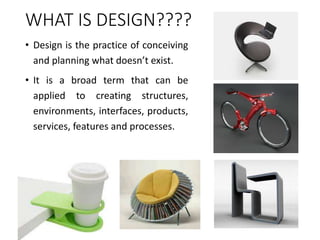
WHAT IS DESIGN????
• Design is the practice of conceiving
and planning what doesn’t exist.
• It is a broad term that can be
applied to creating structures,
environments, interfaces, products,
services, features and processes.
INTRODUCTION TO DESIGN
• Design
• Consists of the specification of
requirements needed to satisfy the
customer.
• The job of a designer is to gather such
requirements from various sources
and produce a specification of some
sort.
• The designer is concerned with
many Human Factors - aesthetics,
functionality, ease-of-use, fitness for
purpose, and quality
• The designer is less concerned with
implementation details.
• Design is the process of envisioning and
planning the creation of objects, interactive
systems, buildings, vehicles, etc.
• It user-centered, i.e. users are at the heart of
the design thinking approach.
• It is about creating solutions for people,
physical items or more abstract systems to
address a need or a problem.
• Design is not about making things
pretty just for the sake of it
• It is about making the user’s interaction
with the environment more natural and
complete.
“Design is not just what it
looks like and feels like.
Design is how it works”.
– Steve Jobs
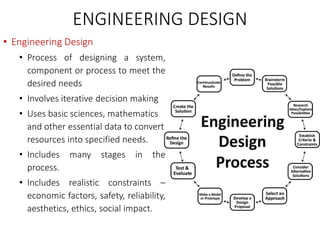
ENGINEERING DESIGN
• Engineering Design
• Process of designing a system,
component or process to meet the
desired needs
• Involves iterative decision making
• Uses basic sciences, mathematics
and other essential data to convert
resources into specified needs.
• Includes many stages in the
process.
• Includes realistic constraints –
economic factors, safety, reliability,
aesthetics, ethics, social impact.
ENGINEERING DESIGN…
• Features of Engineering Design
• Engineering design is the method that engineers use to
identify and solve problems
• Engineering design is a process.
• Engineering design is purposeful.
• Engineering design is “design under constraint.”
• Engineering design is systematic and iterative.
• Engineering design is a social, collaborative enterprise.
DIFFERENCE OF ENGINEERING DESIGN
WITH OTHER KINDS OF DESIGNS
• Types of other designs
• Architecture design: Designing and engineering buildings
and structures
• Interior design: Designing interior and exterior physical
environments used by people
• Landscape design: Integration of nature and architecture
to create gardens and parks
• Industrial design: Designing products for mass
production
• Fashion design: Designing clothing and accessories
DIFFERENCE OF ENGINEERING DESIGN
WITH OTHER KINDS OF DESIGNS…
• Types of other designs…
• Software design: Designing the structures, components,
objects and methods that solve a problem with software
• User Interface design: Designing interfaces that people
use to control and interact with technology.
• Graphic design: Designing visual layouts of magazines,
websites, video content etc.
• Game design: Designing gaming environments and
features
• Sound design: Designing sound environments and
productions
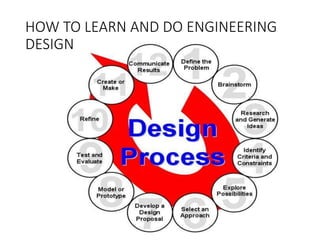
HOW TO LEARN AND DO ENGINEERING
DESIGN
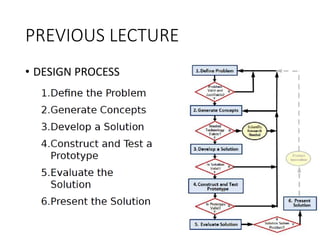
PREVIOUS LECTURE
INTRODUCTION TO DESIGN & ENGINEERING
• WHAT IS DESIGN?
• ENGINEERING DESIGN
• ENGINEERING DESIGN AND OTHER KINDS OF DESIGN
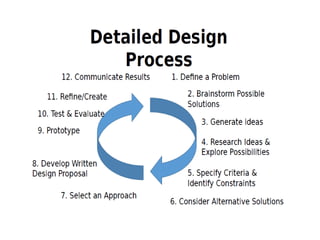
• DESIGN PROCESS
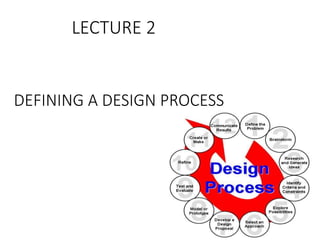
DEFINING A DESIGN PROCESS
LECTURE 2
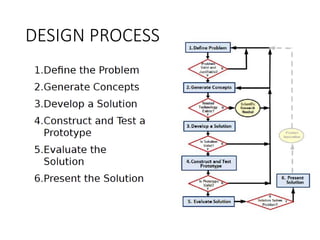
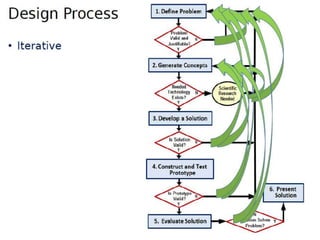
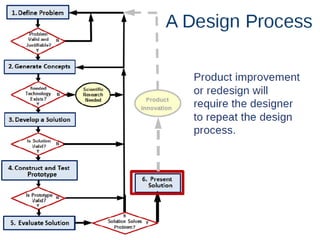
DESIGN PROCESS
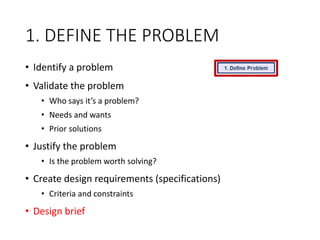
1. DEFINE THE PROBLEM
• Identify a problem
• Validate the problem
• Who says it’s a problem?
• Needs and wants
• Prior solutions
• Justify the problem
• Is the problem worth solving?
• Create design requirements (specifications)
• Criteria and constraints
• Design brief
1. DEFINE THE PROBLEM
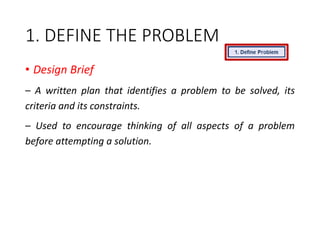
• Design Brief
– A written plan that identifies a problem to be solved, its
criteria and its constraints.
– Used to encourage thinking of all aspects of a problem
before attempting a solution.
1. DEFINE THE PROBLEM
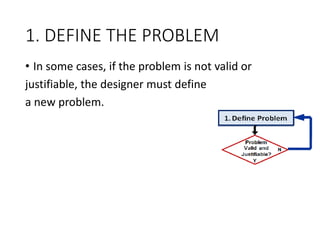
• In some cases, if the problem is not valid or
justifiable, the designer must define
a new problem.
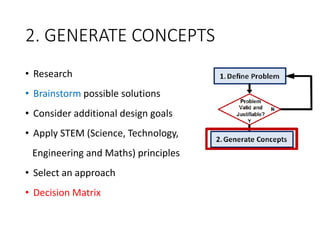
2. GENERATE CONCEPTS
• Research
• Brainstorm possible solutions
• Consider additional design goals
• Apply STEM (Science, Technology,
Engineering and Maths) principles
• Select an approach
• Decision Matrix
2. GENERATE CONCEPTS
BRAINSTORMING
• A group creativity technique
• Discussion on a particular problem to find solution and conclusion
within limited time
• Consists of 5 to 15 members and a leader
• Participation of every member is ensured
• Duration of 30 to 45 minutes
• Highly motivating and productive
• Promotes creativity and spontaneity
• Increases focus on the task
2. GENERATE CONCEPTS
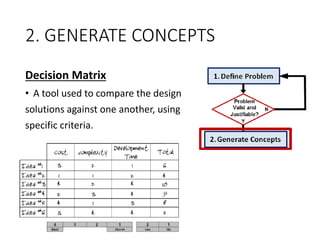
Decision Matrix
• A tool used to compare the design
solutions against one another, using
specific criteria.
2. GENERATE CONCEPTS
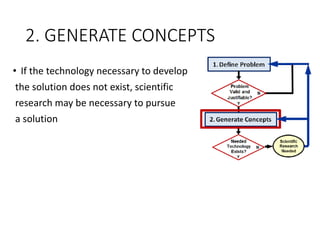
• If the technology necessary to develop
the solution does not exist, scientific
research may be necessary to pursue
a solution
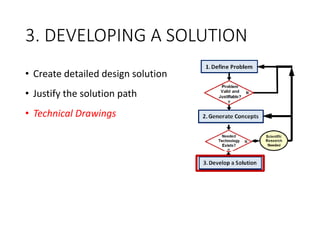
3. DEVELOPING A SOLUTION
• Create detailed design solution
• Justify the solution path
• Technical Drawings
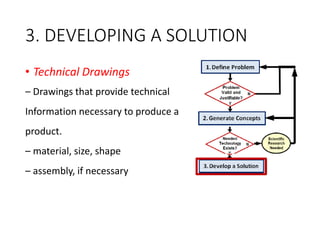
3. DEVELOPING A SOLUTION
• Technical Drawings
– Drawings that provide technical
Information necessary to produce a
product.
– material, size, shape
– assembly, if necessary
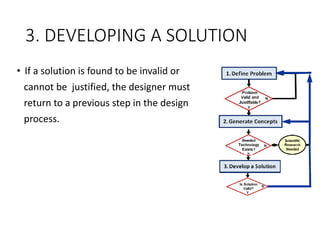
• If a solution is found to be invalid or
cannot be justified, the designer must
return to a previous step in the design
process.
3. DEVELOPING A SOLUTION
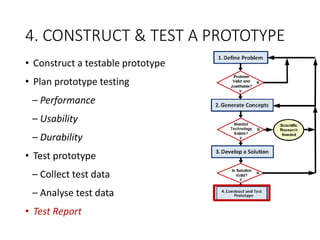
4. CONSTRUCT & TEST A PROTOTYPE
• Construct a testable prototype
• Plan prototype testing
– Performance
– Usability
– Durability
• Test prototype
– Collect test data
– Analyse test data
• Test Report
4. CONSTRUCT & TEST A PROTOTYPE
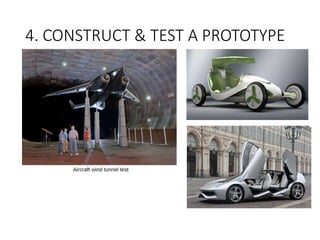
Prototyping
• The first stage of testing and implementation of a new
product
• Consists of building a prototype of the product-the first fully
operational production of the complete design solution.
• A prototype is not fully tested and may not work or operate
as intended.
• The purpose of the prototype is to test the design solution
under real conditions.
4. CONSTRUCT & TEST A PROTOTYPE
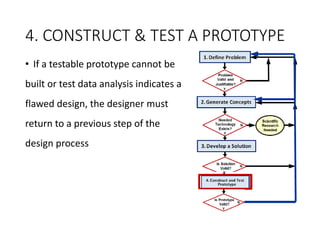
• If a testable prototype cannot be
built or test data analysis indicates a
flawed design, the designer must
return to a previous step of the
design process
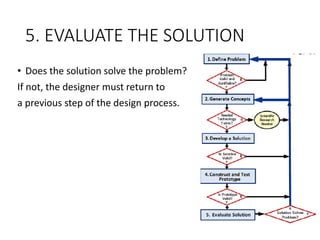
5. EVALUATE THE SOLUTION
• Evaluate solution effectiveness
• Reflect on design
– Recommend improvements
• Optimize/Redesign the solution
– [Return to prior design process steps,
if necessary]
– Revise design documents
• Project Recommendations
5. EVALUATE THE SOLUTION
• Does the solution solve the problem?
If not, the designer must return to
a previous step of the design process.
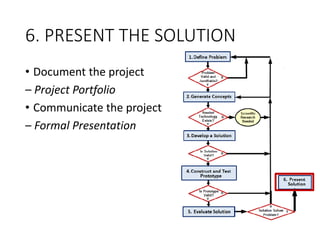
6. PRESENT THE SOLUTION
• Document the project
– Project Portfolio
• Communicate the project
– Formal Presentation
PREVIOUS LECTURE
• DESIGN PROCESS
LECTURE 3
• DETAILING CUSTOMER REQUIREMENTS
1. Identify the Need
• Great focus on identifying customer needs due to
increasing competition
• Who are customers?
• What does a customer want?
• How can a customer be satisfied?
• General definition of a customer – “one that
purchases a product or a service”
• Customers also can be ‘end-users’
• New products developed by consultation with
customers and the people influencing them
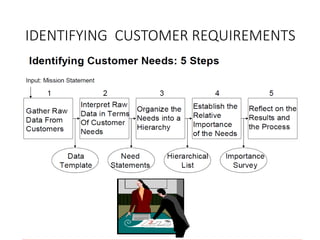
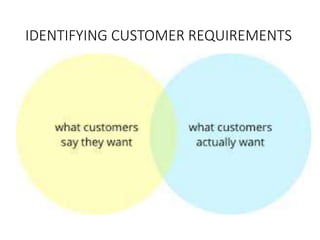
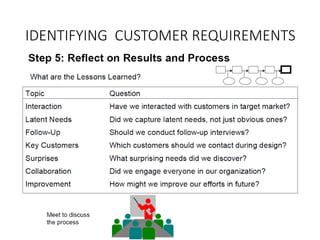
IDENTIFYING CUSTOMER REQUIREMENTS
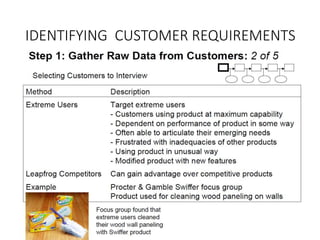
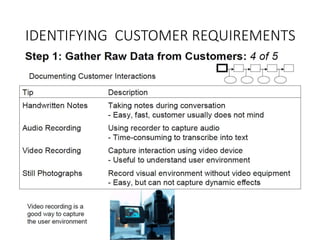
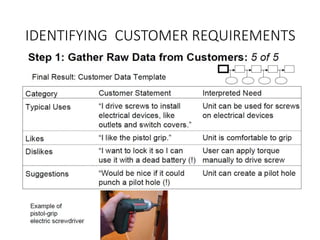
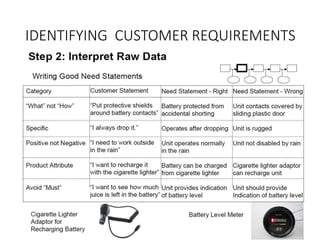
2. Gathering information from customers
• Different methods of gathering information
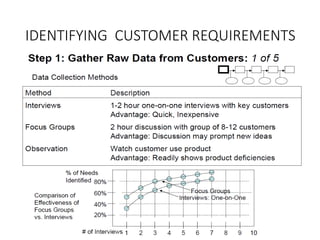
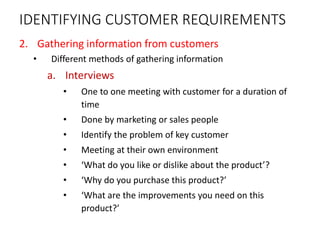
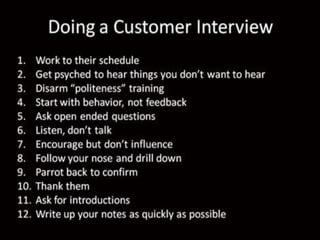
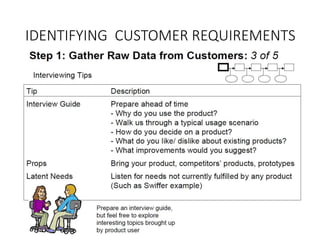
a. Interviews
• One to one meeting with customer for a duration of
time
• Done by marketing or sales people
• Identify the problem of key customer
• Meeting at their own environment
• ‘What do you like or dislike about the product’?
• ‘Why do you purchase this product?’
• ‘What are the improvements you need on this
product?’
IDENTIFYING CUSTOMER REQUIREMENTS
2. Gathering information from customers
• Different methods of gathering information
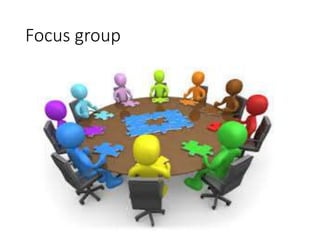
b. Focus groups
• Expanded interview with 8 to 12 customers involved
with an interviewer
• Interviewer comes up with questions for the customers
to discuss about the product
• Every interview is recorded to listen to customer’s
response
• Trained interviewer will pursue any surprise answer
with follow up questions
• This continues until he understands customers
response
IDENTIFYING CUSTOMER REQUIREMENTS
Focus group
2. Gathering information from customers
• Different methods of gathering information
c. Customer Complaints
• A sure way to know about customer needs
• Customer can make complaints through phone,
letter, email to the service centre
• Third party internet websites also act as a source
for customer complaint for a product
• Customer ratings, comments etc in purchasing
websites
IDENTIFYING CUSTOMER REQUIREMENTS
d. Warranty data
• Products claimed for warranty directly
pinpoints to the defects
• Reflects customers dissatisfaction towards the
product
IDENTIFYING CUSTOMER REQUIREMENTS
2. Gathering information from customers
• Different methods of gathering information
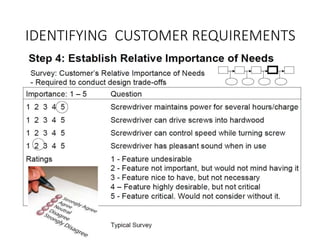
e. Surveys
• Prioritize or identify major problems of the
product
• Done to ensure whether the implemented
solution to a problem is successful or not
• Conducted through e-mail, telephone or in person
IDENTIFYING CUSTOMER REQUIREMENTS
Problem Statement
Problem Statement
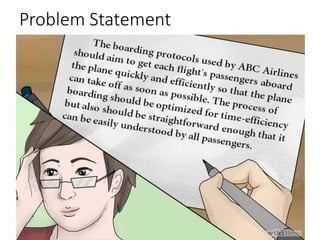
Problem statement-
“Students need an easy way to take their books to school”.
• Now there is the need to define this problem a bit more
in detail.
Who are the students?
What is meant by easy?
• Make the problem definition as best as possible.
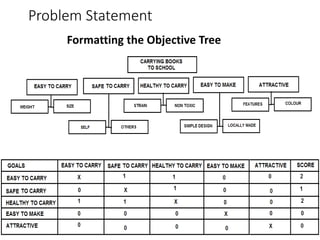
• Identify the Product attributes/functions and assign
weightages.
Problem Statement
Formatting the Objective Tree
Problem Statement
• Provides necessary information for the design team to solve
the problem successfully
• There must be some time duration to be spent for analyzing
the problem before arriving at any solution
• Can be done in the following ways
• Problem analysis
• First step is to analyze the design task to determine the nature of
problem statement
• ‘Why does the problem occur’?
• ‘When does it occur?’
• ‘Under what situations does it occur?’
• ‘How does it occur?’
Problem Statement
• Problem clarification
• Used for further analysis of the problem
• Uses a black-box modeling design to analyze the problem
• Black-box model is a representation of energy, material and signal
inputs of an engineering system
• Overall problem represented by black box should be brought down
to smaller sub-problems
• Helpful in arriving at solutions for a number of complex design
engineering problems
• Allows design team to focus on the sub problems separately
• Solution obtained by combining all sub functions to form overall
designed function
IDENTIFYING CUSTOMER REQUIREMENTS
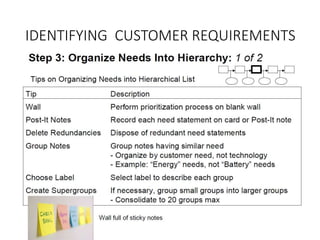
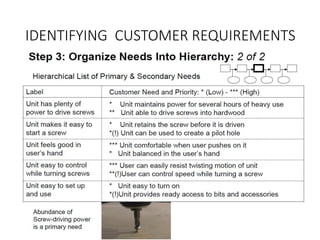
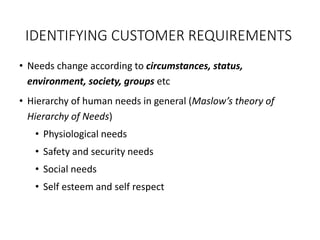
• Needs change according to circumstances, status,
environment, society, groups etc
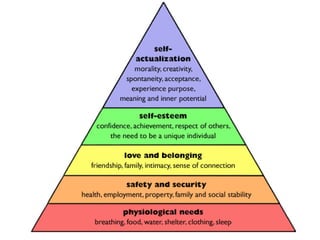
• Hierarchy of human needs in general (Maslow’s theory of
Hierarchy of Needs)
• Physiological needs
• Safety and security needs
• Social needs
• Self esteem and self respect
IDENTIFYING CUSTOMER REQUIREMENTS
PREVIOUS LECTURE
• IDENTIFYING CUSTOMER REQUIREMENTS
LECTURE 4
• SETTING & FINALIZING DESIGN OBJECTIVES
• IDENTIFY DESIGN CONSTRAINTS
• ESTABLISHING FUNCTIONS
DESIGN OBJECTIVES
• Setting objectives is a vital part of design.
• Most important aspect to be understood before initiating
a design
• Objectives provide structure and clarity of expectation for
the customer and the organization
• Objectives are often not what the design should do, but
what the design should be.
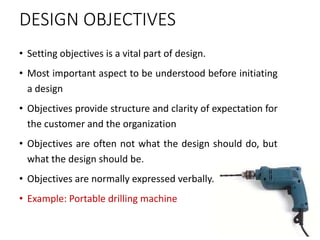
• Objectives are normally expressed verbally.
• Example: Portable drilling machine
PURPOSE OF DESIGN OBJECTIVES
• To identify needs of the user
• To do research and to know the various possibilities of problem
solving
• To reduce cost of the design process
• To reduce complexity of the component
• To increase efficiency of the component
• To complete product design within the specified time
• To make the design more ergonomic and user friendly
• To improve the safety of the component under various static and
dynamic loads
• To make an eco friendly material
• To create a self sustainable component
SETTING OBJECTIVES THE ‘SMART’ WAY
• Objectives contain in a few words, a lot of meaning.
• Formulating objectives is not easy
• Needs imagination, creativity and realism to meet important
criteria such as clarity and specificity.
The ‘SMART’ framework for setting objectives
• ‘S’ – Specific
• Does the objective state a defined outcome/ result?
• Is it precise? (avoid ambiguous statements)
• Being specific about an outcome leads the identification of what
will be achieved.
SETTING OBJECTIVES THE ‘SMART’ WAY
The ‘SMART’ framework for setting objectives
• ‘M’ – Measurable
• Can the outcome be quantified – if so, how?
• If the outcome can’t be quantified – what indicators will show that
the objective has been achieved?
• Who will be measuring the achievement, when it will be measured
and how often?.
• For an evaluation or an assessment carried out by others
• What is it that they are being asked to measure and how does this match up to
the intended outcome?
SETTING OBJECTIVES THE ‘SMART’ WAY
The ‘SMART’ framework for setting objectives
• ‘A’ – Achievable
• Is it within the organizational capabilities?
• Is it in line with the customer expectations?
• Is it set within available resources (time and/or money)?
• Consider conditions and their potential impact
• What is in our control?
• What do we have influence over?
• What do we have to accept (and cannot change)?
SETTING OBJECTIVES THE ‘SMART’ WAY
The ‘SMART’ framework for setting objectives
• ‘R’ – Relevant
• Does it link to the objectives and priorities of the
team/department/ Organization?
• Is it appropriate to the customer?
• ‘T’ – Time framed
• Has a date been set for the completion of each objective?
• Identify whether the objectives are short, medium or long-term?
• If long-term objectives are agreed, ensure there is a series of phased dates
for review/achievement.
FINALIZING DESIGN OBJECTIVES
• Finalizing design objectives is obtained by various methods
• Absolute comparison – comparing the design concept with a
standard concept
• Relative comparison – comparing the design concepts with one
another
• The evaluation methods are:
1. Evaluation based on feasibility of design – feasibility of each
concept is evaluated and divided into 3 categories –
• Feasible: Idea will work, taken for further development
• Conditional: Idea might work with some modifications to be added to it
• Infeasible: Will not work and therefore is discarded
FINALIZING DESIGN OBJECTIVES
• The evaluation methods are:
2. Evaluation based on availability of technology
• Is the technology available in practice
• Can the technology be developed with known sources?
• Are the functional parameters identified?
3. Evaluation based on customer requirements
• Concepts which clear the other 2 evaluation methods only are evaluated in
this method.
• Customer requirements are compiled into questions and matched with
concepts
• The concepts which do not meet customer requirements are discarded
• Improvements are made after few iterations
DESIGN CONSTRAINTS
• Design is not an open field. It has many constraints.
• An engineer has to carefully understand these constraints
and work out a design that fits the situation.
• This at times puts a break on creativity. Such challenges
are there in all designs.
• One major constraint in engineering, is the regulatory
frame work.
DESIGN CONSTRAINTS
• Creating a perfect design is a tedious process
• A number of hurdles and resistances must be overcome
• Design constraints refer to the limits posed on a design process
• Causes significant changes in the final end product
• Necessary to consider technical, social , economical,
environmental constraints during design process
Examples:
Should a design work at high temperature?
Should the product be portable?
Should it meet the environmental regulations?
DESIGN CONSTRAINTS
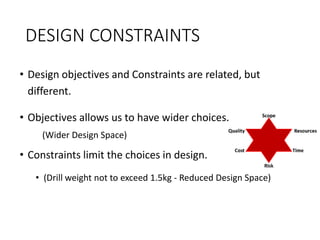
• Design objectives and Constraints are related, but
different.
• Objectives allows us to have wider choices.
(Wider Design Space)
• Constraints limit the choices in design.
• (Drill weight not to exceed 1.5kg - Reduced Design Space)
• Can one think of an example - satellites?
TYPES OF CONSTRAINTS
1. Functional Constraints
• Poses limits on the proposed working principle of a
product
a. Overall geometry
• Dimensions, volume, space requirements, orientation etc should
be satisfied by the system
b. Kinematics Involved
• Types of forces and direction of forces acting on the product
• Product should not fail under the action of applied load
TYPES OF CONSTRAINTS
c. Energy requirement
• Input energy required to perform a specific task
• Can vary based on the product
• Use of appropriate transducers and amplifiers can prevent this
constraint
d. Materials Used
• Type of material used should be according to the strength
required for the product
• Depends on availability of material, machinability, weldability,
cost effectiveness etc
TYPES OF CONSTRAINTS
e. Control System
• Transfers energies and signals from one part of the product to
another
• Makes use of various mechanical and electronic components for
this purpose
• Positioning of sensors, functioning of pneumatic and hydraulic
components under high pressure are the constraints
f. Information flow
• Numerical and graphical data based on the inputs and outputs
• Constraints – calibration of devices, errors in measurement etc
TYPES OF CONSTRAINTS
2. Safety Constraints
• If unattended can cause direct threat to the product/ user
• Every component should have a factor of safety limit
• Consists of
• Operational safety constraints
• Environmental constraints
• Inevitable human errors during operation
3. Quality Constraints
• Constraints for delivering product of high quality
• Several safety regulations & testing performed before reaching
the market
• Design needs to be altered for prolonged use and sufficient
product life
TYPES OF CONSTRAINTS
4. Manufacturing Constraints
• Equipment deficiency, methods of manufacturing, amount of
wastage, machining time, labour shortage..
• Quality and reliability of raw materials, TQM etc
5. Time Constraints
• Proper allocation of time for different processes is important
• Stringent timeline may lead to mediocre design
• Design and development stages allocated with buffer time to get
the best product
6. Economic Constraints
• Economically feasible design required
TYPES OF CONSTRAINTS
Factors influencing economic constraints
• Demand for the product
• Design costs
• Development costs
• Manufacturing costs
• Distribution costs
• Availability of resources
7. Ecological constraints
• Product should have positive impact on natural and social
resources of its surroundings
• Elimination of toxic nature
• Ecologically friendly method of production
• Exhaust and by-products treatment
TYPES OF CONSTRAINTS
8. Legal and Ethical constraints
• End product should be approved by various organisations to
ensure its quality and safety
• Patents and copyrights should be dealt with
• Elimination of legal constraints and plagiarism
9. Ergonomical & Aesthetic Constraints
• Ergonomic design could hinder the basic functional design
• Ergonomic design is concerned with interactions between
product and user
• Functional constraints are affected by aesthetic nature of the
product
• Visually pleasing product attracts more customers
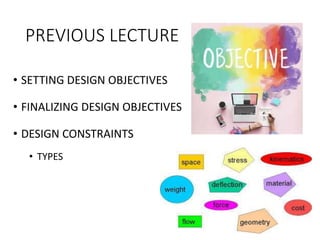
PREVIOUS LECTURE
• SETTING DESIGN OBJECTIVES
• FINALIZING DESIGN OBJECTIVES
• DESIGN CONSTRAINTS
• TYPES
LECTURE 5
• DESIGN FUNCTIONS
DESIGN FUNCTIONS
• Designing involves various functions based on the
type of product
• Functions are the specifics the design is planned to
do.
• The drill should work in high humidity (in rain)
• The drill should switch off if the load exceeds.
• Some of the functions can lead to constraints.
• (specifying the maximum load)
DESIGN FUNCTIONS
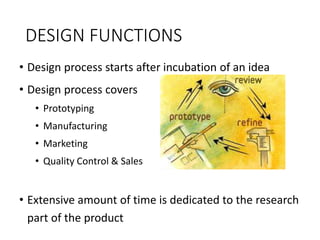
• Design process starts after incubation of an idea
• Design process covers
• Prototyping
• Manufacturing
• Marketing
• Quality Control & Sales
• Extensive amount of time is dedicated to the research
part of the product
CLASSIFICATIONS OF DESIGN FUNCTIONS
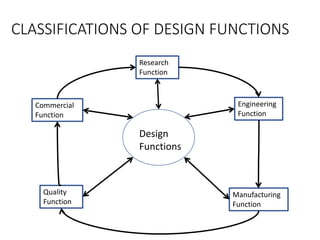
Research
Function
Design
Functions
Commercial
Function
Engineering
Function
Manufacturing
Function
Quality
Function
CLASSIFICATIONS OF DESIGN FUNCTIONS
1. Research Function
• Stage before the product design
• Starts after the incubation of an idea
• Identifying the need of the product
• Defining the working principle
• Collection of data required for the upcoming processes
• Research on better alternatives etc
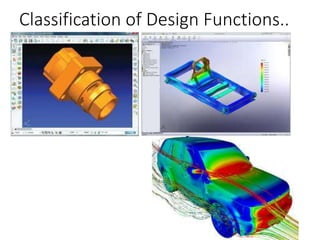
2. Engineering Function
• Involves main product design
• Product design is a 3D model developed in design software
packages
• Cost estimation, concept design, simulation, analysis, safety
check etc performed
CLASSIFICATIONS OF DESIGN FUNCTIONS
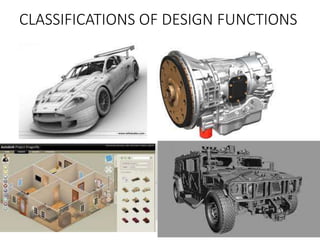
Classification of Design Functions..
CLASSIFICATIONS OF DESIGN FUNCTIONS
3. Manufacturing Function
• Elements of production – casting, forming, assembly, cost
controlling, obtaining laborers, raw material purchasing etc
• Creates physical end product from a virtual design
4. Quality Control Function
• Regulation of products as per design
• Check for safety, dimensions, functionality, design auditing,
energy auditing etc
5. Commercial function
• Cost and service related aspects
• Relationship with clients, marketing, sales, logistics, Human
resources etc
GENERATING DESIGN ALTERNATIVES
• Creating actual designs start by creating a ‘Design space’
• An imaginary space for design alternatives for a problem
• ‘Set of all possible and feasible designs created after finalizing the
design task’
• All the feasible design options should be explored
• Boundary of the design space covers all the feasible designs
• Large design space means there are many design options
available
• Parameters like cost, performance, weight, size etc have more
than three dimensions
GENERATING DESIGN ALTERNATIVES
• Designer has to find out the best of all designs
• Done by searching nearby design space to obtain best feasible
solution
• Systematic design methods provide operations allow designer to
move from one design space to next.
• For a new product, the design space is limited.
• For small design space, study of many other systems or similar
products is needed.
• Design space allows us to explore the possibilities and evaluate
their suitability for a good design.
PREVIOUS LECTURE
• DESIGN FUNCTIONS
• CLASSIFICATION OF DESIGN FUNCTIONS
• GENERATING DESIGN ALTERNATIVES
LECTURE 6
• GENERATING DESIGN ALTERNATIVES
• FINALIZING THE DESIGN
METHODS TO GENERATE ALTERNATE DESIGNS
1. DEFINING A DESIGN SPACE BY GENERATING A MORPHOLOGICAL CHART
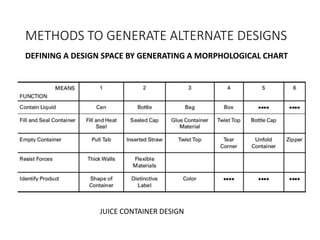
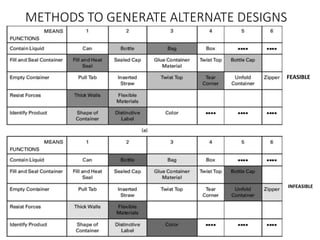
• A morphological chart is a matrix in which the left most column lists all
principal functions and also some of the key features it must have.
• To the right side, the different means of achieving the functions are listed
• Some functions have more means than others.
• We start building conceptual designs from the morph chart
• Any feasible design must be functionally complete
• Every function listed in the left most column must be achieved by the
design.
• The designs are assembled by choosing one means from each row, and
combining them into a functional design concept or scheme.
METHODS TO GENERATE ALTERNATE DESIGNS
DEFINING A DESIGN SPACE BY GENERATING A MORPHOLOGICAL CHART
JUICE CONTAINER DESIGN
METHODS TO GENERATE ALTERNATE DESIGNS
FEASIBLE
INFEASIBLE
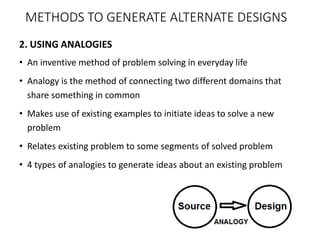
2. USING ANALOGIES
• An inventive method of problem solving in everyday life
• Analogy is the method of connecting two different domains that
share something in common
• Makes use of existing examples to initiate ideas to solve a new
problem
• Relates existing problem to some segments of solved problem
• 4 types of analogies to generate ideas about an existing problem
METHODS TO GENERATE ALTERNATE DESIGNS
Analogies..
• Types of analogies
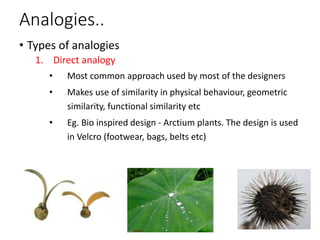
1. Direct analogy
• Most common approach used by most of the designers
• Makes use of similarity in physical behaviour, geometric
similarity, functional similarity etc
• Eg. Bio inspired design - Arctium plants. The design is used
in Velcro (footwear, bags, belts etc)
Analogies..
• Types of analogies…
2. Fantasy analogy
• Designer avoids all problems, limitations and laws of
nature
• Based on imagination of the designer
• Has potential for generating ideas
• Eg. locating a car in a large car parking lot
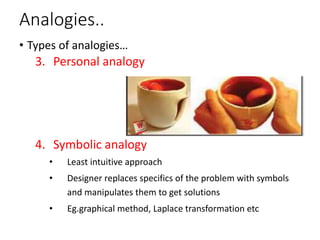
3. Personal analogy
• Designer imagines themselves as the device being
designed
• Associates their body with the device
Analogies..
• Types of analogies…
3. Personal analogy
4. Symbolic analogy
• Least intuitive approach
• Designer replaces specifics of the problem with symbols
and manipulates them to get solutions
• Eg.graphical method, Laplace transformation etc
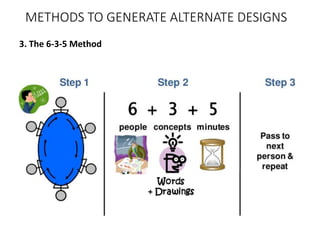
3. The 6-3-5 Method
METHODS TO GENERATE ALTERNATE DESIGNS
3. The 6-3-5 Method
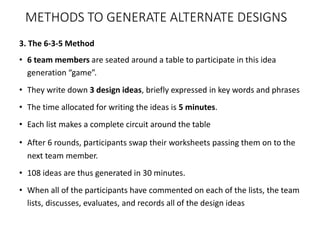
• 6 team members are seated around a table to participate in this idea
generation “game”.
• They write down 3 design ideas, briefly expressed in key words and phrases
• The time allocated for writing the ideas is 5 minutes.
• Each list makes a complete circuit around the table
• After 6 rounds, participants swap their worksheets passing them on to the
next team member.
• 108 ideas are thus generated in 30 minutes.
• When all of the participants have commented on each of the lists, the team
lists, discusses, evaluates, and records all of the design ideas
METHODS TO GENERATE ALTERNATE DESIGNS
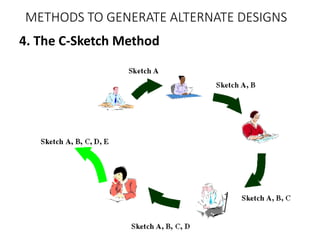
4. The C-Sketch Method
METHODS TO GENERATE ALTERNATE DESIGNS
4. The C-Sketch Method
• Starts with a team seated around a table, with each member sketching one
design idea on a piece of paper.
• Each sketch is circulated through the team in the same fashion as the lists of
ideas in the 6–3–5 method.
• All of the annotations or proposed design modifications will be written or
sketched on the initial concept sketches.
• The only permissible communication is by pencil on paper.
• Discussion follows only after a complete cycle of sketching and modifying (as in
the 6–3–5 method) has been completed.
• The C-sketch method is very appealing in an area such as mechanical design
because since sketching is a natural form of thinking in mechanical device
design.
• Drawings and diagrams facilitate the grouping of relevant information and they
help people to better visualize the objects being discussed.
METHODS TO GENERATE ALTERNATE DESIGNS
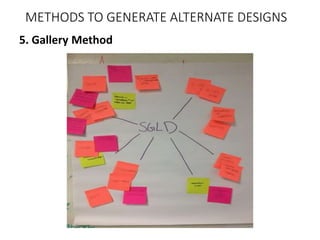
5. Gallery Method
METHODS TO GENERATE ALTERNATE DESIGNS
5. Gallery Method
• The gallery method is a third approach to getting team reactions to design idea
sketches.
• Team members first develop their individual, initial ideas within some allotted
time
• All of the resulting sketches are posted on a cork board or a conference room
whiteboard.
• This set of sketches serves as the backdrop for an open, group discussion of all
of the posted ideas
• Questions are asked, critiques are offered, and suggestions are made.
• Then each participant returns to her or his drawing and suitably modifies or
revises it, again within a specified period of time, with the goal of producing a
second-generation idea
• We proceed until a consensus emerges within the group that one more cycle
will not gain much (or any) new information
METHODS TO GENERATE ALTERNATE DESIGNS
FINALIZING DESIGN
1. Absolute Criteria
• Evaluation of feasibility of design
• Feasible
• Conditional
• Infeasible
• Evaluation on assessment of technology readiness
2. Evaluation on go/ non-go screening
• Customer requirements are transformed into questions
for each of the concepts
• Questions to be answered as Yes (go), May be (go) or No
(non-go)
FINALIZING DESIGN
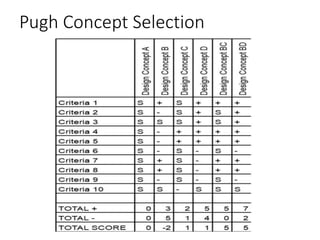
3. Pugh concept selection method
• Most promising design concept
• Compares each concept relative to a reference or a
datum concept
• Determines whether the concept is better than
reference concept
• ‘Individual is best in creating ideas, but a group is
better at selecting ideas’.
FINALIZING DESIGN
3. Pugh concept selection method
• Steps in concept selection method are :
• Concept evaluation by choice of criteria
• Formulate the decision matrix
• Clarify the design concepts
• Choose the datum concept
• Run the matrix
• Evaluate the ratings
• Establish a new datum and return the matrix
• Examining selected concepts for improvement opportunities
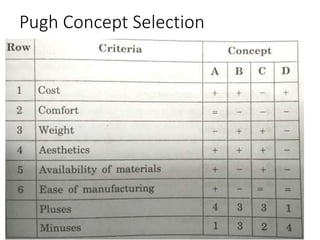
Pugh Concept Selection
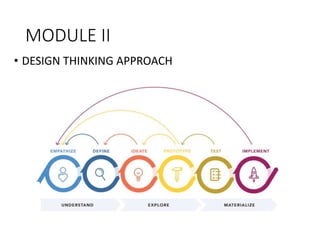
MODULE II
• DESIGN THINKING APPROACH
DESIGN THINKING
• A methodology that designers use to brainstorm and solve
complex problems related to designing and design engineering
• Beneficial for designers to find innovative, desirable and never-
thought-before solutions for customers and clients
• The iterative design process helps the designers to involve clients
and customers in meaningful ways.
• Think of unimaginable solutions and then trying to make them
not just feasible, but also viable
• Design thinking combines logic, powerful imagination, systematic
reasoning and intuition to make workable ideas.
DESIGN THINKING
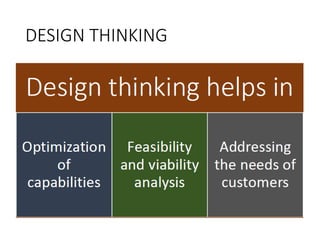
• Design thinking is a methodology for finding
• Simplicity in complexity
• Improving quality of experience with the designed products
• Serving the needs of customers by addressing the target
problem faced by them.
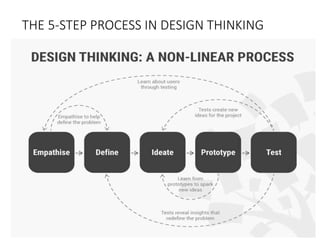
• It is a five-step process, where each step focuses on a specific
goal
• Each of the steps is independent of the next step but is borne out
of the previous step
• Design thinking helps to gain a balance between the problem
statement and the solution developed.
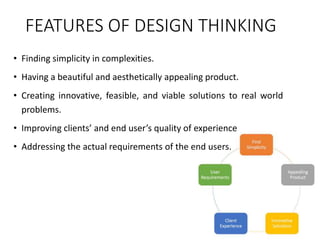
FEATURES OF DESIGN THINKING
• Finding simplicity in complexities.
• Having a beautiful and aesthetically appealing product.
• Creating innovative, feasible, and viable solutions to real world
problems.
• Improving clients’ and end user’s quality of experience
• Addressing the actual requirements of the end users.
DESIGN THINKING
• Design thinking helps you learn the following.
• How to optimize the ability to innovate?
• How to develop a variety of concepts, products, services,
processes, etc. for end users?
• How to leverage the diverse ideas of innovation?
• How to convert useful data, individual insights and vague
ideas into feasible reality?
• How to connect with the customers and end-users by
targeting their actual requirements?
• How to use the different tools used by designers in their
profession for solving your customers’ problems?
DESIGN THINKING
THE 5-STEP PROCESS IN DESIGN THINKING
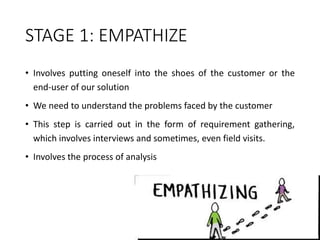
STAGE 1: EMPATHIZE
• Involves putting oneself into the shoes of the customer or the
end-user of our solution
• We need to understand the problems faced by the customer
• This step is carried out in the form of requirement gathering,
which involves interviews and sometimes, even field visits.
• Involves the process of analysis
STAGE 1: EMPATHIZE
A few points to be considered while interviewing the customer.
• The interviewer must brainstorm for the questions beforehand and
must be fully prepared for the interview.
• The questions being asked must be open questions. No question should
be asked for which the interviewee can answer only in Yes or No.
• The interviewer must have plenty of ‘why’ questions. Here, the ‘five
whys’ method can help.
• The themes of the questions must not be intermingled.
• The themes must be arranged properly and questions pertaining to a
particular theme must be asked together.
• The questions must be refined thoroughly so that no trace of ambiguity
is left in them
STAGE 2: DEFINE
• After learning customer problems, we need to define the
problem and arrive at a problem statement
• This statement will give us the necessary direction to proceed
towards the issue faced by the customer.
• As a design thinker, we need to cover all the points and the
answers that we got in the ‘empathize’ phase.
• We have to club all the answers together and convert them into a
coherent single statement.
• The first step towards defining a problem is to find who the user
is, what are his/her/their needs and then develop insights from
the answers.
• Asking ‘How might we’ questions to customers
STAGE 2: DEFINE
• Generating ‘How might we’ questions:
• Amplify the good
• Eliminate the bad
• Explore the opposite
• Question the Assumptions
• Identify the Unexpected Resources
• Create an Analogy
• Break the Problem into Pieces
STAGE 3: IDEATE
• Most interesting and the most rigorous stage
• A design thinker is supposed to bring to the table as many
ideas as possible.
• While brainstorming, it is not checked whether the idea is
possible, feasible, and viable or not.
• The only task of thinkers is to think of as many ideas as
possible for them.
• Design thinkers use boards, sticky notes, sketching, chart
papers, mind maps, etc
STAGE 3: IDEATE
Rules for brainstorming
• Only one conversation is allowed at a time. No other person
must intervene when an idea is being given.
• Focus must be on the quantity and not on quality. In this
step, the group must have large number of ideas with them.
• Think out of the blue. Wild ideas must be encouraged even
if they invoke plain humor or seem impossible.
• The group leader must defer judgment. The fellow thinkers
also need to suspend judgment. Judgmental attitude leads
to an obstruction for the thinkers.
STAGE 4: PROTOTYPE
• Deals with building the ideas and checking for their feasibility to
arrive at the final solution
• Three things are mainly taken care of
• Creation of experience
• Getting feedback
• Iteration
• The end user is actively involved in this component of design
thinking.
• Based on the criticisms, suggestions, and appreciations received,
the design thinkers create a better solution after iterating
Empathize, Define, and Ideate steps.
• Prototyping requires thinkers to create tangible products
STAGE 4: PROTOTYPE - GUIDELINES
• Take the first step and start to build the prototype. Don’t
procrastinate.
• Don’t waste too much of time on building a single
prototype.
• The prototypes must be built with the end user in mind.
• The prototype must not be a mere piece of trash; it must
create an experience for the user.
• Think of open questions that the user can shoot towards
you when he experiences the prototype.
STAGE 4: PROTOTYPE - GUIDELINES
Once the prototype has been developed, the next
steps are as follows:.
• Take the end user through the prototype and let him/her
experience it completely.
• Throughout the experience, make the user speak about his
moment-by-moment experience..
• Try to actively observe and enthusiastically engage with the user
during the experience.
• Once it is over, follow up with the user who had the experience
with a set of questions. It will be better if the set of questions are
prepared beforehand.
STAGE 5: TESTING
• This phase is also called as 'Execute’
• This is the phase where the final solution is tested
on a full scale basis.
• In this step, the design thinkers are supposed to be
collaborative and agile.
• Testing will help to understand what actually works and
what does not.
• Testing can be the most rewarding, if the prototypes
succeed to give positive results, or can be the most
annoying, if the prototype fails.
DESIGN THINKING AS CONVERGENT – DIVERGENT
QUESTIONING
DESIGN THINKING – DIVERGENT
• Divergent thinking is the process of finding more than one solution for a problem
statement.
• It refers to the thought process of generating creative solutions.
The main features of divergent thinking are −
• It is a free flowing chain of ideas.
• It happens in a non-linear manner, i.e. it does not follow any particular sequence of
thinking.
• Multiple ideas can emerge at the same time, rather than one idea coming up only
after the other has occurred.
• Non-linearity also means that multiple solutions are thought of and explored at the
same time.
• This happens in a very short amount of time and unexpected connections are
developed between the ideas
DIVERGENT THINKING
DIVERGENT THINKING
• Divergent thinking is supposed to enhance creativity of thinkers.
• The term ‘Divergent Thinking’ was first coined by Joy Paul
Guilford in 1956.
• The Free Association Theory of Creativity says that concepts are
connected inside our brains as semantic networks.
• Psychologists have claimed that the difference in creativity levels
of people is dependent on the type of semantic networks of
concepts inside the human mind.
• Following are the two connections −
• Flat
• Steep
DIVERGENT THINKING
• The design thinkers with flat networks are those with numerous
loose conceptual connections.
• They are more creative.
• The people with steep networks are more logical, because of the
linear associations between the nodes.
• Since divergent thinking proceeds in a non-linear fashion, a
person with flat associative network will be more successful in
divergent thinking.
• Before getting into the exercise of design thinking, a person has
to find out what type of thinker the person is.
• If he can think of diverse solutions, without any pre-determined
set of solutions, then the person is a divergent thinker.
CONVERGENT THINKING
• Convergent thinking is just the opposite of divergent thinking
• Convergent Thinking’ was coined by Joy Paul Guilford in 1956.
• The concept of convergent thinking:
• The design thinker should go through all possible solutions
thought during divergent thinking
• He should come up with a correct solution.
• This convergence on a single solution or a mix of limited number
of solutions is the essence of convergent thinking.
• The thinker is generally supposed to come up with single, well
established, best possible solution to a problem.
• Delivers the best and concrete solution to the problem statement
CONVERGENT THINKING
• Convergent thinking requires speed, accuracy, efficiency, logical
reasoning and techniques.
• A thinker is supposed to recognize the patterns, reapply a few
techniques and accumulate and organize stored information.
ASPECTS OF CONVERGENT THINKING
• It should help to arrive at a single best answer without any room
for ambiguity.
• The ideas thought of in the process of divergent thinking are
either considered to be possible or impossible in convergent
thinking phase.
• Judgment is an important part of this process
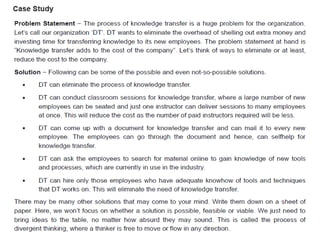
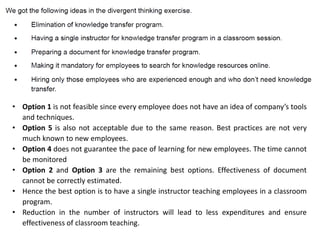
• Option 1 is not feasible since every employee does not have an idea of company’s tools
and techniques.
• Option 5 is also not acceptable due to the same reason. Best practices are not very
much known to new employees.
• Option 4 does not guarantee the pace of learning for new employees. The time cannot
be monitored
• Option 2 and Option 3 are the remaining best options. Effectiveness of document
cannot be correctly estimated.
• Hence the best option is to have a single instructor teaching employees in a classroom
program.
• Reduction in the number of instructors will lead to less expenditures and ensure
effectiveness of classroom teaching.
DESIGN THINKING IN A TEAM ENVIRONMENT
• Design thinking teams, are highly collaborative, multidisciplinary
project teams.
• Comprises of people from different backgrounds, including
design, engineering, research and business.
• Jointly applies human-centered design strategies to solve
problems.
DESIGN THINKING IN A TEAM ENVIRONMENT
The features of design thinking teams are:
1. Design thinking teams seek diverse perspectives.
• Design thinking teams are not only multi-disciplinary in their
composition, but also actively seek out diverse perspectives to
help them devise better solutions.
• Seeks a variety of perspectives outside the team to better
understand the customers needs and preferences.
2. Design thinking teams co-design
• Co-design both internally as a team, as well as externally with
customers or end-users.
DESIGN THINKING IN A TEAM ENVIRONMENT
2. Design thinking teams co-design…
• The design of solutions is not just left up to designers or other
“creative types.”
• All members of the design thinking team, including engineers,
strategists, and business leads, participate in the definition,
design and creation of value for customers/end-users.
• Feedback from customers or end-users all throughout the
product development cycle is obtained.
• Ensures proper design direction and that the team is producing
something genuinely valuable to users.
DESIGN THINKING IN A TEAM ENVIRONMENT
3. Design thinking teams experience radical empathy
• An understanding of customer’s goals, needs, and pain points, is
critical to develop customer-centric solutions.
• However, institutional knowledge and assumptions can often
block our understanding of customers.
• Design thinking teams dedicate resources to speak directly to or
observe customers in real world contexts
• Helps to understand customer needs and also the environmental
factors which affect their behavior and motivations
DESIGN THINKING IN A TEAM ENVIRONMENT
4. Design thinking teams iteratively re-frame problems
• Once a problem is defined, focus is primarily on selecting and refining
the right solution.
• The problems in design are rarely precise
• Requires constant reframing as the design team learns more about the
problem.
5. Design thinking teams get paint on the walls.
• Design thinking teams make ideas tangible.
• Design thinking teams understand the value of externalizing ideas.
• The goal is to make ideas concrete with as minimal effort as
possible.
DESIGN THINKING IN A TEAM ENVIRONMENT
5. Design thinking teams get paint on the walls…
• The illustration of ideas helps teams to discuss, challenge, test
and ultimately, align on what is working and what isn’t.
• This habit of “getting paint on the walls” facilitates a culture of
enlightened trial and error.
• It empowers teams to build on successful ideas or roll back when
something isn’t working.
MODULE III
DESIGN COMMUNICATION
COMMUNICATING
DESIGNS GRAPHICALLY
INTRODUCTION
• To communicate effectively is a critical skill for engineers.
• Communicate in oral presentations, written documents and
technical drawings.
• Communicate individually and as members of design teams.
• Communicate with the client:
• when we define the design problem;
• while we work through the design process;
• when we portray our final design in standardized, detailed drawings
so that it can be built.
INTRODUCTION
• Communicate when we build models or prototypes to
demonstrate or evaluate our design’s effectiveness
• Communicate when we take our ideas from our heads and
commit them to paper
MODES OF GRAPHICAL COMMUNICATION
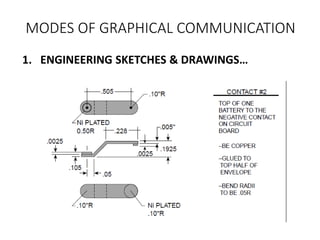
1. ENGINEERING SKETCHES & DRAWINGS
• Drawing is very important in design
• A lot of information is created and transmitted in the
drawing process.
• Design drawings include sketches, freehand drawings, and
computer-aided design and drafting (CADD) models
• Ranges from simple wire- frame model to complex 3D
models
• Drawing is the process of putting “marks on paper.” Marks
include both sketches and marginalia – notes written in the
margins.
MODES OF GRAPHICAL COMMUNICATION
1. ENGINEERING SKETCHES & DRAWINGS…
• Marginalia include notes in text form, lists, dimensions, and
calculations.
• Drawings enable a parallel display of information as they
can be surrounded with adjacent notes, smaller pictures,
formulas, and other pointers
• In some fields (e.g., architecture), sketching, geometry,
perspective, and visualization are the very foundations of
the field.
• Graphic images are used to communicate with other
designers, the client, and the manufacturing organization.
MODES OF GRAPHICAL COMMUNICATION
1. ENGINEERING SKETCHES & DRAWINGS…
• Serve as a launching pad for a brand-new design
• Support the analysis of a design as it evolves
• Simulate the behavior or performance of a design
• Record the shape or geometry of a design
• Communicate design ideas among designers
• Ensure that a design is complete
• Communicate the final design to the manufacturing
specialists.
MODES OF GRAPHICAL COMMUNICATION
1. ENGINEERING SKETCHES & DRAWINGS…
MODES OF GRAPHICAL COMMUNICATION
2. SKETCHING
• Powerful tool in design since it enables to
convey design ideas to others quickly and
concisely.
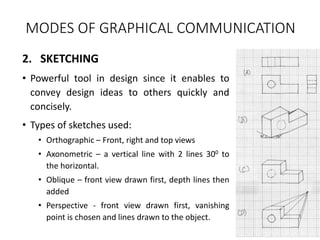
• Types of sketches used:
• Orthographic – Front, right and top views
• Axonometric – a vertical line with 2 lines 300 to
the horizontal.
• Oblique – front view drawn first, depth lines then
added
• Perspective - front view drawn first, vanishing
point is chosen and lines drawn to the object.
MODES OF GRAPHICAL COMMUNICATION
3. FABRICATION SPECIFICATIONS
• Design team must communicate with client(s) and also with
the maker/ manufacturer of the designed artifact.
• The only “instructions” that the fabricator sees are those
representations or descriptions of the designed object that
are included in the final design drawings
• These representations must be complete, unambiguous,
clear, and .
• How to ensure that the design as built will be exactly the
design that was designed?
MODES OF GRAPHICAL COMMUNICATION
3. FABRICATION SPECIFICATIONS…
• Design results need to be communicated to the
manufacturer.
• Should be careful about fabrication specifications
• Created in drawings
• Written in calculations
• Ensure that drawings are appropriate to the design
• Drawings are prepared in accordance to engineering
practices and standards
FORMS OF ENGINEERING DRAWINGS
• Design Drawing
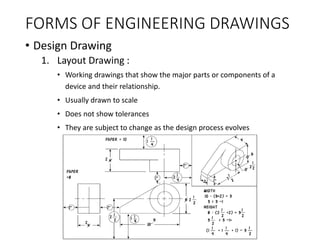
1. Layout Drawing :
• Working drawings that show the major parts or components of a
device and their relationship.
• Usually drawn to scale
• Does not show tolerances
• They are subject to change as the design process evolves
FORMS OF ENGINEERING DRAWINGS
• Design Drawing..
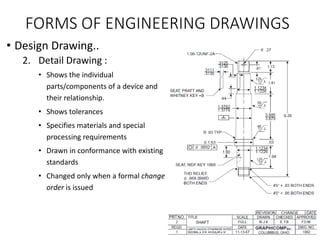
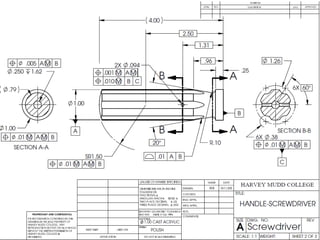
2. Detail Drawing :
• Shows the individual
parts/components of a device and
their relationship.
• Shows tolerances
• Specifies materials and special
processing requirements
• Drawn in conformance with existing
standards
• Changed only when a formal change
order is issued
FORMS OF ENGINEERING DRAWINGS
• Design Drawing..
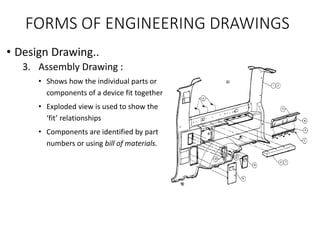
3. Assembly Drawing :
• Shows how the individual parts or
components of a device fit together
• Exploded view is used to show the
‘fit’ relationships
• Components are identified by part
numbers or using bill of materials.
DETAIL DRAWINGS
• Requirements for detail drawings
• Must contain as much information as possible
• Should be clear and uncluttered
• Standard symbols and conventions used to clearly
communicate design data
• Geometric Dimensioning and Tolerancing (GD & T)
• Design is made by designer and has to be fabricated by
manufacturer
• For exact communication of design, common standards are
needed.
DETAIL DRAWINGS
• Essential components that every drawing should have:
• standard drawing views;
• standard symbols to indicate particular items;
• clear lettering;
• clear, steady lines;
• appropriate notes, including specifications of materials;
• a title on the drawing;
• the designer’s initials and the date it was drawn;
• dimensions and units;
• permissible variations, or tolerances.
REQUIREMENTS IN A FABRICATION SPECIFICATION
• physical dimensions;
• materials to be used;
• unusual assembly conditions (e.g., bridge construction scaffolding);
• operating conditions (in the anticipated use environment);
• operating parameters (defining the artifact’s response and behavior);
• maintenance and lifecycle requirements;
• reliability requirements;
• packaging requirements;
• shipping requirements;
• external markings, especially usage and warning labels;
• unusual or special needs (e.g., must use synthetic motor oil).
DIFFERENT WAYS OF WRITING FABRICATION
SPECIFICATIONS
• Prescriptive Fabrication specification:
• Specify a particular part and its number in a vendor’s catalog
• Procedural Fabrication Specification:
• Specify a class of devices that do certain things
• Performance Fabrication Specification:
• Left to supplier or the fabricator to insert/use something
that achieves a certain function to a specified level
COMMUNICATING DESIGNS
ORALLY & IN WRITING
INTRODUCTION
• REPORTING is an essential part of a design project
• Project is not completed if we have not communicated our
work and findings to our client
• Communication of final design results in several ways:
• Oral presentations
• Final reports
• Prototypes and models
• The primary purpose of communication is to inform our
client about the design
• How and why this design was chosen over competing design
alternatives.
• Very important to communicate the results of the design process
INTRODUCTION
• Clients are probably not interested in the history of the
project or in the design team’s internal workings
• Should ensure that final reports and presentations are not
narratives or chronologies of our work.
• Presentations should describe design outcomes, as well as the
processes with which those outcomes were achieved.
GENERAL GUIDELINES FOR TECHNICAL
COMMUNICATION
• Basic elements of effective communication for writing reports, giving
oral presentations
• 7 principles of technical writing
1. Know your purpose.
2. Know your audience.
3. Choose and organize the content around your purpose and
your audience.
4. Write precisely and clearly.
5. Design your pages well.
6. Think visually.
7. Write ethically!
7 Principles of Technical Writing
1. Know your purpose.
• Need to understand the goals of a report or
presentation
• Various cases for which design documentation is
prepared:
• Design documentation informs the client about features of a
selected design.
• Design team may be trying to persuade a client that a design is
the best alternative.
• A designer may wish to report how a design operates to users
7 Principles of Technical Writing
2. Know your audience.
• When documenting a design, it is essential that a design team
structure its materials to its targeted audience.
• What is the technical level of the target audience?
• What is their interest in the design being presented?
• Understand the target audience will help ensure that its members
appreciate the documentation.
• Multiple documents and briefings on the same project for
different audiences may be prepared sometimes.
• Confine concepts of limited interest to specific sections of their
reports
7 Principles of Technical Writing
3 Choose and organize the content around your purpose
and your audience.
• Select and organize the content so that it will reach its intended target.
• Structure the presentation to best reach the audience
• Many different ways to organize information
• going from general concepts to specific details
• going from specific details to general concepts
• Describing devices or systems
• The design team should translate content pattern into a written outline
• Allows the team to develop a unified, coherent document or
presentation
• Avoids needless repetition
7 Principles of Technical Writing
4 Write precisely and clearly.
• Effective use of short paragraphs that have a single common
thesis or topic
• Short, direct sentences that contain a subject and a verb
• Active voice and action verbs that allow a reader to understand
directly what is being said or done
• Opinions or viewpoints should be clearly identified
• These elements of style should be learned so that they can be
correctly applied
7 Principles of Technical Writing
5. Design your pages well
• Use of headings and subheadings, different fonts and underlining
• A long section can be divided into several subsections
• Selecting fonts to highlight key elements or to indicate different
types of information
• Tables should be treated as a single figure and should not be split
over a page break.
• Careful planning of presentation support materials such as slides
can enhance and reinforce important concepts.
• Use of fonts large enough for the entire audience to see.
• Simple and direct slides encourage readers to listen to the
speaker
7 Principles of Technical Writing
6. Think Visually
• Design projects invite visual thinking
• Designs often start as sketches
• analyses often begin with free-body or circuit diagrams
• Plans for realizing a design involve graphics such as objectives
trees and work breakdown structures
• Audiences are helped by good use of visual representation of
information
• Range from the design tools, detailed drawings or assembly
drawings, flow charts and cartoons
• Visual aids are to be used in reports and presentations
7 Principles of Technical Writing
7. Write Ethically
• Designers spend much time and effort in the design choices they make.
• Temptation to present designs or technical results in a favorable manner
• Suppress unfavorable data or issues
• Ethical designers resist this temptation and present facts fully and
accurately
• All results or test outcomes, even those that are not favorable, are
presented and discussed.
• Ethical presentations also describe honestly and directly any limitations
of a design
• Important to give full credit to others, such as authors or previous
researchers, where it is due.
ORAL PRESENTATIONS
• A number of formal and informal presentations to be made to
users, clients and technical reviewers
• Presentations are made
• Before the start of design work
• During the project
• After completion of design alternative
• After completion of project
ORAL PRESENTATIONS
• Before the start of design work
• Done before giving the contract of design work
• Tells the teams ability to understand and handle the work
• During the project
• Team presents their understanding of the project
• Client’s needs, functions
• The alternatives under consideration
• The team’s plan for selecting an alternative
• The progress of work towards completing the project
ORAL PRESENTATIONS
• After completion of design alternative
• Design review before a technical audience
• Done to assess the design
• Identify possible problems, suggest alternate solutions
• End of the project
• Report on overall project to the client
Key elements common to all presentations are:
• To identify the audience
• Outline the presentation
• Develop appropriate supporting materials
• Practice the presentation.
ORAL PRESENTATIONS
To identify the audience
• Design briefings and presentations are given to many types of audiences
• Consider factors such as varying levels of interest, understanding,
technical skill and available time.
• Most attendees are only interested in particular dimensions of the
project
• The area of interest can be identified by asking it to the meeting
organizer
• After identifying, a team can tailor its presentation to that audience.
• Presentation must be properly organized and structured
• Prepare a rough outline, formulate a detailed outline
• Prepare the proper supporting materials, such as visual aids or physical
models.
ORAL PRESENTATIONS
Outline the presentation
• Presentation should have a clear structure
• Presentation structure and organization should be logical and
understandable
• Elements of a sample presentation outline:
• Title slide: identifies clients, project, design team and organization
• Roadmap for presentation: direction in which presentation will proceed
• Problem statement: description of the design requirement in engg terms
• Background material on the problem: Prior work, research, references
• The key objectives of the client and users:
• Key constraints
• Functions that the design must perform:
• Design alternatives: Considered during later stages of evaluation
ORAL PRESENTATIONS
• Elements of a sample presentation outline:
• Highlights of the evaluation procedure and outcomes:
• The selected design: why the design was chosen
• Features of the design:
• Proof-of-concept testing:
• A demonstration of the prototype: Videos, photos
• Conclusion: future work, needed improvements in design
ORAL PRESENTATIONS
Develop appropriate supporting materials…
• Should know the setting in which the presentation will be made.
• The design team should identify the devices available and general
setting of the room.
• Size and capacity, lighting, seating
• Overhead projectors, computer connections, projectors and whiteboards
• Tips and pointers for visual aids:
• Limit the number of slides: 1 or 2 slides per minute
• Self introduction and introducing teammates on the title slide
• Avoid cluttering
• Points to be clear, direct and simple
• Use colors skillfully
• Use animations appropriately
• Consider carefully the size and distance of the audience
ORAL PRESENTATIONS
Practice the presentations
• Design teams can gain confidence by practicing the presentations
• Practicing the presentation alone, in front of others
• Use words and phrases that are natural to the speaker.
• Say key points in several ways to identify and adopt new speech patterns.
• Practicing to be done under conditions close to the actual environment
• Decide in advance on handling questions in the end
• Useful for a speaker to repeat the question, particularly when there is a
large audience present or if the question is unclear.
• Prepare for questions from audience by:
• Generating a possible list of questions
• Preparing Supporting materials like back up slides
• Prepare to say ‘I don’t know’ or ‘We didn’t consider that’
DESIGN REVIEW
• Unique type of presentation
• Long meeting at which the team presents its design choices in detail to
an audience of technical professionals
• Review is intended to be a full and frank exploration of the design
• it should expose the implications of solving the design problem at hand
• Consist of a briefing by the team on the nature of the problem being
addressed
• Extensive presentation of the proposed solution follows
• Best opportunity for the team to get the complete attention of
professionals about their design project
• Members may be asked to defend their design and answer pointed
questions
PROJECT REPORT
• Purpose is to communicate with the client, his acceptance of design
choices made by the team
• Clear presentation of the design problem
• Analyses of the needs to be met,
• The alternatives considered,
• The bases on which decisions were made
• The decisions that were taken.
• Highly detailed or technical materials appear in appendices at the end
of the report
• The process of writing a final report is best managed and controlled
with a structured approach.
• The design process and report writing are very similar, especially in their
early, conceptual stages
PROJECT REPORT
• Structured approach follows these steps:
• Determine the purpose and audience of the technical report;
• Construct a rough outline of the overall structure of the report;
• Review that outline within the team and with the team’s managers
• Construct a topic sentence outline (TSO) and review it within the team;
• Distribute individual writing assignments and assemble, write, and edit an
initial draft;
• Solicit reviews of the initial draft from managers and advisors;
• Revise and rewrite the initial draft to respond to the reviews; and
• Prepare the final version of the report and present it to the client.
PROJECT REPORT
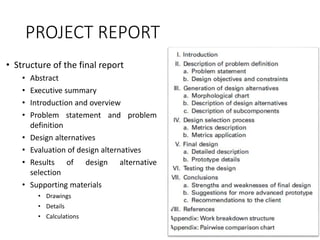
• Structure of the final report
• Abstract
• Executive summary
• Introduction and overview
• Problem statement and problem
definition
• Design alternatives
• Evaluation of design alternatives
• Results of design alternative
selection
• Supporting materials
• Drawings
• Details
• Calculations
PROTOTYPING AND PROOFING THE DESIGN
• “Process of quickly putting together a working model in order
to test various aspects of a design, illustrate ideas or features
and gather early user feedback”
• Derived from Latin word ‘Proto’ meaning Original and ‘types’
means form or model
• Prototype is a crude version of desired result
• Prototype assures whether the product functions as desired
• It is a physical model of a product which is tested to validate the
results of design process
Prototyping
• Testing of design solution under real conditions
• Testing is conducted under all expected and unusual
operating conditions
• If design requirements are not met, then an iteration
has to be done
• Re-design, re-build and re-test are done in iteration
• Once a successful prototype is developed, it is used as
the basis for full scale production
“Picture is worth a 1000 words
Prototype is worth a 1000 meetings”
PROTOTYPES AND MODELS
• Prototype:
• Original models on which something is patterned
• Working models of designed artifacts
• Tested in the same operating environments in which they’re
expected to function as final products
• Model:
• A miniature representation of an object
• Represents devices or processes
• Usually smaller and made of different materials than original
artifacts they represent
• Typically tested in a laboratory or in some other controlled
environment
Model Vs Prototype
Model
• Used to demonstrate how a
product will look or
function
• Can be a working or non
working
Prototype
• Used to test different
working aspects of a
product before the design is
finalized
• Much closer to the form, fit
and function of the final
design
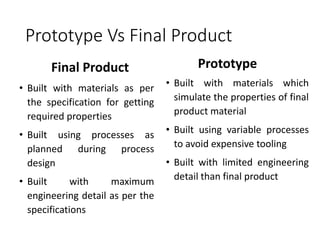
Prototype Vs Final Product
Final Product
• Built with materials as per
the specification for getting
required properties
• Built using processes as
planned during process
design
• Built with maximum
engineering detail as per the
specifications
Prototype
• Built with materials which
simulate the properties of final
product material
• Built using variable processes
to avoid expensive tooling
• Built with limited engineering
detail than final product
Need for prototyping
• Helps to find specific unknowns still present in the intended
design
• Allows evaluation and feedback
• Allows stakeholders to see, hold, interact with a prototype
more easily than a document or drawing
• Allows team members to communicate easily
• Allows faster improvements
• Helps to reduce costs
• Helps to find at an early stage whether the product or service
is actually what the users really need
Types of Prototypes
1. Product concept prototype
2. Proof of concept (Principle) prototype
3. Alpha prototype (First version)
4. Beta or Proof of process prototype
5. Pre-production prototype
Types of prototypes
1. Product concept prototype
• Functionality, design, structure and operational characteristics of the
product is illustrated
• Has the required look and feel of the final product
• Color does not have any importance
• Size of full-scale or reduced scale
• Made by technical and industrial engineers
2. Proof of concept (Principle) prototype
• Shows the principle of working of the final product
• Less concern for appearance, materials used or manufacturing
methods
• Shows technical aspects of product design
Types of prototypes
3. Alpha – prototype (First version)
• Prototype made as per final design drawings
• Same materials used as the final product
• Manufacturing processes different from actual product
• Made in model shop with computer controlled machines
4. Beta or Proof of process prototype
• Materials and processes used are same as for final product
• Tests on this prototype are used for incorporating further
changes in the product if any
Types of prototypes
5. Pre-production prototype
• Represents the final product in every aspect of processes,
appearance, packaging etc
• Expensive to produce than actual unit cost of the product
• Enables producers to go over every aspect of the product in fine
detail
• Made by manufacturing department
WHEN TO BUILD A PROTOTYPE
• The size and type of the design space
• The costs of building a prototype
• The ease of building that prototype
• The role that a full-size prototype might play in
• ensuring the widespread acceptance of a new design
• The number of copies of the final artifact that are expected to be made
or built.
• The project schedule and budget should reflect plans for building them
• Sometimes prototypes of large parts, complex systems are built to be
used as models to check how well those parts behave or function
HOW TO MAKE MODELS/ PROTOTYPES
• Many options for constructing prototypes and models
• Which option to use depends on the cost, timing, and complexity of the
design
• Mockups:
• Construct a mock up of a 3D part from 2D cutouts
• 2D parts can be made using a vinyl cutter or a laser cutter
• Parts are then assembled into 3D mock-ups of a design
• Materials used for these mock-ups might be foam, thin plastic, or wood
• Machining:
• Machining parts or all of the prototypes in a machine shop
• Separate machine shops for woodworking and metalworking
• Woodworking machines - drill presses, band saws , lathes
• Metalworking machines – lathes, mills, drills
• CNC machines can be used for complex parts
HOW TO MAKE MODELS/ PROTOTYPES
• Rapid Prototyping
• Relatively fast and cheap ways to fabricate prototypes
• Use 3D CAD models as inputs, and convert these 3D files into thin
2D layers to build the 3D part.
• Include stereo-lithography, selective laser sintering, fused
deposition modeling
• Using a laser to harden either a resin bath or a polymer powder in a
particular configuration to build each layer.
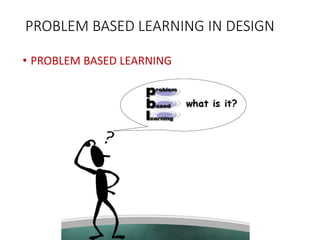
PROBLEM BASED LEARNING IN DESIGN
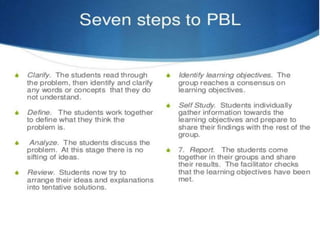
• PROBLEM BASED LEARNING
PROJECT BASED LEARNING & PROBLEM
BASED LEARNING IN DESIGN
• Process of acquiring and understanding of knowledge, skills
in the context of an unfamiliar situation and applying that
learning to the situation.
• Student centred leaning strategy.
• Students collaboratively solve the problems and this reflects
on their experience.
• The starting point is a problem, a query, or a puzzle that the
learner wishes to solve.
GOALS OF PROBLEM BASED LEARNING
• Construct an extensive & flexible knowledge base.
• Foster increased retention of knowledge.
• Develop effective problem – solving skills.
• Develop self-direction, lifelong learning skills.
• Become effective collaborators.
• Strengthen student’s intrinsic motivation to learn.
• Recognize, develop & maintain the personal characteristics
and attitude.
ADVANTAGES OF PROBLEM BASED
LEARNING
• PBL Method is active and cooperative learning, the ability to
think critically and clinical reasoning
• It stimulates the students to use skills of inquiry and critical
thinking, peer teaching and peer evaluation.
• It increases ability to apply knowledge in clinical situations.
• It increases student responsibility for self directed peer
learning
ADVANTAGES OF PROBLEM BASED
LEARNING
• It helps in developing flexible knowledge that can be applied
to different contexts.
• This learning method helps in developing lifelong learning
skills.
• It encourages students to work in teams or groups, there by
facilitating group dynamics.
• Increased motivation for learning is the added advantage.
• Promote collaborative learning.
DISADVANTAGES OF PROBLEM BASED
LEARNING
• Very difficult and expensive to use as a teaching technique,
when the class size is large.
• Students require orientation to perform the role of a learner
in PBL setting.
• Evaluation is quite difficult and sometimes may be
subjective.
• Resource expensive.
• Measurement of learning outcomes is difficult.
PROJECT BASED LEARNING IN DESIGN
• Teaching method in which students gain knowledge and skills by
• working for an extended period of time
• investigate and respond to an engaging and complex
question, problem, or challenge
• It is a style of active learning and inquiry-based learning.
• Students organize their own work and manage their own time in
a project-based class
• Gives students the opportunity to explore problems and
challenges that have real-world applications
CHARACTERISICS OF PROJECT BASED
LEARNING
• It is organized around an open-ended driving question or
challenge.
• PBL creates a need to know essential content and skills.
• Requires critical thinking, problem solving, collaboration,
and various forms of communication known as "21st
Century Skills.“
• Incorporates feedback and revision.
• Results in a publicly presented product or performance.
ADVANTAGES OF PROJECT BASED
LEARNING
• Students need to learn to work in a community, thereby taking on
social responsibilities.
• When students take responsibility, or ownership, for their
learning, their self-esteem increases.
• It also helps to create better work habits and attitudes toward
learning.
• Students also become more independent because they are
receiving less instructions from the teacher.
• Students learn skills that are essential in higher education.
ADVANTAGES OF PROJECT BASED
LEARNING
• Students have to find answers to questions and combine
them using critically thinking skills to come up with answers.
• Project based learning allows students to expand their
minds and think beyond what they normally would.
DISADVANTAGES OF PROJECT BASED
LEARNING
• Unfocused and underdeveloped lessons can result in the
wasting of precious class time.
• Lecture-style instruction can convey the same knowledge in
less class time.
• Instructors can be misled into thinking that as long as a
student is engaged and doing, they are learning.
• If the project does not remain on task and content driven
the student will not be successful in learning the material.
DISADVANTAGES OF PROJECT BASED
LEARNING
• Complex projects need to be on track while attending to
students' individual learning needs.
• When students work in groups some will sit back and let the
others do all the work.
• Not easy to measure success using standard measurement
tools.
• Tendency for the creation of the final product of the project
to become the driving force in classroom activities.

DESIGN AND ENGINEERING.pptx

  • 1.
    COLLEGE OF ENGINEERINGAND MANAGEMENT PUNNAPRA ISO 9001:2015 GOVERNMENT ENGINEERING COLLEGE, ALAPPUZHA CAPE Aksharanagari Campus, Off Kalarcode End of NH 66 Bye-pass ALAPPUZHA - 688003 EST200 – DESIGN AND ENGINEERING SHYAMRAJ.R ASSISTANT PROFESSOR DEPT. OF MECHANICAL ENGINEERING
  • 2.
    COURSE OBJECTIVES The purposeof this course is to I) Introduce the undergraduate engineering students the fundamental principles of design engineering, II) Make them understand the steps involved in the design process and III) Familiarize them with the basic tools used and approaches in design.
  • 3.
    COURSE OUTCOMES After thecompletion of the course the student will be able to: I) Explain the different concepts and principles involved in design engineering. II) Apply design thinking while learning and practicing engineering. III) Develop innovative, reliable, sustainable and economically viable designs incorporating knowledge in engineering.
  • 5.
    WHAT IS DESIGN???? •Design is the practice of conceiving and planning what doesn’t exist. • It is a broad term that can be applied to creating structures, environments, interfaces, products, services, features and processes.
  • 6.
    INTRODUCTION TO DESIGN •Design • Consists of the specification of requirements needed to satisfy the customer. • The job of a designer is to gather such requirements from various sources and produce a specification of some sort. • The designer is concerned with many Human Factors - aesthetics, functionality, ease-of-use, fitness for purpose, and quality • The designer is less concerned with implementation details.
  • 7.
    • Design isthe process of envisioning and planning the creation of objects, interactive systems, buildings, vehicles, etc. • It user-centered, i.e. users are at the heart of the design thinking approach. • It is about creating solutions for people, physical items or more abstract systems to address a need or a problem. • Design is not about making things pretty just for the sake of it • It is about making the user’s interaction with the environment more natural and complete. “Design is not just what it looks like and feels like. Design is how it works”. – Steve Jobs
  • 8.
    ENGINEERING DESIGN • EngineeringDesign • Process of designing a system, component or process to meet the desired needs • Involves iterative decision making • Uses basic sciences, mathematics and other essential data to convert resources into specified needs. • Includes many stages in the process. • Includes realistic constraints – economic factors, safety, reliability, aesthetics, ethics, social impact.
  • 9.
    ENGINEERING DESIGN… • Featuresof Engineering Design • Engineering design is the method that engineers use to identify and solve problems • Engineering design is a process. • Engineering design is purposeful. • Engineering design is “design under constraint.” • Engineering design is systematic and iterative. • Engineering design is a social, collaborative enterprise.
  • 10.
    DIFFERENCE OF ENGINEERINGDESIGN WITH OTHER KINDS OF DESIGNS • Types of other designs • Architecture design: Designing and engineering buildings and structures • Interior design: Designing interior and exterior physical environments used by people • Landscape design: Integration of nature and architecture to create gardens and parks • Industrial design: Designing products for mass production • Fashion design: Designing clothing and accessories
  • 11.
    DIFFERENCE OF ENGINEERINGDESIGN WITH OTHER KINDS OF DESIGNS… • Types of other designs… • Software design: Designing the structures, components, objects and methods that solve a problem with software • User Interface design: Designing interfaces that people use to control and interact with technology. • Graphic design: Designing visual layouts of magazines, websites, video content etc. • Game design: Designing gaming environments and features • Sound design: Designing sound environments and productions
  • 12.
    HOW TO LEARNAND DO ENGINEERING DESIGN
  • 13.
    PREVIOUS LECTURE INTRODUCTION TODESIGN & ENGINEERING • WHAT IS DESIGN? • ENGINEERING DESIGN • ENGINEERING DESIGN AND OTHER KINDS OF DESIGN • DESIGN PROCESS
  • 14.
    DEFINING A DESIGNPROCESS LECTURE 2
  • 15.
  • 16.
    1. DEFINE THEPROBLEM • Identify a problem • Validate the problem • Who says it’s a problem? • Needs and wants • Prior solutions • Justify the problem • Is the problem worth solving? • Create design requirements (specifications) • Criteria and constraints • Design brief
  • 17.
    1. DEFINE THEPROBLEM • Design Brief – A written plan that identifies a problem to be solved, its criteria and its constraints. – Used to encourage thinking of all aspects of a problem before attempting a solution.
  • 18.
    1. DEFINE THEPROBLEM • In some cases, if the problem is not valid or justifiable, the designer must define a new problem.
  • 19.
    2. GENERATE CONCEPTS •Research • Brainstorm possible solutions • Consider additional design goals • Apply STEM (Science, Technology, Engineering and Maths) principles • Select an approach • Decision Matrix
  • 20.
    2. GENERATE CONCEPTS BRAINSTORMING •A group creativity technique • Discussion on a particular problem to find solution and conclusion within limited time • Consists of 5 to 15 members and a leader • Participation of every member is ensured • Duration of 30 to 45 minutes • Highly motivating and productive • Promotes creativity and spontaneity • Increases focus on the task
  • 21.
    2. GENERATE CONCEPTS DecisionMatrix • A tool used to compare the design solutions against one another, using specific criteria.
  • 22.
    2. GENERATE CONCEPTS •If the technology necessary to develop the solution does not exist, scientific research may be necessary to pursue a solution
  • 23.
    3. DEVELOPING ASOLUTION • Create detailed design solution • Justify the solution path • Technical Drawings
  • 24.
    3. DEVELOPING ASOLUTION • Technical Drawings – Drawings that provide technical Information necessary to produce a product. – material, size, shape – assembly, if necessary
  • 27.
    • If asolution is found to be invalid or cannot be justified, the designer must return to a previous step in the design process. 3. DEVELOPING A SOLUTION
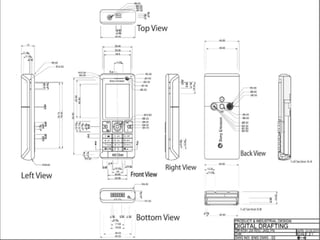
  • 28.
    4. CONSTRUCT &TEST A PROTOTYPE • Construct a testable prototype • Plan prototype testing – Performance – Usability – Durability • Test prototype – Collect test data – Analyse test data • Test Report
  • 29.
    4. CONSTRUCT &TEST A PROTOTYPE Prototyping • The first stage of testing and implementation of a new product • Consists of building a prototype of the product-the first fully operational production of the complete design solution. • A prototype is not fully tested and may not work or operate as intended. • The purpose of the prototype is to test the design solution under real conditions.
  • 30.
    4. CONSTRUCT &TEST A PROTOTYPE
  • 31.
    4. CONSTRUCT &TEST A PROTOTYPE
  • 32.
    4. CONSTRUCT &TEST A PROTOTYPE • If a testable prototype cannot be built or test data analysis indicates a flawed design, the designer must return to a previous step of the design process
  • 33.
    5. EVALUATE THESOLUTION • Evaluate solution effectiveness • Reflect on design – Recommend improvements • Optimize/Redesign the solution – [Return to prior design process steps, if necessary] – Revise design documents • Project Recommendations
  • 34.
    5. EVALUATE THESOLUTION • Does the solution solve the problem? If not, the designer must return to a previous step of the design process.
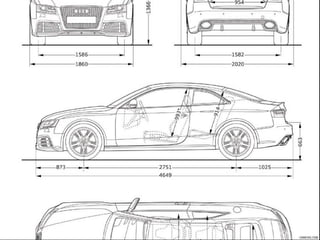
  • 35.
    6. PRESENT THESOLUTION • Document the project – Project Portfolio • Communicate the project – Formal Presentation
  • 39.
  • 40.
    LECTURE 3 • DETAILINGCUSTOMER REQUIREMENTS
  • 41.
    1. Identify theNeed • Great focus on identifying customer needs due to increasing competition • Who are customers? • What does a customer want? • How can a customer be satisfied? • General definition of a customer – “one that purchases a product or a service” • Customers also can be ‘end-users’ • New products developed by consultation with customers and the people influencing them
  • 42.
  • 43.
  • 44.
    IDENTIFYING CUSTOMER REQUIREMENTS 2.Gathering information from customers • Different methods of gathering information a. Interviews • One to one meeting with customer for a duration of time • Done by marketing or sales people • Identify the problem of key customer • Meeting at their own environment • ‘What do you like or dislike about the product’? • ‘Why do you purchase this product?’ • ‘What are the improvements you need on this product?’
  • 45.
  • 47.
  • 48.
  • 49.
    2. Gathering informationfrom customers • Different methods of gathering information b. Focus groups • Expanded interview with 8 to 12 customers involved with an interviewer • Interviewer comes up with questions for the customers to discuss about the product • Every interview is recorded to listen to customer’s response • Trained interviewer will pursue any surprise answer with follow up questions • This continues until he understands customers response IDENTIFYING CUSTOMER REQUIREMENTS
  • 50.
  • 51.
    2. Gathering informationfrom customers • Different methods of gathering information c. Customer Complaints • A sure way to know about customer needs • Customer can make complaints through phone, letter, email to the service centre • Third party internet websites also act as a source for customer complaint for a product • Customer ratings, comments etc in purchasing websites IDENTIFYING CUSTOMER REQUIREMENTS
  • 52.
    d. Warranty data •Products claimed for warranty directly pinpoints to the defects • Reflects customers dissatisfaction towards the product IDENTIFYING CUSTOMER REQUIREMENTS
  • 53.
    2. Gathering informationfrom customers • Different methods of gathering information e. Surveys • Prioritize or identify major problems of the product • Done to ensure whether the implemented solution to a problem is successful or not • Conducted through e-mail, telephone or in person IDENTIFYING CUSTOMER REQUIREMENTS
  • 54.
  • 55.
  • 56.
  • 57.
  • 58.
    Problem Statement Problem statement- “Studentsneed an easy way to take their books to school”. • Now there is the need to define this problem a bit more in detail. Who are the students? What is meant by easy? • Make the problem definition as best as possible. • Identify the Product attributes/functions and assign weightages.
  • 59.
  • 60.
    Problem Statement • Providesnecessary information for the design team to solve the problem successfully • There must be some time duration to be spent for analyzing the problem before arriving at any solution • Can be done in the following ways • Problem analysis • First step is to analyze the design task to determine the nature of problem statement • ‘Why does the problem occur’? • ‘When does it occur?’ • ‘Under what situations does it occur?’ • ‘How does it occur?’
  • 61.
    Problem Statement • Problemclarification • Used for further analysis of the problem • Uses a black-box modeling design to analyze the problem • Black-box model is a representation of energy, material and signal inputs of an engineering system • Overall problem represented by black box should be brought down to smaller sub-problems • Helpful in arriving at solutions for a number of complex design engineering problems • Allows design team to focus on the sub problems separately • Solution obtained by combining all sub functions to form overall designed function
  • 62.
  • 63.
  • 64.
    IDENTIFYING CUSTOMER REQUIREMENTS •Needs change according to circumstances, status, environment, society, groups etc • Hierarchy of human needs in general (Maslow’s theory of Hierarchy of Needs) • Physiological needs • Safety and security needs • Social needs • Self esteem and self respect
  • 66.
  • 67.
  • 68.
    PREVIOUS LECTURE • IDENTIFYINGCUSTOMER REQUIREMENTS
  • 69.
    LECTURE 4 • SETTING& FINALIZING DESIGN OBJECTIVES • IDENTIFY DESIGN CONSTRAINTS • ESTABLISHING FUNCTIONS
  • 70.
    DESIGN OBJECTIVES • Settingobjectives is a vital part of design. • Most important aspect to be understood before initiating a design • Objectives provide structure and clarity of expectation for the customer and the organization • Objectives are often not what the design should do, but what the design should be. • Objectives are normally expressed verbally. • Example: Portable drilling machine
  • 71.
    PURPOSE OF DESIGNOBJECTIVES • To identify needs of the user • To do research and to know the various possibilities of problem solving • To reduce cost of the design process • To reduce complexity of the component • To increase efficiency of the component • To complete product design within the specified time • To make the design more ergonomic and user friendly • To improve the safety of the component under various static and dynamic loads • To make an eco friendly material • To create a self sustainable component
  • 72.
    SETTING OBJECTIVES THE‘SMART’ WAY • Objectives contain in a few words, a lot of meaning. • Formulating objectives is not easy • Needs imagination, creativity and realism to meet important criteria such as clarity and specificity. The ‘SMART’ framework for setting objectives • ‘S’ – Specific • Does the objective state a defined outcome/ result? • Is it precise? (avoid ambiguous statements) • Being specific about an outcome leads the identification of what will be achieved.
  • 73.
    SETTING OBJECTIVES THE‘SMART’ WAY The ‘SMART’ framework for setting objectives • ‘M’ – Measurable • Can the outcome be quantified – if so, how? • If the outcome can’t be quantified – what indicators will show that the objective has been achieved? • Who will be measuring the achievement, when it will be measured and how often?. • For an evaluation or an assessment carried out by others • What is it that they are being asked to measure and how does this match up to the intended outcome?
  • 74.
    SETTING OBJECTIVES THE‘SMART’ WAY The ‘SMART’ framework for setting objectives • ‘A’ – Achievable • Is it within the organizational capabilities? • Is it in line with the customer expectations? • Is it set within available resources (time and/or money)? • Consider conditions and their potential impact • What is in our control? • What do we have influence over? • What do we have to accept (and cannot change)?
  • 75.
    SETTING OBJECTIVES THE‘SMART’ WAY The ‘SMART’ framework for setting objectives • ‘R’ – Relevant • Does it link to the objectives and priorities of the team/department/ Organization? • Is it appropriate to the customer? • ‘T’ – Time framed • Has a date been set for the completion of each objective? • Identify whether the objectives are short, medium or long-term? • If long-term objectives are agreed, ensure there is a series of phased dates for review/achievement.
  • 76.
    FINALIZING DESIGN OBJECTIVES •Finalizing design objectives is obtained by various methods • Absolute comparison – comparing the design concept with a standard concept • Relative comparison – comparing the design concepts with one another • The evaluation methods are: 1. Evaluation based on feasibility of design – feasibility of each concept is evaluated and divided into 3 categories – • Feasible: Idea will work, taken for further development • Conditional: Idea might work with some modifications to be added to it • Infeasible: Will not work and therefore is discarded
  • 77.
    FINALIZING DESIGN OBJECTIVES •The evaluation methods are: 2. Evaluation based on availability of technology • Is the technology available in practice • Can the technology be developed with known sources? • Are the functional parameters identified? 3. Evaluation based on customer requirements • Concepts which clear the other 2 evaluation methods only are evaluated in this method. • Customer requirements are compiled into questions and matched with concepts • The concepts which do not meet customer requirements are discarded • Improvements are made after few iterations
  • 78.
    DESIGN CONSTRAINTS • Designis not an open field. It has many constraints. • An engineer has to carefully understand these constraints and work out a design that fits the situation. • This at times puts a break on creativity. Such challenges are there in all designs. • One major constraint in engineering, is the regulatory frame work.
  • 79.
    DESIGN CONSTRAINTS • Creatinga perfect design is a tedious process • A number of hurdles and resistances must be overcome • Design constraints refer to the limits posed on a design process • Causes significant changes in the final end product • Necessary to consider technical, social , economical, environmental constraints during design process Examples: Should a design work at high temperature? Should the product be portable? Should it meet the environmental regulations?
  • 80.
    DESIGN CONSTRAINTS • Designobjectives and Constraints are related, but different. • Objectives allows us to have wider choices. (Wider Design Space) • Constraints limit the choices in design. • (Drill weight not to exceed 1.5kg - Reduced Design Space) • Can one think of an example - satellites?
  • 81.
    TYPES OF CONSTRAINTS 1.Functional Constraints • Poses limits on the proposed working principle of a product a. Overall geometry • Dimensions, volume, space requirements, orientation etc should be satisfied by the system b. Kinematics Involved • Types of forces and direction of forces acting on the product • Product should not fail under the action of applied load
  • 82.
    TYPES OF CONSTRAINTS c.Energy requirement • Input energy required to perform a specific task • Can vary based on the product • Use of appropriate transducers and amplifiers can prevent this constraint d. Materials Used • Type of material used should be according to the strength required for the product • Depends on availability of material, machinability, weldability, cost effectiveness etc
  • 83.
    TYPES OF CONSTRAINTS e.Control System • Transfers energies and signals from one part of the product to another • Makes use of various mechanical and electronic components for this purpose • Positioning of sensors, functioning of pneumatic and hydraulic components under high pressure are the constraints f. Information flow • Numerical and graphical data based on the inputs and outputs • Constraints – calibration of devices, errors in measurement etc
  • 84.
    TYPES OF CONSTRAINTS 2.Safety Constraints • If unattended can cause direct threat to the product/ user • Every component should have a factor of safety limit • Consists of • Operational safety constraints • Environmental constraints • Inevitable human errors during operation 3. Quality Constraints • Constraints for delivering product of high quality • Several safety regulations & testing performed before reaching the market • Design needs to be altered for prolonged use and sufficient product life
  • 85.
    TYPES OF CONSTRAINTS 4.Manufacturing Constraints • Equipment deficiency, methods of manufacturing, amount of wastage, machining time, labour shortage.. • Quality and reliability of raw materials, TQM etc 5. Time Constraints • Proper allocation of time for different processes is important • Stringent timeline may lead to mediocre design • Design and development stages allocated with buffer time to get the best product 6. Economic Constraints • Economically feasible design required
  • 86.
    TYPES OF CONSTRAINTS Factorsinfluencing economic constraints • Demand for the product • Design costs • Development costs • Manufacturing costs • Distribution costs • Availability of resources 7. Ecological constraints • Product should have positive impact on natural and social resources of its surroundings • Elimination of toxic nature • Ecologically friendly method of production • Exhaust and by-products treatment
  • 87.
    TYPES OF CONSTRAINTS 8.Legal and Ethical constraints • End product should be approved by various organisations to ensure its quality and safety • Patents and copyrights should be dealt with • Elimination of legal constraints and plagiarism 9. Ergonomical & Aesthetic Constraints • Ergonomic design could hinder the basic functional design • Ergonomic design is concerned with interactions between product and user • Functional constraints are affected by aesthetic nature of the product • Visually pleasing product attracts more customers
  • 88.
    PREVIOUS LECTURE • SETTINGDESIGN OBJECTIVES • FINALIZING DESIGN OBJECTIVES • DESIGN CONSTRAINTS • TYPES
  • 89.
  • 90.
    DESIGN FUNCTIONS • Designinginvolves various functions based on the type of product • Functions are the specifics the design is planned to do. • The drill should work in high humidity (in rain) • The drill should switch off if the load exceeds. • Some of the functions can lead to constraints. • (specifying the maximum load)
  • 91.
    DESIGN FUNCTIONS • Designprocess starts after incubation of an idea • Design process covers • Prototyping • Manufacturing • Marketing • Quality Control & Sales • Extensive amount of time is dedicated to the research part of the product
  • 92.
    CLASSIFICATIONS OF DESIGNFUNCTIONS Research Function Design Functions Commercial Function Engineering Function Manufacturing Function Quality Function
  • 93.
    CLASSIFICATIONS OF DESIGNFUNCTIONS 1. Research Function • Stage before the product design • Starts after the incubation of an idea • Identifying the need of the product • Defining the working principle • Collection of data required for the upcoming processes • Research on better alternatives etc 2. Engineering Function • Involves main product design • Product design is a 3D model developed in design software packages • Cost estimation, concept design, simulation, analysis, safety check etc performed
  • 94.
  • 95.
  • 96.
    CLASSIFICATIONS OF DESIGNFUNCTIONS 3. Manufacturing Function • Elements of production – casting, forming, assembly, cost controlling, obtaining laborers, raw material purchasing etc • Creates physical end product from a virtual design 4. Quality Control Function • Regulation of products as per design • Check for safety, dimensions, functionality, design auditing, energy auditing etc 5. Commercial function • Cost and service related aspects • Relationship with clients, marketing, sales, logistics, Human resources etc
  • 97.
    GENERATING DESIGN ALTERNATIVES •Creating actual designs start by creating a ‘Design space’ • An imaginary space for design alternatives for a problem • ‘Set of all possible and feasible designs created after finalizing the design task’ • All the feasible design options should be explored • Boundary of the design space covers all the feasible designs • Large design space means there are many design options available • Parameters like cost, performance, weight, size etc have more than three dimensions
  • 98.
    GENERATING DESIGN ALTERNATIVES •Designer has to find out the best of all designs • Done by searching nearby design space to obtain best feasible solution • Systematic design methods provide operations allow designer to move from one design space to next. • For a new product, the design space is limited. • For small design space, study of many other systems or similar products is needed. • Design space allows us to explore the possibilities and evaluate their suitability for a good design.
  • 99.
    PREVIOUS LECTURE • DESIGNFUNCTIONS • CLASSIFICATION OF DESIGN FUNCTIONS • GENERATING DESIGN ALTERNATIVES
  • 100.
    LECTURE 6 • GENERATINGDESIGN ALTERNATIVES • FINALIZING THE DESIGN
  • 101.
    METHODS TO GENERATEALTERNATE DESIGNS 1. DEFINING A DESIGN SPACE BY GENERATING A MORPHOLOGICAL CHART • A morphological chart is a matrix in which the left most column lists all principal functions and also some of the key features it must have. • To the right side, the different means of achieving the functions are listed • Some functions have more means than others. • We start building conceptual designs from the morph chart • Any feasible design must be functionally complete • Every function listed in the left most column must be achieved by the design. • The designs are assembled by choosing one means from each row, and combining them into a functional design concept or scheme.
  • 102.
    METHODS TO GENERATEALTERNATE DESIGNS DEFINING A DESIGN SPACE BY GENERATING A MORPHOLOGICAL CHART JUICE CONTAINER DESIGN
  • 103.
    METHODS TO GENERATEALTERNATE DESIGNS FEASIBLE INFEASIBLE
  • 104.
    2. USING ANALOGIES •An inventive method of problem solving in everyday life • Analogy is the method of connecting two different domains that share something in common • Makes use of existing examples to initiate ideas to solve a new problem • Relates existing problem to some segments of solved problem • 4 types of analogies to generate ideas about an existing problem METHODS TO GENERATE ALTERNATE DESIGNS
  • 105.
    Analogies.. • Types ofanalogies 1. Direct analogy • Most common approach used by most of the designers • Makes use of similarity in physical behaviour, geometric similarity, functional similarity etc • Eg. Bio inspired design - Arctium plants. The design is used in Velcro (footwear, bags, belts etc)
  • 106.
    Analogies.. • Types ofanalogies… 2. Fantasy analogy • Designer avoids all problems, limitations and laws of nature • Based on imagination of the designer • Has potential for generating ideas • Eg. locating a car in a large car parking lot 3. Personal analogy • Designer imagines themselves as the device being designed • Associates their body with the device
  • 107.
    Analogies.. • Types ofanalogies… 3. Personal analogy 4. Symbolic analogy • Least intuitive approach • Designer replaces specifics of the problem with symbols and manipulates them to get solutions • Eg.graphical method, Laplace transformation etc
  • 108.
    3. The 6-3-5Method METHODS TO GENERATE ALTERNATE DESIGNS
  • 109.
    3. The 6-3-5Method • 6 team members are seated around a table to participate in this idea generation “game”. • They write down 3 design ideas, briefly expressed in key words and phrases • The time allocated for writing the ideas is 5 minutes. • Each list makes a complete circuit around the table • After 6 rounds, participants swap their worksheets passing them on to the next team member. • 108 ideas are thus generated in 30 minutes. • When all of the participants have commented on each of the lists, the team lists, discusses, evaluates, and records all of the design ideas METHODS TO GENERATE ALTERNATE DESIGNS
  • 110.
    4. The C-SketchMethod METHODS TO GENERATE ALTERNATE DESIGNS
  • 111.
    4. The C-SketchMethod • Starts with a team seated around a table, with each member sketching one design idea on a piece of paper. • Each sketch is circulated through the team in the same fashion as the lists of ideas in the 6–3–5 method. • All of the annotations or proposed design modifications will be written or sketched on the initial concept sketches. • The only permissible communication is by pencil on paper. • Discussion follows only after a complete cycle of sketching and modifying (as in the 6–3–5 method) has been completed. • The C-sketch method is very appealing in an area such as mechanical design because since sketching is a natural form of thinking in mechanical device design. • Drawings and diagrams facilitate the grouping of relevant information and they help people to better visualize the objects being discussed. METHODS TO GENERATE ALTERNATE DESIGNS
  • 112.
    5. Gallery Method METHODSTO GENERATE ALTERNATE DESIGNS
  • 113.
    5. Gallery Method •The gallery method is a third approach to getting team reactions to design idea sketches. • Team members first develop their individual, initial ideas within some allotted time • All of the resulting sketches are posted on a cork board or a conference room whiteboard. • This set of sketches serves as the backdrop for an open, group discussion of all of the posted ideas • Questions are asked, critiques are offered, and suggestions are made. • Then each participant returns to her or his drawing and suitably modifies or revises it, again within a specified period of time, with the goal of producing a second-generation idea • We proceed until a consensus emerges within the group that one more cycle will not gain much (or any) new information METHODS TO GENERATE ALTERNATE DESIGNS
  • 114.
    FINALIZING DESIGN 1. AbsoluteCriteria • Evaluation of feasibility of design • Feasible • Conditional • Infeasible • Evaluation on assessment of technology readiness 2. Evaluation on go/ non-go screening • Customer requirements are transformed into questions for each of the concepts • Questions to be answered as Yes (go), May be (go) or No (non-go)
  • 115.
    FINALIZING DESIGN 3. Pughconcept selection method • Most promising design concept • Compares each concept relative to a reference or a datum concept • Determines whether the concept is better than reference concept • ‘Individual is best in creating ideas, but a group is better at selecting ideas’.
  • 116.
    FINALIZING DESIGN 3. Pughconcept selection method • Steps in concept selection method are : • Concept evaluation by choice of criteria • Formulate the decision matrix • Clarify the design concepts • Choose the datum concept • Run the matrix • Evaluate the ratings • Establish a new datum and return the matrix • Examining selected concepts for improvement opportunities
  • 117.
  • 118.
  • 119.
    MODULE II • DESIGNTHINKING APPROACH
  • 120.
    DESIGN THINKING • Amethodology that designers use to brainstorm and solve complex problems related to designing and design engineering • Beneficial for designers to find innovative, desirable and never- thought-before solutions for customers and clients • The iterative design process helps the designers to involve clients and customers in meaningful ways. • Think of unimaginable solutions and then trying to make them not just feasible, but also viable • Design thinking combines logic, powerful imagination, systematic reasoning and intuition to make workable ideas.
  • 121.
    DESIGN THINKING • Designthinking is a methodology for finding • Simplicity in complexity • Improving quality of experience with the designed products • Serving the needs of customers by addressing the target problem faced by them. • It is a five-step process, where each step focuses on a specific goal • Each of the steps is independent of the next step but is borne out of the previous step • Design thinking helps to gain a balance between the problem statement and the solution developed.
  • 122.
    FEATURES OF DESIGNTHINKING • Finding simplicity in complexities. • Having a beautiful and aesthetically appealing product. • Creating innovative, feasible, and viable solutions to real world problems. • Improving clients’ and end user’s quality of experience • Addressing the actual requirements of the end users.
  • 123.
    DESIGN THINKING • Designthinking helps you learn the following. • How to optimize the ability to innovate? • How to develop a variety of concepts, products, services, processes, etc. for end users? • How to leverage the diverse ideas of innovation? • How to convert useful data, individual insights and vague ideas into feasible reality? • How to connect with the customers and end-users by targeting their actual requirements? • How to use the different tools used by designers in their profession for solving your customers’ problems?
  • 124.
  • 125.
    THE 5-STEP PROCESSIN DESIGN THINKING
  • 126.
    STAGE 1: EMPATHIZE •Involves putting oneself into the shoes of the customer or the end-user of our solution • We need to understand the problems faced by the customer • This step is carried out in the form of requirement gathering, which involves interviews and sometimes, even field visits. • Involves the process of analysis
  • 127.
    STAGE 1: EMPATHIZE Afew points to be considered while interviewing the customer. • The interviewer must brainstorm for the questions beforehand and must be fully prepared for the interview. • The questions being asked must be open questions. No question should be asked for which the interviewee can answer only in Yes or No. • The interviewer must have plenty of ‘why’ questions. Here, the ‘five whys’ method can help. • The themes of the questions must not be intermingled. • The themes must be arranged properly and questions pertaining to a particular theme must be asked together. • The questions must be refined thoroughly so that no trace of ambiguity is left in them
  • 128.
    STAGE 2: DEFINE •After learning customer problems, we need to define the problem and arrive at a problem statement • This statement will give us the necessary direction to proceed towards the issue faced by the customer. • As a design thinker, we need to cover all the points and the answers that we got in the ‘empathize’ phase. • We have to club all the answers together and convert them into a coherent single statement. • The first step towards defining a problem is to find who the user is, what are his/her/their needs and then develop insights from the answers. • Asking ‘How might we’ questions to customers
  • 129.
    STAGE 2: DEFINE •Generating ‘How might we’ questions: • Amplify the good • Eliminate the bad • Explore the opposite • Question the Assumptions • Identify the Unexpected Resources • Create an Analogy • Break the Problem into Pieces
  • 130.
    STAGE 3: IDEATE •Most interesting and the most rigorous stage • A design thinker is supposed to bring to the table as many ideas as possible. • While brainstorming, it is not checked whether the idea is possible, feasible, and viable or not. • The only task of thinkers is to think of as many ideas as possible for them. • Design thinkers use boards, sticky notes, sketching, chart papers, mind maps, etc
  • 131.
    STAGE 3: IDEATE Rulesfor brainstorming • Only one conversation is allowed at a time. No other person must intervene when an idea is being given. • Focus must be on the quantity and not on quality. In this step, the group must have large number of ideas with them. • Think out of the blue. Wild ideas must be encouraged even if they invoke plain humor or seem impossible. • The group leader must defer judgment. The fellow thinkers also need to suspend judgment. Judgmental attitude leads to an obstruction for the thinkers.
  • 132.
    STAGE 4: PROTOTYPE •Deals with building the ideas and checking for their feasibility to arrive at the final solution • Three things are mainly taken care of • Creation of experience • Getting feedback • Iteration • The end user is actively involved in this component of design thinking. • Based on the criticisms, suggestions, and appreciations received, the design thinkers create a better solution after iterating Empathize, Define, and Ideate steps. • Prototyping requires thinkers to create tangible products
  • 133.
    STAGE 4: PROTOTYPE- GUIDELINES • Take the first step and start to build the prototype. Don’t procrastinate. • Don’t waste too much of time on building a single prototype. • The prototypes must be built with the end user in mind. • The prototype must not be a mere piece of trash; it must create an experience for the user. • Think of open questions that the user can shoot towards you when he experiences the prototype.
  • 134.
    STAGE 4: PROTOTYPE- GUIDELINES Once the prototype has been developed, the next steps are as follows:. • Take the end user through the prototype and let him/her experience it completely. • Throughout the experience, make the user speak about his moment-by-moment experience.. • Try to actively observe and enthusiastically engage with the user during the experience. • Once it is over, follow up with the user who had the experience with a set of questions. It will be better if the set of questions are prepared beforehand.
  • 135.
    STAGE 5: TESTING •This phase is also called as 'Execute’ • This is the phase where the final solution is tested on a full scale basis. • In this step, the design thinkers are supposed to be collaborative and agile. • Testing will help to understand what actually works and what does not. • Testing can be the most rewarding, if the prototypes succeed to give positive results, or can be the most annoying, if the prototype fails.
  • 136.
    DESIGN THINKING ASCONVERGENT – DIVERGENT QUESTIONING DESIGN THINKING – DIVERGENT • Divergent thinking is the process of finding more than one solution for a problem statement. • It refers to the thought process of generating creative solutions. The main features of divergent thinking are − • It is a free flowing chain of ideas. • It happens in a non-linear manner, i.e. it does not follow any particular sequence of thinking. • Multiple ideas can emerge at the same time, rather than one idea coming up only after the other has occurred. • Non-linearity also means that multiple solutions are thought of and explored at the same time. • This happens in a very short amount of time and unexpected connections are developed between the ideas
  • 137.
  • 138.
    DIVERGENT THINKING • Divergentthinking is supposed to enhance creativity of thinkers. • The term ‘Divergent Thinking’ was first coined by Joy Paul Guilford in 1956. • The Free Association Theory of Creativity says that concepts are connected inside our brains as semantic networks. • Psychologists have claimed that the difference in creativity levels of people is dependent on the type of semantic networks of concepts inside the human mind. • Following are the two connections − • Flat • Steep
  • 139.
    DIVERGENT THINKING • Thedesign thinkers with flat networks are those with numerous loose conceptual connections. • They are more creative. • The people with steep networks are more logical, because of the linear associations between the nodes. • Since divergent thinking proceeds in a non-linear fashion, a person with flat associative network will be more successful in divergent thinking. • Before getting into the exercise of design thinking, a person has to find out what type of thinker the person is. • If he can think of diverse solutions, without any pre-determined set of solutions, then the person is a divergent thinker.
  • 140.
    CONVERGENT THINKING • Convergentthinking is just the opposite of divergent thinking • Convergent Thinking’ was coined by Joy Paul Guilford in 1956. • The concept of convergent thinking: • The design thinker should go through all possible solutions thought during divergent thinking • He should come up with a correct solution. • This convergence on a single solution or a mix of limited number of solutions is the essence of convergent thinking. • The thinker is generally supposed to come up with single, well established, best possible solution to a problem. • Delivers the best and concrete solution to the problem statement
  • 141.
    CONVERGENT THINKING • Convergentthinking requires speed, accuracy, efficiency, logical reasoning and techniques. • A thinker is supposed to recognize the patterns, reapply a few techniques and accumulate and organize stored information. ASPECTS OF CONVERGENT THINKING • It should help to arrive at a single best answer without any room for ambiguity. • The ideas thought of in the process of divergent thinking are either considered to be possible or impossible in convergent thinking phase. • Judgment is an important part of this process
  • 143.
    • Option 1is not feasible since every employee does not have an idea of company’s tools and techniques. • Option 5 is also not acceptable due to the same reason. Best practices are not very much known to new employees. • Option 4 does not guarantee the pace of learning for new employees. The time cannot be monitored • Option 2 and Option 3 are the remaining best options. Effectiveness of document cannot be correctly estimated. • Hence the best option is to have a single instructor teaching employees in a classroom program. • Reduction in the number of instructors will lead to less expenditures and ensure effectiveness of classroom teaching.
  • 144.
    DESIGN THINKING INA TEAM ENVIRONMENT • Design thinking teams, are highly collaborative, multidisciplinary project teams. • Comprises of people from different backgrounds, including design, engineering, research and business. • Jointly applies human-centered design strategies to solve problems.
  • 145.
    DESIGN THINKING INA TEAM ENVIRONMENT The features of design thinking teams are: 1. Design thinking teams seek diverse perspectives. • Design thinking teams are not only multi-disciplinary in their composition, but also actively seek out diverse perspectives to help them devise better solutions. • Seeks a variety of perspectives outside the team to better understand the customers needs and preferences. 2. Design thinking teams co-design • Co-design both internally as a team, as well as externally with customers or end-users.
  • 146.
    DESIGN THINKING INA TEAM ENVIRONMENT 2. Design thinking teams co-design… • The design of solutions is not just left up to designers or other “creative types.” • All members of the design thinking team, including engineers, strategists, and business leads, participate in the definition, design and creation of value for customers/end-users. • Feedback from customers or end-users all throughout the product development cycle is obtained. • Ensures proper design direction and that the team is producing something genuinely valuable to users.
  • 147.
    DESIGN THINKING INA TEAM ENVIRONMENT 3. Design thinking teams experience radical empathy • An understanding of customer’s goals, needs, and pain points, is critical to develop customer-centric solutions. • However, institutional knowledge and assumptions can often block our understanding of customers. • Design thinking teams dedicate resources to speak directly to or observe customers in real world contexts • Helps to understand customer needs and also the environmental factors which affect their behavior and motivations
  • 148.
    DESIGN THINKING INA TEAM ENVIRONMENT 4. Design thinking teams iteratively re-frame problems • Once a problem is defined, focus is primarily on selecting and refining the right solution. • The problems in design are rarely precise • Requires constant reframing as the design team learns more about the problem. 5. Design thinking teams get paint on the walls. • Design thinking teams make ideas tangible. • Design thinking teams understand the value of externalizing ideas. • The goal is to make ideas concrete with as minimal effort as possible.
  • 149.
    DESIGN THINKING INA TEAM ENVIRONMENT 5. Design thinking teams get paint on the walls… • The illustration of ideas helps teams to discuss, challenge, test and ultimately, align on what is working and what isn’t. • This habit of “getting paint on the walls” facilitates a culture of enlightened trial and error. • It empowers teams to build on successful ideas or roll back when something isn’t working.
  • 150.
  • 151.
  • 152.
    INTRODUCTION • To communicateeffectively is a critical skill for engineers. • Communicate in oral presentations, written documents and technical drawings. • Communicate individually and as members of design teams. • Communicate with the client: • when we define the design problem; • while we work through the design process; • when we portray our final design in standardized, detailed drawings so that it can be built.
  • 153.
    INTRODUCTION • Communicate whenwe build models or prototypes to demonstrate or evaluate our design’s effectiveness • Communicate when we take our ideas from our heads and commit them to paper
  • 154.
    MODES OF GRAPHICALCOMMUNICATION 1. ENGINEERING SKETCHES & DRAWINGS • Drawing is very important in design • A lot of information is created and transmitted in the drawing process. • Design drawings include sketches, freehand drawings, and computer-aided design and drafting (CADD) models • Ranges from simple wire- frame model to complex 3D models • Drawing is the process of putting “marks on paper.” Marks include both sketches and marginalia – notes written in the margins.
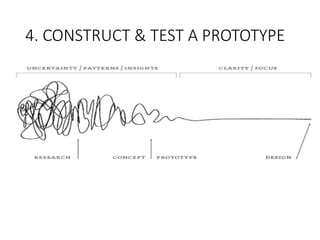
  • 155.
    MODES OF GRAPHICALCOMMUNICATION 1. ENGINEERING SKETCHES & DRAWINGS… • Marginalia include notes in text form, lists, dimensions, and calculations. • Drawings enable a parallel display of information as they can be surrounded with adjacent notes, smaller pictures, formulas, and other pointers • In some fields (e.g., architecture), sketching, geometry, perspective, and visualization are the very foundations of the field. • Graphic images are used to communicate with other designers, the client, and the manufacturing organization.
  • 156.
    MODES OF GRAPHICALCOMMUNICATION 1. ENGINEERING SKETCHES & DRAWINGS… • Serve as a launching pad for a brand-new design • Support the analysis of a design as it evolves • Simulate the behavior or performance of a design • Record the shape or geometry of a design • Communicate design ideas among designers • Ensure that a design is complete • Communicate the final design to the manufacturing specialists.
  • 157.
    MODES OF GRAPHICALCOMMUNICATION 1. ENGINEERING SKETCHES & DRAWINGS…
  • 158.
    MODES OF GRAPHICALCOMMUNICATION 2. SKETCHING • Powerful tool in design since it enables to convey design ideas to others quickly and concisely. • Types of sketches used: • Orthographic – Front, right and top views • Axonometric – a vertical line with 2 lines 300 to the horizontal. • Oblique – front view drawn first, depth lines then added • Perspective - front view drawn first, vanishing point is chosen and lines drawn to the object.
  • 159.
    MODES OF GRAPHICALCOMMUNICATION 3. FABRICATION SPECIFICATIONS • Design team must communicate with client(s) and also with the maker/ manufacturer of the designed artifact. • The only “instructions” that the fabricator sees are those representations or descriptions of the designed object that are included in the final design drawings • These representations must be complete, unambiguous, clear, and . • How to ensure that the design as built will be exactly the design that was designed?
  • 160.
    MODES OF GRAPHICALCOMMUNICATION 3. FABRICATION SPECIFICATIONS… • Design results need to be communicated to the manufacturer. • Should be careful about fabrication specifications • Created in drawings • Written in calculations • Ensure that drawings are appropriate to the design • Drawings are prepared in accordance to engineering practices and standards
  • 161.
    FORMS OF ENGINEERINGDRAWINGS • Design Drawing 1. Layout Drawing : • Working drawings that show the major parts or components of a device and their relationship. • Usually drawn to scale • Does not show tolerances • They are subject to change as the design process evolves
  • 162.
    FORMS OF ENGINEERINGDRAWINGS • Design Drawing.. 2. Detail Drawing : • Shows the individual parts/components of a device and their relationship. • Shows tolerances • Specifies materials and special processing requirements • Drawn in conformance with existing standards • Changed only when a formal change order is issued
  • 163.
    FORMS OF ENGINEERINGDRAWINGS • Design Drawing.. 3. Assembly Drawing : • Shows how the individual parts or components of a device fit together • Exploded view is used to show the ‘fit’ relationships • Components are identified by part numbers or using bill of materials.
  • 164.
    DETAIL DRAWINGS • Requirementsfor detail drawings • Must contain as much information as possible • Should be clear and uncluttered • Standard symbols and conventions used to clearly communicate design data • Geometric Dimensioning and Tolerancing (GD & T) • Design is made by designer and has to be fabricated by manufacturer • For exact communication of design, common standards are needed.
  • 165.
    DETAIL DRAWINGS • Essentialcomponents that every drawing should have: • standard drawing views; • standard symbols to indicate particular items; • clear lettering; • clear, steady lines; • appropriate notes, including specifications of materials; • a title on the drawing; • the designer’s initials and the date it was drawn; • dimensions and units; • permissible variations, or tolerances.
  • 167.
    REQUIREMENTS IN AFABRICATION SPECIFICATION • physical dimensions; • materials to be used; • unusual assembly conditions (e.g., bridge construction scaffolding); • operating conditions (in the anticipated use environment); • operating parameters (defining the artifact’s response and behavior); • maintenance and lifecycle requirements; • reliability requirements; • packaging requirements; • shipping requirements; • external markings, especially usage and warning labels; • unusual or special needs (e.g., must use synthetic motor oil).
  • 168.
    DIFFERENT WAYS OFWRITING FABRICATION SPECIFICATIONS • Prescriptive Fabrication specification: • Specify a particular part and its number in a vendor’s catalog • Procedural Fabrication Specification: • Specify a class of devices that do certain things • Performance Fabrication Specification: • Left to supplier or the fabricator to insert/use something that achieves a certain function to a specified level
  • 169.
  • 170.
    INTRODUCTION • REPORTING isan essential part of a design project • Project is not completed if we have not communicated our work and findings to our client • Communication of final design results in several ways: • Oral presentations • Final reports • Prototypes and models • The primary purpose of communication is to inform our client about the design • How and why this design was chosen over competing design alternatives. • Very important to communicate the results of the design process
  • 171.
    INTRODUCTION • Clients areprobably not interested in the history of the project or in the design team’s internal workings • Should ensure that final reports and presentations are not narratives or chronologies of our work. • Presentations should describe design outcomes, as well as the processes with which those outcomes were achieved.
  • 172.
    GENERAL GUIDELINES FORTECHNICAL COMMUNICATION • Basic elements of effective communication for writing reports, giving oral presentations • 7 principles of technical writing 1. Know your purpose. 2. Know your audience. 3. Choose and organize the content around your purpose and your audience. 4. Write precisely and clearly. 5. Design your pages well. 6. Think visually. 7. Write ethically!
  • 173.
    7 Principles ofTechnical Writing 1. Know your purpose. • Need to understand the goals of a report or presentation • Various cases for which design documentation is prepared: • Design documentation informs the client about features of a selected design. • Design team may be trying to persuade a client that a design is the best alternative. • A designer may wish to report how a design operates to users
  • 174.
    7 Principles ofTechnical Writing 2. Know your audience. • When documenting a design, it is essential that a design team structure its materials to its targeted audience. • What is the technical level of the target audience? • What is their interest in the design being presented? • Understand the target audience will help ensure that its members appreciate the documentation. • Multiple documents and briefings on the same project for different audiences may be prepared sometimes. • Confine concepts of limited interest to specific sections of their reports
  • 175.
    7 Principles ofTechnical Writing 3 Choose and organize the content around your purpose and your audience. • Select and organize the content so that it will reach its intended target. • Structure the presentation to best reach the audience • Many different ways to organize information • going from general concepts to specific details • going from specific details to general concepts • Describing devices or systems • The design team should translate content pattern into a written outline • Allows the team to develop a unified, coherent document or presentation • Avoids needless repetition
  • 176.
    7 Principles ofTechnical Writing 4 Write precisely and clearly. • Effective use of short paragraphs that have a single common thesis or topic • Short, direct sentences that contain a subject and a verb • Active voice and action verbs that allow a reader to understand directly what is being said or done • Opinions or viewpoints should be clearly identified • These elements of style should be learned so that they can be correctly applied
  • 177.
    7 Principles ofTechnical Writing 5. Design your pages well • Use of headings and subheadings, different fonts and underlining • A long section can be divided into several subsections • Selecting fonts to highlight key elements or to indicate different types of information • Tables should be treated as a single figure and should not be split over a page break. • Careful planning of presentation support materials such as slides can enhance and reinforce important concepts. • Use of fonts large enough for the entire audience to see. • Simple and direct slides encourage readers to listen to the speaker
  • 178.
    7 Principles ofTechnical Writing 6. Think Visually • Design projects invite visual thinking • Designs often start as sketches • analyses often begin with free-body or circuit diagrams • Plans for realizing a design involve graphics such as objectives trees and work breakdown structures • Audiences are helped by good use of visual representation of information • Range from the design tools, detailed drawings or assembly drawings, flow charts and cartoons • Visual aids are to be used in reports and presentations
  • 179.
    7 Principles ofTechnical Writing 7. Write Ethically • Designers spend much time and effort in the design choices they make. • Temptation to present designs or technical results in a favorable manner • Suppress unfavorable data or issues • Ethical designers resist this temptation and present facts fully and accurately • All results or test outcomes, even those that are not favorable, are presented and discussed. • Ethical presentations also describe honestly and directly any limitations of a design • Important to give full credit to others, such as authors or previous researchers, where it is due.
  • 180.
    ORAL PRESENTATIONS • Anumber of formal and informal presentations to be made to users, clients and technical reviewers • Presentations are made • Before the start of design work • During the project • After completion of design alternative • After completion of project
  • 181.
    ORAL PRESENTATIONS • Beforethe start of design work • Done before giving the contract of design work • Tells the teams ability to understand and handle the work • During the project • Team presents their understanding of the project • Client’s needs, functions • The alternatives under consideration • The team’s plan for selecting an alternative • The progress of work towards completing the project
  • 182.
    ORAL PRESENTATIONS • Aftercompletion of design alternative • Design review before a technical audience • Done to assess the design • Identify possible problems, suggest alternate solutions • End of the project • Report on overall project to the client Key elements common to all presentations are: • To identify the audience • Outline the presentation • Develop appropriate supporting materials • Practice the presentation.
  • 183.
    ORAL PRESENTATIONS To identifythe audience • Design briefings and presentations are given to many types of audiences • Consider factors such as varying levels of interest, understanding, technical skill and available time. • Most attendees are only interested in particular dimensions of the project • The area of interest can be identified by asking it to the meeting organizer • After identifying, a team can tailor its presentation to that audience. • Presentation must be properly organized and structured • Prepare a rough outline, formulate a detailed outline • Prepare the proper supporting materials, such as visual aids or physical models.
  • 184.
    ORAL PRESENTATIONS Outline thepresentation • Presentation should have a clear structure • Presentation structure and organization should be logical and understandable • Elements of a sample presentation outline: • Title slide: identifies clients, project, design team and organization • Roadmap for presentation: direction in which presentation will proceed • Problem statement: description of the design requirement in engg terms • Background material on the problem: Prior work, research, references • The key objectives of the client and users: • Key constraints • Functions that the design must perform: • Design alternatives: Considered during later stages of evaluation
  • 185.
    ORAL PRESENTATIONS • Elementsof a sample presentation outline: • Highlights of the evaluation procedure and outcomes: • The selected design: why the design was chosen • Features of the design: • Proof-of-concept testing: • A demonstration of the prototype: Videos, photos • Conclusion: future work, needed improvements in design
  • 186.
    ORAL PRESENTATIONS Develop appropriatesupporting materials… • Should know the setting in which the presentation will be made. • The design team should identify the devices available and general setting of the room. • Size and capacity, lighting, seating • Overhead projectors, computer connections, projectors and whiteboards • Tips and pointers for visual aids: • Limit the number of slides: 1 or 2 slides per minute • Self introduction and introducing teammates on the title slide • Avoid cluttering • Points to be clear, direct and simple • Use colors skillfully • Use animations appropriately • Consider carefully the size and distance of the audience
  • 187.
    ORAL PRESENTATIONS Practice thepresentations • Design teams can gain confidence by practicing the presentations • Practicing the presentation alone, in front of others • Use words and phrases that are natural to the speaker. • Say key points in several ways to identify and adopt new speech patterns. • Practicing to be done under conditions close to the actual environment • Decide in advance on handling questions in the end • Useful for a speaker to repeat the question, particularly when there is a large audience present or if the question is unclear. • Prepare for questions from audience by: • Generating a possible list of questions • Preparing Supporting materials like back up slides • Prepare to say ‘I don’t know’ or ‘We didn’t consider that’
  • 188.
    DESIGN REVIEW • Uniquetype of presentation • Long meeting at which the team presents its design choices in detail to an audience of technical professionals • Review is intended to be a full and frank exploration of the design • it should expose the implications of solving the design problem at hand • Consist of a briefing by the team on the nature of the problem being addressed • Extensive presentation of the proposed solution follows • Best opportunity for the team to get the complete attention of professionals about their design project • Members may be asked to defend their design and answer pointed questions
  • 189.
    PROJECT REPORT • Purposeis to communicate with the client, his acceptance of design choices made by the team • Clear presentation of the design problem • Analyses of the needs to be met, • The alternatives considered, • The bases on which decisions were made • The decisions that were taken. • Highly detailed or technical materials appear in appendices at the end of the report • The process of writing a final report is best managed and controlled with a structured approach. • The design process and report writing are very similar, especially in their early, conceptual stages
  • 190.
    PROJECT REPORT • Structuredapproach follows these steps: • Determine the purpose and audience of the technical report; • Construct a rough outline of the overall structure of the report; • Review that outline within the team and with the team’s managers • Construct a topic sentence outline (TSO) and review it within the team; • Distribute individual writing assignments and assemble, write, and edit an initial draft; • Solicit reviews of the initial draft from managers and advisors; • Revise and rewrite the initial draft to respond to the reviews; and • Prepare the final version of the report and present it to the client.
  • 191.
    PROJECT REPORT • Structureof the final report • Abstract • Executive summary • Introduction and overview • Problem statement and problem definition • Design alternatives • Evaluation of design alternatives • Results of design alternative selection • Supporting materials • Drawings • Details • Calculations
  • 192.
    PROTOTYPING AND PROOFINGTHE DESIGN • “Process of quickly putting together a working model in order to test various aspects of a design, illustrate ideas or features and gather early user feedback” • Derived from Latin word ‘Proto’ meaning Original and ‘types’ means form or model • Prototype is a crude version of desired result • Prototype assures whether the product functions as desired • It is a physical model of a product which is tested to validate the results of design process
  • 193.
    Prototyping • Testing ofdesign solution under real conditions • Testing is conducted under all expected and unusual operating conditions • If design requirements are not met, then an iteration has to be done • Re-design, re-build and re-test are done in iteration • Once a successful prototype is developed, it is used as the basis for full scale production “Picture is worth a 1000 words Prototype is worth a 1000 meetings”
  • 194.
    PROTOTYPES AND MODELS •Prototype: • Original models on which something is patterned • Working models of designed artifacts • Tested in the same operating environments in which they’re expected to function as final products • Model: • A miniature representation of an object • Represents devices or processes • Usually smaller and made of different materials than original artifacts they represent • Typically tested in a laboratory or in some other controlled environment
  • 195.
    Model Vs Prototype Model •Used to demonstrate how a product will look or function • Can be a working or non working Prototype • Used to test different working aspects of a product before the design is finalized • Much closer to the form, fit and function of the final design
  • 196.
    Prototype Vs FinalProduct Final Product • Built with materials as per the specification for getting required properties • Built using processes as planned during process design • Built with maximum engineering detail as per the specifications Prototype • Built with materials which simulate the properties of final product material • Built using variable processes to avoid expensive tooling • Built with limited engineering detail than final product
  • 197.
    Need for prototyping •Helps to find specific unknowns still present in the intended design • Allows evaluation and feedback • Allows stakeholders to see, hold, interact with a prototype more easily than a document or drawing • Allows team members to communicate easily • Allows faster improvements • Helps to reduce costs • Helps to find at an early stage whether the product or service is actually what the users really need
  • 198.
    Types of Prototypes 1.Product concept prototype 2. Proof of concept (Principle) prototype 3. Alpha prototype (First version) 4. Beta or Proof of process prototype 5. Pre-production prototype
  • 199.
    Types of prototypes 1.Product concept prototype • Functionality, design, structure and operational characteristics of the product is illustrated • Has the required look and feel of the final product • Color does not have any importance • Size of full-scale or reduced scale • Made by technical and industrial engineers 2. Proof of concept (Principle) prototype • Shows the principle of working of the final product • Less concern for appearance, materials used or manufacturing methods • Shows technical aspects of product design
  • 200.
    Types of prototypes 3.Alpha – prototype (First version) • Prototype made as per final design drawings • Same materials used as the final product • Manufacturing processes different from actual product • Made in model shop with computer controlled machines 4. Beta or Proof of process prototype • Materials and processes used are same as for final product • Tests on this prototype are used for incorporating further changes in the product if any
  • 201.
    Types of prototypes 5.Pre-production prototype • Represents the final product in every aspect of processes, appearance, packaging etc • Expensive to produce than actual unit cost of the product • Enables producers to go over every aspect of the product in fine detail • Made by manufacturing department
  • 202.
    WHEN TO BUILDA PROTOTYPE • The size and type of the design space • The costs of building a prototype • The ease of building that prototype • The role that a full-size prototype might play in • ensuring the widespread acceptance of a new design • The number of copies of the final artifact that are expected to be made or built. • The project schedule and budget should reflect plans for building them • Sometimes prototypes of large parts, complex systems are built to be used as models to check how well those parts behave or function
  • 203.
    HOW TO MAKEMODELS/ PROTOTYPES • Many options for constructing prototypes and models • Which option to use depends on the cost, timing, and complexity of the design • Mockups: • Construct a mock up of a 3D part from 2D cutouts • 2D parts can be made using a vinyl cutter or a laser cutter • Parts are then assembled into 3D mock-ups of a design • Materials used for these mock-ups might be foam, thin plastic, or wood • Machining: • Machining parts or all of the prototypes in a machine shop • Separate machine shops for woodworking and metalworking • Woodworking machines - drill presses, band saws , lathes • Metalworking machines – lathes, mills, drills • CNC machines can be used for complex parts
  • 204.
    HOW TO MAKEMODELS/ PROTOTYPES • Rapid Prototyping • Relatively fast and cheap ways to fabricate prototypes • Use 3D CAD models as inputs, and convert these 3D files into thin 2D layers to build the 3D part. • Include stereo-lithography, selective laser sintering, fused deposition modeling • Using a laser to harden either a resin bath or a polymer powder in a particular configuration to build each layer.
  • 206.
    PROBLEM BASED LEARNINGIN DESIGN • PROBLEM BASED LEARNING
  • 207.
    PROJECT BASED LEARNING& PROBLEM BASED LEARNING IN DESIGN • Process of acquiring and understanding of knowledge, skills in the context of an unfamiliar situation and applying that learning to the situation. • Student centred leaning strategy. • Students collaboratively solve the problems and this reflects on their experience. • The starting point is a problem, a query, or a puzzle that the learner wishes to solve.
  • 208.
    GOALS OF PROBLEMBASED LEARNING • Construct an extensive & flexible knowledge base. • Foster increased retention of knowledge. • Develop effective problem – solving skills. • Develop self-direction, lifelong learning skills. • Become effective collaborators. • Strengthen student’s intrinsic motivation to learn. • Recognize, develop & maintain the personal characteristics and attitude.
  • 210.
    ADVANTAGES OF PROBLEMBASED LEARNING • PBL Method is active and cooperative learning, the ability to think critically and clinical reasoning • It stimulates the students to use skills of inquiry and critical thinking, peer teaching and peer evaluation. • It increases ability to apply knowledge in clinical situations. • It increases student responsibility for self directed peer learning
  • 211.
    ADVANTAGES OF PROBLEMBASED LEARNING • It helps in developing flexible knowledge that can be applied to different contexts. • This learning method helps in developing lifelong learning skills. • It encourages students to work in teams or groups, there by facilitating group dynamics. • Increased motivation for learning is the added advantage. • Promote collaborative learning.
  • 212.
    DISADVANTAGES OF PROBLEMBASED LEARNING • Very difficult and expensive to use as a teaching technique, when the class size is large. • Students require orientation to perform the role of a learner in PBL setting. • Evaluation is quite difficult and sometimes may be subjective. • Resource expensive. • Measurement of learning outcomes is difficult.
  • 213.
    PROJECT BASED LEARNINGIN DESIGN • Teaching method in which students gain knowledge and skills by • working for an extended period of time • investigate and respond to an engaging and complex question, problem, or challenge • It is a style of active learning and inquiry-based learning. • Students organize their own work and manage their own time in a project-based class • Gives students the opportunity to explore problems and challenges that have real-world applications
  • 214.
    CHARACTERISICS OF PROJECTBASED LEARNING • It is organized around an open-ended driving question or challenge. • PBL creates a need to know essential content and skills. • Requires critical thinking, problem solving, collaboration, and various forms of communication known as "21st Century Skills.“ • Incorporates feedback and revision. • Results in a publicly presented product or performance.
  • 215.
    ADVANTAGES OF PROJECTBASED LEARNING • Students need to learn to work in a community, thereby taking on social responsibilities. • When students take responsibility, or ownership, for their learning, their self-esteem increases. • It also helps to create better work habits and attitudes toward learning. • Students also become more independent because they are receiving less instructions from the teacher. • Students learn skills that are essential in higher education.
  • 216.
    ADVANTAGES OF PROJECTBASED LEARNING • Students have to find answers to questions and combine them using critically thinking skills to come up with answers. • Project based learning allows students to expand their minds and think beyond what they normally would.
  • 217.
    DISADVANTAGES OF PROJECTBASED LEARNING • Unfocused and underdeveloped lessons can result in the wasting of precious class time. • Lecture-style instruction can convey the same knowledge in less class time. • Instructors can be misled into thinking that as long as a student is engaged and doing, they are learning. • If the project does not remain on task and content driven the student will not be successful in learning the material.
  • 218.
    DISADVANTAGES OF PROJECTBASED LEARNING • Complex projects need to be on track while attending to students' individual learning needs. • When students work in groups some will sit back and let the others do all the work. • Not easy to measure success using standard measurement tools. • Tendency for the creation of the final product of the project to become the driving force in classroom activities.