Quality Assurance /
Software Testing Training
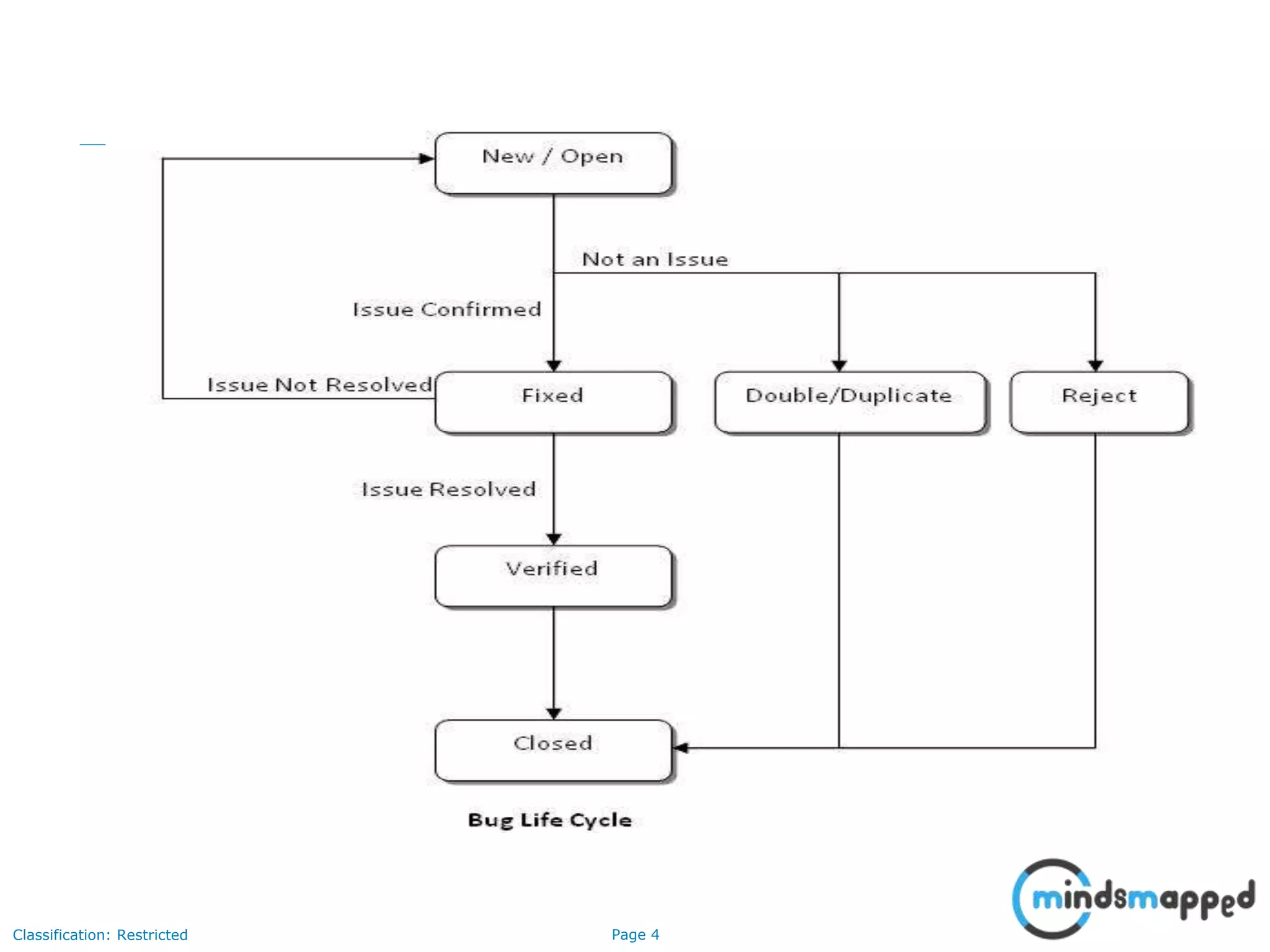
Defect Life Cycle
Page 2Classification: Restricted
Agenda
• Defect Life Cycle
• Defect States
• Defect Content
• Severity Vs Priority
• Severity Levels
Page 3Classification: Restricted
Defect Life Cycle
What is Defect?
A defect is a variance from a desired product attribute.
Two categories of defects are
 Variance from product specifications
 Variance from Customer/User expectations
Variance from product specification
Product built varies from the product specified.
Variance from Customer/User specification
A specification by the user not in the built product, but something
not specified has been included.
Page 4Classification: Restricted
Page 5Classification: Restricted
Defect States:
States:
• Open
• Fixed
• Verified
• Closed
• Double/Duplicate
• Reject (Works as per Requirements, wont fix, works for me)
Page 6Classification: Restricted
Defect Content
• Defect heading: IE Error. “Error Loading https://localhost:10000/index.cgi Connection refused”
• Description:
• Hardware Used:
• Software version:
• Environmental parameters:
• Failed Test case ID:
• Failed Requirement Id:
• Occurrence: Repeatable/Random
• Severity:
• Keyword/Responsible:
• Steps to Reproduce the Problem:
• Expected Result: IE login page should be displayed.
• Actual Result: Error is displayed. “Error Loading https://localhost:10000/index.cgi Connection refused”
• Screenshots if any:
• Log files if any:
• Time stamp for crash defects:
• Symptoms
• Phase originated in
• Phase found in
Page 7Classification: Restricted
Severity Vs Priority
Severity
Factor that shows how bad the defect is and the impact it has on the
product
Priority
Based upon input from users regarding which defects are most
important to them, and be fixed first.
Page 8Classification: Restricted
Severity levels
• Critical
• Major / High
• Average / Medium
• Minor / low
• Cosmetic defects
Page 9Classification: Restricted
Severity Level – Critical
• An installation process which does not load a component.
• A missing menu option.
• Security permission required to access a function under test.
• Functionality does not permit for further testing.
• Runtime Errors like JavaScript errors etc.
• Functionality Missed out / Incorrect Implementation (Major Deviation from
Requirements).
• Performance Issues (If specified by Client).
• Browser incompatibility and Operating systems incompatibility issues
depending on the impact of error.
• Dead Links.
Page 10Classification: Restricted
Severity Level – Major / High
• Reboot the system.
• The wrong field being updated.
• An updated operation that fails to complete.
• Performance Issues (If not specified by Client).
• Mandatory Validations for Mandatory Fields.
• Functionality incorrectly implemented (Minor Deviation from
Requirements).
• Images, Graphics missing which hinders functionality.
• Front End / Home Page Alignment issues.
• Severity Level – Average / Medium
• Incorrect/missing hot key operation.
Page 11Classification: Restricted
Severity Level – Minor / Low
• Misspelled or ungrammatical text
• Inappropriate or incorrect formatting (such as text font, size, alignment,
color, etc.)
• Screen Layout Issues
• Spelling Mistakes / Grammatical Mistakes
• Documentation Errors
• Page Titles Missing
• Alt Text for Images
• Background Color for the Pages other than Home page
• Default Value missing for the fields required
• Cursor Set Focus and Tab Flow on the Page
• Images, Graphics missing, which does not, hinders functionality
Page 12Classification: Restricted
Thank You

Defect Life Cycle

  • 1.
    Quality Assurance / SoftwareTesting Training Defect Life Cycle
  • 2.
    Page 2Classification: Restricted Agenda •Defect Life Cycle • Defect States • Defect Content • Severity Vs Priority • Severity Levels
  • 3.
    Page 3Classification: Restricted DefectLife Cycle What is Defect? A defect is a variance from a desired product attribute. Two categories of defects are  Variance from product specifications  Variance from Customer/User expectations Variance from product specification Product built varies from the product specified. Variance from Customer/User specification A specification by the user not in the built product, but something not specified has been included.
  • 4.
  • 5.
    Page 5Classification: Restricted DefectStates: States: • Open • Fixed • Verified • Closed • Double/Duplicate • Reject (Works as per Requirements, wont fix, works for me)
  • 6.
    Page 6Classification: Restricted DefectContent • Defect heading: IE Error. “Error Loading https://localhost:10000/index.cgi Connection refused” • Description: • Hardware Used: • Software version: • Environmental parameters: • Failed Test case ID: • Failed Requirement Id: • Occurrence: Repeatable/Random • Severity: • Keyword/Responsible: • Steps to Reproduce the Problem: • Expected Result: IE login page should be displayed. • Actual Result: Error is displayed. “Error Loading https://localhost:10000/index.cgi Connection refused” • Screenshots if any: • Log files if any: • Time stamp for crash defects: • Symptoms • Phase originated in • Phase found in
  • 7.
    Page 7Classification: Restricted SeverityVs Priority Severity Factor that shows how bad the defect is and the impact it has on the product Priority Based upon input from users regarding which defects are most important to them, and be fixed first.
  • 8.
    Page 8Classification: Restricted Severitylevels • Critical • Major / High • Average / Medium • Minor / low • Cosmetic defects
  • 9.
    Page 9Classification: Restricted SeverityLevel – Critical • An installation process which does not load a component. • A missing menu option. • Security permission required to access a function under test. • Functionality does not permit for further testing. • Runtime Errors like JavaScript errors etc. • Functionality Missed out / Incorrect Implementation (Major Deviation from Requirements). • Performance Issues (If specified by Client). • Browser incompatibility and Operating systems incompatibility issues depending on the impact of error. • Dead Links.
  • 10.
    Page 10Classification: Restricted SeverityLevel – Major / High • Reboot the system. • The wrong field being updated. • An updated operation that fails to complete. • Performance Issues (If not specified by Client). • Mandatory Validations for Mandatory Fields. • Functionality incorrectly implemented (Minor Deviation from Requirements). • Images, Graphics missing which hinders functionality. • Front End / Home Page Alignment issues. • Severity Level – Average / Medium • Incorrect/missing hot key operation.
  • 11.
    Page 11Classification: Restricted SeverityLevel – Minor / Low • Misspelled or ungrammatical text • Inappropriate or incorrect formatting (such as text font, size, alignment, color, etc.) • Screen Layout Issues • Spelling Mistakes / Grammatical Mistakes • Documentation Errors • Page Titles Missing • Alt Text for Images • Background Color for the Pages other than Home page • Default Value missing for the fields required • Cursor Set Focus and Tab Flow on the Page • Images, Graphics missing, which does not, hinders functionality
  • 12.