LOOPS IN C LANGUAGE
LOOPS
 WHY DO WE NEED LOOPS ???
 There may be a situation, when you need to execute a block
of code several number of times.
 In general statements are executed sequentially: The first
statement in a function is executed first, followed by the
second, and so on.
 A loop statement allows us to execute a statement or group
of statements multiple times.
LOOPS :
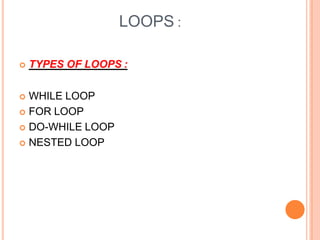
 TYPES OF LOOPS :
 WHILE LOOP
 FOR LOOP
 DO-WHILE LOOP
 NESTED LOOP
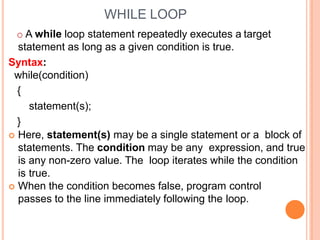
WHILE LOOP
o A while loop statement repeatedly executes a target
statement as long as a given condition is true.
Syntax:
while(condition)
{
statement(s);
}
 Here, statement(s) may be a single statement or a block of
statements. The condition may be any expression, and true
is any non-zero value. The loop iterates while the condition
is true.
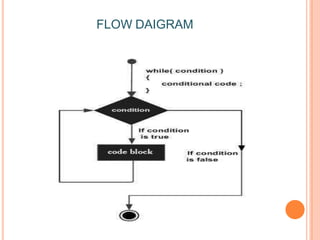
 When the condition becomes false, program control
passes to the line immediately following the loop.
FLOW DAIGRAM
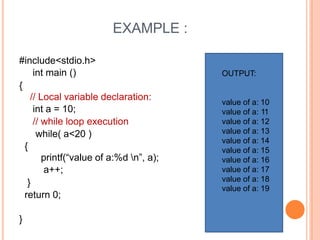
EXAMPLE :
#include<stdio.h>
int main ()
{
// Local variable declaration:
int a = 10;
// while loop execution
while( a<20 )
{
printf(“value of a:%d n”, a);
a++;
}
return 0;
}
OUTPUT:
value of a: 10
value of a: 11
value of a: 12
value of a: 13
value of a: 14
value of a: 15
value of a: 16
value of a: 17
value of a: 18
value of a: 19
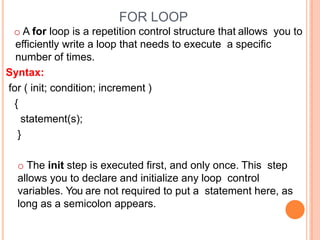
FOR LOOP
o A for loop is a repetition control structure that allows you to
efficiently write a loop that needs to execute a specific
number of times.
Syntax:
for ( init; condition; increment )
{
statement(s);
}
o The init step is executed first, and only once. This step
allows you to declare and initialize any loop control
variables. You are not required to put a statement here, as
long as a semicolon appears.
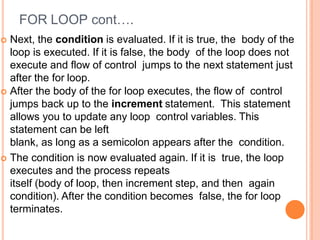
FOR LOOP cont….
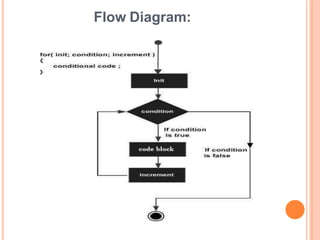
 Next, the condition is evaluated. If it is true, the body of the
loop is executed. If it is false, the body of the loop does not
execute and flow of control jumps to the next statement just
after the for loop.
 After the body of the for loop executes, the flow of control
jumps back up to the increment statement. This statement
allows you to update any loop control variables. This
statement can be left
blank, as long as a semicolon appears after the condition.
 The condition is now evaluated again. If it is true, the loop
executes and the process repeats
itself (body of loop, then increment step, and then again
condition). After the condition becomes false, the for loop
terminates.
Flow Diagram:
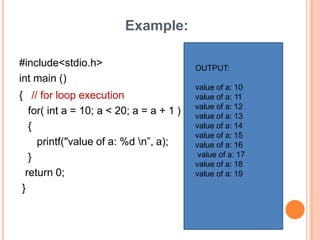
Example:
#include<stdio.h>
int main ()
{ // for loop execution
for( int a = 10; a < 20; a = a + 1 )
{
printf("value of a: %d n”, a);
}
return 0;
}
OUTPUT:
value of a: 10
value of a: 11
value of a: 12
value of a: 13
value of a: 14
value of a: 15
value of a: 16
value of a: 17
value of a: 18
value of a: 19
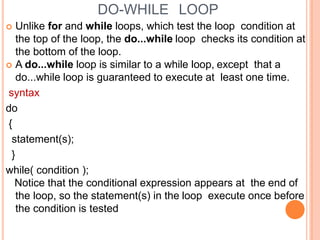
DO-WHILE LOOP
 Unlike for and while loops, which test the loop condition at
the top of the loop, the do...while loop checks its condition at
the bottom of the loop.
 A do...while loop is similar to a while loop, except that a
do...while loop is guaranteed to execute at least one time.
syntax
do
{
statement(s);
}
while( condition );
Notice that the conditional expression appears at the end of
the loop, so the statement(s) in the loop execute once before
the condition is tested
Flow Diagram
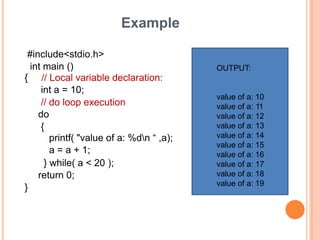
Example
#include<stdio.h>
int main ()
{ // Local variable declaration:
int a = 10;
// do loop execution
do
{
printf( "value of a: %dn “ ,a);
a = a + 1;
} while( a < 20 );
return 0;
}
OUTPUT:
value of a: 10
value of a: 11
value of a: 12
value of a: 13
value of a: 14
value of a: 15
value of a: 16
value of a: 17
value of a: 18
value of a: 19
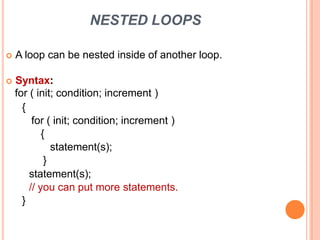
NESTED LOOPS
 A loop can be nested inside of another loop.
 Syntax:
for ( init; condition; increment )
{
for ( init; condition; increment )
{
statement(s);
}
statement(s);
// you can put more statements.
}
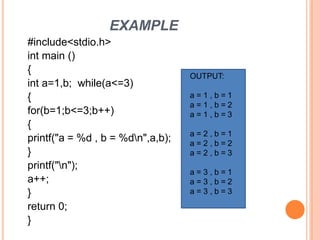
EXAMPLE
#include<stdio.h>
int main ()
{
int a=1,b; while(a<=3)
{
for(b=1;b<=3;b++)
{
printf("a = %d , b = %dn",a,b);
}
printf("n");
a++;
}
return 0;
}
OUTPUT:
a = 1 , b = 1
a = 1 , b = 2
a = 1 , b = 3
a = 2 , b = 1
a = 2 , b = 2
a = 2 , b = 3
a = 3 , b = 1
a = 3 , b = 2
a = 3 , b = 3

Loops in c

  • 1.
    LOOPS IN CLANGUAGE
  • 2.
    LOOPS  WHY DOWE NEED LOOPS ???  There may be a situation, when you need to execute a block of code several number of times.  In general statements are executed sequentially: The first statement in a function is executed first, followed by the second, and so on.  A loop statement allows us to execute a statement or group of statements multiple times.
  • 3.
    LOOPS :  TYPESOF LOOPS :  WHILE LOOP  FOR LOOP  DO-WHILE LOOP  NESTED LOOP
  • 4.
    WHILE LOOP o Awhile loop statement repeatedly executes a target statement as long as a given condition is true. Syntax: while(condition) { statement(s); }  Here, statement(s) may be a single statement or a block of statements. The condition may be any expression, and true is any non-zero value. The loop iterates while the condition is true.  When the condition becomes false, program control passes to the line immediately following the loop.
  • 5.
  • 6.
    EXAMPLE : #include<stdio.h> int main() { // Local variable declaration: int a = 10; // while loop execution while( a<20 ) { printf(“value of a:%d n”, a); a++; } return 0; } OUTPUT: value of a: 10 value of a: 11 value of a: 12 value of a: 13 value of a: 14 value of a: 15 value of a: 16 value of a: 17 value of a: 18 value of a: 19
  • 7.
    FOR LOOP o Afor loop is a repetition control structure that allows you to efficiently write a loop that needs to execute a specific number of times. Syntax: for ( init; condition; increment ) { statement(s); } o The init step is executed first, and only once. This step allows you to declare and initialize any loop control variables. You are not required to put a statement here, as long as a semicolon appears.
  • 8.
    FOR LOOP cont…. Next, the condition is evaluated. If it is true, the body of the loop is executed. If it is false, the body of the loop does not execute and flow of control jumps to the next statement just after the for loop.  After the body of the for loop executes, the flow of control jumps back up to the increment statement. This statement allows you to update any loop control variables. This statement can be left blank, as long as a semicolon appears after the condition.  The condition is now evaluated again. If it is true, the loop executes and the process repeats itself (body of loop, then increment step, and then again condition). After the condition becomes false, the for loop terminates.
  • 9.
  • 10.
    Example: #include<stdio.h> int main () {// for loop execution for( int a = 10; a < 20; a = a + 1 ) { printf("value of a: %d n”, a); } return 0; } OUTPUT: value of a: 10 value of a: 11 value of a: 12 value of a: 13 value of a: 14 value of a: 15 value of a: 16 value of a: 17 value of a: 18 value of a: 19
  • 11.
    DO-WHILE LOOP  Unlikefor and while loops, which test the loop condition at the top of the loop, the do...while loop checks its condition at the bottom of the loop.  A do...while loop is similar to a while loop, except that a do...while loop is guaranteed to execute at least one time. syntax do { statement(s); } while( condition ); Notice that the conditional expression appears at the end of the loop, so the statement(s) in the loop execute once before the condition is tested
  • 12.
  • 13.
    Example #include<stdio.h> int main () {// Local variable declaration: int a = 10; // do loop execution do { printf( "value of a: %dn “ ,a); a = a + 1; } while( a < 20 ); return 0; } OUTPUT: value of a: 10 value of a: 11 value of a: 12 value of a: 13 value of a: 14 value of a: 15 value of a: 16 value of a: 17 value of a: 18 value of a: 19
  • 14.
    NESTED LOOPS  Aloop can be nested inside of another loop.  Syntax: for ( init; condition; increment ) { for ( init; condition; increment ) { statement(s); } statement(s); // you can put more statements. }
  • 15.
    EXAMPLE #include<stdio.h> int main () { inta=1,b; while(a<=3) { for(b=1;b<=3;b++) { printf("a = %d , b = %dn",a,b); } printf("n"); a++; } return 0; } OUTPUT: a = 1 , b = 1 a = 1 , b = 2 a = 1 , b = 3 a = 2 , b = 1 a = 2 , b = 2 a = 2 , b = 3 a = 3 , b = 1 a = 3 , b = 2 a = 3 , b = 3