© 2011 IBM Corporation 
Chris Bailey – Java Support Architect 
Debugging from Dumps 
Debugging Applications and Products from Dumps
© 2011 IBM Corporation 
Debugging Strategies 
■ Two common strategies for debugging: 
– 
■ Debugging from Trace: Log or print relevant data at runtime 
– Typical approach used on distributed platforms 
– Pros: History is available, showing how the failure point was reached 
Collected data usually has context via the trace point 
– Cons: only specified data is collected, often resulting in multiple iterations 
ongoing performance overhead to running application 
■ Debugging from “Dumps”: Collect all available data on failure 
– Used widely on on System Z 
– Pros: All available data is collected 
No ongoing performance overhead to application 
– Cons: Very limited history of how the failure point was reached: only current thread stacks 
Limited context around data: only Object or structure types 
■ Using a combination of the two provides powerful debugging capabilities 
– Note: in-memory trace buffers are in the dumps, so can aid with trace data collection!
© 2011 IBM Corporation 
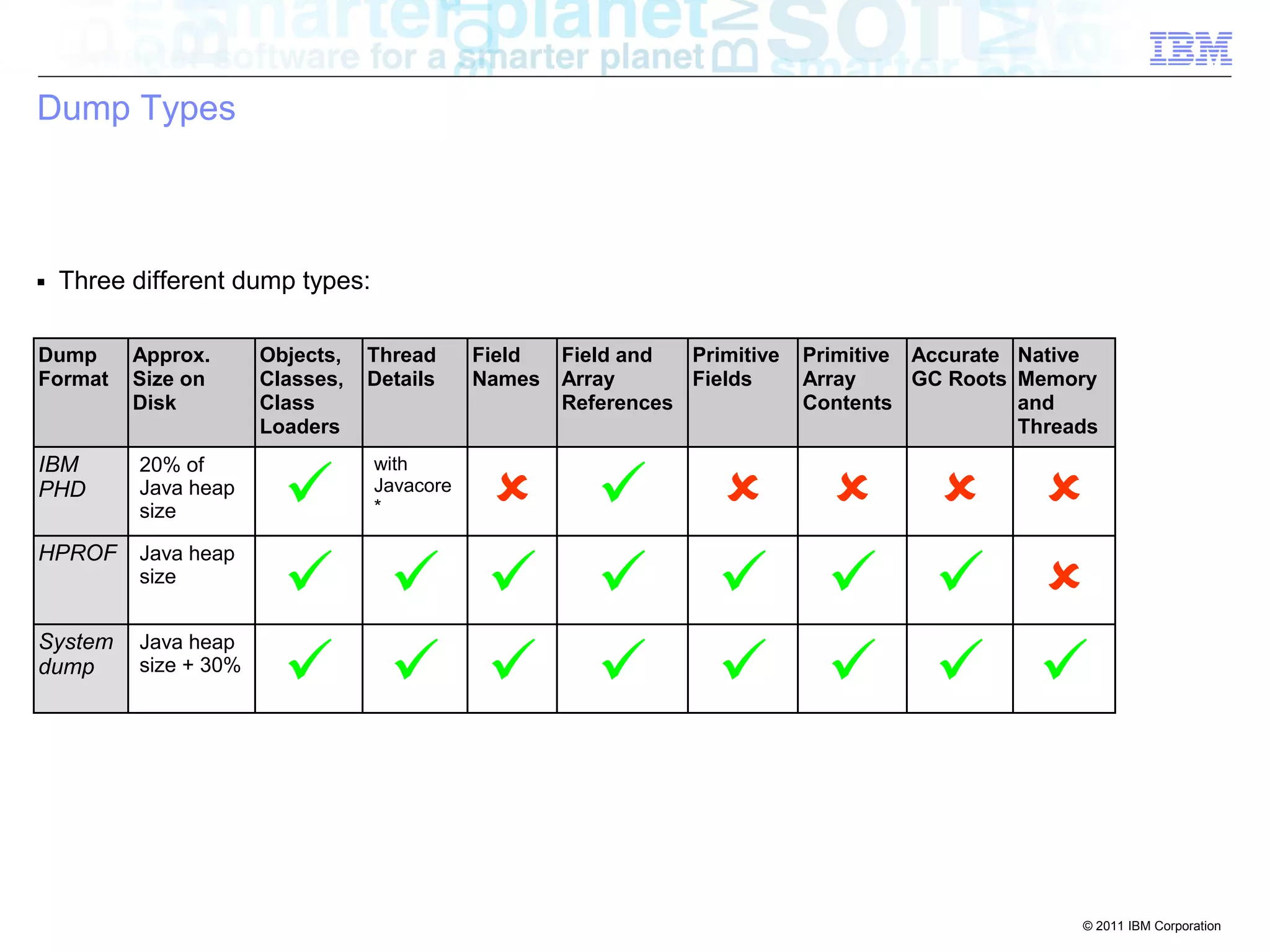
Dump Types 
■ Three different dump types: 
Dump 
Format 
Approx. 
Size on 
Disk 
Objects, 
Classes, 
Class 
Loaders 
Thread 
Details 
Field 
Names 
Field and 
Array 
References 
Primitive 
Fields 
Primitive 
Array 
Contents 
Accurate 
GC Roots 
Native 
Memory 
and 
Threads 
IBM 
PHD 
20% of 
Java heap 
size  with 
Javacore 
*       
HPROF Java heap 
size         
System 
dump 
Java heap 
size + 30%        
© 2011 IBM Corporation 
Dump Generation 
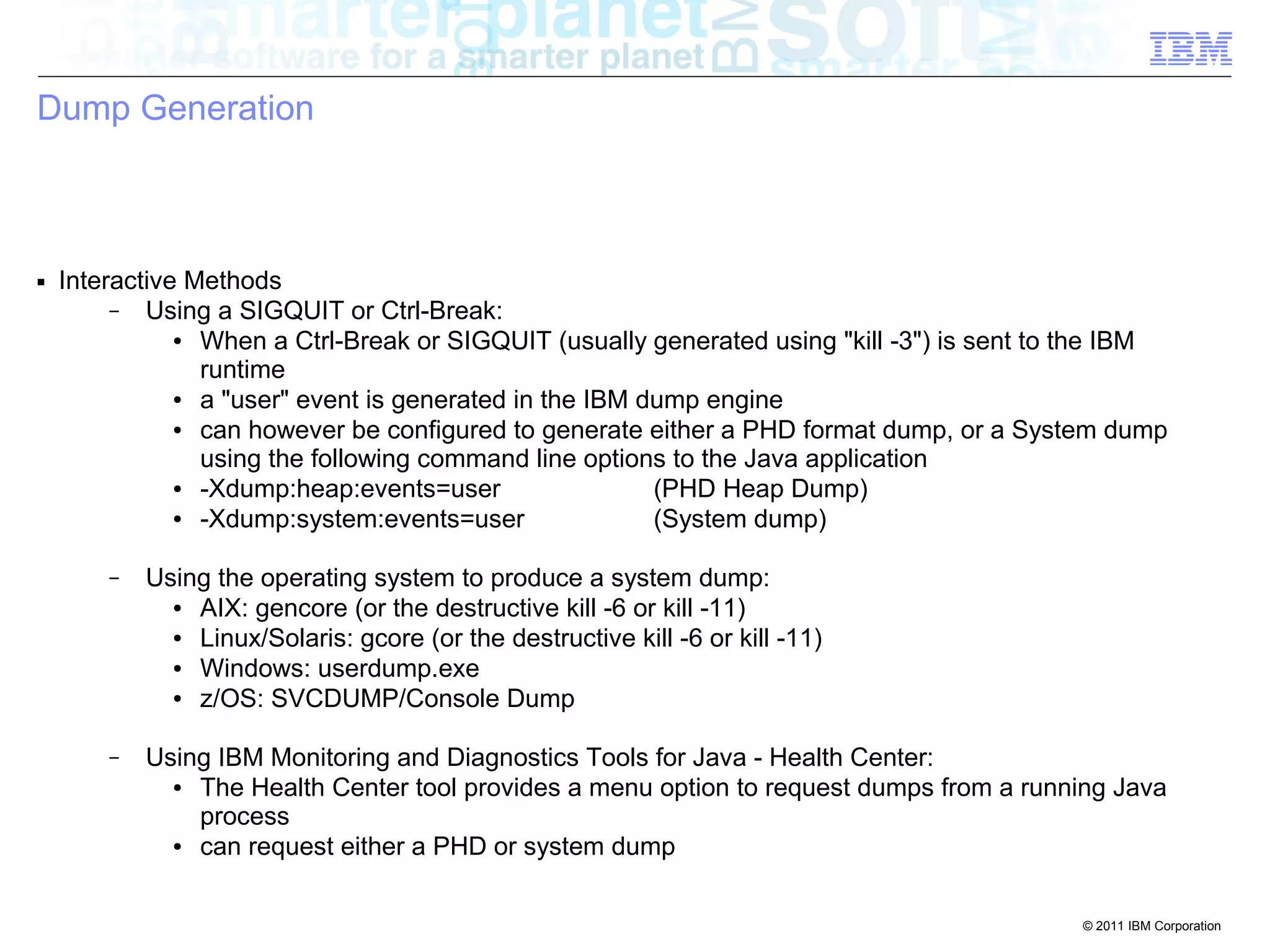
■ Interactive Methods 
– Using a SIGQUIT or Ctrl-Break: 
● When a Ctrl-Break or SIGQUIT (usually generated using "kill -3") is sent to the IBM 
runtime 
● a "user" event is generated in the IBM dump engine 
● can however be configured to generate either a PHD format dump, or a System dump 
using the following command line options to the Java application 
● -Xdump:heap:events=user (PHD Heap Dump) 
● -Xdump:system:events=user (System dump) 
– Using the operating system to produce a system dump: 
● AIX: gencore (or the destructive kill -6 or kill -11) 
● Linux/Solaris: gcore (or the destructive kill -6 or kill -11) 
● Windows: userdump.exe 
● z/OS: SVCDUMP/Console Dump 
– Using IBM Monitoring and Diagnostics Tools for Java - Health Center: 
● The Health Center tool provides a menu option to request dumps from a running Java 
process 
● can request either a PHD or system dump
© 2011 IBM Corporation 
Dump Generation 
■ Interactive Methods 
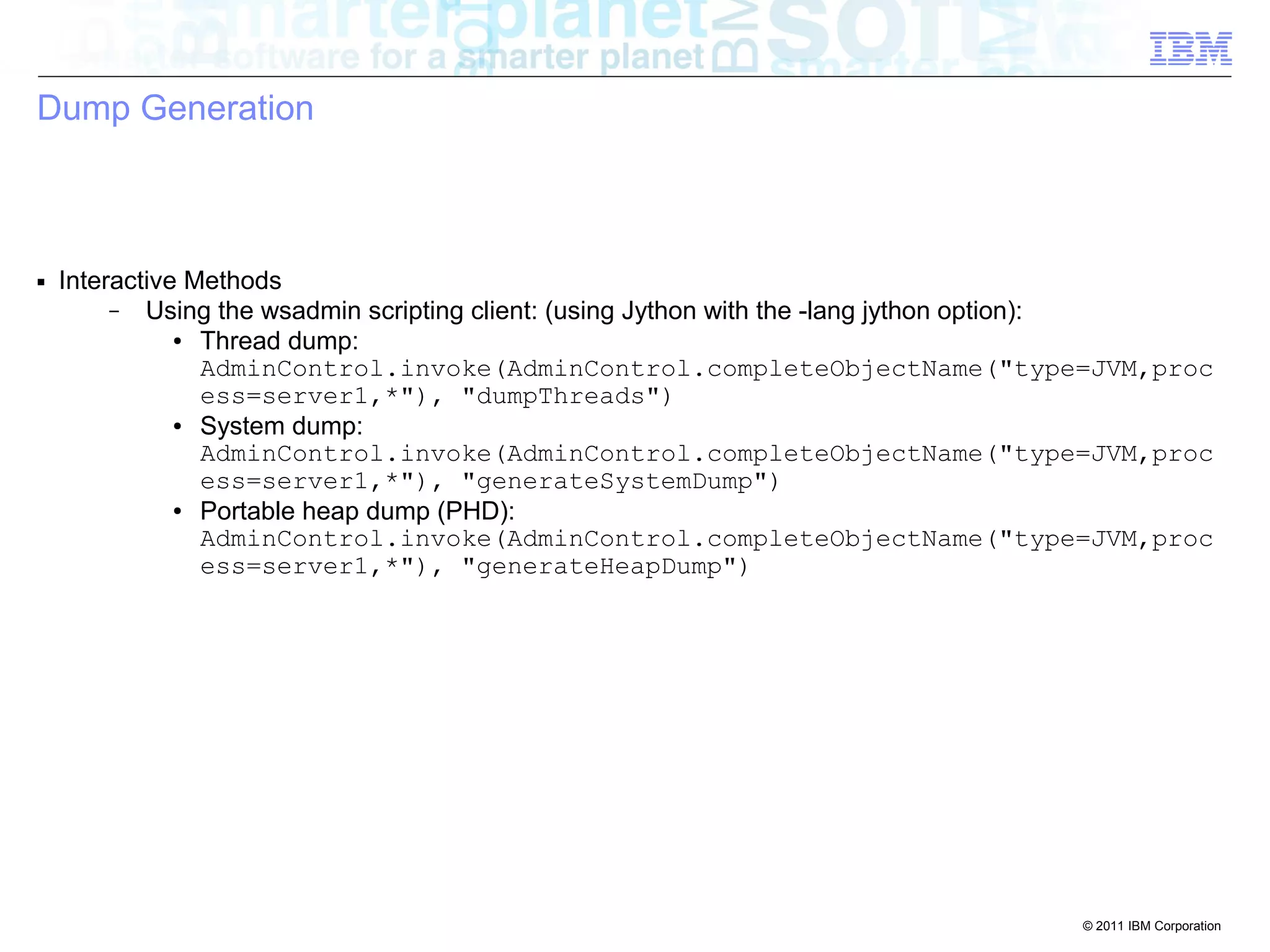
– Using the wsadmin scripting client: (using Jython with the -lang jython option): 
● Thread dump: 
AdminControl.invoke(AdminControl.completeObjectName("type=JVM,proc 
ess=server1,*"), "dumpThreads") 
● System dump: 
AdminControl.invoke(AdminControl.completeObjectName("type=JVM,proc 
ess=server1,*"), "generateSystemDump") 
● Portable heap dump (PHD): 
AdminControl.invoke(AdminControl.completeObjectName("type=JVM,proc 
ess=server1,*"), "generateHeapDump")
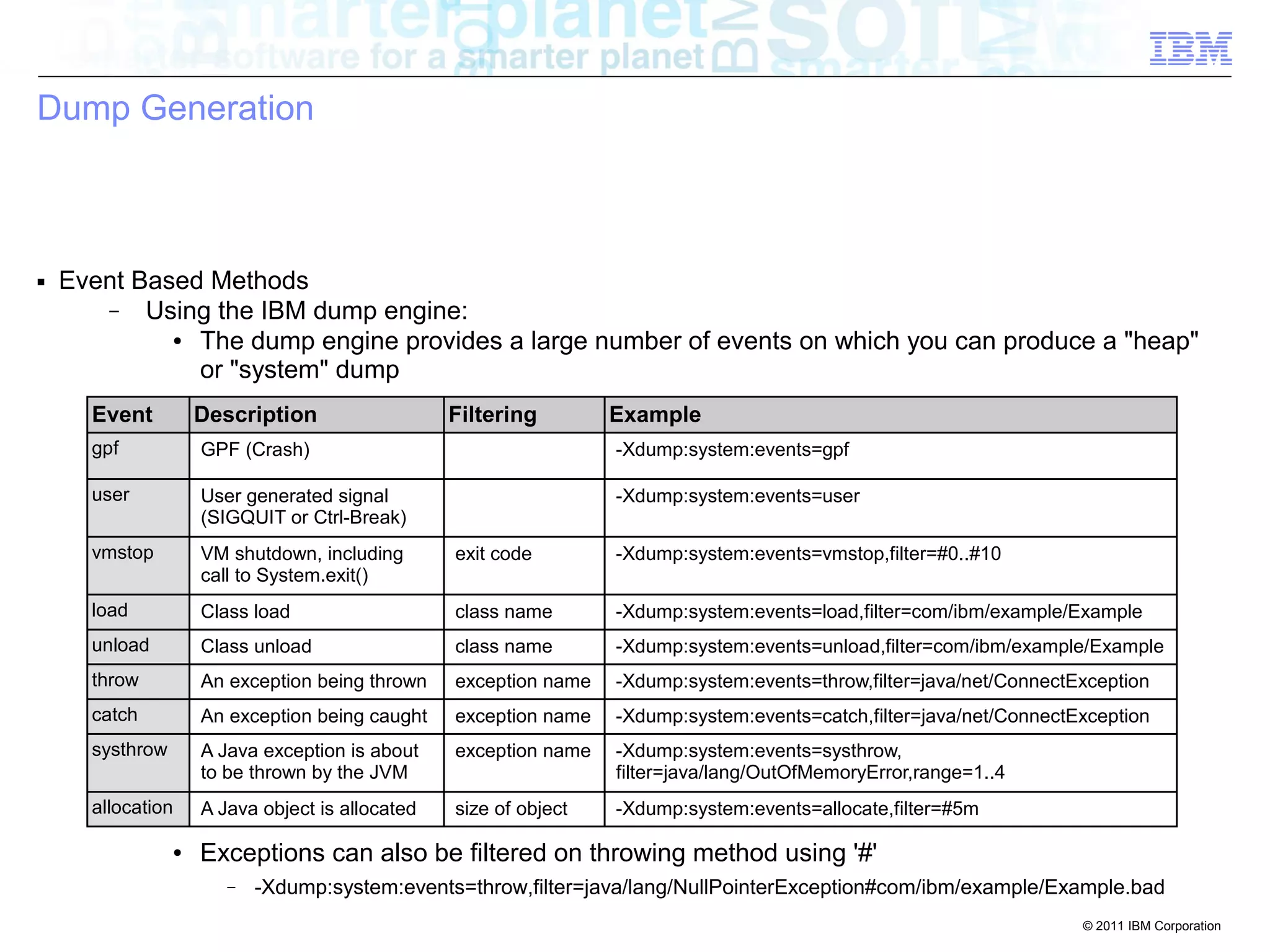
load Class load class name -Xdump:system:events=load,filter=com/ibm/example/Example 
unload Class unload class name -Xdump:system:events=unload,filter=com/ibm/example/Example 
throw An exception being thrown exception name -Xdump:system:events=throw,filter=java/net/ConnectException 
catch An exception being caught exception name -Xdump:system:events=catch,filter=java/net/ConnectException 
systhrow A Java exception is about 
© 2011 IBM Corporation 
Dump Generation 
■ Event Based Methods 
– Using the IBM dump engine: 
● The dump engine provides a large number of events on which you can produce a "heap" 
or "system" dump 
● 
Event Description Filtering Example 
● 
gpf GPF (Crash) -Xdump:system:events=gpf 
● 
user ● 
User generated signal 
● 
vmstop ● 
VM shutdown, including 
● 
● 
● 
● 
● 
● 
● 
● 
allocation A Java object is allocated size of object -Xdump:system:events=allocate,filter=#5m 
● 
(SIGQUIT or Ctrl-Break) 
-Xdump:system:events=user 
call to System.exit() 
exit code -Xdump:system:events=vmstop,filter=#0..#10 
to be thrown by the JVM 
exception name -Xdump:system:events=systhrow, 
filter=java/lang/OutOfMemoryError,range=1..4 
● Exceptions can also be filtered on throwing method using '#' 
– -Xdump:system:events=throw,filter=java/lang/NullPointerException#com/ibm/example/Example.bad
© 2011 IBM Corporation 
Generating Dumps 
■ Event Based Methods 
– Using the IBM trace engine: 
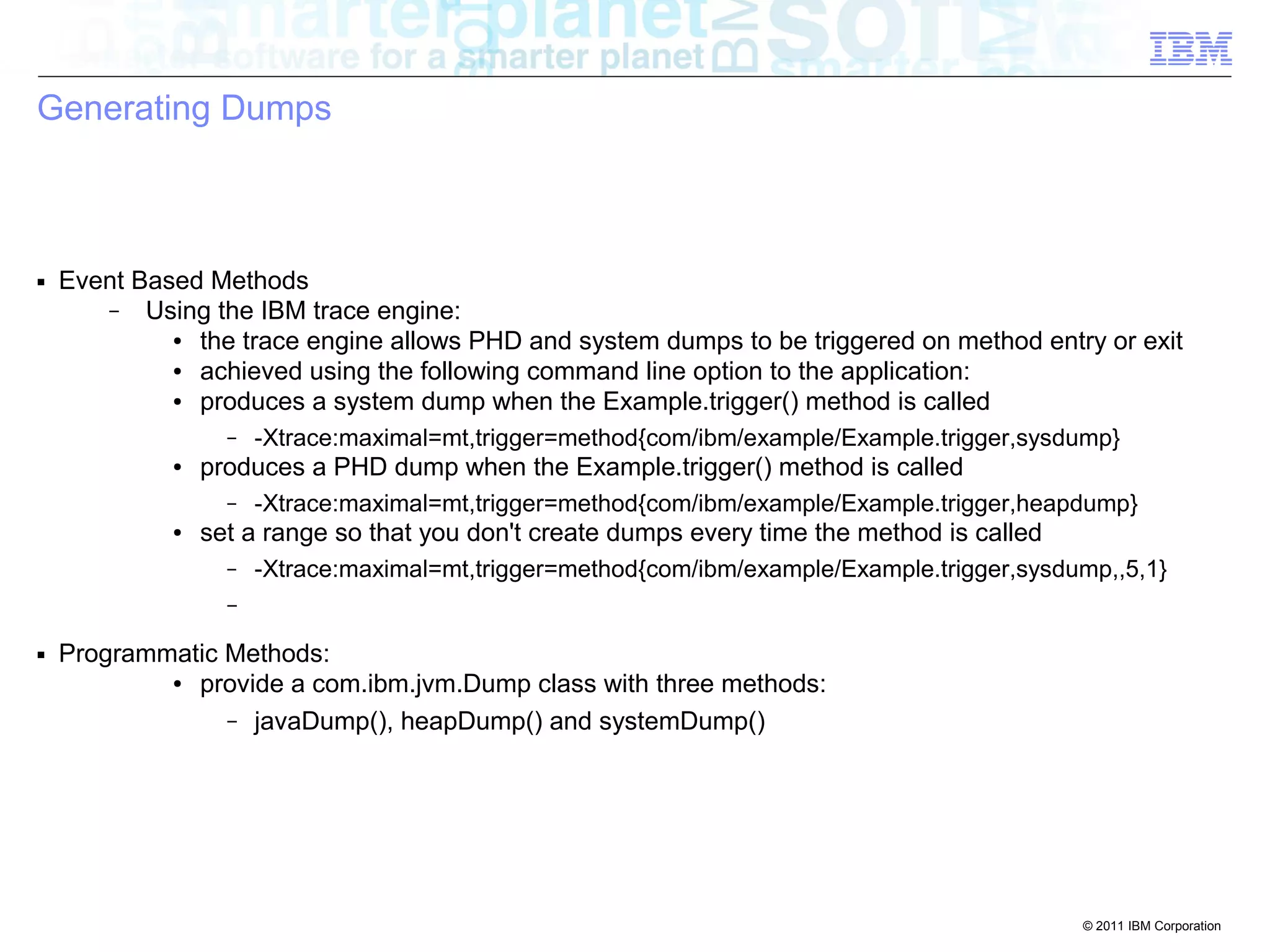
● the trace engine allows PHD and system dumps to be triggered on method entry or exit 
● achieved using the following command line option to the application: 
● produces a system dump when the Example.trigger() method is called 
– -Xtrace:maximal=mt,trigger=method{com/ibm/example/Example.trigger,sysdump} 
● produces a PHD dump when the Example.trigger() method is called 
– -Xtrace:maximal=mt,trigger=method{com/ibm/example/Example.trigger,heapdump} 
● set a range so that you don't create dumps every time the method is called 
– -Xtrace:maximal=mt,trigger=method{com/ibm/example/Example.trigger,sysdump,,5,1} 
– 
■ Programmatic Methods: 
● provide a com.ibm.jvm.Dump class with three methods: 
– javaDump(), heapDump() and systemDump()
© 2011 IBM Corporation 
Generating Dumps 
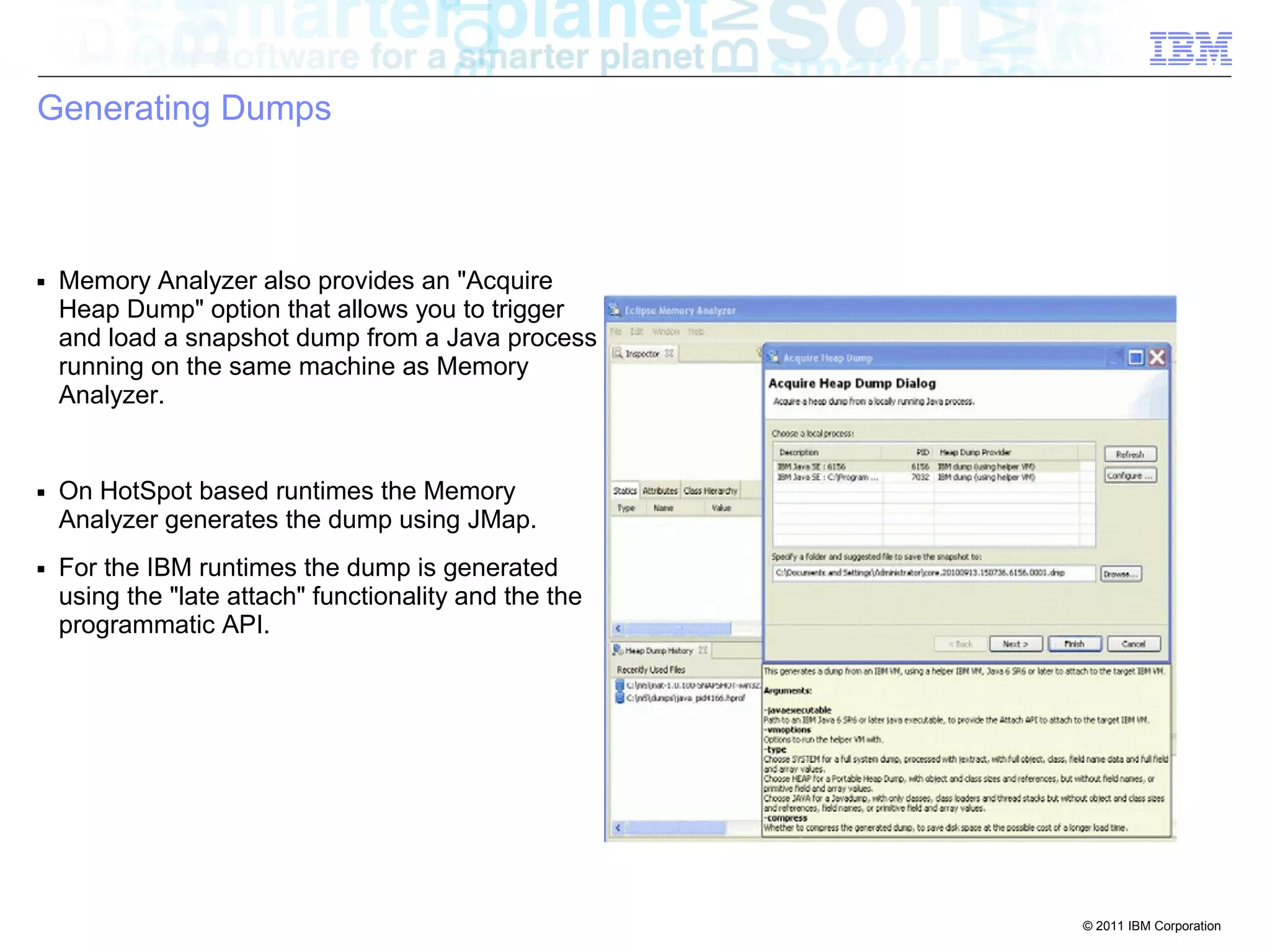
■ Memory Analyzer also provides an "Acquire 
Heap Dump" option that allows you to trigger 
and load a snapshot dump from a Java process 
running on the same machine as Memory 
Analyzer. 
■ On HotSpot based runtimes the Memory 
Analyzer generates the dump using JMap. 
■ For the IBM runtimes the dump is generated 
using the "late attach" functionality and the the 
programmatic API.
© 2011 IBM Corporation 
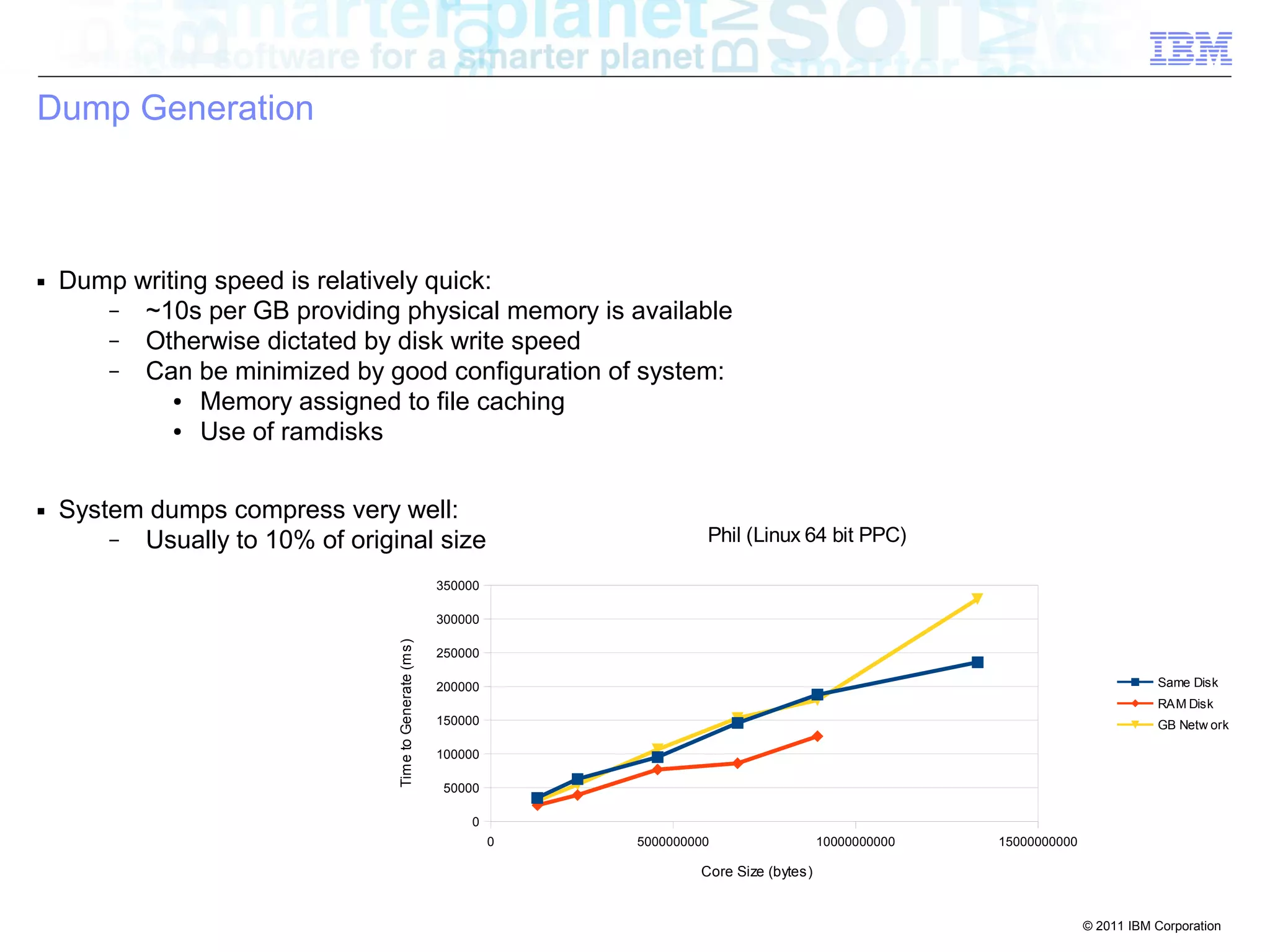
0 5000000000 10000000000 15000000000 
350000 
300000 
250000 
200000 
150000 
100000 
50000 
0 
Phil (Linux 64 bit PPC) 
Same Disk 
RAM Disk 
GB Netw ork 
Core Size (bytes) 
Time to Generate (ms) 
Dump Generation 
■ Dump writing speed is relatively quick: 
– ~10s per GB providing physical memory is available 
– Otherwise dictated by disk write speed 
– Can be minimized by good configuration of system: 
● Memory assigned to file caching 
● Use of ramdisks 
■ System dumps compress very well: 
– Usually to 10% of original size
© 2011 IBM Corporation 
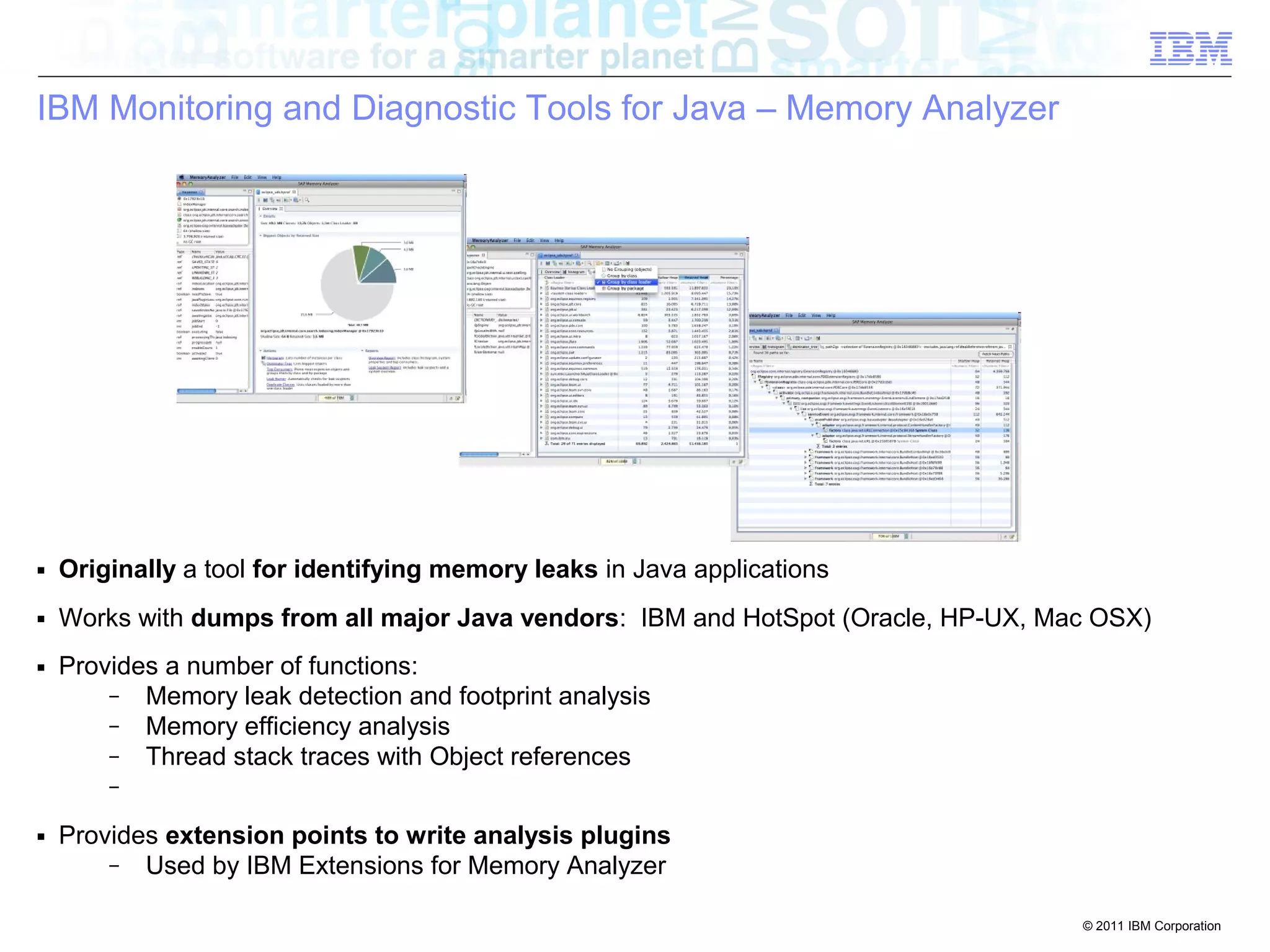
IBM Monitoring and Diagnostic Tools for Java – Memory Analyzer 
■ Originally a tool for identifying memory leaks in Java applications 
■ Works with dumps from all major Java vendors: IBM and HotSpot (Oracle, HP-UX, Mac OSX) 
■ Provides a number of functions: 
– Memory leak detection and footprint analysis 
– Memory efficiency analysis 
– Thread stack traces with Object references 
– 
■ Provides extension points to write analysis plugins 
– Used by IBM Extensions for Memory Analyzer
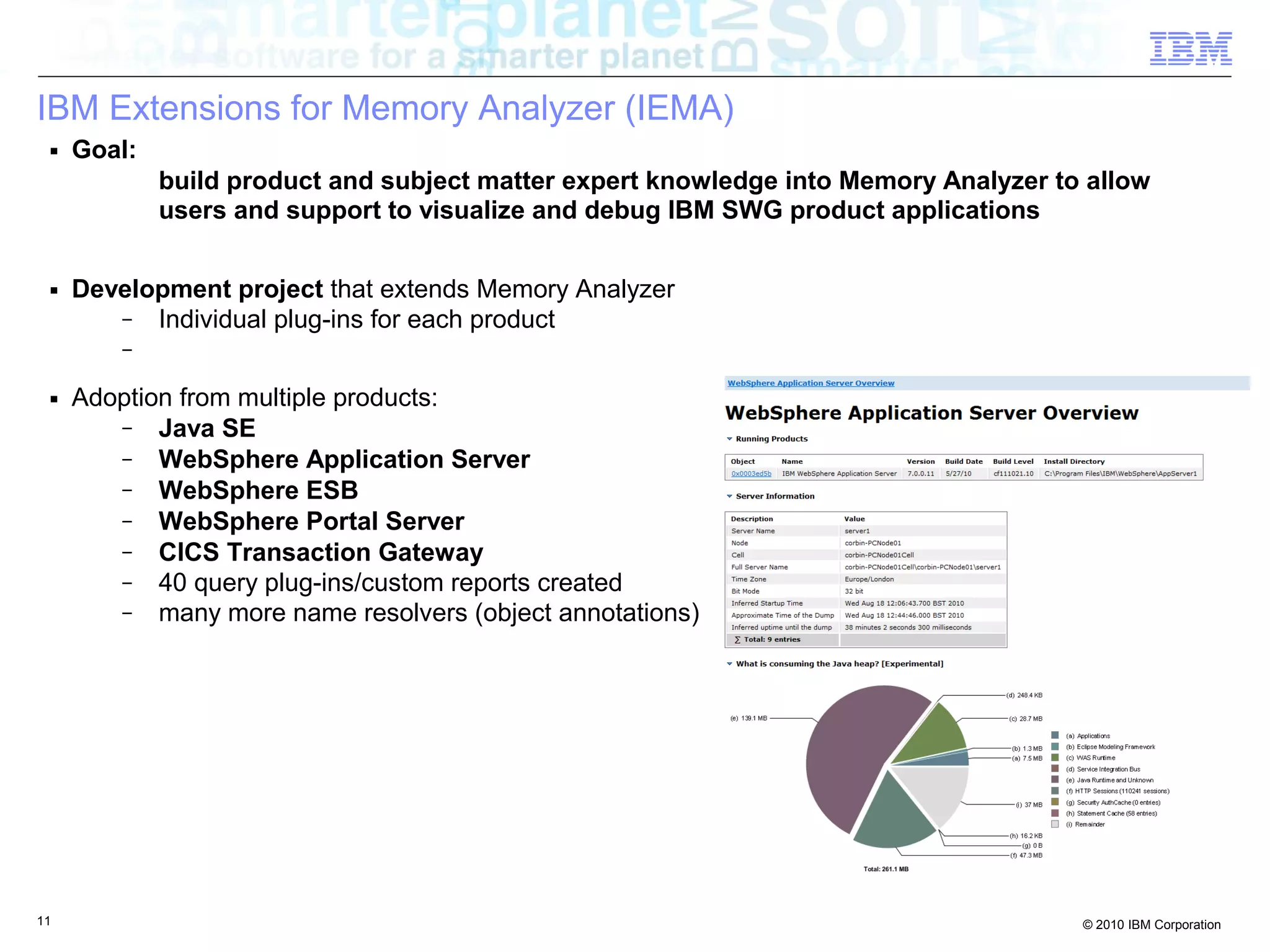
IBM Extensions for Memory Analyzer (IEMA) 
■ Goal: 
build product and subject matter expert knowledge into Memory Analyzer to allow 
users and support to visualize and debug IBM SWG product applications 
■ Development project that extends Memory Analyzer 
– Individual plug-ins for each product 
– 
■ Adoption from multiple products: 
– Java SE 
– WebSphere Application Server 
– WebSphere ESB 
– WebSphere Portal Server 
– CICS Transaction Gateway 
– 40 query plug-ins/custom reports created 
– many more name resolvers (object annotations) 
11 © 2010 IBM Corporation
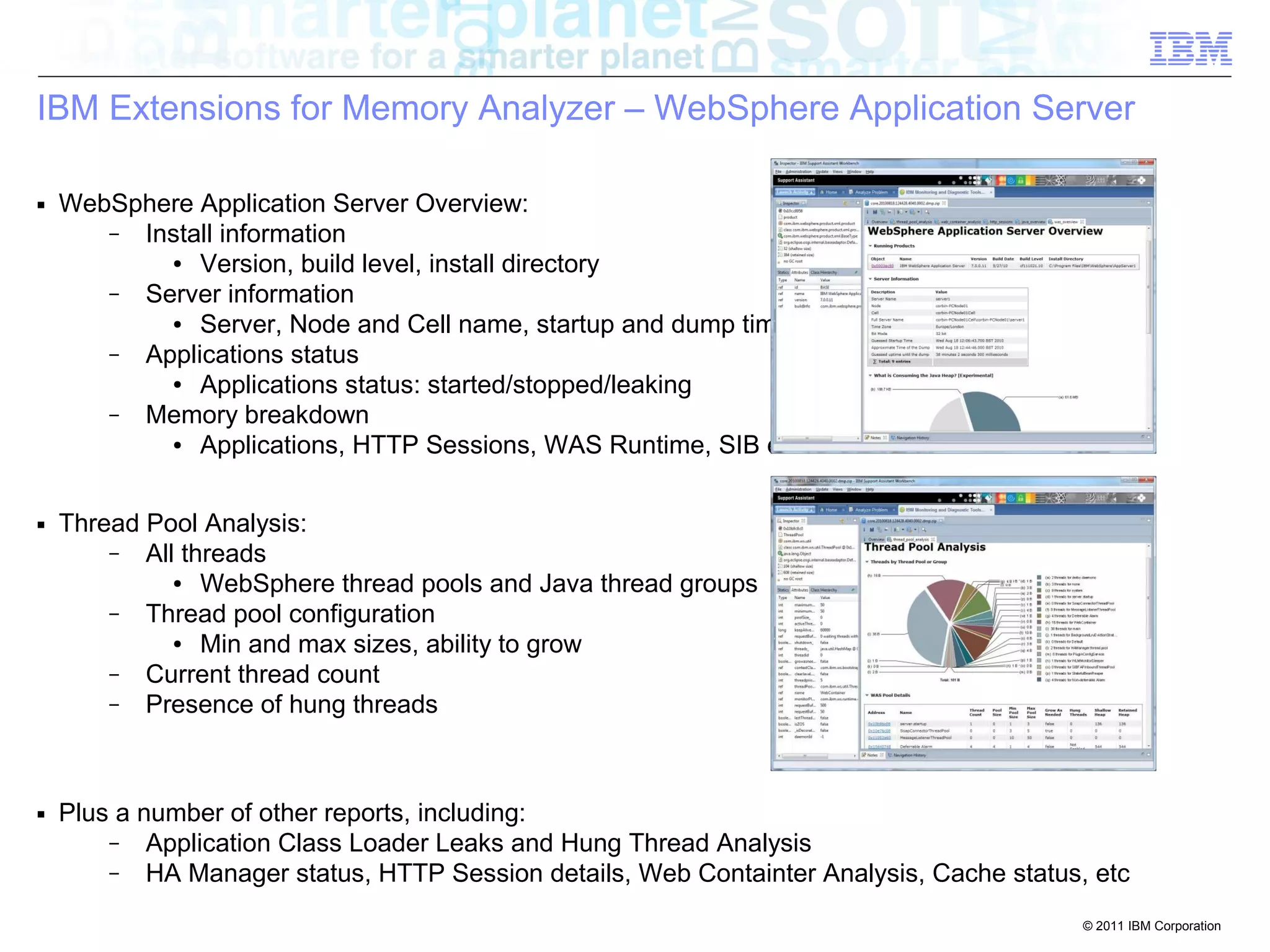
IBM Extensions for Memory Analyzer – WebSphere Application Server 
© 2011 IBM Corporation 
■ WebSphere Application Server Overview: 
– Install information 
● Version, build level, install directory 
– Server information 
● Server, Node and Cell name, startup and dump times 
– Applications status 
● Applications status: started/stopped/leaking 
– Memory breakdown 
● Applications, HTTP Sessions, WAS Runtime, SIB etc 
■ Thread Pool Analysis: 
– All threads 
● WebSphere thread pools and Java thread groups 
– Thread pool configuration 
● Min and max sizes, ability to grow 
– Current thread count 
– Presence of hung threads 
■ Plus a number of other reports, including: 
– Application Class Loader Leaks and Hung Thread Analysis 
– HA Manager status, HTTP Session details, Web Containter Analysis, Cache status, etc
© 2011 IBM Corporation 
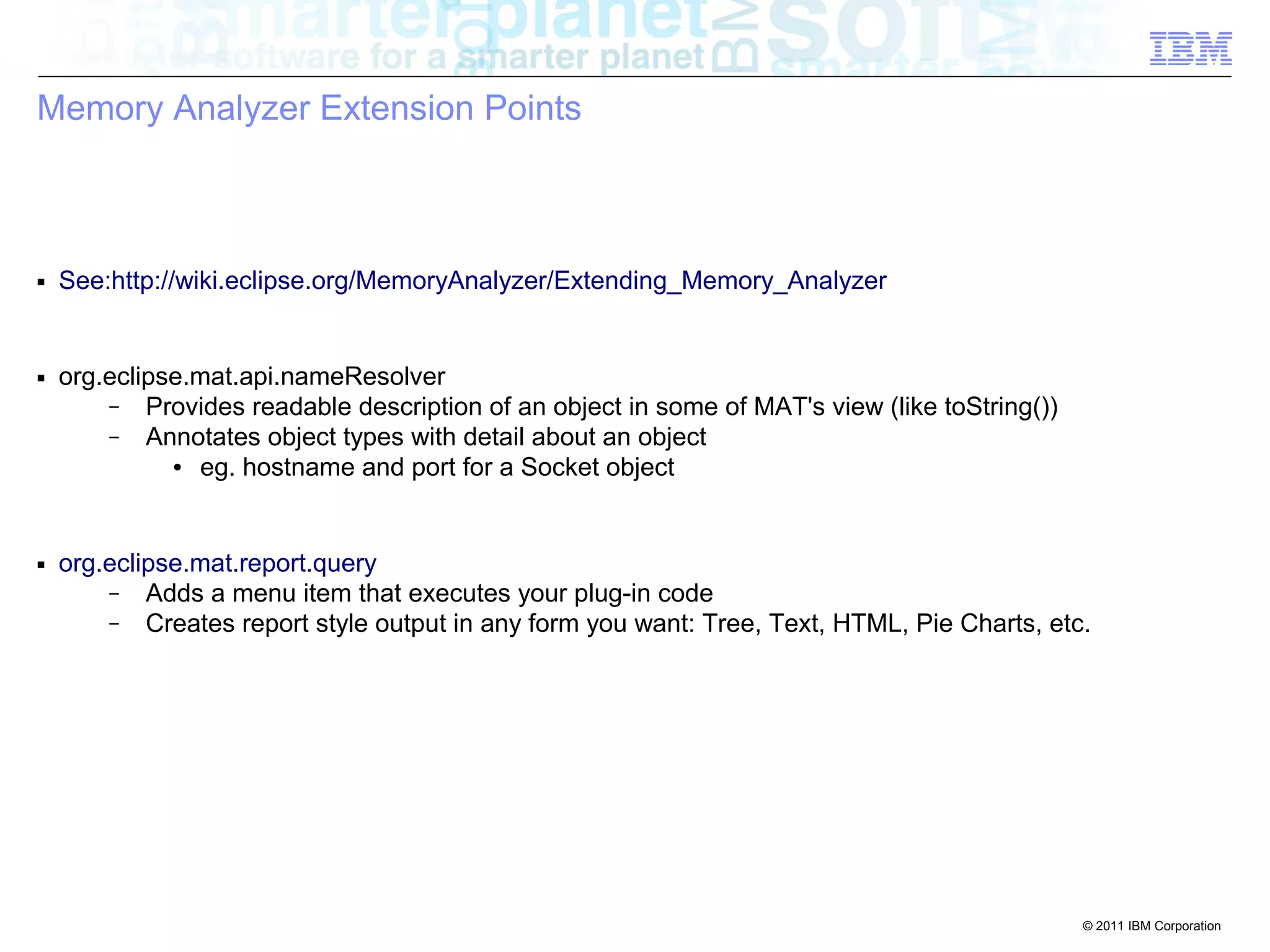
Memory Analyzer Extension Points 
■ See:http://wiki.eclipse.org/MemoryAnalyzer/Extending_Memory_Analyzer 
■ org.eclipse.mat.api.nameResolver 
– Provides readable description of an object in some of MAT's view (like toString()) 
– Annotates object types with detail about an object 
● eg. hostname and port for a Socket object 
■ org.eclipse.mat.report.query 
– Adds a menu item that executes your plug-in code 
– Creates report style output in any form you want: Tree, Text, HTML, Pie Charts, etc.
© 2011 IBM Corporation 
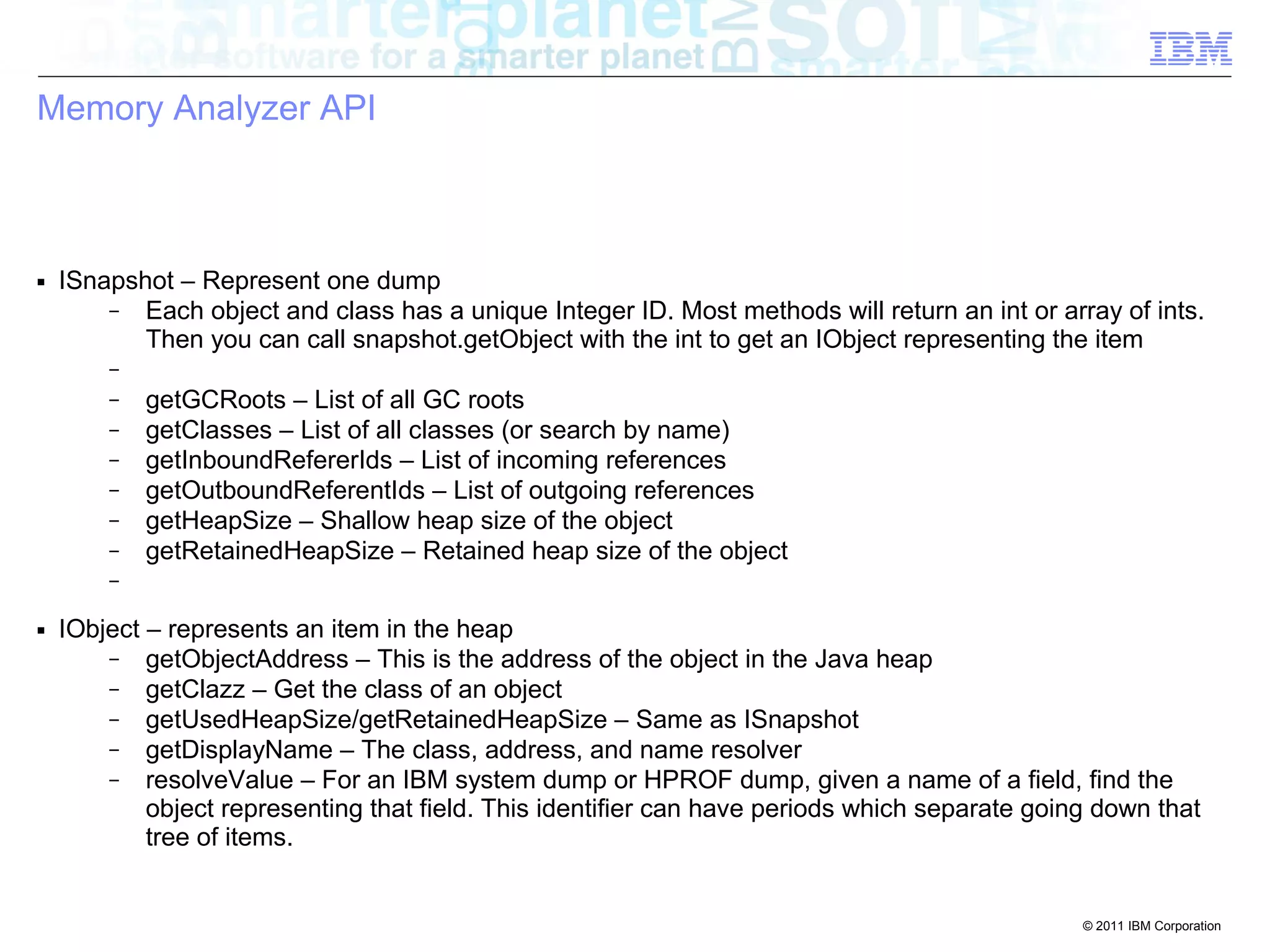
Memory Analyzer API 
■ ISnapshot – Represent one dump 
– Each object and class has a unique Integer ID. Most methods will return an int or array of ints. 
Then you can call snapshot.getObject with the int to get an IObject representing the item 
– 
– getGCRoots – List of all GC roots 
– getClasses – List of all classes (or search by name) 
– getInboundRefererIds – List of incoming references 
– getOutboundReferentIds – List of outgoing references 
– getHeapSize – Shallow heap size of the object 
– getRetainedHeapSize – Retained heap size of the object 
– 
■ IObject – represents an item in the heap 
– getObjectAddress – This is the address of the object in the Java heap 
– getClazz – Get the class of an object 
– getUsedHeapSize/getRetainedHeapSize – Same as ISnapshot 
– getDisplayName – The class, address, and name resolver 
– resolveValue – For an IBM system dump or HPROF dump, given a name of a field, find the 
object representing that field. This identifier can have periods which separate going down that 
tree of items.
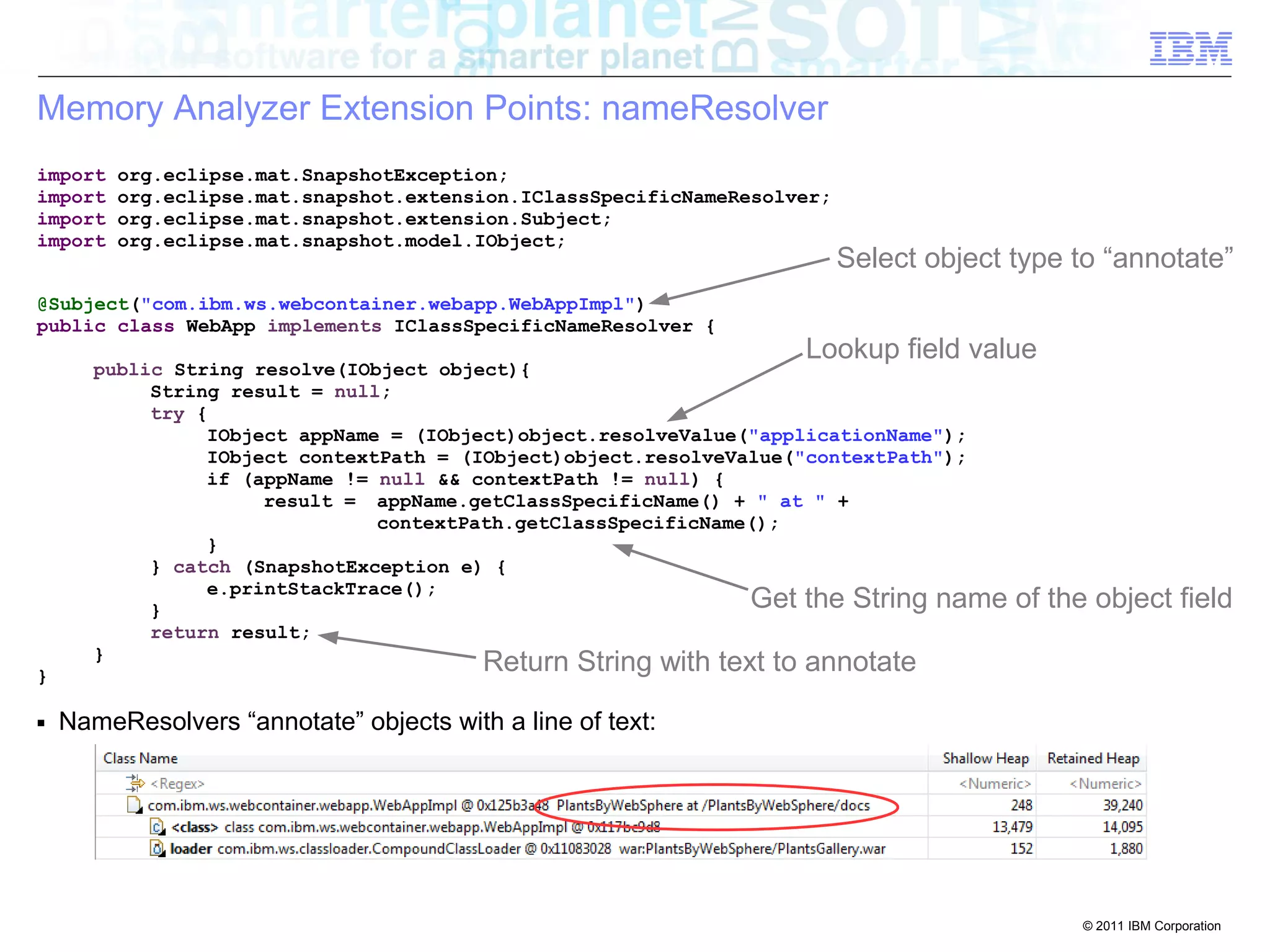
Get the String name of the object field 
© 2011 IBM Corporation 
Memory Analyzer Extension Points: nameResolver 
import org.eclipse.mat.SnapshotException; 
import org.eclipse.mat.snapshot.extension.IClassSpecificNameResolver; 
import org.eclipse.mat.snapshot.extension.Subject; 
import org.eclipse.mat.snapshot.model.IObject; 
@Subject("com.ibm.ws.webcontainer.webapp.WebAppImpl") 
public class WebApp implements IClassSpecificNameResolver { 
public String resolve(IObject object){ 
String result = null; 
try { 
Lookup field value 
IObject appName = (IObject)object.resolveValue("applicationName"); 
IObject contextPath = (IObject)object.resolveValue("contextPath"); 
if (appName != null && contextPath != null) { 
result = appName.getClassSpecificName() + " at " + 
contextPath.getClassSpecificName(); 
} 
} catch (SnapshotException e) { 
e.printStackTrace(); 
} 
return result; 
} 
} 
■ NameResolvers “annotate” objects with a line of text: 
Select object type to “annotate” 
Return String with text to annotate
© 2011 IBM Corporation 
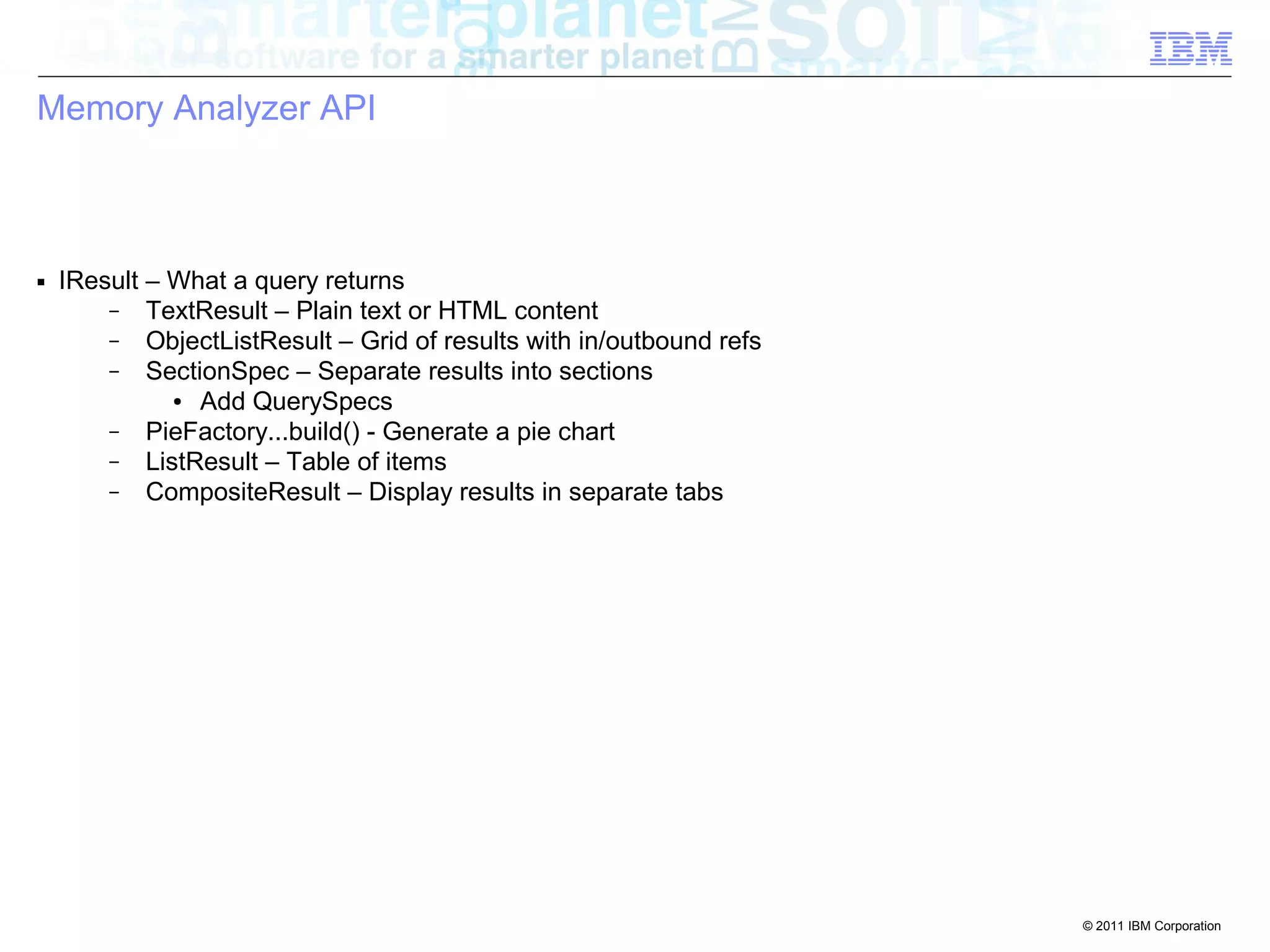
Memory Analyzer API 
■ IResult – What a query returns 
– TextResult – Plain text or HTML content 
– ObjectListResult – Grid of results with in/outbound refs 
– SectionSpec – Separate results into sections 
● Add QuerySpecs 
– PieFactory...build() - Generate a pie chart 
– ListResult – Table of items 
– CompositeResult – Display results in separate tabs
Find the Hung Threads 
© 2011 IBM Corporation 
Memory Analyzer Extensions: query 
import org.eclipse.mat.SnapshotException; 
import org.eclipse.mat.snapshot.extension.IClassSpecificNameResolver; 
import org.eclipse.mat.snapshot.extension.Subject; 
import org.eclipse.mat.snapshot.model.IObject; 
Set name of query in menu 
@Name("Hung Thread Stacks") 
@Category(WASHelper.WAS_CATEGORY + WASHelper.HUNGTHREADS_SUBCATEGORY) 
@Help("List any threads that may be hung.nn") 
public class HungThreadsList extends BasePlugin { 
public IResult execute(IProgressListener listener) throws Exception { 
int[] hungThreadIds = HungThreads.getHungThreadIds(snapshot); 
return new HungThreadsListOutgoingReferencesTree( 
hungThreadIds, listener); 
} 
■ Queries produce “reports” available from pull down menus: 
Set category in menu 
Return “IResult” report
© 2011 IBM Corporation 
Finding the Hung Threads 
public static int[] getHungThreadIds(ISnapshot snapshot) 
throws SnapshotException { 
int[] threadIds = findObjects(snapshot, "java.lang.Thread"); 
List<Integer> hungThreads = new ArrayList<Integer>(); 
for (int thr : threadIds) { 
IObject thrObj = snapshot.getObject(thr); 
if (isThreadHung(thrObj)) { 
hungThreads.add(thr); 
} 
} 
int[] hungThreadObjectIds = getArrayIntegers(hungThreads); 
return hungThreadObjectIds; 
} 
■ findObjects() makes it easy to find all objects of a give type 
■ Returns a list of ObjectIds (ints) for the hung threads 
Find all Threads 
Check if the Thread is hung 
Return the hung threads
© 2011 IBM Corporation 
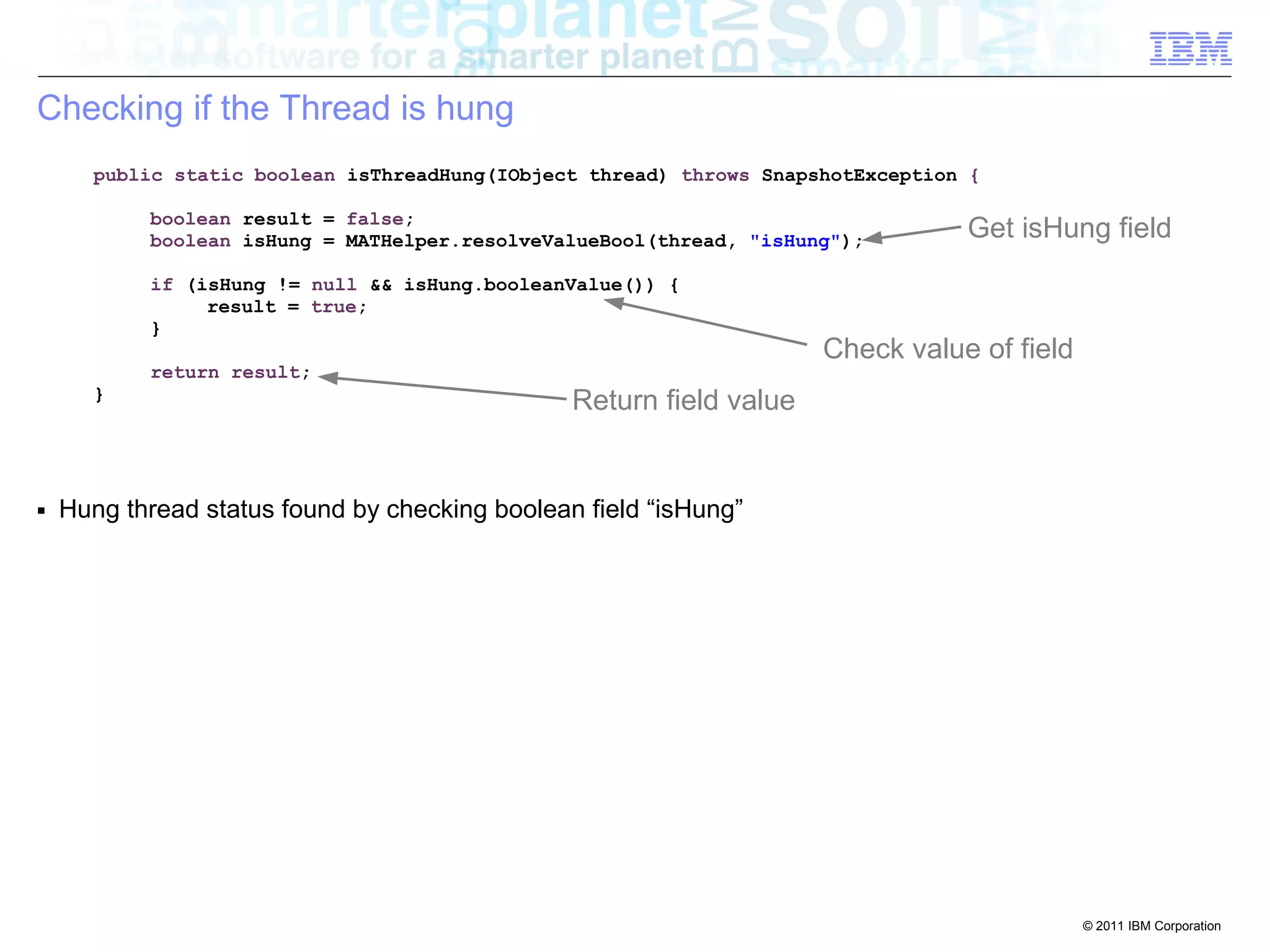
Checking if the Thread is hung 
public static boolean isThreadHung(IObject thread) throws SnapshotException { 
boolean result = false; 
boolean isHung = MATHelper.resolveValueBool(thread, "isHung"); 
if (isHung != null && isHung.booleanValue()) { 
result = true; 
} 
return result; 
} 
■ Hung thread status found by checking boolean field “isHung” 
Get isHung field 
Check value of field 
Return field value
© 2011 IBM Corporation 
Displaying the Hung Threads 
public class HungThreadsListOutgoingReferencesTree extends OutgoingReferencesTree { 
private static final int sortIndex = COLUMN_INDEX_MAX_BUILTIN + 2; 
public HungThreadsListOutgoingReferencesTree(ISnapshot snapshot, 
int[] roots, IProgressListener listener) 
throws SnapshotException { 
super(snapshot, roots, listener); 
} 
■ Customization used to add additional columns to output report: 
– Last Dispatch Time and Estimated Time Hung 
■ Displays a Tree view of outgoing references, from the hung threads 
Customized 
OutgoingReferencesTree
© 2011 IBM Corporation 
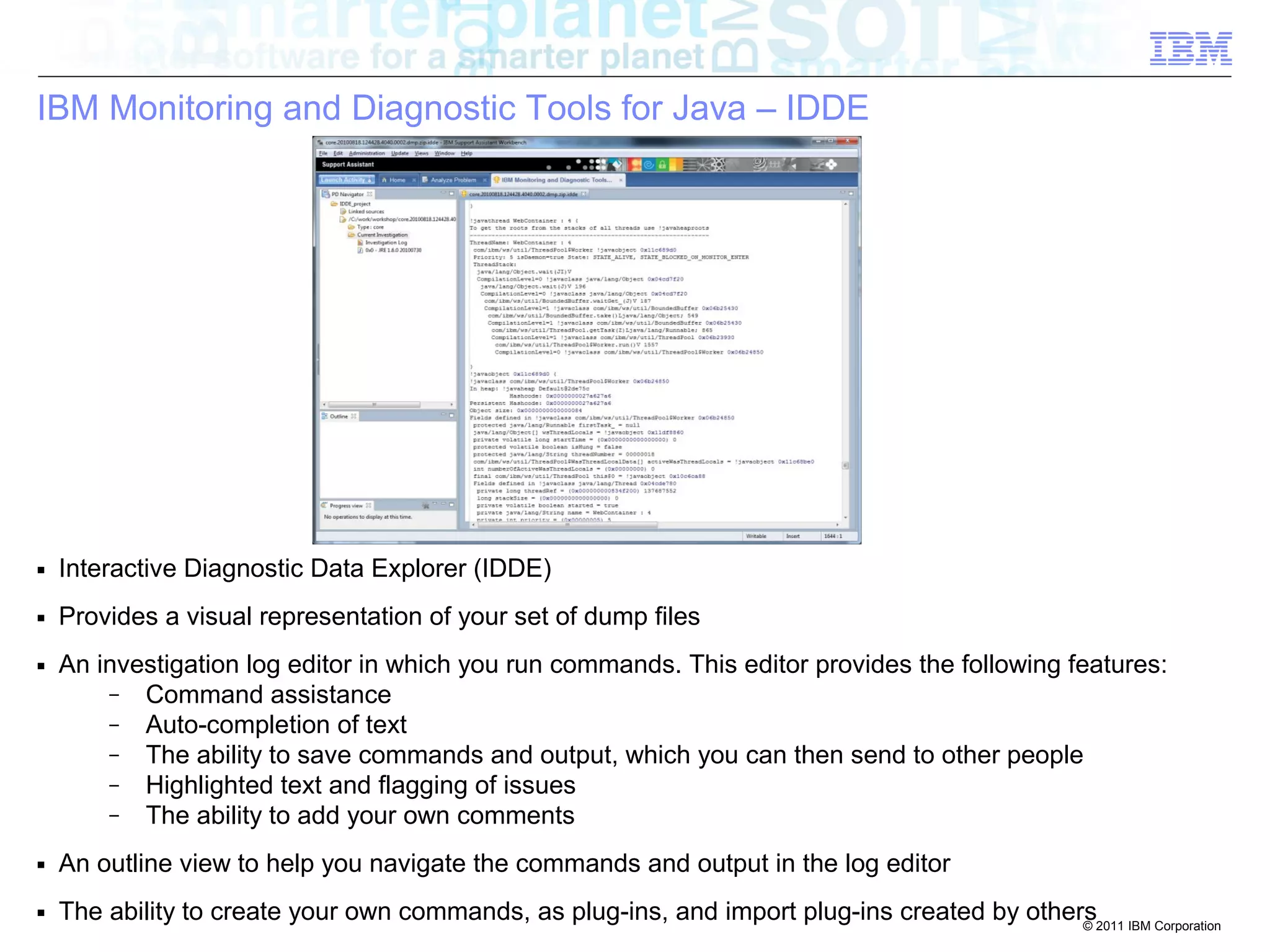
IBM Monitoring and Diagnostic Tools for Java – IDDE 
■ Interactive Diagnostic Data Explorer (IDDE) 
■ Provides a visual representation of your set of dump files 
■ An investigation log editor in which you run commands. This editor provides the following features: 
– Command assistance 
– Auto-completion of text 
– The ability to save commands and output, which you can then send to other people 
– Highlighted text and flagging of issues 
– The ability to add your own comments 
■ An outline view to help you navigate the commands and output in the log editor 
■ The ability to create your own commands, as plug-ins, and import plug-ins created by others

Debugging Java from Dumps

  • 1.
    © 2011 IBMCorporation Chris Bailey – Java Support Architect Debugging from Dumps Debugging Applications and Products from Dumps
  • 2.
    © 2011 IBMCorporation Debugging Strategies ■ Two common strategies for debugging: – ■ Debugging from Trace: Log or print relevant data at runtime – Typical approach used on distributed platforms – Pros: History is available, showing how the failure point was reached Collected data usually has context via the trace point – Cons: only specified data is collected, often resulting in multiple iterations ongoing performance overhead to running application ■ Debugging from “Dumps”: Collect all available data on failure – Used widely on on System Z – Pros: All available data is collected No ongoing performance overhead to application – Cons: Very limited history of how the failure point was reached: only current thread stacks Limited context around data: only Object or structure types ■ Using a combination of the two provides powerful debugging capabilities – Note: in-memory trace buffers are in the dumps, so can aid with trace data collection!
  • 3.
    © 2011 IBMCorporation Dump Types ■ Three different dump types: Dump Format Approx. Size on Disk Objects, Classes, Class Loaders Thread Details Field Names Field and Array References Primitive Fields Primitive Array Contents Accurate GC Roots Native Memory and Threads IBM PHD 20% of Java heap size  with Javacore *       HPROF Java heap size         System dump Java heap size + 30%        
  • 4.
    © 2011 IBMCorporation Dump Generation ■ Interactive Methods – Using a SIGQUIT or Ctrl-Break: ● When a Ctrl-Break or SIGQUIT (usually generated using "kill -3") is sent to the IBM runtime ● a "user" event is generated in the IBM dump engine ● can however be configured to generate either a PHD format dump, or a System dump using the following command line options to the Java application ● -Xdump:heap:events=user (PHD Heap Dump) ● -Xdump:system:events=user (System dump) – Using the operating system to produce a system dump: ● AIX: gencore (or the destructive kill -6 or kill -11) ● Linux/Solaris: gcore (or the destructive kill -6 or kill -11) ● Windows: userdump.exe ● z/OS: SVCDUMP/Console Dump – Using IBM Monitoring and Diagnostics Tools for Java - Health Center: ● The Health Center tool provides a menu option to request dumps from a running Java process ● can request either a PHD or system dump
  • 5.
    © 2011 IBMCorporation Dump Generation ■ Interactive Methods – Using the wsadmin scripting client: (using Jython with the -lang jython option): ● Thread dump: AdminControl.invoke(AdminControl.completeObjectName("type=JVM,proc ess=server1,*"), "dumpThreads") ● System dump: AdminControl.invoke(AdminControl.completeObjectName("type=JVM,proc ess=server1,*"), "generateSystemDump") ● Portable heap dump (PHD): AdminControl.invoke(AdminControl.completeObjectName("type=JVM,proc ess=server1,*"), "generateHeapDump")
  • 6.
    load Class loadclass name -Xdump:system:events=load,filter=com/ibm/example/Example unload Class unload class name -Xdump:system:events=unload,filter=com/ibm/example/Example throw An exception being thrown exception name -Xdump:system:events=throw,filter=java/net/ConnectException catch An exception being caught exception name -Xdump:system:events=catch,filter=java/net/ConnectException systhrow A Java exception is about © 2011 IBM Corporation Dump Generation ■ Event Based Methods – Using the IBM dump engine: ● The dump engine provides a large number of events on which you can produce a "heap" or "system" dump ● Event Description Filtering Example ● gpf GPF (Crash) -Xdump:system:events=gpf ● user ● User generated signal ● vmstop ● VM shutdown, including ● ● ● ● ● ● ● ● allocation A Java object is allocated size of object -Xdump:system:events=allocate,filter=#5m ● (SIGQUIT or Ctrl-Break) -Xdump:system:events=user call to System.exit() exit code -Xdump:system:events=vmstop,filter=#0..#10 to be thrown by the JVM exception name -Xdump:system:events=systhrow, filter=java/lang/OutOfMemoryError,range=1..4 ● Exceptions can also be filtered on throwing method using '#' – -Xdump:system:events=throw,filter=java/lang/NullPointerException#com/ibm/example/Example.bad
  • 7.
    © 2011 IBMCorporation Generating Dumps ■ Event Based Methods – Using the IBM trace engine: ● the trace engine allows PHD and system dumps to be triggered on method entry or exit ● achieved using the following command line option to the application: ● produces a system dump when the Example.trigger() method is called – -Xtrace:maximal=mt,trigger=method{com/ibm/example/Example.trigger,sysdump} ● produces a PHD dump when the Example.trigger() method is called – -Xtrace:maximal=mt,trigger=method{com/ibm/example/Example.trigger,heapdump} ● set a range so that you don't create dumps every time the method is called – -Xtrace:maximal=mt,trigger=method{com/ibm/example/Example.trigger,sysdump,,5,1} – ■ Programmatic Methods: ● provide a com.ibm.jvm.Dump class with three methods: – javaDump(), heapDump() and systemDump()
  • 8.
    © 2011 IBMCorporation Generating Dumps ■ Memory Analyzer also provides an "Acquire Heap Dump" option that allows you to trigger and load a snapshot dump from a Java process running on the same machine as Memory Analyzer. ■ On HotSpot based runtimes the Memory Analyzer generates the dump using JMap. ■ For the IBM runtimes the dump is generated using the "late attach" functionality and the the programmatic API.
  • 9.
    © 2011 IBMCorporation 0 5000000000 10000000000 15000000000 350000 300000 250000 200000 150000 100000 50000 0 Phil (Linux 64 bit PPC) Same Disk RAM Disk GB Netw ork Core Size (bytes) Time to Generate (ms) Dump Generation ■ Dump writing speed is relatively quick: – ~10s per GB providing physical memory is available – Otherwise dictated by disk write speed – Can be minimized by good configuration of system: ● Memory assigned to file caching ● Use of ramdisks ■ System dumps compress very well: – Usually to 10% of original size
  • 10.
    © 2011 IBMCorporation IBM Monitoring and Diagnostic Tools for Java – Memory Analyzer ■ Originally a tool for identifying memory leaks in Java applications ■ Works with dumps from all major Java vendors: IBM and HotSpot (Oracle, HP-UX, Mac OSX) ■ Provides a number of functions: – Memory leak detection and footprint analysis – Memory efficiency analysis – Thread stack traces with Object references – ■ Provides extension points to write analysis plugins – Used by IBM Extensions for Memory Analyzer
  • 11.
    IBM Extensions forMemory Analyzer (IEMA) ■ Goal: build product and subject matter expert knowledge into Memory Analyzer to allow users and support to visualize and debug IBM SWG product applications ■ Development project that extends Memory Analyzer – Individual plug-ins for each product – ■ Adoption from multiple products: – Java SE – WebSphere Application Server – WebSphere ESB – WebSphere Portal Server – CICS Transaction Gateway – 40 query plug-ins/custom reports created – many more name resolvers (object annotations) 11 © 2010 IBM Corporation
  • 12.
    IBM Extensions forMemory Analyzer – WebSphere Application Server © 2011 IBM Corporation ■ WebSphere Application Server Overview: – Install information ● Version, build level, install directory – Server information ● Server, Node and Cell name, startup and dump times – Applications status ● Applications status: started/stopped/leaking – Memory breakdown ● Applications, HTTP Sessions, WAS Runtime, SIB etc ■ Thread Pool Analysis: – All threads ● WebSphere thread pools and Java thread groups – Thread pool configuration ● Min and max sizes, ability to grow – Current thread count – Presence of hung threads ■ Plus a number of other reports, including: – Application Class Loader Leaks and Hung Thread Analysis – HA Manager status, HTTP Session details, Web Containter Analysis, Cache status, etc
  • 13.
    © 2011 IBMCorporation Memory Analyzer Extension Points ■ See:http://wiki.eclipse.org/MemoryAnalyzer/Extending_Memory_Analyzer ■ org.eclipse.mat.api.nameResolver – Provides readable description of an object in some of MAT's view (like toString()) – Annotates object types with detail about an object ● eg. hostname and port for a Socket object ■ org.eclipse.mat.report.query – Adds a menu item that executes your plug-in code – Creates report style output in any form you want: Tree, Text, HTML, Pie Charts, etc.
  • 14.
    © 2011 IBMCorporation Memory Analyzer API ■ ISnapshot – Represent one dump – Each object and class has a unique Integer ID. Most methods will return an int or array of ints. Then you can call snapshot.getObject with the int to get an IObject representing the item – – getGCRoots – List of all GC roots – getClasses – List of all classes (or search by name) – getInboundRefererIds – List of incoming references – getOutboundReferentIds – List of outgoing references – getHeapSize – Shallow heap size of the object – getRetainedHeapSize – Retained heap size of the object – ■ IObject – represents an item in the heap – getObjectAddress – This is the address of the object in the Java heap – getClazz – Get the class of an object – getUsedHeapSize/getRetainedHeapSize – Same as ISnapshot – getDisplayName – The class, address, and name resolver – resolveValue – For an IBM system dump or HPROF dump, given a name of a field, find the object representing that field. This identifier can have periods which separate going down that tree of items.
  • 15.
    Get the Stringname of the object field © 2011 IBM Corporation Memory Analyzer Extension Points: nameResolver import org.eclipse.mat.SnapshotException; import org.eclipse.mat.snapshot.extension.IClassSpecificNameResolver; import org.eclipse.mat.snapshot.extension.Subject; import org.eclipse.mat.snapshot.model.IObject; @Subject("com.ibm.ws.webcontainer.webapp.WebAppImpl") public class WebApp implements IClassSpecificNameResolver { public String resolve(IObject object){ String result = null; try { Lookup field value IObject appName = (IObject)object.resolveValue("applicationName"); IObject contextPath = (IObject)object.resolveValue("contextPath"); if (appName != null && contextPath != null) { result = appName.getClassSpecificName() + " at " + contextPath.getClassSpecificName(); } } catch (SnapshotException e) { e.printStackTrace(); } return result; } } ■ NameResolvers “annotate” objects with a line of text: Select object type to “annotate” Return String with text to annotate
  • 16.
    © 2011 IBMCorporation Memory Analyzer API ■ IResult – What a query returns – TextResult – Plain text or HTML content – ObjectListResult – Grid of results with in/outbound refs – SectionSpec – Separate results into sections ● Add QuerySpecs – PieFactory...build() - Generate a pie chart – ListResult – Table of items – CompositeResult – Display results in separate tabs
  • 17.
    Find the HungThreads © 2011 IBM Corporation Memory Analyzer Extensions: query import org.eclipse.mat.SnapshotException; import org.eclipse.mat.snapshot.extension.IClassSpecificNameResolver; import org.eclipse.mat.snapshot.extension.Subject; import org.eclipse.mat.snapshot.model.IObject; Set name of query in menu @Name("Hung Thread Stacks") @Category(WASHelper.WAS_CATEGORY + WASHelper.HUNGTHREADS_SUBCATEGORY) @Help("List any threads that may be hung.nn") public class HungThreadsList extends BasePlugin { public IResult execute(IProgressListener listener) throws Exception { int[] hungThreadIds = HungThreads.getHungThreadIds(snapshot); return new HungThreadsListOutgoingReferencesTree( hungThreadIds, listener); } ■ Queries produce “reports” available from pull down menus: Set category in menu Return “IResult” report
  • 18.
    © 2011 IBMCorporation Finding the Hung Threads public static int[] getHungThreadIds(ISnapshot snapshot) throws SnapshotException { int[] threadIds = findObjects(snapshot, "java.lang.Thread"); List<Integer> hungThreads = new ArrayList<Integer>(); for (int thr : threadIds) { IObject thrObj = snapshot.getObject(thr); if (isThreadHung(thrObj)) { hungThreads.add(thr); } } int[] hungThreadObjectIds = getArrayIntegers(hungThreads); return hungThreadObjectIds; } ■ findObjects() makes it easy to find all objects of a give type ■ Returns a list of ObjectIds (ints) for the hung threads Find all Threads Check if the Thread is hung Return the hung threads
  • 19.
    © 2011 IBMCorporation Checking if the Thread is hung public static boolean isThreadHung(IObject thread) throws SnapshotException { boolean result = false; boolean isHung = MATHelper.resolveValueBool(thread, "isHung"); if (isHung != null && isHung.booleanValue()) { result = true; } return result; } ■ Hung thread status found by checking boolean field “isHung” Get isHung field Check value of field Return field value
  • 20.
    © 2011 IBMCorporation Displaying the Hung Threads public class HungThreadsListOutgoingReferencesTree extends OutgoingReferencesTree { private static final int sortIndex = COLUMN_INDEX_MAX_BUILTIN + 2; public HungThreadsListOutgoingReferencesTree(ISnapshot snapshot, int[] roots, IProgressListener listener) throws SnapshotException { super(snapshot, roots, listener); } ■ Customization used to add additional columns to output report: – Last Dispatch Time and Estimated Time Hung ■ Displays a Tree view of outgoing references, from the hung threads Customized OutgoingReferencesTree
  • 21.
    © 2011 IBMCorporation IBM Monitoring and Diagnostic Tools for Java – IDDE ■ Interactive Diagnostic Data Explorer (IDDE) ■ Provides a visual representation of your set of dump files ■ An investigation log editor in which you run commands. This editor provides the following features: – Command assistance – Auto-completion of text – The ability to save commands and output, which you can then send to other people – Highlighted text and flagging of issues – The ability to add your own comments ■ An outline view to help you navigate the commands and output in the log editor ■ The ability to create your own commands, as plug-ins, and import plug-ins created by others