© 2003 Prentice Hall, Inc. All rights reserved.
1
Chapter 3 - Functions
Outline
3.15 Functions with Empty Parameter Lists
3.16 Inline Functions
3.17 References and Reference Parameters
3.18 Default Arguments
3.19 Unary Scope Resolution Operator
3.20 Function Overloading
3.21 Function Templates
© 2003 Prentice Hall, Inc. All rights reserved.
2
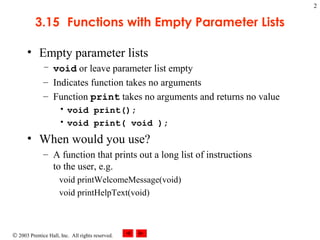
3.15 Functions with Empty Parameter Lists
• Empty parameter lists
– void or leave parameter list empty
– Indicates function takes no arguments
– Function print takes no arguments and returns no value
• void print();
• void print( void );
• When would you use?
– A function that prints out a long list of instructions
to the user, e.g.
void printWelcomeMessage(void)
void printHelpText(void)
© 2003 Prentice Hall, Inc.
All rights reserved.
Outline
3
fig03_18.cpp
(1 of 2)
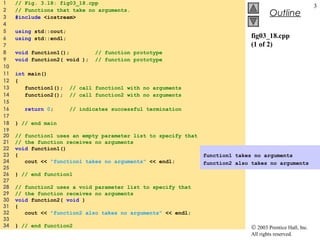
1 // Fig. 3.18: fig03_18.cpp
2 // Functions that take no arguments.
3 #include <iostream>
4
5 using std::cout;
6 using std::endl;
7
8 void function1(); // function prototype
9 void function2( void ); // function prototype
10
11 int main()
12 {
13 function1(); // call function1 with no arguments
14 function2(); // call function2 with no arguments
15
16 return 0; // indicates successful termination
17
18 } // end main
19
20 // function1 uses an empty parameter list to specify that
21 // the function receives no arguments
22 void function1()
23 {
24 cout << "function1 takes no arguments" << endl;
25
26 } // end function1
27
28 // function2 uses a void parameter list to specify that
29 // the function receives no arguments
30 void function2( void )
31 {
32 cout << "function2 also takes no arguments" << endl;
33
34 } // end function2
function1 takes no arguments
function2 also takes no arguments
© 2003 Prentice Hall, Inc. All rights reserved.
4
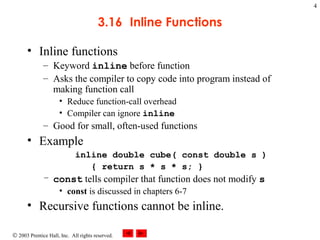
3.16 Inline Functions
• Inline functions
– Keyword inline before function
– Asks the compiler to copy code into program instead of
making function call
• Reduce function-call overhead
• Compiler can ignore inline
– Good for small, often-used functions
• Example
inline double cube( const double s )
{ return s * s * s; }
– const tells compiler that function does not modify s
• const is discussed in chapters 6-7
• Recursive functions cannot be inline.
© 2003 Prentice Hall, Inc.
All rights reserved.
Outline
5
fig03_19.cpp
(1 of 2)
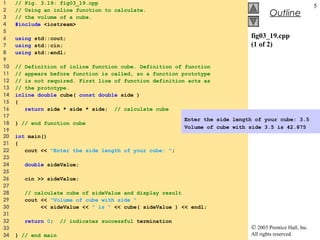
1 // Fig. 3.19: fig03_19.cpp
2 // Using an inline function to calculate.
3 // the volume of a cube.
4 #include <iostream>
5
6 using std::cout;
7 using std::cin;
8 using std::endl;
9
10 // Definition of inline function cube. Definition of function
11 // appears before function is called, so a function prototype
12 // is not required. First line of function definition acts as
13 // the prototype.
14 inline double cube( const double side )
15 {
16 return side * side * side; // calculate cube
17
18 } // end function cube
19
20 int main()
21 {
22 cout << "Enter the side length of your cube: ";
23
24 double sideValue;
25
26 cin >> sideValue;
27
28 // calculate cube of sideValue and display result
29 cout << "Volume of cube with side "
30 << sideValue << " is " << cube( sideValue ) << endl;
31
32 return 0; // indicates successful termination
33
34 } // end main
Enter the side length of your cube: 3.5
Volume of cube with side 3.5 is 42.875
© 2003 Prentice Hall, Inc. All rights reserved.
6
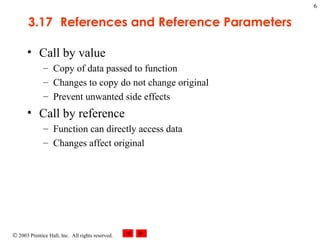
3.17 References and Reference Parameters
• Call by value
– Copy of data passed to function
– Changes to copy do not change original
– Prevent unwanted side effects
• Call by reference
– Function can directly access data
– Changes affect original
© 2003 Prentice Hall, Inc. All rights reserved.
7
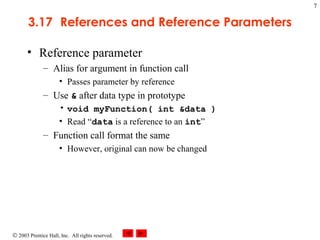
3.17 References and Reference Parameters
• Reference parameter
– Alias for argument in function call
• Passes parameter by reference
– Use & after data type in prototype
• void myFunction( int &data )
• Read “data is a reference to an int”
– Function call format the same
• However, original can now be changed
© 2003 Prentice Hall, Inc.
All rights reserved.
Outline
8
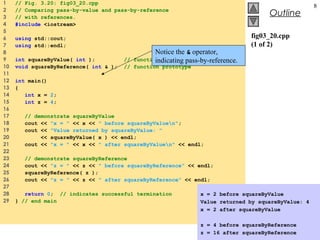
fig03_20.cpp
(1 of 2)
1 // Fig. 3.20: fig03_20.cpp
2 // Comparing pass-by-value and pass-by-reference
3 // with references.
4 #include <iostream>
5
6 using std::cout;
7 using std::endl;
8
9 int squareByValue( int ); // function prototype
10 void squareByReference( int & ); // function prototype
11
12 int main()
13 {
14 int x = 2;
15 int z = 4;
16
17 // demonstrate squareByValue
18 cout << "x = " << x << " before squareByValuen";
19 cout << "Value returned by squareByValue: "
20 << squareByValue( x ) << endl;
21 cout << "x = " << x << " after squareByValuen" << endl;
22
23 // demonstrate squareByReference
24 cout << "z = " << z << " before squareByReference" << endl;
25 squareByReference( z );
26 cout << "z = " << z << " after squareByReference" << endl;
27
28 return 0; // indicates successful termination
29 } // end main
Notice the & operator,
indicating pass-by-reference.
x = 2 before squareByValue
Value returned by squareByValue: 4
x = 2 after squareByValue
z = 4 before squareByReference
z = 16 after squareByReference
© 2003 Prentice Hall, Inc.
All rights reserved.
Outline
9
fig03_20.cpp
(2 of 2)
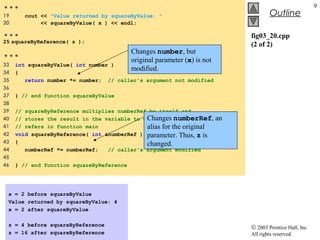
…
19 cout << "Value returned by squareByValue: "
20 << squareByValue( x ) << endl;
…25 squareByReference( z );
…
33 int squareByValue( int number )
34 {
35 return number *= number; // caller's argument not modified
36
37 } // end function squareByValue
38
39 // squareByReference multiplies numberRef by itself and
40 // stores the result in the variable to which numberRef
41 // refers in function main
42 void squareByReference( int &numberRef )
43 {
44 numberRef *= numberRef; // caller's argument modified
45
46 } // end function squareByReference
Changes number, but
original parameter (x) is not
modified.
Changes numberRef, an
alias for the original
parameter. Thus, z is
changed.
x = 2 before squareByValue
Value returned by squareByValue: 4
x = 2 after squareByValue
z = 4 before squareByReference
z = 16 after squareByReference
© 2003 Prentice Hall, Inc. All rights reserved.
10
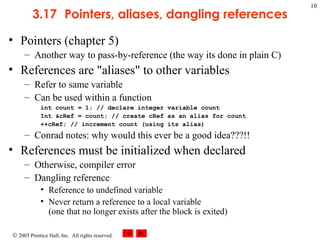
3.17 Pointers, aliases, dangling references
• Pointers (chapter 5)
– Another way to pass-by-reference (the way its done in plain C)
• References are "aliases" to other variables
– Refer to same variable
– Can be used within a function
int count = 1; // declare integer variable count
Int &cRef = count; // create cRef as an alias for count
++cRef; // increment count (using its alias)
– Conrad notes: why would this ever be a good idea???!!
• References must be initialized when declared
– Otherwise, compiler error
– Dangling reference
• Reference to undefined variable
• Never return a reference to a local variable
(one that no longer exists after the block is exited)
© 2003 Prentice Hall, Inc.
All rights reserved.
Outline
11
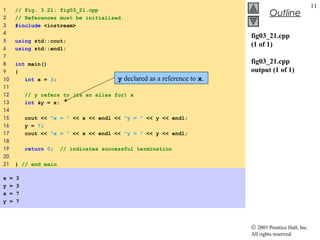
fig03_21.cpp
(1 of 1)
fig03_21.cpp
output (1 of 1)
1 // Fig. 3.21: fig03_21.cpp
2 // References must be initialized.
3 #include <iostream>
4
5 using std::cout;
6 using std::endl;
7
8 int main()
9 {
10 int x = 3;
11
12 // y refers to (is an alias for) x
13 int &y = x;
14
15 cout << "x = " << x << endl << "y = " << y << endl;
16 y = 7;
17 cout << "x = " << x << endl << "y = " << y << endl;
18
19 return 0; // indicates successful termination
20
21 } // end main
x = 3
y = 3
x = 7
y = 7
y declared as a reference to x.
© 2003 Prentice Hall, Inc.
All rights reserved.
Outline
12
fig03_22.cpp
(1 of 1)
fig03_22.cpp
output (1 of 1)
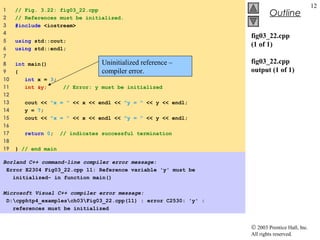
1 // Fig. 3.22: fig03_22.cpp
2 // References must be initialized.
3 #include <iostream>
4
5 using std::cout;
6 using std::endl;
7
8 int main()
9 {
10 int x = 3;
11 int &y; // Error: y must be initialized
12
13 cout << "x = " << x << endl << "y = " << y << endl;
14 y = 7;
15 cout << "x = " << x << endl << "y = " << y << endl;
16
17 return 0; // indicates successful termination
18
19 } // end main
Borland C++ command-line compiler error message:
Error E2304 Fig03_22.cpp 11: Reference variable 'y' must be
initialized- in function main()
Microsoft Visual C++ compiler error message:
D:cpphtp4_examplesch03Fig03_22.cpp(11) : error C2530: 'y' :
references must be initialized
Uninitialized reference –
compiler error.
© 2003 Prentice Hall, Inc. All rights reserved.
13
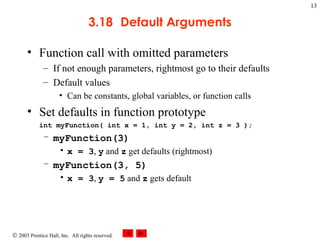
3.18 Default Arguments
• Function call with omitted parameters
– If not enough parameters, rightmost go to their defaults
– Default values
• Can be constants, global variables, or function calls
• Set defaults in function prototype
int myFunction( int x = 1, int y = 2, int z = 3 );
– myFunction(3)
• x = 3, y and z get defaults (rightmost)
– myFunction(3, 5)
• x = 3, y = 5 and z gets default
© 2003 Prentice Hall, Inc.
All rights reserved.
Outline
14
fig03_23.cpp
(1 of 2)
1 // Fig. 3.23: fig03_23.cpp
2 // Using default arguments.
3 #include <iostream>
4
5 using std::cout;
6 using std::endl;
7
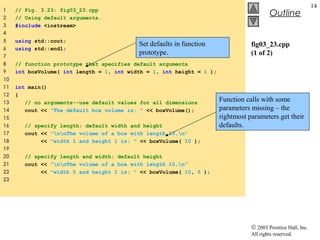
8 // function prototype that specifies default arguments
9 int boxVolume( int length = 1, int width = 1, int height = 1 );
10
11 int main()
12 {
13 // no arguments--use default values for all dimensions
14 cout << "The default box volume is: " << boxVolume();
15
16 // specify length; default width and height
17 cout << "nnThe volume of a box with length 10,n"
18 << "width 1 and height 1 is: " << boxVolume( 10 );
19
20 // specify length and width; default height
21 cout << "nnThe volume of a box with length 10,n"
22 << "width 5 and height 1 is: " << boxVolume( 10, 5 );
23
Set defaults in function
prototype.
Function calls with some
parameters missing – the
rightmost parameters get their
defaults.
© 2003 Prentice Hall, Inc.
All rights reserved.
Outline
15
fig03_23.cpp
(2 of 2)
fig03_23.cpp
output (1 of 1)
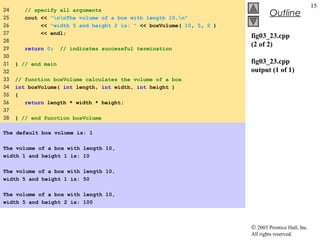
24 // specify all arguments
25 cout << "nnThe volume of a box with length 10,n"
26 << "width 5 and height 2 is: " << boxVolume( 10, 5, 2 )
27 << endl;
28
29 return 0; // indicates successful termination
30
31 } // end main
32
33 // function boxVolume calculates the volume of a box
34 int boxVolume( int length, int width, int height )
35 {
36 return length * width * height;
37
38 } // end function boxVolume
The default box volume is: 1
The volume of a box with length 10,
width 1 and height 1 is: 10
The volume of a box with length 10,
width 5 and height 1 is: 50
The volume of a box with length 10,
width 5 and height 2 is: 100
© 2003 Prentice Hall, Inc. All rights reserved.
16
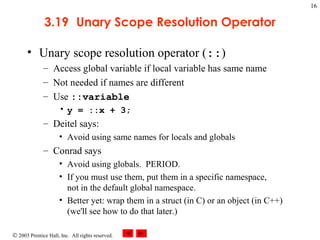
3.19 Unary Scope Resolution Operator
• Unary scope resolution operator (::)
– Access global variable if local variable has same name
– Not needed if names are different
– Use ::variable
• y = ::x + 3;
– Deitel says:
• Avoid using same names for locals and globals
– Conrad says
• Avoid using globals. PERIOD.
• If you must use them, put them in a specific namespace,
not in the default global namespace.
• Better yet: wrap them in a struct (in C) or an object (in C++)
(we'll see how to do that later.)
© 2003 Prentice Hall, Inc.
All rights reserved.
Outline
17
fig03_24.cpp
(1 of 2)
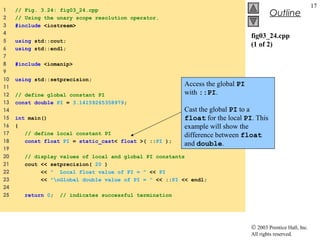
1 // Fig. 3.24: fig03_24.cpp
2 // Using the unary scope resolution operator.
3 #include <iostream>
4
5 using std::cout;
6 using std::endl;
7
8 #include <iomanip>
9
10 using std::setprecision;
11
12 // define global constant PI
13 const double PI = 3.14159265358979;
14
15 int main()
16 {
17 // define local constant PI
18 const float PI = static_cast< float >( ::PI );
19
20 // display values of local and global PI constants
21 cout << setprecision( 20 )
22 << " Local float value of PI = " << PI
23 << "nGlobal double value of PI = " << ::PI << endl;
24
25 return 0; // indicates successful termination
Access the global PI
with ::PI.
Cast the global PI to a
float for the local PI. This
example will show the
difference between float
and double.
© 2003 Prentice Hall, Inc.
All rights reserved.
Outline
18
fig03_24.cpp
(2 of 2)
fig03_24.cpp
output (1 of 1)
26
27 } // end main
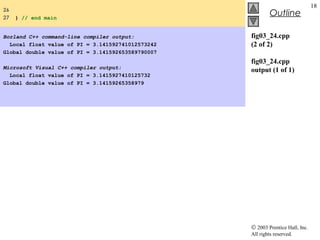
Borland C++ command-line compiler output:
Local float value of PI = 3.141592741012573242
Global double value of PI = 3.141592653589790007
Microsoft Visual C++ compiler output:
Local float value of PI = 3.1415927410125732
Global double value of PI = 3.14159265358979
© 2003 Prentice Hall, Inc. All rights reserved.
19
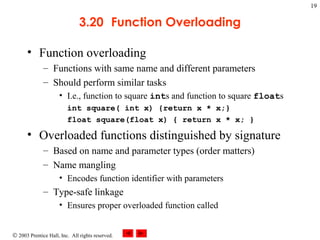
3.20 Function Overloading
• Function overloading
– Functions with same name and different parameters
– Should perform similar tasks
• I.e., function to square ints and function to square floats
int square( int x) {return x * x;}
float square(float x) { return x * x; }
• Overloaded functions distinguished by signature
– Based on name and parameter types (order matters)
– Name mangling
• Encodes function identifier with parameters
– Type-safe linkage
• Ensures proper overloaded function called
© 2003 Prentice Hall, Inc.
All rights reserved.
Outline
20
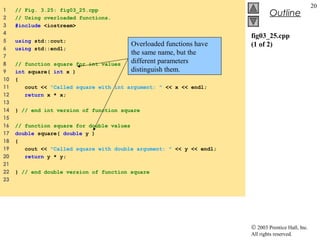
fig03_25.cpp
(1 of 2)
1 // Fig. 3.25: fig03_25.cpp
2 // Using overloaded functions.
3 #include <iostream>
4
5 using std::cout;
6 using std::endl;
7
8 // function square for int values
9 int square( int x )
10 {
11 cout << "Called square with int argument: " << x << endl;
12 return x * x;
13
14 } // end int version of function square
15
16 // function square for double values
17 double square( double y )
18 {
19 cout << "Called square with double argument: " << y << endl;
20 return y * y;
21
22 } // end double version of function square
23
Overloaded functions have
the same name, but the
different parameters
distinguish them.
© 2003 Prentice Hall, Inc.
All rights reserved.
Outline
21
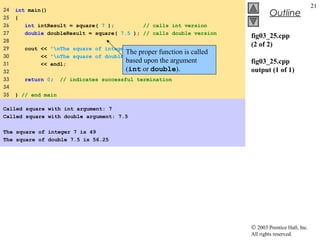
fig03_25.cpp
(2 of 2)
fig03_25.cpp
output (1 of 1)
24 int main()
25 {
26 int intResult = square( 7 ); // calls int version
27 double doubleResult = square( 7.5 ); // calls double version
28
29 cout << "nThe square of integer 7 is " << intResult
30 << "nThe square of double 7.5 is " << doubleResult
31 << endl;
32
33 return 0; // indicates successful termination
34
35 } // end main
Called square with int argument: 7
Called square with double argument: 7.5
The square of integer 7 is 49
The square of double 7.5 is 56.25
The proper function is called
based upon the argument
(int or double).
© 2003 Prentice Hall, Inc.
All rights reserved.
Outline
22
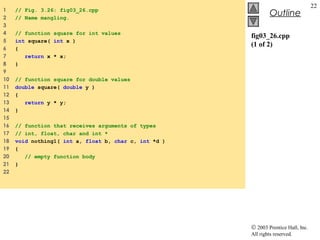
fig03_26.cpp
(1 of 2)
1 // Fig. 3.26: fig03_26.cpp
2 // Name mangling.
3
4 // function square for int values
5 int square( int x )
6 {
7 return x * x;
8 }
9
10 // function square for double values
11 double square( double y )
12 {
13 return y * y;
14 }
15
16 // function that receives arguments of types
17 // int, float, char and int *
18 void nothing1( int a, float b, char c, int *d )
19 {
20 // empty function body
21 }
22
© 2003 Prentice Hall, Inc.
All rights reserved.
Outline
23
fig03_26.cpp
(2 of 2)
fig03_26.cpp
output (1 of 1)
23 // function that receives arguments of types
24 // char, int, float * and double *
25 char *nothing2( char a, int b, float *c, double *d )
26 {
27 return 0;
28 }
29
30 int main()
31 {
32 return 0; // indicates successful termination
33
34 } // end main
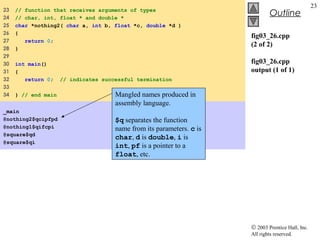
_main
@nothing2$qcipfpd
@nothing1$qifcpi
@square$qd
@square$qi
Mangled names produced in
assembly language.
$q separates the function
name from its parameters. c is
char, d is double, i is
int, pf is a pointer to a
float, etc.
© 2003 Prentice Hall, Inc. All rights reserved.
24
3.21 Function Templates
• Compact way to make overloaded functions
– Generate separate function for different data types
• Format
– Begin with keyword template
– Formal type parameters in brackets <>
• Every type parameter preceded by typename or class
(synonyms)
• Placeholders for built-in types (i.e., int) or user-defined types
• Specify arguments types, return types, declare variables
– Function definition like normal, except formal types used
© 2003 Prentice Hall, Inc. All rights reserved.
25
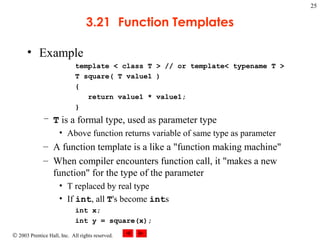
3.21 Function Templates
• Example
template < class T > // or template< typename T >
T square( T value1 )
{
return value1 * value1;
}
– T is a formal type, used as parameter type
• Above function returns variable of same type as parameter
– A function template is a like a "function making machine"
– When compiler encounters function call, it "makes a new
function" for the type of the parameter
• T replaced by real type
• If int, all T's become ints
int x;
int y = square(x);
© 2003 Prentice Hall, Inc.
All rights reserved.
Outline
26
fig03_27.cpp
(1 of 3)
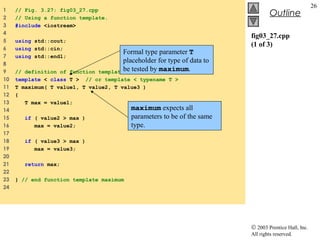
1 // Fig. 3.27: fig03_27.cpp
2 // Using a function template.
3 #include <iostream>
4
5 using std::cout;
6 using std::cin;
7 using std::endl;
8
9 // definition of function template maximum
10 template < class T > // or template < typename T >
11 T maximum( T value1, T value2, T value3 )
12 {
13 T max = value1;
14
15 if ( value2 > max )
16 max = value2;
17
18 if ( value3 > max )
19 max = value3;
20
21 return max;
22
23 } // end function template maximum
24
Formal type parameter T
placeholder for type of data to
be tested by maximum.
maximum expects all
parameters to be of the same
type.
© 2003 Prentice Hall, Inc.
All rights reserved.
Outline
27
fig03_27.cpp
(2 of 3)
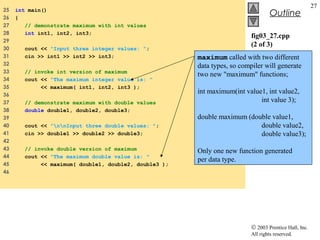
25 int main()
26 {
27 // demonstrate maximum with int values
28 int int1, int2, int3;
29
30 cout << "Input three integer values: ";
31 cin >> int1 >> int2 >> int3;
32
33 // invoke int version of maximum
34 cout << "The maximum integer value is: "
35 << maximum( int1, int2, int3 );
36
37 // demonstrate maximum with double values
38 double double1, double2, double3;
39
40 cout << "nnInput three double values: ";
41 cin >> double1 >> double2 >> double3;
42
43 // invoke double version of maximum
44 cout << "The maximum double value is: "
45 << maximum( double1, double2, double3 );
46
maximum called with two different
data types, so compiler will generate
two new "maximum" functions;
int maximum(int value1, int value2,
int value 3);
double maximum (double value1,
double value2,
double value3);
Only one new function generated
per data type.
© 2003 Prentice Hall, Inc.
All rights reserved.
Outline
28
fig03_27.cpp
(3 of 3)
fig03_27.cpp
output (1 of 1)
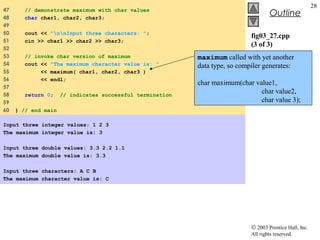
47 // demonstrate maximum with char values
48 char char1, char2, char3;
49
50 cout << "nnInput three characters: ";
51 cin >> char1 >> char2 >> char3;
52
53 // invoke char version of maximum
54 cout << "The maximum character value is: "
55 << maximum( char1, char2, char3 )
56 << endl;
57
58 return 0; // indicates successful termination
59
60 } // end main
Input three integer values: 1 2 3
The maximum integer value is: 3
Input three double values: 3.3 2.2 1.1
The maximum double value is: 3.3
Input three characters: A C B
The maximum character value is: C
maximum called with yet another
data type, so compiler generates:
char maximum(char value1,
char value2,
char value 3);

Dd3.15 thru-3.21-advanced-functions

  • 1.
    © 2003 PrenticeHall, Inc. All rights reserved. 1 Chapter 3 - Functions Outline 3.15 Functions with Empty Parameter Lists 3.16 Inline Functions 3.17 References and Reference Parameters 3.18 Default Arguments 3.19 Unary Scope Resolution Operator 3.20 Function Overloading 3.21 Function Templates
  • 2.
    © 2003 PrenticeHall, Inc. All rights reserved. 2 3.15 Functions with Empty Parameter Lists • Empty parameter lists – void or leave parameter list empty – Indicates function takes no arguments – Function print takes no arguments and returns no value • void print(); • void print( void ); • When would you use? – A function that prints out a long list of instructions to the user, e.g. void printWelcomeMessage(void) void printHelpText(void)
  • 3.
    © 2003 PrenticeHall, Inc. All rights reserved. Outline 3 fig03_18.cpp (1 of 2) 1 // Fig. 3.18: fig03_18.cpp 2 // Functions that take no arguments. 3 #include <iostream> 4 5 using std::cout; 6 using std::endl; 7 8 void function1(); // function prototype 9 void function2( void ); // function prototype 10 11 int main() 12 { 13 function1(); // call function1 with no arguments 14 function2(); // call function2 with no arguments 15 16 return 0; // indicates successful termination 17 18 } // end main 19 20 // function1 uses an empty parameter list to specify that 21 // the function receives no arguments 22 void function1() 23 { 24 cout << "function1 takes no arguments" << endl; 25 26 } // end function1 27 28 // function2 uses a void parameter list to specify that 29 // the function receives no arguments 30 void function2( void ) 31 { 32 cout << "function2 also takes no arguments" << endl; 33 34 } // end function2 function1 takes no arguments function2 also takes no arguments
  • 4.
    © 2003 PrenticeHall, Inc. All rights reserved. 4 3.16 Inline Functions • Inline functions – Keyword inline before function – Asks the compiler to copy code into program instead of making function call • Reduce function-call overhead • Compiler can ignore inline – Good for small, often-used functions • Example inline double cube( const double s ) { return s * s * s; } – const tells compiler that function does not modify s • const is discussed in chapters 6-7 • Recursive functions cannot be inline.
  • 5.
    © 2003 PrenticeHall, Inc. All rights reserved. Outline 5 fig03_19.cpp (1 of 2) 1 // Fig. 3.19: fig03_19.cpp 2 // Using an inline function to calculate. 3 // the volume of a cube. 4 #include <iostream> 5 6 using std::cout; 7 using std::cin; 8 using std::endl; 9 10 // Definition of inline function cube. Definition of function 11 // appears before function is called, so a function prototype 12 // is not required. First line of function definition acts as 13 // the prototype. 14 inline double cube( const double side ) 15 { 16 return side * side * side; // calculate cube 17 18 } // end function cube 19 20 int main() 21 { 22 cout << "Enter the side length of your cube: "; 23 24 double sideValue; 25 26 cin >> sideValue; 27 28 // calculate cube of sideValue and display result 29 cout << "Volume of cube with side " 30 << sideValue << " is " << cube( sideValue ) << endl; 31 32 return 0; // indicates successful termination 33 34 } // end main Enter the side length of your cube: 3.5 Volume of cube with side 3.5 is 42.875
  • 6.
    © 2003 PrenticeHall, Inc. All rights reserved. 6 3.17 References and Reference Parameters • Call by value – Copy of data passed to function – Changes to copy do not change original – Prevent unwanted side effects • Call by reference – Function can directly access data – Changes affect original
  • 7.
    © 2003 PrenticeHall, Inc. All rights reserved. 7 3.17 References and Reference Parameters • Reference parameter – Alias for argument in function call • Passes parameter by reference – Use & after data type in prototype • void myFunction( int &data ) • Read “data is a reference to an int” – Function call format the same • However, original can now be changed
  • 8.
    © 2003 PrenticeHall, Inc. All rights reserved. Outline 8 fig03_20.cpp (1 of 2) 1 // Fig. 3.20: fig03_20.cpp 2 // Comparing pass-by-value and pass-by-reference 3 // with references. 4 #include <iostream> 5 6 using std::cout; 7 using std::endl; 8 9 int squareByValue( int ); // function prototype 10 void squareByReference( int & ); // function prototype 11 12 int main() 13 { 14 int x = 2; 15 int z = 4; 16 17 // demonstrate squareByValue 18 cout << "x = " << x << " before squareByValuen"; 19 cout << "Value returned by squareByValue: " 20 << squareByValue( x ) << endl; 21 cout << "x = " << x << " after squareByValuen" << endl; 22 23 // demonstrate squareByReference 24 cout << "z = " << z << " before squareByReference" << endl; 25 squareByReference( z ); 26 cout << "z = " << z << " after squareByReference" << endl; 27 28 return 0; // indicates successful termination 29 } // end main Notice the & operator, indicating pass-by-reference. x = 2 before squareByValue Value returned by squareByValue: 4 x = 2 after squareByValue z = 4 before squareByReference z = 16 after squareByReference
  • 9.
    © 2003 PrenticeHall, Inc. All rights reserved. Outline 9 fig03_20.cpp (2 of 2) … 19 cout << "Value returned by squareByValue: " 20 << squareByValue( x ) << endl; …25 squareByReference( z ); … 33 int squareByValue( int number ) 34 { 35 return number *= number; // caller's argument not modified 36 37 } // end function squareByValue 38 39 // squareByReference multiplies numberRef by itself and 40 // stores the result in the variable to which numberRef 41 // refers in function main 42 void squareByReference( int &numberRef ) 43 { 44 numberRef *= numberRef; // caller's argument modified 45 46 } // end function squareByReference Changes number, but original parameter (x) is not modified. Changes numberRef, an alias for the original parameter. Thus, z is changed. x = 2 before squareByValue Value returned by squareByValue: 4 x = 2 after squareByValue z = 4 before squareByReference z = 16 after squareByReference
  • 10.
    © 2003 PrenticeHall, Inc. All rights reserved. 10 3.17 Pointers, aliases, dangling references • Pointers (chapter 5) – Another way to pass-by-reference (the way its done in plain C) • References are "aliases" to other variables – Refer to same variable – Can be used within a function int count = 1; // declare integer variable count Int &cRef = count; // create cRef as an alias for count ++cRef; // increment count (using its alias) – Conrad notes: why would this ever be a good idea???!! • References must be initialized when declared – Otherwise, compiler error – Dangling reference • Reference to undefined variable • Never return a reference to a local variable (one that no longer exists after the block is exited)
  • 11.
    © 2003 PrenticeHall, Inc. All rights reserved. Outline 11 fig03_21.cpp (1 of 1) fig03_21.cpp output (1 of 1) 1 // Fig. 3.21: fig03_21.cpp 2 // References must be initialized. 3 #include <iostream> 4 5 using std::cout; 6 using std::endl; 7 8 int main() 9 { 10 int x = 3; 11 12 // y refers to (is an alias for) x 13 int &y = x; 14 15 cout << "x = " << x << endl << "y = " << y << endl; 16 y = 7; 17 cout << "x = " << x << endl << "y = " << y << endl; 18 19 return 0; // indicates successful termination 20 21 } // end main x = 3 y = 3 x = 7 y = 7 y declared as a reference to x.
  • 12.
    © 2003 PrenticeHall, Inc. All rights reserved. Outline 12 fig03_22.cpp (1 of 1) fig03_22.cpp output (1 of 1) 1 // Fig. 3.22: fig03_22.cpp 2 // References must be initialized. 3 #include <iostream> 4 5 using std::cout; 6 using std::endl; 7 8 int main() 9 { 10 int x = 3; 11 int &y; // Error: y must be initialized 12 13 cout << "x = " << x << endl << "y = " << y << endl; 14 y = 7; 15 cout << "x = " << x << endl << "y = " << y << endl; 16 17 return 0; // indicates successful termination 18 19 } // end main Borland C++ command-line compiler error message: Error E2304 Fig03_22.cpp 11: Reference variable 'y' must be initialized- in function main() Microsoft Visual C++ compiler error message: D:cpphtp4_examplesch03Fig03_22.cpp(11) : error C2530: 'y' : references must be initialized Uninitialized reference – compiler error.
  • 13.
    © 2003 PrenticeHall, Inc. All rights reserved. 13 3.18 Default Arguments • Function call with omitted parameters – If not enough parameters, rightmost go to their defaults – Default values • Can be constants, global variables, or function calls • Set defaults in function prototype int myFunction( int x = 1, int y = 2, int z = 3 ); – myFunction(3) • x = 3, y and z get defaults (rightmost) – myFunction(3, 5) • x = 3, y = 5 and z gets default
  • 14.
    © 2003 PrenticeHall, Inc. All rights reserved. Outline 14 fig03_23.cpp (1 of 2) 1 // Fig. 3.23: fig03_23.cpp 2 // Using default arguments. 3 #include <iostream> 4 5 using std::cout; 6 using std::endl; 7 8 // function prototype that specifies default arguments 9 int boxVolume( int length = 1, int width = 1, int height = 1 ); 10 11 int main() 12 { 13 // no arguments--use default values for all dimensions 14 cout << "The default box volume is: " << boxVolume(); 15 16 // specify length; default width and height 17 cout << "nnThe volume of a box with length 10,n" 18 << "width 1 and height 1 is: " << boxVolume( 10 ); 19 20 // specify length and width; default height 21 cout << "nnThe volume of a box with length 10,n" 22 << "width 5 and height 1 is: " << boxVolume( 10, 5 ); 23 Set defaults in function prototype. Function calls with some parameters missing – the rightmost parameters get their defaults.
  • 15.
    © 2003 PrenticeHall, Inc. All rights reserved. Outline 15 fig03_23.cpp (2 of 2) fig03_23.cpp output (1 of 1) 24 // specify all arguments 25 cout << "nnThe volume of a box with length 10,n" 26 << "width 5 and height 2 is: " << boxVolume( 10, 5, 2 ) 27 << endl; 28 29 return 0; // indicates successful termination 30 31 } // end main 32 33 // function boxVolume calculates the volume of a box 34 int boxVolume( int length, int width, int height ) 35 { 36 return length * width * height; 37 38 } // end function boxVolume The default box volume is: 1 The volume of a box with length 10, width 1 and height 1 is: 10 The volume of a box with length 10, width 5 and height 1 is: 50 The volume of a box with length 10, width 5 and height 2 is: 100
  • 16.
    © 2003 PrenticeHall, Inc. All rights reserved. 16 3.19 Unary Scope Resolution Operator • Unary scope resolution operator (::) – Access global variable if local variable has same name – Not needed if names are different – Use ::variable • y = ::x + 3; – Deitel says: • Avoid using same names for locals and globals – Conrad says • Avoid using globals. PERIOD. • If you must use them, put them in a specific namespace, not in the default global namespace. • Better yet: wrap them in a struct (in C) or an object (in C++) (we'll see how to do that later.)
  • 17.
    © 2003 PrenticeHall, Inc. All rights reserved. Outline 17 fig03_24.cpp (1 of 2) 1 // Fig. 3.24: fig03_24.cpp 2 // Using the unary scope resolution operator. 3 #include <iostream> 4 5 using std::cout; 6 using std::endl; 7 8 #include <iomanip> 9 10 using std::setprecision; 11 12 // define global constant PI 13 const double PI = 3.14159265358979; 14 15 int main() 16 { 17 // define local constant PI 18 const float PI = static_cast< float >( ::PI ); 19 20 // display values of local and global PI constants 21 cout << setprecision( 20 ) 22 << " Local float value of PI = " << PI 23 << "nGlobal double value of PI = " << ::PI << endl; 24 25 return 0; // indicates successful termination Access the global PI with ::PI. Cast the global PI to a float for the local PI. This example will show the difference between float and double.
  • 18.
    © 2003 PrenticeHall, Inc. All rights reserved. Outline 18 fig03_24.cpp (2 of 2) fig03_24.cpp output (1 of 1) 26 27 } // end main Borland C++ command-line compiler output: Local float value of PI = 3.141592741012573242 Global double value of PI = 3.141592653589790007 Microsoft Visual C++ compiler output: Local float value of PI = 3.1415927410125732 Global double value of PI = 3.14159265358979
  • 19.
    © 2003 PrenticeHall, Inc. All rights reserved. 19 3.20 Function Overloading • Function overloading – Functions with same name and different parameters – Should perform similar tasks • I.e., function to square ints and function to square floats int square( int x) {return x * x;} float square(float x) { return x * x; } • Overloaded functions distinguished by signature – Based on name and parameter types (order matters) – Name mangling • Encodes function identifier with parameters – Type-safe linkage • Ensures proper overloaded function called
  • 20.
    © 2003 PrenticeHall, Inc. All rights reserved. Outline 20 fig03_25.cpp (1 of 2) 1 // Fig. 3.25: fig03_25.cpp 2 // Using overloaded functions. 3 #include <iostream> 4 5 using std::cout; 6 using std::endl; 7 8 // function square for int values 9 int square( int x ) 10 { 11 cout << "Called square with int argument: " << x << endl; 12 return x * x; 13 14 } // end int version of function square 15 16 // function square for double values 17 double square( double y ) 18 { 19 cout << "Called square with double argument: " << y << endl; 20 return y * y; 21 22 } // end double version of function square 23 Overloaded functions have the same name, but the different parameters distinguish them.
  • 21.
    © 2003 PrenticeHall, Inc. All rights reserved. Outline 21 fig03_25.cpp (2 of 2) fig03_25.cpp output (1 of 1) 24 int main() 25 { 26 int intResult = square( 7 ); // calls int version 27 double doubleResult = square( 7.5 ); // calls double version 28 29 cout << "nThe square of integer 7 is " << intResult 30 << "nThe square of double 7.5 is " << doubleResult 31 << endl; 32 33 return 0; // indicates successful termination 34 35 } // end main Called square with int argument: 7 Called square with double argument: 7.5 The square of integer 7 is 49 The square of double 7.5 is 56.25 The proper function is called based upon the argument (int or double).
  • 22.
    © 2003 PrenticeHall, Inc. All rights reserved. Outline 22 fig03_26.cpp (1 of 2) 1 // Fig. 3.26: fig03_26.cpp 2 // Name mangling. 3 4 // function square for int values 5 int square( int x ) 6 { 7 return x * x; 8 } 9 10 // function square for double values 11 double square( double y ) 12 { 13 return y * y; 14 } 15 16 // function that receives arguments of types 17 // int, float, char and int * 18 void nothing1( int a, float b, char c, int *d ) 19 { 20 // empty function body 21 } 22
  • 23.
    © 2003 PrenticeHall, Inc. All rights reserved. Outline 23 fig03_26.cpp (2 of 2) fig03_26.cpp output (1 of 1) 23 // function that receives arguments of types 24 // char, int, float * and double * 25 char *nothing2( char a, int b, float *c, double *d ) 26 { 27 return 0; 28 } 29 30 int main() 31 { 32 return 0; // indicates successful termination 33 34 } // end main _main @nothing2$qcipfpd @nothing1$qifcpi @square$qd @square$qi Mangled names produced in assembly language. $q separates the function name from its parameters. c is char, d is double, i is int, pf is a pointer to a float, etc.
  • 24.
    © 2003 PrenticeHall, Inc. All rights reserved. 24 3.21 Function Templates • Compact way to make overloaded functions – Generate separate function for different data types • Format – Begin with keyword template – Formal type parameters in brackets <> • Every type parameter preceded by typename or class (synonyms) • Placeholders for built-in types (i.e., int) or user-defined types • Specify arguments types, return types, declare variables – Function definition like normal, except formal types used
  • 25.
    © 2003 PrenticeHall, Inc. All rights reserved. 25 3.21 Function Templates • Example template < class T > // or template< typename T > T square( T value1 ) { return value1 * value1; } – T is a formal type, used as parameter type • Above function returns variable of same type as parameter – A function template is a like a "function making machine" – When compiler encounters function call, it "makes a new function" for the type of the parameter • T replaced by real type • If int, all T's become ints int x; int y = square(x);
  • 26.
    © 2003 PrenticeHall, Inc. All rights reserved. Outline 26 fig03_27.cpp (1 of 3) 1 // Fig. 3.27: fig03_27.cpp 2 // Using a function template. 3 #include <iostream> 4 5 using std::cout; 6 using std::cin; 7 using std::endl; 8 9 // definition of function template maximum 10 template < class T > // or template < typename T > 11 T maximum( T value1, T value2, T value3 ) 12 { 13 T max = value1; 14 15 if ( value2 > max ) 16 max = value2; 17 18 if ( value3 > max ) 19 max = value3; 20 21 return max; 22 23 } // end function template maximum 24 Formal type parameter T placeholder for type of data to be tested by maximum. maximum expects all parameters to be of the same type.
  • 27.
    © 2003 PrenticeHall, Inc. All rights reserved. Outline 27 fig03_27.cpp (2 of 3) 25 int main() 26 { 27 // demonstrate maximum with int values 28 int int1, int2, int3; 29 30 cout << "Input three integer values: "; 31 cin >> int1 >> int2 >> int3; 32 33 // invoke int version of maximum 34 cout << "The maximum integer value is: " 35 << maximum( int1, int2, int3 ); 36 37 // demonstrate maximum with double values 38 double double1, double2, double3; 39 40 cout << "nnInput three double values: "; 41 cin >> double1 >> double2 >> double3; 42 43 // invoke double version of maximum 44 cout << "The maximum double value is: " 45 << maximum( double1, double2, double3 ); 46 maximum called with two different data types, so compiler will generate two new "maximum" functions; int maximum(int value1, int value2, int value 3); double maximum (double value1, double value2, double value3); Only one new function generated per data type.
  • 28.
    © 2003 PrenticeHall, Inc. All rights reserved. Outline 28 fig03_27.cpp (3 of 3) fig03_27.cpp output (1 of 1) 47 // demonstrate maximum with char values 48 char char1, char2, char3; 49 50 cout << "nnInput three characters: "; 51 cin >> char1 >> char2 >> char3; 52 53 // invoke char version of maximum 54 cout << "The maximum character value is: " 55 << maximum( char1, char2, char3 ) 56 << endl; 57 58 return 0; // indicates successful termination 59 60 } // end main Input three integer values: 1 2 3 The maximum integer value is: 3 Input three double values: 3.3 2.2 1.1 The maximum double value is: 3.3 Input three characters: A C B The maximum character value is: C maximum called with yet another data type, so compiler generates: char maximum(char value1, char value2, char value 3);