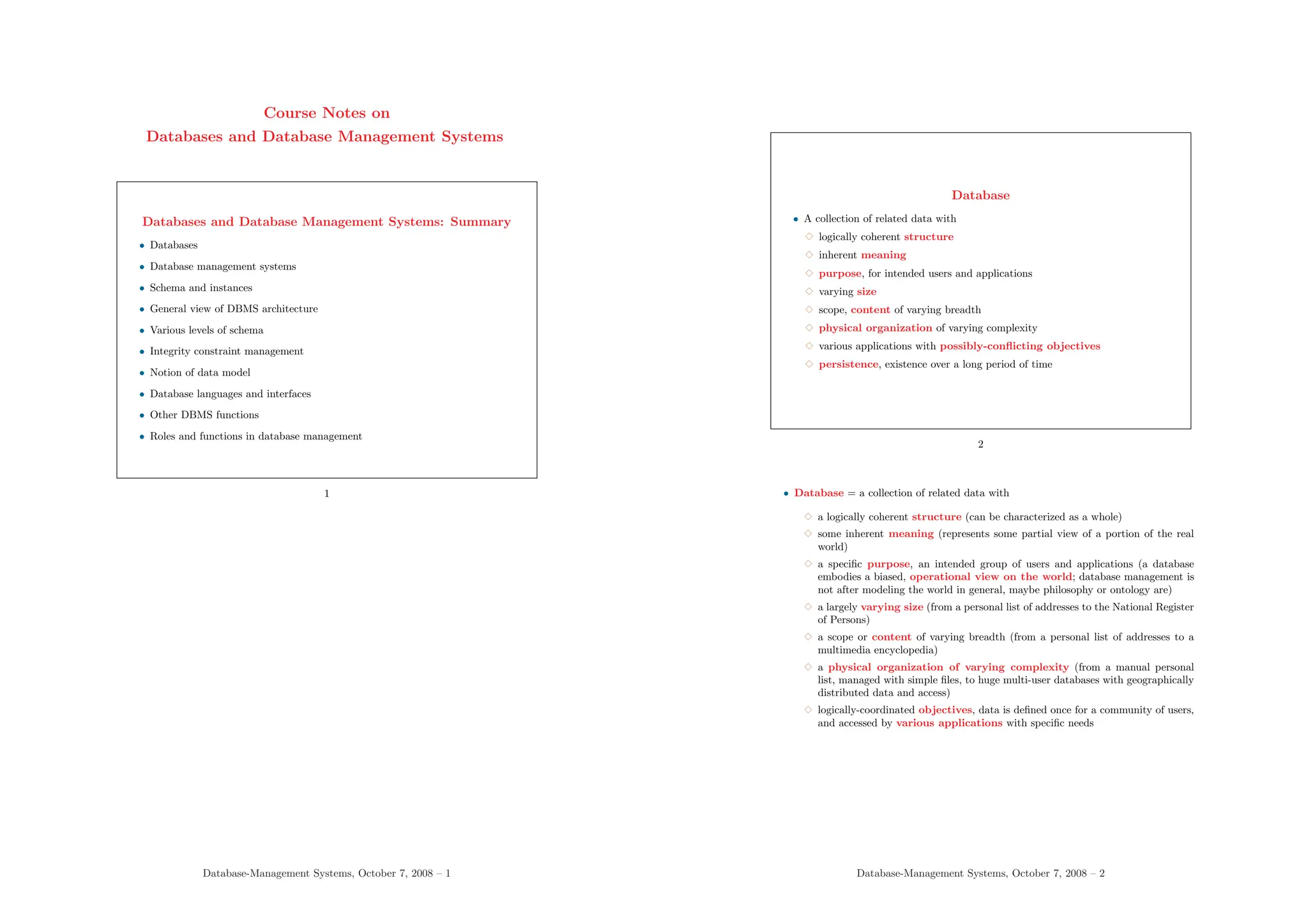
Course Notes on
Databases and Database Management Systems
Databases and Database Management Systems: Summary
• Databases
• Database management systems
• Schema and instances
• General view of DBMS architecture
• Various levels of schema
• Integrity constraint management
• Notion of data model
• Database languages and interfaces
• Other DBMS functions
• Roles and functions in database management
1
Database-Management Systems, October 7, 2008 – 1
Database
• A collection of related data with
3 logically coherent structure
3 inherent meaning
3 purpose, for intended users and applications
3 varying size
3 scope, content of varying breadth
3 physical organization of varying complexity
3 various applications with possibly-conflicting objectives
3 persistence, existence over a long period of time
2
• Database = a collection of related data with
3 a logically coherent structure (can be characterized as a whole)
3 some inherent meaning (represents some partial view of a portion of the real
world)
3 a specific purpose, an intended group of users and applications (a database
embodies a biased, operational view on the world; database management is
not after modeling the world in general, maybe philosophy or ontology are)
3 a largely varying size (from a personal list of addresses to the National Register
of Persons)
3 a scope or content of varying breadth (from a personal list of addresses to a
multimedia encyclopedia)
3 a physical organization of varying complexity (from a manual personal
list, managed with simple files, to huge multi-user databases with geographically
distributed data and access)
3 logically-coordinated objectives, data is defined once for a community of users,
and accessed by various applications with specific needs
Database-Management Systems, October 7, 2008 – 2
Database Management Systems (DBMSs)
• DBMS: a collection of general-purpose, application-independent programs
providing services to
3 define the structure of a database, i.e., data types and constraints that
the data will have to satisfy
3 manage the storage of data, safely for long periods of time, on some storage
medium controled by the DBMS
3 manipulate a database, with efficient user interfaces to query the database
to retrieve specific data, update the database to reflect changes in the world,
generate reports from the data
3 manage database usage: users with their access rights, performance op-
timization, sharing of data among several users, security from accidents or
unauthorized use
3 monitor and analyze database usage
3
• DBMS have similarities with operating systems: both manage memory, process schedul-
ing, I/O, communication
• In addition, DBMSs implement many data-management functions
• Other name for DBMS: database system, database manager
• DBMSs typically do not use the file system of the operating system of the machine
where they are installed. Instead, the define their own richer file organizations and
access methods
Database-Management Systems, October 7, 2008 – 3
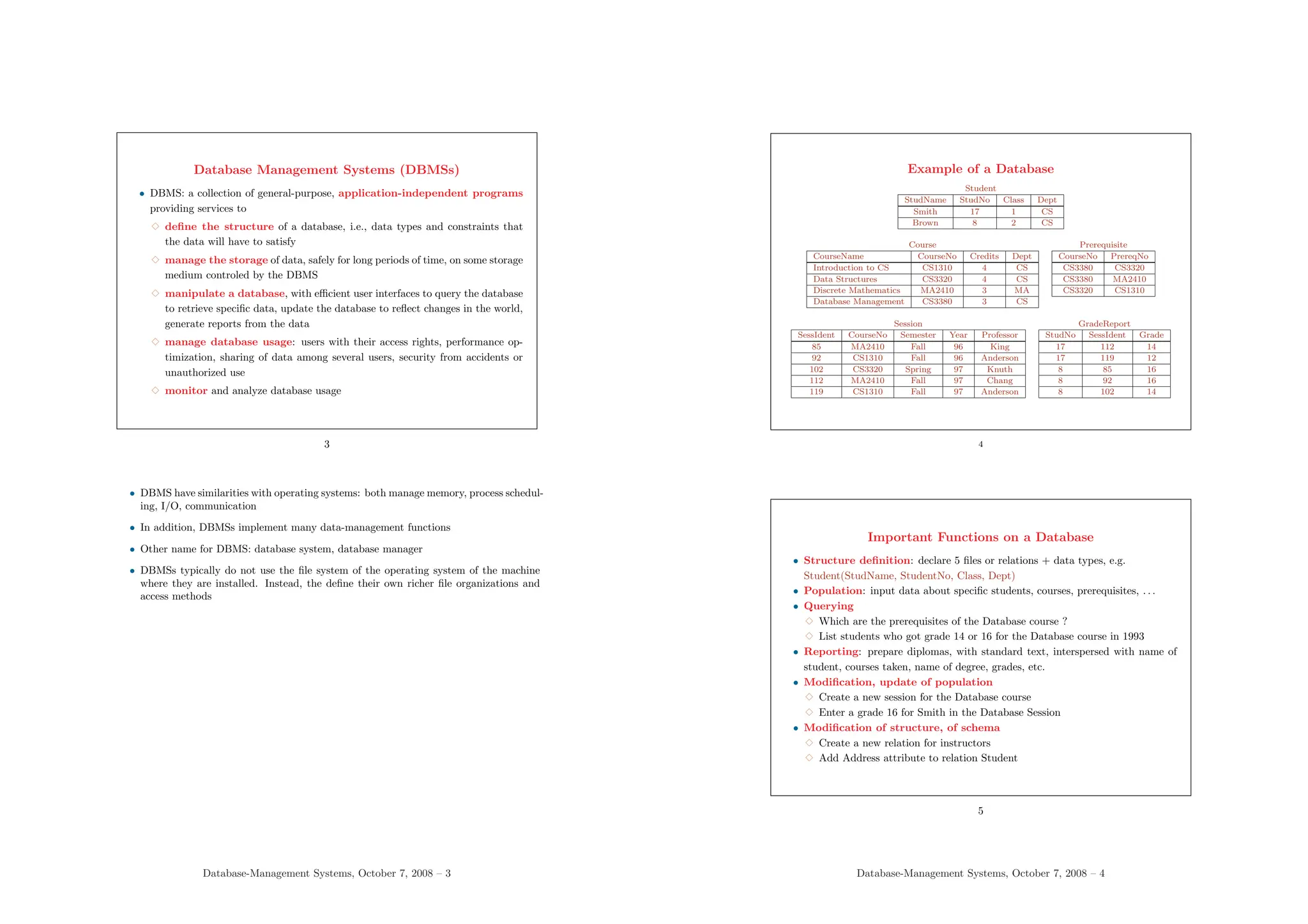
Example of a Database
Student
StudName StudNo Class Dept
Smith 17 1 CS
Brown 8 2 CS
Course
CourseName CourseNo Credits Dept
Introduction to CS CS1310 4 CS
Data Structures CS3320 4 CS
Discrete Mathematics MA2410 3 MA
Database Management CS3380 3 CS
Prerequisite
CourseNo PrereqNo
CS3380 CS3320
CS3380 MA2410
CS3320 CS1310
Session
SessIdent CourseNo Semester Year Professor
85 MA2410 Fall 96 King
92 CS1310 Fall 96 Anderson
102 CS3320 Spring 97 Knuth
112 MA2410 Fall 97 Chang
119 CS1310 Fall 97 Anderson
GradeReport
StudNo SessIdent Grade
17 112 14
17 119 12
8 85 16
8 92 16
8 102 14
4
Important Functions on a Database
• Structure definition: declare 5 files or relations + data types, e.g.
Student(StudName, StudentNo, Class, Dept)
• Population: input data about specific students, courses, prerequisites, . . .
• Querying
3 Which are the prerequisites of the Database course ?
3 List students who got grade 14 or 16 for the Database course in 1993
• Reporting: prepare diplomas, with standard text, interspersed with name of
student, courses taken, name of degree, grades, etc.
• Modification, update of population
3 Create a new session for the Database course
3 Enter a grade 16 for Smith in the Database Session
• Modification of structure, of schema
3 Create a new relation for instructors
3 Add Address attribute to relation Student
5
Database-Management Systems, October 7, 2008 – 4
Transient and Persistent Data
• In practice, information systems often require persistent data
• Data: relevant facts about the domain of interest
3 persistent: continues to exist even when the system is not active
3 transient: created while an application is running and not needed when the
application has terminated
• Persistent data must be stored in secondary memory (not just in computer mem-
ory) and organized to be made available to several applications
6
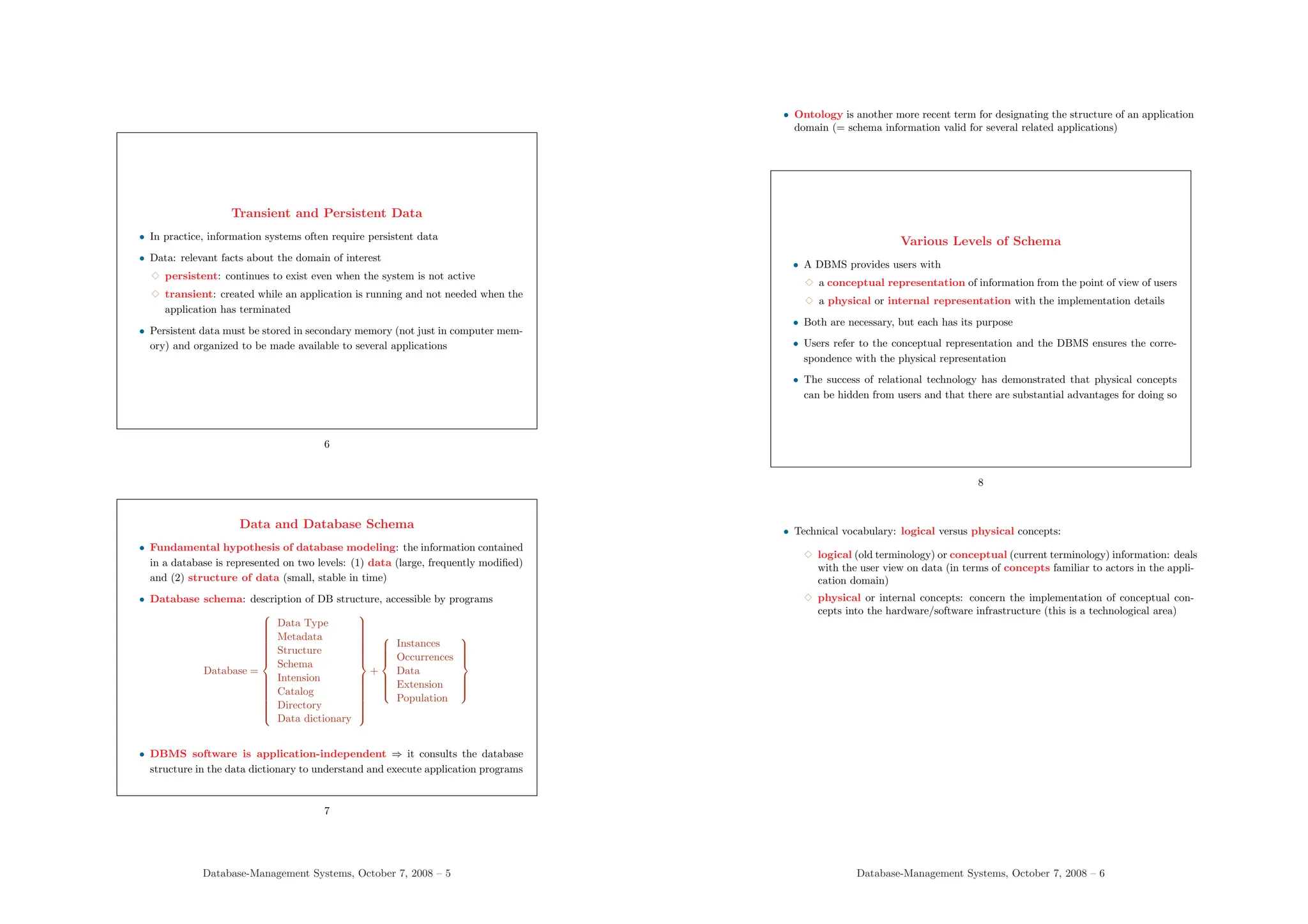
Data and Database Schema
• Fundamental hypothesis of database modeling: the information contained
in a database is represented on two levels: (1) data (large, frequently modified)
and (2) structure of data (small, stable in time)
• Database schema: description of DB structure, accessible by programs
Database =

























Data Type
Metadata
Structure
Schema
Intension
Catalog
Directory
Data dictionary

























+











Instances
Occurrences
Data
Extension
Population











• DBMS software is application-independent ⇒ it consults the database
structure in the data dictionary to understand and execute application programs
7
Database-Management Systems, October 7, 2008 – 5
• Ontology is another more recent term for designating the structure of an application
domain (= schema information valid for several related applications)
Various Levels of Schema
• A DBMS provides users with
3 a conceptual representation of information from the point of view of users
3 a physical or internal representation with the implementation details
• Both are necessary, but each has its purpose
• Users refer to the conceptual representation and the DBMS ensures the corre-
spondence with the physical representation
• The success of relational technology has demonstrated that physical concepts
can be hidden from users and that there are substantial advantages for doing so
8
• Technical vocabulary: logical versus physical concepts:
3 logical (old terminology) or conceptual (current terminology) information: deals
with the user view on data (in terms of concepts familiar to actors in the appli-
cation domain)
3 physical or internal concepts: concern the implementation of conceptual con-
cepts into the hardware/software infrastructure (this is a technological area)
Database-Management Systems, October 7, 2008 – 6
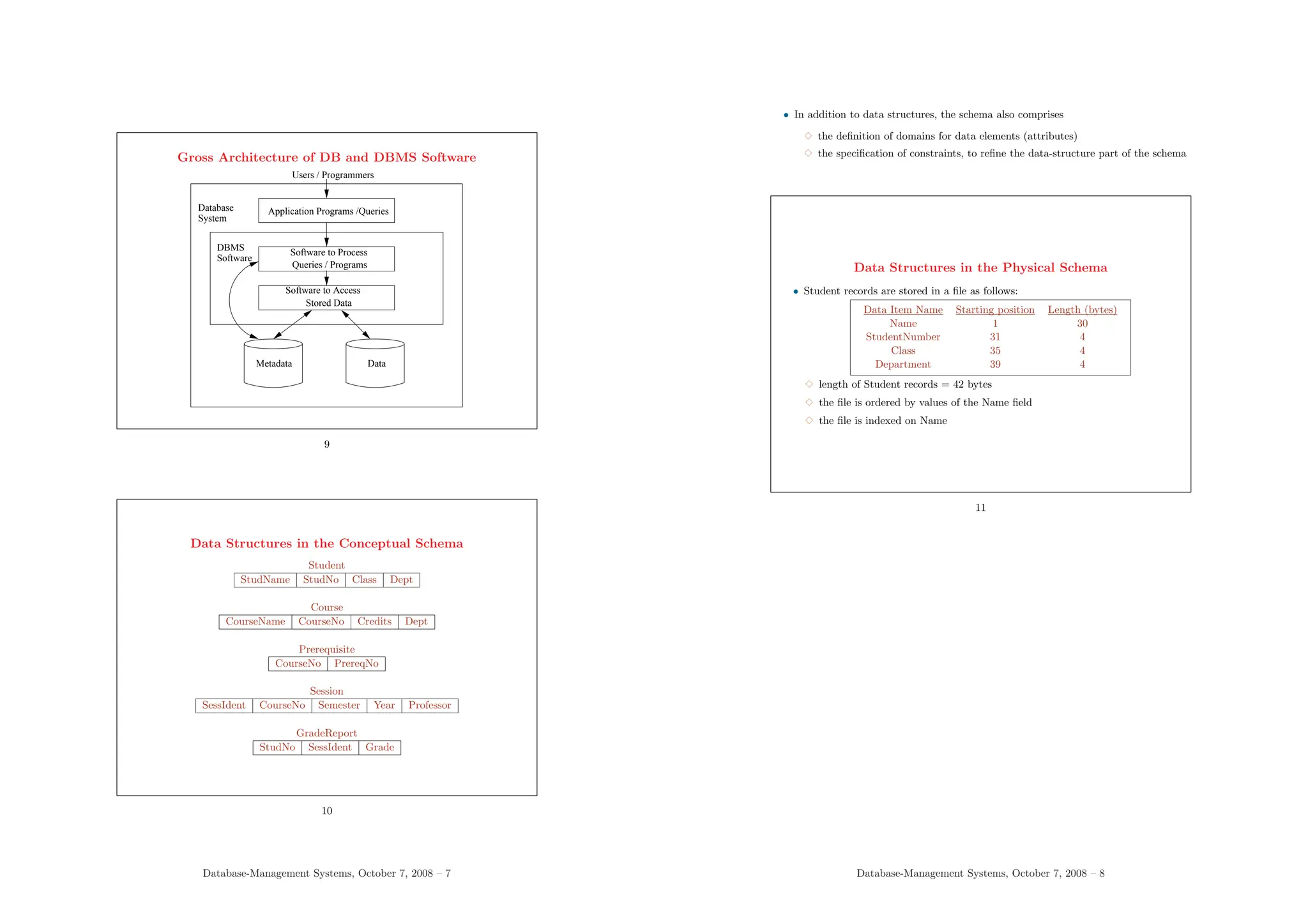
Gross Architecture of DB and DBMS Software
Metadata
Software
DBMS Software to Process
Queries / Programs
Software to Access
Stored Data
System
Database Application Programs /Queries
Users / Programmers
Data
9
Data Structures in the Conceptual Schema
Student
StudName StudNo Class Dept
Course
CourseName CourseNo Credits Dept
Prerequisite
CourseNo PrereqNo
Session
SessIdent CourseNo Semester Year Professor
GradeReport
StudNo SessIdent Grade
10
Database-Management Systems, October 7, 2008 – 7
• In addition to data structures, the schema also comprises
3 the definition of domains for data elements (attributes)
3 the specification of constraints, to refine the data-structure part of the schema
Data Structures in the Physical Schema
• Student records are stored in a file as follows:
Data Item Name Starting position Length (bytes)
Name 1 30
StudentNumber 31 4
Class 35 4
Department 39 4
3 length of Student records = 42 bytes
3 the file is ordered by values of the Name field
3 the file is indexed on Name
11
Database-Management Systems, October 7, 2008 – 8
Support of External Views
• A single database usually serves the needs of a community of users ⇒ different
perspectives or views on the same data are often natural
• View: some subset of the database or some restructuring of the database suited
for an application
• Views are redundant with the basic definition of the database (they may or may
not be stored explicitly, this is an efficiency issue)
• DBMS takes care of the correspondence between views and database data
• View definitions are part of the database schema
• Other terms for view: subschema, external schema, derived relation
12
More on Views
• Relations in a database comprise base relations and views (users do not necessarily
have to know which is which)
• Applications access the database through views, without necessarily knowing about
the whole database
• Views may be
3 queried
3 combined in queries with base relations
3 used to define other views
3 in general, NOT updated freely
Database-Management Systems, October 7, 2008 – 9
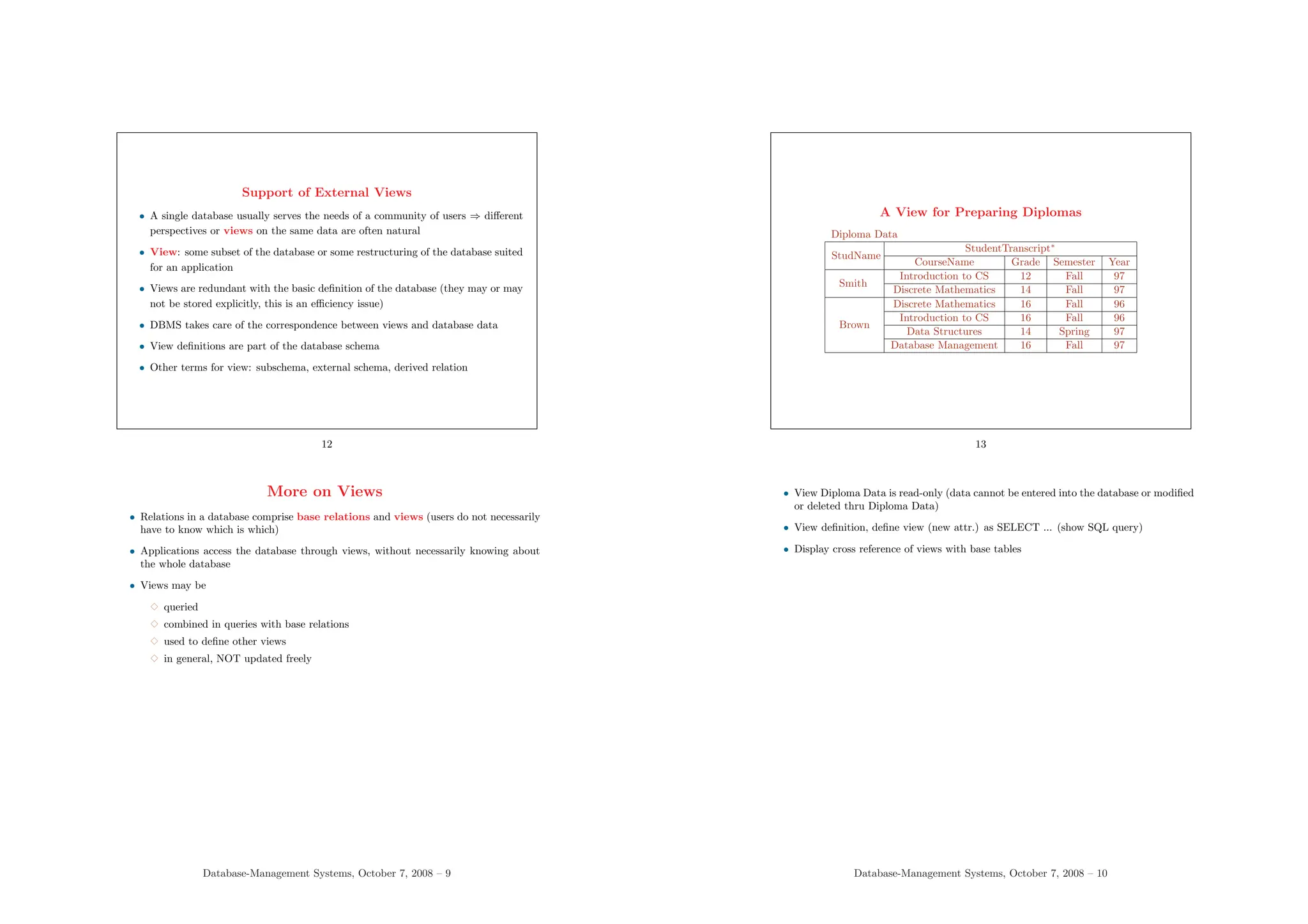
A View for Preparing Diplomas
Diploma Data
StudName
StudentTranscript∗
CourseName Grade Semester Year
Smith
Introduction to CS 12 Fall 97
Discrete Mathematics 14 Fall 97
Brown
Discrete Mathematics 16 Fall 96
Introduction to CS 16 Fall 96
Data Structures 14 Spring 97
Database Management 16 Fall 97
13
• View Diploma Data is read-only (data cannot be entered into the database or modified
or deleted thru Diploma Data)
• View definition, define view (new attr.) as SELECT ... (show SQL query)
• Display cross reference of views with base tables
Database-Management Systems, October 7, 2008 – 10
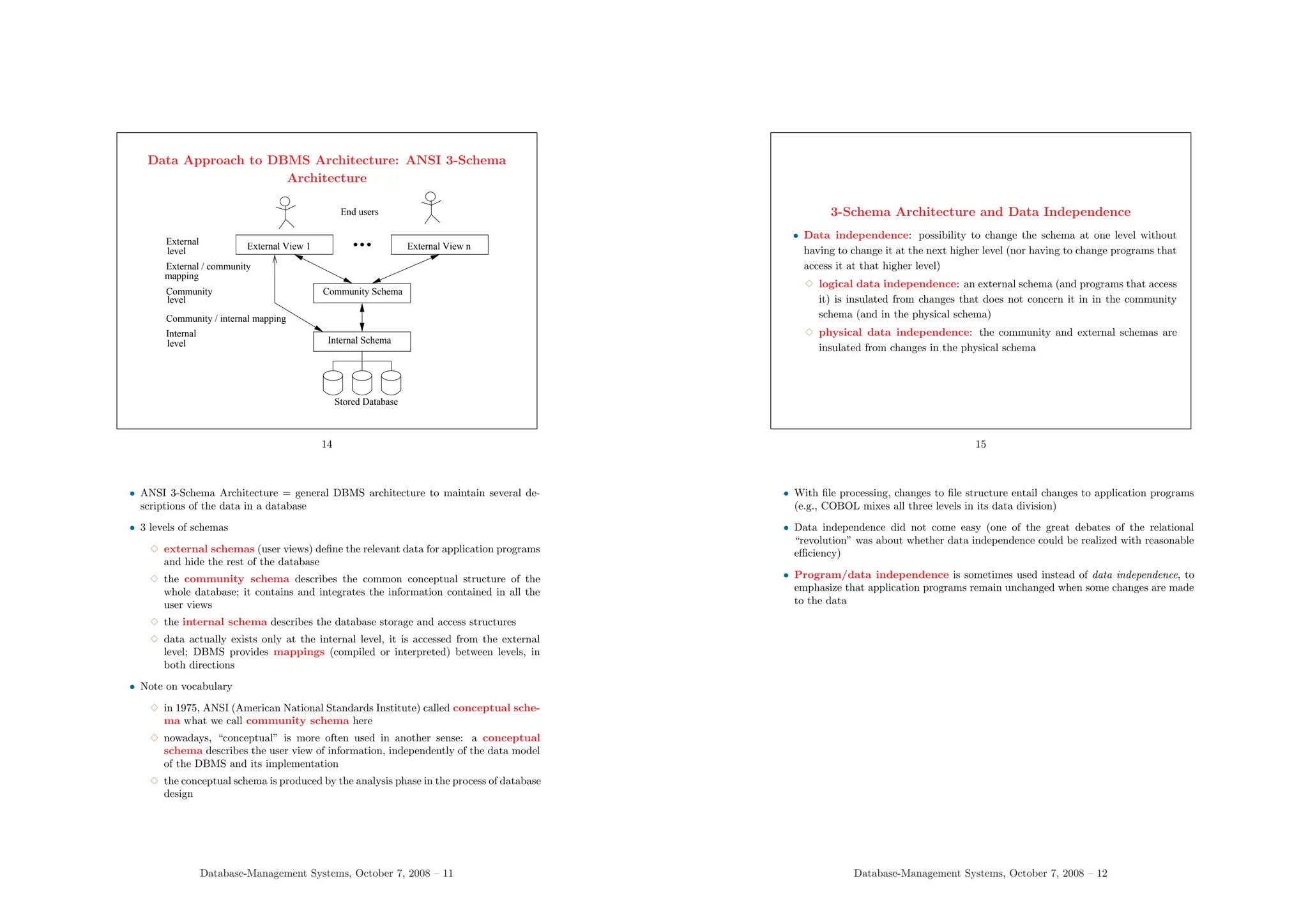
Data Approach to DBMS Architecture: ANSI 3-Schema
Architecture
Community
level
Internal
level Internal Schema
Stored Database
mapping
Community Schema
External View 1
Community / internal mapping
External View n
End users
level
External
External / community
14
• ANSI 3-Schema Architecture = general DBMS architecture to maintain several de-
scriptions of the data in a database
• 3 levels of schemas
3 external schemas (user views) define the relevant data for application programs
and hide the rest of the database
3 the community schema describes the common conceptual structure of the
whole database; it contains and integrates the information contained in all the
user views
3 the internal schema describes the database storage and access structures
3 data actually exists only at the internal level, it is accessed from the external
level; DBMS provides mappings (compiled or interpreted) between levels, in
both directions
• Note on vocabulary
3 in 1975, ANSI (American National Standards Institute) called conceptual sche-
ma what we call community schema here
3 nowadays, “conceptual” is more often used in another sense: a conceptual
schema describes the user view of information, independently of the data model
of the DBMS and its implementation
3 the conceptual schema is produced by the analysis phase in the process of database
design
Database-Management Systems, October 7, 2008 – 11
3-Schema Architecture and Data Independence
• Data independence: possibility to change the schema at one level without
having to change it at the next higher level (nor having to change programs that
access it at that higher level)
3 logical data independence: an external schema (and programs that access
it) is insulated from changes that does not concern it in in the community
schema (and in the physical schema)
3 physical data independence: the community and external schemas are
insulated from changes in the physical schema
15
• With file processing, changes to file structure entail changes to application programs
(e.g., COBOL mixes all three levels in its data division)
• Data independence did not come easy (one of the great debates of the relational
“revolution” was about whether data independence could be realized with reasonable
efficiency)
• Program/data independence is sometimes used instead of data independence, to
emphasize that application programs remain unchanged when some changes are made
to the data
Database-Management Systems, October 7, 2008 – 12
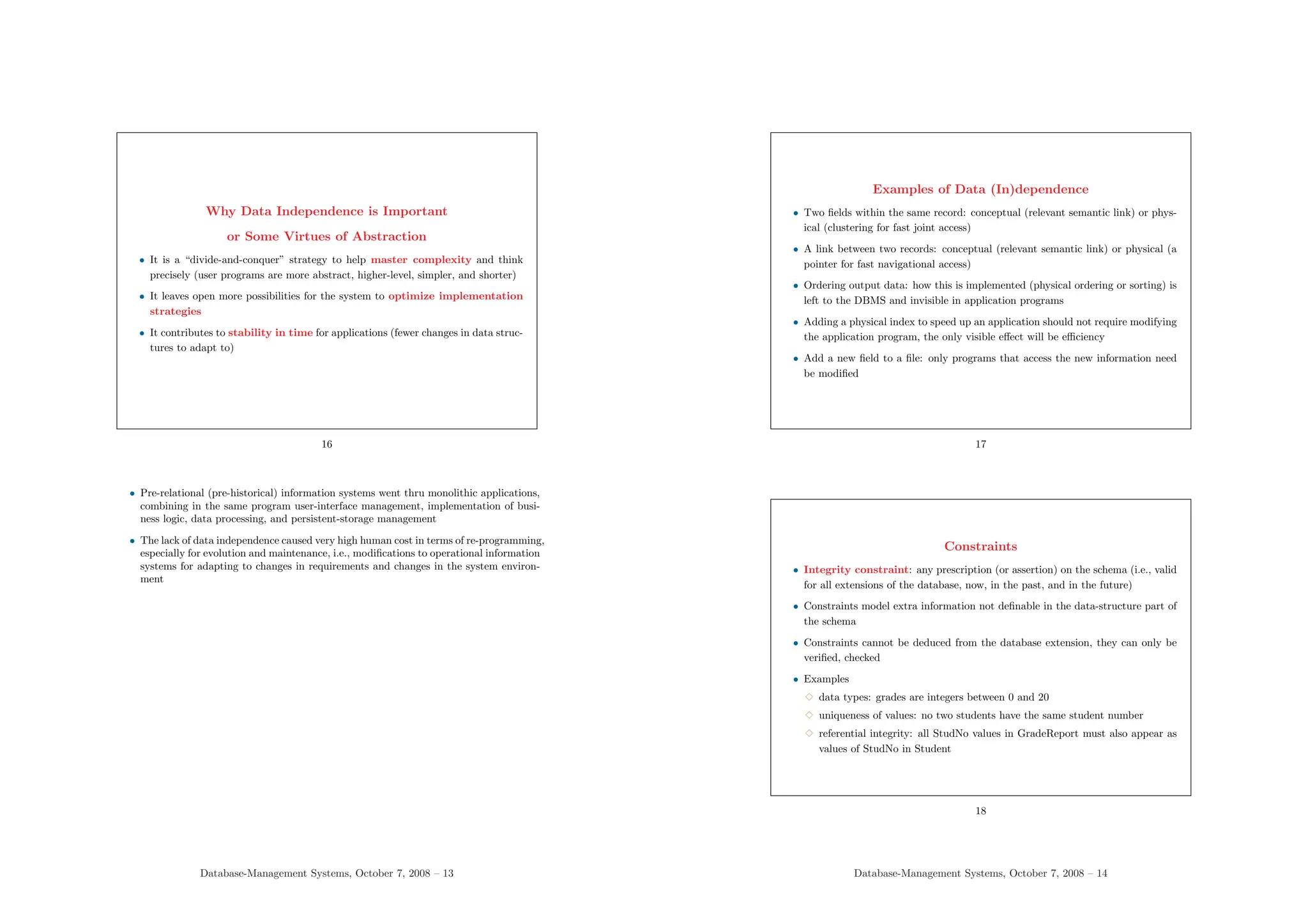
Why Data Independence is Important
or Some Virtues of Abstraction
• It is a “divide-and-conquer” strategy to help master complexity and think
precisely (user programs are more abstract, higher-level, simpler, and shorter)
• It leaves open more possibilities for the system to optimize implementation
strategies
• It contributes to stability in time for applications (fewer changes in data struc-
tures to adapt to)
16
• Pre-relational (pre-historical) information systems went thru monolithic applications,
combining in the same program user-interface management, implementation of busi-
ness logic, data processing, and persistent-storage management
• The lack of data independence caused very high human cost in terms of re-programming,
especially for evolution and maintenance, i.e., modifications to operational information
systems for adapting to changes in requirements and changes in the system environ-
ment
Database-Management Systems, October 7, 2008 – 13
Examples of Data (In)dependence
• Two fields within the same record: conceptual (relevant semantic link) or phys-
ical (clustering for fast joint access)
• A link between two records: conceptual (relevant semantic link) or physical (a
pointer for fast navigational access)
• Ordering output data: how this is implemented (physical ordering or sorting) is
left to the DBMS and invisible in application programs
• Adding a physical index to speed up an application should not require modifying
the application program, the only visible effect will be efficiency
• Add a new field to a file: only programs that access the new information need
be modified
17
Constraints
• Integrity constraint: any prescription (or assertion) on the schema (i.e., valid
for all extensions of the database, now, in the past, and in the future)
• Constraints model extra information not definable in the data-structure part of
the schema
• Constraints cannot be deduced from the database extension, they can only be
verified, checked
• Examples
3 data types: grades are integers between 0 and 20
3 uniqueness of values: no two students have the same student number
3 referential integrity: all StudNo values in GradeReport must also appear as
values of StudNo in Student
18
Database-Management Systems, October 7, 2008 – 14
• Consistency constraint is a better term than integrity constraint
• Any piece of information can be given the status of constraint (i.e., belong to the
schema); remember that
3 schema information is normally more stable in time than instance data
3 schema semantics is managed by DBMS software (still, not all constraints are
managed by DBMS software, see later)
Constraints
• Some constraints express a part of the general semantics of the data, i.e.,
of the application domain modeled in the database
• Some constraints are technical (e.g., referential integrity is specific to the rela-
tional model)
• Not everything can be controled by constraints (e.g., misspellings in names can
only be checked manually)
• Data models with richer, more expressive data structures have fewer explicit
constraints than simpler ones (see later)
• Constraints have to be checked when updates are performed on the database
19
• Basic rule of database modeling:
3 the data in the database must conform to both the prescriptions of the database
structure (the schema) and the constraints
3 it is often said that the constraints belong to the schema
3 basic modality: every piece of data that does not contradict the prescriptions of
schema + constraints is acceptable in the extension of the database (“everything
that is not explicitly forbidden is permitted”)
Database-Management Systems, October 7, 2008 – 15
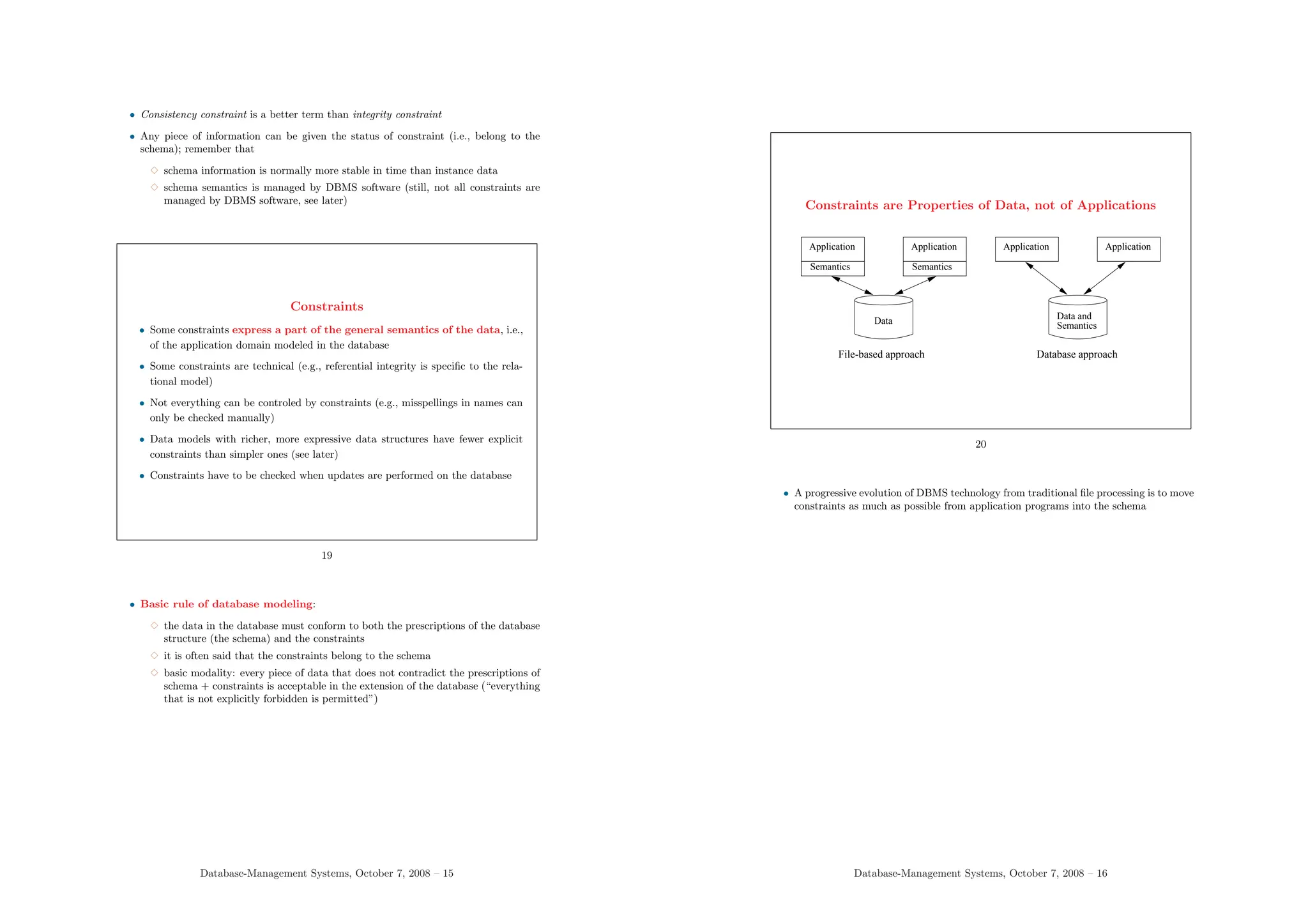
Constraints are Properties of Data, not of Applications
Semantics
Application
Semantics
Application Application
Application
Data
Data and
Semantics
File-based approach Database approach
20
• A progressive evolution of DBMS technology from traditional file processing is to move
constraints as much as possible from application programs into the schema
Database-Management Systems, October 7, 2008 – 16
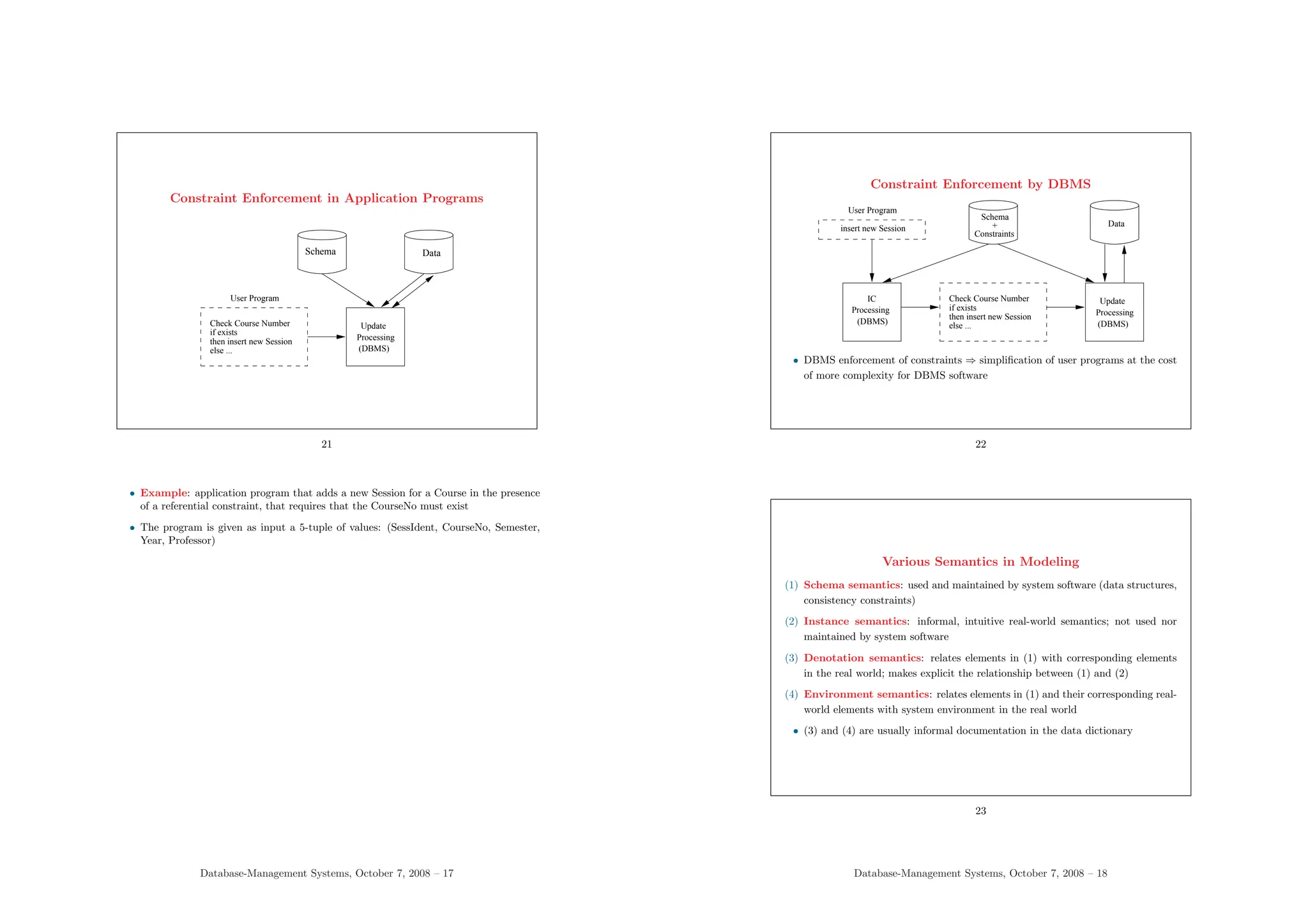
Constraint Enforcement in Application Programs
(DBMS)
Processing
Update
else ...
then insert new Session
if exists
Check Course Number
User Program
Schema Data
21
• Example: application program that adds a new Session for a Course in the presence
of a referential constraint, that requires that the CourseNo must exist
• The program is given as input a 5-tuple of values: (SessIdent, CourseNo, Semester,
Year, Professor)
Database-Management Systems, October 7, 2008 – 17
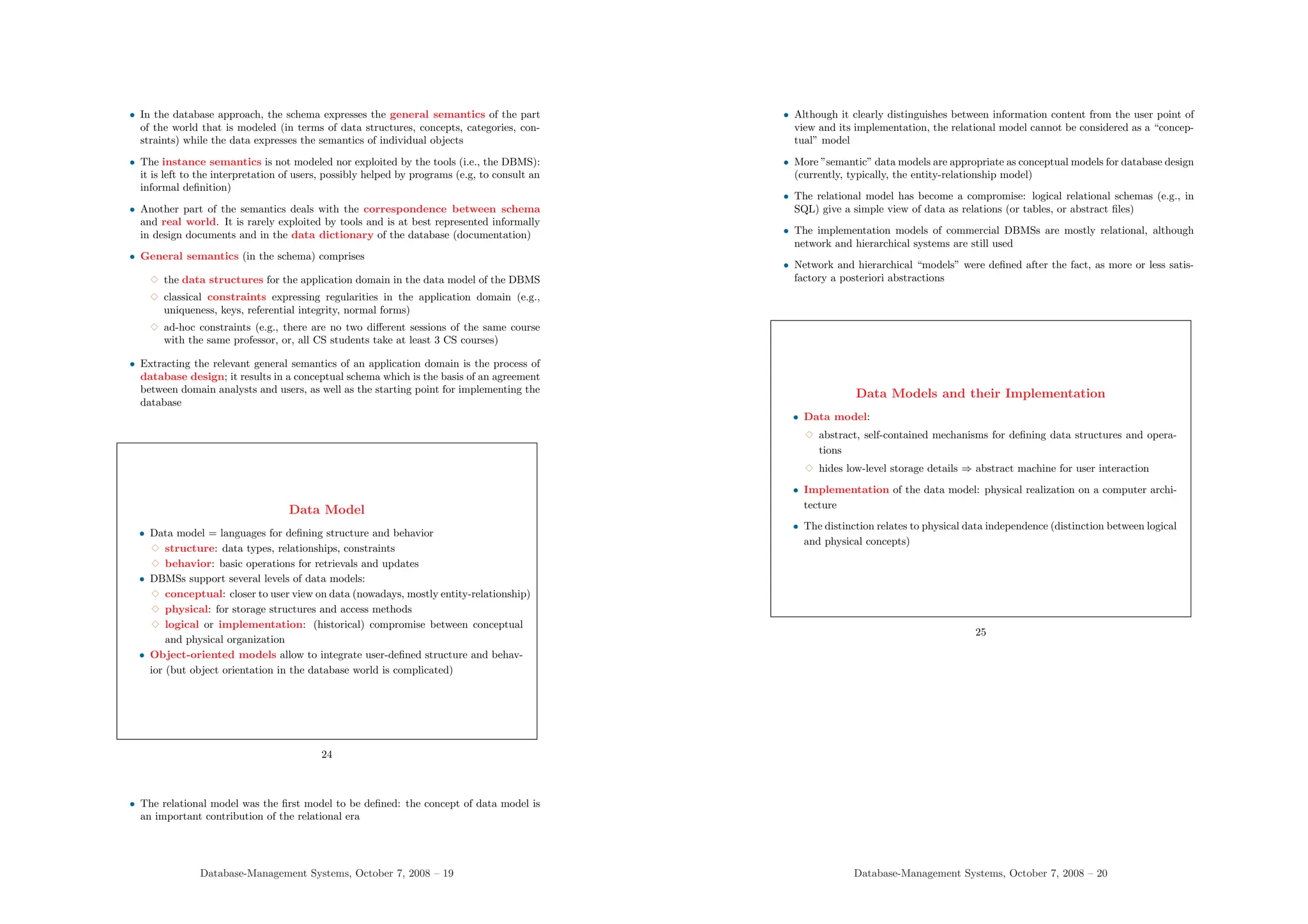
Constraint Enforcement by DBMS
Schema
+
Constraints
Data
else ...
then insert new Session
if exists
Check Course Number
(DBMS)
Processing
Update
IC
Processing
(DBMS)
insert new Session
User Program
• DBMS enforcement of constraints ⇒ simplification of user programs at the cost
of more complexity for DBMS software
22
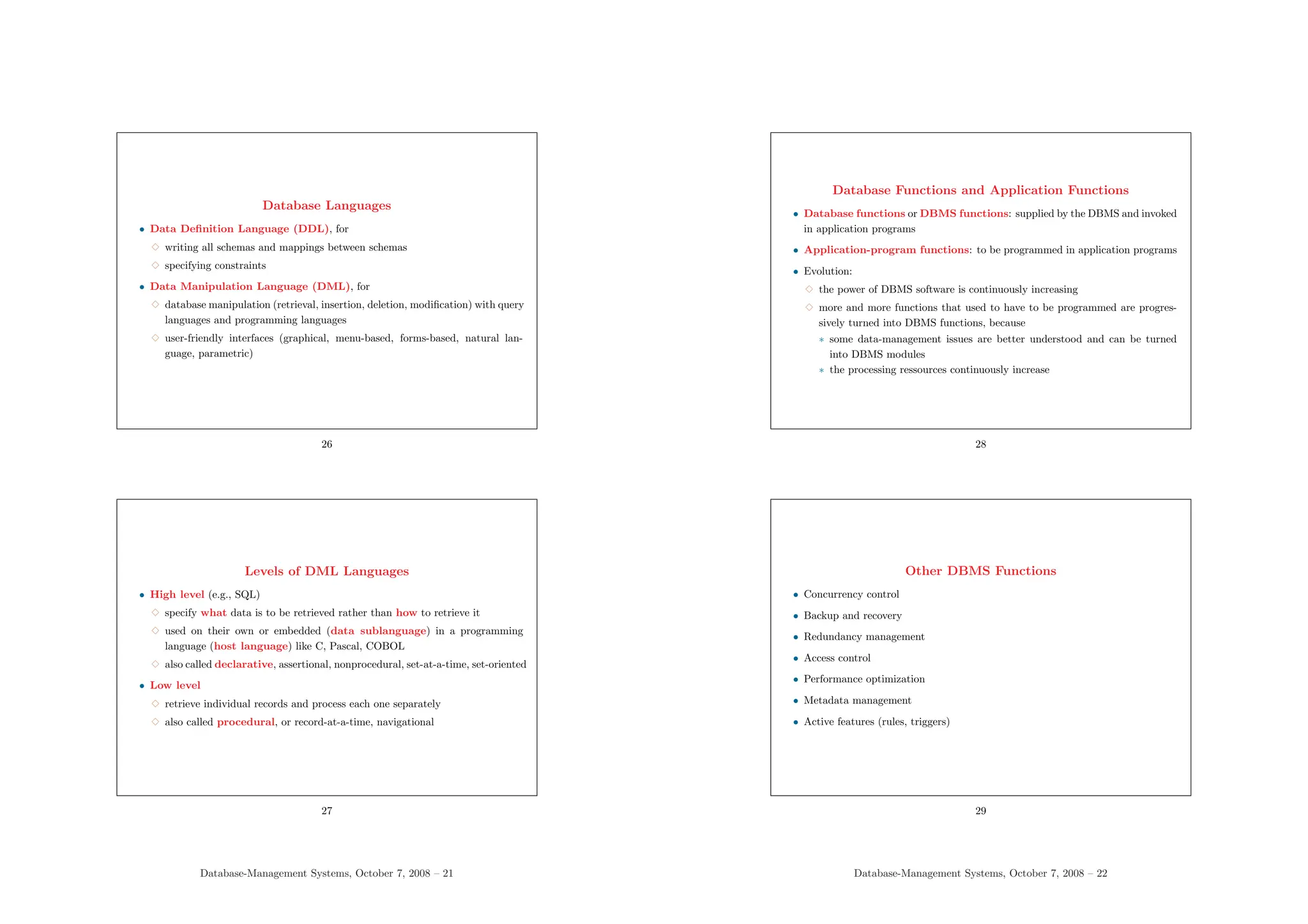
Various Semantics in Modeling
(1) Schema semantics: used and maintained by system software (data structures,
consistency constraints)
(2) Instance semantics: informal, intuitive real-world semantics; not used nor
maintained by system software
(3) Denotation semantics: relates elements in (1) with corresponding elements
in the real world; makes explicit the relationship between (1) and (2)
(4) Environment semantics: relates elements in (1) and their corresponding real-
world elements with system environment in the real world
• (3) and (4) are usually informal documentation in the data dictionary
23
Database-Management Systems, October 7, 2008 – 18
• In the database approach, the schema expresses the general semantics of the part
of the world that is modeled (in terms of data structures, concepts, categories, con-
straints) while the data expresses the semantics of individual objects
• The instance semantics is not modeled nor exploited by the tools (i.e., the DBMS):
it is left to the interpretation of users, possibly helped by programs (e.g, to consult an
informal definition)
• Another part of the semantics deals with the correspondence between schema
and real world. It is rarely exploited by tools and is at best represented informally
in design documents and in the data dictionary of the database (documentation)
• General semantics (in the schema) comprises
3 the data structures for the application domain in the data model of the DBMS
3 classical constraints expressing regularities in the application domain (e.g.,
uniqueness, keys, referential integrity, normal forms)
3 ad-hoc constraints (e.g., there are no two different sessions of the same course
with the same professor, or, all CS students take at least 3 CS courses)
• Extracting the relevant general semantics of an application domain is the process of
database design; it results in a conceptual schema which is the basis of an agreement
between domain analysts and users, as well as the starting point for implementing the
database
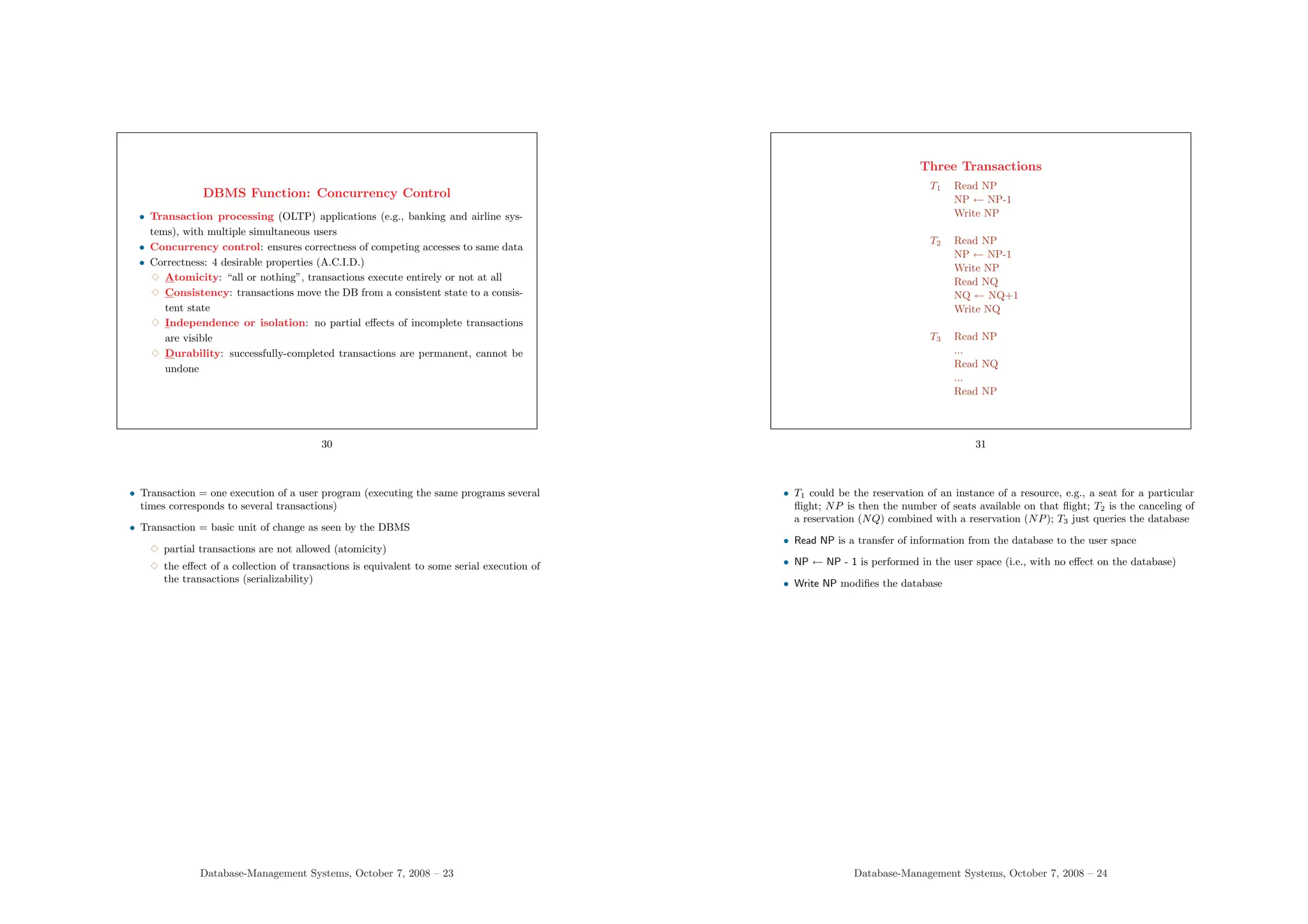
Data Model
• Data model = languages for defining structure and behavior
3 structure: data types, relationships, constraints
3 behavior: basic operations for retrievals and updates
• DBMSs support several levels of data models:
3 conceptual: closer to user view on data (nowadays, mostly entity-relationship)
3 physical: for storage structures and access methods
3 logical or implementation: (historical) compromise between conceptual
and physical organization
• Object-oriented models allow to integrate user-defined structure and behav-
ior (but object orientation in the database world is complicated)
24
• The relational model was the first model to be defined: the concept of data model is
an important contribution of the relational era
Database-Management Systems, October 7, 2008 – 19
• Although it clearly distinguishes between information content from the user point of
view and its implementation, the relational model cannot be considered as a “concep-
tual” model
• More ”semantic” data models are appropriate as conceptual models for database design
(currently, typically, the entity-relationship model)
• The relational model has become a compromise: logical relational schemas (e.g., in
SQL) give a simple view of data as relations (or tables, or abstract files)
• The implementation models of commercial DBMSs are mostly relational, although
network and hierarchical systems are still used
• Network and hierarchical “models” were defined after the fact, as more or less satis-
factory a posteriori abstractions
Data Models and their Implementation
• Data model:
3 abstract, self-contained mechanisms for defining data structures and opera-
tions
3 hides low-level storage details ⇒ abstract machine for user interaction
• Implementation of the data model: physical realization on a computer archi-
tecture
• The distinction relates to physical data independence (distinction between logical
and physical concepts)
25
Database-Management Systems, October 7, 2008 – 20
Database Languages
• Data Definition Language (DDL), for
3 writing all schemas and mappings between schemas
3 specifying constraints
• Data Manipulation Language (DML), for
3 database manipulation (retrieval, insertion, deletion, modification) with query
languages and programming languages
3 user-friendly interfaces (graphical, menu-based, forms-based, natural lan-
guage, parametric)
26
Levels of DML Languages
• High level (e.g., SQL)
3 specify what data is to be retrieved rather than how to retrieve it
3 used on their own or embedded (data sublanguage) in a programming
language (host language) like C, Pascal, COBOL
3 also called declarative, assertional, nonprocedural, set-at-a-time, set-oriented
• Low level
3 retrieve individual records and process each one separately
3 also called procedural, or record-at-a-time, navigational
27
Database-Management Systems, October 7, 2008 – 21
Database Functions and Application Functions
• Database functions or DBMS functions: supplied by the DBMS and invoked
in application programs
• Application-program functions: to be programmed in application programs
• Evolution:
3 the power of DBMS software is continuously increasing
3 more and more functions that used to have to be programmed are progres-
sively turned into DBMS functions, because
∗ some data-management issues are better understood and can be turned
into DBMS modules
∗ the processing ressources continuously increase
28
Other DBMS Functions
• Concurrency control
• Backup and recovery
• Redundancy management
• Access control
• Performance optimization
• Metadata management
• Active features (rules, triggers)
29
Database-Management Systems, October 7, 2008 – 22
DBMS Function: Concurrency Control
• Transaction processing (OLTP) applications (e.g., banking and airline sys-
tems), with multiple simultaneous users
• Concurrency control: ensures correctness of competing accesses to same data
• Correctness: 4 desirable properties (A.C.I.D.)
3 Atomicity: “all or nothing”, transactions execute entirely or not at all
3 Consistency: transactions move the DB from a consistent state to a consis-
tent state
3 Independence or isolation: no partial effects of incomplete transactions
are visible
3 Durability: successfully-completed transactions are permanent, cannot be
undone
30
• Transaction = one execution of a user program (executing the same programs several
times corresponds to several transactions)
• Transaction = basic unit of change as seen by the DBMS
3 partial transactions are not allowed (atomicity)
3 the effect of a collection of transactions is equivalent to some serial execution of
the transactions (serializability)
Database-Management Systems, October 7, 2008 – 23
Three Transactions
T1 Read NP
NP ← NP-1
Write NP
T2 Read NP
NP ← NP-1
Write NP
Read NQ
NQ ← NQ+1
Write NQ
T3 Read NP
...
Read NQ
...
Read NP
31
• T1 could be the reservation of an instance of a resource, e.g., a seat for a particular
flight; NP is then the number of seats available on that flight; T2 is the canceling of
a reservation (NQ) combined with a reservation (NP); T3 just queries the database
• Read NP is a transfer of information from the database to the user space
• NP ← NP - 1 is performed in the user space (i.e., with no effect on the database)
• Write NP modifies the database
Database-Management Systems, October 7, 2008 – 24
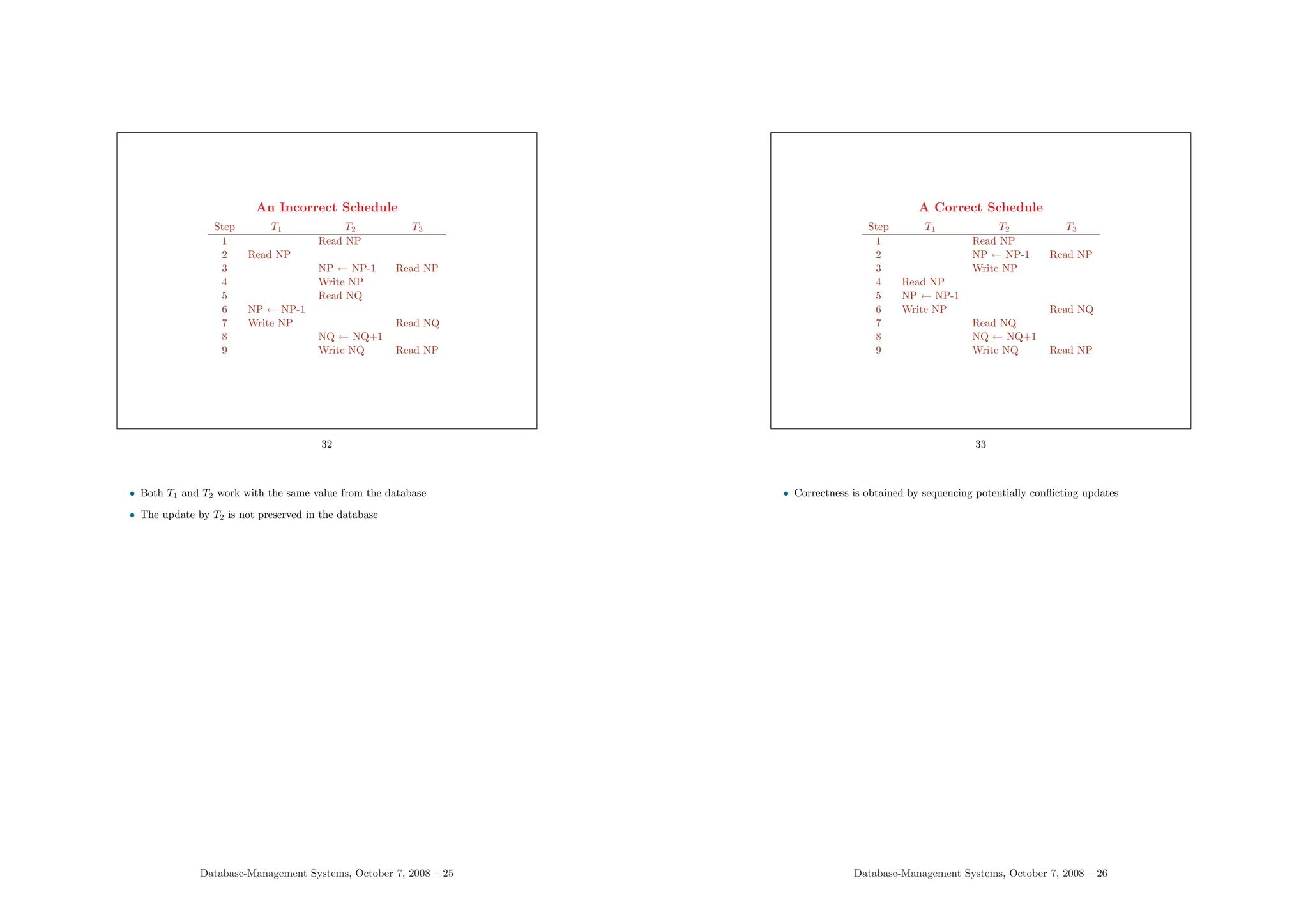
An Incorrect Schedule
Step T1 T2 T3
1 Read NP
2 Read NP
3 NP ← NP-1 Read NP
4 Write NP
5 Read NQ
6 NP ← NP-1
7 Write NP Read NQ
8 NQ ← NQ+1
9 Write NQ Read NP
32
• Both T1 and T2 work with the same value from the database
• The update by T2 is not preserved in the database
Database-Management Systems, October 7, 2008 – 25
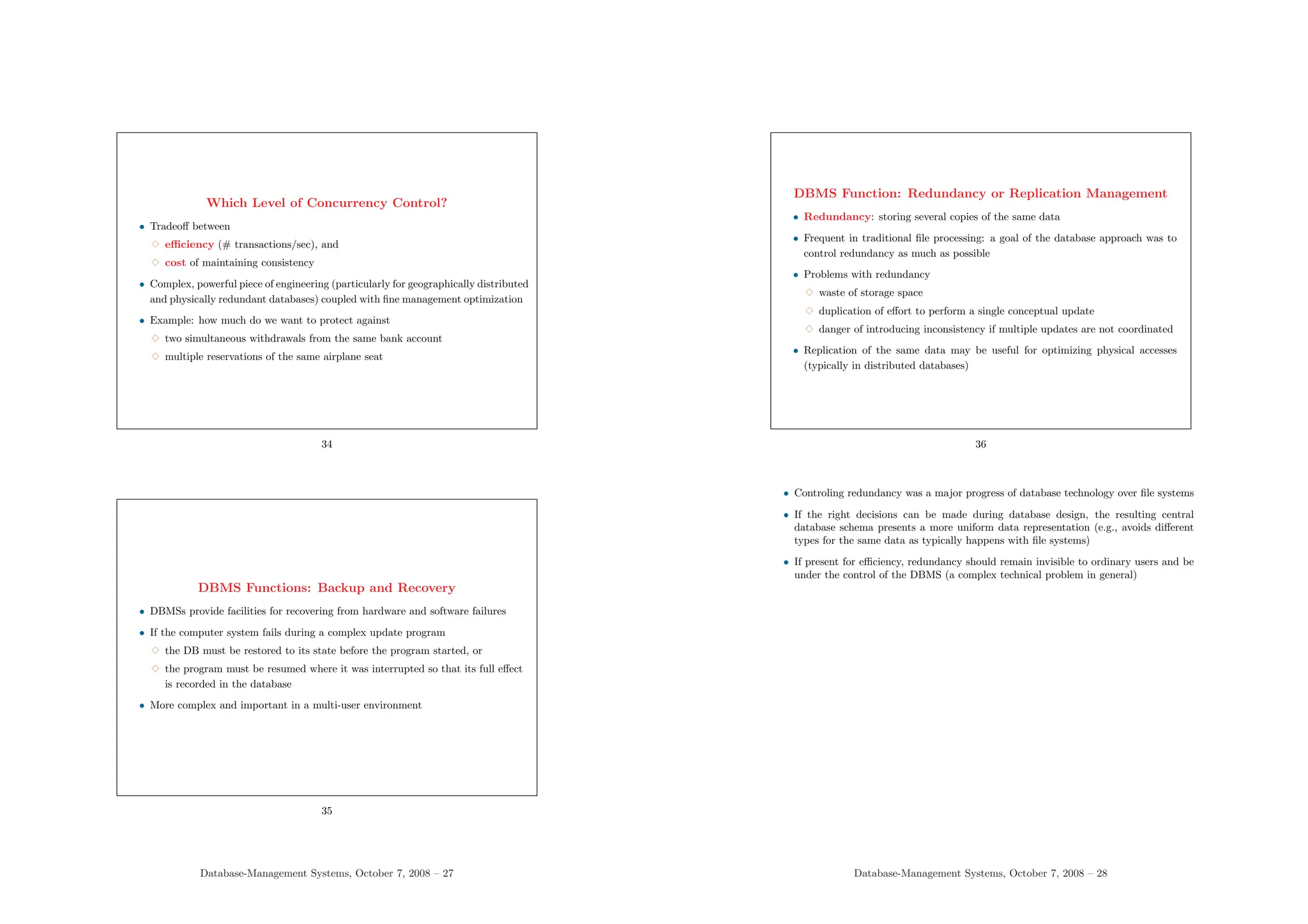
A Correct Schedule
Step T1 T2 T3
1 Read NP
2 NP ← NP-1 Read NP
3 Write NP
4 Read NP
5 NP ← NP-1
6 Write NP Read NQ
7 Read NQ
8 NQ ← NQ+1
9 Write NQ Read NP
33
• Correctness is obtained by sequencing potentially conflicting updates
Database-Management Systems, October 7, 2008 – 26
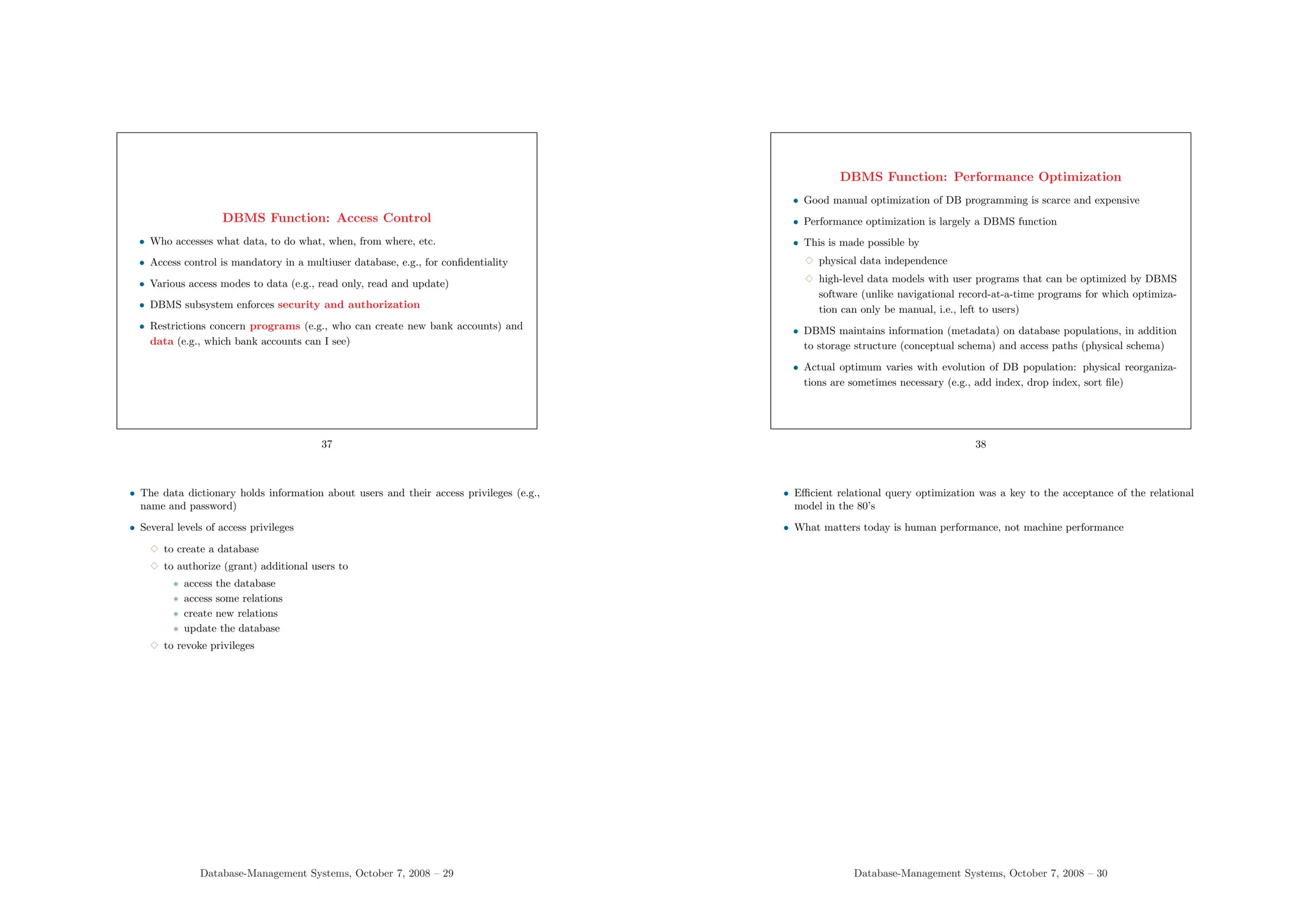
Which Level of Concurrency Control?
• Tradeoff between
3 efficiency (# transactions/sec), and
3 cost of maintaining consistency
• Complex, powerful piece of engineering (particularly for geographically distributed
and physically redundant databases) coupled with fine management optimization
• Example: how much do we want to protect against
3 two simultaneous withdrawals from the same bank account
3 multiple reservations of the same airplane seat
34
DBMS Functions: Backup and Recovery
• DBMSs provide facilities for recovering from hardware and software failures
• If the computer system fails during a complex update program
3 the DB must be restored to its state before the program started, or
3 the program must be resumed where it was interrupted so that its full effect
is recorded in the database
• More complex and important in a multi-user environment
35
Database-Management Systems, October 7, 2008 – 27
DBMS Function: Redundancy or Replication Management
• Redundancy: storing several copies of the same data
• Frequent in traditional file processing: a goal of the database approach was to
control redundancy as much as possible
• Problems with redundancy
3 waste of storage space
3 duplication of effort to perform a single conceptual update
3 danger of introducing inconsistency if multiple updates are not coordinated
• Replication of the same data may be useful for optimizing physical accesses
(typically in distributed databases)
36
• Controling redundancy was a major progress of database technology over file systems
• If the right decisions can be made during database design, the resulting central
database schema presents a more uniform data representation (e.g., avoids different
types for the same data as typically happens with file systems)
• If present for efficiency, redundancy should remain invisible to ordinary users and be
under the control of the DBMS (a complex technical problem in general)
Database-Management Systems, October 7, 2008 – 28
DBMS Function: Access Control
• Who accesses what data, to do what, when, from where, etc.
• Access control is mandatory in a multiuser database, e.g., for confidentiality
• Various access modes to data (e.g., read only, read and update)
• DBMS subsystem enforces security and authorization
• Restrictions concern programs (e.g., who can create new bank accounts) and
data (e.g., which bank accounts can I see)
37
• The data dictionary holds information about users and their access privileges (e.g.,
name and password)
• Several levels of access privileges
3 to create a database
3 to authorize (grant) additional users to
∗ access the database
∗ access some relations
∗ create new relations
∗ update the database
3 to revoke privileges
Database-Management Systems, October 7, 2008 – 29
DBMS Function: Performance Optimization
• Good manual optimization of DB programming is scarce and expensive
• Performance optimization is largely a DBMS function
• This is made possible by
3 physical data independence
3 high-level data models with user programs that can be optimized by DBMS
software (unlike navigational record-at-a-time programs for which optimiza-
tion can only be manual, i.e., left to users)
• DBMS maintains information (metadata) on database populations, in addition
to storage structure (conceptual schema) and access paths (physical schema)
• Actual optimum varies with evolution of DB population: physical reorganiza-
tions are sometimes necessary (e.g., add index, drop index, sort file)
38
• Efficient relational query optimization was a key to the acceptance of the relational
model in the 80’s
• What matters today is human performance, not machine performance
Database-Management Systems, October 7, 2008 – 30
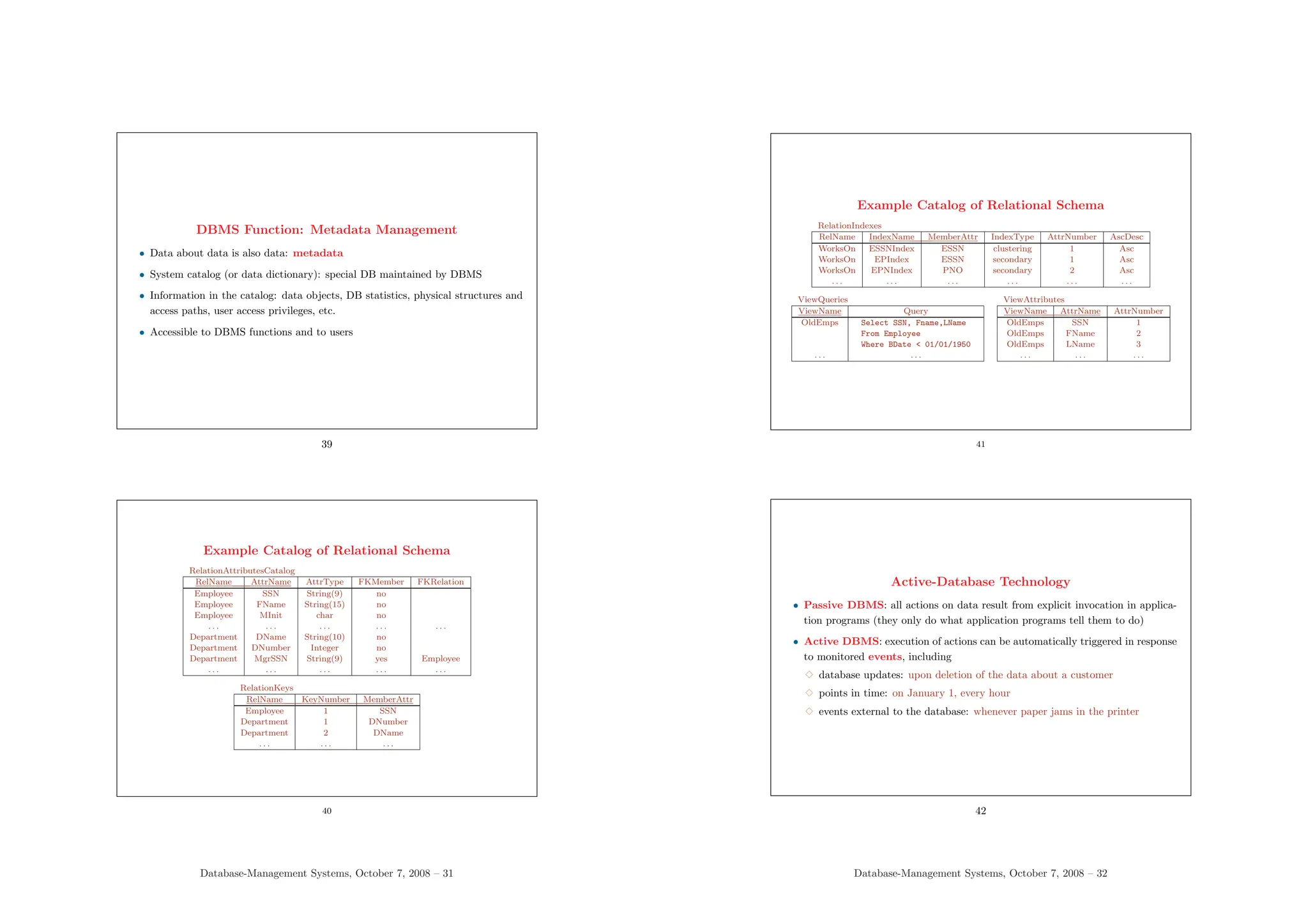
DBMS Function: Metadata Management
• Data about data is also data: metadata
• System catalog (or data dictionary): special DB maintained by DBMS
• Information in the catalog: data objects, DB statistics, physical structures and
access paths, user access privileges, etc.
• Accessible to DBMS functions and to users
39
Example Catalog of Relational Schema
RelationAttributesCatalog
RelName AttrName AttrType FKMember FKRelation
Employee SSN String(9) no
Employee FName String(15) no
Employee MInit char no
. . . . . . . . . . . . . . .
Department DName String(10) no
Department DNumber Integer no
Department MgrSSN String(9) yes Employee
. . . . . . . . . . . . . . .
RelationKeys
RelName KeyNumber MemberAttr
Employee 1 SSN
Department 1 DNumber
Department 2 DName
. . . . . . . . .
40
Database-Management Systems, October 7, 2008 – 31
Example Catalog of Relational Schema
RelationIndexes
RelName IndexName MemberAttr IndexType AttrNumber AscDesc
WorksOn ESSNIndex ESSN clustering 1 Asc
WorksOn EPIndex ESSN secondary 1 Asc
WorksOn EPNIndex PNO secondary 2 Asc
. . . . . . . . . . . . . . . . . .
ViewQueries
ViewName Query
OldEmps Select SSN, Fname,LName
From Employee
Where BDate < 01/01/1950
. . . . . .
ViewAttributes
ViewName AttrName AttrNumber
OldEmps SSN 1
OldEmps FName 2
OldEmps LName 3
. . . . . . . . .
41
Active-Database Technology
• Passive DBMS: all actions on data result from explicit invocation in applica-
tion programs (they only do what application programs tell them to do)
• Active DBMS: execution of actions can be automatically triggered in response
to monitored events, including
3 database updates: upon deletion of the data about a customer
3 points in time: on January 1, every hour
3 events external to the database: whenever paper jams in the printer
42
Database-Management Systems, October 7, 2008 – 32
• Evolution of database technology has been going thru representing and supporting
more functionality of database applications within the DBMS, e.g.,
3 checks of some types of integrity constraints (produced from a declarative
definition located with the database schema)
3 stored procedures: precompiled procedures located within the database, in-
voked from application and system programs
3 common semantics abstracted from application domains (e.g., for spatial, mul-
timedia, temporal, deductive, active databases)
• Active-database technology
3 a relatively recent extension of traditional DBMS technology
3 most commercial RDBMSs include some capability for rules or triggers
3 research prototypes provide more comprehensive support for active rules than
RDBMSs
• Application semantics in programs for active DBMSs is expressed in:
3 traditional application programs (as for passive DBMSs)
3 rules (in the database, available to all applications)
Event - Condition - Action Rules
• When an event occurs, if a condition holds, then an action is performed
Event
a customer has not paid 3 invoices at the due date
Condition
if the credit limit of the customer is less than 20 000 Euros
Action
cancel all current orders of the customer
• ECA rules are part of the database (⇒ “rule base”), available to all applications
43
Database-Management Systems, October 7, 2008 – 33
Rules May Express Various Aspects of Application Semantics
• Static constraints (e.g., referential integrity, cardinality, value restrictions)
3 only regular students can register at the library
3 students can register in no more than 20 courses
3 the salary of employees cannot exceed the salary of their manager
• Control, business rules, workflow management
3 when data for new students is recorded, data is automatically entered to
register the students in the mandatory courses
3 all expenses exceeding 50K must be approved by a manager
3 when an order has been accepted, an invoice is sent
• Historical data
3 the data about completed orders is transferred monthly to the data warehouse
44
Database-Management Systems, October 7, 2008 – 34
Semantics Modeled by Rules (cont’d)
• Implementation of generic relationships (e.g., generalization)
3 a person is a student or a lecturer, but not both
• Derived data: materialized attributes, materialized views, replicated data
3 the number of students registered in a course must be part of the course data
3 orders received are summarized daily in the planning database
• Access control
3 employees can view data about their own department only
• Monitoring: performance, resource-usage monotoring
3 the number of disk accesses of each database query is recorded and statistics
are produced weekly
3 each access to our web pages is reflected in the usage database
45
• Exercise: rephrase the above examples as event-condition-action rules
• Note that many examples have a more declarative form than ECA rules
Database-Management Systems, October 7, 2008 – 35
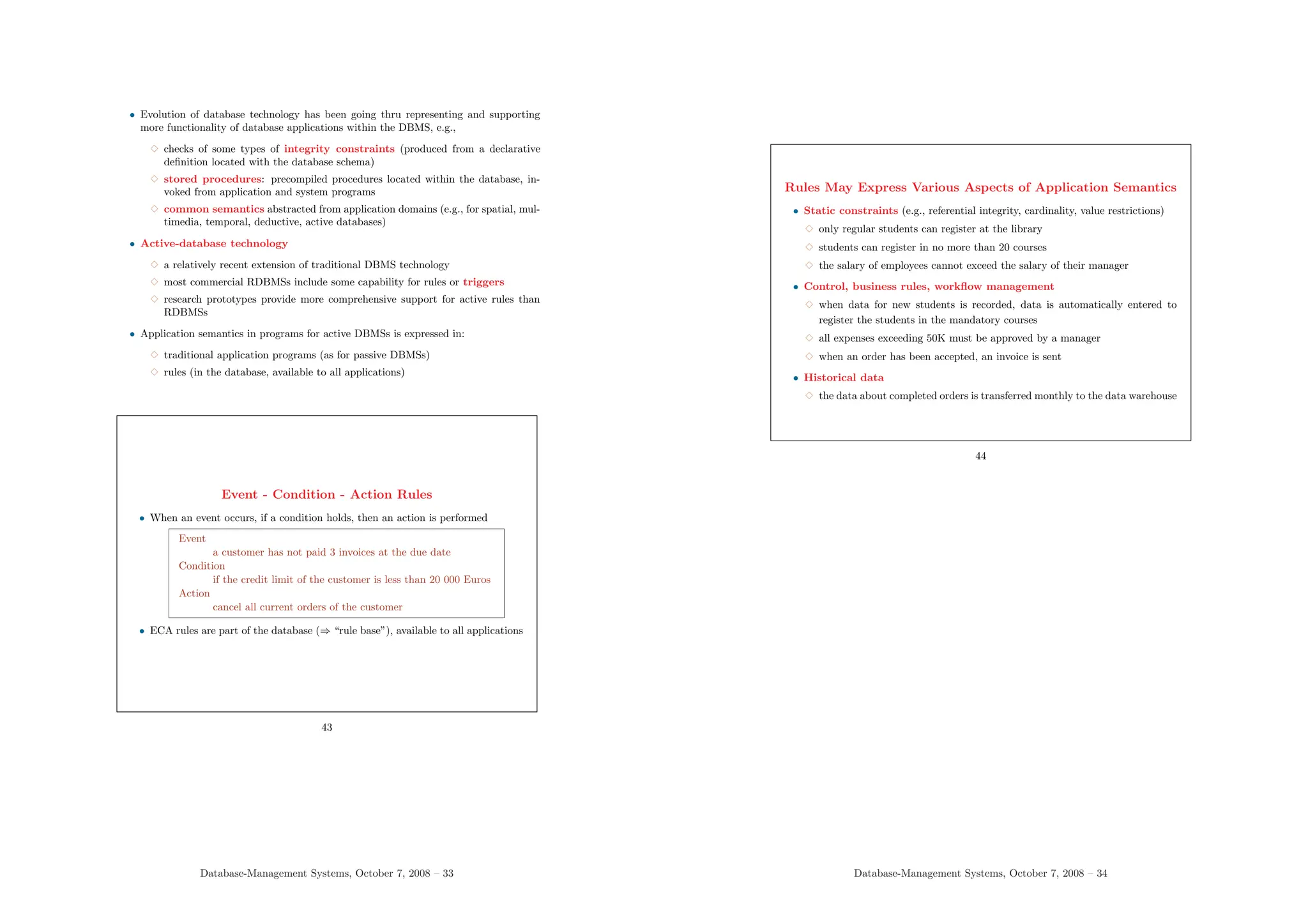
Benefits of Active Technology
• Simplification of application programs: part of the functionality can be
programmed with rules that belong to the database
• Increased automation: actions are triggered without direct user intervention
• Higher reliability of data thru more elaborate checks and repair actions ⇒
better computer-aided decisions for operational management
• Increased flexibility thru centralisation and code reuse ⇒ reduced develop-
ment and maintenance costs
46
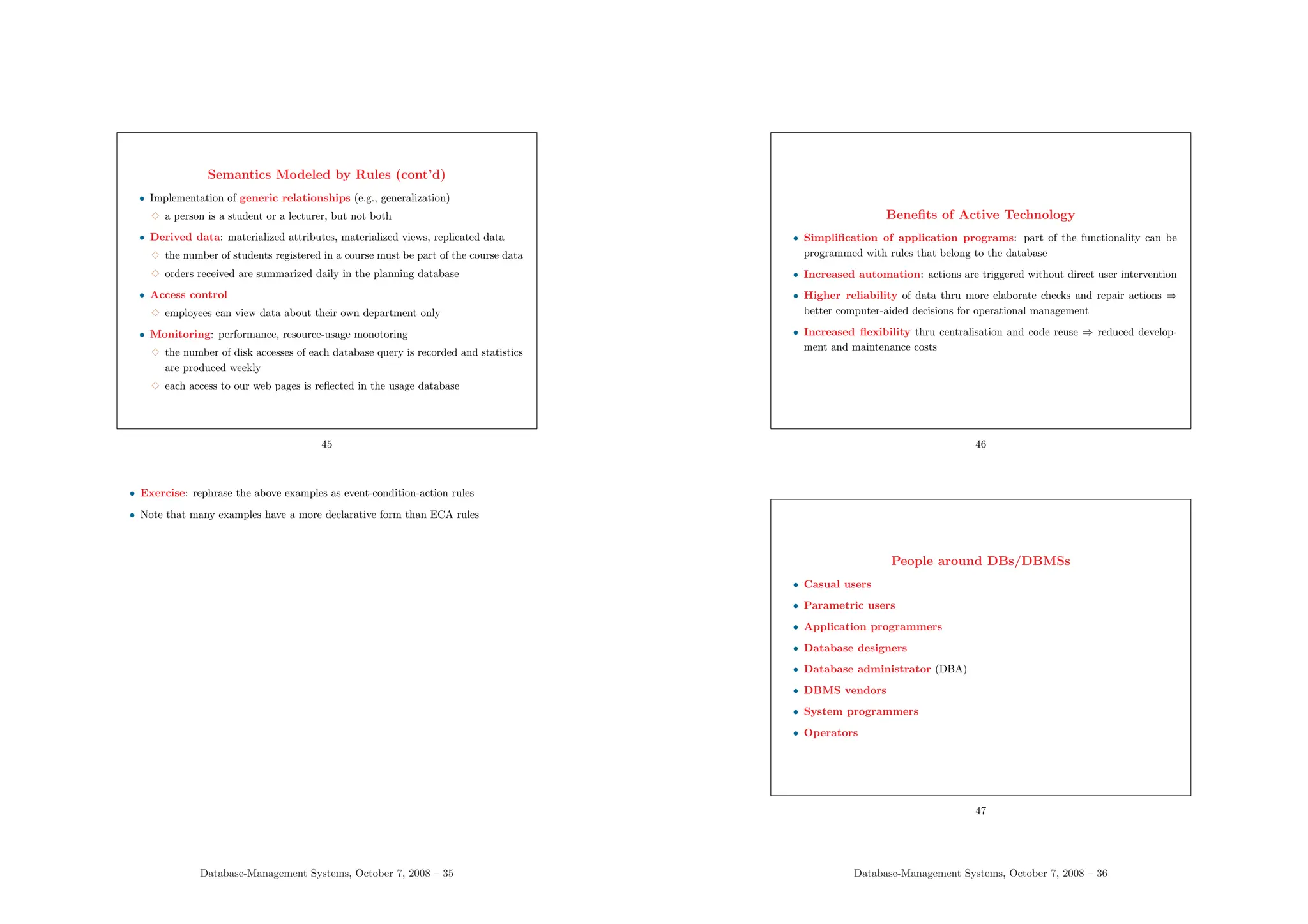
People around DBs/DBMSs
• Casual users
• Parametric users
• Application programmers
• Database designers
• Database administrator (DBA)
• DBMS vendors
• System programmers
• Operators
47
Database-Management Systems, October 7, 2008 – 36
People and Functions around DBs/DBMSs
• End users:
3 casual users: occasional unanticipated access to DB (e.g., tourists, managers)
3 parametric users: query and update the database through fixed programs
(invoked by non-programmer users) (e.g., banking)
• Application programmers: implement database application programs that facili-
tate data access for end users
• Database designers:
3 prepare external schemas for applications
3 identify and integrate user needs into a conceptual (or community, or enterprise)
schema
• Database administrator (DBA):
3 define the internal schema, defining subschemas (with database designers), and
specify mappings between schemas
3 coordinate, supervise, and monitor database usage
3 supervise DBMS functions (e.g., access control, performance optimization, backup
and recovery policies, conflict management)
• DBMS vendors and their technical staff (build and maintain the DBMS software)
• System programmers: interact with DBMS software and internal database level
• Operators: responsible for running and maintaining the HW/SW for the DBMS,
backup, recovery from failures, etc.
Points of View on DBMS Architecture
• Data: several data views and their relationships (ANSI 3-schema architecture)
• Components: DBMS software viewed as a number of components providing
functionality; emphasis on DBMS system design and implementation
• Functions: different classes of users and functions performed for them by DBMS
software; no emphasis on how functions are realized
• Operation: how DBMS functions are realized with current software, hardware,
and network infrastructure (client-server architecture)
48
Database-Management Systems, October 7, 2008 – 37
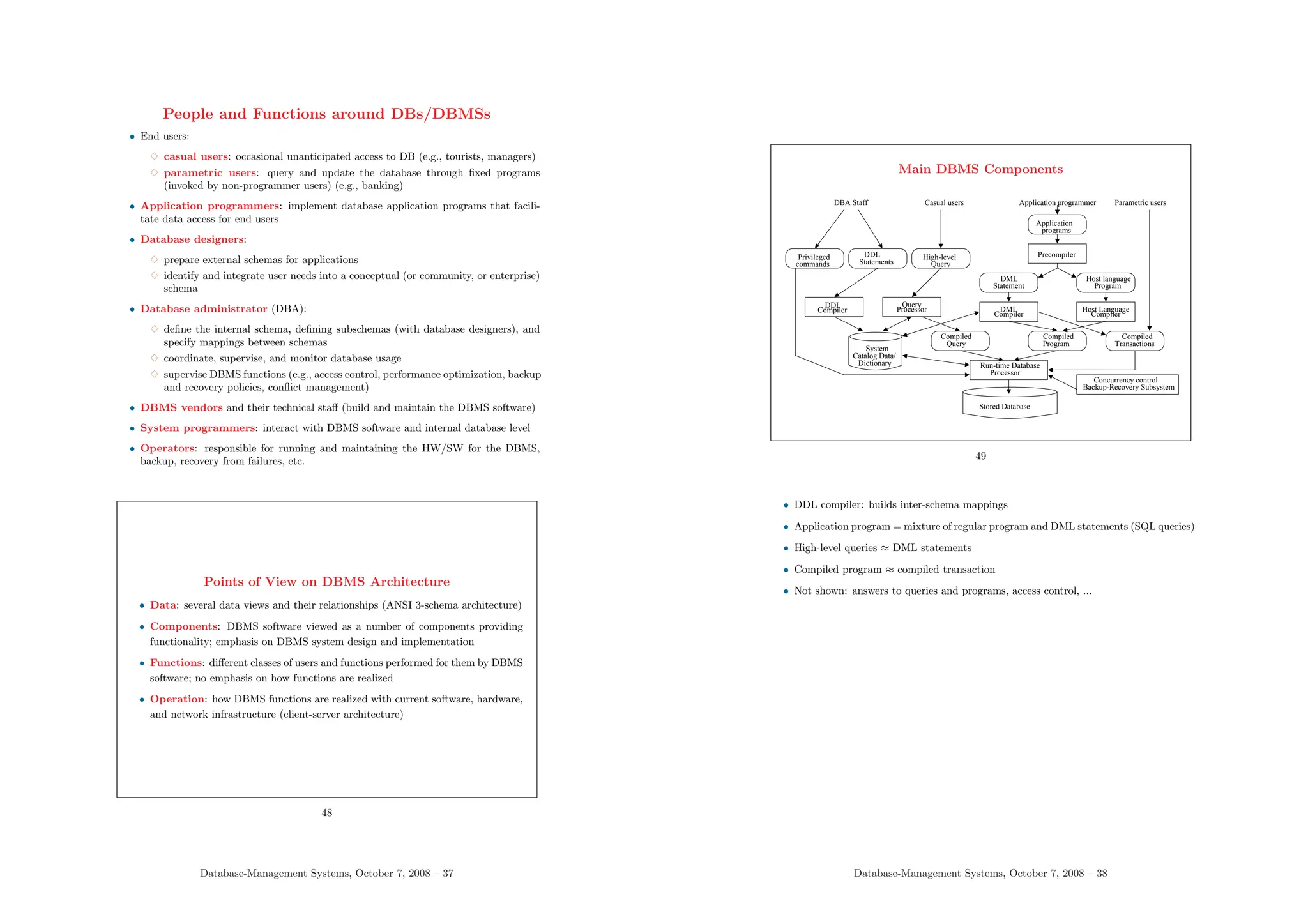
Main DBMS Components
Processor
Run-time Database
Program
Compiled
Stored Database
Concurrency control
Backup-Recovery Subsystem
Compiler
Host Language
Host language
Program
Privileged
commands Statements
DDL
Query
High-level
Query
Compiled
Transactions
Compiled
Processor
Query
Compiler
DML
programs
Application
Compiler
DDL
Statement
DML
Catalog Data/
Dictionary
Precompiler
System
DBA Staff Casual users Application programmer Parametric users
49
• DDL compiler: builds inter-schema mappings
• Application program = mixture of regular program and DML statements (SQL queries)
• High-level queries ≈ DML statements
• Compiled program ≈ compiled transaction
• Not shown: answers to queries and programs, access control, ...
Database-Management Systems, October 7, 2008 – 38
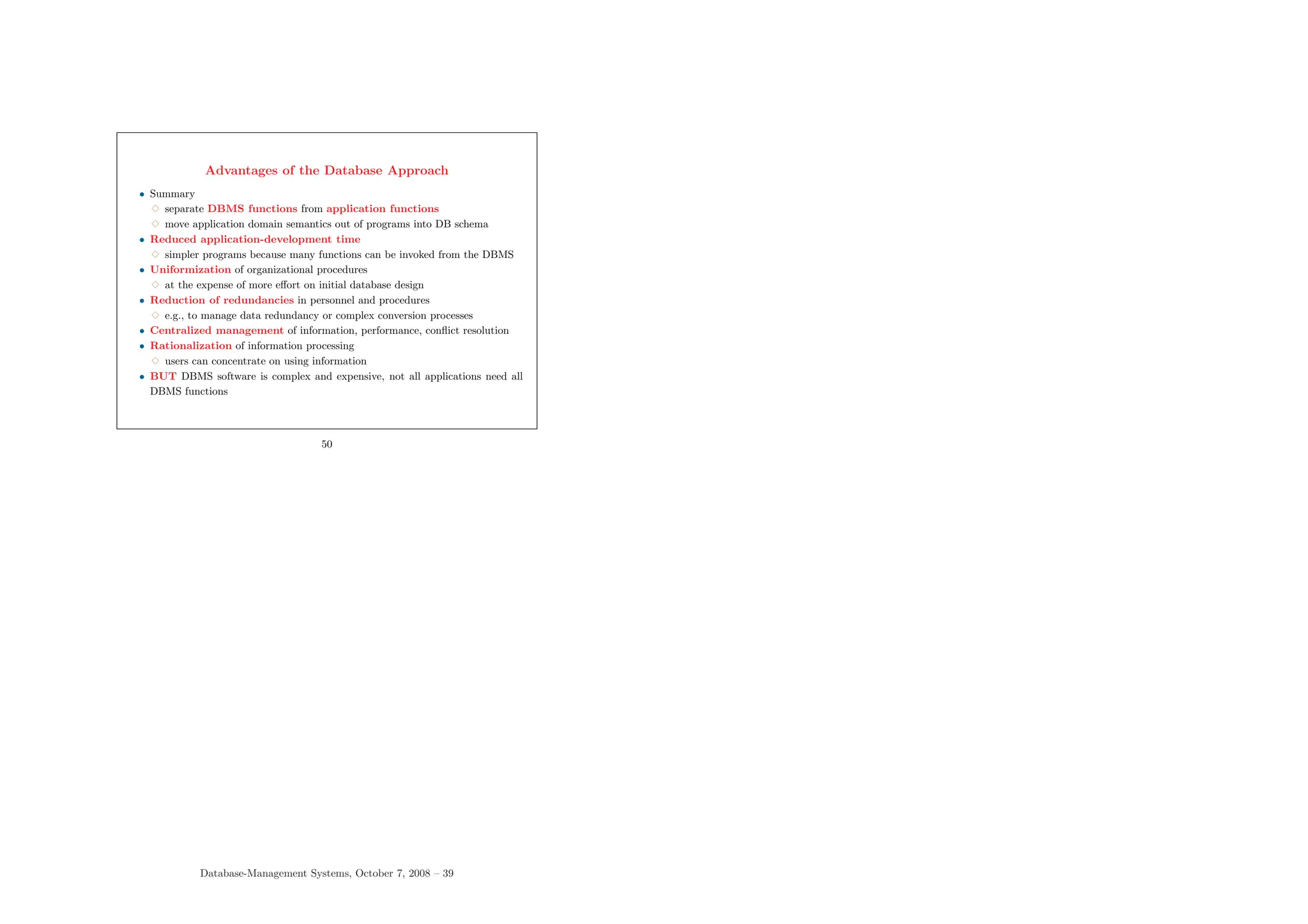
Advantages of the Database Approach
• Summary
3 separate DBMS functions from application functions
3 move application domain semantics out of programs into DB schema
• Reduced application-development time
3 simpler programs because many functions can be invoked from the DBMS
• Uniformization of organizational procedures
3 at the expense of more effort on initial database design
• Reduction of redundancies in personnel and procedures
3 e.g., to manage data redundancy or complex conversion processes
• Centralized management of information, performance, conflict resolution
• Rationalization of information processing
3 users can concentrate on using information
• BUT DBMS software is complex and expensive, not all applications need all
DBMS functions
50
Database-Management Systems, October 7, 2008 – 39

dbmsnotes the largest number of security

  • 1.
    Course Notes on Databasesand Database Management Systems Databases and Database Management Systems: Summary • Databases • Database management systems • Schema and instances • General view of DBMS architecture • Various levels of schema • Integrity constraint management • Notion of data model • Database languages and interfaces • Other DBMS functions • Roles and functions in database management 1 Database-Management Systems, October 7, 2008 – 1 Database • A collection of related data with 3 logically coherent structure 3 inherent meaning 3 purpose, for intended users and applications 3 varying size 3 scope, content of varying breadth 3 physical organization of varying complexity 3 various applications with possibly-conflicting objectives 3 persistence, existence over a long period of time 2 • Database = a collection of related data with 3 a logically coherent structure (can be characterized as a whole) 3 some inherent meaning (represents some partial view of a portion of the real world) 3 a specific purpose, an intended group of users and applications (a database embodies a biased, operational view on the world; database management is not after modeling the world in general, maybe philosophy or ontology are) 3 a largely varying size (from a personal list of addresses to the National Register of Persons) 3 a scope or content of varying breadth (from a personal list of addresses to a multimedia encyclopedia) 3 a physical organization of varying complexity (from a manual personal list, managed with simple files, to huge multi-user databases with geographically distributed data and access) 3 logically-coordinated objectives, data is defined once for a community of users, and accessed by various applications with specific needs Database-Management Systems, October 7, 2008 – 2
  • 2.
    Database Management Systems(DBMSs) • DBMS: a collection of general-purpose, application-independent programs providing services to 3 define the structure of a database, i.e., data types and constraints that the data will have to satisfy 3 manage the storage of data, safely for long periods of time, on some storage medium controled by the DBMS 3 manipulate a database, with efficient user interfaces to query the database to retrieve specific data, update the database to reflect changes in the world, generate reports from the data 3 manage database usage: users with their access rights, performance op- timization, sharing of data among several users, security from accidents or unauthorized use 3 monitor and analyze database usage 3 • DBMS have similarities with operating systems: both manage memory, process schedul- ing, I/O, communication • In addition, DBMSs implement many data-management functions • Other name for DBMS: database system, database manager • DBMSs typically do not use the file system of the operating system of the machine where they are installed. Instead, the define their own richer file organizations and access methods Database-Management Systems, October 7, 2008 – 3 Example of a Database Student StudName StudNo Class Dept Smith 17 1 CS Brown 8 2 CS Course CourseName CourseNo Credits Dept Introduction to CS CS1310 4 CS Data Structures CS3320 4 CS Discrete Mathematics MA2410 3 MA Database Management CS3380 3 CS Prerequisite CourseNo PrereqNo CS3380 CS3320 CS3380 MA2410 CS3320 CS1310 Session SessIdent CourseNo Semester Year Professor 85 MA2410 Fall 96 King 92 CS1310 Fall 96 Anderson 102 CS3320 Spring 97 Knuth 112 MA2410 Fall 97 Chang 119 CS1310 Fall 97 Anderson GradeReport StudNo SessIdent Grade 17 112 14 17 119 12 8 85 16 8 92 16 8 102 14 4 Important Functions on a Database • Structure definition: declare 5 files or relations + data types, e.g. Student(StudName, StudentNo, Class, Dept) • Population: input data about specific students, courses, prerequisites, . . . • Querying 3 Which are the prerequisites of the Database course ? 3 List students who got grade 14 or 16 for the Database course in 1993 • Reporting: prepare diplomas, with standard text, interspersed with name of student, courses taken, name of degree, grades, etc. • Modification, update of population 3 Create a new session for the Database course 3 Enter a grade 16 for Smith in the Database Session • Modification of structure, of schema 3 Create a new relation for instructors 3 Add Address attribute to relation Student 5 Database-Management Systems, October 7, 2008 – 4
  • 3.
    Transient and PersistentData • In practice, information systems often require persistent data • Data: relevant facts about the domain of interest 3 persistent: continues to exist even when the system is not active 3 transient: created while an application is running and not needed when the application has terminated • Persistent data must be stored in secondary memory (not just in computer mem- ory) and organized to be made available to several applications 6 Data and Database Schema • Fundamental hypothesis of database modeling: the information contained in a database is represented on two levels: (1) data (large, frequently modified) and (2) structure of data (small, stable in time) • Database schema: description of DB structure, accessible by programs Database =                          Data Type Metadata Structure Schema Intension Catalog Directory Data dictionary                          +            Instances Occurrences Data Extension Population            • DBMS software is application-independent ⇒ it consults the database structure in the data dictionary to understand and execute application programs 7 Database-Management Systems, October 7, 2008 – 5 • Ontology is another more recent term for designating the structure of an application domain (= schema information valid for several related applications) Various Levels of Schema • A DBMS provides users with 3 a conceptual representation of information from the point of view of users 3 a physical or internal representation with the implementation details • Both are necessary, but each has its purpose • Users refer to the conceptual representation and the DBMS ensures the corre- spondence with the physical representation • The success of relational technology has demonstrated that physical concepts can be hidden from users and that there are substantial advantages for doing so 8 • Technical vocabulary: logical versus physical concepts: 3 logical (old terminology) or conceptual (current terminology) information: deals with the user view on data (in terms of concepts familiar to actors in the appli- cation domain) 3 physical or internal concepts: concern the implementation of conceptual con- cepts into the hardware/software infrastructure (this is a technological area) Database-Management Systems, October 7, 2008 – 6
  • 4.
    Gross Architecture ofDB and DBMS Software Metadata Software DBMS Software to Process Queries / Programs Software to Access Stored Data System Database Application Programs /Queries Users / Programmers Data 9 Data Structures in the Conceptual Schema Student StudName StudNo Class Dept Course CourseName CourseNo Credits Dept Prerequisite CourseNo PrereqNo Session SessIdent CourseNo Semester Year Professor GradeReport StudNo SessIdent Grade 10 Database-Management Systems, October 7, 2008 – 7 • In addition to data structures, the schema also comprises 3 the definition of domains for data elements (attributes) 3 the specification of constraints, to refine the data-structure part of the schema Data Structures in the Physical Schema • Student records are stored in a file as follows: Data Item Name Starting position Length (bytes) Name 1 30 StudentNumber 31 4 Class 35 4 Department 39 4 3 length of Student records = 42 bytes 3 the file is ordered by values of the Name field 3 the file is indexed on Name 11 Database-Management Systems, October 7, 2008 – 8
  • 5.
    Support of ExternalViews • A single database usually serves the needs of a community of users ⇒ different perspectives or views on the same data are often natural • View: some subset of the database or some restructuring of the database suited for an application • Views are redundant with the basic definition of the database (they may or may not be stored explicitly, this is an efficiency issue) • DBMS takes care of the correspondence between views and database data • View definitions are part of the database schema • Other terms for view: subschema, external schema, derived relation 12 More on Views • Relations in a database comprise base relations and views (users do not necessarily have to know which is which) • Applications access the database through views, without necessarily knowing about the whole database • Views may be 3 queried 3 combined in queries with base relations 3 used to define other views 3 in general, NOT updated freely Database-Management Systems, October 7, 2008 – 9 A View for Preparing Diplomas Diploma Data StudName StudentTranscript∗ CourseName Grade Semester Year Smith Introduction to CS 12 Fall 97 Discrete Mathematics 14 Fall 97 Brown Discrete Mathematics 16 Fall 96 Introduction to CS 16 Fall 96 Data Structures 14 Spring 97 Database Management 16 Fall 97 13 • View Diploma Data is read-only (data cannot be entered into the database or modified or deleted thru Diploma Data) • View definition, define view (new attr.) as SELECT ... (show SQL query) • Display cross reference of views with base tables Database-Management Systems, October 7, 2008 – 10
  • 6.
    Data Approach toDBMS Architecture: ANSI 3-Schema Architecture Community level Internal level Internal Schema Stored Database mapping Community Schema External View 1 Community / internal mapping External View n End users level External External / community 14 • ANSI 3-Schema Architecture = general DBMS architecture to maintain several de- scriptions of the data in a database • 3 levels of schemas 3 external schemas (user views) define the relevant data for application programs and hide the rest of the database 3 the community schema describes the common conceptual structure of the whole database; it contains and integrates the information contained in all the user views 3 the internal schema describes the database storage and access structures 3 data actually exists only at the internal level, it is accessed from the external level; DBMS provides mappings (compiled or interpreted) between levels, in both directions • Note on vocabulary 3 in 1975, ANSI (American National Standards Institute) called conceptual sche- ma what we call community schema here 3 nowadays, “conceptual” is more often used in another sense: a conceptual schema describes the user view of information, independently of the data model of the DBMS and its implementation 3 the conceptual schema is produced by the analysis phase in the process of database design Database-Management Systems, October 7, 2008 – 11 3-Schema Architecture and Data Independence • Data independence: possibility to change the schema at one level without having to change it at the next higher level (nor having to change programs that access it at that higher level) 3 logical data independence: an external schema (and programs that access it) is insulated from changes that does not concern it in in the community schema (and in the physical schema) 3 physical data independence: the community and external schemas are insulated from changes in the physical schema 15 • With file processing, changes to file structure entail changes to application programs (e.g., COBOL mixes all three levels in its data division) • Data independence did not come easy (one of the great debates of the relational “revolution” was about whether data independence could be realized with reasonable efficiency) • Program/data independence is sometimes used instead of data independence, to emphasize that application programs remain unchanged when some changes are made to the data Database-Management Systems, October 7, 2008 – 12
  • 7.
    Why Data Independenceis Important or Some Virtues of Abstraction • It is a “divide-and-conquer” strategy to help master complexity and think precisely (user programs are more abstract, higher-level, simpler, and shorter) • It leaves open more possibilities for the system to optimize implementation strategies • It contributes to stability in time for applications (fewer changes in data struc- tures to adapt to) 16 • Pre-relational (pre-historical) information systems went thru monolithic applications, combining in the same program user-interface management, implementation of busi- ness logic, data processing, and persistent-storage management • The lack of data independence caused very high human cost in terms of re-programming, especially for evolution and maintenance, i.e., modifications to operational information systems for adapting to changes in requirements and changes in the system environ- ment Database-Management Systems, October 7, 2008 – 13 Examples of Data (In)dependence • Two fields within the same record: conceptual (relevant semantic link) or phys- ical (clustering for fast joint access) • A link between two records: conceptual (relevant semantic link) or physical (a pointer for fast navigational access) • Ordering output data: how this is implemented (physical ordering or sorting) is left to the DBMS and invisible in application programs • Adding a physical index to speed up an application should not require modifying the application program, the only visible effect will be efficiency • Add a new field to a file: only programs that access the new information need be modified 17 Constraints • Integrity constraint: any prescription (or assertion) on the schema (i.e., valid for all extensions of the database, now, in the past, and in the future) • Constraints model extra information not definable in the data-structure part of the schema • Constraints cannot be deduced from the database extension, they can only be verified, checked • Examples 3 data types: grades are integers between 0 and 20 3 uniqueness of values: no two students have the same student number 3 referential integrity: all StudNo values in GradeReport must also appear as values of StudNo in Student 18 Database-Management Systems, October 7, 2008 – 14
  • 8.
    • Consistency constraintis a better term than integrity constraint • Any piece of information can be given the status of constraint (i.e., belong to the schema); remember that 3 schema information is normally more stable in time than instance data 3 schema semantics is managed by DBMS software (still, not all constraints are managed by DBMS software, see later) Constraints • Some constraints express a part of the general semantics of the data, i.e., of the application domain modeled in the database • Some constraints are technical (e.g., referential integrity is specific to the rela- tional model) • Not everything can be controled by constraints (e.g., misspellings in names can only be checked manually) • Data models with richer, more expressive data structures have fewer explicit constraints than simpler ones (see later) • Constraints have to be checked when updates are performed on the database 19 • Basic rule of database modeling: 3 the data in the database must conform to both the prescriptions of the database structure (the schema) and the constraints 3 it is often said that the constraints belong to the schema 3 basic modality: every piece of data that does not contradict the prescriptions of schema + constraints is acceptable in the extension of the database (“everything that is not explicitly forbidden is permitted”) Database-Management Systems, October 7, 2008 – 15 Constraints are Properties of Data, not of Applications Semantics Application Semantics Application Application Application Data Data and Semantics File-based approach Database approach 20 • A progressive evolution of DBMS technology from traditional file processing is to move constraints as much as possible from application programs into the schema Database-Management Systems, October 7, 2008 – 16
  • 9.
    Constraint Enforcement inApplication Programs (DBMS) Processing Update else ... then insert new Session if exists Check Course Number User Program Schema Data 21 • Example: application program that adds a new Session for a Course in the presence of a referential constraint, that requires that the CourseNo must exist • The program is given as input a 5-tuple of values: (SessIdent, CourseNo, Semester, Year, Professor) Database-Management Systems, October 7, 2008 – 17 Constraint Enforcement by DBMS Schema + Constraints Data else ... then insert new Session if exists Check Course Number (DBMS) Processing Update IC Processing (DBMS) insert new Session User Program • DBMS enforcement of constraints ⇒ simplification of user programs at the cost of more complexity for DBMS software 22 Various Semantics in Modeling (1) Schema semantics: used and maintained by system software (data structures, consistency constraints) (2) Instance semantics: informal, intuitive real-world semantics; not used nor maintained by system software (3) Denotation semantics: relates elements in (1) with corresponding elements in the real world; makes explicit the relationship between (1) and (2) (4) Environment semantics: relates elements in (1) and their corresponding real- world elements with system environment in the real world • (3) and (4) are usually informal documentation in the data dictionary 23 Database-Management Systems, October 7, 2008 – 18
  • 10.
    • In thedatabase approach, the schema expresses the general semantics of the part of the world that is modeled (in terms of data structures, concepts, categories, con- straints) while the data expresses the semantics of individual objects • The instance semantics is not modeled nor exploited by the tools (i.e., the DBMS): it is left to the interpretation of users, possibly helped by programs (e.g, to consult an informal definition) • Another part of the semantics deals with the correspondence between schema and real world. It is rarely exploited by tools and is at best represented informally in design documents and in the data dictionary of the database (documentation) • General semantics (in the schema) comprises 3 the data structures for the application domain in the data model of the DBMS 3 classical constraints expressing regularities in the application domain (e.g., uniqueness, keys, referential integrity, normal forms) 3 ad-hoc constraints (e.g., there are no two different sessions of the same course with the same professor, or, all CS students take at least 3 CS courses) • Extracting the relevant general semantics of an application domain is the process of database design; it results in a conceptual schema which is the basis of an agreement between domain analysts and users, as well as the starting point for implementing the database Data Model • Data model = languages for defining structure and behavior 3 structure: data types, relationships, constraints 3 behavior: basic operations for retrievals and updates • DBMSs support several levels of data models: 3 conceptual: closer to user view on data (nowadays, mostly entity-relationship) 3 physical: for storage structures and access methods 3 logical or implementation: (historical) compromise between conceptual and physical organization • Object-oriented models allow to integrate user-defined structure and behav- ior (but object orientation in the database world is complicated) 24 • The relational model was the first model to be defined: the concept of data model is an important contribution of the relational era Database-Management Systems, October 7, 2008 – 19 • Although it clearly distinguishes between information content from the user point of view and its implementation, the relational model cannot be considered as a “concep- tual” model • More ”semantic” data models are appropriate as conceptual models for database design (currently, typically, the entity-relationship model) • The relational model has become a compromise: logical relational schemas (e.g., in SQL) give a simple view of data as relations (or tables, or abstract files) • The implementation models of commercial DBMSs are mostly relational, although network and hierarchical systems are still used • Network and hierarchical “models” were defined after the fact, as more or less satis- factory a posteriori abstractions Data Models and their Implementation • Data model: 3 abstract, self-contained mechanisms for defining data structures and opera- tions 3 hides low-level storage details ⇒ abstract machine for user interaction • Implementation of the data model: physical realization on a computer archi- tecture • The distinction relates to physical data independence (distinction between logical and physical concepts) 25 Database-Management Systems, October 7, 2008 – 20
  • 11.
    Database Languages • DataDefinition Language (DDL), for 3 writing all schemas and mappings between schemas 3 specifying constraints • Data Manipulation Language (DML), for 3 database manipulation (retrieval, insertion, deletion, modification) with query languages and programming languages 3 user-friendly interfaces (graphical, menu-based, forms-based, natural lan- guage, parametric) 26 Levels of DML Languages • High level (e.g., SQL) 3 specify what data is to be retrieved rather than how to retrieve it 3 used on their own or embedded (data sublanguage) in a programming language (host language) like C, Pascal, COBOL 3 also called declarative, assertional, nonprocedural, set-at-a-time, set-oriented • Low level 3 retrieve individual records and process each one separately 3 also called procedural, or record-at-a-time, navigational 27 Database-Management Systems, October 7, 2008 – 21 Database Functions and Application Functions • Database functions or DBMS functions: supplied by the DBMS and invoked in application programs • Application-program functions: to be programmed in application programs • Evolution: 3 the power of DBMS software is continuously increasing 3 more and more functions that used to have to be programmed are progres- sively turned into DBMS functions, because ∗ some data-management issues are better understood and can be turned into DBMS modules ∗ the processing ressources continuously increase 28 Other DBMS Functions • Concurrency control • Backup and recovery • Redundancy management • Access control • Performance optimization • Metadata management • Active features (rules, triggers) 29 Database-Management Systems, October 7, 2008 – 22
  • 12.
    DBMS Function: ConcurrencyControl • Transaction processing (OLTP) applications (e.g., banking and airline sys- tems), with multiple simultaneous users • Concurrency control: ensures correctness of competing accesses to same data • Correctness: 4 desirable properties (A.C.I.D.) 3 Atomicity: “all or nothing”, transactions execute entirely or not at all 3 Consistency: transactions move the DB from a consistent state to a consis- tent state 3 Independence or isolation: no partial effects of incomplete transactions are visible 3 Durability: successfully-completed transactions are permanent, cannot be undone 30 • Transaction = one execution of a user program (executing the same programs several times corresponds to several transactions) • Transaction = basic unit of change as seen by the DBMS 3 partial transactions are not allowed (atomicity) 3 the effect of a collection of transactions is equivalent to some serial execution of the transactions (serializability) Database-Management Systems, October 7, 2008 – 23 Three Transactions T1 Read NP NP ← NP-1 Write NP T2 Read NP NP ← NP-1 Write NP Read NQ NQ ← NQ+1 Write NQ T3 Read NP ... Read NQ ... Read NP 31 • T1 could be the reservation of an instance of a resource, e.g., a seat for a particular flight; NP is then the number of seats available on that flight; T2 is the canceling of a reservation (NQ) combined with a reservation (NP); T3 just queries the database • Read NP is a transfer of information from the database to the user space • NP ← NP - 1 is performed in the user space (i.e., with no effect on the database) • Write NP modifies the database Database-Management Systems, October 7, 2008 – 24
  • 13.
    An Incorrect Schedule StepT1 T2 T3 1 Read NP 2 Read NP 3 NP ← NP-1 Read NP 4 Write NP 5 Read NQ 6 NP ← NP-1 7 Write NP Read NQ 8 NQ ← NQ+1 9 Write NQ Read NP 32 • Both T1 and T2 work with the same value from the database • The update by T2 is not preserved in the database Database-Management Systems, October 7, 2008 – 25 A Correct Schedule Step T1 T2 T3 1 Read NP 2 NP ← NP-1 Read NP 3 Write NP 4 Read NP 5 NP ← NP-1 6 Write NP Read NQ 7 Read NQ 8 NQ ← NQ+1 9 Write NQ Read NP 33 • Correctness is obtained by sequencing potentially conflicting updates Database-Management Systems, October 7, 2008 – 26
  • 14.
    Which Level ofConcurrency Control? • Tradeoff between 3 efficiency (# transactions/sec), and 3 cost of maintaining consistency • Complex, powerful piece of engineering (particularly for geographically distributed and physically redundant databases) coupled with fine management optimization • Example: how much do we want to protect against 3 two simultaneous withdrawals from the same bank account 3 multiple reservations of the same airplane seat 34 DBMS Functions: Backup and Recovery • DBMSs provide facilities for recovering from hardware and software failures • If the computer system fails during a complex update program 3 the DB must be restored to its state before the program started, or 3 the program must be resumed where it was interrupted so that its full effect is recorded in the database • More complex and important in a multi-user environment 35 Database-Management Systems, October 7, 2008 – 27 DBMS Function: Redundancy or Replication Management • Redundancy: storing several copies of the same data • Frequent in traditional file processing: a goal of the database approach was to control redundancy as much as possible • Problems with redundancy 3 waste of storage space 3 duplication of effort to perform a single conceptual update 3 danger of introducing inconsistency if multiple updates are not coordinated • Replication of the same data may be useful for optimizing physical accesses (typically in distributed databases) 36 • Controling redundancy was a major progress of database technology over file systems • If the right decisions can be made during database design, the resulting central database schema presents a more uniform data representation (e.g., avoids different types for the same data as typically happens with file systems) • If present for efficiency, redundancy should remain invisible to ordinary users and be under the control of the DBMS (a complex technical problem in general) Database-Management Systems, October 7, 2008 – 28
  • 15.
    DBMS Function: AccessControl • Who accesses what data, to do what, when, from where, etc. • Access control is mandatory in a multiuser database, e.g., for confidentiality • Various access modes to data (e.g., read only, read and update) • DBMS subsystem enforces security and authorization • Restrictions concern programs (e.g., who can create new bank accounts) and data (e.g., which bank accounts can I see) 37 • The data dictionary holds information about users and their access privileges (e.g., name and password) • Several levels of access privileges 3 to create a database 3 to authorize (grant) additional users to ∗ access the database ∗ access some relations ∗ create new relations ∗ update the database 3 to revoke privileges Database-Management Systems, October 7, 2008 – 29 DBMS Function: Performance Optimization • Good manual optimization of DB programming is scarce and expensive • Performance optimization is largely a DBMS function • This is made possible by 3 physical data independence 3 high-level data models with user programs that can be optimized by DBMS software (unlike navigational record-at-a-time programs for which optimiza- tion can only be manual, i.e., left to users) • DBMS maintains information (metadata) on database populations, in addition to storage structure (conceptual schema) and access paths (physical schema) • Actual optimum varies with evolution of DB population: physical reorganiza- tions are sometimes necessary (e.g., add index, drop index, sort file) 38 • Efficient relational query optimization was a key to the acceptance of the relational model in the 80’s • What matters today is human performance, not machine performance Database-Management Systems, October 7, 2008 – 30
  • 16.
    DBMS Function: MetadataManagement • Data about data is also data: metadata • System catalog (or data dictionary): special DB maintained by DBMS • Information in the catalog: data objects, DB statistics, physical structures and access paths, user access privileges, etc. • Accessible to DBMS functions and to users 39 Example Catalog of Relational Schema RelationAttributesCatalog RelName AttrName AttrType FKMember FKRelation Employee SSN String(9) no Employee FName String(15) no Employee MInit char no . . . . . . . . . . . . . . . Department DName String(10) no Department DNumber Integer no Department MgrSSN String(9) yes Employee . . . . . . . . . . . . . . . RelationKeys RelName KeyNumber MemberAttr Employee 1 SSN Department 1 DNumber Department 2 DName . . . . . . . . . 40 Database-Management Systems, October 7, 2008 – 31 Example Catalog of Relational Schema RelationIndexes RelName IndexName MemberAttr IndexType AttrNumber AscDesc WorksOn ESSNIndex ESSN clustering 1 Asc WorksOn EPIndex ESSN secondary 1 Asc WorksOn EPNIndex PNO secondary 2 Asc . . . . . . . . . . . . . . . . . . ViewQueries ViewName Query OldEmps Select SSN, Fname,LName From Employee Where BDate < 01/01/1950 . . . . . . ViewAttributes ViewName AttrName AttrNumber OldEmps SSN 1 OldEmps FName 2 OldEmps LName 3 . . . . . . . . . 41 Active-Database Technology • Passive DBMS: all actions on data result from explicit invocation in applica- tion programs (they only do what application programs tell them to do) • Active DBMS: execution of actions can be automatically triggered in response to monitored events, including 3 database updates: upon deletion of the data about a customer 3 points in time: on January 1, every hour 3 events external to the database: whenever paper jams in the printer 42 Database-Management Systems, October 7, 2008 – 32
  • 17.
    • Evolution ofdatabase technology has been going thru representing and supporting more functionality of database applications within the DBMS, e.g., 3 checks of some types of integrity constraints (produced from a declarative definition located with the database schema) 3 stored procedures: precompiled procedures located within the database, in- voked from application and system programs 3 common semantics abstracted from application domains (e.g., for spatial, mul- timedia, temporal, deductive, active databases) • Active-database technology 3 a relatively recent extension of traditional DBMS technology 3 most commercial RDBMSs include some capability for rules or triggers 3 research prototypes provide more comprehensive support for active rules than RDBMSs • Application semantics in programs for active DBMSs is expressed in: 3 traditional application programs (as for passive DBMSs) 3 rules (in the database, available to all applications) Event - Condition - Action Rules • When an event occurs, if a condition holds, then an action is performed Event a customer has not paid 3 invoices at the due date Condition if the credit limit of the customer is less than 20 000 Euros Action cancel all current orders of the customer • ECA rules are part of the database (⇒ “rule base”), available to all applications 43 Database-Management Systems, October 7, 2008 – 33 Rules May Express Various Aspects of Application Semantics • Static constraints (e.g., referential integrity, cardinality, value restrictions) 3 only regular students can register at the library 3 students can register in no more than 20 courses 3 the salary of employees cannot exceed the salary of their manager • Control, business rules, workflow management 3 when data for new students is recorded, data is automatically entered to register the students in the mandatory courses 3 all expenses exceeding 50K must be approved by a manager 3 when an order has been accepted, an invoice is sent • Historical data 3 the data about completed orders is transferred monthly to the data warehouse 44 Database-Management Systems, October 7, 2008 – 34
  • 18.
    Semantics Modeled byRules (cont’d) • Implementation of generic relationships (e.g., generalization) 3 a person is a student or a lecturer, but not both • Derived data: materialized attributes, materialized views, replicated data 3 the number of students registered in a course must be part of the course data 3 orders received are summarized daily in the planning database • Access control 3 employees can view data about their own department only • Monitoring: performance, resource-usage monotoring 3 the number of disk accesses of each database query is recorded and statistics are produced weekly 3 each access to our web pages is reflected in the usage database 45 • Exercise: rephrase the above examples as event-condition-action rules • Note that many examples have a more declarative form than ECA rules Database-Management Systems, October 7, 2008 – 35 Benefits of Active Technology • Simplification of application programs: part of the functionality can be programmed with rules that belong to the database • Increased automation: actions are triggered without direct user intervention • Higher reliability of data thru more elaborate checks and repair actions ⇒ better computer-aided decisions for operational management • Increased flexibility thru centralisation and code reuse ⇒ reduced develop- ment and maintenance costs 46 People around DBs/DBMSs • Casual users • Parametric users • Application programmers • Database designers • Database administrator (DBA) • DBMS vendors • System programmers • Operators 47 Database-Management Systems, October 7, 2008 – 36
  • 19.
    People and Functionsaround DBs/DBMSs • End users: 3 casual users: occasional unanticipated access to DB (e.g., tourists, managers) 3 parametric users: query and update the database through fixed programs (invoked by non-programmer users) (e.g., banking) • Application programmers: implement database application programs that facili- tate data access for end users • Database designers: 3 prepare external schemas for applications 3 identify and integrate user needs into a conceptual (or community, or enterprise) schema • Database administrator (DBA): 3 define the internal schema, defining subschemas (with database designers), and specify mappings between schemas 3 coordinate, supervise, and monitor database usage 3 supervise DBMS functions (e.g., access control, performance optimization, backup and recovery policies, conflict management) • DBMS vendors and their technical staff (build and maintain the DBMS software) • System programmers: interact with DBMS software and internal database level • Operators: responsible for running and maintaining the HW/SW for the DBMS, backup, recovery from failures, etc. Points of View on DBMS Architecture • Data: several data views and their relationships (ANSI 3-schema architecture) • Components: DBMS software viewed as a number of components providing functionality; emphasis on DBMS system design and implementation • Functions: different classes of users and functions performed for them by DBMS software; no emphasis on how functions are realized • Operation: how DBMS functions are realized with current software, hardware, and network infrastructure (client-server architecture) 48 Database-Management Systems, October 7, 2008 – 37 Main DBMS Components Processor Run-time Database Program Compiled Stored Database Concurrency control Backup-Recovery Subsystem Compiler Host Language Host language Program Privileged commands Statements DDL Query High-level Query Compiled Transactions Compiled Processor Query Compiler DML programs Application Compiler DDL Statement DML Catalog Data/ Dictionary Precompiler System DBA Staff Casual users Application programmer Parametric users 49 • DDL compiler: builds inter-schema mappings • Application program = mixture of regular program and DML statements (SQL queries) • High-level queries ≈ DML statements • Compiled program ≈ compiled transaction • Not shown: answers to queries and programs, access control, ... Database-Management Systems, October 7, 2008 – 38
  • 20.
    Advantages of theDatabase Approach • Summary 3 separate DBMS functions from application functions 3 move application domain semantics out of programs into DB schema • Reduced application-development time 3 simpler programs because many functions can be invoked from the DBMS • Uniformization of organizational procedures 3 at the expense of more effort on initial database design • Reduction of redundancies in personnel and procedures 3 e.g., to manage data redundancy or complex conversion processes • Centralized management of information, performance, conflict resolution • Rationalization of information processing 3 users can concentrate on using information • BUT DBMS software is complex and expensive, not all applications need all DBMS functions 50 Database-Management Systems, October 7, 2008 – 39