SQL Server
Performance Troubleshooting
Dan Andrei STEFAN
Database Administrator
Synygy Europa
09.05.2013
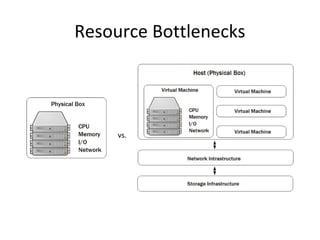
Resource Bottlenecks
vs.
CPU
What can lead to high CPU usage?
• excessive compilation / recompilation
sys.dm_exec_query_optimizer_info
– statistics changes
– unparametrized queries
alter database {} set parameterization forced
Oracle equivalent: cursor_sharing=force
• hash / sort operators
sys.dm_db_task_space_usage
Oracle equivalent: v$sort_usage
• queries that consume cpu time
sys.dm_exec_query_stats
Oracle equivalent: v$sqlstats
• 3rd party applications / services on db server
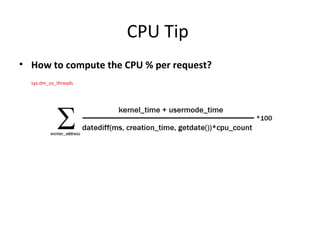
CPU Tip
• How to compute the CPU % per request?
sys.dm_os_threads
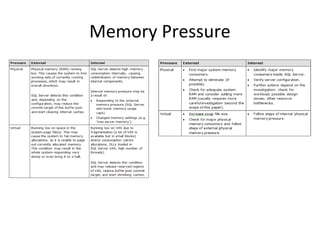
Memory
What can lead to high memory usage or memory pressure?
• Large table / index scans
• Large sorts
• Cached plans for unparametrized queries
• High value for OS available memory
• Memory leaks
• 3rd party applications / services on db server
Memory Pressure
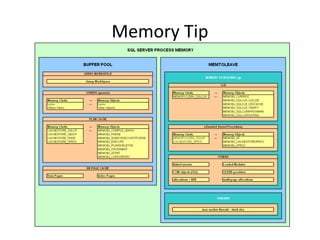
Memory Tip
I/O
What can lead to I/O bottlenecks?
• Missing indexes
• Full Table Scan / Clustered Index Scan
• Memory pressure
• Large sort operations placed on tempdb
• Poor storage infrastructure / IO subsystem
• high values for read/write latency
• Partitions not being aligned
• 3rd party applications / services on db server
I/O Tip
• How to find the HoBT on which sessions are waiting?
sys.dm_os_waiting_tasks
• Identify on what is page on what the transaction is currently waiting
• get page details
• query for object name
Network
What can lead to network bottlenecks?
• Mirroring (High Safety Mode)
• Network card / driver
– Check ProcessorInterruptsSec counter
• Network infrastructure
– switches, routers, firewalls
– Bandwidth
• DoS
tempdb
What can lead to tempdb bottlenecks?
sys.dm_db_file_space_usage
• Memory pressure
• temporary user tables
• Large sorts runs / work files for hash join
• Version store size
• Improper number of files
– not 1 file / cpu core, sometime it is too much (16 cores -> 16 files?!)
– SGAM, GAM, PFS contention
– Round robin allocation mechanism
Parallelism
Up to what level parallelism is good?
• DOP gives the number of threads per parallel operator
– 0 (default) means CPU count
– I’ve seen queries running with 81, 73, 58 threads on an 8 CPUs machine
• Too many threads
– Low CPU usage
– High values of CXPACKET
– High values of Context Switches
– Spinlocks
Slow running queries
Knowing about resources, what make a query slow?
• Improper statistics, leading to improper execution plan
Nested loops vs. hash join
• Improper join/filter conditions, leading to huge /very low cardinality
estimations
Histograms in SQL Server 2000/2005/2008 are only built for a single column—the first column in the set of key columns of
the statistics object.
• Missing indexes
sys.dm_db_missing_index_groups mig / sys.dm_db_missing_index_group_stats / sys.dm_db_missing_index_details
• Too many threads open
• Waits (I/O, memory, CPU, locks)
sys.dm_os_waiting_tasks
• and many, many others
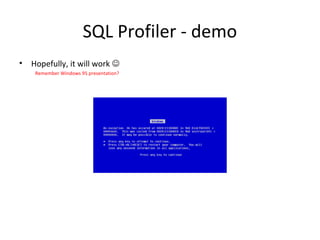
SQL Profiler - demo
• Hopefully, it will work 
Remember Windows 95 presentation?
Thank you
• Slide 6 again?

Dba lounge-sql server-performance-troubleshooting

  • 1.
    SQL Server Performance Troubleshooting DanAndrei STEFAN Database Administrator Synygy Europa 09.05.2013
  • 2.
  • 3.
    CPU What can leadto high CPU usage? • excessive compilation / recompilation sys.dm_exec_query_optimizer_info – statistics changes – unparametrized queries alter database {} set parameterization forced Oracle equivalent: cursor_sharing=force • hash / sort operators sys.dm_db_task_space_usage Oracle equivalent: v$sort_usage • queries that consume cpu time sys.dm_exec_query_stats Oracle equivalent: v$sqlstats • 3rd party applications / services on db server
  • 4.
    CPU Tip • Howto compute the CPU % per request? sys.dm_os_threads
  • 5.
    Memory What can leadto high memory usage or memory pressure? • Large table / index scans • Large sorts • Cached plans for unparametrized queries • High value for OS available memory • Memory leaks • 3rd party applications / services on db server
  • 6.
  • 7.
  • 8.
    I/O What can leadto I/O bottlenecks? • Missing indexes • Full Table Scan / Clustered Index Scan • Memory pressure • Large sort operations placed on tempdb • Poor storage infrastructure / IO subsystem • high values for read/write latency • Partitions not being aligned • 3rd party applications / services on db server
  • 9.
    I/O Tip • Howto find the HoBT on which sessions are waiting? sys.dm_os_waiting_tasks • Identify on what is page on what the transaction is currently waiting • get page details • query for object name
  • 10.
    Network What can leadto network bottlenecks? • Mirroring (High Safety Mode) • Network card / driver – Check ProcessorInterruptsSec counter • Network infrastructure – switches, routers, firewalls – Bandwidth • DoS
  • 11.
    tempdb What can leadto tempdb bottlenecks? sys.dm_db_file_space_usage • Memory pressure • temporary user tables • Large sorts runs / work files for hash join • Version store size • Improper number of files – not 1 file / cpu core, sometime it is too much (16 cores -> 16 files?!) – SGAM, GAM, PFS contention – Round robin allocation mechanism
  • 12.
    Parallelism Up to whatlevel parallelism is good? • DOP gives the number of threads per parallel operator – 0 (default) means CPU count – I’ve seen queries running with 81, 73, 58 threads on an 8 CPUs machine • Too many threads – Low CPU usage – High values of CXPACKET – High values of Context Switches – Spinlocks
  • 13.
    Slow running queries Knowingabout resources, what make a query slow? • Improper statistics, leading to improper execution plan Nested loops vs. hash join • Improper join/filter conditions, leading to huge /very low cardinality estimations Histograms in SQL Server 2000/2005/2008 are only built for a single column—the first column in the set of key columns of the statistics object. • Missing indexes sys.dm_db_missing_index_groups mig / sys.dm_db_missing_index_group_stats / sys.dm_db_missing_index_details • Too many threads open • Waits (I/O, memory, CPU, locks) sys.dm_os_waiting_tasks • and many, many others
  • 14.
    SQL Profiler -demo • Hopefully, it will work  Remember Windows 95 presentation?
  • 15.