Datatypes
Datatypes
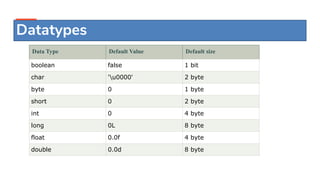
Data Type Default Value Default size
boolean false 1 bit
char 'u0000' 2 byte
byte 0 1 byte
short 0 2 byte
int 0 4 byte
long 0L 8 byte
float 0.0f 4 byte
double 0.0d 8 byte
Datatypes
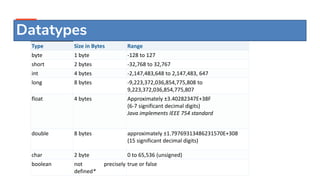
Type Size in Bytes Range
byte 1 byte -128 to 127
short 2 bytes -32,768 to 32,767
int 4 bytes -2,147,483,648 to 2,147,483, 647
long 8 bytes -9,223,372,036,854,775,808 to
9,223,372,036,854,775,807
float 4 bytes Approximately ±3.40282347E+38F
(6-7 significant decimal digits)
Java implements IEEE 754 standard
double 8 bytes approximately ±1.79769313486231570E+308
(15 significant decimal digits)
char 2 byte 0 to 65,536 (unsigned)
boolean not precisely
defined*
true or false
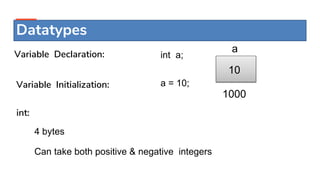
int a;
1000
10
a
Variable Declaration:
Variable Initialization: a = 10;
int:
4 bytes
Can take both positive & negative integers
Datatypes
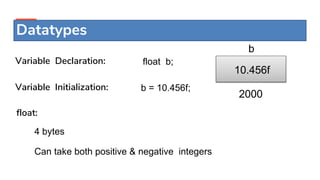
float b;
2000
10.456f
b
Variable Declaration:
Variable Initialization: b = 10.456f;
float:
4 bytes
Can take both positive & negative integers
Datatypes
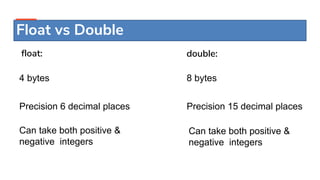
float:
4 bytes
Precision 6 decimal places
Can take both positive &
negative integers
double:
8 bytes
Precision 15 decimal places
Can take both positive &
negative integers
Float vs Double
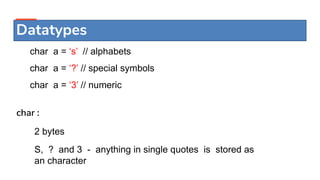
char a = ‘s’ // alphabets
char a = ‘?’ // special symbols
char a = ‘3’ // numeric
Datatypes
char :
2 bytes
S, ? and 3 - anything in single quotes is stored as
an character
 Byte -> Short -> Int -> Float -> Double
 Byte -> short -> int -> long
Example:
int a = 10;
float = a + 10;
Type Conversion(Implicit conversion)
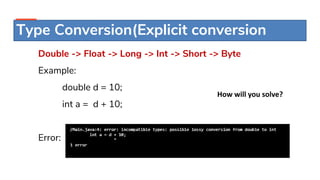
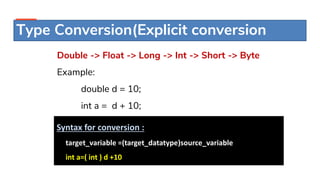
Type Conversion(Explicit conversion
Double -> Float -> Long -> Int -> Short -> Byte
Example:
double d = 10;
int a = d + 10;
Error:
How will you solve?
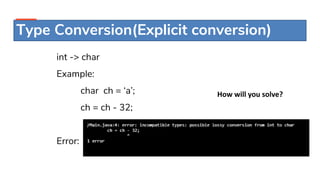
Type Conversion(Explicit conversion)
int -> char
Example:
char ch = ‘a’;
ch = ch - 32;
Error:
How will you solve?
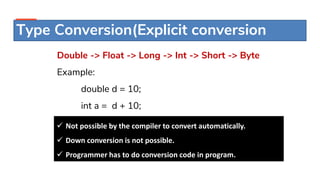
Type Conversion(Explicit conversion
Double -> Float -> Long -> Int -> Short -> Byte
Example:
double d = 10;
int a = d + 10;
 Not possible by the compiler to convert automatically.
 Down conversion is not possible.
 Programmer has to do conversion code in program.
Type Conversion(Explicit conversion
Double -> Float -> Long -> Int -> Short -> Byte
Example:
double d = 10;
int a = d + 10;
Syntax for conversion :
target_variable =(target_datatype)source_variable
int a=( int ) d +10
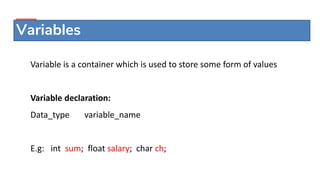
Variables
Variable is a container which is used to store some form of values
Variable declaration:
Data_type variable_name
E.g: int sum; float salary; char ch;
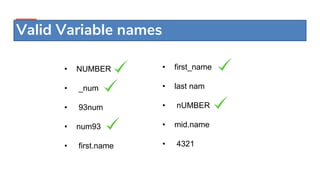
• NUMBER
• _num
• 93num
• num93
• first.name
• first_name
• last nam
• nUMBER
• mid.name
• 4321
Valid Variable names
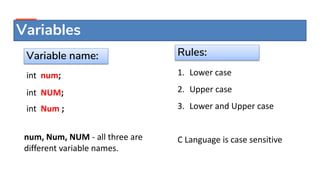
int num;
int NUM;
int Num ;
num, Num, NUM - all three are
different variable names.
Rules:
1. Lower case
2. Upper case
3. Lower and Upper case
C Language is case sensitive
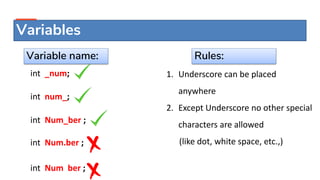
Variable name:
Variables
int _num;
int num_;
int Num_ber ;
int Num.ber ;
int Num ber ;
1. Underscore can be placed
anywhere
2. Except Underscore no other special
characters are allowed
(like dot, white space, etc.,)
Variables
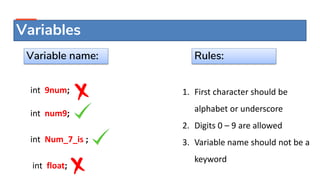
Rules:
Variable name:
int 9num;
int num9;
int Num_7_is ;
int float;
1. First character should be
alphabet or underscore
2. Digits 0 – 9 are allowed
3. Variable name should not be a
keyword
Variables
Rules:
Variable name:
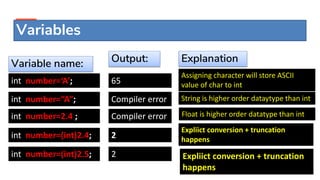
int number=‘A’;
int number=“A”;
int number=2.4 ;
int number=(int)2.4;
Variables
Output:
Variable name:
int number=(int)2.5;
65
Compiler error
Compiler error
2
2
Explanation
Assigning character will store ASCII
value of char to int
String is higher order dataytype than int
Float is higher order datatype than int
Expliict conversion + truncation
happens
Expliict conversion + truncation
happens
THANK YOU

Datatypes & variables in java

  • 2.
  • 3.
    Datatypes Data Type DefaultValue Default size boolean false 1 bit char 'u0000' 2 byte byte 0 1 byte short 0 2 byte int 0 4 byte long 0L 8 byte float 0.0f 4 byte double 0.0d 8 byte
  • 4.
    Datatypes Type Size inBytes Range byte 1 byte -128 to 127 short 2 bytes -32,768 to 32,767 int 4 bytes -2,147,483,648 to 2,147,483, 647 long 8 bytes -9,223,372,036,854,775,808 to 9,223,372,036,854,775,807 float 4 bytes Approximately ±3.40282347E+38F (6-7 significant decimal digits) Java implements IEEE 754 standard double 8 bytes approximately ±1.79769313486231570E+308 (15 significant decimal digits) char 2 byte 0 to 65,536 (unsigned) boolean not precisely defined* true or false
  • 5.
    int a; 1000 10 a Variable Declaration: VariableInitialization: a = 10; int: 4 bytes Can take both positive & negative integers Datatypes
  • 6.
    float b; 2000 10.456f b Variable Declaration: VariableInitialization: b = 10.456f; float: 4 bytes Can take both positive & negative integers Datatypes
  • 7.
    float: 4 bytes Precision 6decimal places Can take both positive & negative integers double: 8 bytes Precision 15 decimal places Can take both positive & negative integers Float vs Double
  • 8.
    char a =‘s’ // alphabets char a = ‘?’ // special symbols char a = ‘3’ // numeric Datatypes char : 2 bytes S, ? and 3 - anything in single quotes is stored as an character
  • 10.
     Byte ->Short -> Int -> Float -> Double  Byte -> short -> int -> long Example: int a = 10; float = a + 10; Type Conversion(Implicit conversion)
  • 11.
    Type Conversion(Explicit conversion Double-> Float -> Long -> Int -> Short -> Byte Example: double d = 10; int a = d + 10; Error: How will you solve?
  • 12.
    Type Conversion(Explicit conversion) int-> char Example: char ch = ‘a’; ch = ch - 32; Error: How will you solve?
  • 13.
    Type Conversion(Explicit conversion Double-> Float -> Long -> Int -> Short -> Byte Example: double d = 10; int a = d + 10;  Not possible by the compiler to convert automatically.  Down conversion is not possible.  Programmer has to do conversion code in program.
  • 14.
    Type Conversion(Explicit conversion Double-> Float -> Long -> Int -> Short -> Byte Example: double d = 10; int a = d + 10; Syntax for conversion : target_variable =(target_datatype)source_variable int a=( int ) d +10
  • 15.
    Variables Variable is acontainer which is used to store some form of values Variable declaration: Data_type variable_name E.g: int sum; float salary; char ch;
  • 16.
    • NUMBER • _num •93num • num93 • first.name • first_name • last nam • nUMBER • mid.name • 4321 Valid Variable names
  • 17.
    int num; int NUM; intNum ; num, Num, NUM - all three are different variable names. Rules: 1. Lower case 2. Upper case 3. Lower and Upper case C Language is case sensitive Variable name: Variables
  • 18.
    int _num; int num_; intNum_ber ; int Num.ber ; int Num ber ; 1. Underscore can be placed anywhere 2. Except Underscore no other special characters are allowed (like dot, white space, etc.,) Variables Rules: Variable name:
  • 19.
    int 9num; int num9; intNum_7_is ; int float; 1. First character should be alphabet or underscore 2. Digits 0 – 9 are allowed 3. Variable name should not be a keyword Variables Rules: Variable name:
  • 20.
    int number=‘A’; int number=“A”; intnumber=2.4 ; int number=(int)2.4; Variables Output: Variable name: int number=(int)2.5; 65 Compiler error Compiler error 2 2 Explanation Assigning character will store ASCII value of char to int String is higher order dataytype than int Float is higher order datatype than int Expliict conversion + truncation happens Expliict conversion + truncation happens
  • 21.

Editor's Notes

  • #2 1st slide (Mandatory)
  • #3 Title + Image + Text
  • #4 Title + Image + Text
  • #5 Title + Image + Text
  • #7 Float data type in Java stores a decimal value with 6-7 total digits of precision. So for example 12.12345 can be saved as a float, but 12.123456789 cannot be saved as a float. When representing a float data type in Java we should append the letter f to the end of the data type, otherwise, it will save as double. Double data type stores decimal values with 15-16 digits of precision. The default value is 0.0d, this means that if you do not append f or d to the end of the decimal, the value will be stored as a double in Java.
  • #22 Thank you slide