DBMS
Database Management
System
Presented by: Zainab
Table of Content
 Introdution of Database
 What is DBMS?
 Types Of DBMS
 Database Terminologies
 Database Advantages
Introduction
 A database is a collection of interrelated data that helps
in the efficient retrieval, insertion, and deletion of data
from the database and organizes the data in the form of
tables, views, schemas, reports, etc. For Example, a
university database organizes the data about students,
faculty, admin staff, etc. which helps in the efficient
retrieval, insertion, and deletion of data from it.
What is DBMS?
 A Database Management System (DBMS) is a software
system that is designed to manage and organize data in a
structured manner. It allows users to create, modify
database. DBMS provides an environment to store and
retrieve data in convenient and efficient manner.
Types of DBMS
 Relational Database Management System (RDBMS)
 NoSQL DBMS
 Object-Oriented DBMS (OODBMS)
Database Terminologies
 Table
 Entity
 Attribute
 Primary Key
 Foreign Key
 Relationship
 Schema
 Normalization
Database Terminologies
 Table
• Definition: A collection of related data entries and consists
of rows and columns.
• Structure: Each table in a database holds data about a
specific subject, like customers or products.
 Entity
• Definition: An object or concept about which data is stored.
• Examples: Student, Course, Employee, Product.
Database Terminologies
 Attribute
• Definition: A property or characteristic of an entity.
• Examples: For an entity Student, attributes could include
Name, Student, and Date_of_Birth.
 Primary Key
Definition:
• A unique identifier for each record in a table.
• Function: Ensures each record is uniquely identifiable.
• Example: Student_ID in a Student table.
 Foreign Key
• Definition: An attribute in one table that links to the
primary key of another table.
• Purpose: Establishes a relationship between two tables.
• Example: Department_ID in Employee table linking to
Department table.
Database Terminologies
 Relationship
• Definition: A connection between two tables based on
common attributes.
• Types:
• One-to-One: Each record in Table A relates to only one
record in Table B.
• One-to-Many: Each record in Table A relates to multiple
records in Table B.
• Many-to-Many: Multiple records in Table A relate to
multiple records in Table B.
Database Terminologies
 Schema
• Definition: The structure that defines the organization of
data within the database, including tables, fields, and
relationships.
• Purpose: Provides a blueprint of how the database is
structured.
 Normalization
• Definition: The process of organizing data to reduce
redundancy and improve data integrity.
• Purpose: Ensures efficient use of storage and maintains
data consistency.
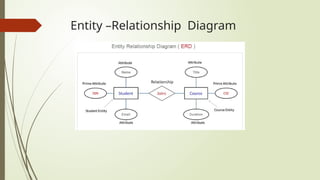
Entity –Relationship Diagram
Advantages Of DBMS
 Reduces Data Redundancy
 Data Consistency
 Flexible
 Backup and Recovery
 Data Security
Thank You

Databases Management System (DBMS)ppt by prof.zainab

  • 1.
  • 2.
    Table of Content Introdution of Database  What is DBMS?  Types Of DBMS  Database Terminologies  Database Advantages
  • 3.
    Introduction  A databaseis a collection of interrelated data that helps in the efficient retrieval, insertion, and deletion of data from the database and organizes the data in the form of tables, views, schemas, reports, etc. For Example, a university database organizes the data about students, faculty, admin staff, etc. which helps in the efficient retrieval, insertion, and deletion of data from it.
  • 4.
    What is DBMS? A Database Management System (DBMS) is a software system that is designed to manage and organize data in a structured manner. It allows users to create, modify database. DBMS provides an environment to store and retrieve data in convenient and efficient manner.
  • 5.
    Types of DBMS Relational Database Management System (RDBMS)  NoSQL DBMS  Object-Oriented DBMS (OODBMS)
  • 6.
    Database Terminologies  Table Entity  Attribute  Primary Key  Foreign Key  Relationship  Schema  Normalization
  • 7.
    Database Terminologies  Table •Definition: A collection of related data entries and consists of rows and columns. • Structure: Each table in a database holds data about a specific subject, like customers or products.  Entity • Definition: An object or concept about which data is stored. • Examples: Student, Course, Employee, Product.
  • 8.
    Database Terminologies  Attribute •Definition: A property or characteristic of an entity. • Examples: For an entity Student, attributes could include Name, Student, and Date_of_Birth.  Primary Key Definition: • A unique identifier for each record in a table. • Function: Ensures each record is uniquely identifiable. • Example: Student_ID in a Student table.
  • 9.
     Foreign Key •Definition: An attribute in one table that links to the primary key of another table. • Purpose: Establishes a relationship between two tables. • Example: Department_ID in Employee table linking to Department table. Database Terminologies
  • 10.
    Database Terminologies  Relationship •Definition: A connection between two tables based on common attributes. • Types: • One-to-One: Each record in Table A relates to only one record in Table B. • One-to-Many: Each record in Table A relates to multiple records in Table B. • Many-to-Many: Multiple records in Table A relate to multiple records in Table B.
  • 11.
    Database Terminologies  Schema •Definition: The structure that defines the organization of data within the database, including tables, fields, and relationships. • Purpose: Provides a blueprint of how the database is structured.  Normalization • Definition: The process of organizing data to reduce redundancy and improve data integrity. • Purpose: Ensures efficient use of storage and maintains data consistency.
  • 12.
  • 13.
    Advantages Of DBMS Reduces Data Redundancy  Data Consistency  Flexible  Backup and Recovery  Data Security
  • 14.