DIY Tech Support
Brought to you by:
Tech Benders
Karen Fredricks
Your Act! Guru
Karen@TechBenders.com
561-470-5450 x1
Brought to you by:
Tech Benders
Karen Fredricks
Your Act! Guru
Karen@TechBenders.com
561-470-5450 x1
And yes, I’m the lady who created:
•11 “For Dummies” books on CRM
•2 “Act! CookBooks”
•The lynda.com Act! training videos
Support Options
• Act Premium Subscription comes with free
SwiftPage Support (877-716-6296)
• Pro does not come with Support
• You can purchase $40 installation Support ONLY
• Tech Benders Support 561-470-5450
– Ext 1: Karen: Sales, Training & Consulting
– Ext 2: Kim: Database repair, Conversión & Support
– Ext 3: Roy: Reports & Support
• DIY Tech Support (keep Reading)
Kb.act.com
Search by article #
Brought to you by:
Tech Benders
Karen Fredricks
Your Act! Guru
Karen@TechBenders.com
561-470-5450 x1
Other Search Options
• Search Kb.act.com by error message
– You must be exact in your messaging
• Search Google
– It does a better job of searching
– Go figure!
Help! My software won’t stay registered !
• KB #17847
• Blame Windows 10 on this one 
• Quick Fix: Right-click your Act! icon and
choose Run as Administrator
• Re-register when Act! opens
Help! I lost my password!
• KB 14150
• Yes, EVERY database has at least one user
– If you don’t know it go to Tools/Manage Users
• A single user database doesn’t show you the login screen unless
you do something special like update or restore your database
• The password is CaSe SenSitive, the User name is not
• Both the User Name and Password must be correct to log into the
database
– Quick Fix: Try leaving the password field BLANK
– Try variations of your name: kfredricks, Karen, Karen Fredricks,
Karen F, KarenF
• We offer password recovery for all Act! versions for $100
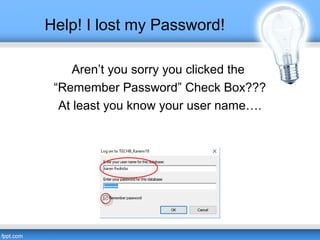
Help! I lost my Password!
Aren’t you sorry you clicked the
“Remember Password” Check Box???
At least you know your user name….
Help! I’ve lost my Software!
• Quick Fix: the download center
http://www.act.com/resources/downloads/
• Quick Fix: be sneaky…
http://www.act.com/download/pro2011
http://www.act.com/download/premium2012
http://www.act.com/download/premiumv18
• Quick Fix: if you purchased from Tech
Benders we have your license number and
download link on file 
Help! I have an Unhandled Exception!
• KB 17510
• Quick Fix: Reboot; this is usually temporary
• “Object reference not set to an instance of an
object”
• KB 24350
• Quick Fix: None – this could be a number of
things 
Help! Act! won’t open!
• KB 19640
• Quick Fix (90%)
– With Act! closed….Type services.msc at the Windows
prompt
– Scroll down to SQL Server (Act! 7)
– Either Start or Restart the service
• A/V Software
– Add exceptions for act.exe and sql.exe
• Turn Windows Firewall off (Control Panel)
• The Bottom Line: Act! and SQL have to “talk” to one
another
Help! I just upgraded to Windows 10!
• KB 38170
• Quick Fix: upgrade to v17.2 or v18
• Rule of thumb: when upgrading look before you leap!
• Typical issues with older versions:
– Act! crashes when opening a document or attachment
– Act! keeps prompting you for your password
– SQL doesn’t restart after reboot
– Database won’t open and is listed as Suspect or
Recovery in ActDiag
Help! My Documents stopped working!
• KB 38261: Microsoft .net update on
1/26/16
• KB 38199: Windows 10
Help! Act! looks screwy on my All-in-One!
• You are going to need to adjust your resolutions if you’re
now working on a 13” monitor
• Quick Fix: Make Text Larger or Smaller
• Windows 10:
– Settings/System/Display/Settings
– Type Display at Windows prompt and click Display Settings
– Right Click Desktop/Display Settings
• Windows 7:
– Control Panel/Display/Smaller fonts OR
– Right-Click Desktop/Screen Resolution
Help! Act! looks screwy on my All-in-One!
• KB #38200 –
– Lower resolution (ex 3200x1800 to 1600x900)
– Disable DPI scaling (not necessary on YOGA)
– Set Display scaling in Windows 8 and 10
– Adjusting your layout should be the LAST thing you try
• Surface Pros cause the most problems
– Go to my site: http://acthelp.techbenders.com/2016/02/act-and-
surface-pro/
– There’s a video, a text file and an executable file
Help! Act! My Preferences aren’t Saving!
• Symptoms: Contact List changes don’t
stick, Preference Settings don’t stay
• KB #14770
• Quick Fix: Rebuild your Preferences
– Start/Run/ActDiag
– Select Databases/Database List
– Tools/Delete Preference Files
Help! Outlook isn’t working
Compatibility
• Act! v18: Outlook 2007-2016
• Act! v17: Outlook 2007-2013
• Act! v16: Outlook 2003 - 2013
• Act! 2011: Outlook 2003-2010
• Act! 2007: Outlook 2000-2003
• ONLY 32 BIT VERSIONS!
• http://kb.act.com/app/answers/
detail/a_id/29767/kw/outlook
KB’s For Setup
• KB 26832: Outlook setup
PLEASE USE THE
RECOMMENDED SETTINGS!
• KB 19465 Outlook setup for
Act! Web version
• You cannot have both versions
on the same machine!
• You can remove Act! Premium
for Web Outlook integration
from Control Panel
Outlook Rules of Thumb
Outlook must be installed prior to the
Act! install!
That means: If you UPGRADE to a new
version of Office you must reinstall Act!
Act! requires a FULL 32 BIT installation of Office.
That means:
•Do not use “Click to Run”
•Do not use “Office 365 Click to Run”
That means: If you UPGRADE to a new
version of Office uninstall the old version!
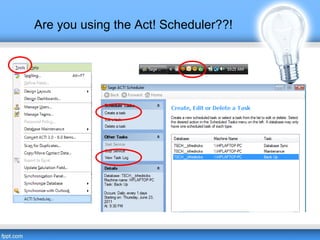
Are you using the Act! Scheduler??!
Warning: Not all “automatic system backups” are
capable of backing up SQL databases!
• Use it to run nightly backups
• Use it to run weekly maintenance
• Use it to automatically sync your remote
database
• Use it to automate the synching of your Outlook
calendar
You must run this on the server or computer
that
houses your database!
Are you using the Act! Scheduler??!
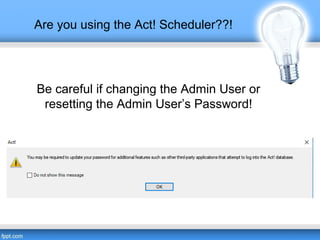
Be careful if changing the Admin User or
resetting the Admin User’s Password!
My Database is Act!ing Up!
Act! Diag
Advanced Maintenance
• All users must exit out of
Act!
• This must be run on the
server or main computer
– Start/Run/ActDiag
– Select Databases/
Database List
– Tools/Repair Database
– Tools/Reindex
Database
– All Database Rebuilds
Basic Maintenance
• Tools/Database
Maintenance
• Check and Repair
• Integrity and Re-Index
• This is preventative
maintenance and does not
repair.
• Same Maintenance that is
run by the Act! Scheduler
• Do this after a large
deletion, change or import
Act! Database Repair!
• We can repair any damaged database from Act! v1 –
v18
• We offer weekend service
• Call 561-470-5450 x1 for further details

Database repair

  • 1.
    DIY Tech Support Broughtto you by: Tech Benders Karen Fredricks Your Act! Guru Karen@TechBenders.com 561-470-5450 x1
  • 2.
    Brought to youby: Tech Benders Karen Fredricks Your Act! Guru Karen@TechBenders.com 561-470-5450 x1 And yes, I’m the lady who created: •11 “For Dummies” books on CRM •2 “Act! CookBooks” •The lynda.com Act! training videos
  • 3.
    Support Options • ActPremium Subscription comes with free SwiftPage Support (877-716-6296) • Pro does not come with Support • You can purchase $40 installation Support ONLY • Tech Benders Support 561-470-5450 – Ext 1: Karen: Sales, Training & Consulting – Ext 2: Kim: Database repair, Conversión & Support – Ext 3: Roy: Reports & Support • DIY Tech Support (keep Reading)
  • 4.
    Kb.act.com Search by article# Brought to you by: Tech Benders Karen Fredricks Your Act! Guru Karen@TechBenders.com 561-470-5450 x1
  • 5.
    Other Search Options •Search Kb.act.com by error message – You must be exact in your messaging • Search Google – It does a better job of searching – Go figure!
  • 6.
    Help! My softwarewon’t stay registered ! • KB #17847 • Blame Windows 10 on this one  • Quick Fix: Right-click your Act! icon and choose Run as Administrator • Re-register when Act! opens
  • 7.
    Help! I lostmy password! • KB 14150 • Yes, EVERY database has at least one user – If you don’t know it go to Tools/Manage Users • A single user database doesn’t show you the login screen unless you do something special like update or restore your database • The password is CaSe SenSitive, the User name is not • Both the User Name and Password must be correct to log into the database – Quick Fix: Try leaving the password field BLANK – Try variations of your name: kfredricks, Karen, Karen Fredricks, Karen F, KarenF • We offer password recovery for all Act! versions for $100
  • 8.
    Help! I lostmy Password! Aren’t you sorry you clicked the “Remember Password” Check Box??? At least you know your user name….
  • 9.
    Help! I’ve lostmy Software! • Quick Fix: the download center http://www.act.com/resources/downloads/ • Quick Fix: be sneaky… http://www.act.com/download/pro2011 http://www.act.com/download/premium2012 http://www.act.com/download/premiumv18 • Quick Fix: if you purchased from Tech Benders we have your license number and download link on file 
  • 10.
    Help! I havean Unhandled Exception! • KB 17510 • Quick Fix: Reboot; this is usually temporary • “Object reference not set to an instance of an object” • KB 24350 • Quick Fix: None – this could be a number of things 
  • 11.
    Help! Act! won’topen! • KB 19640 • Quick Fix (90%) – With Act! closed….Type services.msc at the Windows prompt – Scroll down to SQL Server (Act! 7) – Either Start or Restart the service • A/V Software – Add exceptions for act.exe and sql.exe • Turn Windows Firewall off (Control Panel) • The Bottom Line: Act! and SQL have to “talk” to one another
  • 12.
    Help! I justupgraded to Windows 10! • KB 38170 • Quick Fix: upgrade to v17.2 or v18 • Rule of thumb: when upgrading look before you leap! • Typical issues with older versions: – Act! crashes when opening a document or attachment – Act! keeps prompting you for your password – SQL doesn’t restart after reboot – Database won’t open and is listed as Suspect or Recovery in ActDiag
  • 13.
    Help! My Documentsstopped working! • KB 38261: Microsoft .net update on 1/26/16 • KB 38199: Windows 10
  • 14.
    Help! Act! looksscrewy on my All-in-One! • You are going to need to adjust your resolutions if you’re now working on a 13” monitor • Quick Fix: Make Text Larger or Smaller • Windows 10: – Settings/System/Display/Settings – Type Display at Windows prompt and click Display Settings – Right Click Desktop/Display Settings • Windows 7: – Control Panel/Display/Smaller fonts OR – Right-Click Desktop/Screen Resolution
  • 15.
    Help! Act! looksscrewy on my All-in-One! • KB #38200 – – Lower resolution (ex 3200x1800 to 1600x900) – Disable DPI scaling (not necessary on YOGA) – Set Display scaling in Windows 8 and 10 – Adjusting your layout should be the LAST thing you try • Surface Pros cause the most problems – Go to my site: http://acthelp.techbenders.com/2016/02/act-and- surface-pro/ – There’s a video, a text file and an executable file
  • 16.
    Help! Act! MyPreferences aren’t Saving! • Symptoms: Contact List changes don’t stick, Preference Settings don’t stay • KB #14770 • Quick Fix: Rebuild your Preferences – Start/Run/ActDiag – Select Databases/Database List – Tools/Delete Preference Files
  • 17.
    Help! Outlook isn’tworking Compatibility • Act! v18: Outlook 2007-2016 • Act! v17: Outlook 2007-2013 • Act! v16: Outlook 2003 - 2013 • Act! 2011: Outlook 2003-2010 • Act! 2007: Outlook 2000-2003 • ONLY 32 BIT VERSIONS! • http://kb.act.com/app/answers/ detail/a_id/29767/kw/outlook KB’s For Setup • KB 26832: Outlook setup PLEASE USE THE RECOMMENDED SETTINGS! • KB 19465 Outlook setup for Act! Web version • You cannot have both versions on the same machine! • You can remove Act! Premium for Web Outlook integration from Control Panel
  • 18.
    Outlook Rules ofThumb Outlook must be installed prior to the Act! install! That means: If you UPGRADE to a new version of Office you must reinstall Act! Act! requires a FULL 32 BIT installation of Office. That means: •Do not use “Click to Run” •Do not use “Office 365 Click to Run” That means: If you UPGRADE to a new version of Office uninstall the old version!
  • 19.
    Are you usingthe Act! Scheduler??! Warning: Not all “automatic system backups” are capable of backing up SQL databases! • Use it to run nightly backups • Use it to run weekly maintenance • Use it to automatically sync your remote database • Use it to automate the synching of your Outlook calendar You must run this on the server or computer that houses your database!
  • 20.
    Are you usingthe Act! Scheduler??!
  • 21.
    Are you usingthe Act! Scheduler??! Be careful if changing the Admin User or resetting the Admin User’s Password!
  • 22.
    My Database isAct!ing Up! Act! Diag Advanced Maintenance • All users must exit out of Act! • This must be run on the server or main computer – Start/Run/ActDiag – Select Databases/ Database List – Tools/Repair Database – Tools/Reindex Database – All Database Rebuilds Basic Maintenance • Tools/Database Maintenance • Check and Repair • Integrity and Re-Index • This is preventative maintenance and does not repair. • Same Maintenance that is run by the Act! Scheduler • Do this after a large deletion, change or import
  • 23.
    Act! Database Repair! •We can repair any damaged database from Act! v1 – v18 • We offer weekend service • Call 561-470-5450 x1 for further details