UNIVERSITY SCHOOL OF
MANAGEMENT
KURKSHETRA UNIVERSITY
1
Presented To :-
Ms. Manisha Gahlawat
(Assistance Professor)
Presented By :-
Neeraj (115)
DATA BASE
MANAGEMENT
SYSTEM (DBMS)
2
CONTENT IN PRESENTATION
 Introduction to Database Management System
 DBMS v/s File System
 Database models
 Database Languages: DML, DDL
 Database users and administrators
 Applications of DBMS
 Advantage and Disadvantages of DBMS
3
INTRODUCTION TO DBMS
 Database
 is collection of related data and its metadata organized in a
structured format for optimized information management.
 Database Management System (DBMS)
 is a software that enables easy creation, access, and
modification of databases
 for efficient and effective database management
 Database System
 is an integrated system of hardware, software, people,
procedures, and data
 that define and regulate the collection, storage, management,
and use of data within a database environment
4
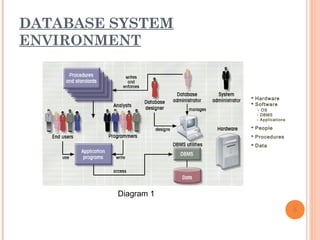
DATABASE SYSTEM
ENVIRONMENT
5
 Hardware
 Software
- OS
- DBMS
- Applications
 People
 Procedures
 Data
Diagram 1
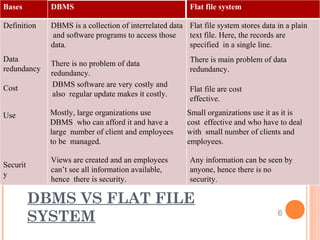
Bases DBMS Flat file system
Definition
Data
redundancy
Cost
Use
Securit
y
DBMS is a collection of interrelated data
and software programs to access those
data.
There is no problem of data
redundancy.
DBMS software are very costly and
also regular update makes it costly.
Mostly, large organizations use
DBMS who can afford it and have a
large number of client and employees
to be managed.
Views are created and an employees
can’t see all information available,
hence there is security.
Flat file system stores data in a plain
text file. Here, the records are
specified in a single line.
There is main problem of data
redundancy.
Flat file are cost
effective.
Small organizations use it as it is
cost effective and who have to deal
with small number of clients and
employees.
Any information can be seen by
anyone, hence there is no
security.
DBMS VS FLAT FILE
SYSTEM 6
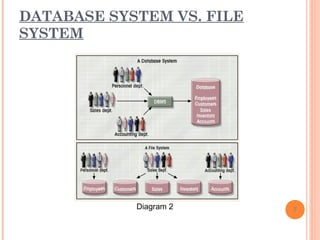
DATABASE SYSTEM VS. FILE
SYSTEM
7Diagram 2
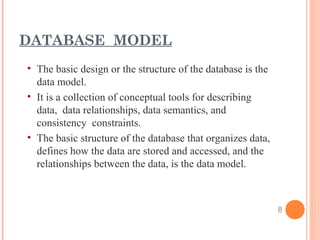
• The basic design or the structure of the database is the
data model.
• It is a collection of conceptual tools for describing
data, data relationships, data semantics, and
consistency constraints.
• The basic structure of the database that organizes data,
defines how the data are stored and accessed, and the
relationships between the data, is the data model.
DATABASE MODEL
8
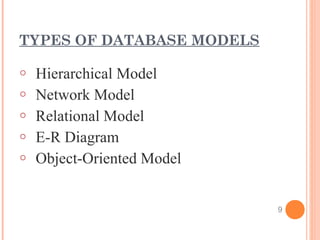
TYPES OF DATABASE MODELS
o Hierarchical Model
o Network Model
o Relational Model
o E-R Diagram
o Object-Oriented Model
9
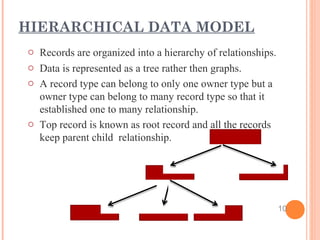
o Records are organized into a hierarchy of relationships.
o Data is represented as a tree rather then graphs.
o A record type can belong to only one owner type but a
owner type can belong to many record type so that it
established one to many relationship.
o Top record is known as root record and all the records
keep parent child relationship.
HIERARCHICAL DATA MODEL
10
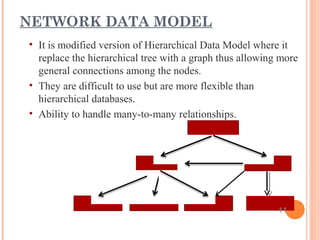
• It is modified version of Hierarchical Data Model where it
replace the hierarchical tree with a graph thus allowing more
general connections among the nodes.
• They are difficult to use but are more flexible than
hierarchical databases.
• Ability to handle many-to-many relationships.
NETWORK DATA MODEL
11
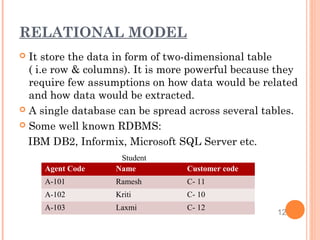
Agent Code Name Customer code
A-101 Ramesh C- 11
A-102 Kriti C- 10
A-103 Laxmi C- 12
Student
RELATIONAL MODEL
 It store the data in form of two-dimensional table
( i.e row & columns). It is more powerful because they
require few assumptions on how data would be related
and how data would be extracted.
 A single database can be spread across several tables.
 Some well known RDBMS:
IBM DB2, Informix, Microsoft SQL Server etc.
12
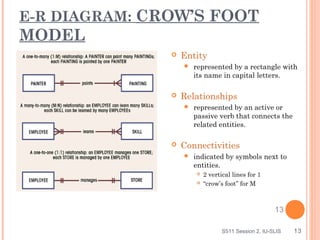
E-R DIAGRAM: CROW’S FOOT
MODEL
 Entity
 represented by a rectangle with
its name in capital letters.
 Relationships
 represented by an active or
passive verb that connects the
related entities.
 Connectivities
 indicated by symbols next to
entities.
 2 vertical lines for 1
 “crow’s foot” for M
S511 Session 2, IU-SLIS 13
13
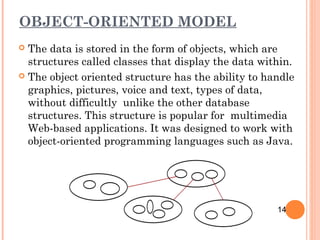
OBJECT-ORIENTED MODEL
 The data is stored in the form of objects, which are
structures called classes that display the data within.
 The object oriented structure has the ability to handle
graphics, pictures, voice and text, types of data,
without difficultly unlike the other database
structures. This structure is popular for multimedia
Web-based applications. It was designed to work with
object-oriented programming languages such as Java.
14
Data Definition Language(DDL):
o Database language that is used to create, delete or modify
database schema is called DDL.
o It is used by Database Administrators(DBA) to specify the
conceptual schema.
o DDL interpreter converts DDL statements into equivalent
low level statements understood by the DBMS.
o Normally, create, alter, and drop statements are DDL
statements.
o DDL statements make changes in the schema
DATABASE LANGUAGES
15
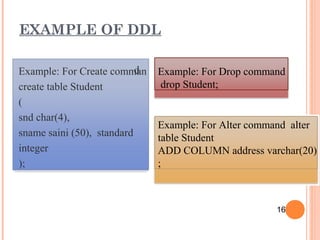
dExample: For Create comman
create table Student
(
snd char(4),
sname saini (50), standard
integer
);
Example: For Drop command
drop Student;
Example: For Alter command alter
table Student
ADD COLUMN address varchar(20)
;
EXAMPLE OF DDL
16
• Database language that enables insert, update, delete,
and retrieval of data from the database is called Data
Manipulation Language.
• DML complier converts DML statements into equivalent
low level statements that the database understands.
• Normally, select, insert, update, delete are DML
commands.
• DML reflects change in the instance, not the schema.
DML( DATA MANIPULATION
LANGUAGE)
17
DATABASE USERS AND
ADMINISTRATORS
 Database users
o Naive Users
o Specialized Users
o Sophisticated Users
o Application Programmers
18
DBA is a person who has control over data and the
associated application programs. He is the one who can
define schema, install new software, enforcing security
to the system, etc.
Major responsibilities of DBA are:
1.Define schema and modify as per needed
2.Install new software for efficient operations
3.Enforcing and monitoring security
4.Analyzing the data stored in the DBMS
5.Keeping the backup of the DBMS periodically
6.Ensuring the state of the hardware and software
DATABASE ADMINISTRATORS
19
APPLICATIONS OF DBMS
 Airlines and railways
 Banking
 Education
 Telecommunication
 Government
 Private organisations
20
ADVANTAGE OF DBMS
 Improved data sharing
 Improved data security
 Improved data integrity
 Minimized data inconsistency
 Reduced Redundancy
 Better administration and control
 Better transaction management
 Data independence
21
DISADVANTAGE OF DBMS
 Increased costs
 Management complexity
 Frequent upgrade
 Insufficient database expertise
 Data security and integrity
22
THANK
YOU
23

Database management system overview

  • 1.
    UNIVERSITY SCHOOL OF MANAGEMENT KURKSHETRAUNIVERSITY 1 Presented To :- Ms. Manisha Gahlawat (Assistance Professor) Presented By :- Neeraj (115)
  • 2.
  • 3.
    CONTENT IN PRESENTATION Introduction to Database Management System  DBMS v/s File System  Database models  Database Languages: DML, DDL  Database users and administrators  Applications of DBMS  Advantage and Disadvantages of DBMS 3
  • 4.
    INTRODUCTION TO DBMS Database  is collection of related data and its metadata organized in a structured format for optimized information management.  Database Management System (DBMS)  is a software that enables easy creation, access, and modification of databases  for efficient and effective database management  Database System  is an integrated system of hardware, software, people, procedures, and data  that define and regulate the collection, storage, management, and use of data within a database environment 4
  • 5.
    DATABASE SYSTEM ENVIRONMENT 5  Hardware Software - OS - DBMS - Applications  People  Procedures  Data Diagram 1
  • 6.
    Bases DBMS Flatfile system Definition Data redundancy Cost Use Securit y DBMS is a collection of interrelated data and software programs to access those data. There is no problem of data redundancy. DBMS software are very costly and also regular update makes it costly. Mostly, large organizations use DBMS who can afford it and have a large number of client and employees to be managed. Views are created and an employees can’t see all information available, hence there is security. Flat file system stores data in a plain text file. Here, the records are specified in a single line. There is main problem of data redundancy. Flat file are cost effective. Small organizations use it as it is cost effective and who have to deal with small number of clients and employees. Any information can be seen by anyone, hence there is no security. DBMS VS FLAT FILE SYSTEM 6
  • 7.
    DATABASE SYSTEM VS.FILE SYSTEM 7Diagram 2
  • 8.
    • The basicdesign or the structure of the database is the data model. • It is a collection of conceptual tools for describing data, data relationships, data semantics, and consistency constraints. • The basic structure of the database that organizes data, defines how the data are stored and accessed, and the relationships between the data, is the data model. DATABASE MODEL 8
  • 9.
    TYPES OF DATABASEMODELS o Hierarchical Model o Network Model o Relational Model o E-R Diagram o Object-Oriented Model 9
  • 10.
    o Records areorganized into a hierarchy of relationships. o Data is represented as a tree rather then graphs. o A record type can belong to only one owner type but a owner type can belong to many record type so that it established one to many relationship. o Top record is known as root record and all the records keep parent child relationship. HIERARCHICAL DATA MODEL 10
  • 11.
    • It ismodified version of Hierarchical Data Model where it replace the hierarchical tree with a graph thus allowing more general connections among the nodes. • They are difficult to use but are more flexible than hierarchical databases. • Ability to handle many-to-many relationships. NETWORK DATA MODEL 11
  • 12.
    Agent Code NameCustomer code A-101 Ramesh C- 11 A-102 Kriti C- 10 A-103 Laxmi C- 12 Student RELATIONAL MODEL  It store the data in form of two-dimensional table ( i.e row & columns). It is more powerful because they require few assumptions on how data would be related and how data would be extracted.  A single database can be spread across several tables.  Some well known RDBMS: IBM DB2, Informix, Microsoft SQL Server etc. 12
  • 13.
    E-R DIAGRAM: CROW’SFOOT MODEL  Entity  represented by a rectangle with its name in capital letters.  Relationships  represented by an active or passive verb that connects the related entities.  Connectivities  indicated by symbols next to entities.  2 vertical lines for 1  “crow’s foot” for M S511 Session 2, IU-SLIS 13 13
  • 14.
    OBJECT-ORIENTED MODEL  Thedata is stored in the form of objects, which are structures called classes that display the data within.  The object oriented structure has the ability to handle graphics, pictures, voice and text, types of data, without difficultly unlike the other database structures. This structure is popular for multimedia Web-based applications. It was designed to work with object-oriented programming languages such as Java. 14
  • 15.
    Data Definition Language(DDL): oDatabase language that is used to create, delete or modify database schema is called DDL. o It is used by Database Administrators(DBA) to specify the conceptual schema. o DDL interpreter converts DDL statements into equivalent low level statements understood by the DBMS. o Normally, create, alter, and drop statements are DDL statements. o DDL statements make changes in the schema DATABASE LANGUAGES 15
  • 16.
    dExample: For Createcomman create table Student ( snd char(4), sname saini (50), standard integer ); Example: For Drop command drop Student; Example: For Alter command alter table Student ADD COLUMN address varchar(20) ; EXAMPLE OF DDL 16
  • 17.
    • Database languagethat enables insert, update, delete, and retrieval of data from the database is called Data Manipulation Language. • DML complier converts DML statements into equivalent low level statements that the database understands. • Normally, select, insert, update, delete are DML commands. • DML reflects change in the instance, not the schema. DML( DATA MANIPULATION LANGUAGE) 17
  • 18.
    DATABASE USERS AND ADMINISTRATORS Database users o Naive Users o Specialized Users o Sophisticated Users o Application Programmers 18
  • 19.
    DBA is aperson who has control over data and the associated application programs. He is the one who can define schema, install new software, enforcing security to the system, etc. Major responsibilities of DBA are: 1.Define schema and modify as per needed 2.Install new software for efficient operations 3.Enforcing and monitoring security 4.Analyzing the data stored in the DBMS 5.Keeping the backup of the DBMS periodically 6.Ensuring the state of the hardware and software DATABASE ADMINISTRATORS 19
  • 20.
    APPLICATIONS OF DBMS Airlines and railways  Banking  Education  Telecommunication  Government  Private organisations 20
  • 21.
    ADVANTAGE OF DBMS Improved data sharing  Improved data security  Improved data integrity  Minimized data inconsistency  Reduced Redundancy  Better administration and control  Better transaction management  Data independence 21
  • 22.
    DISADVANTAGE OF DBMS Increased costs  Management complexity  Frequent upgrade  Insufficient database expertise  Data security and integrity 22
  • 23.

Editor's Notes

  • #5 End user data – raw facts of interests to the end user Metadata – description of data characteristics and relationships Organization of data helps: improve data accuracy improve timely access correlation and comparison DBMS: a collection of programs that manages the database structure, control access to data - Makes data management more efficient and effective - Query language allows quick answers to ad hoc queries - Provides better access to more and better-managed data - Promotes integrated view of organization’s operations - Reduces the probability of inconsistent data