CHAPTER 6: Understanding Database
Management Systems (DBMS)
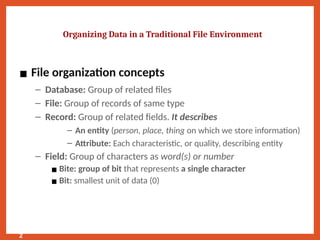
▪ File organization concepts
– Database: Group of related files
– File: Group of records of same type
– Record: Group of related fields. It describes
– An entity (person, place, thing on which we store information)
– Attribute: Each characteristic, or quality, describing entity
– Field: Group of characters as word(s) or number
▪ Bite: group of bit that represents a single character
▪ Bit: smallest unit of data (0)
Organizing Data in a Traditional File Environment
2
What is a DBMS?
A Database Management System (DBMS) is software for
managing data
• Think of it as a digital librarian for your information
• Stores, organizes, retrieves, and protects large amounts of
data
• Acts as a bridge between data and the apps that use it
Business Benefits of a DBMS
• Efficiency – Automates tasks and reduces manual
work
• Better Decisions – Accurate, real-time data for
smarter choices
• Data Security – Encryption, access control, and
authentication
• Cost Savings – Avoids duplication, saves space and
effort
Types of DBMS (Overview)
There are 5 common types of DBMS:
1. Relational (RDBMS)
2. NoSQL
3. Hierarchical
4. Network
5. Object-Oriented
Type 1 – Relational (RDBMS)
• Uses tables with rows & columns
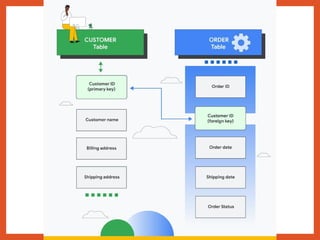
• Data linked through keys (e.g., Customer ID)
• Supports SQL for querying
• Best for structured, interrelated data (e.g., sales, customer
info)
Type 2 – NoSQL
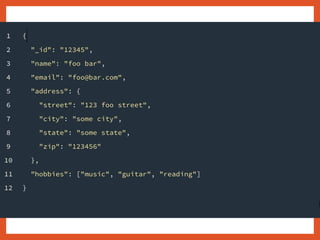
• Stores data in flexible formats: documents, key-value pairs,
etc.
• Great for big data, unstructured info, or real-time apps
• Used in social media, streaming, and user activity tracking
Types 3–5: Specialized DBMS
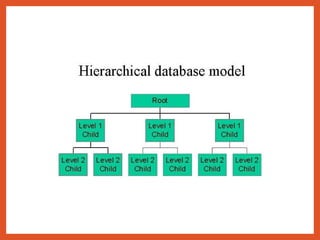
• Hierarchical DBMS: Tree-like (parent-child); great for org
charts, file systems
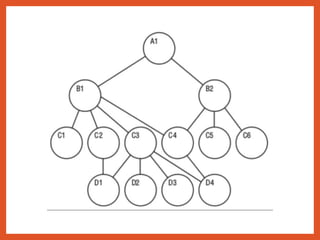
• Network DBMS: Flexible links (many-to-many); good for
school data, contacts
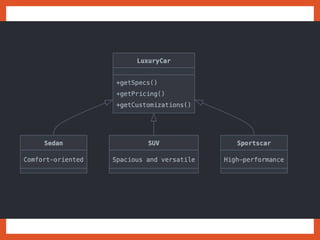
• Object-Oriented DBMS: Stores data as objects; used in
engineering or multimedia
Types 3–5: Specialized DBMS
• Hierarchical DBMS: Tree-like (parent-child); great for org
charts, file systems
• Network DBMS: Flexible links (many-to-many); good for
school data, contacts
• Object-Oriented DBMS: Stores data as objects; used in
engineering or multimedia
Types 3–5: Specialized DBMS
• Hierarchical DBMS: Tree-like (parent-child); great for org
charts, file systems
• Network DBMS: Flexible links (many-to-many); good for
school data, contacts
• Object-Oriented DBMS: Stores data as objects; used in
engineering or multimedia
Key Features of a Good DBMS
• Data Modeling – Visualize how your data connects
• Fast Storage & Retrieval – Access large data sets quickly
• Concurrency Control – Multiple users can work at once
• Security & Integrity – Keep data safe and accurate
• Backup & Recovery – Restore data in case of error or loss

Database Information System - Management Information System

  • 1.
    CHAPTER 6: UnderstandingDatabase Management Systems (DBMS)
  • 2.
    ▪ File organizationconcepts – Database: Group of related files – File: Group of records of same type – Record: Group of related fields. It describes – An entity (person, place, thing on which we store information) – Attribute: Each characteristic, or quality, describing entity – Field: Group of characters as word(s) or number ▪ Bite: group of bit that represents a single character ▪ Bit: smallest unit of data (0) Organizing Data in a Traditional File Environment 2
  • 3.
    What is aDBMS? A Database Management System (DBMS) is software for managing data • Think of it as a digital librarian for your information • Stores, organizes, retrieves, and protects large amounts of data • Acts as a bridge between data and the apps that use it
  • 4.
    Business Benefits ofa DBMS • Efficiency – Automates tasks and reduces manual work • Better Decisions – Accurate, real-time data for smarter choices • Data Security – Encryption, access control, and authentication • Cost Savings – Avoids duplication, saves space and effort
  • 5.
    Types of DBMS(Overview) There are 5 common types of DBMS: 1. Relational (RDBMS) 2. NoSQL 3. Hierarchical 4. Network 5. Object-Oriented
  • 6.
    Type 1 –Relational (RDBMS) • Uses tables with rows & columns • Data linked through keys (e.g., Customer ID) • Supports SQL for querying • Best for structured, interrelated data (e.g., sales, customer info)
  • 8.
    Type 2 –NoSQL • Stores data in flexible formats: documents, key-value pairs, etc. • Great for big data, unstructured info, or real-time apps • Used in social media, streaming, and user activity tracking
  • 10.
    Types 3–5: SpecializedDBMS • Hierarchical DBMS: Tree-like (parent-child); great for org charts, file systems • Network DBMS: Flexible links (many-to-many); good for school data, contacts • Object-Oriented DBMS: Stores data as objects; used in engineering or multimedia
  • 12.
    Types 3–5: SpecializedDBMS • Hierarchical DBMS: Tree-like (parent-child); great for org charts, file systems • Network DBMS: Flexible links (many-to-many); good for school data, contacts • Object-Oriented DBMS: Stores data as objects; used in engineering or multimedia
  • 14.
    Types 3–5: SpecializedDBMS • Hierarchical DBMS: Tree-like (parent-child); great for org charts, file systems • Network DBMS: Flexible links (many-to-many); good for school data, contacts • Object-Oriented DBMS: Stores data as objects; used in engineering or multimedia
  • 16.
    Key Features ofa Good DBMS • Data Modeling – Visualize how your data connects • Fast Storage & Retrieval – Access large data sets quickly • Concurrency Control – Multiple users can work at once • Security & Integrity – Keep data safe and accurate • Backup & Recovery – Restore data in case of error or loss