Database Management System
UNIT I
What is DBMS?
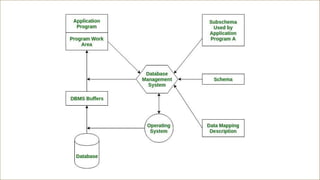
 A Database Management System (DBMS) is a software system that
is designed to manage and organize data in a structured manner.
 It allows users to create, modify, and query a database, as well as
manage the security and access controls for that database.
 DBMS provides an environment to store and retrieve data in
convenient and efficient manner.
Key Features of DBMS
• Data modeling: A DBMS provides tools for creating and modifying data models,
which define the structure and relationships of the data in a database.
• Data storage and retrieval: A DBMS is responsible for storing and retrieving data
from the database, and can provide various methods for searching and querying
the data.
• Concurrency control: A DBMS provides mechanisms for controlling concurrent
access to the database, to ensure that multiple users can access the data
without conflicting with each other.
• Data integrity and security: A DBMS provides tools for enforcing data integrity
and security constraints, such as constraints on the values of data and access
controls that restrict who can access the data.
• Backup and recovery: A DBMS provides mechanisms for backing up and
recovering the data in the event of a system failure.
• DBMS can be classified into two types: Relational Database Management
System (RDBMS) and Non-Relational Database Management System (NoSQL or
Non-SQL)
• RDBMS: Data is organized in the form of tables and each table has a set of
rows and columns. The data are related to each other through primary and
foreign keys.
• NoSQL: Data is organized in the form of key-value pairs, documents, graphs,
or column-based. These are designed to handle large-scale, high-performance
scenarios.
Key Features of DBMS
Types of DBMS
1. Relational Database Management System (RDBMS): Data is organized into
tables (relations) with rows and columns, and the relationships between the
data are managed through primary and foreign keys. SQL (Structured Query
Language) is used to query and manipulate the data.
2. NoSQL DBMS: Designed for high-performance scenarios and large-scale data,
NoSQL databases store data in various non-relational formats such as key-
value pairs, documents, graphs, or columns.
3. Object-Oriented DBMS (OODBMS): Stores data as objects, similar to those used
in object-oriented programming, allowing for complex data representations
and relationships
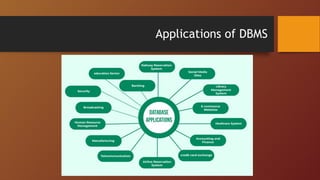
Applications of DBMS
Purpose of Database Management System
• Efficient storage and retrieval are allowed by structured organization of data
through database systems utilizing predefined schemas and data models.
• DBMS maintains the reliability and accuracy of the information and returns it
through enforced constraints and rules defined in the database schema that
eliminates data redundancy and anomalies, respectively.
• Protecting confidential data is crucial and database systems successfully
achieve this with their safeguards against unauthorized access.
• Database systems prioritize the security of sensitive data with their solid
mechanisms in place to preserve data confidentiality.
Purpose of Database Management System
• The inclusion of strong security measures in database systems ensures the
protection of sensitive data and upholds its confidentiality. Confidentiality
and privacy of data are maintained by utilizing resilient security measures
within database systems.
• Collaboration made easy with DBMS. With the provision of a platform to
access and manipulate data, multiple users can now work together and ensure
data consistency across various applications. Data sharing and collaboration
are now synonymous with the help of DBMS.
• Data backups and transaction management are mechanisms provided by
database systems to ensure data durability. Safeguarding data against system
crashes and failures is their main priority.
DBMS Instance & Schema
Definition of instance: The data stored in database at a particular moment of
time is called instance of database. Database schema defines the attributes in
tables that belong to a particular database. The value of these attributes at a
moment of time is called the instance of that database.
Definition of schema: Design of a database is called the schema.
Differences between Database Schema and Instance
Database Schema Database Instance
It is the definition of the database, or it is defined as
the description of the database.
It is a snapshot of a database at a specific moment.
It rarely changes. It changes frequently.
This corresponds to the variable declaration of a
programming language.
The value of the variable in a program at a point in
time corresponds to an instance of the database
schema.
Defines the basic structure of the database, i.e., how
the data will be stored in the database.
It is the set of Information stored at a particular
time.
Schema is same for whole database.
Data in instances can be changed using addition,
deletion, updation.
It does not change very frequently. It changes very frequently
Data Models in DBMS
 Flat Model
 Hierarchical Model
 Network Model
 Relational Model
 Star Schema
 Snowflake Schema
Flat Model
A flat model schema is a 2-D array in which
every column contains the same type of
data/information and the elements with
rows are related to each other. It is just like
a table or a spreadsheet. This schema is
better for small applications that do not
contain complex data.
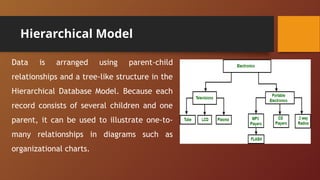
Hierarchical Model
Data is arranged using parent-child
relationships and a tree-like structure in the
Hierarchical Database Model. Because each
record consists of several children and one
parent, it can be used to illustrate one-to-
many relationships in diagrams such as
organizational charts.
Network Model
The network model and the hierarchical
model are quite similar with an
important difference that is related to
data relationships. The network model
allows many-to-many relationships
whereas hierarchical models allow one-
to-many relationships.
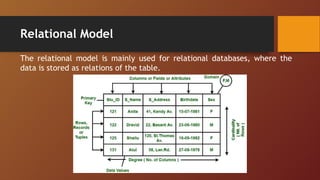
Relational Model
The relational model is mainly used for relational databases, where the
data is stored as relations of the table.
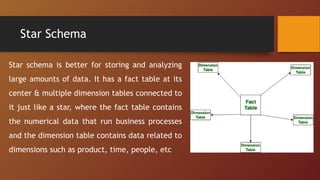
Star Schema
Star schema is better for storing and analyzing
large amounts of data. It has a fact table at its
center & multiple dimension tables connected to
it just like a star, where the fact table contains
the numerical data that run business processes
and the dimension table contains data related to
dimensions such as product, time, people, etc
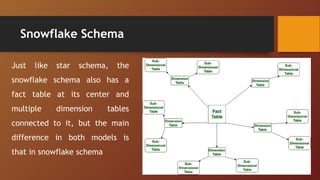
Snowflake Schema
Just like star schema, the
snowflake schema also has a
fact table at its center and
multiple dimension tables
connected to it, but the main
difference in both models is
that in snowflake schema
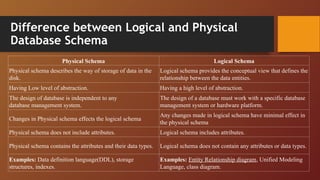
Difference between Logical and Physical
Database Schema
Physical Schema Logical Schema
Physical schema describes the way of storage of data in the
disk.
Logical schema provides the conceptual view that defines the
relationship between the data entities.
Having Low level of abstraction. Having a high level of abstraction.
The design of database is independent to any
database management system.
The design of a database must work with a specific database
management system or hardware platform.
Changes in Physical schema effects the logical schema
Any changes made in logical schema have minimal effect in
the physical schema
Physical schema does not include attributes. Logical schema includes attributes.
Physical schema contains the attributes and their data types. Logical schema does not contain any attributes or data types.
Examples: Data definition language(DDL), storage
structures, indexes.
Examples: Entity Relationship diagram, Unified Modeling
Language, class diagram.
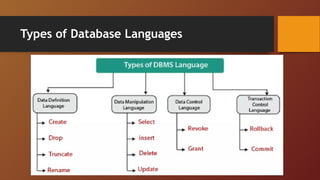
Types of Database Languages

Introduction to Database Management Systems

  • 1.
  • 2.
    What is DBMS? A Database Management System (DBMS) is a software system that is designed to manage and organize data in a structured manner.  It allows users to create, modify, and query a database, as well as manage the security and access controls for that database.  DBMS provides an environment to store and retrieve data in convenient and efficient manner.
  • 3.
    Key Features ofDBMS • Data modeling: A DBMS provides tools for creating and modifying data models, which define the structure and relationships of the data in a database. • Data storage and retrieval: A DBMS is responsible for storing and retrieving data from the database, and can provide various methods for searching and querying the data. • Concurrency control: A DBMS provides mechanisms for controlling concurrent access to the database, to ensure that multiple users can access the data without conflicting with each other. • Data integrity and security: A DBMS provides tools for enforcing data integrity and security constraints, such as constraints on the values of data and access controls that restrict who can access the data.
  • 4.
    • Backup andrecovery: A DBMS provides mechanisms for backing up and recovering the data in the event of a system failure. • DBMS can be classified into two types: Relational Database Management System (RDBMS) and Non-Relational Database Management System (NoSQL or Non-SQL) • RDBMS: Data is organized in the form of tables and each table has a set of rows and columns. The data are related to each other through primary and foreign keys. • NoSQL: Data is organized in the form of key-value pairs, documents, graphs, or column-based. These are designed to handle large-scale, high-performance scenarios. Key Features of DBMS
  • 5.
    Types of DBMS 1.Relational Database Management System (RDBMS): Data is organized into tables (relations) with rows and columns, and the relationships between the data are managed through primary and foreign keys. SQL (Structured Query Language) is used to query and manipulate the data. 2. NoSQL DBMS: Designed for high-performance scenarios and large-scale data, NoSQL databases store data in various non-relational formats such as key- value pairs, documents, graphs, or columns. 3. Object-Oriented DBMS (OODBMS): Stores data as objects, similar to those used in object-oriented programming, allowing for complex data representations and relationships
  • 6.
  • 7.
    Purpose of DatabaseManagement System • Efficient storage and retrieval are allowed by structured organization of data through database systems utilizing predefined schemas and data models. • DBMS maintains the reliability and accuracy of the information and returns it through enforced constraints and rules defined in the database schema that eliminates data redundancy and anomalies, respectively. • Protecting confidential data is crucial and database systems successfully achieve this with their safeguards against unauthorized access. • Database systems prioritize the security of sensitive data with their solid mechanisms in place to preserve data confidentiality.
  • 8.
    Purpose of DatabaseManagement System • The inclusion of strong security measures in database systems ensures the protection of sensitive data and upholds its confidentiality. Confidentiality and privacy of data are maintained by utilizing resilient security measures within database systems. • Collaboration made easy with DBMS. With the provision of a platform to access and manipulate data, multiple users can now work together and ensure data consistency across various applications. Data sharing and collaboration are now synonymous with the help of DBMS. • Data backups and transaction management are mechanisms provided by database systems to ensure data durability. Safeguarding data against system crashes and failures is their main priority.
  • 10.
    DBMS Instance &Schema Definition of instance: The data stored in database at a particular moment of time is called instance of database. Database schema defines the attributes in tables that belong to a particular database. The value of these attributes at a moment of time is called the instance of that database. Definition of schema: Design of a database is called the schema.
  • 11.
    Differences between DatabaseSchema and Instance Database Schema Database Instance It is the definition of the database, or it is defined as the description of the database. It is a snapshot of a database at a specific moment. It rarely changes. It changes frequently. This corresponds to the variable declaration of a programming language. The value of the variable in a program at a point in time corresponds to an instance of the database schema. Defines the basic structure of the database, i.e., how the data will be stored in the database. It is the set of Information stored at a particular time. Schema is same for whole database. Data in instances can be changed using addition, deletion, updation. It does not change very frequently. It changes very frequently
  • 12.
    Data Models inDBMS  Flat Model  Hierarchical Model  Network Model  Relational Model  Star Schema  Snowflake Schema
  • 13.
    Flat Model A flatmodel schema is a 2-D array in which every column contains the same type of data/information and the elements with rows are related to each other. It is just like a table or a spreadsheet. This schema is better for small applications that do not contain complex data.
  • 14.
    Hierarchical Model Data isarranged using parent-child relationships and a tree-like structure in the Hierarchical Database Model. Because each record consists of several children and one parent, it can be used to illustrate one-to- many relationships in diagrams such as organizational charts.
  • 15.
    Network Model The networkmodel and the hierarchical model are quite similar with an important difference that is related to data relationships. The network model allows many-to-many relationships whereas hierarchical models allow one- to-many relationships.
  • 16.
    Relational Model The relationalmodel is mainly used for relational databases, where the data is stored as relations of the table.
  • 17.
    Star Schema Star schemais better for storing and analyzing large amounts of data. It has a fact table at its center & multiple dimension tables connected to it just like a star, where the fact table contains the numerical data that run business processes and the dimension table contains data related to dimensions such as product, time, people, etc
  • 18.
    Snowflake Schema Just likestar schema, the snowflake schema also has a fact table at its center and multiple dimension tables connected to it, but the main difference in both models is that in snowflake schema
  • 19.
    Difference between Logicaland Physical Database Schema Physical Schema Logical Schema Physical schema describes the way of storage of data in the disk. Logical schema provides the conceptual view that defines the relationship between the data entities. Having Low level of abstraction. Having a high level of abstraction. The design of database is independent to any database management system. The design of a database must work with a specific database management system or hardware platform. Changes in Physical schema effects the logical schema Any changes made in logical schema have minimal effect in the physical schema Physical schema does not include attributes. Logical schema includes attributes. Physical schema contains the attributes and their data types. Logical schema does not contain any attributes or data types. Examples: Data definition language(DDL), storage structures, indexes. Examples: Entity Relationship diagram, Unified Modeling Language, class diagram.
  • 20.