CENTRAL UNIVERSITY OF RAJASTHAN
DEPARTMENT OF MANAGEMENT
DATA SECURITY
PRESENTED BY :-
HITESH KUMAR
2019MBA011
DATA SECURITY
1) INTRODUCTION
2) COMMON TYPES OF CYBER ATTACK
3) ONLINE SAFETY BASICS
4) KEY ACCOUNTS & DEVICES
5) MANAGING YOUR PRIVACY
6) AADHAAR CARD CONTROVERSY
7) CONCLUSION
8) REFERENCES
1) INTRODUCTION
Data security is a key asset in today’s era
For organizations, protecting privacy and personal data is an
issue of risk and trust.
Protecting privacy mitigates risks of costly incidents,
reputational harm, regulatory penalties, and other harms.
 An organization depends upon the trust of its existing and
prospective customers, clients, business partners, vendors, and
employees.
 When this trust is lost, it can have a devastating impact on an
organization.
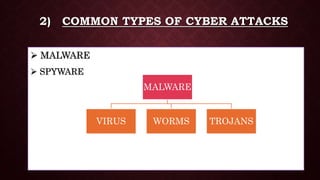
2) COMMON TYPES OF CYBER ATTACKS
 MALWARE
 SPYWARE
MALWARE
VIRUS WORMS TROJANS
 VIRUS: Damage Particular file or software
• First Virus Term : Fred Cohen (1985)
• First Network Virus : Creeper [ARPANET - 1970],
oAnti Virus – Reaper (Bob Thomas)
• First PC Virus – ELK Cloner (Richard Skrenla, 1982)
 WORMS : Multiples & Copy, affects speed & Memory
 TROJANS : Fake software i.e. ads like speed boosters, Memory
clearness, Antivirus, affects Backdoor security
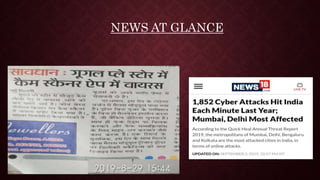
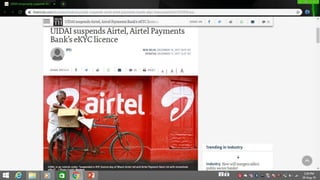
NEWS AT GLANCE
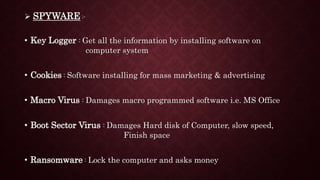
 SPYWARE :-
• Key Logger : Get all the information by installing software on
computer system
• Cookies : Software installing for mass marketing & advertising
• Macro Virus : Damages macro programmed software i.e. MS Office
• Boot Sector Virus : Damages Hard disk of Computer, slow speed,
Finish space
• Ransomware : Lock the computer and asks money
3) ONLINE SAFTEY BASICS
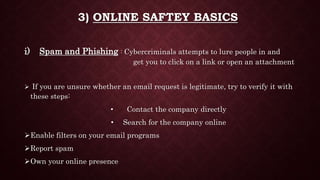
i) Spam and Phishing : Cybercriminals attempts to lure people in and
get you to click on a link or open an attachment
 If you are unsure whether an email request is legitimate, try to verify it with
these steps:
• Contact the company directly
• Search for the company online
Enable filters on your email programs
Report spam
Own your online presence
 Keep a clean machine
 What to Do if You Are a Victim
• Report it to the appropriate people within the organization, including
network administrators
• If you believe your financial accounts may be compromised, contact your
financial institution immediately and close the account(s).
• Watch for any unauthorized charges to your account.
• Consider reporting the attack to your local police department, and file a
report with the Federal Trade Commission or the Internet Crime Complaint
Centre.
ii) Shopping Online :-
• Conduct research: new website, positive or negative reviews
• When in doubt, throw it out: Links in emails, posts and texts
• Personal information is like money: value it and protect it, you only need to fill out
required fields at checkout.
• Use safe payment options: Credit cards are generally the safest option
• Don’t be disappointed: Read return policies if the purchase doesn’t go as planned.
• Verify security level : Sure the site is security enabled with https://
iii)Back It Up : Protect yourself against data loss by
making electronic copies – or backups – of important
files.
CDs, DVDs and flash drives
External hard drive
Online backup services
4) SECURING KEY ACCOUNTS AND DEVICES
 Passphrases
• Make your passphrase a sentence
• Unique account, unique passphrase
• Don’t Write it down and keep in mind
Lock down your login
• Fortify your online accounts by enabling the strongest authentication
tools available, such as biometrics, security keys or a unique one-time
code through an app on your mobile device
5) MANAGING YOUR PRIVACY
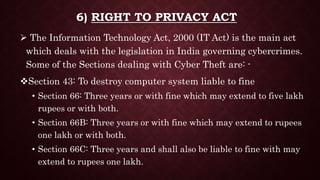
 Share with care – What you post can last a lifetime
Post only about others as you would like to have them post about you
Own your online presence
Remain positively engaged
Stay current. Keep pace with new ways to stay safe online
6) RIGHT TO PRIVACY ACT
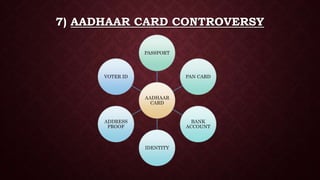
 The Information Technology Act, 2000 (IT Act) is the main act
which deals with the legislation in India governing cybercrimes.
Some of the Sections dealing with Cyber Theft are: -
Section 43: To destroy computer system liable to fine
• Section 66: Three years or with fine which may extend to five lakh
rupees or with both.
• Section 66B: Three years or with fine which may extend to rupees
one lakh or with both.
• Section 66C: Three years and shall also be liable to fine with may
extend to rupees one lakh.
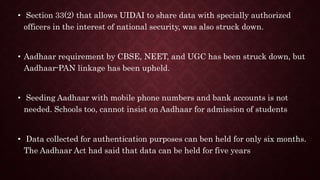
7) AADHAAR CARD CONTROVERSY
AADHAAR
CARD
PASSPORT
PAN CARD
BANK
ACCOUNT
IDENTITY
ADDRESS
PROOF
VOTER ID
• Section 33(2) that allows UIDAI to share data with specially authorized
officers in the interest of national security, was also struck down.
• Aadhaar requirement by CBSE, NEET, and UGC has been struck down, but
Aadhaar-PAN linkage has been upheld.
• Seeding Aadhaar with mobile phone numbers and bank accounts is not
needed. Schools too, cannot insist on Aadhaar for admission of students
• Data collected for authentication purposes can ben held for only six months.
The Aadhaar Act had said that data can be held for five years
7) CONCLUSION
 An attacker needs three things:
• method—the skill and knowledge to perform a successful attack;
• opportunity—time and access by which to attack;
• motive—a reason to want to attack.
o Alas, none of these three is in short supply, which means attacks are inevitable
 Security situations arise in many everyday activities, although sometimes it can be difficult
to distinguish between a security attack and an ordinary human or technological breakdown.
• Alas, clever attackers realize this confusion, so they may make their attack seem like a
simple, random failure
 Therefore, try to control certain threats and vulnerabilities, apply countermeasures that are
reasonable, and accept the risk of harm from uncountered cases
8) REFERENCES
• The HINDU newspaper
• https://staysafeonline.org
• http://www.informit.com
• Fundamentals-Cyber-Security
oBy Mayank-Bhushan


Data security

  • 1.
    CENTRAL UNIVERSITY OFRAJASTHAN DEPARTMENT OF MANAGEMENT DATA SECURITY PRESENTED BY :- HITESH KUMAR 2019MBA011
  • 2.
    DATA SECURITY 1) INTRODUCTION 2)COMMON TYPES OF CYBER ATTACK 3) ONLINE SAFETY BASICS 4) KEY ACCOUNTS & DEVICES 5) MANAGING YOUR PRIVACY 6) AADHAAR CARD CONTROVERSY 7) CONCLUSION 8) REFERENCES
  • 3.
    1) INTRODUCTION Data securityis a key asset in today’s era For organizations, protecting privacy and personal data is an issue of risk and trust. Protecting privacy mitigates risks of costly incidents, reputational harm, regulatory penalties, and other harms.  An organization depends upon the trust of its existing and prospective customers, clients, business partners, vendors, and employees.  When this trust is lost, it can have a devastating impact on an organization.
  • 4.
    2) COMMON TYPESOF CYBER ATTACKS  MALWARE  SPYWARE MALWARE VIRUS WORMS TROJANS
  • 5.
     VIRUS: DamageParticular file or software • First Virus Term : Fred Cohen (1985) • First Network Virus : Creeper [ARPANET - 1970], oAnti Virus – Reaper (Bob Thomas) • First PC Virus – ELK Cloner (Richard Skrenla, 1982)  WORMS : Multiples & Copy, affects speed & Memory  TROJANS : Fake software i.e. ads like speed boosters, Memory clearness, Antivirus, affects Backdoor security
  • 6.
  • 7.
     SPYWARE :- •Key Logger : Get all the information by installing software on computer system • Cookies : Software installing for mass marketing & advertising • Macro Virus : Damages macro programmed software i.e. MS Office • Boot Sector Virus : Damages Hard disk of Computer, slow speed, Finish space • Ransomware : Lock the computer and asks money
  • 8.
    3) ONLINE SAFTEYBASICS i) Spam and Phishing : Cybercriminals attempts to lure people in and get you to click on a link or open an attachment  If you are unsure whether an email request is legitimate, try to verify it with these steps: • Contact the company directly • Search for the company online Enable filters on your email programs Report spam Own your online presence
  • 9.
     Keep aclean machine  What to Do if You Are a Victim • Report it to the appropriate people within the organization, including network administrators • If you believe your financial accounts may be compromised, contact your financial institution immediately and close the account(s). • Watch for any unauthorized charges to your account. • Consider reporting the attack to your local police department, and file a report with the Federal Trade Commission or the Internet Crime Complaint Centre.
  • 10.
    ii) Shopping Online:- • Conduct research: new website, positive or negative reviews • When in doubt, throw it out: Links in emails, posts and texts • Personal information is like money: value it and protect it, you only need to fill out required fields at checkout. • Use safe payment options: Credit cards are generally the safest option • Don’t be disappointed: Read return policies if the purchase doesn’t go as planned. • Verify security level : Sure the site is security enabled with https://
  • 11.
    iii)Back It Up: Protect yourself against data loss by making electronic copies – or backups – of important files. CDs, DVDs and flash drives External hard drive Online backup services
  • 12.
    4) SECURING KEYACCOUNTS AND DEVICES  Passphrases • Make your passphrase a sentence • Unique account, unique passphrase • Don’t Write it down and keep in mind Lock down your login • Fortify your online accounts by enabling the strongest authentication tools available, such as biometrics, security keys or a unique one-time code through an app on your mobile device
  • 13.
    5) MANAGING YOURPRIVACY  Share with care – What you post can last a lifetime Post only about others as you would like to have them post about you Own your online presence Remain positively engaged Stay current. Keep pace with new ways to stay safe online
  • 14.
    6) RIGHT TOPRIVACY ACT  The Information Technology Act, 2000 (IT Act) is the main act which deals with the legislation in India governing cybercrimes. Some of the Sections dealing with Cyber Theft are: - Section 43: To destroy computer system liable to fine • Section 66: Three years or with fine which may extend to five lakh rupees or with both. • Section 66B: Three years or with fine which may extend to rupees one lakh or with both. • Section 66C: Three years and shall also be liable to fine with may extend to rupees one lakh.
  • 15.
    7) AADHAAR CARDCONTROVERSY AADHAAR CARD PASSPORT PAN CARD BANK ACCOUNT IDENTITY ADDRESS PROOF VOTER ID
  • 16.
    • Section 33(2)that allows UIDAI to share data with specially authorized officers in the interest of national security, was also struck down. • Aadhaar requirement by CBSE, NEET, and UGC has been struck down, but Aadhaar-PAN linkage has been upheld. • Seeding Aadhaar with mobile phone numbers and bank accounts is not needed. Schools too, cannot insist on Aadhaar for admission of students • Data collected for authentication purposes can ben held for only six months. The Aadhaar Act had said that data can be held for five years
  • 18.
    7) CONCLUSION  Anattacker needs three things: • method—the skill and knowledge to perform a successful attack; • opportunity—time and access by which to attack; • motive—a reason to want to attack. o Alas, none of these three is in short supply, which means attacks are inevitable  Security situations arise in many everyday activities, although sometimes it can be difficult to distinguish between a security attack and an ordinary human or technological breakdown. • Alas, clever attackers realize this confusion, so they may make their attack seem like a simple, random failure  Therefore, try to control certain threats and vulnerabilities, apply countermeasures that are reasonable, and accept the risk of harm from uncountered cases
  • 19.
    8) REFERENCES • TheHINDU newspaper • https://staysafeonline.org • http://www.informit.com • Fundamentals-Cyber-Security oBy Mayank-Bhushan
  • 20.