Data exposure in Azure:
Production use-case
April, 2018
2
FEW WORDS ABOUT MYSELF…
I’m Alexander Laysha
• Solution Architect at EPAM Systems
• Co-Head of TR Cloud Center of Excellence at EPAM Systems
• Microsoft Azure MVP
• Focused on backend cloud solutions
• Leader of Belarus Azure Community
My contacts
• Email: layshaalex@gmail.com
• Twitter: @layshaalexander
• Facebook: alexander.laysha
3
• Overview & Requirements
• OData API Solution
• Data Abstraction Solution
• Tabular Model Solution
• Summary
AGENDA
4
OVERVIEW & REQUIREMENTS
5
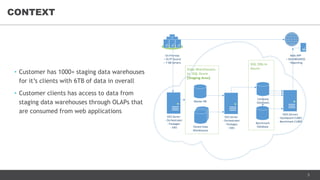
• Сustomer has 1000+ staging data warehouses
for it’s clients with 6TB of data in overall
• Customer clients has access to data from
staging data warehouses through OLAPs that
are consumed from web applications
CONTEXT
SSIS Server
- Orchestrator
- Packages
- Jobs
On-Premise
– OLTP Source
– 7 DB Servers
Master DB
Tenant Data
Warehouses
SSAS Servers
- Dashboard CUBES
- Benchmark CUBES
Web APP
– DASHBOARDS
- Reporting
Company
Databases
Benchmark
Database
SSIS Server
- Orchestrator
- Packages
- Jobs
6
• Integration Client - would like to perform full & incremental extract of it's own raw data from
staging data warehouses
• BI Client - would like to connect to it’s data in staging data warehouses using own BI Tools
NEW USE-CASES
7
• Data warehouses are exposed as read-only sources
• Client can’t connect to data warehouse directly because of customer security policies
• Source database schema change propagation
• Multi-tenant support & strong tenant data isolation
• Azure AD authentication
• Role-based data access
• Row-level security in the future
• Support of major BI Tools: PowerBI, Tableau, Qlik
• Clients should not wait hours to load their data
• Data warehouses should not be affected by load spikes
ARCHITECTURE REQUIREMENTS
8
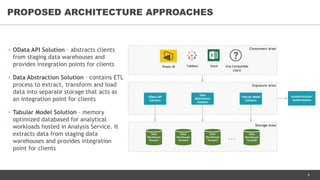
PROPOSED ARCHITECTURE APPROACHES
• OData API Solution – abstracts clients
from staging data warehouses and
provides integration points for clients
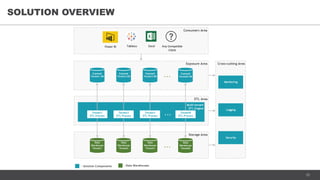
• Data Abstraction Solution – contains ETL
process to extract, transform and load
data into separate storage that acts as
an integration point for clients
• Tabular Model Solution – memory
optimized databased for analytical
workloads hosted in Analysis Service. It
extracts data from staging data
warehouses and provides integration
point for clients
Storage Area
Data
Warehouse
Tenant1
Data
Warehouse
Tenant2
Data
Warehouse
Tenant3
...
Data
Warehouse
TenantN
Consumers Area
Power BI Tableau Excel Any Compatible
Client
Exposure Area
OData API
Solution
Data
Abstraction
Solution
Tabular Model
Solution
Authentication/
Authorization
9
ODATA API SOLUTION
10
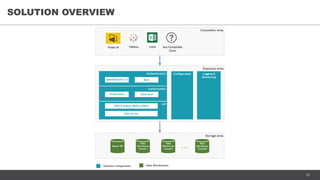
SOLUTION OVERVIEW
Storage Area
- Data Warehouses- Solution Components
Master DB
Data
Warehouse
Tenant1
Data
Warehouse
Tenant2
...
...
Data
Warehouse
TenantN
Exposure Area
Configuration Logging &
Monitoring
Consumers Area
Power BI Tableau Excel Any Compatible
Client
Authentication
BasicOpenID/OAuth 2.0
Authorization
Table-levelTenant-level
API
ODATA Engine (Maskx.Odata)
Data Access
11
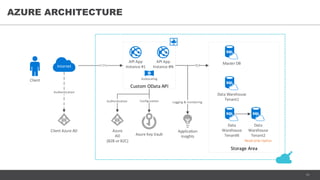
AZURE ARCHITECTURE
Client Autoscaling
Azure Key Vault
Master DB
Client Azure AD
API App
Instance #1
API App
Instance #N
Custom OData API
Storage Area
TCP
Application
Insights
HTTPSInternet
Authentication
Configuration Logging & monitoring
Data Warehouse
Tenant1
Data
Warehouse
TenantN
Azure
AD
(B2B or B2C)
Authentication
Data
Warehouse
Tenant2
Read-only replica
12
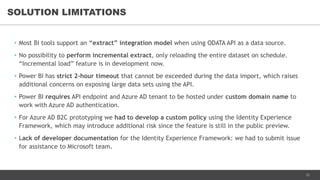
• Most BI tools support an “extract” integration model when using ODATA API as a data source.
• No possibility to perform incremental extract, only reloading the entire dataset on schedule.
“Incremental load” feature is in development now.
• Power BI has strict 2-hour timeout that cannot be exceeded during the data import, which raises
additional concerns on exposing large data sets using the API.
• Power BI requires API endpoint and Azure AD tenant to be hosted under custom domain name to
work with Azure AD authentication.
• For Azure AD B2C prototyping we had to develop a custom policy using the Identity Experience
Framework, which may introduce additional risk since the feature is still in the public preview.
• Lack of developer documentation for the Identity Experience Framework: we had to submit issue
for assistance to Microsoft team.
SOLUTION LIMITATIONS
13
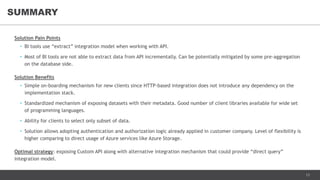
Solution Pain Points
• BI tools use “extract” integration model when working with API.
• Most of BI tools are not able to extract data from API incrementally. Can be potentially mitigated by some pre-aggregation
on the database side.
Solution Benefits
• Simple on-boarding mechanism for new clients since HTTP-based integration does not introduce any dependency on the
implementation stack.
• Standardized mechanism of exposing datasets with their metadata. Good number of client libraries available for wide set
of programming languages.
• Ability for clients to select only subset of data.
• Solution allows adopting authentication and authorization logic already applied in customer company. Level of flexibility is
higher comparing to direct usage of Azure services like Azure Storage.
Optimal strategy: exposing Custom API along with alternative integration mechanism that could provide “direct query”
integration model.
SUMMARY
14
DATA ABSTRACTION
SOLUTION
15
SOLUTION OVERVIEW
Storage Area
- Data Warehouses- Solution Components
Data
Warehouse
Tenant1
Data
Warehouse
Tenant2
Data
Warehouse
Tenant3
...
Data
Warehouse
TenantN
ETL Area
Cross-cutting Area
Consumers Area
Power BI Tableau Excel Any Compatible
Client
Multi-tenant
ETL Engine
Tenant1
ETL Process
Tenant2
ETL Process
Tenant3
ETL Process
TenantN
ETL Process
...
Exposure Area
Exposed
Tenant1 DB
Exposed
Tenant2 DB
Exposed
Tenant3 DB ... Exposed
TenantN DB
Monitoring
Logging
Security
16
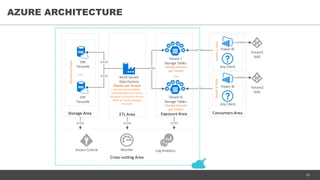
AZURE ARCHITECTURE
DW
TenantN
DW
TenantN
TCP/IP
TCP/IP
...
Storage Area ETL Area
SQLAzureCluster
Pipeline per Tenant
Version of successfully
extracted data from every
sql table is stored in Version
Table of Tenant Storage
Account
Multi-tenant
Data Factory
Tenant 1
Storage Tables
Storage Account
per Tenant
Tenant N
Storage Tables
Storage Account
per Tenant
HTTPS
Exposure Area
...
Consumers Area
HTTPS
HTTPS
Power BI
Power BI
TenantNToolsTenant1Tools
HTTPS
Tenant1
AAD
Any Client
Any Client
Cross-cutting Area
Log Analytics
HTTPS HTTPS HTTPS
Tenant2
AAD
HTTPS
Access Control Monitor
17
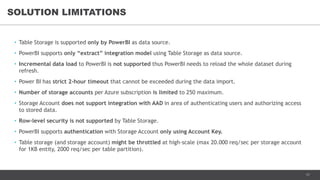
• Table Storage is supported only by PowerBI as data source.
• PowerBI supports only “extract” integration model using Table Storage as data source.
• Incremental data load to PowerBI is not supported thus PowerBI needs to reload the whole dataset during
refresh.
• Power BI has strict 2-hour timeout that cannot be exceeded during the data import.
• Number of storage accounts per Azure subscription is limited to 250 maximum.
• Storage Account does not support integration with AAD in area of authenticating users and authorizing access
to stored data.
• Row-level security is not supported by Table Storage.
• PowerBI supports authentication with Storage Account only using Account Key.
• Table storage (and storage account) might be throttled at high-scale (max 20.000 req/sec per storage account
for 1KB entity, 2000 req/sec per table partition).
SOLUTION LIMITATIONS
18
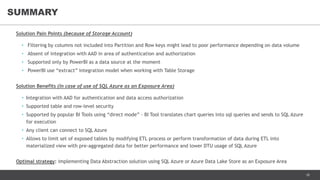
Solution Pain Points (because of Storage Account)
• Filtering by columns not included into Partition and Row keys might lead to poor performance depending on data volume
• Absent of integration with AAD in area of authentication and authorization
• Supported only by PowerBI as a data source at the moment
• PowerBI use “extract” integration model when working with Table Storage
Solution Benefits (in case of use of SQL Azure as an Exposure Area)
• Integration with AAD for authentication and data access authorization
• Supported table and row-level security
• Supported by popular BI Tools using “direct mode” – BI Tool translates chart queries into sql queries and sends to SQL Azure
for execution
• Any client can connect to SQL Azure
• Allows to limit set of exposed tables by modifying ETL process or perform transformation of data during ETL into
materialized view with pre-aggregated data for better performance and lower DTU usage of SQL Azure
Optimal strategy: implementing Data Abstraction solution using SQL Azure or Azure Data Lake Store as an Exposure Area
SUMMARY
19
TABULAR MODEL SOLUTION
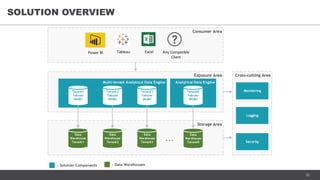
20
SOLUTION OVERVIEW
Storage Area
- Data Warehouses- Solution Components
Data
Warehouse
Tenant1
Data
Warehouse
Tenant2
Data
Warehouse
Tenant3
...
Data
Warehouse
TenantN
Exposure Area Cross-cutting Area
Consumer Area
Power BI Tableau Excel Any Compatible
Client
Multi-tenant Analytical Data Engine
Tenant1
Tabular
Model
Monitoring
Logging
Security
Tenant2
Tabular
Model
Tenant3
Tabular
Model
Analytical Data Engine
TenantN
Tabular
Model
21
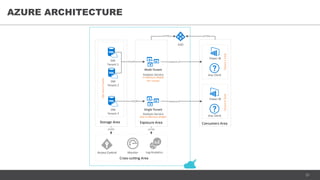
AZURE ARCHITECTURE
Multi-Tenant
Analysis Service
DW
Tenant 2
DW
Tenant 3
Single Tenant
Analysis Service
TCP/IP
TCP/IP
Storage Area Exposure Area
SQLAzureCluster
HTTPS
In-Memory Model
Per Tenant
One In-Memory Model
AAD
DW
Tenant 1
asazure://
asazure://
TenantNToolsTenant1Tools
Consumers Area
Power BI
Power BI
HTTPS
Any Client
Any Client
Monitor
Cross-cutting Area
Log Analytics
HTTPS HTTPS
Access Control
22
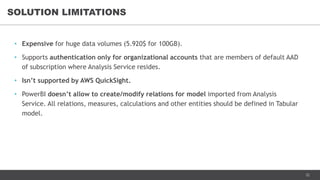
• Expensive for huge data volumes (5.920$ for 100GB).
• Supports authentication only for organizational accounts that are members of default AAD
of subscription where Analysis Service resides.
• Isn’t supported by AWS QuickSight.
• PowerBI doesn’t allow to create/modify relations for model imported from Analysis
Service. All relations, measures, calculations and other entities should be defined in Tabular
model.
SOLUTION LIMITATIONS
23
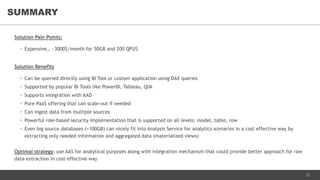
Solution Pain Points:
• Expensive… ~3000$/month for 50GB and 200 QPUS
Solution Benefits
• Can be queried directly using BI Tool or custom application using DAX queries
• Supported by popular BI Tools like PowerBI, Tableau, Qlik
• Supports integration with AAD
• Pure PaaS offering that can scale-out if needed
• Can ingest data from multiple sources
• Powerful role-based security implementation that is supported on all levels: model, table, row
• Even big source databases (>100GB) can nicely fit into Analysis Service for analytics scenarios in a cost effective way by
extracting only needed information and aggregated data (materialized views)
Optimal strategy: use AAS for analytical purposes along with integration mechanism that could provide better approach for raw
data extraction in cost effective way
SUMMARY
24
SUMMARY
25
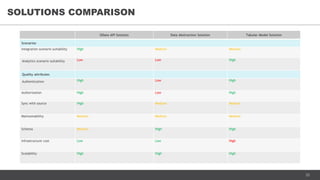
SOLUTIONS COMPARISON
OData API Solution Data Abstraction Solution Tabular Model Solution
Scenarios
Integration scenario suitability High Medium Medium
Analytics scenario suitability Low Low High
Quality attributes
Authentication High Low High
Authorization High Low High
Sync with source High Medium Medium
Maintainability Medium Medium Medium
Schema Medium High High
Infrastructure cost Low Low High
Scalability High High High
26
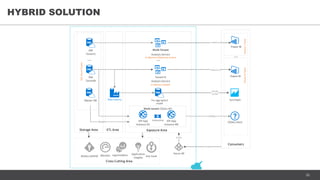
HYBRID SOLUTION
Multi-Tenant
Analysis Service
Monitor
DW
Tenant1
DW
TenantN
Tenant N
Analysis Service
asazure://
asazure://
... ...
Storage Area Exposure Area
Consumers
SQLAzureCluster
Power BI
Power BI
Cross-Cutting Area
Log Analytics
HTTPS
TenantNToolsTenant1Tools
In-Memory Model per tenant
In-Memory Model
HTTPS
...
Application
Insights
Master DB
Multi-tenant OData API
API App
Instance #1
API App
Instance #N
Key Vault
HTTPS
TCP/IP
Access control
OData client
Pre-aggregated
model
QuickSight
TCP/IP,
HTTPS
Data Factory
ETL Area
Autoscaling
Azure AD
27
THANK YOU!

Data exposure in Azure - production use-case

  • 1.
    Data exposure inAzure: Production use-case April, 2018
  • 2.
    2 FEW WORDS ABOUTMYSELF… I’m Alexander Laysha • Solution Architect at EPAM Systems • Co-Head of TR Cloud Center of Excellence at EPAM Systems • Microsoft Azure MVP • Focused on backend cloud solutions • Leader of Belarus Azure Community My contacts • Email: layshaalex@gmail.com • Twitter: @layshaalexander • Facebook: alexander.laysha
  • 3.
    3 • Overview &Requirements • OData API Solution • Data Abstraction Solution • Tabular Model Solution • Summary AGENDA
  • 4.
  • 5.
    5 • Сustomer has1000+ staging data warehouses for it’s clients with 6TB of data in overall • Customer clients has access to data from staging data warehouses through OLAPs that are consumed from web applications CONTEXT SSIS Server - Orchestrator - Packages - Jobs On-Premise – OLTP Source – 7 DB Servers Master DB Tenant Data Warehouses SSAS Servers - Dashboard CUBES - Benchmark CUBES Web APP – DASHBOARDS - Reporting Company Databases Benchmark Database SSIS Server - Orchestrator - Packages - Jobs
  • 6.
    6 • Integration Client- would like to perform full & incremental extract of it's own raw data from staging data warehouses • BI Client - would like to connect to it’s data in staging data warehouses using own BI Tools NEW USE-CASES
  • 7.
    7 • Data warehousesare exposed as read-only sources • Client can’t connect to data warehouse directly because of customer security policies • Source database schema change propagation • Multi-tenant support & strong tenant data isolation • Azure AD authentication • Role-based data access • Row-level security in the future • Support of major BI Tools: PowerBI, Tableau, Qlik • Clients should not wait hours to load their data • Data warehouses should not be affected by load spikes ARCHITECTURE REQUIREMENTS
  • 8.
    8 PROPOSED ARCHITECTURE APPROACHES •OData API Solution – abstracts clients from staging data warehouses and provides integration points for clients • Data Abstraction Solution – contains ETL process to extract, transform and load data into separate storage that acts as an integration point for clients • Tabular Model Solution – memory optimized databased for analytical workloads hosted in Analysis Service. It extracts data from staging data warehouses and provides integration point for clients Storage Area Data Warehouse Tenant1 Data Warehouse Tenant2 Data Warehouse Tenant3 ... Data Warehouse TenantN Consumers Area Power BI Tableau Excel Any Compatible Client Exposure Area OData API Solution Data Abstraction Solution Tabular Model Solution Authentication/ Authorization
  • 9.
  • 10.
    10 SOLUTION OVERVIEW Storage Area -Data Warehouses- Solution Components Master DB Data Warehouse Tenant1 Data Warehouse Tenant2 ... ... Data Warehouse TenantN Exposure Area Configuration Logging & Monitoring Consumers Area Power BI Tableau Excel Any Compatible Client Authentication BasicOpenID/OAuth 2.0 Authorization Table-levelTenant-level API ODATA Engine (Maskx.Odata) Data Access
  • 11.
    11 AZURE ARCHITECTURE Client Autoscaling AzureKey Vault Master DB Client Azure AD API App Instance #1 API App Instance #N Custom OData API Storage Area TCP Application Insights HTTPSInternet Authentication Configuration Logging & monitoring Data Warehouse Tenant1 Data Warehouse TenantN Azure AD (B2B or B2C) Authentication Data Warehouse Tenant2 Read-only replica
  • 12.
    12 • Most BItools support an “extract” integration model when using ODATA API as a data source. • No possibility to perform incremental extract, only reloading the entire dataset on schedule. “Incremental load” feature is in development now. • Power BI has strict 2-hour timeout that cannot be exceeded during the data import, which raises additional concerns on exposing large data sets using the API. • Power BI requires API endpoint and Azure AD tenant to be hosted under custom domain name to work with Azure AD authentication. • For Azure AD B2C prototyping we had to develop a custom policy using the Identity Experience Framework, which may introduce additional risk since the feature is still in the public preview. • Lack of developer documentation for the Identity Experience Framework: we had to submit issue for assistance to Microsoft team. SOLUTION LIMITATIONS
  • 13.
    13 Solution Pain Points •BI tools use “extract” integration model when working with API. • Most of BI tools are not able to extract data from API incrementally. Can be potentially mitigated by some pre-aggregation on the database side. Solution Benefits • Simple on-boarding mechanism for new clients since HTTP-based integration does not introduce any dependency on the implementation stack. • Standardized mechanism of exposing datasets with their metadata. Good number of client libraries available for wide set of programming languages. • Ability for clients to select only subset of data. • Solution allows adopting authentication and authorization logic already applied in customer company. Level of flexibility is higher comparing to direct usage of Azure services like Azure Storage. Optimal strategy: exposing Custom API along with alternative integration mechanism that could provide “direct query” integration model. SUMMARY
  • 14.
  • 15.
    15 SOLUTION OVERVIEW Storage Area -Data Warehouses- Solution Components Data Warehouse Tenant1 Data Warehouse Tenant2 Data Warehouse Tenant3 ... Data Warehouse TenantN ETL Area Cross-cutting Area Consumers Area Power BI Tableau Excel Any Compatible Client Multi-tenant ETL Engine Tenant1 ETL Process Tenant2 ETL Process Tenant3 ETL Process TenantN ETL Process ... Exposure Area Exposed Tenant1 DB Exposed Tenant2 DB Exposed Tenant3 DB ... Exposed TenantN DB Monitoring Logging Security
  • 16.
    16 AZURE ARCHITECTURE DW TenantN DW TenantN TCP/IP TCP/IP ... Storage AreaETL Area SQLAzureCluster Pipeline per Tenant Version of successfully extracted data from every sql table is stored in Version Table of Tenant Storage Account Multi-tenant Data Factory Tenant 1 Storage Tables Storage Account per Tenant Tenant N Storage Tables Storage Account per Tenant HTTPS Exposure Area ... Consumers Area HTTPS HTTPS Power BI Power BI TenantNToolsTenant1Tools HTTPS Tenant1 AAD Any Client Any Client Cross-cutting Area Log Analytics HTTPS HTTPS HTTPS Tenant2 AAD HTTPS Access Control Monitor
  • 17.
    17 • Table Storageis supported only by PowerBI as data source. • PowerBI supports only “extract” integration model using Table Storage as data source. • Incremental data load to PowerBI is not supported thus PowerBI needs to reload the whole dataset during refresh. • Power BI has strict 2-hour timeout that cannot be exceeded during the data import. • Number of storage accounts per Azure subscription is limited to 250 maximum. • Storage Account does not support integration with AAD in area of authenticating users and authorizing access to stored data. • Row-level security is not supported by Table Storage. • PowerBI supports authentication with Storage Account only using Account Key. • Table storage (and storage account) might be throttled at high-scale (max 20.000 req/sec per storage account for 1KB entity, 2000 req/sec per table partition). SOLUTION LIMITATIONS
  • 18.
    18 Solution Pain Points(because of Storage Account) • Filtering by columns not included into Partition and Row keys might lead to poor performance depending on data volume • Absent of integration with AAD in area of authentication and authorization • Supported only by PowerBI as a data source at the moment • PowerBI use “extract” integration model when working with Table Storage Solution Benefits (in case of use of SQL Azure as an Exposure Area) • Integration with AAD for authentication and data access authorization • Supported table and row-level security • Supported by popular BI Tools using “direct mode” – BI Tool translates chart queries into sql queries and sends to SQL Azure for execution • Any client can connect to SQL Azure • Allows to limit set of exposed tables by modifying ETL process or perform transformation of data during ETL into materialized view with pre-aggregated data for better performance and lower DTU usage of SQL Azure Optimal strategy: implementing Data Abstraction solution using SQL Azure or Azure Data Lake Store as an Exposure Area SUMMARY
  • 19.
  • 20.
    20 SOLUTION OVERVIEW Storage Area -Data Warehouses- Solution Components Data Warehouse Tenant1 Data Warehouse Tenant2 Data Warehouse Tenant3 ... Data Warehouse TenantN Exposure Area Cross-cutting Area Consumer Area Power BI Tableau Excel Any Compatible Client Multi-tenant Analytical Data Engine Tenant1 Tabular Model Monitoring Logging Security Tenant2 Tabular Model Tenant3 Tabular Model Analytical Data Engine TenantN Tabular Model
  • 21.
    21 AZURE ARCHITECTURE Multi-Tenant Analysis Service DW Tenant2 DW Tenant 3 Single Tenant Analysis Service TCP/IP TCP/IP Storage Area Exposure Area SQLAzureCluster HTTPS In-Memory Model Per Tenant One In-Memory Model AAD DW Tenant 1 asazure:// asazure:// TenantNToolsTenant1Tools Consumers Area Power BI Power BI HTTPS Any Client Any Client Monitor Cross-cutting Area Log Analytics HTTPS HTTPS Access Control
  • 22.
    22 • Expensive forhuge data volumes (5.920$ for 100GB). • Supports authentication only for organizational accounts that are members of default AAD of subscription where Analysis Service resides. • Isn’t supported by AWS QuickSight. • PowerBI doesn’t allow to create/modify relations for model imported from Analysis Service. All relations, measures, calculations and other entities should be defined in Tabular model. SOLUTION LIMITATIONS
  • 23.
    23 Solution Pain Points: •Expensive… ~3000$/month for 50GB and 200 QPUS Solution Benefits • Can be queried directly using BI Tool or custom application using DAX queries • Supported by popular BI Tools like PowerBI, Tableau, Qlik • Supports integration with AAD • Pure PaaS offering that can scale-out if needed • Can ingest data from multiple sources • Powerful role-based security implementation that is supported on all levels: model, table, row • Even big source databases (>100GB) can nicely fit into Analysis Service for analytics scenarios in a cost effective way by extracting only needed information and aggregated data (materialized views) Optimal strategy: use AAS for analytical purposes along with integration mechanism that could provide better approach for raw data extraction in cost effective way SUMMARY
  • 24.
  • 25.
    25 SOLUTIONS COMPARISON OData APISolution Data Abstraction Solution Tabular Model Solution Scenarios Integration scenario suitability High Medium Medium Analytics scenario suitability Low Low High Quality attributes Authentication High Low High Authorization High Low High Sync with source High Medium Medium Maintainability Medium Medium Medium Schema Medium High High Infrastructure cost Low Low High Scalability High High High
  • 26.
    26 HYBRID SOLUTION Multi-Tenant Analysis Service Monitor DW Tenant1 DW TenantN TenantN Analysis Service asazure:// asazure:// ... ... Storage Area Exposure Area Consumers SQLAzureCluster Power BI Power BI Cross-Cutting Area Log Analytics HTTPS TenantNToolsTenant1Tools In-Memory Model per tenant In-Memory Model HTTPS ... Application Insights Master DB Multi-tenant OData API API App Instance #1 API App Instance #N Key Vault HTTPS TCP/IP Access control OData client Pre-aggregated model QuickSight TCP/IP, HTTPS Data Factory ETL Area Autoscaling Azure AD
  • 27.