Dark Alleys of the Internet
Updated 2015
For System and Network
Administrators
Do the Right Thing!
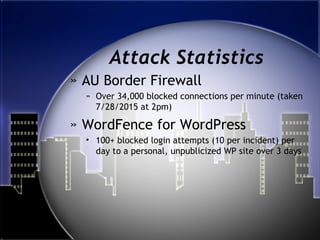
Attack Statistics
» AU Border Firewall
» Over 34,000 blocked connections per minute (taken
7/28/2015 at 2pm)
» WordFence for WordPress
• 100+ blocked login attempts (10 per incident) per
day to a personal, unpublicized WP site over 3 days
Passwords on a
Sticky Note?
How to stop the sharing madness
Passwords
» No reason to share passwords
because you can use:
• Shared files/folders
• Permissions settings
• Remote Desktop
• E-mail Proxy
• Web 2.0 products
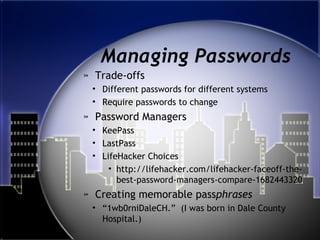
Managing Passwords
» Trade-offs
• Different passwords for different systems
• Require passwords to change
» Password Managers
• KeePass
• LastPass
• LifeHacker Choices
• http://lifehacker.com/lifehacker-faceoff-the-
best-password-managers-compare-1682443320
» Creating memorable passphrases
• “1wb0rniDaleCH.” (I was born in Dale County
Hospital.)
Network Protocols
Help protect users
Secure All Protocols
» Telnet -> SSH
» FTP -> SFTP
» SSL Certificates
• LDAP -> LDAPS
• HTTP -> HTTPS
» Require Secure Protocols for
authenticated Applications
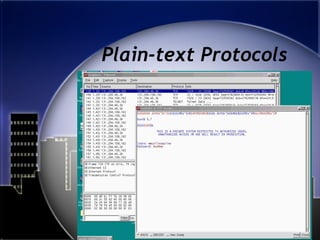
Plain-text Protocols
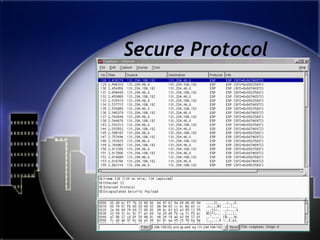
Secure Protocol
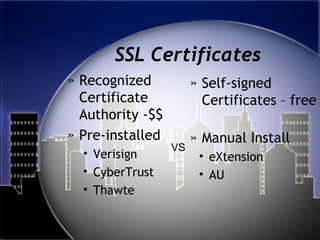
SSL Certificates
» Recognized
Certificate
Authority -$$
» Pre-installed
• Verisign
• CyberTrust
• Thawte
» Self-signed
Certificates – free
» Manual Install
• eXtension
• AU
VS
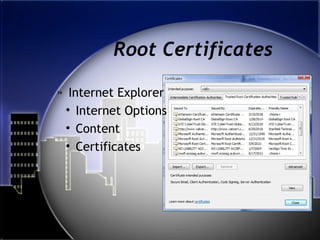
Root Certificates
» Internet Explorer
• Internet Options
• Content
• Certificates
Self-Signed Certificates
» Products
• Microsoft Certificate Authority
• Mac OS - Keychain
• Linux - OpenSSL
» Trouble is that people do BYOD and
then get certificate errors. Training
people to accept errors is bad.
Secure Network Access
For the Road Warriors
Virtual Private Network
» VPN provides unlimited access to
campus network
» Prevent eavesdropping
» Treat off-campus just like WiFi
An insecure transmission medium
Public/Private WiFi
» Restrict open WiFi ports/protocols
» Encourage VPN
• Better encryption
• Unrestricted access
• Restrict OS announcements
• Gain benefit of University border firewall
• Restrict services to internal Ips
» Enable Security
• Prevent stealing bandwidth
• Add some security to insecure sites
Remote Access
» Remote Desktop
» Bomgar, LogMeIn, etc
» Shared space access
» Printer access
» Internal websites
Other References
» Bruce Schneier’s
http://www.schneier.com
» SANS’ “@RISK: The Consensus
Security Alert”
Thank You
Until it goes missing, security is a boring
obstacle to productivity in the minds of most
people. Don’t be most people.

Dark alleys-2015

  • 1.
    Dark Alleys ofthe Internet Updated 2015 For System and Network Administrators Do the Right Thing!
  • 2.
    Attack Statistics » AUBorder Firewall » Over 34,000 blocked connections per minute (taken 7/28/2015 at 2pm) » WordFence for WordPress • 100+ blocked login attempts (10 per incident) per day to a personal, unpublicized WP site over 3 days
  • 3.
    Passwords on a StickyNote? How to stop the sharing madness
  • 4.
    Passwords » No reasonto share passwords because you can use: • Shared files/folders • Permissions settings • Remote Desktop • E-mail Proxy • Web 2.0 products
  • 5.
    Managing Passwords » Trade-offs •Different passwords for different systems • Require passwords to change » Password Managers • KeePass • LastPass • LifeHacker Choices • http://lifehacker.com/lifehacker-faceoff-the- best-password-managers-compare-1682443320 » Creating memorable passphrases • “1wb0rniDaleCH.” (I was born in Dale County Hospital.)
  • 6.
  • 7.
    Secure All Protocols »Telnet -> SSH » FTP -> SFTP » SSL Certificates • LDAP -> LDAPS • HTTP -> HTTPS » Require Secure Protocols for authenticated Applications
  • 8.
  • 9.
  • 10.
    SSL Certificates » Recognized Certificate Authority-$$ » Pre-installed • Verisign • CyberTrust • Thawte » Self-signed Certificates – free » Manual Install • eXtension • AU VS
  • 11.
    Root Certificates » InternetExplorer • Internet Options • Content • Certificates
  • 12.
    Self-Signed Certificates » Products •Microsoft Certificate Authority • Mac OS - Keychain • Linux - OpenSSL » Trouble is that people do BYOD and then get certificate errors. Training people to accept errors is bad.
  • 13.
    Secure Network Access Forthe Road Warriors
  • 14.
    Virtual Private Network »VPN provides unlimited access to campus network » Prevent eavesdropping » Treat off-campus just like WiFi An insecure transmission medium
  • 15.
    Public/Private WiFi » Restrictopen WiFi ports/protocols » Encourage VPN • Better encryption • Unrestricted access • Restrict OS announcements • Gain benefit of University border firewall • Restrict services to internal Ips » Enable Security • Prevent stealing bandwidth • Add some security to insecure sites
  • 16.
    Remote Access » RemoteDesktop » Bomgar, LogMeIn, etc » Shared space access » Printer access » Internal websites
  • 17.
    Other References » BruceSchneier’s http://www.schneier.com » SANS’ “@RISK: The Consensus Security Alert”
  • 18.
    Thank You Until itgoes missing, security is a boring obstacle to productivity in the minds of most people. Don’t be most people.

Editor's Notes

  • #2 This is a presentation for system network administrators. Administrators should help teach their users proper security methods.
  • #4 To minimize the impacts of those suspicious and possibly successful attacks, one of the best things we can do is educate our users not to share their passwords.
  • #5 Collaboration products are available in many forms.
  • #6 Like everything else security related, there is *ALWAYS A TRADEOFF* For convenience and security, minimize the number of passwords your users will need to use your system. Tradeoff is that one breached password gets you all of that person’s stuff. Force changing passwords often will invariably cause them to be written down. There is much debate on this one, but an annual password change is likely a good, real world policy.
  • #8 We’ll show you an example of telnet FTP just as bad Both can be replaced by SSH, which covers both interactive (telnet style) logins and file transfers (SFTP) SSL certificates secure the connection between PC and server prior to data traffic
  • #9 Telnet – notice password may not be displayed to you as you type it, but the person sniffing your connection gets the real thing
  • #10 Secure, encrypted data looks like jibberish to the sniffer
  • #11 Certificates offer a means of verifying that a site is who it says it is. THERE IS A PROBLEM WITH THE SECURITY OF THIS SITE, DO YOU WANT TO CONTINUE? THE ANSWER SHOULD ALWAYS BE NO, BUT USERS ARE TRAINED TO HIT YES. One solution is to install your self-signed root certificates on users’ machines. Another is to obtain legitimate certificates. Certificates are cheap or free to EDUs.
  • #12 This certificate “store” contains the ones from MS, plus eXtension’s and ours. After you have a single self signed root certificate installed, you can use it to sign as many certs as you’d like.
  • #13 Security Certificates are used to encrypt network traffic for SSL encrypted connections. Examples include HTTPS, IMAPS, and LDAPS. The "S" denotes a secure/encrypted connection. No confidential data (esp usernames/passwords) should ever be sent over a non-secure connection. It is possible to sign your own certificates, but that makes a warning pop up when you connect saying that the site could not be verified as trusted. Again, a “free” solution is to trust a single server and let it sign all certs. Pushed the single root certification to PCs via AD and placed into "Trusted Publishers" certificate store. See CntrlPnl->InternetOptions->Content->Certificates.
  • #14 Anyone not on the same “campus” with your servers.
  • #15 We try to prevent as many connections as possible when not on our campus network to force VPN usage. Restrictions based on IP or port can be lifted. Encryption takes care of snooping. WiFi can be treated same way. Assume people can see what you do, since we all share the same airwaves.
  • #16 For example, don’t’ allow telnet, file sharing, IMAP (email) to traverse public WiFi at all. VPN usage solves multiple problems. In small office or home scenarios where proper VPN management not possible, enable security.
  • #17 With firewalls, VPNs, and IP restrictions in place you can block most attacks while allowing full usability and adding user friendliness.
  • #18 Beyond Fear offers common sense look at security problems in general. His other work offers reminders of how we should approach security. SANS feeds and newsletters offer one stop shopping for multiple platforms and applications.