Badges and Certificates with the
Brightspace Awards Tool
Dan Semi – D2L Brightspace Sr Solutions Engineer
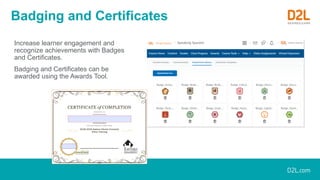
Badging and Certificates
Increase learner engagement and
recognize achievements with Badges
and Certificates.
Badging and Certificates can be
awarded using the Awards Tool.
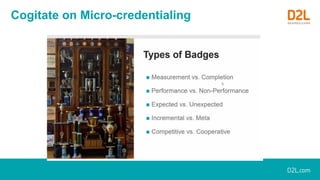
Cogitate on Micro-credentialing
Motivate your Learners
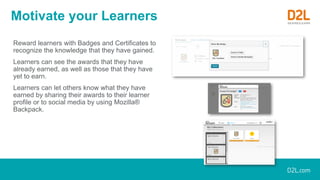
Reward learners with Badges and Certificates to
recognize the knowledge that they have gained.
Learners can see the awards that they have
already earned, as well as those that they have
yet to earn.
Learners can let others know what they have
earned by sharing their awards to their learner
profile or to social media by using Mozilla®
Backpack.
Instant Gratification
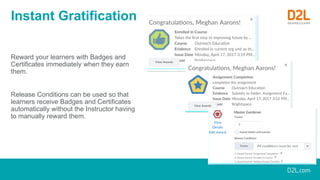
Reward your learners with Badges and
Certificates immediately when they earn
them.
Release Conditions can be used so that
learners receive Badges and Certificates
automatically without the Instructor having
to manually reward them.
Customize your Awards
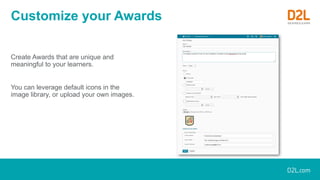
Create Awards that are unique and
meaningful to your learners.
You can leverage default icons in the
image library, or upload your own images.
Features
Issue ~ Host ~ Display ~ Verify
• Create a badge or Certificate
• Add a badge to a course with achievement method
• Manually award a badge
• Revoke a badge
• Automatically awarding a badge
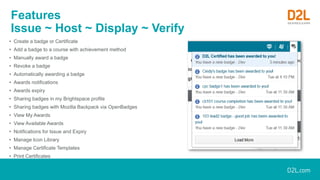
• Awards notifications
• Awards expiry
• Sharing badges in my Brightspace profile
• Sharing badges with Mozilla Backpack via OpenBadges
• View My Awards
• View Available Awards
• Notifications for Issue and Expiry
• Manage Icon Library
• Manage Certificate Templates
• Print Certificates
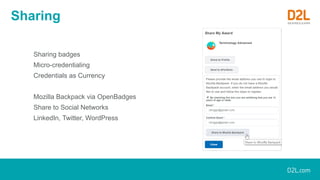
Sharing
Sharing badges
Micro-credentialing
Credentials as Currency
Mozilla Backpack via OpenBadges
Share to Social Networks
LinkedIn, Twitter, WordPress
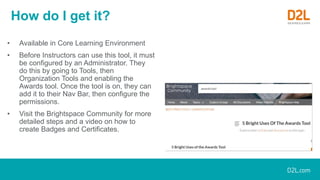
How do I get it?
• Available in Core Learning Environment
• Before Instructors can use this tool, it must
be configured by an Administrator. They
do this by going to Tools, then
Organization Tools and enabling the
Awards tool. Once the tool is on, they can
add it to their Nav Bar, then configure the
permissions.
• Visit the Brightspace Community for more
detailed steps and a video on how to
create Badges and Certificates.
All D2L marks are trademarks of D2L Corporation. Please visit D2L.com/trademarks for a list of D2L marks.
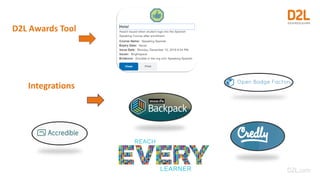
D2L Awards Tool
Integrations
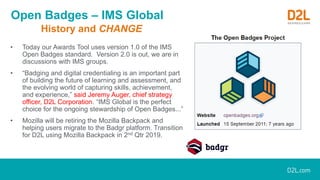
Open Badges – IMS Global
History and CHANGE
• Today our Awards Tool uses version 1.0 of the IMS
Open Badges standard. Version 2.0 is out, we are in
discussions with IMS groups.
• “Badging and digital credentialing is an important part
of building the future of learning and assessment, and
the evolving world of capturing skills, achievement,
and experience,” said Jeremy Auger, chief strategy
officer, D2L Corporation. “IMS Global is the perfect
choice for the ongoing stewardship of Open Badges...”
• Mozilla will be retiring the Mozilla Backpack and
helping users migrate to the Badgr platform. Transition
for D2L using Mozilla Backpack in 2nd Qtr 2019.

D2L Awards Tool - Badging, Certificates, Microcredentialing

  • 1.
    Badges and Certificateswith the Brightspace Awards Tool Dan Semi – D2L Brightspace Sr Solutions Engineer
  • 2.
    Badging and Certificates Increaselearner engagement and recognize achievements with Badges and Certificates. Badging and Certificates can be awarded using the Awards Tool.
  • 3.
  • 4.
    Motivate your Learners Rewardlearners with Badges and Certificates to recognize the knowledge that they have gained. Learners can see the awards that they have already earned, as well as those that they have yet to earn. Learners can let others know what they have earned by sharing their awards to their learner profile or to social media by using Mozilla® Backpack.
  • 5.
    Instant Gratification Reward yourlearners with Badges and Certificates immediately when they earn them. Release Conditions can be used so that learners receive Badges and Certificates automatically without the Instructor having to manually reward them.
  • 6.
    Customize your Awards CreateAwards that are unique and meaningful to your learners. You can leverage default icons in the image library, or upload your own images.
  • 7.
    Features Issue ~ Host~ Display ~ Verify • Create a badge or Certificate • Add a badge to a course with achievement method • Manually award a badge • Revoke a badge • Automatically awarding a badge • Awards notifications • Awards expiry • Sharing badges in my Brightspace profile • Sharing badges with Mozilla Backpack via OpenBadges • View My Awards • View Available Awards • Notifications for Issue and Expiry • Manage Icon Library • Manage Certificate Templates • Print Certificates
  • 8.
    Sharing Sharing badges Micro-credentialing Credentials asCurrency Mozilla Backpack via OpenBadges Share to Social Networks LinkedIn, Twitter, WordPress
  • 9.
    How do Iget it? • Available in Core Learning Environment • Before Instructors can use this tool, it must be configured by an Administrator. They do this by going to Tools, then Organization Tools and enabling the Awards tool. Once the tool is on, they can add it to their Nav Bar, then configure the permissions. • Visit the Brightspace Community for more detailed steps and a video on how to create Badges and Certificates.
  • 10.
    All D2L marksare trademarks of D2L Corporation. Please visit D2L.com/trademarks for a list of D2L marks. D2L Awards Tool Integrations
  • 11.
    Open Badges –IMS Global History and CHANGE • Today our Awards Tool uses version 1.0 of the IMS Open Badges standard. Version 2.0 is out, we are in discussions with IMS groups. • “Badging and digital credentialing is an important part of building the future of learning and assessment, and the evolving world of capturing skills, achievement, and experience,” said Jeremy Auger, chief strategy officer, D2L Corporation. “IMS Global is the perfect choice for the ongoing stewardship of Open Badges...” • Mozilla will be retiring the Mozilla Backpack and helping users migrate to the Badgr platform. Transition for D2L using Mozilla Backpack in 2nd Qtr 2019.