The Educator’s Role inSafe ComputingJana BaxterAnn Noonen
The goal of this session is to give educators an overview of cyber security.We will examine three categories:Cyber securityCyber ethicsCyber safetySafe Computing in Education
DefinitionCyber security is a set of principles and practices designed to teach you how to safeguard your computing assets and online information against threats. Cyber Security
What is the Internet?	The Internet is a global network that connects over one billion people and more than 600 million computers. More than 100 countries are linked into exchanges of data, news, and opinions. [http://www.internet.com]What kind of technologies are connect to the Internet?ComputersPersonal digital assistants (PDAs)Cell phonesDigital cable or satellite television and radioATM machines, credit cards, and debit cardsGlobal positioning system (GPS) devices and softwareTechnology Connects Schools to the Internet
Educators assume many roles in the physical and social environment of their schools. Now they need to play these roles in the realm of cyber security.TeacherAuthority figureFacilitatorMentorCounselorProtectorEducators Play Many Roles
It is now!To avoid teaching and practicing safe computing in their classrooms, many educators use the excuse that computer safety is the responsibility of the school’s technology personnel.We all have to make computing safe. How?Understand the nature and cause of cyber threats to protect yourself, your students, and your school from potential cyber threats.Learn how to fight cyber threats and teach your students, colleagues, and their families about cyber security.“Cyber security is not my job!”
 A code of safe and responsible behavior for the Internet CommunityUnderstanding the risks of harmful and illegal behavior onlineHow to protect ourselves and other Internet and other Internet users from such behaviorLower Merion School DistrictCyber Ethics
There are many types of cyber threats:Piracy illegal use of copyrighted material such as plagiarism or illegal downloading of music, movies, text, or other types of filesIntrusionunauthorized individuals trying to gain access to computer systems in order to steal information, corrupt files, illegitimately view data, or gain control of the computer. (In schools, as in any organization, intruders can be outsiders or insiders.)Identity theftcomputer intruders intent on stealing your personal information to commit fraud or theftCyber Threats -1
Predatory behaviora person with malicious intent who targets your online information to hurt your reputation, compromise your data, intimidate you, etc.Virusa self-replicating program that spreads by inserting copies of itself into other computer code or into documentsSpamunwanted messages, often automated, sent to multiple users, mailing lists, or email groupsCyber Threats -2
Worma self-replicating, self-spreading malicious computer programTrojan horsea malicious program disguised as or hidden in legitimate softwareMalwaresoftware designed to harm your computerSpywaresoftware that sends information from your computer to a third party without your consentCyber Threats - 3
Illegal download or redistribution of copyrighted materialmay result in legal fines, job loss, or action against you from law enforcement officers.Intrusion into a school network, whether it is from an insider or outsidermay result in data alteration, identity theft, and theft or destruction of test material.Effect of Cyber Threats
Clicking on an advertisement pop-up windowmay result in spam sent to your email address and to others in your address book.A virus, malware, worm, or Trojan horse received accidentally in your emailmay result in the destruction of your data, computer, or the school’s entire network.Effect of Cyber Threats - 2
Create a “strong” password such as Mathew12!goals.Lock your computer (an unlocked computer is an invitation to intruders).Create unique user IDs for anyone sharing your computer.Always assume your email, chat sessions, and text messages are not  private.Use caution when opening an unexpected email.Protect against cyber threats -1
Back up your data regularly. Be wary of file sharing or sharing your computer with others.Update your anti-virus program and virus definitions as well as your anti-spyware software.Use and maintain a firewall.Protect against cyber threats -2
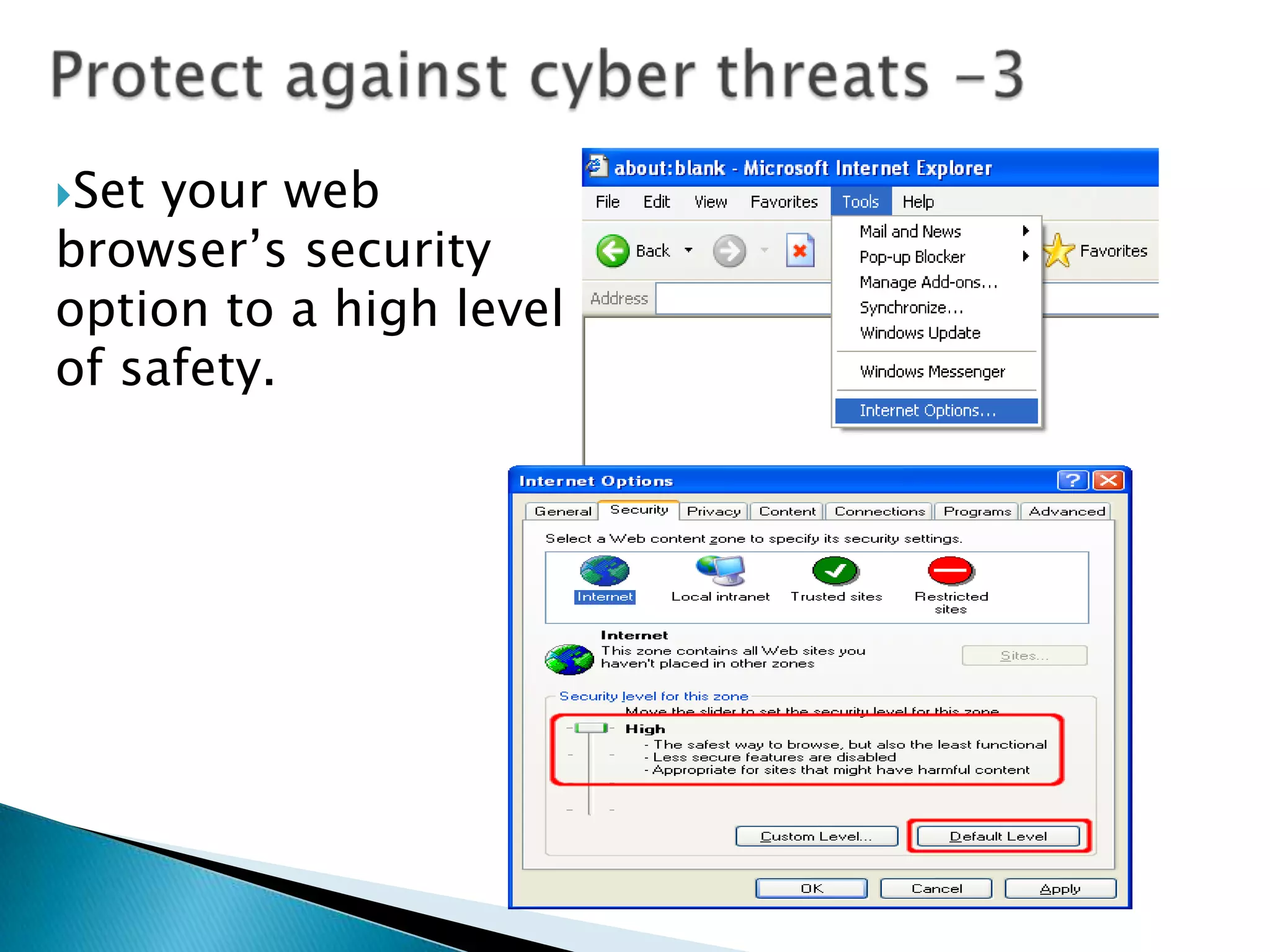
Protect against cyber threats -3Set your web browser’s security option to a high level of safety.
Enable your “pop-up” blocker.Disconnect your computer from the Internet when you are not using it.Take care when opening any attachment you receive through email, chat rooms, or SMS.Update your computer with the latest security patches for the software and operating system you use.Protect against cyber threats -4
You can incorporate short lessons and techniques about cyber security as you teach various subjects. Teaching Cyber Security
http://www.us-cert.govhttp://www.mysecurecyberspace.comhttp://www.webopedia.comhttp://www.internet.comhttp://www.csialliance.orgReferences

cyber_security

  • 1.
    The Educator’s RoleinSafe ComputingJana BaxterAnn Noonen
  • 2.
    The goal ofthis session is to give educators an overview of cyber security.We will examine three categories:Cyber securityCyber ethicsCyber safetySafe Computing in Education
  • 3.
    DefinitionCyber security isa set of principles and practices designed to teach you how to safeguard your computing assets and online information against threats. Cyber Security
  • 4.
    What is theInternet? The Internet is a global network that connects over one billion people and more than 600 million computers. More than 100 countries are linked into exchanges of data, news, and opinions. [http://www.internet.com]What kind of technologies are connect to the Internet?ComputersPersonal digital assistants (PDAs)Cell phonesDigital cable or satellite television and radioATM machines, credit cards, and debit cardsGlobal positioning system (GPS) devices and softwareTechnology Connects Schools to the Internet
  • 5.
    Educators assume manyroles in the physical and social environment of their schools. Now they need to play these roles in the realm of cyber security.TeacherAuthority figureFacilitatorMentorCounselorProtectorEducators Play Many Roles
  • 6.
    It is now!Toavoid teaching and practicing safe computing in their classrooms, many educators use the excuse that computer safety is the responsibility of the school’s technology personnel.We all have to make computing safe. How?Understand the nature and cause of cyber threats to protect yourself, your students, and your school from potential cyber threats.Learn how to fight cyber threats and teach your students, colleagues, and their families about cyber security.“Cyber security is not my job!”
  • 7.
    A codeof safe and responsible behavior for the Internet CommunityUnderstanding the risks of harmful and illegal behavior onlineHow to protect ourselves and other Internet and other Internet users from such behaviorLower Merion School DistrictCyber Ethics
  • 8.
    There are manytypes of cyber threats:Piracy illegal use of copyrighted material such as plagiarism or illegal downloading of music, movies, text, or other types of filesIntrusionunauthorized individuals trying to gain access to computer systems in order to steal information, corrupt files, illegitimately view data, or gain control of the computer. (In schools, as in any organization, intruders can be outsiders or insiders.)Identity theftcomputer intruders intent on stealing your personal information to commit fraud or theftCyber Threats -1
  • 9.
    Predatory behaviora personwith malicious intent who targets your online information to hurt your reputation, compromise your data, intimidate you, etc.Virusa self-replicating program that spreads by inserting copies of itself into other computer code or into documentsSpamunwanted messages, often automated, sent to multiple users, mailing lists, or email groupsCyber Threats -2
  • 10.
    Worma self-replicating, self-spreadingmalicious computer programTrojan horsea malicious program disguised as or hidden in legitimate softwareMalwaresoftware designed to harm your computerSpywaresoftware that sends information from your computer to a third party without your consentCyber Threats - 3
  • 11.
    Illegal download orredistribution of copyrighted materialmay result in legal fines, job loss, or action against you from law enforcement officers.Intrusion into a school network, whether it is from an insider or outsidermay result in data alteration, identity theft, and theft or destruction of test material.Effect of Cyber Threats
  • 12.
    Clicking on anadvertisement pop-up windowmay result in spam sent to your email address and to others in your address book.A virus, malware, worm, or Trojan horse received accidentally in your emailmay result in the destruction of your data, computer, or the school’s entire network.Effect of Cyber Threats - 2
  • 13.
    Create a “strong”password such as Mathew12!goals.Lock your computer (an unlocked computer is an invitation to intruders).Create unique user IDs for anyone sharing your computer.Always assume your email, chat sessions, and text messages are not private.Use caution when opening an unexpected email.Protect against cyber threats -1
  • 14.
    Back up yourdata regularly. Be wary of file sharing or sharing your computer with others.Update your anti-virus program and virus definitions as well as your anti-spyware software.Use and maintain a firewall.Protect against cyber threats -2
  • 15.
    Protect against cyberthreats -3Set your web browser’s security option to a high level of safety.
  • 16.
    Enable your “pop-up”blocker.Disconnect your computer from the Internet when you are not using it.Take care when opening any attachment you receive through email, chat rooms, or SMS.Update your computer with the latest security patches for the software and operating system you use.Protect against cyber threats -4
  • 17.
    You can incorporateshort lessons and techniques about cyber security as you teach various subjects. Teaching Cyber Security
  • 18.