Custom Announcement in SharePoint 2013/2016 using bootstrap and
REST API
In this article, I have explained how to create a custom announcement using REST API.
Step 1: Open SharePoint site.
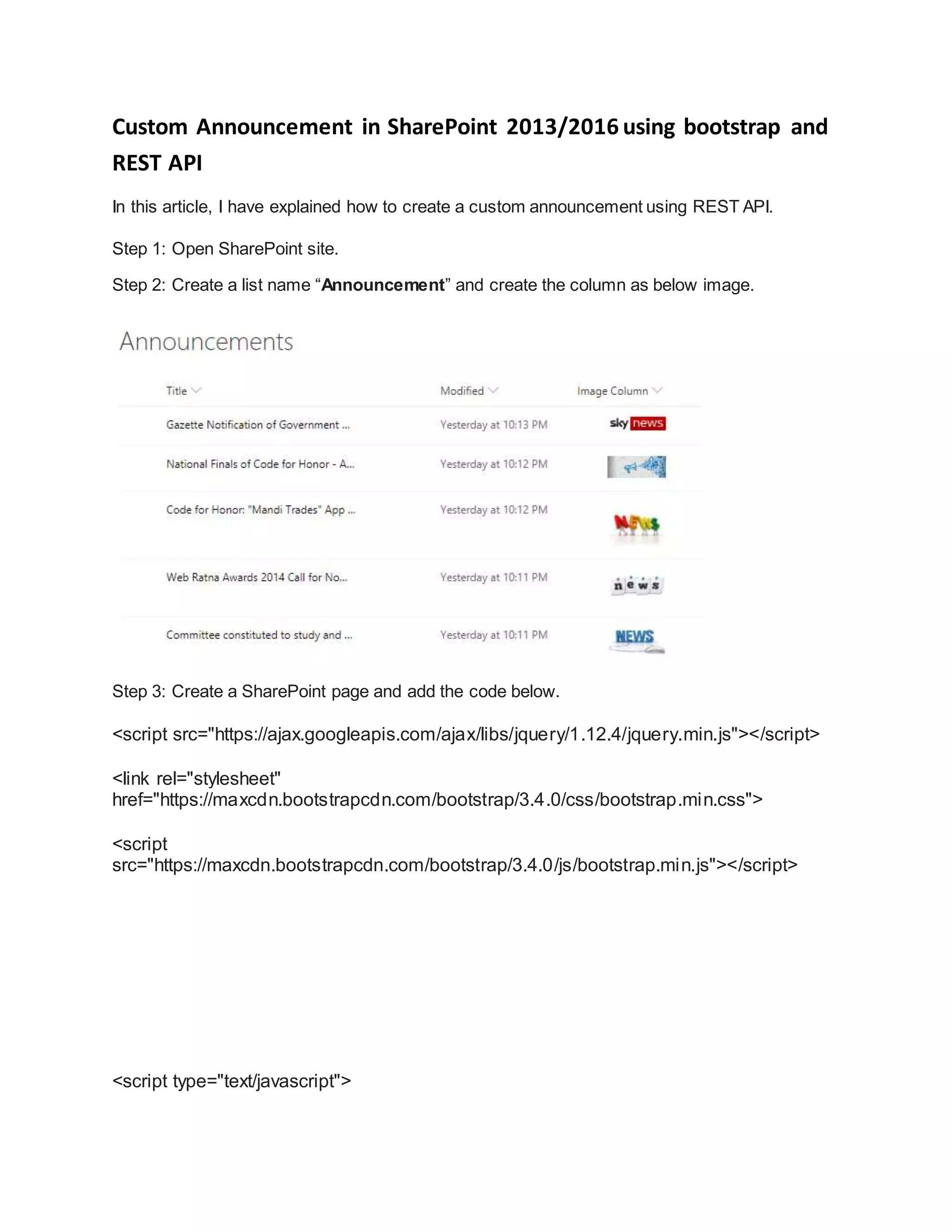
Step 2: Create a list name “Announcement” and create the column as below image.
Step 3: Create a SharePoint page and add the code below.
<script src="https://ajax.googleapis.com/ajax/libs/jquery/1.12.4/jquery.min.js"></script>
<link rel="stylesheet"
href="https://maxcdn.bootstrapcdn.com/bootstrap/3.4.0/css/bootstrap.min.css">
<script
src="https://maxcdn.bootstrapcdn.com/bootstrap/3.4.0/js/bootstrap.min.js"></script>
<script type="text/javascript">
var ItemID = 0;
var slidInd = "";
var ids = [];
var site = "https://pikasha12.sharepoint.com/sites/DLH/";
$(document).ready(function () {
var settings = {
url: site +
"_api/web/lists/getByTitle('Announcements')/items?$select=ID&$Orderby=Created
desc&$top=5",
type: "GET",
headers: { "Accept": "application/json;odata=verbose" }
}
$.ajax(settings).done(
function (data) {
//script to build UI HERE
slidInd = "";
$.each(data.d.results, function (index, value) {
ItemID = value.ID;
ids.push(ItemID)
});
getImage();
});
});
var htmls = [];
function getImage() {
$.each(ids, function (index, value) {
var settings = {
url: site + "_api/web/lists/getByTitle('Announcements')/items('" + value +
"')/FieldValuesAsHtml?$select=Title,Image_x0020_Column",
type: "GET",
headers: { "Accept": "application/json;odata=verbose" }
}
$.ajax(settings)
.done(function (response) {
var img = $(response.d.Image_x005f_x0020_x005f_Column);
slidInd = '';
slidInd = '<div class="media row"><div class="col-xs-4"><a
href="https://pikasha12.sharepoint.com/sites/DLH/Lists/Announcements/DispForm.aspx
?ID=' + value + '" class="pull-left"><img class="media-object" src="' + img[0].innerHTML
+ '"alt="amazing" height="100" width="100"></a></div><div class="col-xs-8"><h4
class="media-heading">' + response.d.Title + '</h4></div></div>';
$(".annoucement-items").append(slidInd);
})
.error(function () {
});
htmls.push(slidInd);
});
}
</script>
<style>
.media {
/* border: 1px solid #0797c2; */
box-shadow: 0 4px 8px 0 rgba(0, 0, 0, 0.2), 0 6px 20px 0 rgba(0, 0, 0, 0.19);
background: #790707;
color: white;
/* font-size: 16px; */
}
.media h4 {
font-size: 14px;
}
.ms-rtestate-field h4, h4.ms-rteElement-H4 {
line-height: 1.6;
color: #dedede;
}
.media img:hover {
transform: scale(1.5);
}
</style>
<div class="row">
<div class="col-xs-6">
<h2 class="pull-left">Latest Announcements</h2>
</div>
</div>
<div class="row">
<div class="col-xs-3 annoucement-items">
</div>
</div>
O/p:

Custom announcement in share point 2013

  • 1.
    Custom Announcement inSharePoint 2013/2016 using bootstrap and REST API In this article, I have explained how to create a custom announcement using REST API. Step 1: Open SharePoint site. Step 2: Create a list name “Announcement” and create the column as below image. Step 3: Create a SharePoint page and add the code below. <script src="https://ajax.googleapis.com/ajax/libs/jquery/1.12.4/jquery.min.js"></script> <link rel="stylesheet" href="https://maxcdn.bootstrapcdn.com/bootstrap/3.4.0/css/bootstrap.min.css"> <script src="https://maxcdn.bootstrapcdn.com/bootstrap/3.4.0/js/bootstrap.min.js"></script> <script type="text/javascript">
  • 2.
    var ItemID =0; var slidInd = ""; var ids = []; var site = "https://pikasha12.sharepoint.com/sites/DLH/"; $(document).ready(function () { var settings = { url: site + "_api/web/lists/getByTitle('Announcements')/items?$select=ID&$Orderby=Created desc&$top=5", type: "GET", headers: { "Accept": "application/json;odata=verbose" } } $.ajax(settings).done( function (data) { //script to build UI HERE slidInd = ""; $.each(data.d.results, function (index, value) { ItemID = value.ID; ids.push(ItemID) }); getImage();
  • 3.
    }); }); var htmls =[]; function getImage() { $.each(ids, function (index, value) { var settings = { url: site + "_api/web/lists/getByTitle('Announcements')/items('" + value + "')/FieldValuesAsHtml?$select=Title,Image_x0020_Column", type: "GET", headers: { "Accept": "application/json;odata=verbose" } } $.ajax(settings) .done(function (response) { var img = $(response.d.Image_x005f_x0020_x005f_Column); slidInd = ''; slidInd = '<div class="media row"><div class="col-xs-4"><a href="https://pikasha12.sharepoint.com/sites/DLH/Lists/Announcements/DispForm.aspx ?ID=' + value + '" class="pull-left"><img class="media-object" src="' + img[0].innerHTML + '"alt="amazing" height="100" width="100"></a></div><div class="col-xs-8"><h4 class="media-heading">' + response.d.Title + '</h4></div></div>'; $(".annoucement-items").append(slidInd); }) .error(function () {
  • 4.
    }); htmls.push(slidInd); }); } </script> <style> .media { /* border:1px solid #0797c2; */ box-shadow: 0 4px 8px 0 rgba(0, 0, 0, 0.2), 0 6px 20px 0 rgba(0, 0, 0, 0.19); background: #790707; color: white; /* font-size: 16px; */ } .media h4 { font-size: 14px; } .ms-rtestate-field h4, h4.ms-rteElement-H4 { line-height: 1.6; color: #dedede; }
  • 5.
    .media img:hover { transform:scale(1.5); } </style> <div class="row"> <div class="col-xs-6"> <h2 class="pull-left">Latest Announcements</h2> </div> </div> <div class="row"> <div class="col-xs-3 annoucement-items"> </div> </div> O/p: