Chris O’Connor
Senior Consultant (OBS)
 Chris O’Connor
 Senior Consultant – OBS (Melbourne)
 Blog : www.sharepointroot.com
 Twitter : @GrumpyWookie
 Father of three boys
 Weekend MAMIL
 Let’s go Mountain Biking !

 Where have we come from ?
 The new AppModel (SP2013) + Why ?
 New thinking for developers
 CSOM
 REST
 JSON
 ODATA
 OAUTH
 Client/Server
 Rich client + networked server
 N-tier
 Evolution of client/server (layers)
 ASP Classic -> ASP.NET
 MVC / MVVM
 SharePoint
 Features, Packages, Solutions
 ASP.NET + SharePoint API
 Office 365
 SharePoint 2013
 SharePoint 2013 + Office 365
 Architecture Pattern : AppModel
 SharePoint = Server
 App = Client
 It’s Client/Server !!
Everything is an app
Lists
Libraries
Calendars
Tasks
Issues
Announcements
EVERYTHING !
SharePoint 2003, 2007, 2010
Farm Solutions – WSP’s
Full Trust
2010 introduced Sandboxed Solutions
Isolation, but problematic/limited
To solve some problems :
 Code running on the SharePoint box
 Developer laziness
 RunWithElevatedPriveleges
SPSecurity.RunWithElevatedPrivileges(delegate()
{
using (SPSite site = new SPSite(web.Site.ID))
{
// do something
// call a method
});
}
SPSecurity.RunWithScissors(delegate()
{
using (SPSite site = new SPSite(web.Site.ID))
{
// do something
// call a method
});
}
Goal : Isolation
Benefits
 Multi-tenancy -> Office 365
 Ease of upgrade
 Easier to develop / update
Need to think “outside the box”
AppModel = Isolation
 Brings new challenges
Security
Code
Data
• CSOM
• REST
• JSON
• ODATA
• OAUTH
App
SharePoint 2013
- On-Premise
- Office 365
Security / Code / Data
- Authorisation + Permissions
- Structured API
- Data Contracts
ServerClient
Black Box thinking
SharePoint is “the server”
Developer will create “the client”
Apps for SharePoint
 Provider Hosted
 Auto-Hosted (Azure)
 SharePoint Hosted
 Client/Server “flavours”
 Visual Studio 2012 Project Types
App
 Visual Studio 2012
 Need to install project templates
 Microsoft Office Developer Tools for Visual Studio 2012
 Via Web Platform Installer (WebPI)
 http://tinyurl.com/platform-install
 SharePoint Designer 2013
 Napa
 Office 365 Development tools
 Add An App > SharePoint Store
 Browser based tools
 Works with ‘Developer Site’ on Office 365
 Office 365 Developer Site
 http://dev.office.com/
 Sign up today !
- Run Project
- Remove App
- Properties
- Open in Visual Studio
- Share Project
- Publish
- Quick Open
SharePoint App Model (2013)
 Isolation + multi-tenancy
 Brings new challenges
New application architectures
 Provider Hosted
 Azure Hosted
 SharePoint Hosted
New toolsets
 Visual Studio 2012
 Napa (Office 365)
 SharePoint Designer 2013
“Client Server” thinking
 Security
 Code
 Data
 Scope
 List
 WebSite
 Site Collection
 Tenancy
 AppPermissionRequest
 Read
 Write
 Manager
 Full Control
Code Security
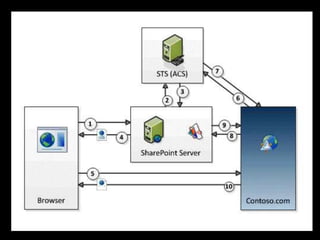
 OAUTH – Security Protocol
 Between Apps & Services
 Without username/password
 Works in conjunction with :
 ACS – Access Control Services
 STS – Security Token Service
OAUTH
 Only for ‘cloud hosted’ apps
 Provider Hosted
 Azure Hosted
 Pass tokens via IFRAME (!??!)
 Need to do this way – avoid XSS
Provider-Hosted
 Any language / anything / anywhere
Azure-Hosted
 .NET languages – C# / VB.NET
SharePoint-Hosted
 JavaScript
 jQuery
 HTML
 CSOM
 REST
 No Server Object Model (SharePoint.dll)
 No code in the GAC
 Auto-Hosted -> Office 365
 Local application (IIS on laptop)
 Uses CSOM code
 TokenHelper
 ContextToken
 AccessToken
.
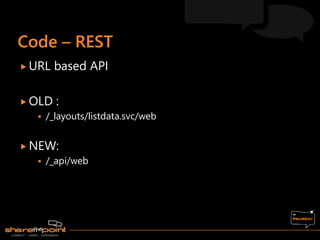
 URL based API
 OLD :
 /_layouts/listdata.svc/web
 NEW:
 /_api/web
 http://server/site/_api/web/lists
 http://server/site/_api/web/lists/getbytitle(‘name’)
 http://server/site/_api/web/lists('guid')/items?$select=Title,
Products
 http://server/site/_api/web/lists('guid')/items$filter=MyColu
mn eq 'Music’
 OData
 Open Data Specification
 CRUD operations via HTTP verbs
 GET (default) – retrieve data
 PUT – create new item
 POST – update item
 DELETE – remove item
 OData is built upon message formats
 AtomPub
 XML
 JSON
 JavaScript Object Notation
Open Standards
JavaScript Object Notation
{Key,Value} pairs
 Allows for objects, arrays + nested multiples
 SharePoint-Hosted -> Office 365
 JavaScript + jQuery
 REST – retrieve list of documents
 Data formatted & returned as JSON
 Display as HTML
 ContextToken
 Security
.
 Where have we come from ?
 The new AppModel (SP2013) + Why ?
 New thinking for developers
 CSOM
 REST
 JSON
 ODATA
 OAUTH
<< Security
<< Code
<< Data
Questions & Answers ??
 More Information ??
 Contact Me :
 Blog : www.sharepointroot.com
 Twitter : @GrumpyWookie

Thank you to our sponsors

2013 - Back to the Future with Client/Server Development

  • 1.
  • 2.
     Chris O’Connor Senior Consultant – OBS (Melbourne)  Blog : www.sharepointroot.com  Twitter : @GrumpyWookie  Father of three boys  Weekend MAMIL  Let’s go Mountain Biking ! 
  • 3.
     Where havewe come from ?  The new AppModel (SP2013) + Why ?  New thinking for developers  CSOM  REST  JSON  ODATA  OAUTH
  • 4.
     Client/Server  Richclient + networked server  N-tier  Evolution of client/server (layers)  ASP Classic -> ASP.NET  MVC / MVVM  SharePoint  Features, Packages, Solutions  ASP.NET + SharePoint API  Office 365  SharePoint 2013
  • 5.
     SharePoint 2013+ Office 365  Architecture Pattern : AppModel  SharePoint = Server  App = Client  It’s Client/Server !!
  • 8.
    Everything is anapp Lists Libraries Calendars Tasks Issues Announcements EVERYTHING !
  • 9.
    SharePoint 2003, 2007,2010 Farm Solutions – WSP’s Full Trust 2010 introduced Sandboxed Solutions Isolation, but problematic/limited
  • 10.
    To solve someproblems :  Code running on the SharePoint box  Developer laziness  RunWithElevatedPriveleges
  • 11.
    SPSecurity.RunWithElevatedPrivileges(delegate() { using (SPSite site= new SPSite(web.Site.ID)) { // do something // call a method }); }
  • 12.
    SPSecurity.RunWithScissors(delegate() { using (SPSite site= new SPSite(web.Site.ID)) { // do something // call a method }); }
  • 13.
    Goal : Isolation Benefits Multi-tenancy -> Office 365  Ease of upgrade  Easier to develop / update Need to think “outside the box”
  • 14.
    AppModel = Isolation Brings new challenges Security Code Data
  • 15.
    • CSOM • REST •JSON • ODATA • OAUTH App SharePoint 2013 - On-Premise - Office 365 Security / Code / Data - Authorisation + Permissions - Structured API - Data Contracts ServerClient
  • 17.
    Black Box thinking SharePointis “the server” Developer will create “the client” Apps for SharePoint
  • 18.
     Provider Hosted Auto-Hosted (Azure)  SharePoint Hosted  Client/Server “flavours”  Visual Studio 2012 Project Types App
  • 20.
     Visual Studio2012  Need to install project templates  Microsoft Office Developer Tools for Visual Studio 2012  Via Web Platform Installer (WebPI)  http://tinyurl.com/platform-install  SharePoint Designer 2013
  • 23.
     Napa  Office365 Development tools  Add An App > SharePoint Store  Browser based tools  Works with ‘Developer Site’ on Office 365  Office 365 Developer Site  http://dev.office.com/  Sign up today !
  • 26.
    - Run Project -Remove App - Properties - Open in Visual Studio - Share Project - Publish - Quick Open
  • 28.
    SharePoint App Model(2013)  Isolation + multi-tenancy  Brings new challenges New application architectures  Provider Hosted  Azure Hosted  SharePoint Hosted
  • 29.
    New toolsets  VisualStudio 2012  Napa (Office 365)  SharePoint Designer 2013 “Client Server” thinking  Security  Code  Data
  • 31.
     Scope  List WebSite  Site Collection  Tenancy  AppPermissionRequest  Read  Write  Manager  Full Control
  • 34.
    Code Security  OAUTH– Security Protocol  Between Apps & Services  Without username/password  Works in conjunction with :  ACS – Access Control Services  STS – Security Token Service
  • 35.
    OAUTH  Only for‘cloud hosted’ apps  Provider Hosted  Azure Hosted  Pass tokens via IFRAME (!??!)  Need to do this way – avoid XSS
  • 37.
    Provider-Hosted  Any language/ anything / anywhere Azure-Hosted  .NET languages – C# / VB.NET SharePoint-Hosted  JavaScript  jQuery  HTML
  • 38.
     CSOM  REST No Server Object Model (SharePoint.dll)  No code in the GAC
  • 39.
     Auto-Hosted ->Office 365  Local application (IIS on laptop)  Uses CSOM code  TokenHelper  ContextToken  AccessToken .
  • 40.
     URL basedAPI  OLD :  /_layouts/listdata.svc/web  NEW:  /_api/web
  • 41.
     http://server/site/_api/web/lists  http://server/site/_api/web/lists/getbytitle(‘name’) http://server/site/_api/web/lists('guid')/items?$select=Title, Products  http://server/site/_api/web/lists('guid')/items$filter=MyColu mn eq 'Music’
  • 43.
     OData  OpenData Specification  CRUD operations via HTTP verbs  GET (default) – retrieve data  PUT – create new item  POST – update item  DELETE – remove item
  • 44.
     OData isbuilt upon message formats  AtomPub  XML  JSON  JavaScript Object Notation Open Standards
  • 45.
    JavaScript Object Notation {Key,Value}pairs  Allows for objects, arrays + nested multiples
  • 47.
     SharePoint-Hosted ->Office 365  JavaScript + jQuery  REST – retrieve list of documents  Data formatted & returned as JSON  Display as HTML  ContextToken  Security .
  • 48.
     Where havewe come from ?  The new AppModel (SP2013) + Why ?  New thinking for developers  CSOM  REST  JSON  ODATA  OAUTH << Security << Code << Data
  • 49.
    Questions & Answers??  More Information ??  Contact Me :  Blog : www.sharepointroot.com  Twitter : @GrumpyWookie 
  • 50.
    Thank you toour sponsors

Editor's Notes

  • #2 Session Title: Back to the Future with Client/Server Development Session Description: With the new SharePoint 2013 platform, the application development model changes the ways that developers will approach a solution. This includes client-development concepts such as CSOM, REST, jQuery - AND - can also mean ASP.NET via custom apps hosted outside of SharePoint. This session will show an overview of this approach, and some code samples / examples / demos. Speaker:Chris O'Connor Track:Developer Specialty:Branding and Design Audience:Developer 
  • #4 02
  • #5 04
  • #6 06
  • #9 08
  • #10 10
  • #11 12
  • #12 14
  • #13 15
  • #14 16
  • #15 18 Security – user has to approve app when adding – “do you trust this” App Security – not person security Protect data / avoid breach View, Contribute, Manage, Full Control Code – runs in an isolated “AppWeb” Data – via XML / key-value pair
  • #16 19 This slide depicts the high-level architecture of an app. You can see SharePoint can communicate with other services such as Windows Azure, or SQL Azure via REST and OData based services. Apps, running from either within an isolated SharePoint AppWeb or on a remote infrastructure such as Windows Azure, communicate back to SharePoint using the same REST & CSOM APIs, gaining permission to SharePoint sites using Windows Azure’s Access Control Service (ACS).
  • #18 20
  • #19 21
  • #20 22-24
  • #21 25
  • #22 26 *** Visual Studio project – add different types of app
  • #23 27 *** Visual Studio project – add different types of app
  • #24 28
  • #29 29
  • #32 30
  • #35 App Authentication and server-to-server services in SharePoint 2013 now support OAuth 2.0 authentication. OAuth is a security protocol which enables sharing limited information between applications and services, without sharing the actual username/password credentials. Specific resources can be identified for sharing using OAuth, using a different set of credentials, which cannot be used to access other restricted information from the Application / Service.
  • #37 Diagram - http://msdn.microsoft.com/en-us/library/fp142382.aspx
  • #40 New Solution Auto Hosted
  • #42 https://sharepointroot.sharepoint.com/_api/web/lists/Shared_x0020_Documents/Items?$select=Title
  • #48 New Solution Auto Hosted