

Building Windows 8 Modern Style
apps for SharePoint 2013
SharePoint Saturday Vietnam 5th
Binh Nguyen
About me
My name is Nguyen Thanh Binh
Work at Bamboo Solutions (http://bamboosolutions.com)
Hobbies: Football; Coffee; SharePoint 
Reach me at:
• Email: binhtnguyen@live.com
• Facebook: http://facebook.com/binhthanhng
• LinkedIn: http://linkedin.com/in/binhthanhng
• Twitter: @binhtnguyen
Agenda
Windows 8 Modern (Metro) Style App
• Introduction Windows 8
• Platform
• DEMO
SharePoint 2013 and Windows 8 App
• APIs
• REST
• Web Services
• DEMO
Q&A
Windows 8 and
Modern Style
apps
Cloud-
connected
Built on a
solid
foundation
Get more at
the Windows
Store
At home and
at work
All the apps
you want
Reimagined
browsing with
IE10
Windows
reimagined
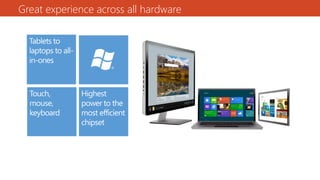
Great
experience
across all
hardware
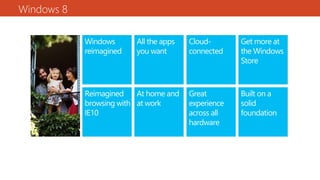
Windows 8
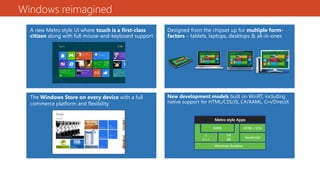
Windows reimagined
A new Metro style UI where touch is a first-class
citizen along with full mouse-and-keyboard support
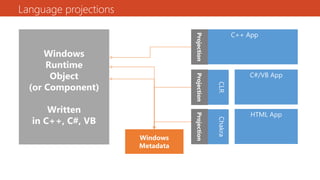
New development models built on WinRT, including
native support for HTML/CSS/JS, C#/XAML, C++/DirectX
Designed from the chipset up for multiple form-
factors – tablets, laptops, desktops & all-in-ones
The Windows Store on every device with a full
commerce platform and flexibility
Great experience across all hardware
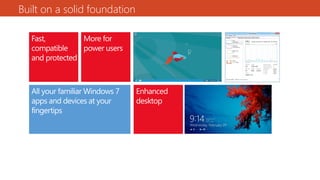
Built on a solid foundation
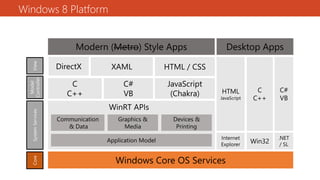
Windows 8 Platform
Language projections
DEMO
Windows 8 Apps
SharePoint 2013
and Windows 8
Apps
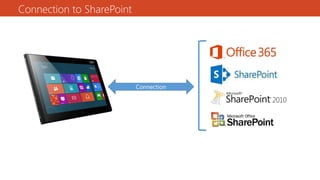
Connection to SharePoint
Connection
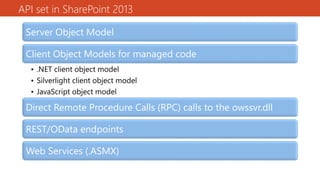
API set in SharePoint 2013
Server Object Model
Client Object Models for managed code
• .NET client object model
• Silverlight client object model
• JavaScript object model
Direct Remote Procedure Calls (RPC) calls to the owssvr.dll
REST/OData endpoints
Web Services (.ASMX)
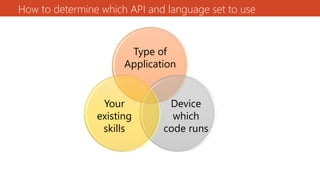
How to determine which API and language set to use
Type of
Application
Device
which
code runs
Your
existing
skills
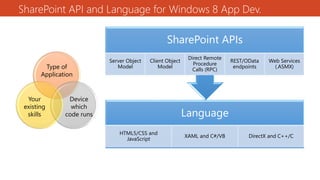
SharePoint API and Language for Windows 8 App Dev.
Type of
Application
Device
which
code runs
Your
existing
skills Language
HTML5/CSS and
JavaScript
XAML and C#/VB DirectX and C++/C
SharePoint APIs
Server Object
Model
Client Object
Model
Direct Remote
Procedure
Calls (RPC)
REST/OData
endpoints
Web Services
(.ASMX)
REST
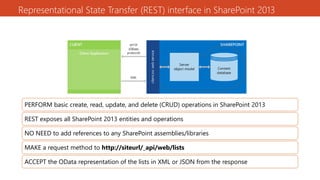
Representational State Transfer (REST) interface in SharePoint 2013
PERFORM basic create, read, update, and delete (CRUD) operations in SharePoint 2013
REST exposes all SharePoint 2013 entities and operations
NO NEED to add references to any SharePoint assemblies/libraries
MAKE a request method to http://siteurl/_api/web/lists
ACCEPT the OData representation of the lists in XML or JSON from the response
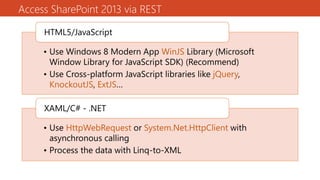
Access SharePoint 2013 via REST
• Use Windows 8 Modern App WinJS Library (Microsoft
Window Library for JavaScript SDK) (Recommend)
• Use Cross-platform JavaScript libraries like jQuery,
KnockoutJS, ExtJS…
HTML5/JavaScript
• Use HttpWebRequest or System.Net.HttpClient with
asynchronous calling
• Process the data with Linq-to-XML
XAML/C# - .NET
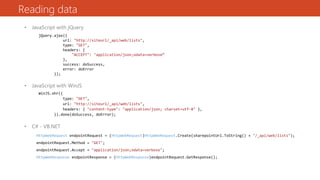
Reading data
• JavaScript with jQuery
jQuery.ajax({
url: "http://siteurl/_api/web/lists",
type: "GET",
headers: {
"ACCEPT": "application/json;odata=verbose“
},
success: doSuccess,
error: doError
});
• JavaScript with WinJS
WinJS.xhr({
type: "GET",
url: "http://siteurl/_api/web/lists",
headers: { "content-type": "application/json; charset=utf-8" },
}).done(doSuccess, doError);
• C# - VB.NET
HttpWebRequest endpointRequest = (HttpWebRequest)HttpWebRequest.Create(sharepointUrl.ToString() + "/_api/web/lists");
endpointRequest.Method = "GET";
endpointRequest.Accept = "application/json;odata=verbose";
HttpWebResponse endpointResponse = (HttpWebResponse)endpointRequest.GetResponse();
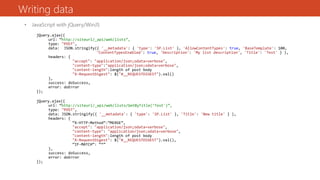
Writing data
• JavaScript with jQuery/WinJS
jQuery.ajax({
url: “http://siteurl/_api/web/lists”,
type: "POST",
data: JSON.stringify({ '__metadata': { 'type': 'SP.List' }, 'AllowContentTypes': true, 'BaseTemplate': 100,
'ContentTypesEnabled': true, 'Description': 'My list description', 'Title': 'Test' } ),
headers: {
"accept": "application/json;odata=verbose",
"content-type":"application/json;odata=verbose",
"content-length":length of post body
"X-RequestDigest": $("#__REQUESTDIGEST").val()
},
success: doSuccess,
error: doError
});
jQuery.ajax({
url: “http://siteurl/_api/web/lists/GetByTitle(‘Test')”,
type: "POST",
data: JSON.stringify({ '__metadata': { 'type': 'SP.List' }, 'Title': 'New title' } ),
headers: {
“X-HTTP-Method”:”MERGE”,
"accept": "application/json;odata=verbose",
"content-type": "application/json;odata=verbose",
"content-length":length of post body
"X-RequestDigest": $("#__REQUESTDIGEST").val(),
“IF-MATCH”: “*”
},
success: doSuccess,
error: doError
});
DEMO
REST endpoints
Web Services
(.ASMX)
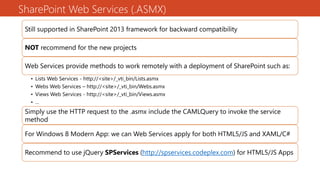
SharePoint Web Services (.ASMX)
Still supported in SharePoint 2013 framework for backward compatibility
NOT recommend for the new projects
Web Services provide methods to work remotely with a deployment of SharePoint such as:
• Lists Web Services - http://<site>/_vti_bin/Lists.asmx
• Webs Web Services – http://<site>/_vti_bin/Webs.asmx
• Views Web Services - http://<site>/_vti_bin/Views.asmx
• …
• …Simply use the HTTP request to the .asmx include the CAMLQuery to invoke the service
method
For Windows 8 Modern App: we can Web Services apply for both HTML5/JS and XAML/C#
Recommend to use jQuery SPServices (http://spservices.codeplex.com) for HTML5/JS Apps
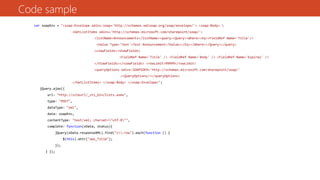
Code sample
var soapEnv = "<soap:Envelope xmlns:soap='http://schemas.xmlsoap.org/soap/envelope/'> <soap:Body> 
<GetListItems xmlns='http://schemas.microsoft.com/sharepoint/soap/'>
<listName>Announcements</listName><query><Query><Where><Eq><FieldRef Name='Title'/>
<Value Type='Text'>Test Announcement</Value></Eq></Where></Query></query>
<viewFields><ViewFields>
<FieldRef Name='Title' /> <FieldRef Name='Body' /> <FieldRef Name='Expires' />
</ViewFields></viewFields> <rowLimit>99999</rowLimit>
<queryOptions xmlns:SOAPSDK9='http://schemas.microsoft.com/sharepoint/soap/'
><QueryOptions/></queryOptions>
</GetListItems> </soap:Body> </soap:Envelope>";
jQuery.ajax({
url: "http://siteurl/_vti_bin/lists.asmx",
type: "POST",
dataType: "xml",
data: soapEnv,
contentType: "text/xml; charset="utf-8"",
complete: function(xData, status){
jQuery(xData.responseXML).find("z:row").each(function () {
$(this).attr("ows_Title");
});
} });
jQuery SPServices
jQuery Library for SharePoint Web Services
Support SharePoint 2007/2010 and 2013 as well
Syntax:
$().SPServices({
operation: "operationname",
[webURL: "/sitepath",]
[option1: value1,]
[option2: value2,]
[async: false,]
completefunc: function (xData, Status) {
...do stuff...
}
});
jQuery SPServices sample
$().SPServices({
webURL: "http://siteurl/"
operation: "GetListItems",
async: false,
listName: "Announcements",
CAMLViewFields: "<ViewFields><FieldRef Name='Title' /></ViewFields>",
completefunc: function (xData, Status) {
$(xData.responseXML).SPFilterNode("z:row").each(function() {
var liHtml = "<li>" + $(this).attr("ows_Title") + "</li>";
$("#tasksUL").append(liHtml);
});
}
});
SPServices({
operation: "UpdateListItems",
listName: testList,
ID: ID,
valuepairs: [["Title", “abc”]],
completefunc: function (xData, Status) {
…
}
});
DEMO
Web Services (.ASMX)
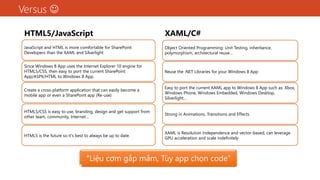
Versus 
HTML5/JavaScript
JavaScript and HTML is more comfortable for SharePoint
Developers than the XAML and Silverlight
Since Windows 8 App uses the Internet Explorer 10 engine for
HTML5/CSS, then easy to port the current SharePoint
App/ASPX/HTML to Windows 8 App.
Create a cross-platform application that can easily become a
mobile app or even a SharePoint app (Re-use)
HTML5/CSS is easy to use, branding, design and get support from
other team, community, Internet…
HTML5 is the future so it's best to always be up to date.
XAML/C#
Object Oriented Programming: Unit Testing, inheritance,
polymorphism, architectural reuse…
Reuse the .NET Libraries for your Windows 8 App
Easy to port the current XAML app to Windows 8 App such as: Xbox,
Windows Phone, Windows Embedded, Windows Desktop,
Silverlight…
Strong in Animations, Transitions and Effects
XAML is Resolution Independence and vector-based, can leverage
GPU acceleration and scale indefinitely
“Liệu cơm gắp mắm, Tùy app chọn code”
Reference
 http://msdn.microsoft.com/en-us/windows/apps/br229512.aspx
 http://msdn.microsoft.com/en-us/library/jj164022(v=office.15).aspx
 http://msdn.microsoft.com/en-us/library/jj164060(v=office.15).aspx
 http://blogs.microsoft.co.il/blogs/choroshin/archive/2012/09/15/how-to-create-a-windows-8-app-for-
sharepoint-part-1-the-planning-stage.aspx
 http://blogs.microsoft.co.il/blogs/choroshin/archive/2012/09/30/how-to-create-a-windows-8-app-for-
sharepoint-part-2-the-development-stage.aspx
 http://spservices.codeplex.com/
Q&A
Thank you!
See you at next SharePoint Saturday Vietnam event!

Building windows8 modern app for sp2013

  • 1.
    Building Windows 8Modern Style apps for SharePoint 2013 SharePoint Saturday Vietnam 5th Binh Nguyen
  • 2.
    About me My nameis Nguyen Thanh Binh Work at Bamboo Solutions (http://bamboosolutions.com) Hobbies: Football; Coffee; SharePoint  Reach me at: • Email: binhtnguyen@live.com • Facebook: http://facebook.com/binhthanhng • LinkedIn: http://linkedin.com/in/binhthanhng • Twitter: @binhtnguyen
  • 3.
    Agenda Windows 8 Modern(Metro) Style App • Introduction Windows 8 • Platform • DEMO SharePoint 2013 and Windows 8 App • APIs • REST • Web Services • DEMO Q&A
  • 4.
  • 5.
    Cloud- connected Built on a solid foundation Getmore at the Windows Store At home and at work All the apps you want Reimagined browsing with IE10 Windows reimagined Great experience across all hardware Windows 8
  • 6.
    Windows reimagined A newMetro style UI where touch is a first-class citizen along with full mouse-and-keyboard support New development models built on WinRT, including native support for HTML/CSS/JS, C#/XAML, C++/DirectX Designed from the chipset up for multiple form- factors – tablets, laptops, desktops & all-in-ones The Windows Store on every device with a full commerce platform and flexibility
  • 7.
  • 8.
    Built on asolid foundation
  • 9.
  • 10.
  • 11.
  • 12.
  • 13.
  • 14.
    API set inSharePoint 2013 Server Object Model Client Object Models for managed code • .NET client object model • Silverlight client object model • JavaScript object model Direct Remote Procedure Calls (RPC) calls to the owssvr.dll REST/OData endpoints Web Services (.ASMX)
  • 15.
    How to determinewhich API and language set to use Type of Application Device which code runs Your existing skills
  • 16.
    SharePoint API andLanguage for Windows 8 App Dev. Type of Application Device which code runs Your existing skills Language HTML5/CSS and JavaScript XAML and C#/VB DirectX and C++/C SharePoint APIs Server Object Model Client Object Model Direct Remote Procedure Calls (RPC) REST/OData endpoints Web Services (.ASMX)
  • 17.
  • 18.
    Representational State Transfer(REST) interface in SharePoint 2013 PERFORM basic create, read, update, and delete (CRUD) operations in SharePoint 2013 REST exposes all SharePoint 2013 entities and operations NO NEED to add references to any SharePoint assemblies/libraries MAKE a request method to http://siteurl/_api/web/lists ACCEPT the OData representation of the lists in XML or JSON from the response
  • 19.
    Access SharePoint 2013via REST • Use Windows 8 Modern App WinJS Library (Microsoft Window Library for JavaScript SDK) (Recommend) • Use Cross-platform JavaScript libraries like jQuery, KnockoutJS, ExtJS… HTML5/JavaScript • Use HttpWebRequest or System.Net.HttpClient with asynchronous calling • Process the data with Linq-to-XML XAML/C# - .NET
  • 20.
    Reading data • JavaScriptwith jQuery jQuery.ajax({ url: "http://siteurl/_api/web/lists", type: "GET", headers: { "ACCEPT": "application/json;odata=verbose“ }, success: doSuccess, error: doError }); • JavaScript with WinJS WinJS.xhr({ type: "GET", url: "http://siteurl/_api/web/lists", headers: { "content-type": "application/json; charset=utf-8" }, }).done(doSuccess, doError); • C# - VB.NET HttpWebRequest endpointRequest = (HttpWebRequest)HttpWebRequest.Create(sharepointUrl.ToString() + "/_api/web/lists"); endpointRequest.Method = "GET"; endpointRequest.Accept = "application/json;odata=verbose"; HttpWebResponse endpointResponse = (HttpWebResponse)endpointRequest.GetResponse();
  • 21.
    Writing data • JavaScriptwith jQuery/WinJS jQuery.ajax({ url: “http://siteurl/_api/web/lists”, type: "POST", data: JSON.stringify({ '__metadata': { 'type': 'SP.List' }, 'AllowContentTypes': true, 'BaseTemplate': 100, 'ContentTypesEnabled': true, 'Description': 'My list description', 'Title': 'Test' } ), headers: { "accept": "application/json;odata=verbose", "content-type":"application/json;odata=verbose", "content-length":length of post body "X-RequestDigest": $("#__REQUESTDIGEST").val() }, success: doSuccess, error: doError }); jQuery.ajax({ url: “http://siteurl/_api/web/lists/GetByTitle(‘Test')”, type: "POST", data: JSON.stringify({ '__metadata': { 'type': 'SP.List' }, 'Title': 'New title' } ), headers: { “X-HTTP-Method”:”MERGE”, "accept": "application/json;odata=verbose", "content-type": "application/json;odata=verbose", "content-length":length of post body "X-RequestDigest": $("#__REQUESTDIGEST").val(), “IF-MATCH”: “*” }, success: doSuccess, error: doError });
  • 22.
  • 23.
  • 24.
    SharePoint Web Services(.ASMX) Still supported in SharePoint 2013 framework for backward compatibility NOT recommend for the new projects Web Services provide methods to work remotely with a deployment of SharePoint such as: • Lists Web Services - http://<site>/_vti_bin/Lists.asmx • Webs Web Services – http://<site>/_vti_bin/Webs.asmx • Views Web Services - http://<site>/_vti_bin/Views.asmx • … • …Simply use the HTTP request to the .asmx include the CAMLQuery to invoke the service method For Windows 8 Modern App: we can Web Services apply for both HTML5/JS and XAML/C# Recommend to use jQuery SPServices (http://spservices.codeplex.com) for HTML5/JS Apps
  • 25.
    Code sample var soapEnv= "<soap:Envelope xmlns:soap='http://schemas.xmlsoap.org/soap/envelope/'> <soap:Body> <GetListItems xmlns='http://schemas.microsoft.com/sharepoint/soap/'> <listName>Announcements</listName><query><Query><Where><Eq><FieldRef Name='Title'/> <Value Type='Text'>Test Announcement</Value></Eq></Where></Query></query> <viewFields><ViewFields> <FieldRef Name='Title' /> <FieldRef Name='Body' /> <FieldRef Name='Expires' /> </ViewFields></viewFields> <rowLimit>99999</rowLimit> <queryOptions xmlns:SOAPSDK9='http://schemas.microsoft.com/sharepoint/soap/' ><QueryOptions/></queryOptions> </GetListItems> </soap:Body> </soap:Envelope>"; jQuery.ajax({ url: "http://siteurl/_vti_bin/lists.asmx", type: "POST", dataType: "xml", data: soapEnv, contentType: "text/xml; charset="utf-8"", complete: function(xData, status){ jQuery(xData.responseXML).find("z:row").each(function () { $(this).attr("ows_Title"); }); } });
  • 26.
    jQuery SPServices jQuery Libraryfor SharePoint Web Services Support SharePoint 2007/2010 and 2013 as well Syntax: $().SPServices({ operation: "operationname", [webURL: "/sitepath",] [option1: value1,] [option2: value2,] [async: false,] completefunc: function (xData, Status) { ...do stuff... } });
  • 27.
    jQuery SPServices sample $().SPServices({ webURL:"http://siteurl/" operation: "GetListItems", async: false, listName: "Announcements", CAMLViewFields: "<ViewFields><FieldRef Name='Title' /></ViewFields>", completefunc: function (xData, Status) { $(xData.responseXML).SPFilterNode("z:row").each(function() { var liHtml = "<li>" + $(this).attr("ows_Title") + "</li>"; $("#tasksUL").append(liHtml); }); } }); SPServices({ operation: "UpdateListItems", listName: testList, ID: ID, valuepairs: [["Title", “abc”]], completefunc: function (xData, Status) { … } });
  • 28.
  • 29.
    Versus  HTML5/JavaScript JavaScript andHTML is more comfortable for SharePoint Developers than the XAML and Silverlight Since Windows 8 App uses the Internet Explorer 10 engine for HTML5/CSS, then easy to port the current SharePoint App/ASPX/HTML to Windows 8 App. Create a cross-platform application that can easily become a mobile app or even a SharePoint app (Re-use) HTML5/CSS is easy to use, branding, design and get support from other team, community, Internet… HTML5 is the future so it's best to always be up to date. XAML/C# Object Oriented Programming: Unit Testing, inheritance, polymorphism, architectural reuse… Reuse the .NET Libraries for your Windows 8 App Easy to port the current XAML app to Windows 8 App such as: Xbox, Windows Phone, Windows Embedded, Windows Desktop, Silverlight… Strong in Animations, Transitions and Effects XAML is Resolution Independence and vector-based, can leverage GPU acceleration and scale indefinitely “Liệu cơm gắp mắm, Tùy app chọn code”
  • 30.
    Reference  http://msdn.microsoft.com/en-us/windows/apps/br229512.aspx  http://msdn.microsoft.com/en-us/library/jj164022(v=office.15).aspx http://msdn.microsoft.com/en-us/library/jj164060(v=office.15).aspx  http://blogs.microsoft.co.il/blogs/choroshin/archive/2012/09/15/how-to-create-a-windows-8-app-for- sharepoint-part-1-the-planning-stage.aspx  http://blogs.microsoft.co.il/blogs/choroshin/archive/2012/09/30/how-to-create-a-windows-8-app-for- sharepoint-part-2-the-development-stage.aspx  http://spservices.codeplex.com/
  • 31.
  • 32.
    Thank you! See youat next SharePoint Saturday Vietnam event!