Packetmaster EX2 - A desktop NPB
Learn about all the useful applications
June 2018
www.cubro.com
Packetmaster EX2
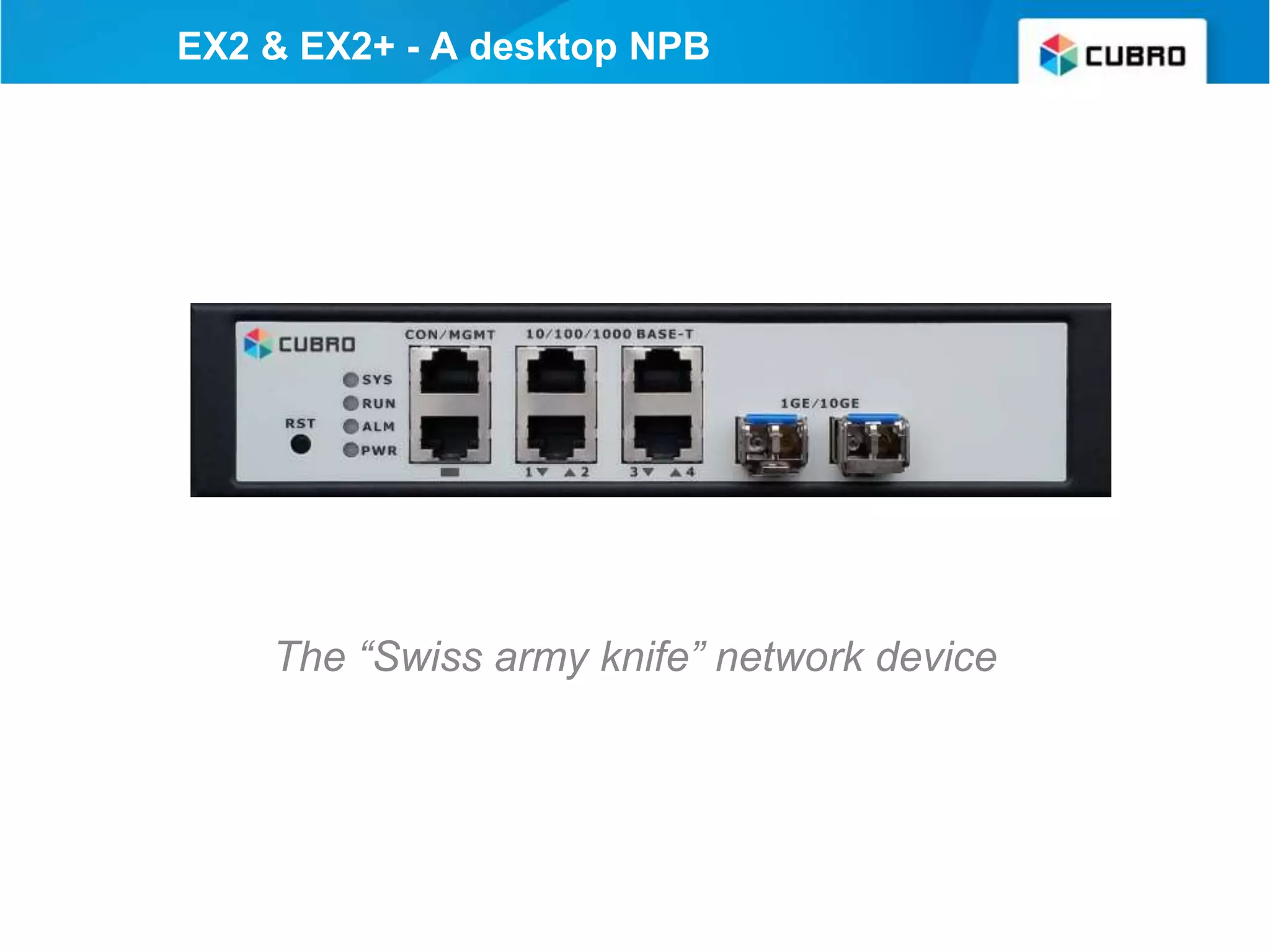
The “Swiss army knife” network device
EX2 & EX2+ - A desktop NPB
Cubro Packetmaster EX2
The Cubro Packetmaster EX2 series devices are Network
Packet Brokers (switch-like devices) based on a newly
designed ASIC and purpose-built for network traffic filtering
and aggregation applications.
● Very portable
● Same feature set as full 1RU units.
● Graphical User Interface (GUI)
● Can be customized to customer’s requirement
• An aggregation TAP
• A media converter
• An aggregation filter TAP
• An aggregation filter converter TAP
• An sflow generator
• GRE endpoint (virtual TAP endpoint)
• A desktop/tactical network packet broker
• A loopback device for measurement purpose
EX2 - A multifunctional device
Cubro Packetmaster supports all SFP brands
and SFP types including 10 Gbit copper
Front view
Packetmaster EX2
Optical TAP included
Optionally, the EX2 can be equipped with an internal optical TAP
(one SM link and one MM link) - this is the EX2+ model
Rear view
Packetmaster EX2
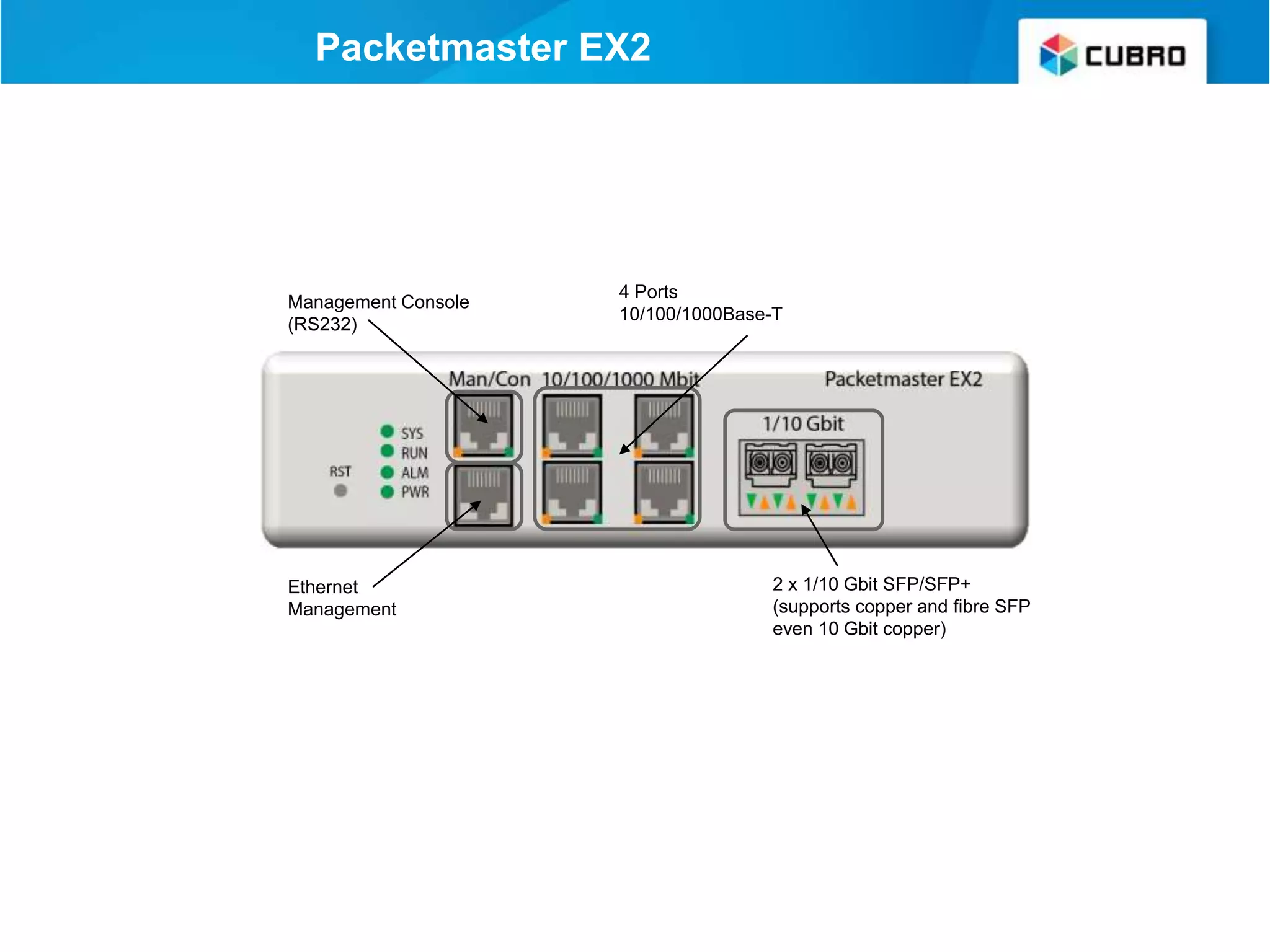
Ethernet
Management
Management Console
(RS232)
4 Ports
10/100/1000Base-T
2 x 1/10 Gbit SFP/SFP+
(supports copper and fibre SFP
even 10 Gbit copper)
Easy to use Web UI
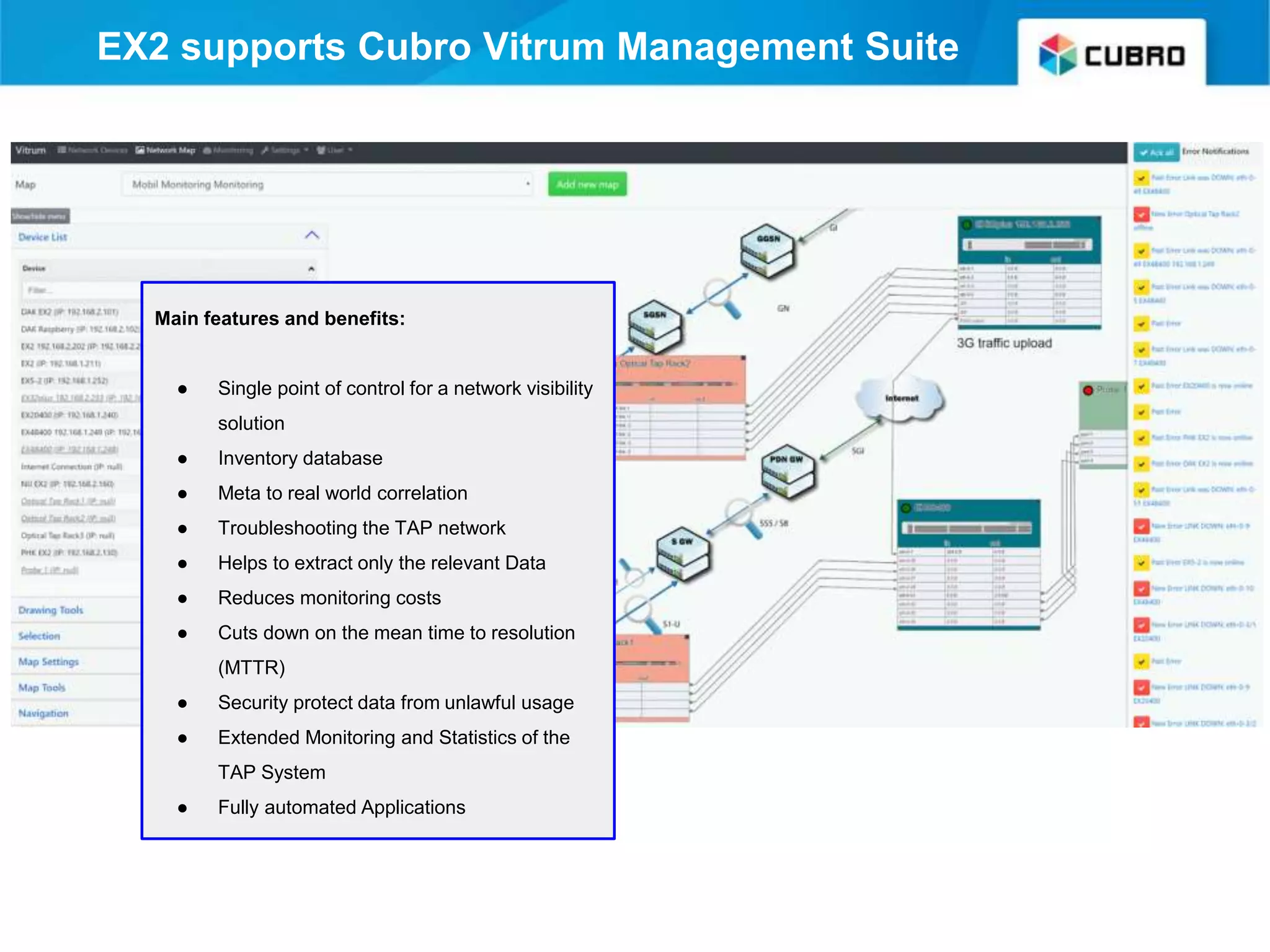
Main features and benefits:
● Single point of control for a network visibility
solution
● Inventory database
● Meta to real world correlation
● Troubleshooting the TAP network
● Helps to extract only the relevant Data
● Reduces monitoring costs
● Cuts down on the mean time to resolution
(MTTR)
● Security protect data from unlawful usage
● Extended Monitoring and Statistics of the
TAP System
● Fully automated Applications
EX2 supports Cubro Vitrum Management Suite
EX2 as an Aggregator
• 10 Gbit support
• Fibre TAP included on EX2+
• More ports than a regular Aggregation TAP
• Copper TAP fail safe
• Same price as any Aggregation TAP available on
the market
Aggregation matrix
Aggregation
1 copper link
input 1 Gbit
2 copper link
input 1 Gbit
1 fibre link
input 1 Gbit
1 fibre link
input 10 Gbit
1 copper output
2 copper output
3 copper output
4 copper output
1 fibre output Gbit
2 fibre output Gbit
1 fibre output 10 Gbit
2 fibre output 10 Gbit
An Aggregation TAP
EX2 + fail safe copper TAP 10/100 also available in 10/100/1000 mounted in 19” frame
live link
monitoring output
EX2 - A filter TAP & Aggregator
• Filter on all fields marked with red dot
• Filter and Aggregate at the same time
• 2000 filter rules can be handled in
parallel
• A packet load of 48 Gbit can be
achieved due to the non-blocking design
EX2 - A media / bandwidth converter
The EX2 is an intelligent media & bandwidth converter
• Can convert 10 Mbit copper to 10 Gbit fibre and all bandwidth
combinations in any direction
• Can also be used inline to limit the bandwidth
• Can also be an inline traffic converter (change almost any field in
layer 4)
Media converter matrix
aggregation
1 copper link
input 1 Gbit
2 copper link
input 1 Gbit
1 fiber link
input 1 Gbit
1 fiber link
input 10 Gbit
1 copper output
2 copper output
3 copper output
4 copper output
1 fiber output Gbit
2 fiber output Gbit
1 fiber output 10 Gbit
2 fiber output 10 Gbit
The EX2 can convert from copper to fiber and fiber to copper
The EX2 can also convert bandwidth from 10 Mbit up to 10 Gbit and vice versa
EX2 - A desktop network packet broker
• Built in optical TAP
• Battery operated as an option
• Wireless control as an option
• A desktop/tactical network packet broker
Application Example
live link
passive TAP
build in on
the back
aggregated output
Aggregation of one 10 Gbit link with optical
splitter to 10 Gbit fibre output
To aggregate two directions of a 10 Gbit link
you normally need three 10 Gbit ports. It is
different and easy with the EX2.
● First you connect the two cables from the
link over the splitter on the backside of
the EX2.
● Then you connect the two monitoring
outputs with the two 10 Gbit receivers on
the EX2.
● The 10 Gbit transmitters are
still available and can be connected to the
probe.
live link
passive tap
aggregated,
filtered output
Application Example
Aggregation of one 10 Gbit link with
optical splitter to 1 Gbit copper output
To aggregate the two directions of a 10 Gbit link
to a 1 Gbit output. This will work only if the total
load is less than 1 Gbit, or if filters are used to
reduce the load on the output.
● First you connect the two cables from the
link over the splitter on the backside of the
EX2.
● Then you must connect the two
monitoring outputs with the two
10 Gbit receivers on the EX2.
● Then connect your capture device on one
copper port.
live link
aggregated,
filtered output
Application Example
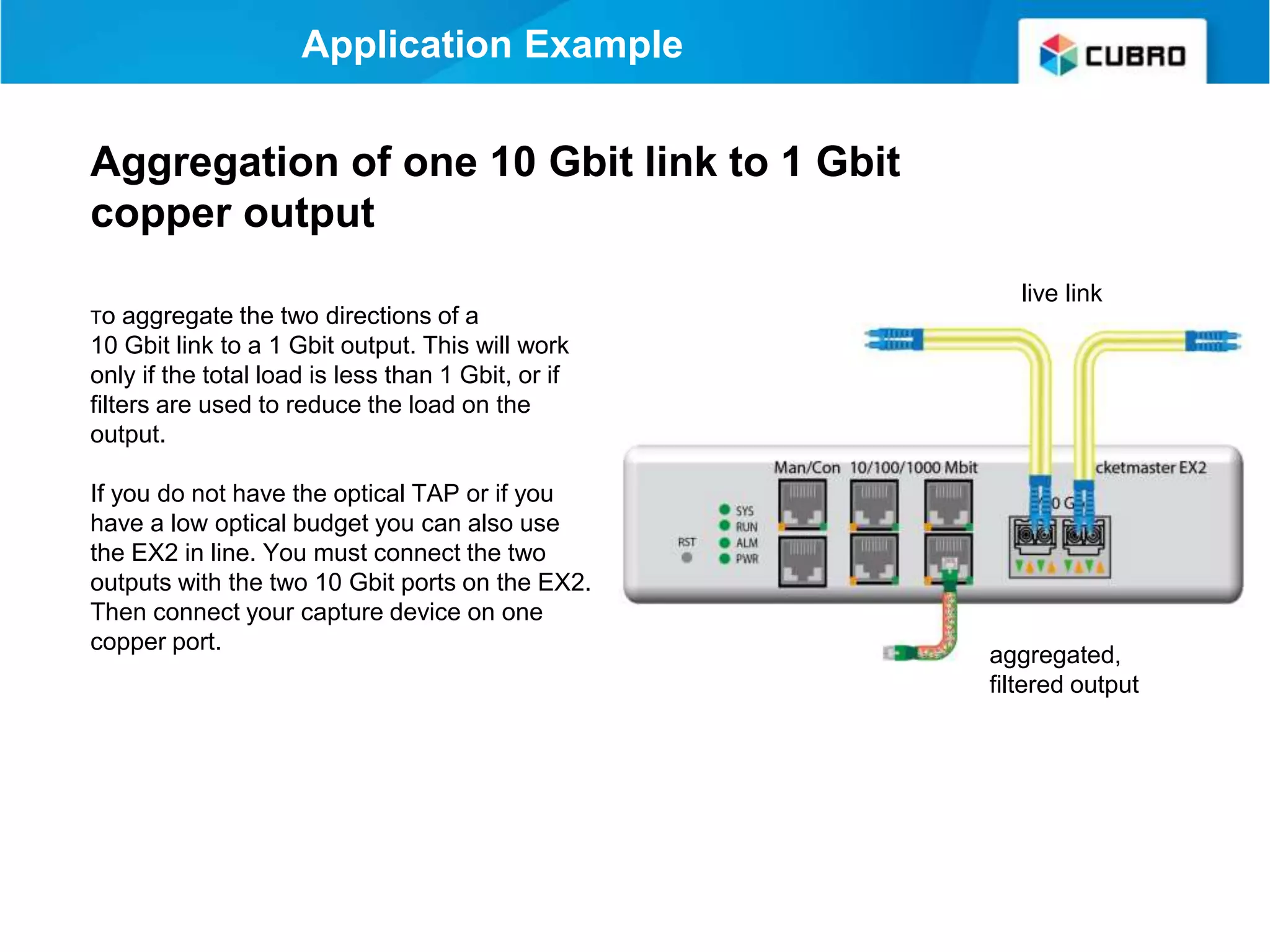
Aggregation of one 10 Gbit link to 1 Gbit
copper output
To aggregate the two directions of a
10 Gbit link to a 1 Gbit output. This will work
only if the total load is less than 1 Gbit, or if
filters are used to reduce the load on the
output.
If you do not have the optical TAP or if you
have a low optical budget you can also use
the EX2 in line. You must connect the two
outputs with the two 10 Gbit ports on the EX2.
Then connect your capture device on one
copper port.
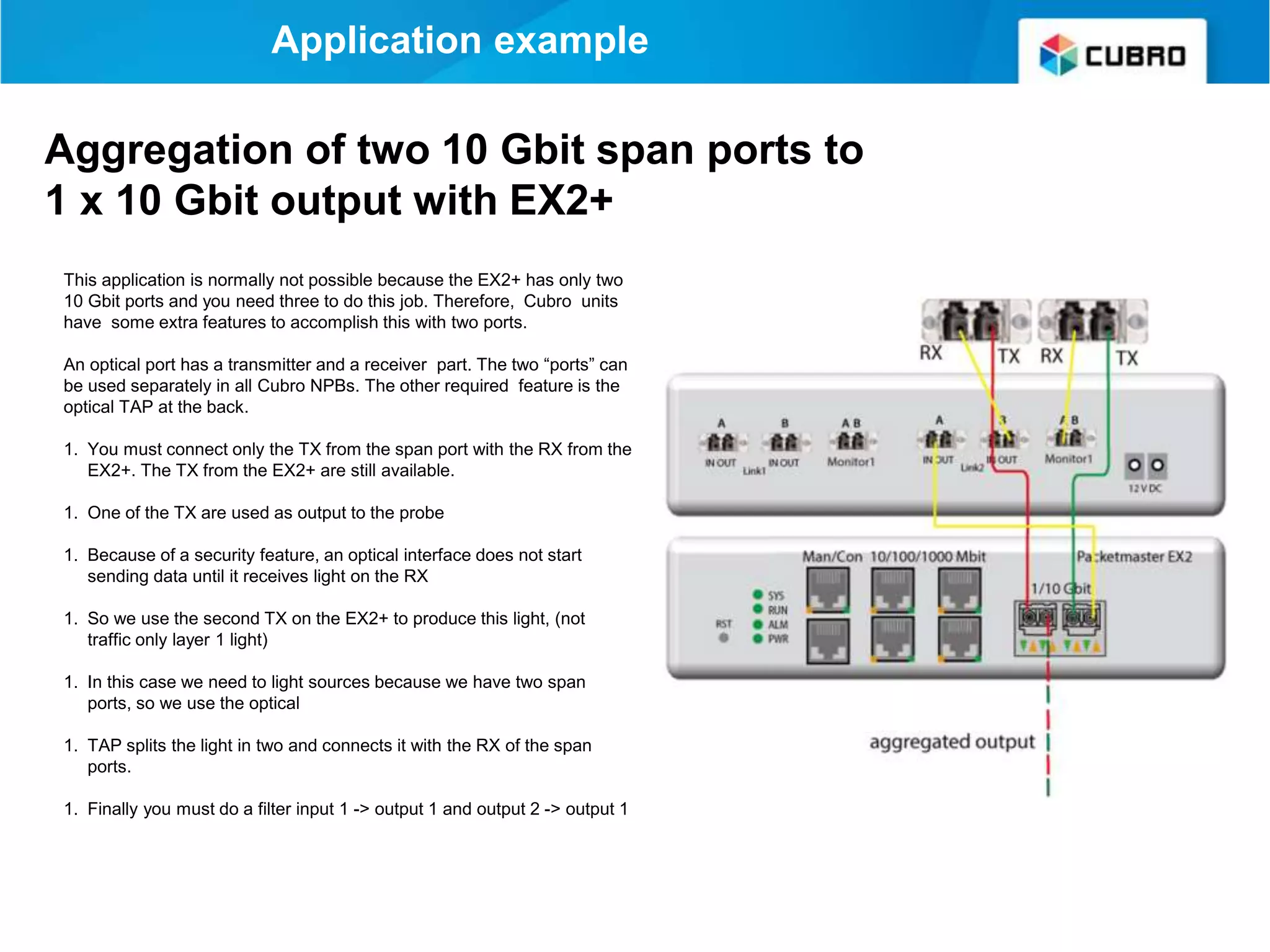
Application example
This application is normally not possible because the EX2+ has only two
10 Gbit ports and you need three to do this job. Therefore, Cubro units
have some extra features to accomplish this with two ports.
An optical port has a transmitter and a receiver part. The two “ports” can
be used separately in all Cubro NPBs. The other required feature is the
optical TAP at the back.
1. You must connect only the TX from the span port with the RX from the
EX2+. The TX from the EX2+ are still available.
1. One of the TX are used as output to the probe
1. Because of a security feature, an optical interface does not start
sending data until it receives light on the RX
1. So we use the second TX on the EX2+ to produce this light, (not
traffic only layer 1 light)
1. In this case we need to light sources because we have two span
ports, so we use the optical
1. TAP splits the light in two and connects it with the RX of the span
ports.
1. Finally you must do a filter input 1 -> output 1 and output 2 -> output 1
Aggregation of two 10 Gbit span ports to
1 x 10 Gbit output with EX2+
In this application the traffic is
forwarded between the optical ports
(passive TAP) and at the same
time the traffic is aggregated and
forwarded (load balanced) to 4 x
Gbit outputs.
This works only if the total traffic on
the 10 Gbit link is less than 4 Gbit ,
or filters are used to reduce the
output traffic.
live link
passive tap
aggregated,load
balanced, filtered output
Application Example
Aggregation of one 10 Gbit link with
optical splitter to 4 parallel 1 Gbit copper
outputs
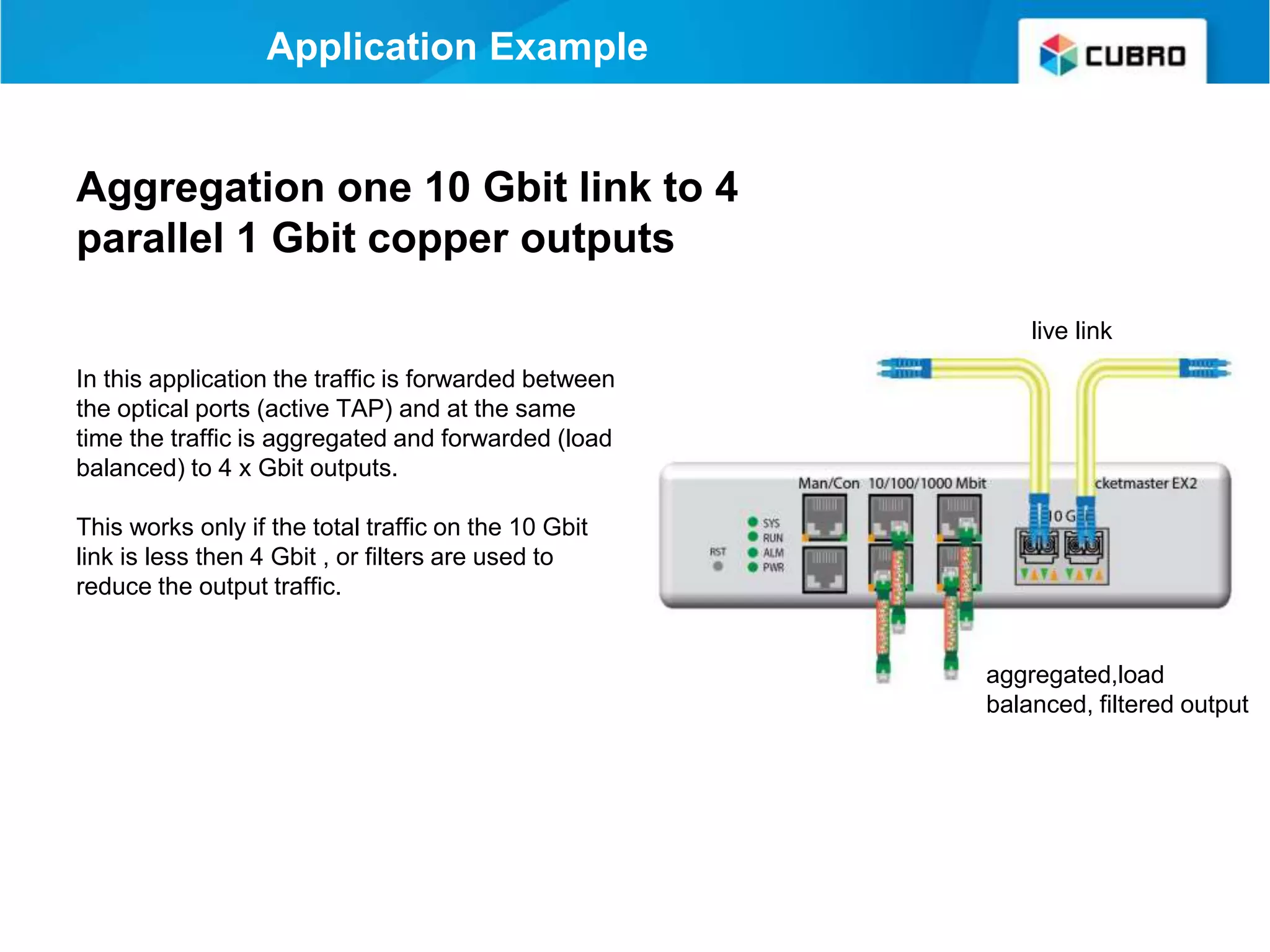
Aggregation one 10 Gbit link to 4
parallel 1 Gbit copper outputs
In this application the traffic is forwarded between
the optical ports (active TAP) and at the same
time the traffic is aggregated and forwarded (load
balanced) to 4 x Gbit outputs.
This works only if the total traffic on the 10 Gbit
link is less then 4 Gbit , or filters are used to
reduce the output traffic.
live link
aggregated,load
balanced, filtered output
Application Example
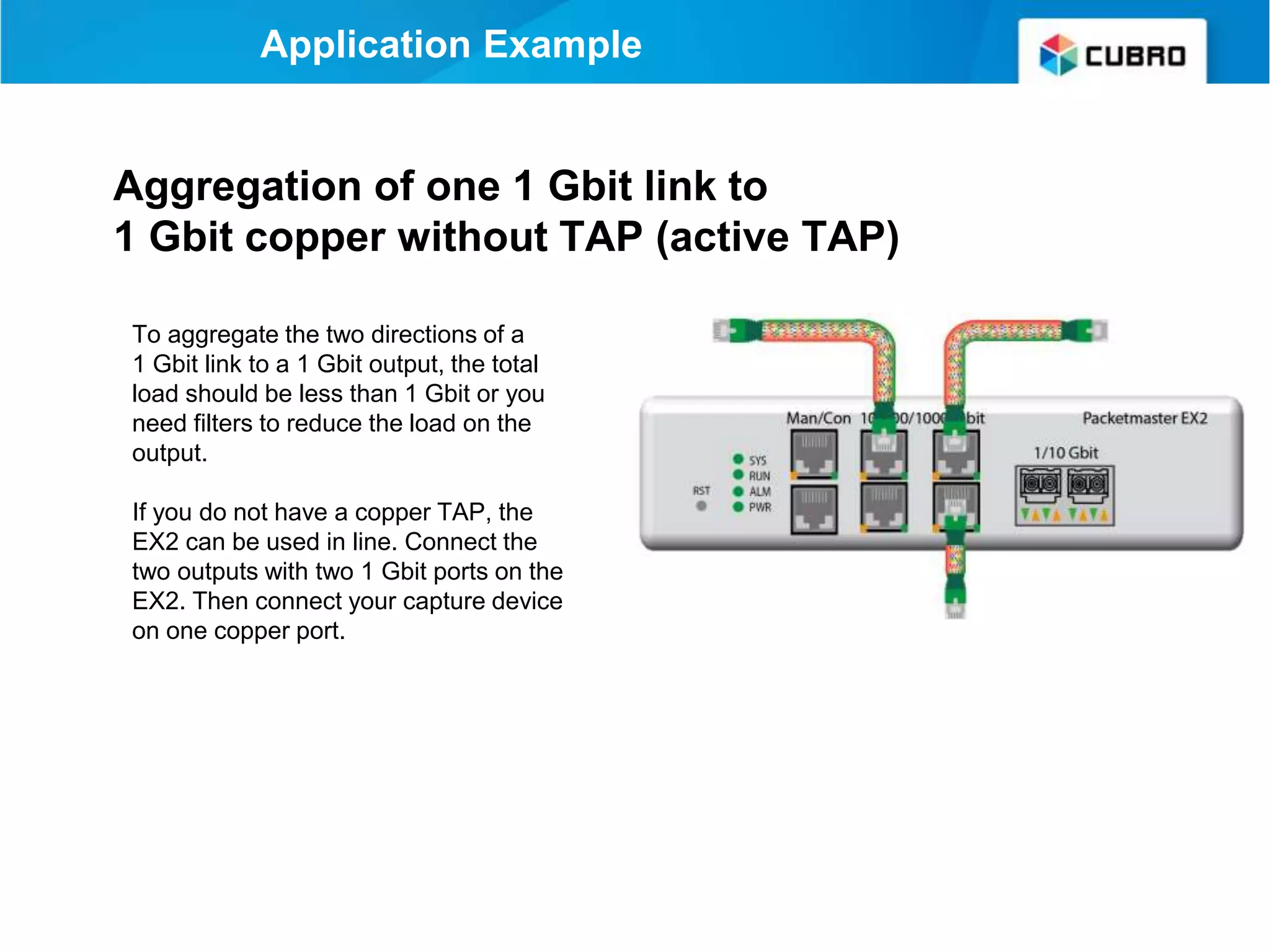
Aggregation of one 1 Gbit link to
1 Gbit copper without TAP (active TAP)
To aggregate the two directions of a
1 Gbit link to a 1 Gbit output, the total
load should be less than 1 Gbit or you
need filters to reduce the load on the
output.
If you do not have a copper TAP, the
EX2 can be used in line. Connect the
two outputs with two 1 Gbit ports on the
EX2. Then connect your capture device
on one copper port.
Application Example
Aggregation of one 2 x 1 Gbit link to 2 Gbit
copper outputs
The two SFP ports of the EX2
can be equipped with copper
SFP as well.
If you do so the EX2 supports 6
copper ports.
In this example we show how you
can tap two copper links inline
and send the traffic to two copper
outputs at the same time.
Link1
Link2
Application Example
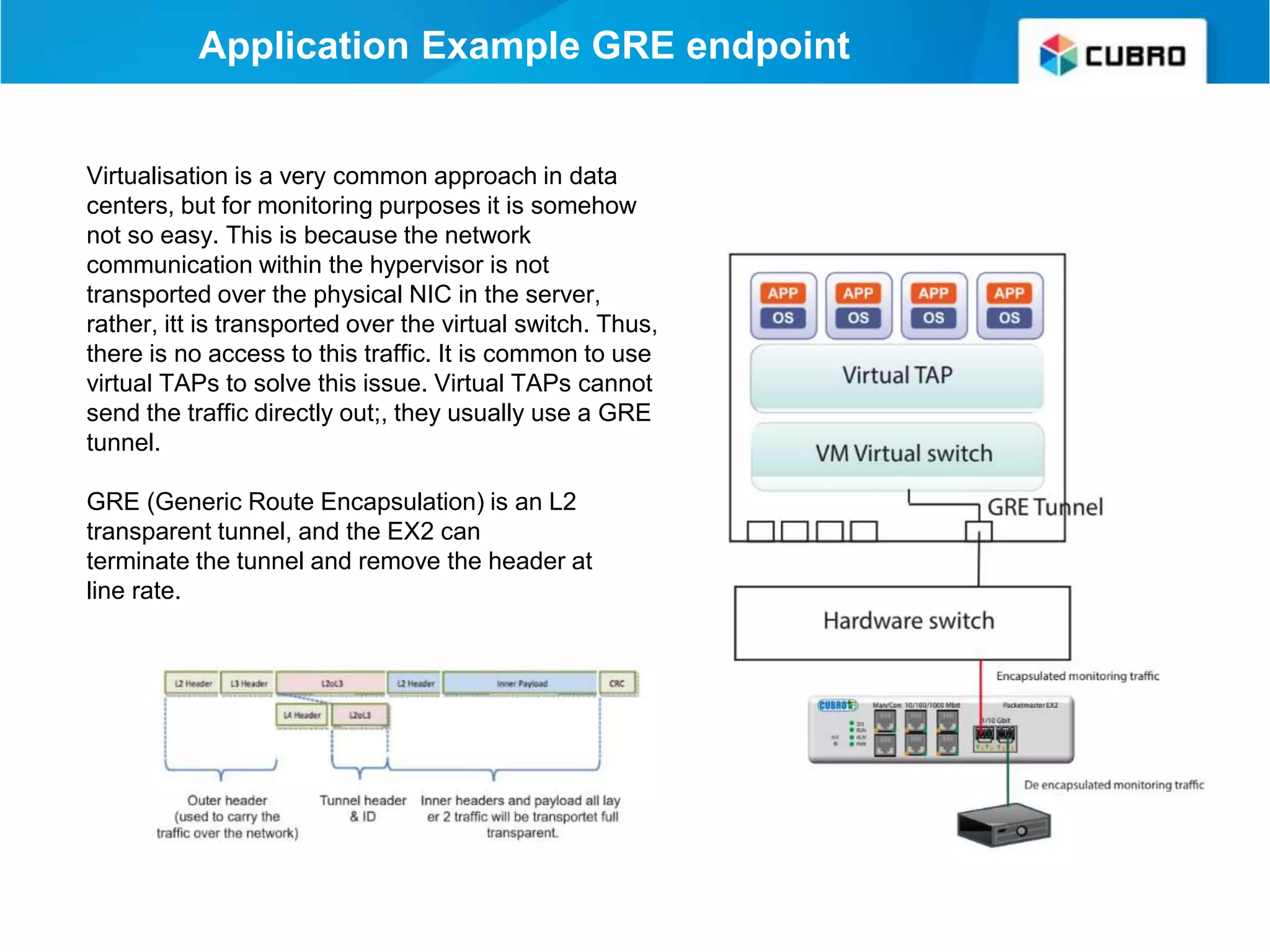
Application Example GRE endpoint
Virtualisation is a very common approach in data
centers, but for monitoring purposes it is somehow
not so easy. This is because the network
communication within the hypervisor is not
transported over the physical NIC in the server,
rather, itt is transported over the virtual switch. Thus,
there is no access to this traffic. It is common to use
virtual TAPs to solve this issue. Virtual TAPs cannot
send the traffic directly out;, they usually use a GRE
tunnel.
GRE (Generic Route Encapsulation) is an L2
transparent tunnel, and the EX2 can
terminate the tunnel and remove the header at
line rate.
10 Gbit <-> 1 Gbit media bandwidth -
converter
The EX2 can also work as a
”simple” media converter.
The device can not only convert
the media layer (optical -
electrical), it can also convert
between the bandwidths 1 Gbit -
10 Gbit in order to connect a
1 Gbit device to a 10 Gbit network
and vice versa.
Application example
Application Example EX2 + Micro Server
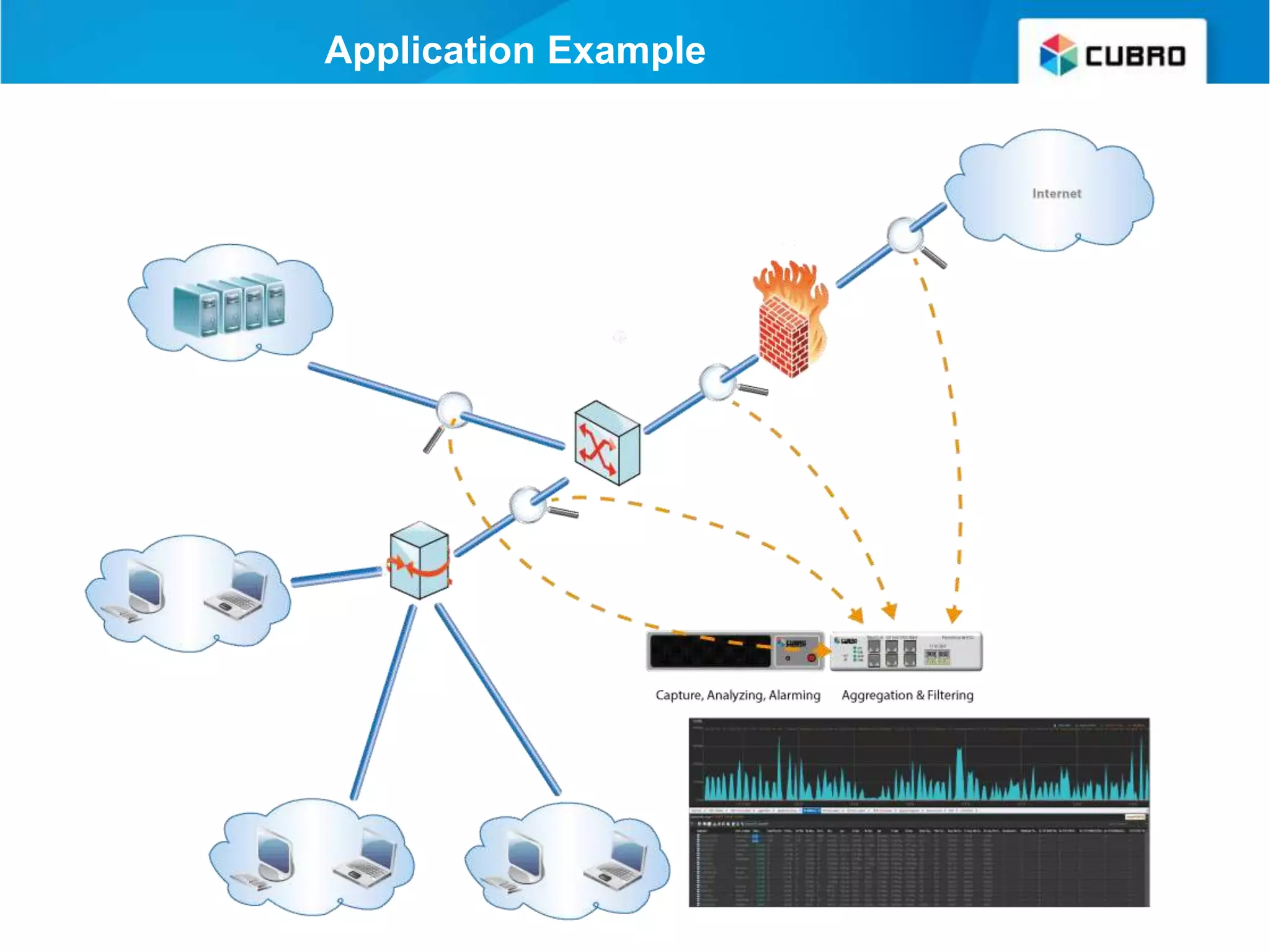
A nice combination of an EX2 and a high performance server on an 19 inch tray
The EX2 does aggregation and filtering and the Server runs any software to analyze the traffic
Application Example
Application Example Micro Server
● Wireshark (capture tool and protocol analyzer)
“https://www.wireshark.org”
● NTOP several tools from capture, DPI and netflow generator
“https://www.ntop.org/”
● Colasoft (comercial Capture and protocol analyzer)
“https://www.colasoft.com/”
● Savvius (comercial Capture and protocol analyzer)
“https://www.savvius.com”
● QXIP (comercial Capture and voice protocol analyzer)
“http://qxip.net”
any many more
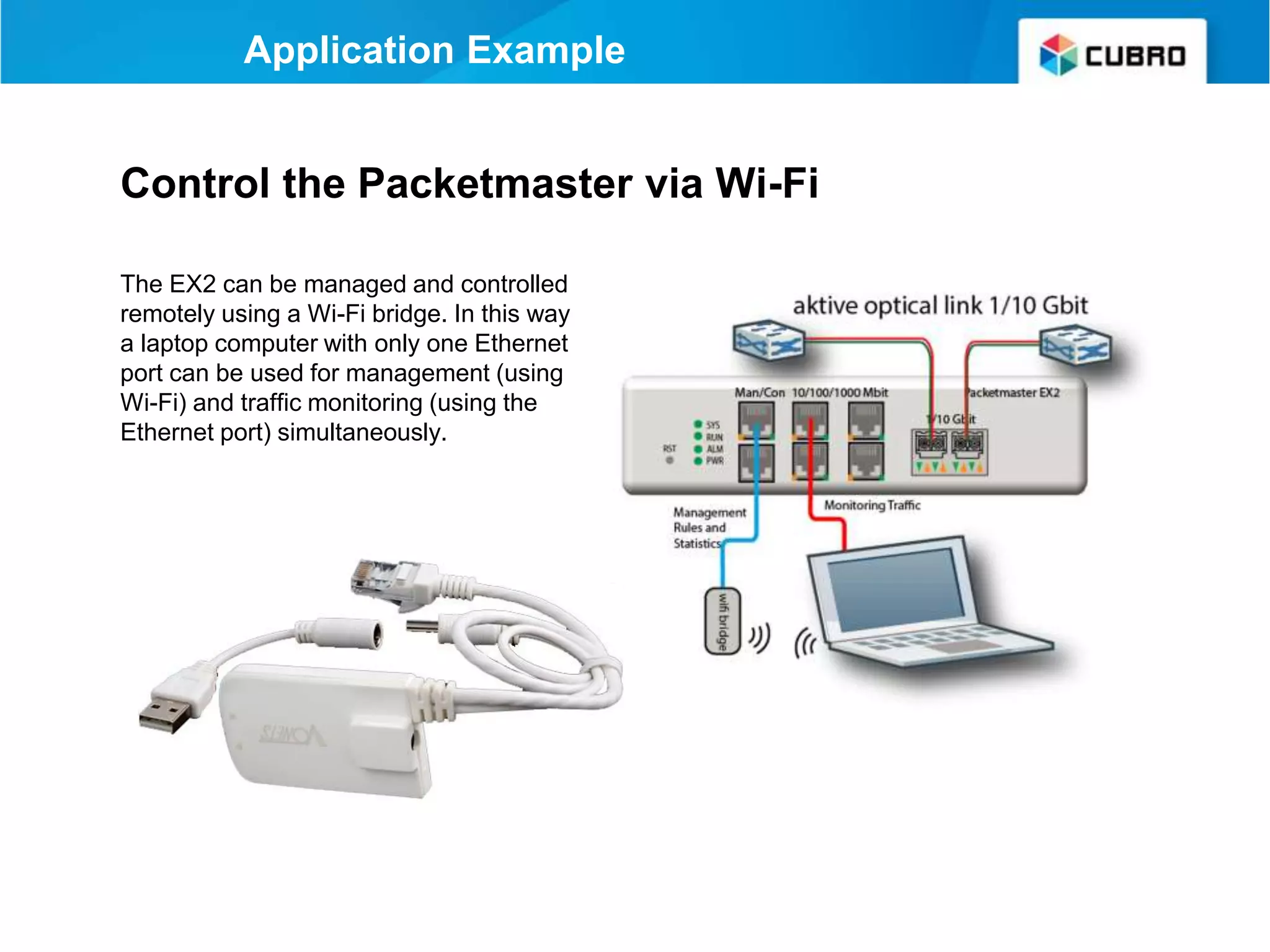
Control the Packetmaster via Wi-Fi
The EX2 can be managed and controlled
remotely using a Wi-Fi bridge. In this way
a laptop computer with only one Ethernet
port can be used for management (using
Wi-Fi) and traffic monitoring (using the
Ethernet port) simultaneously.
Application Example
Insertion of Traffic
The idea is to insert the EX2 in a
live 10 Gbit link, and connect a
standard PC to this link. The
Packetmaster works like a "switch”
but offers full control and the
1 Gbit PC can be part of a 10 Gbit
network.
The IP or the MAC address of the
PC must be known!
Application example
live link
connect PC
and insert
traffic
Thank you
EMEA
Cubro Network Visibility
Ghegastraße 1030 Vienna,
Austria
Tel.: +43 1 29826660
Fax: +43 1 2982666399
Email: support@cubro.com
Cubro US
337 West Chocolate Ave
Hershey, PA 17033
Tel.:717-576-9050
Fax.: 866-735-9232
Email: support@cubro.com
Cubro Asia Pacific
8, Ubi Road 2 #04-12 Zervex
Singapore 408538
Tel.: +65-97255386
Email: jl@cubro.com
North America APAC Japan
Cubro Japan
8-11-10-3F, Nishi-Shinjuku,
Shinjuku,
Tokyo, 160-0023 Japan
Email: japan@cubro.com

Cubro packetmaster ex2 may 2018

  • 1.
    Packetmaster EX2 -A desktop NPB Learn about all the useful applications June 2018 www.cubro.com
  • 2.
    Packetmaster EX2 The “Swissarmy knife” network device EX2 & EX2+ - A desktop NPB
  • 3.
    Cubro Packetmaster EX2 TheCubro Packetmaster EX2 series devices are Network Packet Brokers (switch-like devices) based on a newly designed ASIC and purpose-built for network traffic filtering and aggregation applications. ● Very portable ● Same feature set as full 1RU units. ● Graphical User Interface (GUI) ● Can be customized to customer’s requirement
  • 4.
    • An aggregationTAP • A media converter • An aggregation filter TAP • An aggregation filter converter TAP • An sflow generator • GRE endpoint (virtual TAP endpoint) • A desktop/tactical network packet broker • A loopback device for measurement purpose EX2 - A multifunctional device
  • 5.
    Cubro Packetmaster supportsall SFP brands and SFP types including 10 Gbit copper Front view Packetmaster EX2
  • 6.
    Optical TAP included Optionally,the EX2 can be equipped with an internal optical TAP (one SM link and one MM link) - this is the EX2+ model Rear view
  • 7.
    Packetmaster EX2 Ethernet Management Management Console (RS232) 4Ports 10/100/1000Base-T 2 x 1/10 Gbit SFP/SFP+ (supports copper and fibre SFP even 10 Gbit copper)
  • 8.
  • 9.
    Main features andbenefits: ● Single point of control for a network visibility solution ● Inventory database ● Meta to real world correlation ● Troubleshooting the TAP network ● Helps to extract only the relevant Data ● Reduces monitoring costs ● Cuts down on the mean time to resolution (MTTR) ● Security protect data from unlawful usage ● Extended Monitoring and Statistics of the TAP System ● Fully automated Applications EX2 supports Cubro Vitrum Management Suite
  • 10.
    EX2 as anAggregator • 10 Gbit support • Fibre TAP included on EX2+ • More ports than a regular Aggregation TAP • Copper TAP fail safe • Same price as any Aggregation TAP available on the market
  • 11.
    Aggregation matrix Aggregation 1 copperlink input 1 Gbit 2 copper link input 1 Gbit 1 fibre link input 1 Gbit 1 fibre link input 10 Gbit 1 copper output 2 copper output 3 copper output 4 copper output 1 fibre output Gbit 2 fibre output Gbit 1 fibre output 10 Gbit 2 fibre output 10 Gbit
  • 12.
    An Aggregation TAP EX2+ fail safe copper TAP 10/100 also available in 10/100/1000 mounted in 19” frame live link monitoring output
  • 13.
    EX2 - Afilter TAP & Aggregator • Filter on all fields marked with red dot • Filter and Aggregate at the same time • 2000 filter rules can be handled in parallel • A packet load of 48 Gbit can be achieved due to the non-blocking design
  • 14.
    EX2 - Amedia / bandwidth converter The EX2 is an intelligent media & bandwidth converter • Can convert 10 Mbit copper to 10 Gbit fibre and all bandwidth combinations in any direction • Can also be used inline to limit the bandwidth • Can also be an inline traffic converter (change almost any field in layer 4)
  • 15.
    Media converter matrix aggregation 1copper link input 1 Gbit 2 copper link input 1 Gbit 1 fiber link input 1 Gbit 1 fiber link input 10 Gbit 1 copper output 2 copper output 3 copper output 4 copper output 1 fiber output Gbit 2 fiber output Gbit 1 fiber output 10 Gbit 2 fiber output 10 Gbit The EX2 can convert from copper to fiber and fiber to copper The EX2 can also convert bandwidth from 10 Mbit up to 10 Gbit and vice versa
  • 16.
    EX2 - Adesktop network packet broker • Built in optical TAP • Battery operated as an option • Wireless control as an option • A desktop/tactical network packet broker
  • 17.
    Application Example live link passiveTAP build in on the back aggregated output Aggregation of one 10 Gbit link with optical splitter to 10 Gbit fibre output To aggregate two directions of a 10 Gbit link you normally need three 10 Gbit ports. It is different and easy with the EX2. ● First you connect the two cables from the link over the splitter on the backside of the EX2. ● Then you connect the two monitoring outputs with the two 10 Gbit receivers on the EX2. ● The 10 Gbit transmitters are still available and can be connected to the probe.
  • 18.
    live link passive tap aggregated, filteredoutput Application Example Aggregation of one 10 Gbit link with optical splitter to 1 Gbit copper output To aggregate the two directions of a 10 Gbit link to a 1 Gbit output. This will work only if the total load is less than 1 Gbit, or if filters are used to reduce the load on the output. ● First you connect the two cables from the link over the splitter on the backside of the EX2. ● Then you must connect the two monitoring outputs with the two 10 Gbit receivers on the EX2. ● Then connect your capture device on one copper port.
  • 19.
    live link aggregated, filtered output ApplicationExample Aggregation of one 10 Gbit link to 1 Gbit copper output To aggregate the two directions of a 10 Gbit link to a 1 Gbit output. This will work only if the total load is less than 1 Gbit, or if filters are used to reduce the load on the output. If you do not have the optical TAP or if you have a low optical budget you can also use the EX2 in line. You must connect the two outputs with the two 10 Gbit ports on the EX2. Then connect your capture device on one copper port.
  • 20.
    Application example This applicationis normally not possible because the EX2+ has only two 10 Gbit ports and you need three to do this job. Therefore, Cubro units have some extra features to accomplish this with two ports. An optical port has a transmitter and a receiver part. The two “ports” can be used separately in all Cubro NPBs. The other required feature is the optical TAP at the back. 1. You must connect only the TX from the span port with the RX from the EX2+. The TX from the EX2+ are still available. 1. One of the TX are used as output to the probe 1. Because of a security feature, an optical interface does not start sending data until it receives light on the RX 1. So we use the second TX on the EX2+ to produce this light, (not traffic only layer 1 light) 1. In this case we need to light sources because we have two span ports, so we use the optical 1. TAP splits the light in two and connects it with the RX of the span ports. 1. Finally you must do a filter input 1 -> output 1 and output 2 -> output 1 Aggregation of two 10 Gbit span ports to 1 x 10 Gbit output with EX2+
  • 21.
    In this applicationthe traffic is forwarded between the optical ports (passive TAP) and at the same time the traffic is aggregated and forwarded (load balanced) to 4 x Gbit outputs. This works only if the total traffic on the 10 Gbit link is less than 4 Gbit , or filters are used to reduce the output traffic. live link passive tap aggregated,load balanced, filtered output Application Example Aggregation of one 10 Gbit link with optical splitter to 4 parallel 1 Gbit copper outputs
  • 22.
    Aggregation one 10Gbit link to 4 parallel 1 Gbit copper outputs In this application the traffic is forwarded between the optical ports (active TAP) and at the same time the traffic is aggregated and forwarded (load balanced) to 4 x Gbit outputs. This works only if the total traffic on the 10 Gbit link is less then 4 Gbit , or filters are used to reduce the output traffic. live link aggregated,load balanced, filtered output Application Example
  • 23.
    Aggregation of one1 Gbit link to 1 Gbit copper without TAP (active TAP) To aggregate the two directions of a 1 Gbit link to a 1 Gbit output, the total load should be less than 1 Gbit or you need filters to reduce the load on the output. If you do not have a copper TAP, the EX2 can be used in line. Connect the two outputs with two 1 Gbit ports on the EX2. Then connect your capture device on one copper port. Application Example
  • 24.
    Aggregation of one2 x 1 Gbit link to 2 Gbit copper outputs The two SFP ports of the EX2 can be equipped with copper SFP as well. If you do so the EX2 supports 6 copper ports. In this example we show how you can tap two copper links inline and send the traffic to two copper outputs at the same time. Link1 Link2 Application Example
  • 25.
    Application Example GREendpoint Virtualisation is a very common approach in data centers, but for monitoring purposes it is somehow not so easy. This is because the network communication within the hypervisor is not transported over the physical NIC in the server, rather, itt is transported over the virtual switch. Thus, there is no access to this traffic. It is common to use virtual TAPs to solve this issue. Virtual TAPs cannot send the traffic directly out;, they usually use a GRE tunnel. GRE (Generic Route Encapsulation) is an L2 transparent tunnel, and the EX2 can terminate the tunnel and remove the header at line rate.
  • 26.
    10 Gbit <->1 Gbit media bandwidth - converter The EX2 can also work as a ”simple” media converter. The device can not only convert the media layer (optical - electrical), it can also convert between the bandwidths 1 Gbit - 10 Gbit in order to connect a 1 Gbit device to a 10 Gbit network and vice versa. Application example
  • 27.
    Application Example EX2+ Micro Server A nice combination of an EX2 and a high performance server on an 19 inch tray The EX2 does aggregation and filtering and the Server runs any software to analyze the traffic
  • 28.
  • 29.
    Application Example MicroServer ● Wireshark (capture tool and protocol analyzer) “https://www.wireshark.org” ● NTOP several tools from capture, DPI and netflow generator “https://www.ntop.org/” ● Colasoft (comercial Capture and protocol analyzer) “https://www.colasoft.com/” ● Savvius (comercial Capture and protocol analyzer) “https://www.savvius.com” ● QXIP (comercial Capture and voice protocol analyzer) “http://qxip.net” any many more
  • 30.
    Control the Packetmastervia Wi-Fi The EX2 can be managed and controlled remotely using a Wi-Fi bridge. In this way a laptop computer with only one Ethernet port can be used for management (using Wi-Fi) and traffic monitoring (using the Ethernet port) simultaneously. Application Example
  • 31.
    Insertion of Traffic Theidea is to insert the EX2 in a live 10 Gbit link, and connect a standard PC to this link. The Packetmaster works like a "switch” but offers full control and the 1 Gbit PC can be part of a 10 Gbit network. The IP or the MAC address of the PC must be known! Application example live link connect PC and insert traffic
  • 32.
    Thank you EMEA Cubro NetworkVisibility Ghegastraße 1030 Vienna, Austria Tel.: +43 1 29826660 Fax: +43 1 2982666399 Email: support@cubro.com Cubro US 337 West Chocolate Ave Hershey, PA 17033 Tel.:717-576-9050 Fax.: 866-735-9232 Email: support@cubro.com Cubro Asia Pacific 8, Ubi Road 2 #04-12 Zervex Singapore 408538 Tel.: +65-97255386 Email: jl@cubro.com North America APAC Japan Cubro Japan 8-11-10-3F, Nishi-Shinjuku, Shinjuku, Tokyo, 160-0023 Japan Email: japan@cubro.com