A new perspective on NETWORK VISIBILITY
- 10th RiSK Conference, Laško, Slovenia -
Siniša Popović
Regional Sales Manager
11-12th March 2015
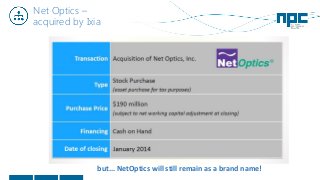
Net Optics –
acquired by Ixia
but... NetOptics will still remain as a brand name!
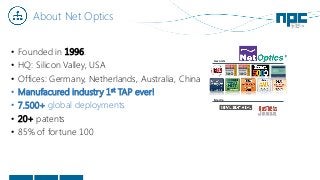
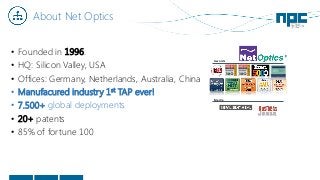
About Net Optics
• Founded in 1996.
• HQ: Silicon Valley, USA
• Offices: Germany, Netherlands, Australia, China
• Manufacured industry 1st TAP ever!
• 7.500+ global deployments
• 20+ patents
• 85% of fortune 100
Awards
Media
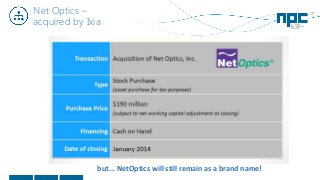
Net Optics –
acquired by Ixia
but... NetOptics will still remain as a brand name!
About Net Optics
• Founded in 1996.
• HQ: Silicon Valley, USA
• Offices: Germany, Netherlands, Australia, China
• Manufacured industry 1st TAP ever!
• 7.500+ global deployments
• 20+ patents
• 85% of fortune 100
Awards
Media
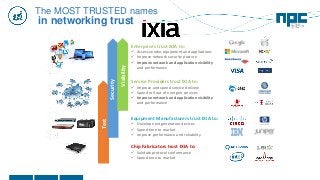
Service Providers trust IXIA to:
 Improve and speed service delivery
 Speed roll out of next gen services
 Improve network and application visibility
and performance
Equipment Manufacturers trust IXIA to:
 Develop next generation devices
 Speed time to market
 Improve performance and reliability
Enterprises trust IXIA to:
 Assess vendor equipment and applications
 Improve network security posture
 Improve network and application visibility
and performance
Chip Fabricators trust IXIA to:
 Validate protocol conformance
 Speed time to market
Test
Security
Visibility
The MOST TRUSTED names
in networking trust
Today’s Challenges
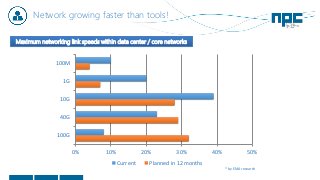
Network growing faster than tools!
0% 10% 20% 30% 40% 50%
100M
1G
10G
40G
100G
Current Planned in 12 months
* by EMA research
Maximum networking link speeds within data center / core networks
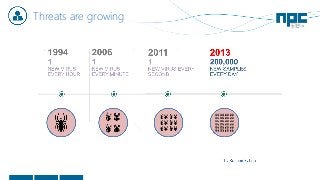
Threats are growing
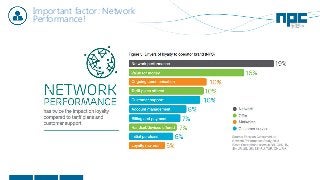
Important factor: Network
Performance!
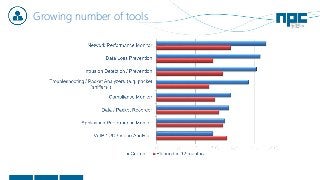
Growing number of tools
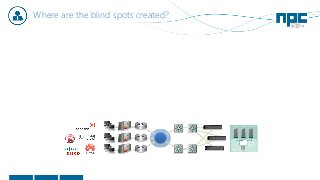
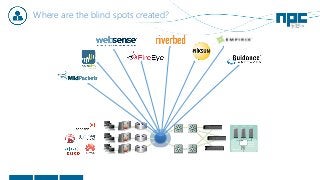
Where are the blind spots created?
ESX Stack
Hypervisor
Phantom
Monitor™
V Switch
vm 1 Vm 2 Vm 3
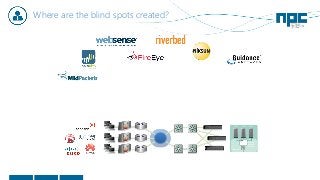
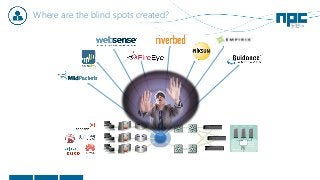
Where are the blind spots created?
ESX Stack
Hypervisor
Phantom
Monitor™
V Switch
vm 1 Vm 2 Vm 3
Where are the blind spots created?
ESX Stack
Hypervisor
Phantom
Monitor™
V Switch
vm 1 Vm 2 Vm 3
Where are the blind spots created?
ESX Stack
Hypervisor
Phantom
Monitor™
V Switch
vm 1 Vm 2 Vm 3
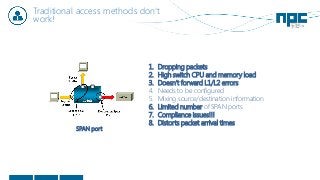
Traditional access methods don‘t
work!
1. Dropping packets
2. High switch CPU and memory load
3. Doesn‘t forward L1/L2 errors
4. Needs to be configured
5. Mixing source/destination information
6. Limited number of SPAN ports
7. Compliance issues!!!
8. Distorts packet arrival times
SPAN port
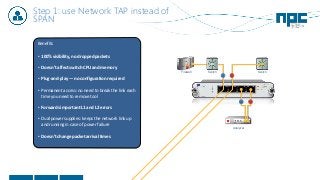
Step 1: use Network TAP instead of
SPAN
Benefits
• 100% visibility, no dropped packets
• Doesn’t affect switch CPU and memory
• Plug-and-play — no configuration required
• Permanent access: no need to break the link each
time you need to remove tool
• Forwards important L1 and L2 errors
• Dual power supplies: keeps the network link up
and running in case of power failure
• Doesn’t change packet arrival times
SwitchFirewall
Analyzer
Switch
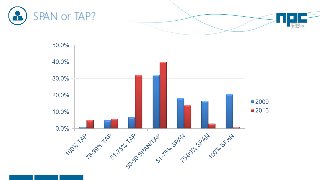
SPAN or TAP?
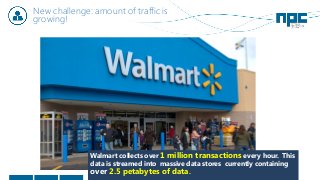
New challenge: amount of traffic is
growing!
Walmart collects over 1 million transactions every hour. This
data is streamed into massive data stores currently containing
over 2.5 petabytes of data.
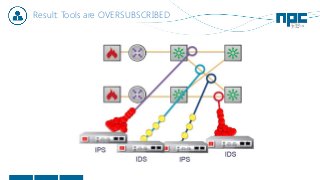
Result: Tools are OVERSUBSCRIBED
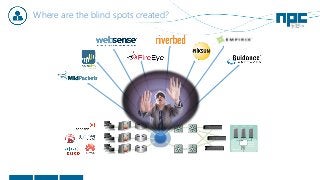
Where are the blind spots created?
ESX Stack
Hypervisor
Phantom
Monitor™
V Switch
vm 1 Vm 2 Vm 3
Where are the blind spots created?
ESX Stack
Hypervisor
Phantom
Monitor™
V Switch
vm 1 Vm 2 Vm 3
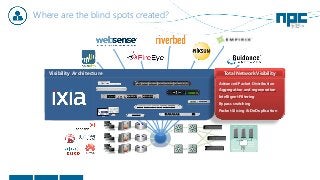
Director
Aggregation
Visibility Architecture
Advanced Packet Distribution
Aggregation and regeneration
Intelligent Filtering
Bypass switching
Packet Slicing & DeDuplication
Total Network Visibility
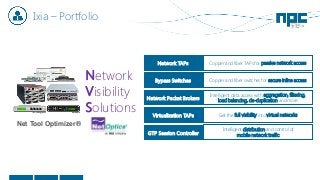
Ixia – Portfolio
Net Tool Optimizer®
Network
Visibility
Solutions
Network TAPs Copper and fiber TAPs for passive network access
Bypass Switches Copper and fiber switches for secure inline access
Network Packet Brokers
Intelligent data access with aggregation, filtering,
load balancing, de-duplication and more
Virtualization TAPs Get the full visibility into virtual networks
GTP Session Controller
Intelligent distribution and control of
mobile network traffic
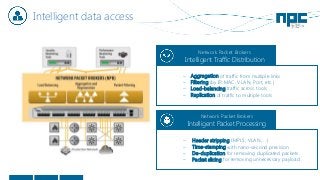
Intelligent data access
Network Packet Brokers
Intelligent Traffic Distribution
− Aggregation of traffic from multiple links
− Filtering (by IP, MAC, VLAN, Port, etc.)
− Load-balancing traffic across tools
− Replication of traffic to multiple tools
Network Packet Brokers
Intelligent Packet Processing
− Header stripping (MPLS, VLAN, ...)
− Time-stamping with nano-second precision
− De-duplication for removing duplicated packets
− Packet slicing for removing unnecessary payload
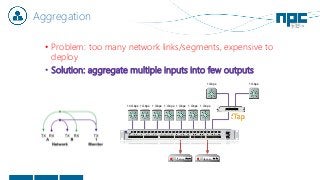
Aggregation
• Problem: too many network links/segments, expensive to
deploy
• Solution: aggregate multiple inputs into few outputs
10 Gbps 1 Gbps 1 Gbps 1 Gbps 1 Gbps 1 Gbps 1 Gbps
1 Gbps1 Gbps
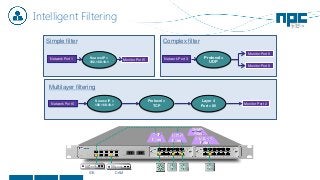
Intelligent Filtering
TCP
Filter
HTTP
Filter
192.0.0.5
Filter
SNMP
Filter
Complex filter
Network Port 1 Monitor Port 5Source IP =
192.168.10.1
Network Port 3
Monitor Port 6
Protocol=
UDP
Monitor Port 8
Network Port 6
Source IP =
192.168.10.1
Protocol =
TCP
Layer 4
Port = 80
Monitor Port 2
Multilayer filtering
Simple filter
IDS DAM
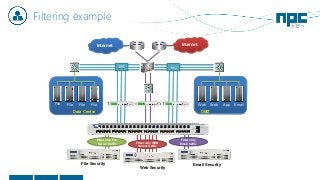
Filtering example
Internet
Web Web App EmailFile File File File
Internet
File Security
Web Security
Email Security
Data Center DMZ
Filter only File
Server traffic Filter only WEB
Server traffic
Filter only
Email traffic
10G 10G
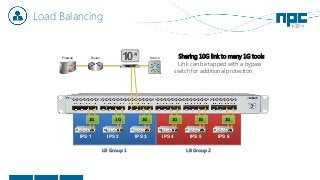
Load Balancing
LB Group 2LB Group 1
Switch
IPS 1
Firewall Router
IPS 2 IPS 3 IPS 4 IPS 5 IPS 6
1G 1G 1G 1G 1G 1G
• Sharing 10G link to many 1G tools
• Link can be tapped with a bypass
switch for additional protection
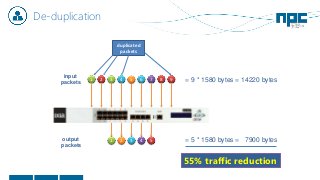
De-duplication
2 3 4 5 6 7 8 9
input
packets
duplicated
packets
1
21 3 4 5output
packets
= 9 * 1580 bytes = 14220 bytes
= 5 * 1580 bytes = 7900 bytes
55% traffic reduction
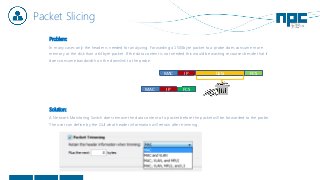
Packet Slicing
Problem:
In many cases only the header is needed for analyzing. Forwarding a 1500byte packet to a probe does consume more
memory at the disk than a 64byte packet. If the data content is not needed this would be wasting recourses beside that it
does consume bandwidth on the downlink to the probe.
Solution:
A Network Monitoring Switch does remove the data content of a packet before the packet will be forwarded to the probe.
The user can define by the GUI what header information will retrain after trimming.
MAC IP Data FCS
MAC IP FCS
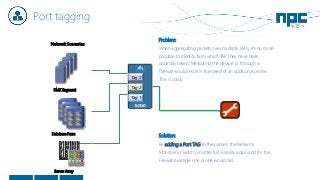
Port tagging
Network Scenarios
DMZ Segment
Database Farm
Tag 1
Tag 3
Tag 2
Server Array
Problem:
When aggregating packets over multiple TAPs, it’s no more
possible to identify from which TAP they have been
originally taken. Measuring the delay e.g. through a
Firewall would result in the need of an additional probe.
This is costly.
Solution:
By adding a Port TAG to the packet, the Network
Monitoring Switch provides full visibility again and for the
Firewall example one probe would last.
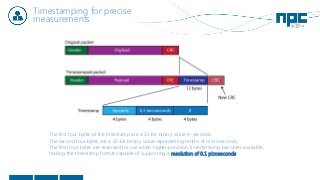
Timestamping for precise
measurements
The first four bytes of the timestamp are a 32-bit binary value in seconds.
The second four bytes are a 32-bit binary value representing tenths of microseconds;
The final four bytes are reserved for use when higher-precision timestamping becomes available,
making the timestamp format capable of supporting a resolution of 0.1 picoseconds.
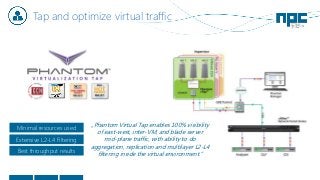
Tap and optimize virtual traffic
„Phantom Virtual Tap enables 100% visibility
of east-west, inter-VM, and blade server
mid-plane traffic, with ability to do
aggregation, replication and multilayer L2-L4
filtering inside the virtual environment.”Best throughput results
Extensive L2-L4 Filtering
Minimal resources used
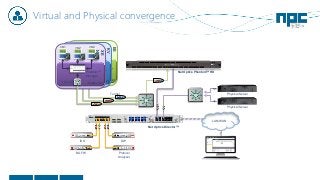
Virtual and Physical convergence
ES
X
App
OS
VM1
Hypervisor
App
OS
VM2
App
OS
VM2
V Switch
Phantom™
Manager
KV
M
App
OS
VM1
Hypervisor
App
OS
VM2
App
OS
VM2
V Switch
Phantom™
Manager
XE
N
App
OS
VM1
Hypervisor
App
OS
VM2
App
OS
VM2
V Switch
Phantom™
Manager
Tunnel
IDS
NGFW Protocol
Analyzer
DLP
Net Optics Director™
Net Optics Phantom™ HD
Physical Server
Physical Server
LAN/WAN
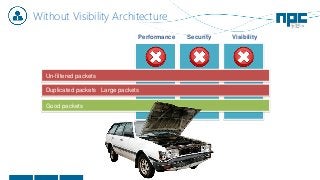
Without Visibility Architecture
Performance Security Visibility
Good packets
Duplicated packets
Un-filtered packets
Large packets
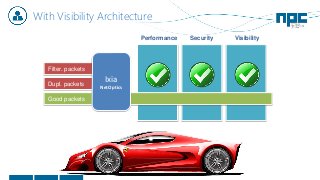
With Visibility Architecture
Performance Security Visibility
Good packets
Dupl. packets
Ixia
NetOptics
Filter. packets
Carrier Networks
Wired and Mobile
Data Center
Private Cloud
Virtualization
Core
Remote Office
Branch Office
Campus
Network
Operations
Performance
Management
Security
Admin
Server Admin
Audit &
Privacy
Forensics
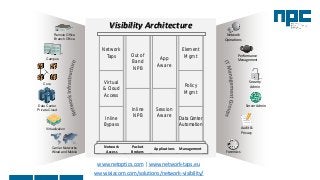
Visibility Architecture
App
Aware
Out of
Band
NPB
Network
Taps
Element
Mgmt
Virtual
& Cloud
Access
Policy
Mgmt
Inline
NPBInline
Bypass
Session
Aware
Data Center
Automation
Network
Access
Packet
Brokers
Applications Management
www.ixiacom.com/solutions/network-visibility/
www.netoptics.com | www.network-taps.eu
The End
Thank you!
Siniša Popović
Regional Sales Manager
E: sinisa.popovic@np-channel.com
T: +43 676 793 4000

A new perspective on Network Visibility - RISK 2015

  • 1.
    A new perspectiveon NETWORK VISIBILITY - 10th RiSK Conference, Laško, Slovenia - Siniša Popović Regional Sales Manager 11-12th March 2015
  • 2.
    Net Optics – acquiredby Ixia but... NetOptics will still remain as a brand name!
  • 3.
    About Net Optics •Founded in 1996. • HQ: Silicon Valley, USA • Offices: Germany, Netherlands, Australia, China • Manufacured industry 1st TAP ever! • 7.500+ global deployments • 20+ patents • 85% of fortune 100 Awards Media
  • 4.
    Net Optics – acquiredby Ixia but... NetOptics will still remain as a brand name!
  • 5.
    About Net Optics •Founded in 1996. • HQ: Silicon Valley, USA • Offices: Germany, Netherlands, Australia, China • Manufacured industry 1st TAP ever! • 7.500+ global deployments • 20+ patents • 85% of fortune 100 Awards Media
  • 6.
    Service Providers trustIXIA to:  Improve and speed service delivery  Speed roll out of next gen services  Improve network and application visibility and performance Equipment Manufacturers trust IXIA to:  Develop next generation devices  Speed time to market  Improve performance and reliability Enterprises trust IXIA to:  Assess vendor equipment and applications  Improve network security posture  Improve network and application visibility and performance Chip Fabricators trust IXIA to:  Validate protocol conformance  Speed time to market Test Security Visibility The MOST TRUSTED names in networking trust
  • 7.
  • 8.
    Network growing fasterthan tools! 0% 10% 20% 30% 40% 50% 100M 1G 10G 40G 100G Current Planned in 12 months * by EMA research Maximum networking link speeds within data center / core networks
  • 9.
  • 10.
  • 11.
  • 12.
    Where are theblind spots created? ESX Stack Hypervisor Phantom Monitor™ V Switch vm 1 Vm 2 Vm 3
  • 13.
    Where are theblind spots created? ESX Stack Hypervisor Phantom Monitor™ V Switch vm 1 Vm 2 Vm 3
  • 14.
    Where are theblind spots created? ESX Stack Hypervisor Phantom Monitor™ V Switch vm 1 Vm 2 Vm 3
  • 15.
    Where are theblind spots created? ESX Stack Hypervisor Phantom Monitor™ V Switch vm 1 Vm 2 Vm 3
  • 16.
    Traditional access methodsdon‘t work! 1. Dropping packets 2. High switch CPU and memory load 3. Doesn‘t forward L1/L2 errors 4. Needs to be configured 5. Mixing source/destination information 6. Limited number of SPAN ports 7. Compliance issues!!! 8. Distorts packet arrival times SPAN port
  • 17.
    Step 1: useNetwork TAP instead of SPAN Benefits • 100% visibility, no dropped packets • Doesn’t affect switch CPU and memory • Plug-and-play — no configuration required • Permanent access: no need to break the link each time you need to remove tool • Forwards important L1 and L2 errors • Dual power supplies: keeps the network link up and running in case of power failure • Doesn’t change packet arrival times SwitchFirewall Analyzer Switch
  • 18.
  • 19.
    New challenge: amountof traffic is growing! Walmart collects over 1 million transactions every hour. This data is streamed into massive data stores currently containing over 2.5 petabytes of data.
  • 20.
    Result: Tools areOVERSUBSCRIBED
  • 21.
    Where are theblind spots created? ESX Stack Hypervisor Phantom Monitor™ V Switch vm 1 Vm 2 Vm 3
  • 22.
    Where are theblind spots created? ESX Stack Hypervisor Phantom Monitor™ V Switch vm 1 Vm 2 Vm 3 Director Aggregation Visibility Architecture Advanced Packet Distribution Aggregation and regeneration Intelligent Filtering Bypass switching Packet Slicing & DeDuplication Total Network Visibility
  • 23.
    Ixia – Portfolio NetTool Optimizer® Network Visibility Solutions Network TAPs Copper and fiber TAPs for passive network access Bypass Switches Copper and fiber switches for secure inline access Network Packet Brokers Intelligent data access with aggregation, filtering, load balancing, de-duplication and more Virtualization TAPs Get the full visibility into virtual networks GTP Session Controller Intelligent distribution and control of mobile network traffic
  • 24.
    Intelligent data access NetworkPacket Brokers Intelligent Traffic Distribution − Aggregation of traffic from multiple links − Filtering (by IP, MAC, VLAN, Port, etc.) − Load-balancing traffic across tools − Replication of traffic to multiple tools Network Packet Brokers Intelligent Packet Processing − Header stripping (MPLS, VLAN, ...) − Time-stamping with nano-second precision − De-duplication for removing duplicated packets − Packet slicing for removing unnecessary payload
  • 25.
    Aggregation • Problem: toomany network links/segments, expensive to deploy • Solution: aggregate multiple inputs into few outputs 10 Gbps 1 Gbps 1 Gbps 1 Gbps 1 Gbps 1 Gbps 1 Gbps 1 Gbps1 Gbps
  • 26.
    Intelligent Filtering TCP Filter HTTP Filter 192.0.0.5 Filter SNMP Filter Complex filter NetworkPort 1 Monitor Port 5Source IP = 192.168.10.1 Network Port 3 Monitor Port 6 Protocol= UDP Monitor Port 8 Network Port 6 Source IP = 192.168.10.1 Protocol = TCP Layer 4 Port = 80 Monitor Port 2 Multilayer filtering Simple filter IDS DAM
  • 27.
    Filtering example Internet Web WebApp EmailFile File File File Internet File Security Web Security Email Security Data Center DMZ Filter only File Server traffic Filter only WEB Server traffic Filter only Email traffic 10G 10G
  • 28.
    Load Balancing LB Group2LB Group 1 Switch IPS 1 Firewall Router IPS 2 IPS 3 IPS 4 IPS 5 IPS 6 1G 1G 1G 1G 1G 1G • Sharing 10G link to many 1G tools • Link can be tapped with a bypass switch for additional protection
  • 29.
    De-duplication 2 3 45 6 7 8 9 input packets duplicated packets 1 21 3 4 5output packets = 9 * 1580 bytes = 14220 bytes = 5 * 1580 bytes = 7900 bytes 55% traffic reduction
  • 30.
    Packet Slicing Problem: In manycases only the header is needed for analyzing. Forwarding a 1500byte packet to a probe does consume more memory at the disk than a 64byte packet. If the data content is not needed this would be wasting recourses beside that it does consume bandwidth on the downlink to the probe. Solution: A Network Monitoring Switch does remove the data content of a packet before the packet will be forwarded to the probe. The user can define by the GUI what header information will retrain after trimming. MAC IP Data FCS MAC IP FCS
  • 31.
    Port tagging Network Scenarios DMZSegment Database Farm Tag 1 Tag 3 Tag 2 Server Array Problem: When aggregating packets over multiple TAPs, it’s no more possible to identify from which TAP they have been originally taken. Measuring the delay e.g. through a Firewall would result in the need of an additional probe. This is costly. Solution: By adding a Port TAG to the packet, the Network Monitoring Switch provides full visibility again and for the Firewall example one probe would last.
  • 32.
    Timestamping for precise measurements Thefirst four bytes of the timestamp are a 32-bit binary value in seconds. The second four bytes are a 32-bit binary value representing tenths of microseconds; The final four bytes are reserved for use when higher-precision timestamping becomes available, making the timestamp format capable of supporting a resolution of 0.1 picoseconds.
  • 33.
    Tap and optimizevirtual traffic „Phantom Virtual Tap enables 100% visibility of east-west, inter-VM, and blade server mid-plane traffic, with ability to do aggregation, replication and multilayer L2-L4 filtering inside the virtual environment.”Best throughput results Extensive L2-L4 Filtering Minimal resources used
  • 34.
    Virtual and Physicalconvergence ES X App OS VM1 Hypervisor App OS VM2 App OS VM2 V Switch Phantom™ Manager KV M App OS VM1 Hypervisor App OS VM2 App OS VM2 V Switch Phantom™ Manager XE N App OS VM1 Hypervisor App OS VM2 App OS VM2 V Switch Phantom™ Manager Tunnel IDS NGFW Protocol Analyzer DLP Net Optics Director™ Net Optics Phantom™ HD Physical Server Physical Server LAN/WAN
  • 35.
    Without Visibility Architecture PerformanceSecurity Visibility Good packets Duplicated packets Un-filtered packets Large packets
  • 36.
    With Visibility Architecture PerformanceSecurity Visibility Good packets Dupl. packets Ixia NetOptics Filter. packets
  • 37.
    Carrier Networks Wired andMobile Data Center Private Cloud Virtualization Core Remote Office Branch Office Campus Network Operations Performance Management Security Admin Server Admin Audit & Privacy Forensics Visibility Architecture App Aware Out of Band NPB Network Taps Element Mgmt Virtual & Cloud Access Policy Mgmt Inline NPBInline Bypass Session Aware Data Center Automation Network Access Packet Brokers Applications Management www.ixiacom.com/solutions/network-visibility/ www.netoptics.com | www.network-taps.eu
  • 38.
    The End Thank you! SinišaPopović Regional Sales Manager E: sinisa.popovic@np-channel.com T: +43 676 793 4000