CT-3077BC Jammer
Operating Guide
(Version 13.11)
Jammers4u Confidential
Document version 13.11
Nov 2013
If you have any comments, please contact Jammers4u:
Email: sales@jammers4u.com
Disclaimer:
Information in this document is subject to change without notice.
No part of this publication may be reproduced, photocopied, stored in a retrieval system, or
transmitted without the express prior written consent of Jammers4u
All other brands and product names are trademarks or registered trademarks of their
respective companies or organizations.
1. Introduction
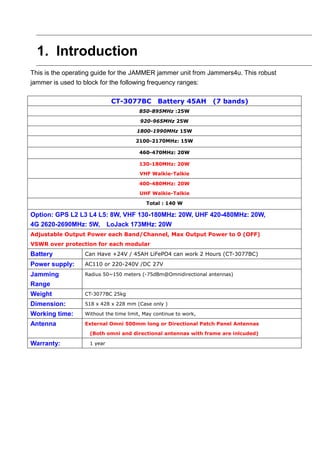
This is the operating guide for the JAMMER jammer unit from Jammers4u. This robust
jammer is used to block for the following frequency ranges:
CT-3077BC Battery 45AH (7 bands)
850-895MHz :25W
920-965MHz 25W
1800-1990MHz 15W
2100-2170MHz: 15W
460-470MHz: 20W
130-180MHz: 20W
VHF Walkie-Talkie
400-480MHz: 20W
UHF Walkie-Talkie
Total : 140 W
Option: GPS L2 L3 L4 L5: 8W, VHF 130-180MHz: 20W, UHF 420-480MHz: 20W,
4G 2620-2690MHz: 5W, LoJack 173MHz: 20W
Adjustable Output Power each Band/Channel, Max Output Power to 0 (OFF)
VSWR over protection for each modular
Battery Can Have +24V / 45AH LiFePO4 can work 2 Hours (CT-3077BC)
Power supply: AC110 or 220-240V /DC 27V
Jamming
Range
Radius 50~150 meters (-75dBm@Omnidirectional antennas)
Weight CT-3077BC 25kg
Dimension: 518 x 428 x 228 mm (Case only )
Working time: Without the time limit, May continue to work,
Antenna External Omni 500mm long or Directional Patch Panel Antennas
(Both omni and directional antennas with frame are inlcuded)
Warranty: 1 year
2. How to Use this Operating Guide
Before you use this operating guide, follow the below points:
 We advise you to read through the introductory sections on safety standards, the
product, and accessories, so that you have some basic understanding of the product,
before starting the installation. If you know about the unit accessories and their
characteristics, you can move to the installation and operation chapter starting from
page 19. However, the introductory material may still be useful as a reference.
 To operate the jammer using remote configuration from the notebook, follow the
procedures starting on page 30.
 You should refer to the Maintenance section on page xx for general information on
maintaining the jammer unit.
 To understand more about the technical features of the CT-3077BC JAMMER unit,
refer to the Specifications chapter on page 38.
3. JAMMER Users
This operating guide is best suited for users in the military and police forces who wish to
perform Cell Phone jamming operations. To carry out operations with maximum safety and
efficiency, it is best advised that more than one operator is available on hand. With some
operations, such as carrying the unit in Pelican cases, it is mandatory that two or more
personnel are available. This operating guide is also useful for technicians who wish to
analyze and troubleshoot product operations. The troubleshooting and specifications
sections on page XX should be most useful for these users.
4. CT-3077BC JAMMER Safety Standards
Before using the CT-3077BC JAMMER, please read the following safety guidelines, and
make sure you comply with local laws and regulations relating to radio transmittal. Failure
to comply with these guidelines may be dangerous or illegal. In event of doubt, please
consult your local Jammers4u distributor
5. The Product
The CT-3077BCB JAMMER product consists of the following:
 Main unit that allows you to control jamming. The unit is housed in a Pelican case.
Mandatory accessories that are used with the unit, including cables, antennas. Techwise
will automatically supply these items to you. Before assembling the jammer system, you
must make sure that you have the unit and all accessories that you require. It is important
that you not only check the equipment, but that you have some understanding of their
functions before selecting an installation procedure:
5.1 Packaging
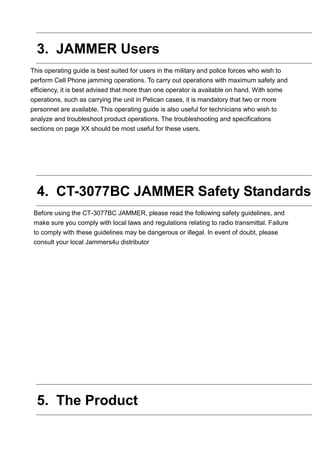
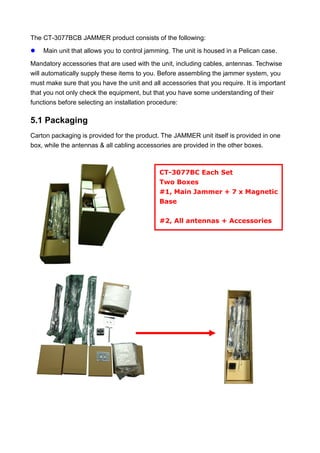
Carton packaging is provided for the product. The JAMMER unit itself is provided in one
box, while the antennas & all cabling accessories are provided in the other boxes.
CT-3077BC Each Set
Two Boxes
#1, Main Jammer + 7 x Magnetic
Base
#2, All antennas + Accessories
5.2 CT-3077BC JAMMER Unit
The JAMMER consists of a control unit that allows you to jam specific cellular frequencies.
The unit consists of controls; and an aluminum chassis casing, with holes to provide
ventilation.
The control panel that lets you perform the following:
 Power ON/OFF
 Fans Power ON/OFF
 Antenna’s Connector
 AC adapter / battery charger
JAMMER Accessories
You will be provided with the following accessories when you purchase the JAMMER. You
can purchase optional accessories from Jammers4u. All units and accessories have a 1
year warranty agreement. It is important that you not only check the accessories, but that
you have some understanding of their functions before selecting an installation procedure
Antenna
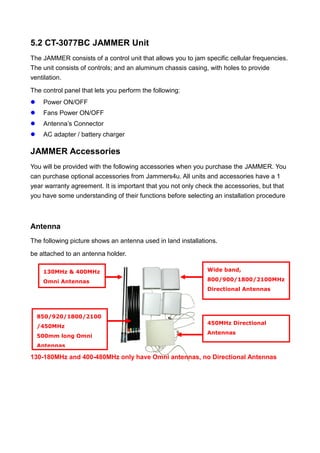
The following picture shows an antenna used in land installations.
be attached to an antenna holder.
130-180MHz and 400-480MHz only have Omni antennas, no Directional Antennas
130MHz & 400MHz
Omni Antennas
850/920/1800/2100
/450MHz
500mm long Omni
Antennas
Wide band,
800/900/1800/2100MHz
Directional Antennas
450MHz Directional
Antennas
RF Cable / Antennas Magnetic Base
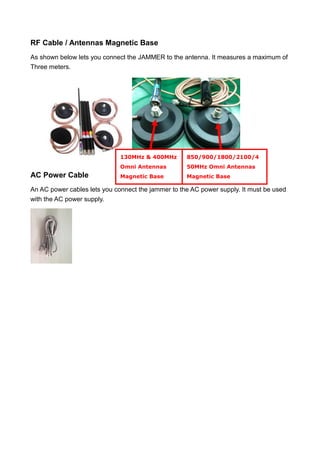
As shown below lets you connect the JAMMER to the antenna. It measures a maximum of
Three meters.
AC Power Cable
An AC power cables lets you connect the jammer to the AC power supply. It must be used
with the AC power supply.
130MHz & 400MHz
Omni Antennas
Magnetic Base
850/900/1800/2100/4
50MHz Omni Antennas
Magnetic Base
6. JAMMER Installation and Operation
Assembling the Antenna
Three Options:
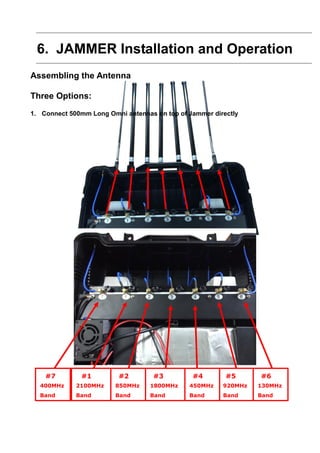
1. Connect 500mm Long Omni antennas on top of Jammer directly
#6
130MHz
Band
#5
920MHz
Band
#4
450MHz
Band
#3
1800MHz
Band
#2
850MHz
Band
#1
2100MHz
Band
#7
400MHz
Band
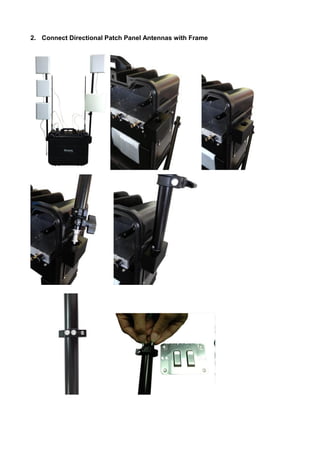
2. Connect Directional Patch Panel Antennas with Frame
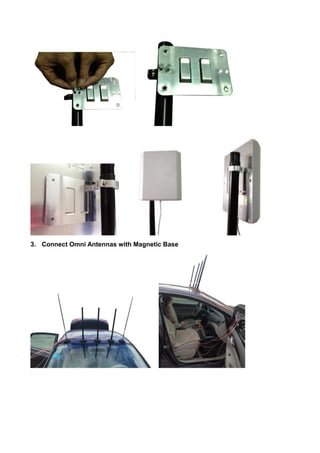
3. Connect Omni Antennas with Magnetic Base
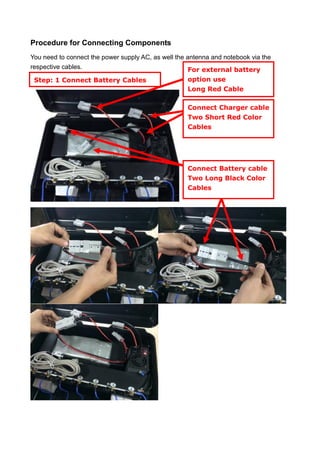
Procedure for Connecting Components
You need to connect the power supply AC, as well the antenna and notebook via the
respective cables.
Step: 1 Connect Battery Cables
All antennas
Connect Battery cable
Two Long Black Color
Cables
Connect Charger cable
Two Short Red Color
Cables
For external battery
option use
Long Red Cable
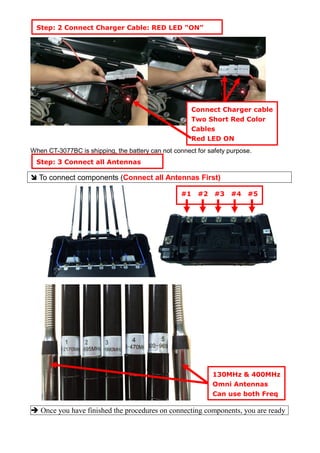
When CT-3077BC is shipping, the battery can not connect for safety purpose.
 To connect components (Connect all Antennas First)
 Once you have finished the procedures on connecting components, you are ready
Step: 3 Connect all Antennas
All antennas
Connect Charger cable
Two Short Red Color
Cables
Red LED ON
Step: 2 Connect Charger Cable: RED LED “ON”
All antennas
#1 #2 #3 #4 #5
130MHz & 400MHz
Omni Antennas
Can use both Freq
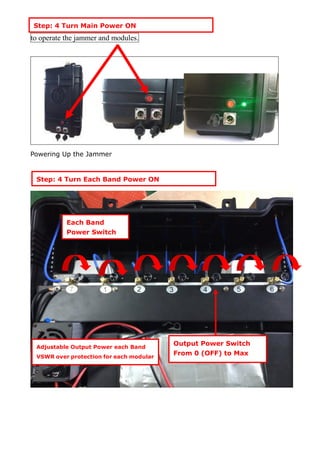
to operate the jammer and modules.
Powering Up the Jammer
Step: 4 Turn Main Power ON
All antennas
Step: 4 Turn Each Band Power ON
Each Band
Power Switch
Output Power Switch
From 0 (OFF) to Max
Adjustable Output Power each Band
VSWR over protection for each modular
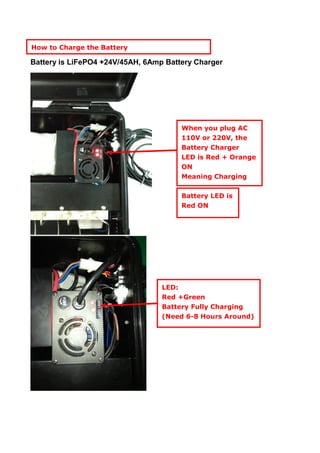
Battery is LiFePO4 +24V/45AH, 6Amp Battery Charger
Battery LED is
Red ON
LED:
Red +Green
Battery Fully Charging
(Need 6-8 Hours Around)
How to Charge the Battery
When you plug AC
110V or 220V, the
Battery Charger
LED is Red + Orange
ON
Meaning Charging

CT-3077B jammer user guide v.13.11 by jammers4u

  • 1.
  • 2.
    Jammers4u Confidential Document version13.11 Nov 2013 If you have any comments, please contact Jammers4u: Email: sales@jammers4u.com Disclaimer: Information in this document is subject to change without notice. No part of this publication may be reproduced, photocopied, stored in a retrieval system, or transmitted without the express prior written consent of Jammers4u All other brands and product names are trademarks or registered trademarks of their respective companies or organizations.
  • 3.
    1. Introduction This isthe operating guide for the JAMMER jammer unit from Jammers4u. This robust jammer is used to block for the following frequency ranges: CT-3077BC Battery 45AH (7 bands) 850-895MHz :25W 920-965MHz 25W 1800-1990MHz 15W 2100-2170MHz: 15W 460-470MHz: 20W 130-180MHz: 20W VHF Walkie-Talkie 400-480MHz: 20W UHF Walkie-Talkie Total : 140 W Option: GPS L2 L3 L4 L5: 8W, VHF 130-180MHz: 20W, UHF 420-480MHz: 20W, 4G 2620-2690MHz: 5W, LoJack 173MHz: 20W Adjustable Output Power each Band/Channel, Max Output Power to 0 (OFF) VSWR over protection for each modular Battery Can Have +24V / 45AH LiFePO4 can work 2 Hours (CT-3077BC) Power supply: AC110 or 220-240V /DC 27V Jamming Range Radius 50~150 meters (-75dBm@Omnidirectional antennas) Weight CT-3077BC 25kg Dimension: 518 x 428 x 228 mm (Case only ) Working time: Without the time limit, May continue to work, Antenna External Omni 500mm long or Directional Patch Panel Antennas (Both omni and directional antennas with frame are inlcuded) Warranty: 1 year
  • 5.
    2. How toUse this Operating Guide Before you use this operating guide, follow the below points:  We advise you to read through the introductory sections on safety standards, the product, and accessories, so that you have some basic understanding of the product, before starting the installation. If you know about the unit accessories and their characteristics, you can move to the installation and operation chapter starting from page 19. However, the introductory material may still be useful as a reference.  To operate the jammer using remote configuration from the notebook, follow the procedures starting on page 30.  You should refer to the Maintenance section on page xx for general information on maintaining the jammer unit.  To understand more about the technical features of the CT-3077BC JAMMER unit, refer to the Specifications chapter on page 38.
  • 6.
    3. JAMMER Users Thisoperating guide is best suited for users in the military and police forces who wish to perform Cell Phone jamming operations. To carry out operations with maximum safety and efficiency, it is best advised that more than one operator is available on hand. With some operations, such as carrying the unit in Pelican cases, it is mandatory that two or more personnel are available. This operating guide is also useful for technicians who wish to analyze and troubleshoot product operations. The troubleshooting and specifications sections on page XX should be most useful for these users. 4. CT-3077BC JAMMER Safety Standards Before using the CT-3077BC JAMMER, please read the following safety guidelines, and make sure you comply with local laws and regulations relating to radio transmittal. Failure to comply with these guidelines may be dangerous or illegal. In event of doubt, please consult your local Jammers4u distributor 5. The Product
  • 7.
    The CT-3077BCB JAMMERproduct consists of the following:  Main unit that allows you to control jamming. The unit is housed in a Pelican case. Mandatory accessories that are used with the unit, including cables, antennas. Techwise will automatically supply these items to you. Before assembling the jammer system, you must make sure that you have the unit and all accessories that you require. It is important that you not only check the equipment, but that you have some understanding of their functions before selecting an installation procedure: 5.1 Packaging Carton packaging is provided for the product. The JAMMER unit itself is provided in one box, while the antennas & all cabling accessories are provided in the other boxes. CT-3077BC Each Set Two Boxes #1, Main Jammer + 7 x Magnetic Base #2, All antennas + Accessories
  • 8.
    5.2 CT-3077BC JAMMERUnit The JAMMER consists of a control unit that allows you to jam specific cellular frequencies. The unit consists of controls; and an aluminum chassis casing, with holes to provide ventilation. The control panel that lets you perform the following:  Power ON/OFF  Fans Power ON/OFF  Antenna’s Connector  AC adapter / battery charger JAMMER Accessories You will be provided with the following accessories when you purchase the JAMMER. You can purchase optional accessories from Jammers4u. All units and accessories have a 1 year warranty agreement. It is important that you not only check the accessories, but that you have some understanding of their functions before selecting an installation procedure Antenna The following picture shows an antenna used in land installations. be attached to an antenna holder. 130-180MHz and 400-480MHz only have Omni antennas, no Directional Antennas 130MHz & 400MHz Omni Antennas 850/920/1800/2100 /450MHz 500mm long Omni Antennas Wide band, 800/900/1800/2100MHz Directional Antennas 450MHz Directional Antennas
  • 9.
    RF Cable /Antennas Magnetic Base As shown below lets you connect the JAMMER to the antenna. It measures a maximum of Three meters. AC Power Cable An AC power cables lets you connect the jammer to the AC power supply. It must be used with the AC power supply. 130MHz & 400MHz Omni Antennas Magnetic Base 850/900/1800/2100/4 50MHz Omni Antennas Magnetic Base
  • 10.
    6. JAMMER Installationand Operation Assembling the Antenna Three Options: 1. Connect 500mm Long Omni antennas on top of Jammer directly #6 130MHz Band #5 920MHz Band #4 450MHz Band #3 1800MHz Band #2 850MHz Band #1 2100MHz Band #7 400MHz Band
  • 11.
    2. Connect DirectionalPatch Panel Antennas with Frame
  • 12.
    3. Connect OmniAntennas with Magnetic Base
  • 13.
    Procedure for ConnectingComponents You need to connect the power supply AC, as well the antenna and notebook via the respective cables. Step: 1 Connect Battery Cables All antennas Connect Battery cable Two Long Black Color Cables Connect Charger cable Two Short Red Color Cables For external battery option use Long Red Cable
  • 14.
    When CT-3077BC isshipping, the battery can not connect for safety purpose.  To connect components (Connect all Antennas First)  Once you have finished the procedures on connecting components, you are ready Step: 3 Connect all Antennas All antennas Connect Charger cable Two Short Red Color Cables Red LED ON Step: 2 Connect Charger Cable: RED LED “ON” All antennas #1 #2 #3 #4 #5 130MHz & 400MHz Omni Antennas Can use both Freq
  • 15.
    to operate thejammer and modules. Powering Up the Jammer Step: 4 Turn Main Power ON All antennas Step: 4 Turn Each Band Power ON Each Band Power Switch Output Power Switch From 0 (OFF) to Max Adjustable Output Power each Band VSWR over protection for each modular
  • 16.
    Battery is LiFePO4+24V/45AH, 6Amp Battery Charger Battery LED is Red ON LED: Red +Green Battery Fully Charging (Need 6-8 Hours Around) How to Charge the Battery When you plug AC 110V or 220V, the Battery Charger LED is Red + Orange ON Meaning Charging