

CSS – Cascading Style Sheet
CSS MARGINS
Call US: +91-9915337448 Email Us: info@webtechlearning.com
CSS Margin Properties
• The CSS margin properties are used to generate space around
elements.
• The margin properties set the size of the white space
OUTSIDE the border.
Call US: +91-9915337448 Email Us: info@webtechlearning.com
CSS Margins
• The CSS margin properties set the size of the white space
OUTSIDE the border.
• The margins are completely transparent - and cannot have a
background color!
• With CSS, you have full control over the margins. There are
CSS properties for setting the margin for each side of an
element (top, right, bottom, and left).
Call US: +91-9915337448 Email Us: info@webtechlearning.com
Margin - Individual Sides
CSS has properties for specifying the margin for each side of an
element:
• margin-top
• margin-right
• margin-bottom
• margin-left
Call US: +91-9915337448 Email Us: info@webtechlearning.com
Margin - Individual Sides
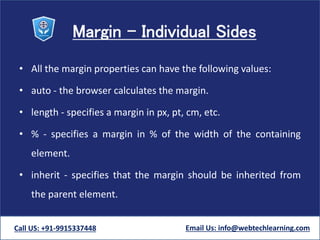
• All the margin properties can have the following values:
• auto - the browser calculates the margin.
• length - specifies a margin in px, pt, cm, etc.
• % - specifies a margin in % of the width of the containing
element.
• inherit - specifies that the margin should be inherited from
the parent element.
Call US: +91-9915337448 Email Us: info@webtechlearning.com
Margin - Individual Sides
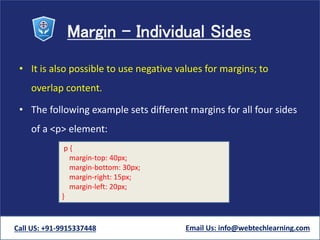
• It is also possible to use negative values for margins; to
overlap content.
• The following example sets different margins for all four sides
of a <p> element:
Call US: +91-9915337448 Email Us: info@webtechlearning.com
p {
margin-top: 40px;
margin-bottom: 30px;
margin-right: 15px;
margin-left: 20px;
}
Margin - Shorthand Property
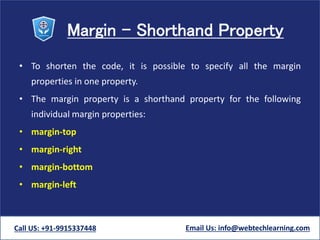
• To shorten the code, it is possible to specify all the margin
properties in one property.
• The margin property is a shorthand property for the following
individual margin properties:
• margin-top
• margin-right
• margin-bottom
• margin-left
Call US: +91-9915337448 Email Us: info@webtechlearning.com
Margin - Shorthand Property
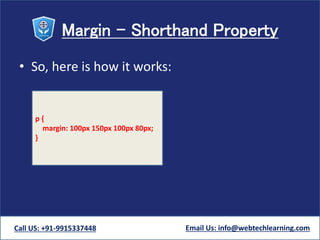
• So, here is how it works:
Call US: +91-9915337448 Email Us: info@webtechlearning.com
p {
margin: 100px 150px 100px 80px;
}
Margin - Shorthand Property
• If the margin property has four values:
• margin: 20px 20px 55px 200px;
– top margin is 20px
– right margin is 20px
– bottom margin is 55px
– left margin is 200px
Call US: +91-9915337448 Email Us: info@webtechlearning.com
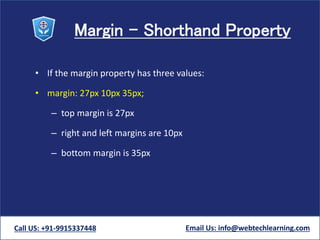
Margin - Shorthand Property
• If the margin property has three values:
• margin: 27px 10px 35px;
– top margin is 27px
– right and left margins are 10px
– bottom margin is 35px
Call US: +91-9915337448 Email Us: info@webtechlearning.com
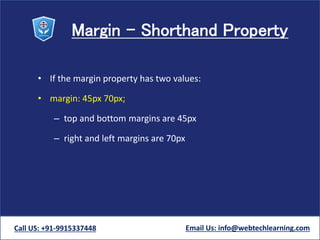
Margin - Shorthand Property
• If the margin property has two values:
• margin: 45px 70px;
– top and bottom margins are 45px
– right and left margins are 70px
Call US: +91-9915337448 Email Us: info@webtechlearning.com
Margin - Shorthand Property
• If the margin property has one value:
• margin: 25px;
– all four margins are 25px
Call US: +91-9915337448 Email Us: info@webtechlearning.com
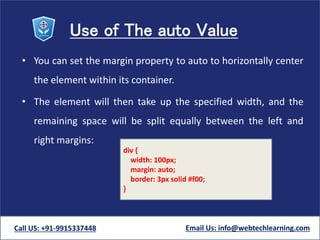
Use of The auto Value
• You can set the margin property to auto to horizontally center
the element within its container.
• The element will then take up the specified width, and the
remaining space will be split equally between the left and
right margins:
Call US: +91-9915337448 Email Us: info@webtechlearning.com
div {
width: 100px;
margin: auto;
border: 3px solid #f00;
}
Css margins

Css margins

  • 1.
    CSS – CascadingStyle Sheet CSS MARGINS Call US: +91-9915337448 Email Us: info@webtechlearning.com
  • 2.
    CSS Margin Properties •The CSS margin properties are used to generate space around elements. • The margin properties set the size of the white space OUTSIDE the border. Call US: +91-9915337448 Email Us: info@webtechlearning.com
  • 3.
    CSS Margins • TheCSS margin properties set the size of the white space OUTSIDE the border. • The margins are completely transparent - and cannot have a background color! • With CSS, you have full control over the margins. There are CSS properties for setting the margin for each side of an element (top, right, bottom, and left). Call US: +91-9915337448 Email Us: info@webtechlearning.com
  • 4.
    Margin - IndividualSides CSS has properties for specifying the margin for each side of an element: • margin-top • margin-right • margin-bottom • margin-left Call US: +91-9915337448 Email Us: info@webtechlearning.com
  • 5.
    Margin - IndividualSides • All the margin properties can have the following values: • auto - the browser calculates the margin. • length - specifies a margin in px, pt, cm, etc. • % - specifies a margin in % of the width of the containing element. • inherit - specifies that the margin should be inherited from the parent element. Call US: +91-9915337448 Email Us: info@webtechlearning.com
  • 6.
    Margin - IndividualSides • It is also possible to use negative values for margins; to overlap content. • The following example sets different margins for all four sides of a <p> element: Call US: +91-9915337448 Email Us: info@webtechlearning.com p { margin-top: 40px; margin-bottom: 30px; margin-right: 15px; margin-left: 20px; }
  • 7.
    Margin - ShorthandProperty • To shorten the code, it is possible to specify all the margin properties in one property. • The margin property is a shorthand property for the following individual margin properties: • margin-top • margin-right • margin-bottom • margin-left Call US: +91-9915337448 Email Us: info@webtechlearning.com
  • 8.
    Margin - ShorthandProperty • So, here is how it works: Call US: +91-9915337448 Email Us: info@webtechlearning.com p { margin: 100px 150px 100px 80px; }
  • 9.
    Margin - ShorthandProperty • If the margin property has four values: • margin: 20px 20px 55px 200px; – top margin is 20px – right margin is 20px – bottom margin is 55px – left margin is 200px Call US: +91-9915337448 Email Us: info@webtechlearning.com
  • 10.
    Margin - ShorthandProperty • If the margin property has three values: • margin: 27px 10px 35px; – top margin is 27px – right and left margins are 10px – bottom margin is 35px Call US: +91-9915337448 Email Us: info@webtechlearning.com
  • 11.
    Margin - ShorthandProperty • If the margin property has two values: • margin: 45px 70px; – top and bottom margins are 45px – right and left margins are 70px Call US: +91-9915337448 Email Us: info@webtechlearning.com
  • 12.
    Margin - ShorthandProperty • If the margin property has one value: • margin: 25px; – all four margins are 25px Call US: +91-9915337448 Email Us: info@webtechlearning.com
  • 13.
    Use of Theauto Value • You can set the margin property to auto to horizontally center the element within its container. • The element will then take up the specified width, and the remaining space will be split equally between the left and right margins: Call US: +91-9915337448 Email Us: info@webtechlearning.com div { width: 100px; margin: auto; border: 3px solid #f00; }