Planning a Data Entry Operation
P.Prabhu
Manager Research
5th August 2013
Creating the Application
 The data entry application can be designed by one or by
multiple people
 It is advisable that one person or a team work on the dictionary
together
 After the dictionary is final, people can work on different forms
independently, which will then be copied-and-pasted together
for the final product
 Make sure to backup the application data files frequently; not
only might you make an unrecoverable mistake to your files, but
CSPro has been known to (very rarely) render applications
unusable
Operator and System Controlled Modes
 CSPro has two modes of data entry, which come about due to
the differences in CSPro’s parent software packages
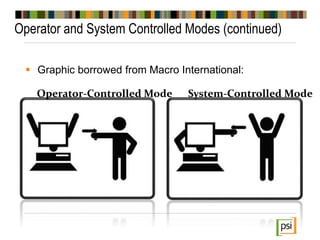
 Operator-controlled mode: as in IMPS, which was designed for
census data entry, where speed of data entry is sometimes
prioritized over accuracy, and where the sheer volume of
keying means that office editing of questionnaires may not be
possible (heads-down keying)
 System-controlled mode: as in ISSA, which was designed for
survey data entry, where accuracy is critical, and where office
editing is often possible (heads-up keying)
Operator and System Controlled Modes (continued)
 Graphic borrowed from Macro International:
Operator-Controlled Mode System-Controlled Mode
Operator-Controlled Mode
 In operator-controlled mode, the keyer can use the mouse to move
around the questionnaire, bypassing fields or whole sections of the
data entry application
 The mouse can also be used to skip to fields after having keyed in an
invalid response for a value
 Mouse action can cause havoc, but it can also make the keyed data
more true to the data on the questionnaire, as it eliminates the need for
office editing (though the data will have to be edited later)
 Keyers generally like this mode, though programmers are often
reluctant to give so much control to the keyers
System-Controlled Mode
 System-controlled mode ensures that keyed data comes in a format
that the programmer has specified, with skip patterns obeyed and all
consistency checks passed
 CSPro keeps track of the “path” of data entry, so that going backwards
in the questionnaire faithfully returns to the previous fields keyed, which
may not be the previous fields on a form in the case of skips
 Requires that keyers resolve all errors before moving on in the
questionnaire, which can slow down progress
 A mistake in the programming of the application can ruin the integrity of
the data file
 Unless consistent office editing rules are followed, system-controlled
mode can introduce various biases in the data file
Network Data Entry
 In the past, each keyer entered data to a file on a computer and a
supervisor had to copy the data from each machine to a centralized
computer and concatenate the data
 Now, with LANs very easy to set up, it may be easier to have the
keyers enter data directly to a single machine
 It is not possible for multiple keyers to enter data to one data file, but
they can enter data to different files on a network drive
 The supervisor must still concatenate the data to create the master
data file, but backing up and concatenating data is much easier if using
a network drive
 Similarly, placing the data entry application on a network drive
eliminates the prior need to redistribute the application after any
modifications were made
Testing the Application
 As a CSPro programmer, you should test the application thoroughly
– Ensure that every skip pattern works successfully, and that all
consistency checks are valid
– Make sure any calls to a lookup file complete without error
 It is extremely important, however, to have someone without any
CSPro experience test the application
 A novice can often discover problems more quickly, and can uncover
different problems, than an expert user
 Ideally a data entry application will be created and tested before the
census or survey goes to the field
 Timing several keyers entering pilot or test data will help determine how
many keyers must be hired for the keying operation
Verifying Data
 Verifying census or survey data (double keying) adds significant
expense to a data entry operation, but it may be necessary to
ensure good quality keyed data, particularly for a survey
 Two forms of verification:
– Independent verification
– Dependent verification
Independent Verification
 Two keyers key a questionnaire to separate data files
 The operational control system should ensure that the keying
supervisor can easily identify in what files the two keyed
questionnaires are located
 The supervisor runs the Compare Data tool, which produces a
report identifying differences in the keyed files
 The supervisor then chooses one file as the source file for the
final data file and modifies that file, resolving all errors by
reexamining the paper questionnaire
Dependent Verification
 A keyer keys a questionnaire to a data file
 A second keyer takes the first keyer’s data file and keys the
questionnaires in the same order as the first keyer keyed them
 If the second keyer enters a value that differs from the value
entered by the first keyer, the second keyer is prompted to rekey
the value
 The second keyer, not a supervisor, is the arbitrator of the
correct value of a field
Verifying Data (continued)
 Independent verification advantages:
– Keyers will not be slowed down by mistakes made by the
other keyer
– May be more accurate because three people look at hard-to-
read fields
– The second keying does not need to be in the same order as
the first keying
 Dependent verification advantages:
– Can be faster than independent verification because of the
elimination of the supervisory position and the need to look
at the paper questionnaires a third time
– Eliminates the need for two copies of all data files
– Allows for the verification of only high priority fields
Moving to next
PSI

CSPro workshop P- 2

  • 1.
    Planning a DataEntry Operation P.Prabhu Manager Research 5th August 2013
  • 2.
    Creating the Application The data entry application can be designed by one or by multiple people  It is advisable that one person or a team work on the dictionary together  After the dictionary is final, people can work on different forms independently, which will then be copied-and-pasted together for the final product  Make sure to backup the application data files frequently; not only might you make an unrecoverable mistake to your files, but CSPro has been known to (very rarely) render applications unusable
  • 3.
    Operator and SystemControlled Modes  CSPro has two modes of data entry, which come about due to the differences in CSPro’s parent software packages  Operator-controlled mode: as in IMPS, which was designed for census data entry, where speed of data entry is sometimes prioritized over accuracy, and where the sheer volume of keying means that office editing of questionnaires may not be possible (heads-down keying)  System-controlled mode: as in ISSA, which was designed for survey data entry, where accuracy is critical, and where office editing is often possible (heads-up keying)
  • 4.
    Operator and SystemControlled Modes (continued)  Graphic borrowed from Macro International: Operator-Controlled Mode System-Controlled Mode
  • 5.
    Operator-Controlled Mode  Inoperator-controlled mode, the keyer can use the mouse to move around the questionnaire, bypassing fields or whole sections of the data entry application  The mouse can also be used to skip to fields after having keyed in an invalid response for a value  Mouse action can cause havoc, but it can also make the keyed data more true to the data on the questionnaire, as it eliminates the need for office editing (though the data will have to be edited later)  Keyers generally like this mode, though programmers are often reluctant to give so much control to the keyers
  • 6.
    System-Controlled Mode  System-controlledmode ensures that keyed data comes in a format that the programmer has specified, with skip patterns obeyed and all consistency checks passed  CSPro keeps track of the “path” of data entry, so that going backwards in the questionnaire faithfully returns to the previous fields keyed, which may not be the previous fields on a form in the case of skips  Requires that keyers resolve all errors before moving on in the questionnaire, which can slow down progress  A mistake in the programming of the application can ruin the integrity of the data file  Unless consistent office editing rules are followed, system-controlled mode can introduce various biases in the data file
  • 7.
    Network Data Entry In the past, each keyer entered data to a file on a computer and a supervisor had to copy the data from each machine to a centralized computer and concatenate the data  Now, with LANs very easy to set up, it may be easier to have the keyers enter data directly to a single machine  It is not possible for multiple keyers to enter data to one data file, but they can enter data to different files on a network drive  The supervisor must still concatenate the data to create the master data file, but backing up and concatenating data is much easier if using a network drive  Similarly, placing the data entry application on a network drive eliminates the prior need to redistribute the application after any modifications were made
  • 8.
    Testing the Application As a CSPro programmer, you should test the application thoroughly – Ensure that every skip pattern works successfully, and that all consistency checks are valid – Make sure any calls to a lookup file complete without error  It is extremely important, however, to have someone without any CSPro experience test the application  A novice can often discover problems more quickly, and can uncover different problems, than an expert user  Ideally a data entry application will be created and tested before the census or survey goes to the field  Timing several keyers entering pilot or test data will help determine how many keyers must be hired for the keying operation
  • 9.
    Verifying Data  Verifyingcensus or survey data (double keying) adds significant expense to a data entry operation, but it may be necessary to ensure good quality keyed data, particularly for a survey  Two forms of verification: – Independent verification – Dependent verification
  • 10.
    Independent Verification  Twokeyers key a questionnaire to separate data files  The operational control system should ensure that the keying supervisor can easily identify in what files the two keyed questionnaires are located  The supervisor runs the Compare Data tool, which produces a report identifying differences in the keyed files  The supervisor then chooses one file as the source file for the final data file and modifies that file, resolving all errors by reexamining the paper questionnaire
  • 11.
    Dependent Verification  Akeyer keys a questionnaire to a data file  A second keyer takes the first keyer’s data file and keys the questionnaires in the same order as the first keyer keyed them  If the second keyer enters a value that differs from the value entered by the first keyer, the second keyer is prompted to rekey the value  The second keyer, not a supervisor, is the arbitrator of the correct value of a field
  • 12.
    Verifying Data (continued) Independent verification advantages: – Keyers will not be slowed down by mistakes made by the other keyer – May be more accurate because three people look at hard-to- read fields – The second keying does not need to be in the same order as the first keying  Dependent verification advantages: – Can be faster than independent verification because of the elimination of the supervisory position and the need to look at the paper questionnaires a third time – Eliminates the need for two copies of all data files – Allows for the verification of only high priority fields
  • 13.