HUMAN COMPUTERINTERACTION
UNIT-I
INTRODUCTION
Prepared By
K.Thangadurai
Virtual Display
MEMORY
Interaction
DEVICES FOR VR AND 3D INTERACTION
 VR
 is the use of computer technology to create a simulated
environment
 Entertainment (i.e. gaming)
 Educational purposes (i.e. medical or military training)
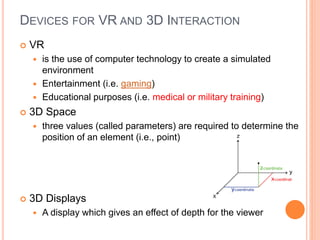
 3D Space
 three values (called parameters) are required to determine the
position of an element (i.e., point)
 3D Displays
 A display which gives an effect of depth for the viewer
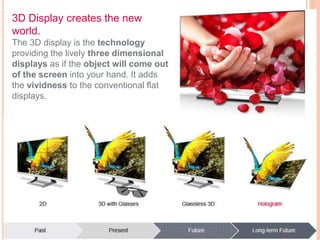
3D Display creates the new
world.
The 3D display is the technology
providing the lively three dimensional
displays as if the object will come out
of the screen into your hand. It adds
the vividness to the conventional flat
displays.
DEVICES FOR VR AND 3D INTERACTION
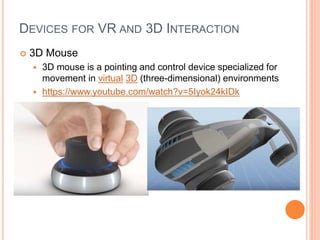
 3D Mouse
 3D mouse is a pointing and control device specialized for
movement in virtual 3D (three-dimensional) environments
 https://www.youtube.com/watch?v=5Iyok24kIDk
DEVICES FOR VR AND 3D INTERACTION
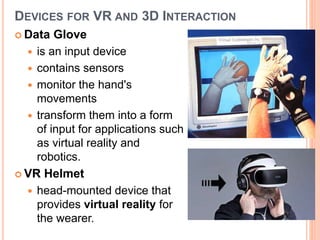
 Data Glove
 is an input device
 contains sensors
 monitor the hand's
movements
 transform them into a form
of input for applications such
as virtual reality and
robotics.
 VR Helmet
 head-mounted device that
provides virtual reality for
the wearer.
DEVICES FOR VR AND 3D INTERACTION
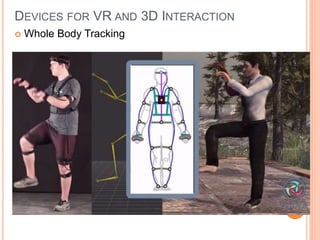
 Whole Body Tracking
DEVICES: PHYSICAL CONTROL, SENSOR & SPECIAL
DEVICES
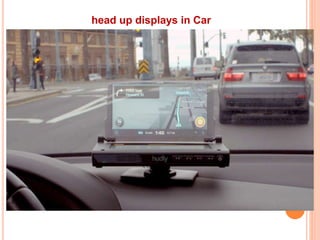
 Special Displays : head up displays
 Sound Output : Telephone Keypad
 Touch Feel & Smell :
 Haptic Devices : Mobile Phone touch / games /
vibration
 Physical Control : Washing Machines have
physical controls to do a task- Large Knobs
 Environment & Bio Sensing : Washbasin
controller
head up displays in Car
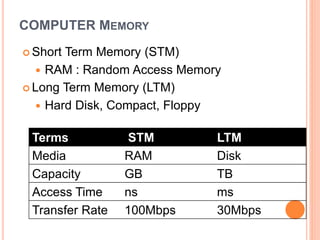
COMPUTER MEMORY
 Short Term Memory (STM)
 RAM : Random Access Memory
 Long Term Memory (LTM)
 Hard Disk, Compact, Floppy
Terms STM LTM
Media RAM Disk
Capacity GB TB
Access Time ns ms
Transfer Rate 100Mbps 30Mbps
COMPRESSION & STORAGE FORMATS
 Compression
 To reduce the amount of storage
 Compression Algorithms
Text : Fractal Compression : lossy compression
Video : Difference between successive frames
Image: Bit information
 Decompression : to any Quality
 Storage Formats & Standards:
 Text ; ASCII (8 bit), UNICODE(16bit)
 RTF: style sheets information
 SGML , XML – Own format
NETWORK
 1969 – Internet
 Communication
 Sharing of resources
 Web
 Web 1.0
Static pages.
 Web 2.0
participative social web, interaction and
collaboration
 Web 3.0
Dynamic content, online commenting
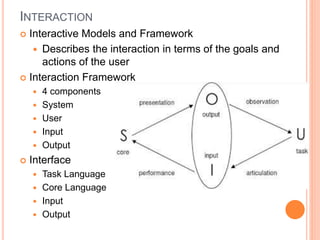
INTERACTION
 Interactive Models and Framework
 Describes the interaction in terms of the goals and
actions of the user
 Interaction Framework
 4 components
 System
 User
 Input
 Output
 Interface
 Task Language
 Core Language
 Input
 Output
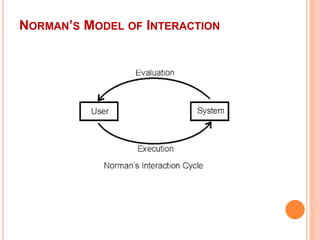
INTERACTIVE CYCLE
 User formulates Goal
 Manipulate a Machine
 Execution Phase:
 Input Lang (task) is translated into Core Language
 Evaluation Phase
 System generates the output
 User Observes the output
 Compare it with Original Goal
 One Interaction Cycle : 4 Translations
 Articulation
 Performance
 Presentation
 Observation
NORMAN’S MODEL OF INTERACTION
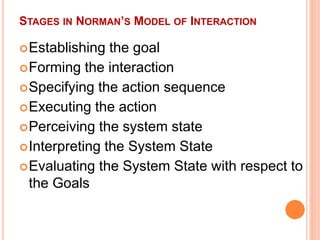
STAGES IN NORMAN’S MODEL OF INTERACTION
Establishing the goal
Forming the interaction
Specifying the action sequence
Executing the action
Perceiving the system state
Interpreting the System State
Evaluating the System State with respect to
the Goals
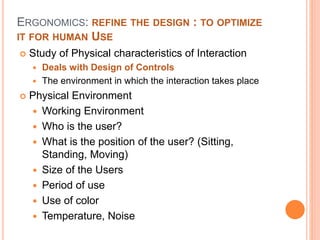
ERGONOMICS: REFINE THE DESIGN : TO OPTIMIZE
IT FOR HUMAN USE
 Study of Physical characteristics of Interaction
 Deals with Design of Controls
 The environment in which the interaction takes place
 Physical Environment
 Working Environment
 Who is the user?
 What is the position of the user? (Sitting,
Standing, Moving)
 Size of the Users
 Period of use
 Use of color
 Temperature, Noise
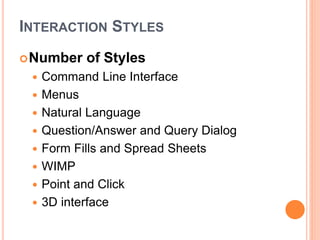
INTERACTION STYLES
Number of Styles
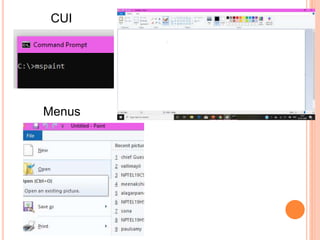
 Command Line Interface
 Menus
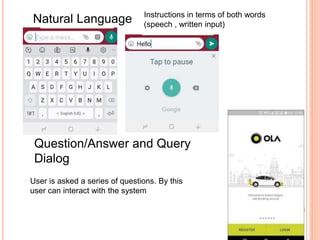
 Natural Language
 Question/Answer and Query Dialog
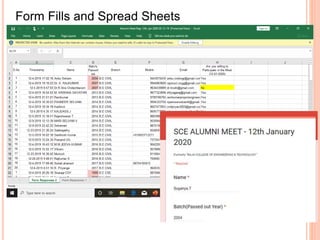
 Form Fills and Spread Sheets
 WIMP
 Point and Click
 3D interface
Menus
CUI
Natural Language Instructions in terms of both words
(speech , written input)
User is asked a series of questions. By this
user can interact with the system
Question/Answer and Query
Dialog
Form Fills and Spread Sheets
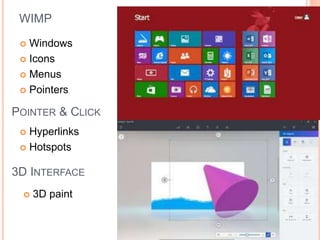
WIMP
 Windows
 Icons
 Menus
 Pointers
POINTER & CLICK
 Hyperlinks
 Hotspots
3D INTERFACE
 3D paint
CS8079 Human Computer Interaction

CS8079 Human Computer Interaction

  • 1.
  • 2.
    DEVICES FOR VRAND 3D INTERACTION  VR  is the use of computer technology to create a simulated environment  Entertainment (i.e. gaming)  Educational purposes (i.e. medical or military training)  3D Space  three values (called parameters) are required to determine the position of an element (i.e., point)  3D Displays  A display which gives an effect of depth for the viewer
  • 3.
    3D Display createsthe new world. The 3D display is the technology providing the lively three dimensional displays as if the object will come out of the screen into your hand. It adds the vividness to the conventional flat displays.
  • 4.
    DEVICES FOR VRAND 3D INTERACTION  3D Mouse  3D mouse is a pointing and control device specialized for movement in virtual 3D (three-dimensional) environments  https://www.youtube.com/watch?v=5Iyok24kIDk
  • 5.
    DEVICES FOR VRAND 3D INTERACTION  Data Glove  is an input device  contains sensors  monitor the hand's movements  transform them into a form of input for applications such as virtual reality and robotics.  VR Helmet  head-mounted device that provides virtual reality for the wearer.
  • 6.
    DEVICES FOR VRAND 3D INTERACTION  Whole Body Tracking
  • 7.
    DEVICES: PHYSICAL CONTROL,SENSOR & SPECIAL DEVICES  Special Displays : head up displays  Sound Output : Telephone Keypad  Touch Feel & Smell :  Haptic Devices : Mobile Phone touch / games / vibration  Physical Control : Washing Machines have physical controls to do a task- Large Knobs  Environment & Bio Sensing : Washbasin controller
  • 8.
  • 9.
    COMPUTER MEMORY  ShortTerm Memory (STM)  RAM : Random Access Memory  Long Term Memory (LTM)  Hard Disk, Compact, Floppy Terms STM LTM Media RAM Disk Capacity GB TB Access Time ns ms Transfer Rate 100Mbps 30Mbps
  • 10.
    COMPRESSION & STORAGEFORMATS  Compression  To reduce the amount of storage  Compression Algorithms Text : Fractal Compression : lossy compression Video : Difference between successive frames Image: Bit information  Decompression : to any Quality  Storage Formats & Standards:  Text ; ASCII (8 bit), UNICODE(16bit)  RTF: style sheets information  SGML , XML – Own format
  • 11.
    NETWORK  1969 –Internet  Communication  Sharing of resources  Web  Web 1.0 Static pages.  Web 2.0 participative social web, interaction and collaboration  Web 3.0 Dynamic content, online commenting
  • 12.
    INTERACTION  Interactive Modelsand Framework  Describes the interaction in terms of the goals and actions of the user  Interaction Framework  4 components  System  User  Input  Output  Interface  Task Language  Core Language  Input  Output
  • 13.
    INTERACTIVE CYCLE  Userformulates Goal  Manipulate a Machine  Execution Phase:  Input Lang (task) is translated into Core Language  Evaluation Phase  System generates the output  User Observes the output  Compare it with Original Goal  One Interaction Cycle : 4 Translations  Articulation  Performance  Presentation  Observation
  • 14.
  • 15.
    STAGES IN NORMAN’SMODEL OF INTERACTION Establishing the goal Forming the interaction Specifying the action sequence Executing the action Perceiving the system state Interpreting the System State Evaluating the System State with respect to the Goals
  • 16.
    ERGONOMICS: REFINE THEDESIGN : TO OPTIMIZE IT FOR HUMAN USE  Study of Physical characteristics of Interaction  Deals with Design of Controls  The environment in which the interaction takes place  Physical Environment  Working Environment  Who is the user?  What is the position of the user? (Sitting, Standing, Moving)  Size of the Users  Period of use  Use of color  Temperature, Noise
  • 17.
    INTERACTION STYLES Number ofStyles  Command Line Interface  Menus  Natural Language  Question/Answer and Query Dialog  Form Fills and Spread Sheets  WIMP  Point and Click  3D interface
  • 18.
  • 19.
    Natural Language Instructionsin terms of both words (speech , written input) User is asked a series of questions. By this user can interact with the system Question/Answer and Query Dialog
  • 20.
    Form Fills andSpread Sheets
  • 21.
    WIMP  Windows  Icons Menus  Pointers POINTER & CLICK  Hyperlinks  Hotspots 3D INTERFACE  3D paint