CRM Options
for Enterprise
Nonprofits
5/23/2017
About Heller Consulting
Experience Places People Focus
20 Years
1,500+ Clients
3,000+ Projects
San Francisco
Chicago
New York
Boston
Austin
35 People:
Smart
Skilled
Committed
Serve solely
nonprofits
All consultants
have worked in
nonprofits
CRM Strategy &
Design
• CRM vision planning
• System design and software
selection
• Analyzing and optimizing
existing systems, and building a
roadmap forward
CRM Implementation
• Advanced CRM development
and integration
• Change management
solutions
• Team configuration and
training
Fundraising &
Engagement
• Aligning strategy, team,
and mission goals
• Planning effective
engagement strategy
• Developing and
integrating effective
fundraising tools
Heller’s Skills with Nonprofit & Higher Ed
Clients Include
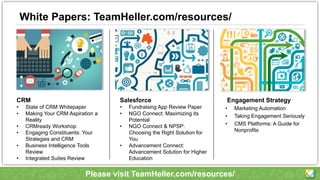
White Papers: TeamHeller.com/resources/
Engagement Strategy
• Marketing Automation
• Taking Engagement Seriously
• CMS Platforms: A Guide for
Nonprofits
CRM
• State of CRM Whitepaper
• Making Your CRM Aspiration a
Reality
• CRMready Workshop
• Engaging Constituents: Your
Strategies and CRM
• Business Intelligence Tools
Review
• Integrated Suites Review
Salesforce
• Fundraising App Review Paper
• NGO Connect: Maximizing its
Potential
• NGO Connect & NPSP:
Choosing the Right Solution for
You
• Advancement Connect:
Advancement Solution for Higher
Education
Please visit TeamHeller.com/resources/
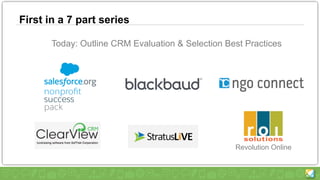
First in a 7 part series
Today: Outline CRM Evaluation & Selection Best Practices
Revolution Online
Webinar Series Introduction
• What is this series?
• Why are we offering it?
• What do we hope you’ll learn?
• Our suggested next steps
Enterprise Nonprofits
• What do we mean by that?
– Organization Size
OR
– Sophistication of CRM Vision
• How selection process differs
for Enterprise Nonprofits
– Multi application environments
– Likely BI – data warehouse etc.
– Vendor relationships key
– Change Management is a huge piece
– Alignment with organizational strategies is crucial
Big Picture
Market Trends
• The Bad News - For many nonprofits, systems are 10+ years old
• The Good News – Contemporary choices are SO much better
• Emergence of true CRM platforms & powerful BI / Analytics
• Moving along the Adoption Curve
• It’s a great time to be choosing new technology
Your Big Picture
• What’s the purpose? (of choosing a new system)
– Replacing tools?
– Optimizing efficiency?
– Increasing access to information / data?
– Breaking down silos?
– Collaborating within and across departments?
• Supporting larger strategies
• Look to the future, not to the past
– Strategies
– Processes
– Working together
• 15 years…..
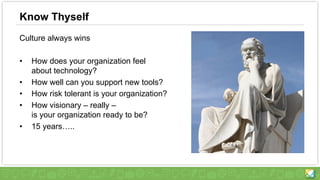
Know Thyself
Culture always wins
• How does your organization feel
about technology?
• How well can you support new tools?
• How risk tolerant is your organization?
• How visionary – really –
is your organization ready to be?
• 15 years…..
Choosing a Product vs. Platform
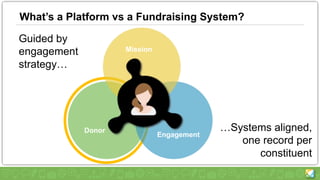
What’s a Platform vs a Fundraising System?
Mission
Donor
Engagement
Guided by
engagement
strategy…
…Systems aligned,
one record per
constituent
Choosing a Product vs a Platform
• All these vendors claim they are platforms, what do they mean?
• What’s the difference?
• Why does it matter to you?
• What are the benefits of a true platform?
• What will a platform require of you?
• Buzzwords to Avoid - “smooth” “easy” “seamless” “integrated”
The Impact of Business Intelligence Tools
• What are BI Tools?
– Reporting applications that pull data from a data warehouse and/or
multiple additional systems.
• Tremendous strides – greater functionality, easier to use, cheaper
• Do I really need to centralize my data?
• Living (& thriving) with multiple systems / multiple CRM instances
Promises, Promises: Single vendor vs integrated environments
• Is there really a benefit to single vendor for enterprise NGOs?
• No, you will either end up integrating
• Or you’ll end up compromising your strategies in costly ways
• This is different for smaller NGOs, they don’t have the option
The Selection Process
Getting Started…
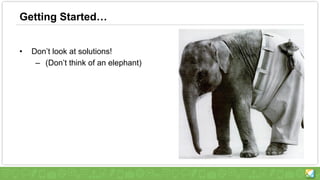
• Don’t look at solutions!
– (Don’t think of an elephant)
Key Selection Guidelines
• Buy in (but not too much participation)
• Priorities (but room for growth)
• Full CRM or just Fundraising + Communications?
• Change management – start early
• Lean Selection Process
• It’s Art, not Math
• Assign the right people to the right topics
• Build Momentum, avoid Burnout
Setting Expectations
• This is a Strategic Project
– The goal for the organization is…..
– As a result of this project our constituents’
experience will improve (how?)….
• You will be asked to…
• Your job will change in this way…
• The benefit to the organization will be….
• Communicate the Process and Timeline
– And keep communicating throughout
Roles
• Determine your organizations strategic goals (with your stakeholders
and primary users)
• Who are the key stakeholders / business owners?
• Who are the primary users?
• Who evaluates different business needs?
• Project / Process Management
– Who will represent/drive this project with vendors and other providers
– Who will represent/drive this project internally?
• Who will represent / support the system(s) over the long-term?
• Executive Sponsorship
Functionality – A First Look
• New features for you
• New features for the market
• “Future-proof” systems
• What’s working now
(and needs to keep working!)
Cataloging Business Needs
• Cataloging business needs
– Huge lists can be overwhelming, vendor responses unhelpful
– Don’t start lists from scratch, get from peers / internet
– Assign areas to different
stakeholders / staff to:
• Prioritize
• Evaluate
• Test
• Score
– Include the whole organization:
• Fundraising
• Marketing & Communications
• Program / Mission Departments
• Call / Customer Service Center
• Finance
Prioritizing Needs – Let the compromising being
• Align Needs to Strategic Goals….
• Consider a rating or weight system or other ways to assign points to identify importance.
– Identify/assign a rating for the need/requirement for example:
• Critical – Must have to function
• High – Needed for day-to-day functions and processes
• Medium – Would be useful
• Low – Would be nice to have
– Not everything gets to be important! (equal distribution of ratings)
• This is where the Art happens….
– Remembering our big goals for changing systems
– Conversation, compromise & leadership
– Balancing “front-line” needs with “back office”
– Start simple, accommodate the future, don’t recreate the past
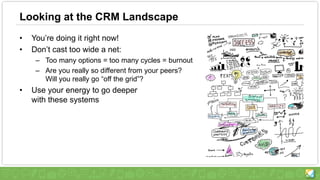
Looking at the CRM Landscape
• You’re doing it right now!
• Don’t cast too wide a net:
– Too many options = too many cycles = burnout
– Are you really so different from your peers?
Will you really go “off the grid”?
• Use your energy to go deeper
with these systems
Vendors
How Systems Work
• Trust but verify. Then verify again.
• Test environments
• References
• Plus colleagues not
provided as references
• User communities
• Demos
• Multi day demos or
“how to crush your staff”
• Targeted walk thrus
How Sales Works
• Motivations, Quotas & Timing
• Partnering well with your vendor
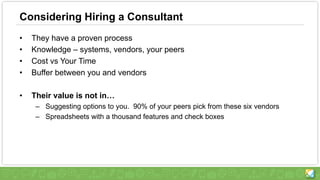
Considering Hiring a Consultant
• They have a proven process
• Knowledge – systems, vendors, your peers
• Cost vs Your Time
• Buffer between you and vendors
• Their value is not in…
– Suggesting options to you. 90% of your peers pick from these six vendors
– Spreadsheets with a thousand features and check boxes
Where to Go Next
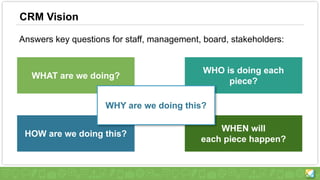
CRM Vision
Answers key questions for staff, management, board, stakeholders:
WHAT are we doing?
HOW are we doing this?
WHO is doing each
piece?
WHEN will
each piece happen?
WHY are we doing this?
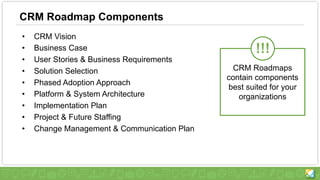
CRM Roadmap Components
• CRM Vision
• Business Case
• User Stories & Business Requirements
• Solution Selection
• Phased Adoption Approach
• Platform & System Architecture
• Implementation Plan
• Project & Future Staffing
• Change Management & Communication Plan
CRM Roadmaps
contain components
best suited for your
organizations
!!!
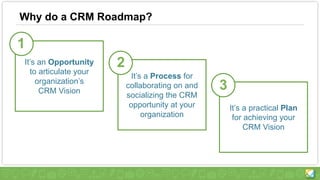
It’s a practical Plan
for achieving your
CRM Vision
Why do a CRM Roadmap?
It’s a Process for
collaborating on and
socializing the CRM
opportunity at your
organization
It’s an Opportunity
to articulate your
organization’s
CRM Vision
1
2
3
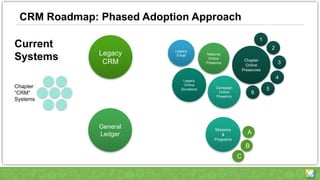
CRM Roadmap: Phased Adoption Approach
Legacy
CRM
Legacy
Email
Legacy
Online
Donations
National
Online
Presence
Campaign
Online
Presence
Chapter
Online
Presences
6
1
2
3
4
5
General
Ledger
Missions
&
Programs
A
B
C
Chapter
“CRM”
Systems
Current
Systems
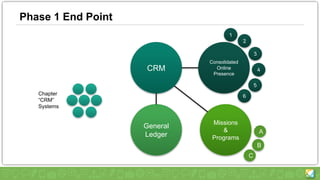
Phase 1 End Point
CRM
General
Ledger
Consolidated
Online
Presence
Missions
&
Programs
A
B
C
Chapter
“CRM”
Systems
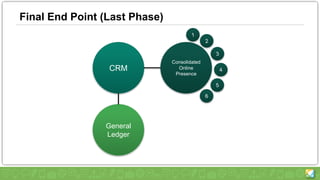
Final End Point (Last Phase)
CRM
General
Ledger
Consolidated
Online
Presence
Next Steps
• Read our CRM papers. We’ve published many papers that go into detail on
how to strategically plan for new systems. Please download these
resources and have your team review them.
– Making Your CRM Aspirations a Reality
– Insights into CRM for Nonprofits
– Managing Technology Change at Enterprise Nonprofit Organizations
– Getting Started with CRM Webinar Series
• Network with like organizations to find out what they are doing
– You aren’t the only one going through this. Talk to other organizations
and share what you have learned. They are sure to have additional
perspectives you haven’t considered, and will appreciate your input as
well.
• Contact Heller Consulting
510-841-4222 TeamHeller.com510-841-4222 TeamHeller.com

CRM Options for Enterprise Nonprofits - Heller Consulting

  • 1.
  • 2.
    About Heller Consulting ExperiencePlaces People Focus 20 Years 1,500+ Clients 3,000+ Projects San Francisco Chicago New York Boston Austin 35 People: Smart Skilled Committed Serve solely nonprofits All consultants have worked in nonprofits
  • 3.
    CRM Strategy & Design •CRM vision planning • System design and software selection • Analyzing and optimizing existing systems, and building a roadmap forward CRM Implementation • Advanced CRM development and integration • Change management solutions • Team configuration and training Fundraising & Engagement • Aligning strategy, team, and mission goals • Planning effective engagement strategy • Developing and integrating effective fundraising tools Heller’s Skills with Nonprofit & Higher Ed
  • 4.
  • 5.
    White Papers: TeamHeller.com/resources/ EngagementStrategy • Marketing Automation • Taking Engagement Seriously • CMS Platforms: A Guide for Nonprofits CRM • State of CRM Whitepaper • Making Your CRM Aspiration a Reality • CRMready Workshop • Engaging Constituents: Your Strategies and CRM • Business Intelligence Tools Review • Integrated Suites Review Salesforce • Fundraising App Review Paper • NGO Connect: Maximizing its Potential • NGO Connect & NPSP: Choosing the Right Solution for You • Advancement Connect: Advancement Solution for Higher Education Please visit TeamHeller.com/resources/
  • 6.
    First in a7 part series Today: Outline CRM Evaluation & Selection Best Practices Revolution Online
  • 7.
    Webinar Series Introduction •What is this series? • Why are we offering it? • What do we hope you’ll learn? • Our suggested next steps
  • 8.
    Enterprise Nonprofits • Whatdo we mean by that? – Organization Size OR – Sophistication of CRM Vision • How selection process differs for Enterprise Nonprofits – Multi application environments – Likely BI – data warehouse etc. – Vendor relationships key – Change Management is a huge piece – Alignment with organizational strategies is crucial
  • 9.
  • 10.
    Market Trends • TheBad News - For many nonprofits, systems are 10+ years old • The Good News – Contemporary choices are SO much better • Emergence of true CRM platforms & powerful BI / Analytics • Moving along the Adoption Curve • It’s a great time to be choosing new technology
  • 11.
    Your Big Picture •What’s the purpose? (of choosing a new system) – Replacing tools? – Optimizing efficiency? – Increasing access to information / data? – Breaking down silos? – Collaborating within and across departments? • Supporting larger strategies • Look to the future, not to the past – Strategies – Processes – Working together • 15 years…..
  • 12.
    Know Thyself Culture alwayswins • How does your organization feel about technology? • How well can you support new tools? • How risk tolerant is your organization? • How visionary – really – is your organization ready to be? • 15 years…..
  • 13.
    Choosing a Productvs. Platform
  • 14.
    What’s a Platformvs a Fundraising System? Mission Donor Engagement Guided by engagement strategy… …Systems aligned, one record per constituent
  • 15.
    Choosing a Productvs a Platform • All these vendors claim they are platforms, what do they mean? • What’s the difference? • Why does it matter to you? • What are the benefits of a true platform? • What will a platform require of you? • Buzzwords to Avoid - “smooth” “easy” “seamless” “integrated”
  • 16.
    The Impact ofBusiness Intelligence Tools • What are BI Tools? – Reporting applications that pull data from a data warehouse and/or multiple additional systems. • Tremendous strides – greater functionality, easier to use, cheaper • Do I really need to centralize my data? • Living (& thriving) with multiple systems / multiple CRM instances
  • 17.
    Promises, Promises: Singlevendor vs integrated environments • Is there really a benefit to single vendor for enterprise NGOs? • No, you will either end up integrating • Or you’ll end up compromising your strategies in costly ways • This is different for smaller NGOs, they don’t have the option
  • 18.
  • 19.
    Getting Started… • Don’tlook at solutions! – (Don’t think of an elephant)
  • 20.
    Key Selection Guidelines •Buy in (but not too much participation) • Priorities (but room for growth) • Full CRM or just Fundraising + Communications? • Change management – start early • Lean Selection Process • It’s Art, not Math • Assign the right people to the right topics • Build Momentum, avoid Burnout
  • 21.
    Setting Expectations • Thisis a Strategic Project – The goal for the organization is….. – As a result of this project our constituents’ experience will improve (how?)…. • You will be asked to… • Your job will change in this way… • The benefit to the organization will be…. • Communicate the Process and Timeline – And keep communicating throughout
  • 22.
    Roles • Determine yourorganizations strategic goals (with your stakeholders and primary users) • Who are the key stakeholders / business owners? • Who are the primary users? • Who evaluates different business needs? • Project / Process Management – Who will represent/drive this project with vendors and other providers – Who will represent/drive this project internally? • Who will represent / support the system(s) over the long-term? • Executive Sponsorship
  • 23.
    Functionality – AFirst Look • New features for you • New features for the market • “Future-proof” systems • What’s working now (and needs to keep working!)
  • 24.
    Cataloging Business Needs •Cataloging business needs – Huge lists can be overwhelming, vendor responses unhelpful – Don’t start lists from scratch, get from peers / internet – Assign areas to different stakeholders / staff to: • Prioritize • Evaluate • Test • Score – Include the whole organization: • Fundraising • Marketing & Communications • Program / Mission Departments • Call / Customer Service Center • Finance
  • 25.
    Prioritizing Needs –Let the compromising being • Align Needs to Strategic Goals…. • Consider a rating or weight system or other ways to assign points to identify importance. – Identify/assign a rating for the need/requirement for example: • Critical – Must have to function • High – Needed for day-to-day functions and processes • Medium – Would be useful • Low – Would be nice to have – Not everything gets to be important! (equal distribution of ratings) • This is where the Art happens…. – Remembering our big goals for changing systems – Conversation, compromise & leadership – Balancing “front-line” needs with “back office” – Start simple, accommodate the future, don’t recreate the past
  • 26.
    Looking at theCRM Landscape • You’re doing it right now! • Don’t cast too wide a net: – Too many options = too many cycles = burnout – Are you really so different from your peers? Will you really go “off the grid”? • Use your energy to go deeper with these systems
  • 27.
    Vendors How Systems Work •Trust but verify. Then verify again. • Test environments • References • Plus colleagues not provided as references • User communities • Demos • Multi day demos or “how to crush your staff” • Targeted walk thrus How Sales Works • Motivations, Quotas & Timing • Partnering well with your vendor
  • 28.
    Considering Hiring aConsultant • They have a proven process • Knowledge – systems, vendors, your peers • Cost vs Your Time • Buffer between you and vendors • Their value is not in… – Suggesting options to you. 90% of your peers pick from these six vendors – Spreadsheets with a thousand features and check boxes
  • 29.
  • 30.
    CRM Vision Answers keyquestions for staff, management, board, stakeholders: WHAT are we doing? HOW are we doing this? WHO is doing each piece? WHEN will each piece happen? WHY are we doing this?
  • 31.
    CRM Roadmap Components •CRM Vision • Business Case • User Stories & Business Requirements • Solution Selection • Phased Adoption Approach • Platform & System Architecture • Implementation Plan • Project & Future Staffing • Change Management & Communication Plan CRM Roadmaps contain components best suited for your organizations !!!
  • 32.
    It’s a practicalPlan for achieving your CRM Vision Why do a CRM Roadmap? It’s a Process for collaborating on and socializing the CRM opportunity at your organization It’s an Opportunity to articulate your organization’s CRM Vision 1 2 3
  • 33.
    CRM Roadmap: PhasedAdoption Approach Legacy CRM Legacy Email Legacy Online Donations National Online Presence Campaign Online Presence Chapter Online Presences 6 1 2 3 4 5 General Ledger Missions & Programs A B C Chapter “CRM” Systems Current Systems
  • 34.
    Phase 1 EndPoint CRM General Ledger Consolidated Online Presence Missions & Programs A B C Chapter “CRM” Systems
  • 35.
    Final End Point(Last Phase) CRM General Ledger Consolidated Online Presence
  • 36.
    Next Steps • Readour CRM papers. We’ve published many papers that go into detail on how to strategically plan for new systems. Please download these resources and have your team review them. – Making Your CRM Aspirations a Reality – Insights into CRM for Nonprofits – Managing Technology Change at Enterprise Nonprofit Organizations – Getting Started with CRM Webinar Series • Network with like organizations to find out what they are doing – You aren’t the only one going through this. Talk to other organizations and share what you have learned. They are sure to have additional perspectives you haven’t considered, and will appreciate your input as well. • Contact Heller Consulting
  • 38.