



Our expertise. Your digital DNA | evolvingweb.ca | @evolvingweb
CREATING A RE-USABLE
DRUPAL SITE
For Higher-Education
SUZANNE DERGACHEVA
• Drupal trainer
• Co-founded Evolving Web in 2007
• Manage Drupal projects
• Experienced site builder, themer,
and developer
• Follow me @suzanne_kennedy
Our expertise. Your digital DNA.
.ca
WE MAKE DRUPAL WEBSITES
FOR ALL TYPES OF CLIENTS
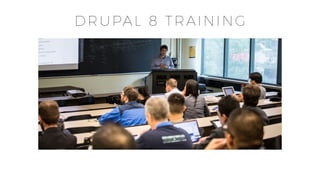
DRUPAL 8 TRAINING
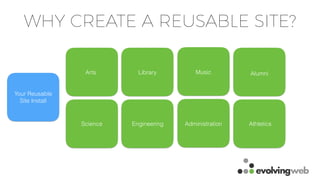
WHY CREATE A REUSABLE SITE?
Arts Library AlumniMusic
Science Engineering AthleticsAdministration
Your Reusable
Site Install
WHY CREATE A REUSABLE SITE?
• Easier to maintain
• Less work to spin up each new site
• Easier to train everyone
• Best practices are reused by everyone
• Easier to run updates for everyone at once
PROCESS TO CREATE A REUSABLE SITE
• Create a sample site (start with something representative)
• Plan which configuration is fixed or flexible or optional
• Add default content
• Make sure themes and modules are reusable
• Create an Install Profile out of the sample site
• Test & Iterate
PLANNING YOUR SITE
#1 Identify types of sites (departments,
research groups, administrative groups,
labs, professor sites, student groups)
#2 For each group, list common
components:
• Common theme elements
• Content types and configuration
• Standard modules
#3 Identify common deviations:
• Theme variations (theme settings)
• Variable configuration
• Non-standard modules
#4 Consider if each group should have
its own install profile
CONFIGURATION
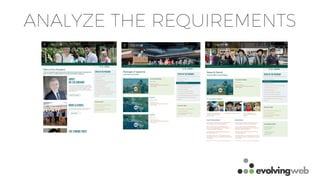
ANALYZE THE REQUIREMENTS
FIXED CONFIGURATION
• Things that are identical for all sites:
• Common Content Types & Views
• Menus
• Vocabularies
• WYSIWYG profiles
• Permissions
• Image Styles
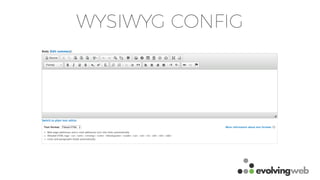
WYSIWYG CONFIG
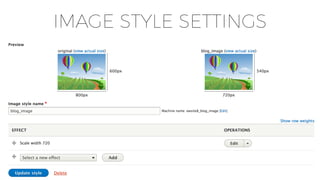
IMAGE STYLE SETTINGS
MANAGING FIXED CONFIG
• Drupal 7:
• Features/Strongarm
• Drupal 8:
• Configuration Management (.yml files)
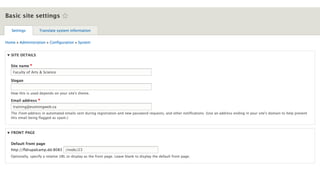
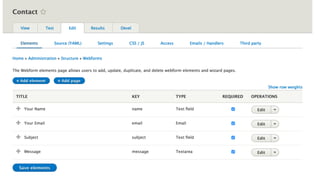
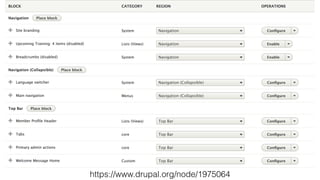
FLEXIBLE CONFIGURATION
• Things that admins need to be able to change.
• Set the defaults on install, but then expect them to change
• Name of the Site
• Default front page
• Block Configuration
• Theme Settings
• Specific Module Settings
• Webform Configuration
https://www.drupal.org/node/1975064
MANAGING FLEXIBLE CONFIG
• Drupal 7:
• Default config from an install profile
• Drupal 8:
• Configuration Management (.yml files)
• Use modules like Configuration Split, Config Ignore to track
configuration that can change
OPTIONAL CONFIGURATION
• Configuration that might be enabled on some sites but not
others
• Courses and Programs Content
• Video Feed
• Photo Albums
MANAGING OPTIONAL CONFIGURATION
• Drupal 7
• Features
• Drupal 8
• Export the optional configuration to Features or a Module
REUSABLE THEMES
THEME SETTINGS
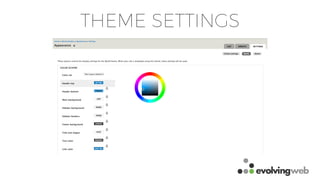
THEME SETTINGS
• You might have some theme settings that you want to set in the install process:
• Variable colour schemes
• Banner image
• Height of the banner section
• Background images
• Region placement
• Sub-site logo
• Branding options
STYLE GUIDES!
• Style guides for content
• WYSIWYG Editor Format options
• Use the Style Guide module to test your theme
• Component-driven design!
STYLING VARIABLE CONFIG
• Panels
• Block placement
• Out-of-control menu configuration
• Webforms
DEFAULT CONTENT
DEFAULT CONTENT
• Drupal 8 module that allows you to define default content
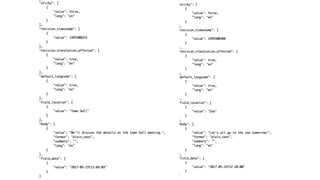
• Create the content on a test site
• Export it to .json files
• Include the files in your modules
• Instructions: https://www.drupal.org/docs/8/modules/default-
content
CREATING AN INSTALL PROFILE
INSTALL PROFILE
• Installs modules/themes by default
• Can include configuration
• Creates default content
• Allows admins to choose options during the install (install
tasks) - for example, to change which modules are installed,
install default content
BENEFITS
• Ensures the same set of configuration, content, and assets for
all sites
• Limit the variability between sites
• Make it easy for site admins to get up and running quickly
• Make it easy to switch features on/off and change options on
install
HOW TO CREATE AN INSTALL PROFILE
• Look at the minimal/standard install profiles in core
• Add list of modules/themes that your install profile uses
• Include the configuration from your test site
• Add Features for optional features
• Add default content
• Add install tasks if needed
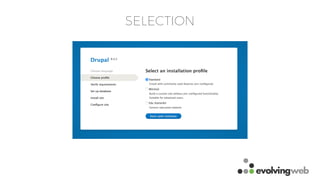
SELECTION
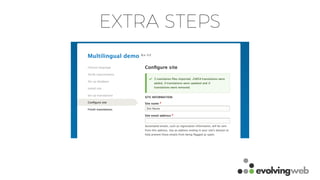
EXTRA STEPS
MAKE IT A DISTRIBUTION
• In the .info.yml file for your install profile, include the
‘distribution’ property
• Use composer to set up your project
• Include the .json file as part of your repository
ALTERNATIVE: CONFIG INSTALLER
• Configuration-only install profile
• Use the Config Installer module
• More information on this approach: https://evolvingweb.ca/
blog/drupal-8-configuration-management-multi-site
CONFIGURATION
WORKFLOW
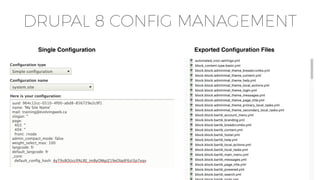
DRUPAL 8 CONFIG MANAGEMENT
Single Configuration Exported Configuration Files
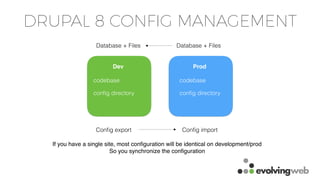
DRUPAL 8 CONFIG MANAGEMENT
Dev Prod
codebase
config directory
codebase
config directory
Config export Config import
If you have a single site, most configuration will be identical on development/prod
So you synchronize the configuration
Database + Files Database + Files
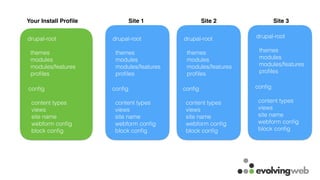
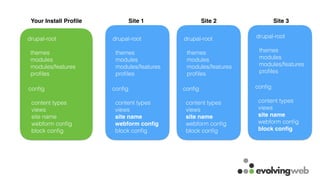
Your Install Profile Site 1 Site 2 Site 3
drupal-root
themes
modules
modules/features
profiles
config
content types
views
site name
webform config
block config
drupal-root
themes
modules
modules/features
profiles
drupal-root
themes
modules
modules/features
profiles
drupal-root
themes
modules
modules/features
profiles
config
content types
views
site name
webform config
block config
config
content types
views
site name
webform config
block config
config
content types
views
site name
webform config
block config
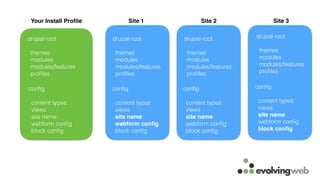
Your Install Profile Site 1 Site 2 Site 3
drupal-root
themes
modules
modules/features
profiles
config
content types
views
site name
webform config
block config
drupal-root
themes
modules
modules/features
profiles
drupal-root
themes
modules
modules/features
profiles
drupal-root
themes
modules
modules/features
profiles
config
content types
views
site name
webform config
block config
config
content types
views
site name
webform config
block config
config
content types
views
site name
webform config
block config
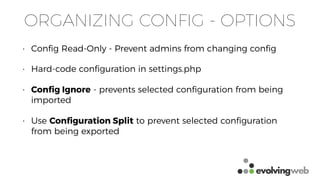
ORGANIZING CONFIG - OPTIONS
• Config Read-Only - Prevent admins from changing config
• Hard-code configuration in settings.php
• Config Ignore - prevents selected configuration from being
imported
• Use Configuration Split to prevent selected configuration
from being exported
Your Install Profile Site 1 Site 2 Site 3
drupal-root
themes
modules
modules/features
profiles
config
content types
views
site name
webform config
block config
drupal-root
themes
modules
modules/features
profiles
drupal-root
themes
modules
modules/features
profiles
drupal-root
themes
modules
modules/features
profiles
config
content types
views
site name
webform config
block config
config
content types
views
site name
webform config
block config
config
content types
views
site name
webform config
block config
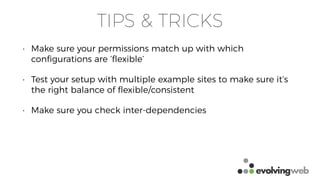
TIPS & TRICKS
• Make sure your permissions match up with which
configurations are ‘flexible’
• Test your setup with multiple example sites to make sure it’s
the right balance of flexible/consistent
• Make sure you check inter-dependencies
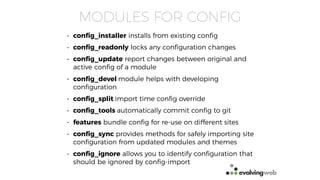
MODULES FOR CONFIG
• config_installer installs from existing config
• config_readonly locks any configuration changes
• config_update report changes between original and
active config of a module
• config_devel module helps with developing
configuration
• config_split import time config override
• config_tools automatically commit config to git
• features bundle config for re-use on different sites
• config_sync provides methods for safely importing site
configuration from updated modules and themes
• config_ignore allows you to identify configuration that
should be ignored by config-import
TESTING
• Gather representative content to test your standard site
• Use the Default Content module or create a migration
• Create a list of sample URLs to test
• Use a tool to track differences between sites when running security updates
• Site Diff: https://github.com/evolvingweb/sitediff
• Create standards
• Content Style Guides
• Design Style Guides
RESOURCES
• Config Management with Multisite: https://evolvingweb.ca/blog/drupal-8-configuration-
management-multi-site
• Install Profile Docs for D7: https://www.drupal.org/docs/7/creating-distributions/how-to-write-
a-drupal-7-installation-profile
• Install Profile Docs for D8 https://www.drupal.org/docs/8/creating-distributions/how-to-write-
a-drupal-8-installation-profile
• How to set up your project with composer and use configuration management workflows:
https://www.youtube.com/watch?v=RzOt0LxNAec
• Using Configuration Split to exclude configuration: https://blog.liip.ch/archive/2017/04/07/
advanced-drupal-8-cmi-workflows.html
• Features + Config Management for Drupal 8: http://nuvole.org/blog/2015/apr/27/drupal-8-
configuration-management-features
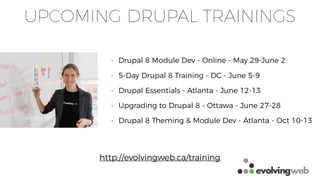
UPCOMING DRUPAL TRAININGS
• Drupal 8 Module Dev - Online - May 29-June 2
• 5-Day Drupal 8 Training - DC - June 5-9
• Drupal Essentials - Atlanta - June 12-13
• Upgrading to Drupal 8 - Ottawa - June 27-28
• Drupal 8 Theming & Module Dev - Atlanta - Oct 10-13
http://evolvingweb.ca/training

Creating a Reusable Drupal Website for Higher Education - Webinar

  • 1.
    Our expertise. Yourdigital DNA | evolvingweb.ca | @evolvingweb CREATING A RE-USABLE DRUPAL SITE For Higher-Education
  • 2.
    SUZANNE DERGACHEVA • Drupaltrainer • Co-founded Evolving Web in 2007 • Manage Drupal projects • Experienced site builder, themer, and developer • Follow me @suzanne_kennedy
  • 3.
    Our expertise. Yourdigital DNA. .ca
  • 4.
    WE MAKE DRUPALWEBSITES FOR ALL TYPES OF CLIENTS
  • 5.
  • 6.
    WHY CREATE AREUSABLE SITE? Arts Library AlumniMusic Science Engineering AthleticsAdministration Your Reusable Site Install
  • 7.
    WHY CREATE AREUSABLE SITE? • Easier to maintain • Less work to spin up each new site • Easier to train everyone • Best practices are reused by everyone • Easier to run updates for everyone at once
  • 8.
    PROCESS TO CREATEA REUSABLE SITE • Create a sample site (start with something representative) • Plan which configuration is fixed or flexible or optional • Add default content • Make sure themes and modules are reusable • Create an Install Profile out of the sample site • Test & Iterate
  • 9.
    PLANNING YOUR SITE #1Identify types of sites (departments, research groups, administrative groups, labs, professor sites, student groups) #2 For each group, list common components: • Common theme elements • Content types and configuration • Standard modules #3 Identify common deviations: • Theme variations (theme settings) • Variable configuration • Non-standard modules #4 Consider if each group should have its own install profile
  • 10.
  • 11.
  • 12.
    FIXED CONFIGURATION • Thingsthat are identical for all sites: • Common Content Types & Views • Menus • Vocabularies • WYSIWYG profiles • Permissions • Image Styles
  • 13.
  • 14.
  • 15.
    MANAGING FIXED CONFIG •Drupal 7: • Features/Strongarm • Drupal 8: • Configuration Management (.yml files)
  • 16.
    FLEXIBLE CONFIGURATION • Thingsthat admins need to be able to change. • Set the defaults on install, but then expect them to change • Name of the Site • Default front page • Block Configuration • Theme Settings • Specific Module Settings • Webform Configuration
  • 19.
  • 20.
    MANAGING FLEXIBLE CONFIG •Drupal 7: • Default config from an install profile • Drupal 8: • Configuration Management (.yml files) • Use modules like Configuration Split, Config Ignore to track configuration that can change
  • 21.
    OPTIONAL CONFIGURATION • Configurationthat might be enabled on some sites but not others • Courses and Programs Content • Video Feed • Photo Albums
  • 22.
    MANAGING OPTIONAL CONFIGURATION •Drupal 7 • Features • Drupal 8 • Export the optional configuration to Features or a Module
  • 23.
  • 25.
  • 26.
    THEME SETTINGS • Youmight have some theme settings that you want to set in the install process: • Variable colour schemes • Banner image • Height of the banner section • Background images • Region placement • Sub-site logo • Branding options
  • 27.
    STYLE GUIDES! • Styleguides for content • WYSIWYG Editor Format options • Use the Style Guide module to test your theme • Component-driven design!
  • 28.
    STYLING VARIABLE CONFIG •Panels • Block placement • Out-of-control menu configuration • Webforms
  • 29.
  • 30.
    DEFAULT CONTENT • Drupal8 module that allows you to define default content • Create the content on a test site • Export it to .json files • Include the files in your modules • Instructions: https://www.drupal.org/docs/8/modules/default- content
  • 32.
  • 33.
    INSTALL PROFILE • Installsmodules/themes by default • Can include configuration • Creates default content • Allows admins to choose options during the install (install tasks) - for example, to change which modules are installed, install default content
  • 34.
    BENEFITS • Ensures thesame set of configuration, content, and assets for all sites • Limit the variability between sites • Make it easy for site admins to get up and running quickly • Make it easy to switch features on/off and change options on install
  • 35.
    HOW TO CREATEAN INSTALL PROFILE • Look at the minimal/standard install profiles in core • Add list of modules/themes that your install profile uses • Include the configuration from your test site • Add Features for optional features • Add default content • Add install tasks if needed
  • 36.
  • 37.
  • 38.
    MAKE IT ADISTRIBUTION • In the .info.yml file for your install profile, include the ‘distribution’ property • Use composer to set up your project • Include the .json file as part of your repository
  • 39.
    ALTERNATIVE: CONFIG INSTALLER •Configuration-only install profile • Use the Config Installer module • More information on this approach: https://evolvingweb.ca/ blog/drupal-8-configuration-management-multi-site
  • 40.
  • 41.
    DRUPAL 8 CONFIGMANAGEMENT Single Configuration Exported Configuration Files
  • 42.
    DRUPAL 8 CONFIGMANAGEMENT Dev Prod codebase config directory codebase config directory Config export Config import If you have a single site, most configuration will be identical on development/prod So you synchronize the configuration Database + Files Database + Files
  • 43.
    Your Install ProfileSite 1 Site 2 Site 3 drupal-root themes modules modules/features profiles config content types views site name webform config block config drupal-root themes modules modules/features profiles drupal-root themes modules modules/features profiles drupal-root themes modules modules/features profiles config content types views site name webform config block config config content types views site name webform config block config config content types views site name webform config block config
  • 44.
    Your Install ProfileSite 1 Site 2 Site 3 drupal-root themes modules modules/features profiles config content types views site name webform config block config drupal-root themes modules modules/features profiles drupal-root themes modules modules/features profiles drupal-root themes modules modules/features profiles config content types views site name webform config block config config content types views site name webform config block config config content types views site name webform config block config
  • 45.
    ORGANIZING CONFIG -OPTIONS • Config Read-Only - Prevent admins from changing config • Hard-code configuration in settings.php • Config Ignore - prevents selected configuration from being imported • Use Configuration Split to prevent selected configuration from being exported
  • 46.
    Your Install ProfileSite 1 Site 2 Site 3 drupal-root themes modules modules/features profiles config content types views site name webform config block config drupal-root themes modules modules/features profiles drupal-root themes modules modules/features profiles drupal-root themes modules modules/features profiles config content types views site name webform config block config config content types views site name webform config block config config content types views site name webform config block config
  • 47.
    TIPS & TRICKS •Make sure your permissions match up with which configurations are ‘flexible’ • Test your setup with multiple example sites to make sure it’s the right balance of flexible/consistent • Make sure you check inter-dependencies
  • 48.
    MODULES FOR CONFIG •config_installer installs from existing config • config_readonly locks any configuration changes • config_update report changes between original and active config of a module • config_devel module helps with developing configuration • config_split import time config override • config_tools automatically commit config to git • features bundle config for re-use on different sites • config_sync provides methods for safely importing site configuration from updated modules and themes • config_ignore allows you to identify configuration that should be ignored by config-import
  • 49.
    TESTING • Gather representativecontent to test your standard site • Use the Default Content module or create a migration • Create a list of sample URLs to test • Use a tool to track differences between sites when running security updates • Site Diff: https://github.com/evolvingweb/sitediff • Create standards • Content Style Guides • Design Style Guides
  • 50.
    RESOURCES • Config Managementwith Multisite: https://evolvingweb.ca/blog/drupal-8-configuration- management-multi-site • Install Profile Docs for D7: https://www.drupal.org/docs/7/creating-distributions/how-to-write- a-drupal-7-installation-profile • Install Profile Docs for D8 https://www.drupal.org/docs/8/creating-distributions/how-to-write- a-drupal-8-installation-profile • How to set up your project with composer and use configuration management workflows: https://www.youtube.com/watch?v=RzOt0LxNAec • Using Configuration Split to exclude configuration: https://blog.liip.ch/archive/2017/04/07/ advanced-drupal-8-cmi-workflows.html • Features + Config Management for Drupal 8: http://nuvole.org/blog/2015/apr/27/drupal-8- configuration-management-features
  • 51.
    UPCOMING DRUPAL TRAININGS •Drupal 8 Module Dev - Online - May 29-June 2 • 5-Day Drupal 8 Training - DC - June 5-9 • Drupal Essentials - Atlanta - June 12-13 • Upgrading to Drupal 8 - Ottawa - June 27-28 • Drupal 8 Theming & Module Dev - Atlanta - Oct 10-13 http://evolvingweb.ca/training