evolvingweb.ca @evolvingweb
Dipping Your Toe into Drupal
8 Module Development
WITH SUZANNE DERGACHEVA
• Co-founded Evolving Web in
2007
• Experienced Drupal themer,
developer, project lead
• Loves teaching DrupalSuzanne Dergacheva
CO-FOUNDER AND FRONT-END LEAD
Creating great websites
with Drupal
TRAINING WEB DEVELOPMENT WEB CONSULTING
Some of our happy clients
Should I Create a Module?
PROS
• You get a flexible solution
• Might be simpler than installing
a complex module
CONS
• Takes time/skills to develop
• You have to maintain the code
• Can introduce bugs
Simple Module Examples
• Change a form
• Add a programmatic block
• Add a programmatic page
• Add a menu link
• Create a field formatter
• Add custom validation
Before You Start
• Use the local.settings.php file and development.services.yml files
(https://www.drupal.org/node/2598914)
• Enables errors and warnings
• Disables some caching
• Disables aggregation of CSS/JS
• Install the Devel module
• Make sure your editor has syntax highlighting set up
Step 1: Research
• Is there already a module that does this?
• If not, is there something similar. Look for an example:
• Drupal core
• Contrib modules
• Examples module
• Try and find the code that does the thing you want
• Figure out how it integrates with Drupal (usually a hook or a Class)
Step 2: Create the Scaffolding
• Use the Drupal Console to write the scaffolding code or use
examples from other modules to see what structure you need
• Create a module folder, and an .info.yml file
• Then, add a Class or hook to your module
drupal generate:module
drupal generate:controller
Step 3: Fill in the Custom Code
• Write the logical part of your code that does the custom work
• Look for exmaples of what you’re trying to do
• You can copy and paste code snippets
• … But make sure you read/understand each line of code!
Step 4: Testing
• Easy to forget to test when you’re doing something simple
• QA Tips:
• Read error messages
• Make sure you understand what you’re testing (what is supposed
to change on the site)
• Also test that your code doesn’t break other use cases. You might
need to add an ‘if’ statement
Essential Terminology
• Yml - File format used to define modules/theme, permissions, paths,
menu items, and exported configuration
• Class - Group of properties and methods that define an object. Used
to extend parts of Drupal so you can create your own Forms, Blocks,
Fields, Entities, Webform Elements, etc.
• Plugin - Class that is ‘discoverable’ by Drupal. Examples: Blocks,
Fields
• Hook - Function that allows you to alter how something works in
Drupal. Examples: altering forms, emails, adding things to cron
Let’s Build a Module
Real Example Module
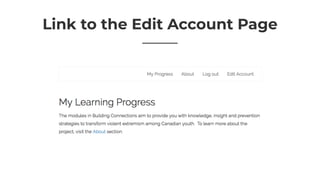
Link to the Edit Account Page
• Define a new path
• The path points to a Controller
• The controller redirects you to the path /user/[uid] but fills in the uid
of the current User
drupal generate:controller
drupal generate:module
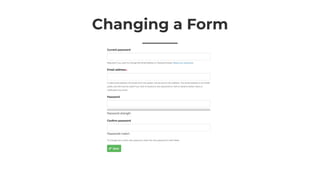
Changing a Form
Changing a Form
• Find the form ID
• Implement hook_form_alter
• Add/remove/update elements of the form
• Use this reference: https://api.drupal.org/api/drupal/elements/8.2.x
drupal generate:form:alter
drupal generate:module
Useful Code Snippets
http://bit.ly/d8-snippets
Next Steps
• Drupal Docs for Creating Custom Modules: https://www.drupal.org/
docs/8/creating-custom-modules
• Try this tutorial: https://www.drupal.org/docs/8/creating-custom-
modules/a-hello-world-custom-page-module
• Download the Examples module: http://drupal.org/project/examples
Upcoming Drupal
Trainings
MAY 7-11, IN-PERSON

Drupal 8 Training in Princeton NJ
FEB 5-8, ONLINE

Drupal 8 Module Development
FEB 20-23, ONLINE

Migrate to Drupal 8
MARCH 1-2, ONLINE

Drupal 8 Site Building
MARCH 12-15, ONLINE

Drupal 8 Theming
evolvingweb.ca/training
training@evolvingweb.ca
@suzanne_kennedy
evolvingweb.ca @evolvingweb
Thank you!

Dipping Your Toe into Drupal 8 Module Development

  • 1.
    evolvingweb.ca @evolvingweb Dipping YourToe into Drupal 8 Module Development WITH SUZANNE DERGACHEVA
  • 2.
    • Co-founded EvolvingWeb in 2007 • Experienced Drupal themer, developer, project lead • Loves teaching DrupalSuzanne Dergacheva CO-FOUNDER AND FRONT-END LEAD
  • 3.
    Creating great websites withDrupal TRAINING WEB DEVELOPMENT WEB CONSULTING
  • 4.
    Some of ourhappy clients
  • 5.
    Should I Createa Module? PROS • You get a flexible solution • Might be simpler than installing a complex module CONS • Takes time/skills to develop • You have to maintain the code • Can introduce bugs
  • 6.
    Simple Module Examples •Change a form • Add a programmatic block • Add a programmatic page • Add a menu link • Create a field formatter • Add custom validation
  • 7.
    Before You Start •Use the local.settings.php file and development.services.yml files (https://www.drupal.org/node/2598914) • Enables errors and warnings • Disables some caching • Disables aggregation of CSS/JS • Install the Devel module • Make sure your editor has syntax highlighting set up
  • 8.
    Step 1: Research •Is there already a module that does this? • If not, is there something similar. Look for an example: • Drupal core • Contrib modules • Examples module • Try and find the code that does the thing you want • Figure out how it integrates with Drupal (usually a hook or a Class)
  • 9.
    Step 2: Createthe Scaffolding • Use the Drupal Console to write the scaffolding code or use examples from other modules to see what structure you need • Create a module folder, and an .info.yml file • Then, add a Class or hook to your module drupal generate:module drupal generate:controller
  • 10.
    Step 3: Fillin the Custom Code • Write the logical part of your code that does the custom work • Look for exmaples of what you’re trying to do • You can copy and paste code snippets • … But make sure you read/understand each line of code!
  • 11.
    Step 4: Testing •Easy to forget to test when you’re doing something simple • QA Tips: • Read error messages • Make sure you understand what you’re testing (what is supposed to change on the site) • Also test that your code doesn’t break other use cases. You might need to add an ‘if’ statement
  • 12.
    Essential Terminology • Yml- File format used to define modules/theme, permissions, paths, menu items, and exported configuration • Class - Group of properties and methods that define an object. Used to extend parts of Drupal so you can create your own Forms, Blocks, Fields, Entities, Webform Elements, etc. • Plugin - Class that is ‘discoverable’ by Drupal. Examples: Blocks, Fields • Hook - Function that allows you to alter how something works in Drupal. Examples: altering forms, emails, adding things to cron
  • 13.
  • 14.
  • 15.
    Link to theEdit Account Page
  • 16.
    Link to theEdit Account Page • Define a new path • The path points to a Controller • The controller redirects you to the path /user/[uid] but fills in the uid of the current User drupal generate:controller drupal generate:module
  • 17.
  • 18.
    Changing a Form •Find the form ID • Implement hook_form_alter • Add/remove/update elements of the form • Use this reference: https://api.drupal.org/api/drupal/elements/8.2.x drupal generate:form:alter drupal generate:module
  • 19.
  • 20.
    Next Steps • DrupalDocs for Creating Custom Modules: https://www.drupal.org/ docs/8/creating-custom-modules • Try this tutorial: https://www.drupal.org/docs/8/creating-custom- modules/a-hello-world-custom-page-module • Download the Examples module: http://drupal.org/project/examples
  • 21.
    Upcoming Drupal Trainings MAY 7-11,IN-PERSON
 Drupal 8 Training in Princeton NJ FEB 5-8, ONLINE
 Drupal 8 Module Development FEB 20-23, ONLINE
 Migrate to Drupal 8 MARCH 1-2, ONLINE
 Drupal 8 Site Building MARCH 12-15, ONLINE
 Drupal 8 Theming evolvingweb.ca/training training@evolvingweb.ca
  • 22.