Drupal 8
Configuration Management
Code driven development in drupal 8
Drupal 6: Features appears, with the
possibility to export configuration to PHP
code
Drupal 7: Features support is mature, but
still relying on third parties and incomplete
Drupal 8: Configuration and content are
separated, configuration is text-based
Database Driven
Workflow
Disadvantages
Standard approach: you
click, you save, Drupal
saves to database and
forgets.
Bad: Losing track of
configuration changes
Features Driven
Workflow
Disadvantages
Standard approach:Package
configuration into
modules, you need to make
it exportable to "code".
Bad:
★ Features is very good
for packaging, not as
good for exporting
★ Not everything is
exportable/traceable
★ You must "whitelist"
elements to be tracked.
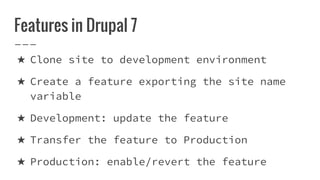
Features in Drupal 7
★ Clone site to development environment
★ Create a feature exporting the site name
variable
★ Development: update the feature
★ Transfer the feature to Production
★ Production: enable/revert the feature
Code Driven
Workflow
Advantages
★ Text-based
configuration
★ Traceability
★ Repeatability
★ Reuse
Configuration Management
The goal of the configuration system in Drupal 8 is to make
taking a copy of the site configuration easy to set up a
development site where you make changes. Then importing those
changes on the live site is also made simple.
Configuration Management
★ There are two kinds of configuration in Drupal 8: simple
configuration and configuration entities.
★ Simple configuration stores basic configuration, such as
boolean values, integers, or texts. Simple configuration
has exactly one copy or version, and is somewhat similar
to using variable_get() and variable_set() in Drupal 7.
★ Configuration entities, like content types, enable the
creation of zero or more items and are far more complex.
Examples of configuration entities include views, content
types, and image styles.
Configuration Management
Configuration can still be overridden in settings.php.
The $config variable in the settings.php file provides a
mechanism for overriding configuration data. This is called
the configuration override system. Overrides in settings.php
take precedence over values provided by modules. This is a
good method for storing sensitive data that should not be
stored in the database
Configuration Management
Drupal 8 retains the possibility of using the global $config
overrides. The configuration system integrates these override
values via the DrupalCoreConfigConfigFactory::get()
implementation.
// Get system site maintenance message text. This value may be overriden by
// default from global $config (as well as translations, see below).
$message = Drupal::config('system.maintenance')->get('message');
To override configuration values in global $config for example in
settings.php, reference their configuration keys:
$config['system.maintenance']['message'] = 'Sorry, our site is down now.';
Configuration Management
// Get the site name, with overrides.
$site_name = Drupal::config('system.site')->get('name');
// Get the site name without overrides.
$site_name = Drupal::config('system.site')->getOriginal('name', FALSE);
// Note that mutable config is always override free.
$site_name = Drupal::configFactory()->getEditable('system.site')-
>get('name');
How Configuration Management Works?
First, you will find configuration files inside the
/config/install/ directory. These settings will create the
configuration when a module is first installed. However,
don't try to update a module using these files. Drupal will
only read from that directory when the module is installed.
The data is stored in YAML files, which use the .yml suffix:
How Configuration Management Works?
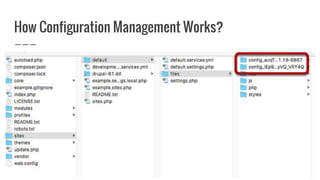
Second, when you install Drupal 8, there will be two
randomly-named directories inside the public files folder.
Normally that will mean the directory for sync files is in
/sites/default/files/. It is possible to change this location
if you follow these instructions.
How Configuration Management Works?
One of these directories will contain a subdirectory called /sync/. This is
where your files will be stored when you move configuration between sites:
The other directory will contain two subdirectories, /active/ and /staging/.
These folders are here to illustrate a very basic configuration workflow:
moving between an active and a staging site.
How Configuration Management Works?
The active directory is supposed to keep currently active
configuration. I said “is supposed” because by default this
directory is empty, active configuration is stored in the
database. It is made this way for performance and security
reasons. However, you can force configuration storage to use
the file system with the Configuration Tools module.
The staging directory is the place from where the
configuration is imported/synchronized. It’s also empty until
configuration will be exported/imported.
How Configuration Management Works?
The active directory is supposed to keep currently active configuration. I said “is
supposed” because by default this directory is empty, active configuration is stored in
the database. It is made this way for performance and security reasons. However, you can
force configuration storage to use the file system with the Configuration Tools module.
The staging directory is the place from where the configuration is imported/synchronized.
It’s also empty until configuration will be exported/imported.
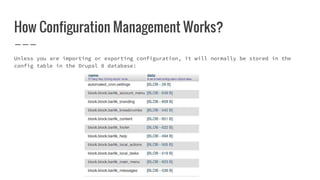
How Configuration Management Works?
Unless you are importing or exporting configuration, it will normally be stored in the
config table in the Drupal 8 database:
How Configuration Management Works?
UI For Configuration management - Configuration > Configuration synchronization.
Synchronize: Here you can actually sync changes from a file that you have imported
Import: This allows you to import sync changes from other sites.
How Configuration Management Works?
If you do a "Full archive" export, and then import it to a new site, your /sync/ directory
will fill up with .yml files:
How Configuration Management Works?
These user interface settings for Configuration Management are very promising,
but they still have significant limitations:
★ Single items can not be exported into a file. You will have to copy-and-
paste the details.
★ You can't select multiple items at once. So you can't select a content
type and multiple fields.
This interface feels half-finished.So, most people are likely to continue to
use the Features module for more advanced configuration management.
How Configuration Management Works?
You can not important configuration settings unless both the exporting and importing sites
have exactly the same UUID.
In other words, configuration management only works if the sites are exact clones.
Reference
https://www.lullabot.com/articles/configuration-management-
in-drupal-8-the-key-concepts
https://dev.acquia.com/blog/drupal-8/my-drupal-8-learning-
path-configuration-management-in-d8/03/05/2016/10376
https://www.ostraining.com/blog/drupal/config/
Drupal 8 Configuration Management

Drupal 8 Configuration Management

  • 1.
  • 2.
    Code driven developmentin drupal 8 Drupal 6: Features appears, with the possibility to export configuration to PHP code Drupal 7: Features support is mature, but still relying on third parties and incomplete Drupal 8: Configuration and content are separated, configuration is text-based
  • 3.
    Database Driven Workflow Disadvantages Standard approach:you click, you save, Drupal saves to database and forgets. Bad: Losing track of configuration changes
  • 4.
    Features Driven Workflow Disadvantages Standard approach:Package configurationinto modules, you need to make it exportable to "code". Bad: ★ Features is very good for packaging, not as good for exporting ★ Not everything is exportable/traceable ★ You must "whitelist" elements to be tracked.
  • 5.
    Features in Drupal7 ★ Clone site to development environment ★ Create a feature exporting the site name variable ★ Development: update the feature ★ Transfer the feature to Production ★ Production: enable/revert the feature
  • 6.
  • 7.
    Configuration Management The goalof the configuration system in Drupal 8 is to make taking a copy of the site configuration easy to set up a development site where you make changes. Then importing those changes on the live site is also made simple.
  • 8.
    Configuration Management ★ Thereare two kinds of configuration in Drupal 8: simple configuration and configuration entities. ★ Simple configuration stores basic configuration, such as boolean values, integers, or texts. Simple configuration has exactly one copy or version, and is somewhat similar to using variable_get() and variable_set() in Drupal 7. ★ Configuration entities, like content types, enable the creation of zero or more items and are far more complex. Examples of configuration entities include views, content types, and image styles.
  • 9.
    Configuration Management Configuration canstill be overridden in settings.php. The $config variable in the settings.php file provides a mechanism for overriding configuration data. This is called the configuration override system. Overrides in settings.php take precedence over values provided by modules. This is a good method for storing sensitive data that should not be stored in the database
  • 10.
    Configuration Management Drupal 8retains the possibility of using the global $config overrides. The configuration system integrates these override values via the DrupalCoreConfigConfigFactory::get() implementation. // Get system site maintenance message text. This value may be overriden by // default from global $config (as well as translations, see below). $message = Drupal::config('system.maintenance')->get('message'); To override configuration values in global $config for example in settings.php, reference their configuration keys: $config['system.maintenance']['message'] = 'Sorry, our site is down now.';
  • 11.
    Configuration Management // Getthe site name, with overrides. $site_name = Drupal::config('system.site')->get('name'); // Get the site name without overrides. $site_name = Drupal::config('system.site')->getOriginal('name', FALSE); // Note that mutable config is always override free. $site_name = Drupal::configFactory()->getEditable('system.site')- >get('name');
  • 12.
    How Configuration ManagementWorks? First, you will find configuration files inside the /config/install/ directory. These settings will create the configuration when a module is first installed. However, don't try to update a module using these files. Drupal will only read from that directory when the module is installed. The data is stored in YAML files, which use the .yml suffix:
  • 13.
  • 14.
    How Configuration ManagementWorks? Second, when you install Drupal 8, there will be two randomly-named directories inside the public files folder. Normally that will mean the directory for sync files is in /sites/default/files/. It is possible to change this location if you follow these instructions.
  • 15.
  • 16.
    How Configuration ManagementWorks? One of these directories will contain a subdirectory called /sync/. This is where your files will be stored when you move configuration between sites: The other directory will contain two subdirectories, /active/ and /staging/. These folders are here to illustrate a very basic configuration workflow: moving between an active and a staging site.
  • 17.
    How Configuration ManagementWorks? The active directory is supposed to keep currently active configuration. I said “is supposed” because by default this directory is empty, active configuration is stored in the database. It is made this way for performance and security reasons. However, you can force configuration storage to use the file system with the Configuration Tools module. The staging directory is the place from where the configuration is imported/synchronized. It’s also empty until configuration will be exported/imported.
  • 18.
    How Configuration ManagementWorks? The active directory is supposed to keep currently active configuration. I said “is supposed” because by default this directory is empty, active configuration is stored in the database. It is made this way for performance and security reasons. However, you can force configuration storage to use the file system with the Configuration Tools module. The staging directory is the place from where the configuration is imported/synchronized. It’s also empty until configuration will be exported/imported.
  • 19.
    How Configuration ManagementWorks? Unless you are importing or exporting configuration, it will normally be stored in the config table in the Drupal 8 database:
  • 20.
    How Configuration ManagementWorks? UI For Configuration management - Configuration > Configuration synchronization. Synchronize: Here you can actually sync changes from a file that you have imported Import: This allows you to import sync changes from other sites.
  • 21.
    How Configuration ManagementWorks? If you do a "Full archive" export, and then import it to a new site, your /sync/ directory will fill up with .yml files:
  • 22.
  • 23.
  • 24.
    How Configuration ManagementWorks? These user interface settings for Configuration Management are very promising, but they still have significant limitations: ★ Single items can not be exported into a file. You will have to copy-and- paste the details. ★ You can't select multiple items at once. So you can't select a content type and multiple fields. This interface feels half-finished.So, most people are likely to continue to use the Features module for more advanced configuration management.
  • 25.
    How Configuration ManagementWorks? You can not important configuration settings unless both the exporting and importing sites have exactly the same UUID. In other words, configuration management only works if the sites are exact clones.
  • 26.