© 2014 IBM Corporation
Create
Bluemix Docker Container
with REST API
Joseph Chang
Senior IT Specialist
IBM Cloud Group
Document number
© 2014 IBM Corporation2
If you are new to Bluemix Docker Container, please start from here:
https://console.ng.bluemix.net/docs/containers/container_index.html
© 2014 IBM Corporation3
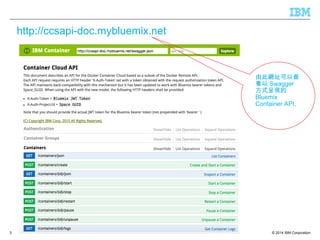
http://ccsapi-doc.mybluemix.net
由此網址可以查
看以 Swagger
方式呈現的
Bluemix
Container API,
© 2014 IBM Corporation
Get X-Auth-Token and X-Auth-Project-Id
4
© 2014 IBM Corporation
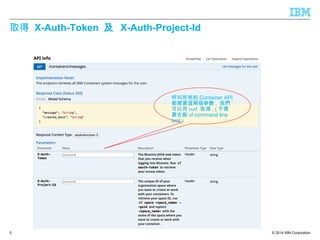
取得 X-Auth-Token 及 X-Auth-Project-Id
5
呼叫所有的 Container API
都需要這兩個參數 , 我們
可以用 curl 取得 , ( 不需
要安裝 cf command line
tool )
© 2014 IBM Corporation
利用 curl 取得 X-Auth-Token 及 X-Auth-Project-Id
6
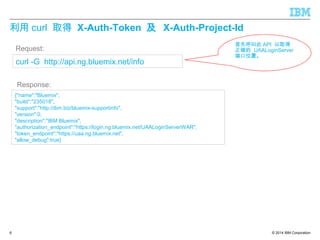
首先呼叫此 API 以取得
正確的 UAALoginServer
端口位置。
curl -G http://api.ng.bluemix.net/info
{"name":"Bluemix",
"build":"235018",
"support":"http://ibm.biz/bluemix-supportinfo",
"version":0,
"description":"IBM Bluemix",
"authorization_endpoint":"https://login.ng.bluemix.net/UAALoginServerWAR",
"token_endpoint":"https://uaa.ng.bluemix.net",
"allow_debug":true}
Request:
Response:
© 2014 IBM Corporation
利用 curl 取得 X-Auth-Token
7
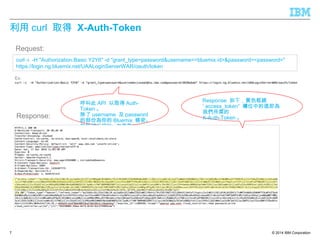
呼叫此 API 以取得 Auth-
Token 。
除了 username 及 password
的部份為你的 Bluemix 帳密。
其餘部份照抄 , 勿更動。
curl -i -H "Authorization:Basic Y2Y6" -d "grant_type=password&username=<bluemix id>&password=<password>"
https://login.ng.bluemix.net/UAALoginServerWAR/oauth/token
Request:
Response:
Response 如下,黃色框線
” access_token” 欄位中的值即為
我們所需的
X-Auth-Token 。
Ex:
© 2014 IBM Corporation
利用 curl 取得 X-Auth-Project-Id
8
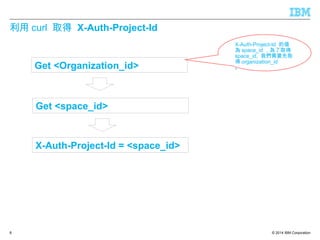
X-Auth-Project-Id 的值
為 space_id ,為了取得
space_id, 我們需要先取
得 organization_id
。
X-Auth-Project-Id = <space_id>
Get <space_id>
Get <Organization_id>
© 2014 IBM Corporation
利用 curl 取得 X-Auth-Project-Id
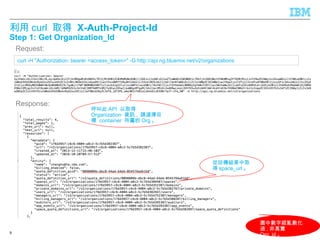
Step 1: Get Organization_Id
9
Request:
Response:
curl -H "Authorization: bearer <access_token>" -G http://api.ng.bluemix.net/v2/organizations
Ex:
從回傳結果中取
得 space_url 。
呼叫此 API 以取得
Organization 資訊 , 請選擇目
標 container 所屬的 Org 。
圖中數字經亂數化
過 , 非真實
Org_id 。
© 2014 IBM Corporation
利用 curl 取得 X-Auth-Project-Id
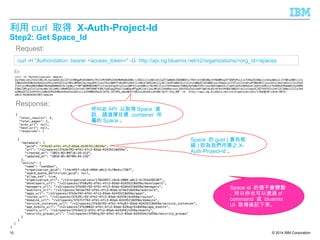
Step2: Get Space_Id
10
Request:
Response:
curl -H "Authorization: bearer <access_token>" -G http://api.ng.bluemix.net/v2/organizations/<org_id>/spaces
Ex:
Space id 的值不會變動
, 所以你也可以透過 cf
command 或 bluemix
UI 取得後記下來。
呼叫此 API 以取得 Space 資
訊 , 請選擇目標 container 所
屬的 Space 。
Space 的 guid ( 黃色框
線 ) 即為我們所需之 X-
Auth-Project-id 。
© 2014 IBM Corporation
Test Calling API
11
© 2014 IBM Corporation
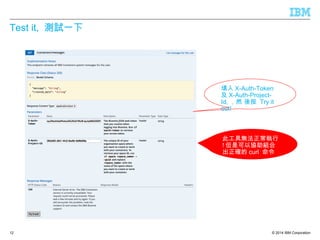
Test it, 測試一下
12
填入 X-Auth-Token
及 X-Auth-Project-
Id, ,然 後按 Try it
out!
此工具無法正常執行
! 但是可以協助組合
出正確的 curl 命令
© 2014 IBM Corporation
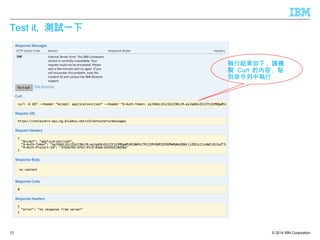
Test it, 測試一下
13
執行結果如下 , 請複
製 Curl 的內容 , 貼
到命令列中執行
© 2014 IBM Corporation
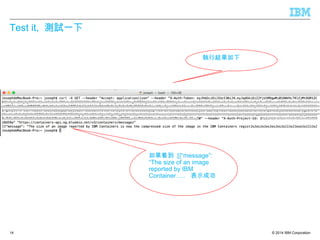
Test it, 測試一下
14
執行結果如下
如果看到 [{“message”:
“The size of an image
reported by IBM
Container….. 表示成功
© 2014 IBM Corporation
Create Container with API
15
© 2014 IBM Corporation
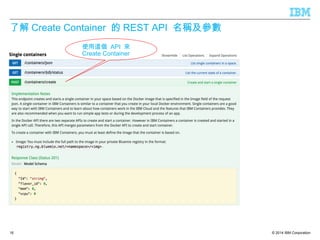
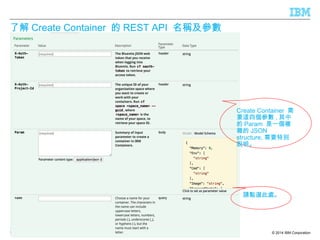
了解 Create Container 的 REST API 名稱及參數
16
使用這個 API 來
Create Container
© 2014 IBM Corporation
了解 Create Container 的 REST API 名稱及參數
17
Create Container 需
要這四個參數 , 其中
的 Param 是一個複
雜的 JSON
structure, 需要特別
說明。
請點選此處。
© 2014 IBM Corporation
了解 Create Container 的 REST API 名稱及參數
18
點選後會自
動帶入以上
預設內容。
Param 參數 值 備註
Memory 256
Env [“ENV1=TEST1] 格式正確即可 , 在此不會直正用到
Cmd Remove it 與 liberty server 搭配時 , 請刪除此參數 , 以
免影響 Server 起動
Image “registry.ng.bluemix.net/
ibmliberty:latest”
此 Image 帶有 liberty server, 容易觀察結果
是否正確
ExposedPorts [“9080”,”9443”]
HostConfig 參考下表
BluemixApp “” 填入的 cf app 必須存在 , 否則否有錯誤
, 初次測試時建議留空白
Volumes Remove it 填入值不正確會導致 “ The container could
not be created because the volume format
was invalid”
NumberCpus 1
Cpuset “”
HosConfig 參數 值 備註
PortBindings [“9080”,”9443”]
Links Remove it !! 填入值不正確時會導致 “ list index out of
range"
Binds Remove it !! 填入值不正確會導致 “ The container could
not be created because the volume
format was invalid”
ExtraHosts Remove it !! 填入值不正確會導致 container 建立時
crash
© 2014 IBM Corporation
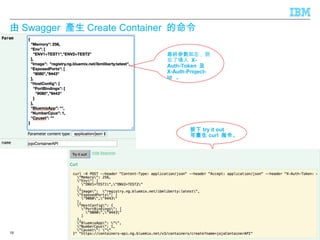
由 Swagger 產生 Create Container 的命令
19
按下 try it out
可產生 curl 指令。
最終參數如左 , 別
忘了填入 X-
Auth-Token 及
X-Auth-Project-
Id 。
© 2014 IBM Corporation
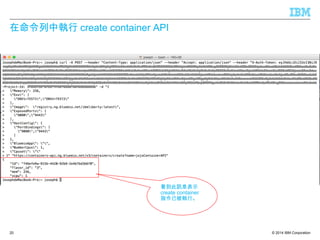
在命令列中執行 create container API
20
看到此訊息表示
create container
指令已被執行。
© 2014 IBM Corporation
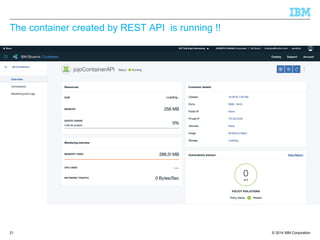
The container created by REST API is running !!
21
© 2014 IBM Corporation
Thank you
22
Take me to Bluemix
Click Here

Create to blumix docker container with rest api

  • 1.
    © 2014 IBMCorporation Create Bluemix Docker Container with REST API Joseph Chang Senior IT Specialist IBM Cloud Group Document number
  • 2.
    © 2014 IBMCorporation2 If you are new to Bluemix Docker Container, please start from here: https://console.ng.bluemix.net/docs/containers/container_index.html
  • 3.
    © 2014 IBMCorporation3 http://ccsapi-doc.mybluemix.net 由此網址可以查 看以 Swagger 方式呈現的 Bluemix Container API,
  • 4.
    © 2014 IBMCorporation Get X-Auth-Token and X-Auth-Project-Id 4
  • 5.
    © 2014 IBMCorporation 取得 X-Auth-Token 及 X-Auth-Project-Id 5 呼叫所有的 Container API 都需要這兩個參數 , 我們 可以用 curl 取得 , ( 不需 要安裝 cf command line tool )
  • 6.
    © 2014 IBMCorporation 利用 curl 取得 X-Auth-Token 及 X-Auth-Project-Id 6 首先呼叫此 API 以取得 正確的 UAALoginServer 端口位置。 curl -G http://api.ng.bluemix.net/info {"name":"Bluemix", "build":"235018", "support":"http://ibm.biz/bluemix-supportinfo", "version":0, "description":"IBM Bluemix", "authorization_endpoint":"https://login.ng.bluemix.net/UAALoginServerWAR", "token_endpoint":"https://uaa.ng.bluemix.net", "allow_debug":true} Request: Response:
  • 7.
    © 2014 IBMCorporation 利用 curl 取得 X-Auth-Token 7 呼叫此 API 以取得 Auth- Token 。 除了 username 及 password 的部份為你的 Bluemix 帳密。 其餘部份照抄 , 勿更動。 curl -i -H "Authorization:Basic Y2Y6" -d "grant_type=password&username=<bluemix id>&password=<password>" https://login.ng.bluemix.net/UAALoginServerWAR/oauth/token Request: Response: Response 如下,黃色框線 ” access_token” 欄位中的值即為 我們所需的 X-Auth-Token 。 Ex:
  • 8.
    © 2014 IBMCorporation 利用 curl 取得 X-Auth-Project-Id 8 X-Auth-Project-Id 的值 為 space_id ,為了取得 space_id, 我們需要先取 得 organization_id 。 X-Auth-Project-Id = <space_id> Get <space_id> Get <Organization_id>
  • 9.
    © 2014 IBMCorporation 利用 curl 取得 X-Auth-Project-Id Step 1: Get Organization_Id 9 Request: Response: curl -H "Authorization: bearer <access_token>" -G http://api.ng.bluemix.net/v2/organizations Ex: 從回傳結果中取 得 space_url 。 呼叫此 API 以取得 Organization 資訊 , 請選擇目 標 container 所屬的 Org 。 圖中數字經亂數化 過 , 非真實 Org_id 。
  • 10.
    © 2014 IBMCorporation 利用 curl 取得 X-Auth-Project-Id Step2: Get Space_Id 10 Request: Response: curl -H "Authorization: bearer <access_token>" -G http://api.ng.bluemix.net/v2/organizations/<org_id>/spaces Ex: Space id 的值不會變動 , 所以你也可以透過 cf command 或 bluemix UI 取得後記下來。 呼叫此 API 以取得 Space 資 訊 , 請選擇目標 container 所 屬的 Space 。 Space 的 guid ( 黃色框 線 ) 即為我們所需之 X- Auth-Project-id 。
  • 11.
    © 2014 IBMCorporation Test Calling API 11
  • 12.
    © 2014 IBMCorporation Test it, 測試一下 12 填入 X-Auth-Token 及 X-Auth-Project- Id, ,然 後按 Try it out! 此工具無法正常執行 ! 但是可以協助組合 出正確的 curl 命令
  • 13.
    © 2014 IBMCorporation Test it, 測試一下 13 執行結果如下 , 請複 製 Curl 的內容 , 貼 到命令列中執行
  • 14.
    © 2014 IBMCorporation Test it, 測試一下 14 執行結果如下 如果看到 [{“message”: “The size of an image reported by IBM Container….. 表示成功
  • 15.
    © 2014 IBMCorporation Create Container with API 15
  • 16.
    © 2014 IBMCorporation 了解 Create Container 的 REST API 名稱及參數 16 使用這個 API 來 Create Container
  • 17.
    © 2014 IBMCorporation 了解 Create Container 的 REST API 名稱及參數 17 Create Container 需 要這四個參數 , 其中 的 Param 是一個複 雜的 JSON structure, 需要特別 說明。 請點選此處。
  • 18.
    © 2014 IBMCorporation 了解 Create Container 的 REST API 名稱及參數 18 點選後會自 動帶入以上 預設內容。 Param 參數 值 備註 Memory 256 Env [“ENV1=TEST1] 格式正確即可 , 在此不會直正用到 Cmd Remove it 與 liberty server 搭配時 , 請刪除此參數 , 以 免影響 Server 起動 Image “registry.ng.bluemix.net/ ibmliberty:latest” 此 Image 帶有 liberty server, 容易觀察結果 是否正確 ExposedPorts [“9080”,”9443”] HostConfig 參考下表 BluemixApp “” 填入的 cf app 必須存在 , 否則否有錯誤 , 初次測試時建議留空白 Volumes Remove it 填入值不正確會導致 “ The container could not be created because the volume format was invalid” NumberCpus 1 Cpuset “” HosConfig 參數 值 備註 PortBindings [“9080”,”9443”] Links Remove it !! 填入值不正確時會導致 “ list index out of range" Binds Remove it !! 填入值不正確會導致 “ The container could not be created because the volume format was invalid” ExtraHosts Remove it !! 填入值不正確會導致 container 建立時 crash
  • 19.
    © 2014 IBMCorporation 由 Swagger 產生 Create Container 的命令 19 按下 try it out 可產生 curl 指令。 最終參數如左 , 別 忘了填入 X- Auth-Token 及 X-Auth-Project- Id 。
  • 20.
    © 2014 IBMCorporation 在命令列中執行 create container API 20 看到此訊息表示 create container 指令已被執行。
  • 21.
    © 2014 IBMCorporation The container created by REST API is running !! 21
  • 22.
    © 2014 IBMCorporation Thank you 22 Take me to Bluemix Click Here