Course Project Solutions
Discrete Mathematics 2018
Requirements
 This Mini-Project will give you a chance to
see how you can use computer languages
to solve problems.
 I recommend Scratch because it is the most
accessible language and is available online
at scratch.mit.edu.
 You don't have to use Scratch and any
other programming language with which
you are familiar will work just as well.
 Take advantage of this opportunity to learn.
Problem 1
 A prime number is a number greater
than 1 which is only divisible by itself and
1. Thus, 2, 3, 5 etc are prime numbers. To
determine if a number is prime we just
have to determine if it is divisible by any
integer less than itself.
Produce a program that counts the
number of primes less than 10000.
Algorithm
 To solve the problem, you would need to
develop an algorithm to count the number
of primes less than 1000000.
 Google the internet to see if you can find a
suitable algorithm, or better still come up
with one of your own design.
 You can use this as a base for developing
your own algorithm and program to solve
the problem. It should be obvious what the
algorithm is doing.
 You still have to test it using a dry run
anyway.
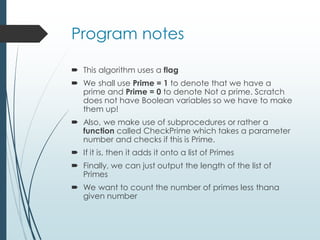
Program notes
 This algorithm uses a flag
 We shall use Prime = 1 to denote that we have a
prime and Prime = 0 to denote Not a prime. Scratch
does not have Boolean variables so we have to make
them up!
 Also, we make use of subprocedures or rather a
function called CheckPrime which takes a parameter
number and checks if this is Prime.
 If it is, then it adds it onto a list of Primes
 Finally, we can just output the length of the list of
Primes
 We want to count the number of primes less thana
given number
Algorithm
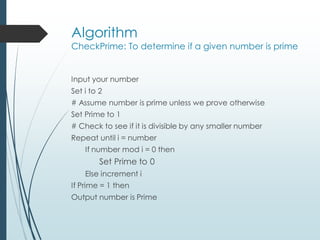
CheckPrime: To determine if a given number is prime
Input your number
Set i to 2
# Assume number is prime unless we prove otherwise
Set Prime to 1
# Check to see if it is divisible by any smaller number
Repeat until i = number
If number mod i = 0 then
Set Prime to 0
Else increment i
If Prime = 1 then
Output number is Prime
Dry Run
At this point, you should have a dry
run to test your algorithm to see if it
is doing what you intended it to
do…
In the dry run you follow the
execution line by line through the
algorithm until you obtain the
output.
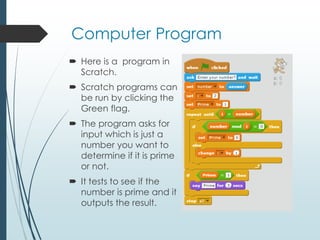
Computer Program
 Here is a program in
Scratch.
 Scratch programs can
be run by clicking the
Green flag.
 The program asks for
input which is just a
number you want to
determine if it is prime
or not.
 It tests to see if the
number is prime and it
outputs the result.
Program development
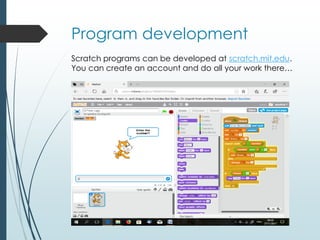
Scratch programs can be developed at scratch.mit.edu.
You can create an account and do all your work there…
Try it yourself
Try creating this project in
Scratch. It is most educational.
You will enjoy the experience.
Program Solution
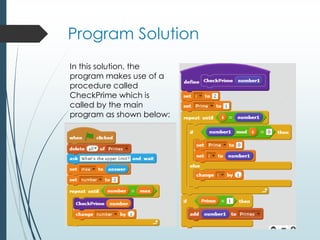
In this solution, the
program makes use of a
procedure called
CheckPrime which is
called by the main
program as shown below:
Testing
Once you have your program, first find the
number of primes less than 10, and then less than
100 and by using this sieve check to see if your
program is returning the correct answers.
Once you are satisfied, you can enter higher limits
and hopefully your program will work for the limit
100000 as per required.
If possible, add a timer to see how long your
program takes to run each of the tests and graph
the result. From your graph, project how long it
would take to compute the result for n = 106.
Testing the Code
Limit Computer Generated
Output
Expected Output
10 4 4
100 25 25
1000 168 168
10000 1229 1229
1000000 78498 78498
1 2 3 4 5 6 7 8 9 10
11 12 13 14 15 16 17 18 19 20
21 22 23 24 25 26 27 28 29 30
31 32 33 34 35 36 37 38 39 40
41 42 43 44 45 46 47 48 49 50
51 52 53 54 55 56 57 58 59 60
61 62 63 64 65 66 67 68 69 70
71 72 73 74 75 76 77 78 79 80
81 82 83 84 85 86 87 88 89 90
91 92 93 94 95 96 97 98 99 100
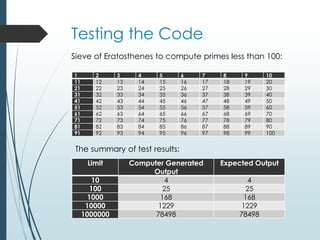
Sieve of Eratosthenes to compute primes less than 100:
The summary of test results:
Conclusion
 We were asked to produce a program
that counts the number of primes less than
10000.
 From the results obtained and the testing
it appears that the program is outputting
the result which is the number of primes
less than the limit.
 The number of primes less than 10000 is
1229. The program can also produce
counts higher than for the limit 10000
without causing any overflow.
Problem 2
 Over the years, it has become very fascinating to
discover the various types of numbers and to explore
their uniqueness. One such type of numbers is the set of
triangular numbers.
 A triangular number or triangle number counts the
objects that can form an equilateral triangle, as in the
diagram.
 The nth triangle number is the number of dots composing
a triangle with n dots on a side, and is equal to the sum
of the n natural numbers from 1 to n.
 The problem is to determine how many of these
numbers there are that are less than 1000000 just as
you did for the primes.
Triangle Numbers
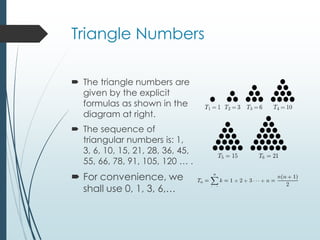
 The triangle numbers are
given by the explicit
formulas as shown in the
diagram at right.
 The sequence of
triangular numbers is: 1,
3, 6, 10, 15, 21, 28, 36, 45,
55, 66, 78, 91, 105, 120 … .
 For convenience, we
shall use 0, 1, 3, 6,…
Algorithm
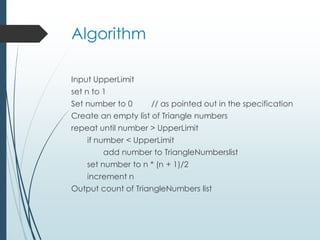
Input UpperLimit
set n to 1
Set number to 0 // as pointed out in the specification
Create an empty list of Triangle numbers
repeat until number > UpperLimit
if number < UpperLimit
add number to TriangleNumberslist
set number to n * (n + 1)/2
increment n
Output count of TriangleNumbers list
Dry Run
You need a dry run for the algorithm
here to make sure it is doing what
you want it to do and giving you the
results, you expect.
Basically, it sets the upper limit,
checks to see if the number is a
triangular number and adds it in if it
is. Finally, it outputs the count.
Check out this algorithm…
Go through step by step to see if it
is actually doing what it is
supposed to do.
Try to follow the next slide.
We would need to run it up to an
UpperLimit of say 5 to convince
ourselves of its correctness.
Dry Run
UpperLimit = 5
Code n n(n + 1)/2 number TriNum count Output
Set n to 1, number to
zero, count to 0
1 0 [] 0
Add number to
TriNums
[0]
Set number to
n(n+1)/2
1 1
Increment n 2
Add number to
TriNums
[0, 1]
Set number to
n(n + 1)/2
3
Add number to
TriNums
[0, 1, 3]
Increment n 3
Set number to
n(n + 1)/2
6 [0,1, 3]
Number is greater than UpperLimit so drops out of loop.
Scratch Program
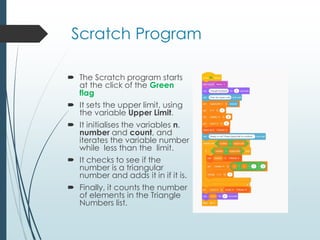
 The Scratch program starts
at the click of the Green
flag
 It sets the upper limit, using
the variable Upper Limit.
 It initialises the variables n,
number and count, and
iterates the variable number
while less than the limit.
 It checks to see if the
number is a triangular
number and adds it in if it is.
 Finally, it counts the number
of elements in the Triangle
Numbers list.
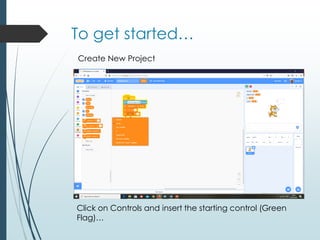
To get started…
Create New Project
Click on Controls and insert the starting control (Green
Flag)…
Variables
 Variables are temporary locations in
memory which you can assign values…
 We have already created several
variables including: n, UpperLimit,
answer, etc
 Use meaningful names for the variable
identifiers
Continuing…
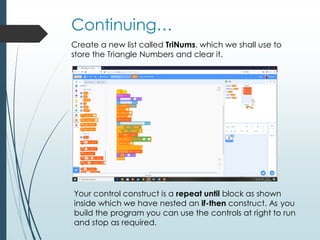
Create a new list called TriNums, which we shall use to
store the Triangle Numbers and clear it.
Your control construct is a repeat until block as shown
inside which we have nested an if-then construct. As you
build the program you can use the controls at right to run
and stop as required.
Program Run with n = 5
Notice the output on the right hand side. With the
UpperLimit as 5 we have the list [0, 1, 3] as per the dry
run.
Shared Program
 This program is shared at Scratch so you can see it at:
 https://scratch.mit.edu/projects/374487361/
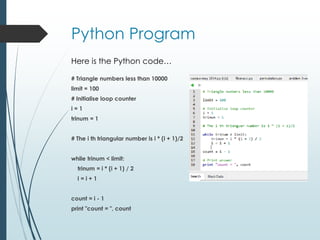
Python Program
# Triangle numbers less than 10000
limit = 100
# Initialise loop counter
i = 1
trinum = 1
# The i th triangular number is i * (i + 1)/2
while trinum < limit:
trinum = i * (i + 1) / 2
i = i + 1
count = i - 1
print "count = ", count
Here is the Python code…
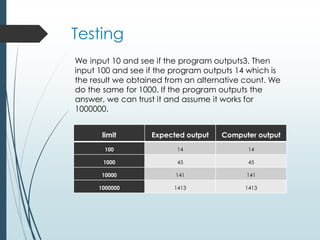
Testing
limit Expected output Computer output
100 14 14
1000 45 45
10000 141 141
1000000 1413 1413
We input 10 and see if the program outputs3. Then
input 100 and see if the program outputs 14 which is
the result we obtained from an alternative count. We
do the same for 1000. If the program outputs the
answer, we can trust it and assume it works for
1000000.
Conclusion
 We designed this program for numbers 0, 1, 3, 6
etc. You could try to see if you could arrange for
it to print out the list as we initially wanted it.
 From the results of the testing using lower
limits, it appears that the program is
computing the count of the triangle
numbers less than the limit.
 We were asked for the count of the triangle
numbers less than 1000000 and the answer is
1413.

Course project solutions 2018

  • 1.
  • 2.
    Requirements  This Mini-Projectwill give you a chance to see how you can use computer languages to solve problems.  I recommend Scratch because it is the most accessible language and is available online at scratch.mit.edu.  You don't have to use Scratch and any other programming language with which you are familiar will work just as well.  Take advantage of this opportunity to learn.
  • 3.
    Problem 1  Aprime number is a number greater than 1 which is only divisible by itself and 1. Thus, 2, 3, 5 etc are prime numbers. To determine if a number is prime we just have to determine if it is divisible by any integer less than itself. Produce a program that counts the number of primes less than 10000.
  • 4.
    Algorithm  To solvethe problem, you would need to develop an algorithm to count the number of primes less than 1000000.  Google the internet to see if you can find a suitable algorithm, or better still come up with one of your own design.  You can use this as a base for developing your own algorithm and program to solve the problem. It should be obvious what the algorithm is doing.  You still have to test it using a dry run anyway.
  • 5.
    Program notes  Thisalgorithm uses a flag  We shall use Prime = 1 to denote that we have a prime and Prime = 0 to denote Not a prime. Scratch does not have Boolean variables so we have to make them up!  Also, we make use of subprocedures or rather a function called CheckPrime which takes a parameter number and checks if this is Prime.  If it is, then it adds it onto a list of Primes  Finally, we can just output the length of the list of Primes  We want to count the number of primes less thana given number
  • 6.
    Algorithm CheckPrime: To determineif a given number is prime Input your number Set i to 2 # Assume number is prime unless we prove otherwise Set Prime to 1 # Check to see if it is divisible by any smaller number Repeat until i = number If number mod i = 0 then Set Prime to 0 Else increment i If Prime = 1 then Output number is Prime
  • 7.
    Dry Run At thispoint, you should have a dry run to test your algorithm to see if it is doing what you intended it to do… In the dry run you follow the execution line by line through the algorithm until you obtain the output.
  • 8.
    Computer Program  Hereis a program in Scratch.  Scratch programs can be run by clicking the Green flag.  The program asks for input which is just a number you want to determine if it is prime or not.  It tests to see if the number is prime and it outputs the result.
  • 9.
    Program development Scratch programscan be developed at scratch.mit.edu. You can create an account and do all your work there…
  • 10.
    Try it yourself Trycreating this project in Scratch. It is most educational. You will enjoy the experience.
  • 11.
    Program Solution In thissolution, the program makes use of a procedure called CheckPrime which is called by the main program as shown below:
  • 12.
    Testing Once you haveyour program, first find the number of primes less than 10, and then less than 100 and by using this sieve check to see if your program is returning the correct answers. Once you are satisfied, you can enter higher limits and hopefully your program will work for the limit 100000 as per required. If possible, add a timer to see how long your program takes to run each of the tests and graph the result. From your graph, project how long it would take to compute the result for n = 106.
  • 13.
    Testing the Code LimitComputer Generated Output Expected Output 10 4 4 100 25 25 1000 168 168 10000 1229 1229 1000000 78498 78498 1 2 3 4 5 6 7 8 9 10 11 12 13 14 15 16 17 18 19 20 21 22 23 24 25 26 27 28 29 30 31 32 33 34 35 36 37 38 39 40 41 42 43 44 45 46 47 48 49 50 51 52 53 54 55 56 57 58 59 60 61 62 63 64 65 66 67 68 69 70 71 72 73 74 75 76 77 78 79 80 81 82 83 84 85 86 87 88 89 90 91 92 93 94 95 96 97 98 99 100 Sieve of Eratosthenes to compute primes less than 100: The summary of test results:
  • 14.
    Conclusion  We wereasked to produce a program that counts the number of primes less than 10000.  From the results obtained and the testing it appears that the program is outputting the result which is the number of primes less than the limit.  The number of primes less than 10000 is 1229. The program can also produce counts higher than for the limit 10000 without causing any overflow.
  • 15.
    Problem 2  Overthe years, it has become very fascinating to discover the various types of numbers and to explore their uniqueness. One such type of numbers is the set of triangular numbers.  A triangular number or triangle number counts the objects that can form an equilateral triangle, as in the diagram.  The nth triangle number is the number of dots composing a triangle with n dots on a side, and is equal to the sum of the n natural numbers from 1 to n.  The problem is to determine how many of these numbers there are that are less than 1000000 just as you did for the primes.
  • 16.
    Triangle Numbers  Thetriangle numbers are given by the explicit formulas as shown in the diagram at right.  The sequence of triangular numbers is: 1, 3, 6, 10, 15, 21, 28, 36, 45, 55, 66, 78, 91, 105, 120 … .  For convenience, we shall use 0, 1, 3, 6,…
  • 17.
    Algorithm Input UpperLimit set nto 1 Set number to 0 // as pointed out in the specification Create an empty list of Triangle numbers repeat until number > UpperLimit if number < UpperLimit add number to TriangleNumberslist set number to n * (n + 1)/2 increment n Output count of TriangleNumbers list
  • 18.
    Dry Run You needa dry run for the algorithm here to make sure it is doing what you want it to do and giving you the results, you expect. Basically, it sets the upper limit, checks to see if the number is a triangular number and adds it in if it is. Finally, it outputs the count.
  • 19.
    Check out thisalgorithm… Go through step by step to see if it is actually doing what it is supposed to do. Try to follow the next slide. We would need to run it up to an UpperLimit of say 5 to convince ourselves of its correctness.
  • 20.
    Dry Run UpperLimit =5 Code n n(n + 1)/2 number TriNum count Output Set n to 1, number to zero, count to 0 1 0 [] 0 Add number to TriNums [0] Set number to n(n+1)/2 1 1 Increment n 2 Add number to TriNums [0, 1] Set number to n(n + 1)/2 3 Add number to TriNums [0, 1, 3] Increment n 3 Set number to n(n + 1)/2 6 [0,1, 3] Number is greater than UpperLimit so drops out of loop.
  • 21.
    Scratch Program  TheScratch program starts at the click of the Green flag  It sets the upper limit, using the variable Upper Limit.  It initialises the variables n, number and count, and iterates the variable number while less than the limit.  It checks to see if the number is a triangular number and adds it in if it is.  Finally, it counts the number of elements in the Triangle Numbers list.
  • 22.
    To get started… CreateNew Project Click on Controls and insert the starting control (Green Flag)…
  • 23.
    Variables  Variables aretemporary locations in memory which you can assign values…  We have already created several variables including: n, UpperLimit, answer, etc  Use meaningful names for the variable identifiers
  • 24.
    Continuing… Create a newlist called TriNums, which we shall use to store the Triangle Numbers and clear it. Your control construct is a repeat until block as shown inside which we have nested an if-then construct. As you build the program you can use the controls at right to run and stop as required.
  • 25.
    Program Run withn = 5 Notice the output on the right hand side. With the UpperLimit as 5 we have the list [0, 1, 3] as per the dry run.
  • 26.
    Shared Program  Thisprogram is shared at Scratch so you can see it at:  https://scratch.mit.edu/projects/374487361/
  • 27.
    Python Program # Trianglenumbers less than 10000 limit = 100 # Initialise loop counter i = 1 trinum = 1 # The i th triangular number is i * (i + 1)/2 while trinum < limit: trinum = i * (i + 1) / 2 i = i + 1 count = i - 1 print "count = ", count Here is the Python code…
  • 28.
    Testing limit Expected outputComputer output 100 14 14 1000 45 45 10000 141 141 1000000 1413 1413 We input 10 and see if the program outputs3. Then input 100 and see if the program outputs 14 which is the result we obtained from an alternative count. We do the same for 1000. If the program outputs the answer, we can trust it and assume it works for 1000000.
  • 29.
    Conclusion  We designedthis program for numbers 0, 1, 3, 6 etc. You could try to see if you could arrange for it to print out the list as we initially wanted it.  From the results of the testing using lower limits, it appears that the program is computing the count of the triangle numbers less than the limit.  We were asked for the count of the triangle numbers less than 1000000 and the answer is 1413.