Continuous Security
Embracing Security Automation
1
What I Will Cover
Attack Volumes
Recent Attacks
Taking an Agile Approach
Project Overview
Tool Survey
Wrap Up
2
Attack Volumes
3
4
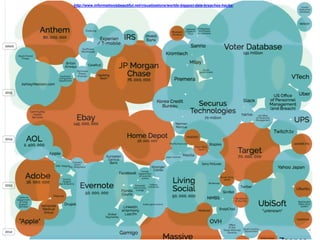
http://www.informationisbeautiful.net/visualizations/worlds-biggest-data-breaches-hacks/
High Profile Attacks
5
Target
Unnecessarily Exposed Data
Phishing Attack
Non-Segmented Network
Out of Date Software
Exposed Secrets
In Memory Data
7
Stolen Vendors Credentials
Improper Configurations
Important Anti-Virus Feature Turned Off
POS Systems Running on Windows XP
Unencrypted Data In Transit
Non-Segmented Network
Inadequate Monitoring
Home Depot
8
Sally Beauty
10
Credentials Taped to Laptop
Network Admin Credentials in VB
Scripts
Installed Malware on Cash
Registers
An Agile Approach
11
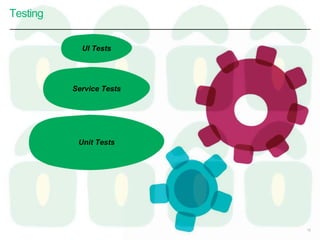
Testing
12
Unit Tests
Service Tests
UI Tests
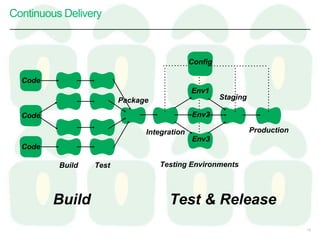
Continuous Delivery
13
Code
Code
Code
Config
Build Test
Package
Integration
Staging
Production
Env1
Env2
Env3
Testing Environments
Build Test & Release
How Can We Apply This to Security?
14
Project Overview
15
16
17
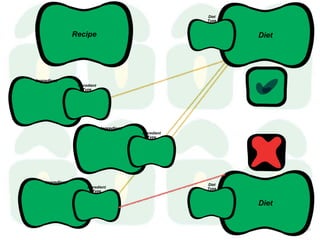
Recipe
Ingredient
Ingredient
Type
Diet
Diet
Type
Ingredient
Ingredient
Type
Ingredient
Ingredient
Type
Diet
Diet
Type
18
Tool Survey
19
If checking
for vulnerable components
is good,
we will do so every time
we commit code.
20
Objenesis
Vulnerable Components
21
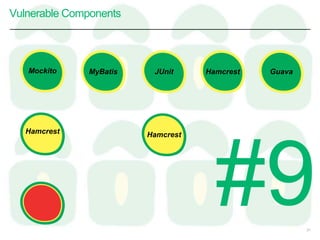
GuavaMyBatis JUnit Hamcrest
Hamcrest Hamcrest
Mockito
Vulnerable Components
22
http://www.aspectsecurity.com/research-presentations/the-unfortunate-reality-of-insecure-libraries
We studied the 31 most popular
Java frameworks and security libraries
downloaded from the [maven central]
and discovered that 26% of these
have known vulnerabilities.
More than half of the Global 500
use software built using components
with vulnerable code.
Vulnerable Components - Examples
23
https://www.owasp.org/index.php/Top_10_2013-A9-Using_Components_with_Known_Vulnerabilities
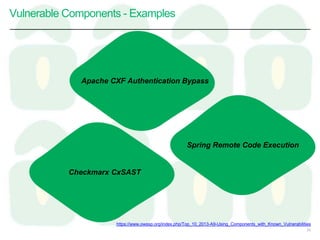
Apache CXF Authentication Bypass
Spring Remote Code Execution
Checkmarx CxSAST
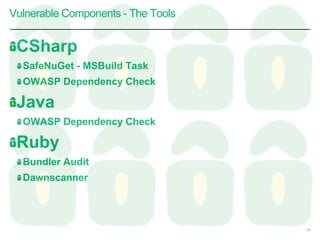
CSharp
SafeNuGet - MSBuild Task
OWASP Dependency Check
Java
OWASP Dependency Check
Ruby
Bundler Audit
Dawnscanner
Vulnerable Components - The Tools
24
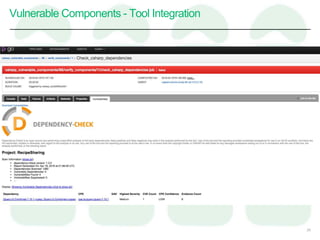
Vulnerable Components - Tool Integration
25
If updating
our dependencies
is desired,
we will
run canary builds regularly
to tell us when we can update.
26
Objenesis
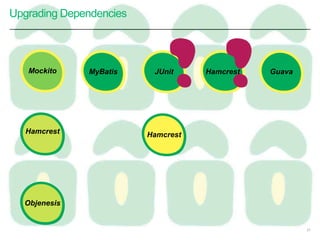
Upgrading Dependencies
27
GuavaMyBatis JUnit Hamcrest
Hamcrest Hamcrest
MockitoMockito
Hamcrest
Objenesis
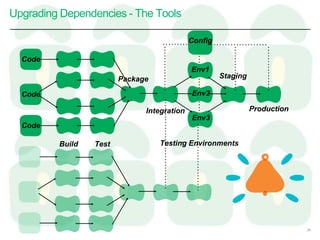
Upgrading Dependencies - The Tools
28
Code
Code
Code
Config
Build Test
Package
Integration
Staging
Production
Env1
Env2
Env3
Testing Environments
If not exposing secrets
is important,
we will ensure
they are never committed
to our version control system.
29
Exposing Secrets
30
A talisman is an object which is
believed to contain certain
magical or sacramental
properties which would provide
good luck for the possessor or
possibly offer protection from
evil or harm.
Exposing Secrets - The Tools
31
https://en.wikipedia.org/wiki/Talisman
Exposing Secrets - Tool Integration
32
Exposing Secrets - Tool Integration
33
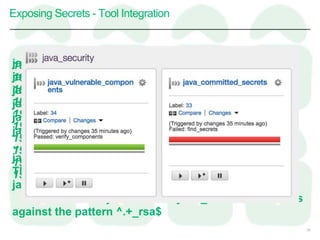
19:54:42.329 :findSecrets FAILED
19:54:42.336
19:54:42.336 BUILD FAILED
19:54:42.336
19:54:42.336 Total time: 3.085 secs
19:54:42.339
19:54:42.339 FAILURE: Build failed with an exception.
19:54:42.339
19:54:42.339 * What went wrong:
19:54:42.339 Execution failed for task ':findSecrets'.
java/build.gradle
java/gradle/wrapper/gradle-wrapper.jar
java/gradle/wrapper/gradle-wrapper.properties
java/gradlew
java/gradlew.bat
java/notReallyAn._rsa
…
java/src/vulnerableCheckSuppression.xml
The following errors were detected in
java/notReallyAn._rsa
The file name "java/notReallyAn._rsa" failed checks
against the pattern ^.+_rsa$
If searching for
possible attack vectors
for our web sites
is good,
we will
automate this search.
to our version control system.
34
Finding Vulnerabilities
35
Finding Vulnerabilities - The Tools
36
HTML
Ajax
Extensions
Port Scanning
Fuzzing
LDAP Injection
Session Fixation
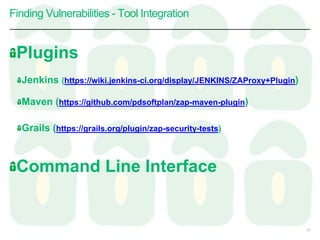
Finding Vulnerabilities - Tool Integration
Plugins
Jenkins (https://wiki.jenkins-ci.org/display/JENKINS/ZAProxy+Plugin)
Maven (https://github.com/pdsoftplan/zap-maven-plugin)
Grails (https://grails.org/plugin/zap-security-tests)
Command Line Interface
37
Wrap Up
38
Potential Downsides
False Positives
Longer Running Builds
Won’t Catch Everything
New Things Everyday
39
Attack Tie Backs - Target
Secrets may not have been
discovered
Up to date vendor system may
have eliminated vulnerabilities
ZAP testing might have
highlighted network navigability
40
Attack Tie Backs - Home Depot
41
Up to date POS OS may have
eliminated vulnerabilities
ZAP testing might have
highlighted network navigability
Attack Tie Backs - Sally Beauty
Secrets may not have been
discovered
42
Application Code:
https://github.com/wendyi/continuousSecurity
Pipelines:
https://github.com/wendyi/continuousSecurityCi
Slides:
http://www.slideshare.net/WendyIstvanick
Trello:
https://trello.com/b/SVoLynan/continuous-security
Links
43
Next Steps
Finish Wiring Up Existing Checks
Contribute Talisman Changes
Finish End to End Code
Wire Up ZAP
Set Up Canary Builds
Find Other Tools to Include
44
Thank You
Questions?
45

Continuous Security - TCCC

Editor's Notes

  • #7 exposed data phishing out of date software non-segmented network secrets in memory data 2000 stores 40 million credit cards private data for 70 million customers
  • #8 2000 stores 40 million credit cards private data for 70 million customers switch to hidden slide with images
  • #9 Lacked proper segmentation between corporate network and POS network. switch to slide with images
  • #11 260,000 credit cards 2600 locations switch to hidden slide with images
  • #24 Apache CXF Authentication Bypass – By failing to provide an identity token, attackers could invoke any web service with full permission. (Apache CXF is a services framework, not to be confused with the Apache Application Server.) Spring Remote Code Execution – Abuse of the Expression Language implementation in Spring allowed attackers to execute arbitrary code, effectively taking over the server. Checkmarx CxSAST (formerly CxSuite) before 7.1.8 allows remote authenticated users to bypass the CxQL sandbox protection mechanism and execute arbitrary C# code by asserting the (1) System.Security.Permissions.PermissionState.Unrestricted or (2) System.Security.Permissions.SecurityPermissionFlag.AllFlags permission. Add Ruby/Rails Example
  • #29 Canary Builds
  • #37 Zed Attack Proxy ZAP passively scans all of the requests and responses that it discovers via the spiders or that are proxied through it from your browser. Passive scanning does not change the responses in any way and is therefore always safe to use. Scanned is performed in a background thread to ensure that it does not slow down the exploration of an application. Passive scanning is good for finding a limited number of potential vulnerabilities, such as missing security related HTTP headers. It can be an effective way to get a sense of the state of security in a given web application, and clues for where to focus more invasive manual testing. Active scanning attempts to find potential vulnerabilities by using known attacks against the selected targets. As active scanning is an attack on those targets it is completely under user control and should only be used against applications that you have permission to test. Active scanning can be started via the Active Scan tab or the right click ‘Attack’ menu.
  • #40 Change to Symbols to Represent These
  • #41 Additionally - Exposed private data on vendor web site & Microsoft web site - Did not use 2-factor authentication - Used default user names & passwords - Unencrypted card data in memory - Logs could have been monitored more closely - Missed initial alerts
  • #42 Additionally - Vendor out of their control
  • #43 Additionally - Password written down