1
CHAPTER 1
INTRODUCTION OF PHP
What is PHP?
The PHP Hypertext Preprocessor (PHP) is a programming language that allows web developers to
create dynamic content that interacts with databases. PHP is basically used for developing web
based software applications. It is a widely-used, open source scripting language and executed on
the server.PHP started out as a small open source project that evolved as more and more people
found out how useful it was. Rasmus Lerdorf unleashed the first version of PHP way back in 1994.
 PHP is a server side scripting language that is embedded in HTML. It is used to manage
dynamic content, databases, session tracking, even build entire e-commerce sites.
 It is integrated with a number of popular databases, including MySQL, PostgreSQL,
Oracle, Sybase, Informix, and Microsoft SQL Server.
 PHP is pleasingly zippy in its execution, especially when compiled as an Apache module
on the Unix side. The MySQL server, once started, executes even very complex queries
with huge result sets in record-setting time.
 PHP supports a large number of major protocols such as POP3, IMAP, and LDAP. PHP4
added support for Java and distributed object architectures (COM and CORBA), making
n-tier development a possibility for the first time.
 PHP is forgiving: PHP language tries to be as forgiving as possible.
 PHP Syntax is C-Like.
Why PHP?
 PHP runs on various platforms (Windows, Linux, Unix, Mac OS X, etc.)
 PHP is compatible with almost all servers used today (Apache, IIS, etc.)
2
 PHP supports a wide range of databases
 PHP is free. Download it from the official PHP resource: www.php.net
 PHP is easy to learn and runs efficiently on the server side.
Installation
What Do I Need?
1. Browser
2. Server ( Wampserver , Xampp)
3. Editor (Dreamweaver, notepad++,notepad )
Set Up PHP on Your Own PC
1. Step 1: download the files. Download the latest PHP 5 ZIP package from
www.php.net/downloads.php. ...
2. Step 2: extract the files. ...
3. Step 3: configure php.ini. ...
4. Step 4: add C:php to the path environment variable. ...
5. Step 5: configure PHP as an A
6. pache module. ...
7. Step 6: test a PHP file.
3
CHAPTER 2
INTRODUCTION OF THE PROJECT
1.1 The Definition of a CMS
A web site's "content" is a combination of different components: text, graphics, images,
scripts, included files such as Flash animations, audio/video streams or downloadable files.
All of these may be components of one page, included in an HTML page using links or
sometimes integrated in the HTML page itself. But even the text shown in the HTML page
itself is regarded as "content". Content management systems organize and classify these
components by dividing the content from the layout. In more concrete terms, the content is
stored in content files, the layout is stored in layout files (i.e. document templates).
Using this approach, a CMS provides the means for treating content and layout in separate
ways. This also allows using the same content in different documents and formatted for
different media ("crossmedia publishing"); think of an HTML page as it shows in the browser
and the printer-friendly display of the same page,
for example. A content management system is a software package specifically designed to
manage a website. It is installed by the web designers, but intended to be used by you. First
off, it provides you with a simple, non-technical way of updating your content. This is
typically (but not always) done via a web-based interface that works much like Word does.
Just point-and-click, type in the new words, and hit save. The site is instantly updated. Equally
easy is adding new pages, deleting old ones, or restructuring the site to match your new
business model.
The index page or the Blog page of this website consists of the images that user wants to upload
and manage on his website which consists of its category ,time when its uploaded and the and
other user can comments on his site too .
4
CHAPTER 3
REQUIREMENTS, FEASIBILITY AND SCOPE
3.1 SOFTWAREREQUIREMNETS
 Browser
 Server(Wampserver ,XAMPP)
 PHP
 Database (MySQL suggested)
 Editor(Notepad, Notepad++,Dreamweaver)
3.2 HARWARE REQUIREMENTS
 Minimum 350MB Hard Disk spacefor installation.
 4GB HD spacerequired for a typical live system with 1000-2000 events.
 Recommended minimum CPU - Pentium 4, 3.2GHz.
 Recommended 1GB RAM for a Central Server with 3 Nodes.
 Network card.
3.3 FEASIBILITY AND SCOPE
 This project is feasible as all modules are working on the local server or wamp server.
 This project can be used to develop any educational website. This website can be used to
promote the school and colleges on web.
 The mail containing the order information reaches the to the responsible person within a
second.
 After receiving the mail the school staff can contact the person who has fill the contact
from and mail can be send to the mailer person.
5
CHAPTER 4
Introduction to bootstrap
 Bootstrap is a sleek, intuitive, and powerful mobile first front-end framework for faster
and easier web development.
 It uses HTML,CSS and Javascript.
History
 Bootstrap was developed by Mark Otto and Jacob Thornton at Twitter.
 Mobile first approach: Since Bootstrap 3, the framework consists of Mobile first styles
Throught the entire library instead of in separate files.
 Browser Support: It is supported by all popular browsers..
 Easy to get started: With just the knowledge of HTML and CSS anyone can get started
With bootstrap. Also the bootstap also the bootstrap official site has a good
documentation.
 Responsive design: Bootstrap's responsive CSS adjusts to Desktops, Tablets and Mobiles.
 Provides a clean and uniform solution for building an interface for developers.
 It contains beautiful and functional built-in components which are easy to customize.
 Scaffolding: Bootstrap provides a basic structure with Grid System, link styles, background.
 CSS: Bootstrap comes with feature of global CSS settings, fundamental HTML elements
 Components: Bootstrap contains over a dozen reusable components built to provide
dropdowns, navigation, alerts, popovers, and much more.
 JavaScript Plugins: Bootstrap contains over a dozen custom jQuery plugins. You can easily
include them all, or one by one. This is covered in details in the section Bootstrap Plugins.
 Customize: You can customize Bootstrap's components, LESS variables, and jQuery plugins to
get your very own version.
6
CHAPTER 5
CODING, DESIGN AND DATA FLOW DIGRAM
5.1 Include Folder
5.1.1 Database Connection:
<?php
$con= mysqli_connect("localhost","root","","phpcms");
?>
5.1.2 Functions:-
<?php
require_once("include/db.php");
require_once("include/session.php");
require_once("include/function.php");
?>
<?php
function redirect_to($newlocation){
header("Location:".$newlocation);
exit;
}
function login_attempt($username, $password){
global $con;
$query="select * from registration where username='$username' and
password='$password'";
$execute=mysqli_query($con,$query);
7
if($admin=mysqli_fetch_assoc($execute)){
return $admin;
}
else
return null;
}
function login(){
if(isset($_SESSION['id'])){
return true;
}
}
function confirm_login(){
if(!login()){
$_SESSION["ERROR MESSAGE"]= "Log in required!";
redirect_to('adminlogin.php');
}
}
?>
5.1.3 Sessions:-
8
<?php
session_start();
function message(){
if(isset($_SESSION["ERROR MESSAGE"])){
$output="<div class="alert alert-danger">" ;
$output.=htmlentities($_SESSION["ERROR MESSAGE"]);
$output.="</div>";
$_SESSION["ERROR MESSAGE"]=null;
return $output;
}
}
function successmessage(){
if(isset($_SESSION["SUCCESS MESSAGE"])){
$output="<div class="alert alert-success">" ;
$output.=htmlentities($_SESSION["SUCCESS MESSAGE"]);
$output.="</div>";
$_SESSION["SUCCESS MESSAGE"]=null;
return $output;
}
}
?>
9
CHAPTER 6:
PUBLIC PAGE:-
HOME
Coding of home page:-
<?php
require_once("include/db.php");
require_once("include/session.php");
require_once("include/function.php");
?>
<!DOCTYPE html PUBLIC "-//W3C//DTD XHTML 1.0 Transitional//EN"
"http://www.w3.org/TR/xhtml1/DTD/xhtml1-transitional.dtd">
<html xmlns="http://www.w3.org/1999/xhtml">
<head>
<meta charset="utf-8">
<meta http-equiv="X-UA-Compatible" content="IE=edge">
<meta name="viewport" content="width=device-width, initial-scale=1">
<meta name="description" content="">
<meta name="author" content=""> <title>Content Management
System</title>
<link href="css/half-slider.css" rel="stylesheet">
<meta http-equiv="Content-Type" content="text/html; charset=utf-8" />
10
<link rel="stylesheet" href="https://cdnjs.cloudflare.com/ajax/libs/font-
awesome/4.7.0/css/font-awesome.min.css">
<link rel="stylesheet" href="css/bootstrap.min.css" >
<script src="js/jquery-3.3.1.min.js"></script>
<script src="js/bootstrap.min.js"></script>
<link rel="stylesheet" href="css/publicstyle.css" >
</head>
<bodybackground="admin/image/Picture1.jpg" style="font-family: "Raleway",
sans-serif;">
<?php include 'header.php'; ?>
<header id="myCarousel" class="carouselslide">
<!-- Indicators -->
<ol class="carousel-indicators">
<li data-target="#myCarousel" data-slide-to="0" class="active"></li>
<li data-target="#myCarousel" data-slide-to="1"></li>
<li data-target="#myCarousel" data-slide-to="2"></li>
</ol>
<!-- Wrapper for Slides -->
<div class="carousel-inner">
<div class="item active">
<!-- Set the second background image using inline CSS below. -->
11
<div class="fill" style="background-image:url('admin/image/black-
b.jpg');"></div>
<div class="carousel-caption">
</div>
</div>
<div class="item">
<!-- Set the third background image using inline CSS below. -->
<div class="fill" style="background-
image:url('admin/image/blo.jpg');"></div>
<div class="carousel-caption">
</div>
</div>
</div>
<!-- Controls -->
<a class="left carousel-control" href="#myCarousel" data-slide="prev">
<spanclass="icon-prev"></span>
</a>
<a class="right carousel-control" href="#myCarousel" data-slide="next">
<spanclass="icon-next"></span>
12
</a>
</header>
<!-- Page Content -->
<div class="container">
<div class="row">
<div class="col-lg-12">
<h1 align="center">Welcome To Online Content Management
System</h1>
<p><img src="admin/image/blogging-b7.jpg" width="50%"
height="50%" align="left">
<img src="admin/image/blogg.jpg" width="50%" height="40%"
align="right">
</p></div>
</div>
<hr>
<!-- Footer --> <?php include'footer.php'; ?>
</div>
<!-- /.container -->
<!-- jQuery –!>
<script src="js/jquery.js"></script>
13
<!-- Bootstrap Core JavaScript -->
<scriptsrc="js/bootstrap.min.js"></script>
<!-- Script to Activate the Carousel -->
<script>
$('.carousel').carousel({
interval: 500 //changes the speed })</script></body></html>
14
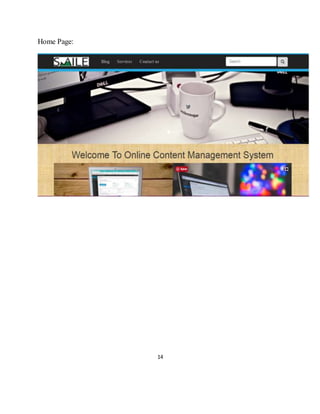
Home Page:
15
6.1 Header Page
6.1.1 CODING
<?php
require_once("include/db.php");
require_once("include/session.php");
require_once("include/function.php");
?>
<!DOCTYPE html PUBLIC "-//W3C//DTD XHTML 1.0 Transitional//EN"
"http://www.w3.org/TR/xhtml1/DTD/xhtml1-transitional.dtd">
<html xmlns="http://www.w3.org/1999/xhtml">
<head><meta http-equiv="Content-Type" content="text/html; charset=utf-8" />
<title>blog</title>
<link rel="stylesheet" href="css/bootstrap.min.css" >
<script src="js/jquery-3.3.1.min.js"></script>
<script src="js/bootstrap.min.js"></script>
<link rel="stylesheet" href="css/publicstyle.css" >
</head>
<body style="background-color:#09F;">
<div style="height:10px; background:#27aae1;"></div>
<nav class="navbar navbar-inverse "role="navigation">
<div class="container">
<div class="navbar-header">
<button type="button" class="navbar-toggle collapsed " data-toggle="collapse" data-
target="#collapse">
<!--toggle ke liye!-->
<span class="sr-only">TOggle Navigation</span>
16
<span class="icon-bar"></span><span class="icon-bar"></span>
<span class="icon-bar"></span>
</button><a class="navbar-brand" href="blog.php"> <img style="margin-top:-6px;"
src="image/cover.jpg" width="139" height="33" width:100; height:30; "> </a> </div>
<!--navbar header!--><div class="collapse navbar-collapse" id="collapse">
<ul class="nav navbar-nav">
<li class="active"><a href="blog.php">Blog</a></li>
<li><a href="services.php">Services</a></li>
<li><a href="contactus.php">Contact us</a></li>
</ul>
<form action="blog.php" class="navbar-form navbar-right">
<div class="form-group">
<input name="search" type="text" class="form-control" placeholder="Search" >
</div>
<button class="btn btn-deafult" name="searchbutton"><span class="fa fa-
search">GO</span> </button>
</form> </div> <!--collapse navbar-collapse wala !-->
</div> <!--container div!-->
</nav> <!--navigation wala!-->
<div class="line" style="height:10px; background:#27aae1;"></div>
<div class="blog-header">
<h3>
<div class="col-sm-offset-1 col-sm-3" >
</div><!--div of sm 3 wala!-->
</div><!-- this div is for row --!>
</div><!-- this div for the body part of main class container!-->
</body></html>
17
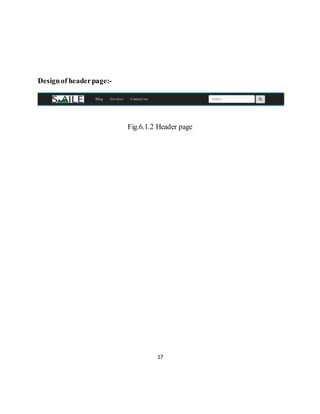
Designof headerpage:-
Fig.6.1.2 Header page
18
6.2 Footer
6.2.1 Coding of footerpage:-
<!DOCTYPE html PUBLIC "-//W3C//DTD XHTML 1.0 Transitional//EN"
"http://www.w3.org/TR/xhtml1/DTD/xhtml1-transitional.dtd">
<html xmlns="http://www.w3.org/1999/xhtml">
<head>
<meta http-equiv="Content-Type" content="text/html; charset=utf-8" />
<title>blog</title>
<link rel="stylesheet" href="css/bootstrap.min.css" >
<script src="js/jquery-3.3.1.min.js"></script>
<script src="js/bootstrap.min.js"></script>
<link rel="stylesheet" href="css/publicstyle.css" >
</head>
<body>
<div id="footer">
<hr> <p>
Simple CMS in cooperation With| Ramanpreet & Anand | &nbsp; &copy; 2018-2024-----All
Rights Reserved. <a href="https://www.facebook.com/Ananduvx" class="fa fa-facebook"></a>
<a href="https://www.twitter.com/ananduvx" class="fa fa-twitter"></a>
</p> <hr>
<div style="height:10px; background:#27aae1;"></div>
</div><!--ending of footer!--> </body>
</html>
19
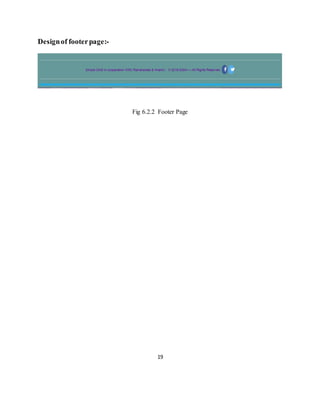
Designof footerpage:-
Fig 6.2.2 Footer Page
20
6.3 Blog
Coding of Blog page:-
<?php
require_once("include/db.php");
require_once("include/session.php");
require_once("include/function.php");
?>
<!DOCTYPE html PUBLIC "-//W3C//DTD XHTML 1.0 Transitional//EN"
"http://www.w3.org/TR/xhtml1/DTD/xhtml1-transitional.dtd">
<html xmlns="http://www.w3.org/1999/xhtml">
<head>
<meta http-equiv="Content-Type" content="text/html; charset=utf-8" />
<title>blog</title>
<link rel="stylesheet" href="https://cdnjs.cloudflare.com/ajax/libs/font-
awesome/4.7.0/css/font-awesome.min.css">
<link rel="stylesheet" href="css/bootstrap.min.css" >
<script src="js/jquery-3.3.1.min.js"></script>
<script src="js/bootstrap.min.js"></script>
<link rel="stylesheet" href="css/publicstyle.css" >
</head><bodybackground="admin/image/Picture1.jpg" style="font-family:
"Raleway", sans-serif;">
21
<div style="height:10px; background:#27aae1;"></div>
<nav class="navbar navbar-inverse "role="navigation">
<div class="container">
<div class="navbar-header">
<button type="button" class="navbar-toggle collapsed " data-
toggle="collapse" data-target="#collapse">
<!--toggle ke liye!-->
<span class="sr-only">TOggle Navigation</span>
<span class="icon-bar"></span>
</button>
<a class="navbar-brand" href="index.php"> <img style="margin-top:-6px;"
src="admin/image/cover.jpg" width="139" height="33" width:100; height:30; ">
</a>
</div>
<!--navbar header!-->
<div class="collapse navbar-collapse" id="collapse">
<ul class="nav navbar-nav">
<li class="active"><a href="blog.php">Blog</a></li
22
<li><a href="services.php">Services</a></li>
<li><a href="contactus.php">Contactus</a></li>
</ul>
<form action="blog.php" class="navbar-form navbar-right">
<div class="form-group">
<input name="search" type="text" class="form-control"
placeholder="Search" >
</div>
<button class="btnbtn-deafult glyphicon glyphicon-search"
name="searchbutton"></button>
</form>
</div> <!--collapse navbar-collapse wala !-->
</div>
<!--container div!-->
</nav> <!--navigation wala!-->
<div class="line" style="height:10px; background:#27aae1;"></div>
<div class="container">
<div class="blog-header">
<h3>
Blogs </h3>
<?php echo message();
23
echo successmessage();?>
</div> <!--blog header!-->
<div class="rowcontent">
<div class="col-sm-6" >
<?php
global $con; if(isset($_GET['searchbutton'])){
$search=$_GET['search'];
$query= "select * from admin where datetime like '%$search%'
or title like '%$search%'
or category like '%$search%'
or postlike '%$search%'
"; }
else{
$query="select * from admin order by datetime desc";
}
$execute=mysqli_query($con,$query);
while($data=mysqli_fetch_array($execute)){
$id= $data['id'];
$date=$data['datetime'];
24
$title=$data['title'];
$category=$data['category'];
$admin=$data['author'];
$image=$data['image'];
$post=$data['post'];
?>
<div class="blogpostthumbnail">
<img class="img-responsive img-rounded" src="admin/upload/<?php echo
$image; ?>" >
<div class="caption">
<h1 id="heading"><?php echo htmlentities($title); ?></h1>
<p class="description">Category:<?php echo htmlentities($category); ?>
Published on: <?php echo htmlentities($date); ?></p>
<p class="post"><?php
if(strlen($post)>5){
$post=substr($post,0,200)."...";
}
echo htmlentities($post); ?></p>
</div>
<a href="fullpost.php?id=<?php echo $id; ?>" ><spanclass="btnbtn-info">Read
more &rsaquo;&rsaquo;</span></a>
25
</div>
</p>
</div><!--sm-7-wala!-->
<div class="col-sm-6" >
<?php
} ?>
</div><!--div of sm 3 wala!-->
</div><!-- this div is for row !-->
</div><!-- this div for the bodypart of main class
container!-->
<?php include'footer.php';?>
</body>
</html>
26
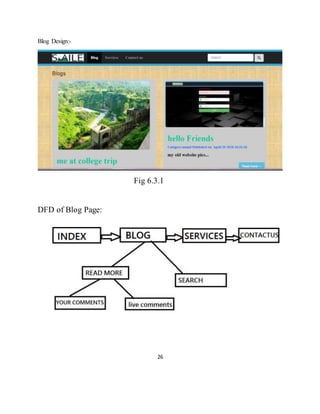
Blog Design:-
Fig 6.3.1
DFD of Blog Page:
27
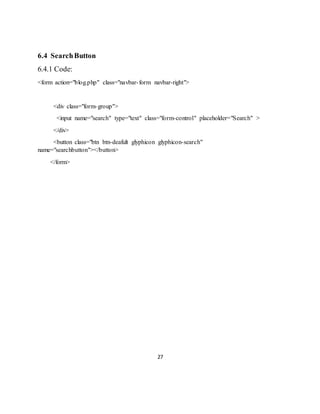
6.4 SearchButton
6.4.1 Code:
<form action="blog.php" class="navbar-form navbar-right">
<div class="form-group">
<input name="search" type="text" class="form-control" placeholder="Search" >
</div>
<button class="btn btn-deafult glyphicon glyphicon-search"
name="searchbutton"></button>
</form>
28
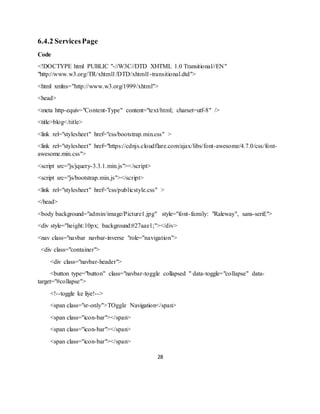
6.4.2 ServicesPage
Code
<!DOCTYPE html PUBLIC "-//W3C//DTD XHTML 1.0 Transitional//EN"
"http://www.w3.org/TR/xhtml1/DTD/xhtml1-transitional.dtd">
<html xmlns="http://www.w3.org/1999/xhtml">
<head>
<meta http-equiv="Content-Type" content="text/html; charset=utf-8" />
<title>blog</title>
<link rel="stylesheet" href="css/bootstrap.min.css" >
<link rel="stylesheet" href="https://cdnjs.cloudflare.com/ajax/libs/font-awesome/4.7.0/css/font-
awesome.min.css">
<script src="js/jquery-3.3.1.min.js"></script>
<script src="js/bootstrap.min.js"></script>
<link rel="stylesheet" href="css/publicstyle.css" >
</head>
<body background="admin/image/Picture1.jpg" style="font-family: "Raleway", sans-serif;">
<div style="height:10px; background:#27aae1;"></div>
<nav class="navbar navbar-inverse "role="navigation">
<div class="container">
<div class="navbar-header">
<button type="button" class="navbar-toggle collapsed " data-toggle="collapse" data-
target="#collapse">
<!--toggle ke liye!-->
<span class="sr-only">TOggle Navigation</span>
<span class="icon-bar"></span>
29
</button>
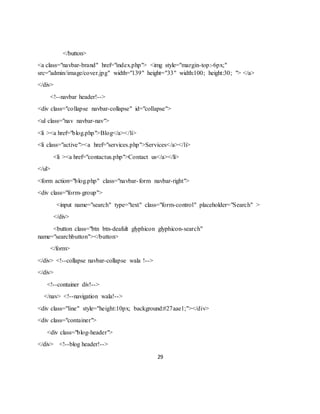
<a class="navbar-brand" href="index.php"> <img style="margin-top:-6px;"
src="admin/image/cover.jpg" width="139" height="33" width:100; height:30; "> </a>
</div>
<!--navbar header!-->
<div class="collapse navbar-collapse" id="collapse">
<ul class="nav navbar-nav">
<li ><a href="blog.php">Blog</a></li>
<li class="active"><a href="services.php">Services</a></li>
<li ><a href="contactus.php">Contact us</a></li>
</ul>
<form action="blog.php" class="navbar-form navbar-right">
<div class="form-group">
<input name="search" type="text" class="form-control" placeholder="Search" >
</div>
<button class="btn btn-deafult glyphicon glyphicon-search"
name="searchbutton"></button>
</form>
</div> <!--collapse navbar-collapse wala !-->
</div>
<!--container div!-->
</nav> <!--navigation wala!-->
<div class="line" style="height:10px; background:#27aae1;"></div>
<div class="container">
<div class="blog-header">
</div> <!--blog header!-->
30
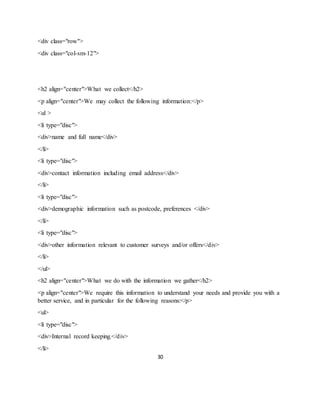
<div class="row">
<div class="col-sm-12">
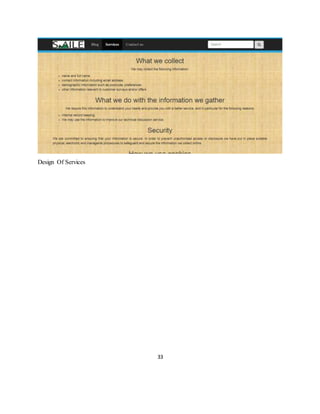
<h2 align="center">What we collect</h2>
<p align="center">We may collect the following information:</p>
<ul >
<li type="disc">
<div>name and full name</div>
</li>
<li type="disc">
<div>contact information including email address</div>
</li>
<li type="disc">
<div>demographic information such as postcode, preferences </div>
</li>
<li type="disc">
<div>other information relevant to customer surveys and/or offers</div>
</li>
</ul>
<h2 align="center">What we do with the information we gather</h2>
<p align="center">We require this information to understand your needs and provide you with a
better service, and in particular for the following reasons:</p>
<ul>
<li type="disc">
<div>Internal record keeping.</div>
</li>
31
<li type="disc">
<div>We may use the information to improve our technical discussion service.</div>
</li>
</ul>
<h2 align="center">Security</h2>
<p align="justify">We are committed to ensuring that your information is secure. In order to
prevent unauthorised access or disclosure we have put in place suitable physical, electronic and
managerial procedures to safeguard and secure the information we collect online.</p>
<h2 align="center">How we use cookies</h2>
<p align="center">A cookie is a small file which asks permission to be placed on your
computer’s hard drive. Once you agree, the file is added and the cookie helps analyse web traffic
or lets you know when you visit a particular site. Cookies allow web applications to respond to
you as an individual. The web application can tailor its operations to your needs, likes and
dislikes by gathering and remembering information about your preferences.We use traffic log
cookies to identify which pages are being used. This helps us analyse data about webpage traffic
and improve our website in order to tailor it to customer needs. We only use this information for
statistical analysis purposes and then the data is removed from the system.Overall, cookies help
us provide you with a better website, by enabling us to monitor which pages you find useful and
which you do not. A cookie in no way gives us access to your computer or any information about
you, other than the data you choose to share with us.You can choose to accept or decline cookies.
Most web browsers automatically accept cookies, but you can usually modify your browser
setting to decline cookies if you prefer. This may prevent you from taking full advantage of the
website.</p>
<h2 align="center">Controlling your personal information</h2>
<p align="center">You may choose to restrict the collection or use of your personal information
in the following ways:</p>
<ul>
<li type="disc">
<div>whenever you are asked to fill in a form on the website, look for the box that you can click
to indicate that you do not want the information to be used by anybody for direct marketing
purposes</div>
</li>
<li type="disc">
32
<div>if you have previously agreed to us using your personal information for direct asking
question answer purpose, you may change your mind at any time by <strong>writing to
us</strong><strong>.</strong></div>
</li>
</ul>
<p align="center">We will not sell, distribute or lease your personal information to third parties
unless we have your permission or are required by law to do so. We may use your personal
information to send you promotional information about third parties which we think you may
find interesting if you tell us that you wish this to happen.You may request details of personal
information which we hold about you under the Data Protection Act . A small fee will be
payable. If you would like a copy of the information held on you please <a
href="contactus.php"><strong>contact us.</strong></a>If you believe that any information we
are holding on you is incorrect or incomplete, please write to or email us as soon as possible, at
the above address. We will promptly correct any information found to be incorrect.</p>
<h2 align="center">Privacy Policy</h2>
<p align="center">This privacy policy sets out how <b>Technical Discussion Forum</b> uses
and protects any information that you give TDF when you use this website. TDF is committed to
ensuring that your privacy is protected. Should we ask you to provide certain information by
which you can be identified when using this website, then you can be assured that it will only be
used in accordance with this privacy statement. TDF may change this policy from time to time
by updating this page. You should check this page from time to time to ensure that you are happy
with any changes. This policy is effective from 31th of March, 2012.</p>
</div>
</div><!-- this div is for row !-->
</div><!-- this div for the body part of main class container!-->
<?php include'footer.php'; ?> </body>
</html>
33
Design Of Services
34
Admin Login
Coding of Admin login page:
<?php
require_once("include/db.php");
require_once("include/session.php");
require_once("include/function.php");
?>
<?php
if(isset($_POST["submit"]))
{
$name=$_POST["username"];
$password=$_POST["password"];
//more at http://php.net/manual/en/timezones.php
if(empty($name)||empty($password))
{
$_SESSION["ERROR MESSAGE"]= "All field must
be filled";
redirect_to("adminlogin.php");
}
else
35
{
$foundaccount=login_attempt($name,$password);
$_SESSION['id']=$foundaccount['id'];
$_SESSION['username']=$foundaccount['username'];
if($foundaccount)
{
$_SESSION["SUCCESS MESSAGE"]= "Welcome
{$_SESSION['username']}";
redirect_to("index.php");
}
else{
$_SESSION["ERROR MESSAGE"]=
"oops.. login again ";
redirect_to("adminlogin.php");
}
}
}
36
?>
<!DOCTYPE html PUBLIC "-//W3C//DTD XHTML 1.0 Transitional//EN"
"http://www.w3.org/TR/xhtml1/DTD/xhtml1-transitional.dtd">
<html xmlns="http://www.w3.org/1999/xhtml">
<head>
<meta http-equiv="Content-Type" content="text/html; charset=utf-8" />
<title>LOG IN</title>
<link rel="stylesheet" href="https://cdnjs.cloudflare.com/ajax/libs/font-awesome/4.7.0/css/font-
awesome.min.css">
<link rel="stylesheet" href="css/bootstrap.min.css" >
<script src="js/jquery-3.3.1.min.js"></script>
<script src="js/bootstrap.min.js"></script>
<link rel="stylesheet" href="css/adminstyle.css" >
</head>
<body background="image/black.jpg" style="font-family: "Raleway", sans-serif;">
<div style="height:10px; background:#27aae1;"></div>
<nav class="navbar navbar-inverse "role="navigation">
<div class="container">
<div class="navbar-header">
37
<button type="button" class="navbar-toggle collapsed " data-toggle="collapse" data-
target="#collapse">
<!--toggle ke liye!-->
<span class="sr-only">TOggle Navigation</span>
<span class="icon-bar"></span>
</button>
<a class="navbar-brand" href="../index.php"> <img style="margin-top:-6px;"
src="image/cover.jpg" width="139" height="33" width:100; height:30; "> </a>
</div>
<!--navbar header!-->
</div>
<!--container div!-->
</nav> <!--navigation wala!-->
<div class="line" style="height:10px; background:#27aae1;"></div>
<div class="container-fluid">
<div class="row">
<div class="col-sm-offset-4 col-sm-4">
<h3>Welcome Back</h3>
<?php echo message();
echo successmessage(); ?>
<div>
<form id="form1" name="form1" method="post" action="adminlogin.php"
enctype="multipart/form-data">
38
<fieldset>
<div class="form-group">
<label for="USERNAME"><span class="fieldinfo">USERNAME:</span></label>
<div class="input-group input-group-lg">
<span class="input-group-addon">
<span class="glyphicon glyphicon-envelope text-info"> </span>
</span>
<input class="form-control" type="text" name="username" id="username"
placeholder="username"/> </div>
</div>
<div class="form-group">
<label for="password"><span class="fieldinfo">PASSWORD</span></label>
<div class="input-group input-group-lg">
<span class="input-group-addon">
<span class="glyphicon glyphicon-lock text-info"> </span>
</span>
<input class="form-control" name="password" id="password" type="password"
placeholder="password" ></div></div> <p>
<input class="btn btn-success btn-block btn-lg" type="submit" name="submit" value="LOG
IN"/></p> <p>&nbsp; </p></fieldset></form> </div><!--ending of form wala div!-->
</div><!--ending of row!--></div><!-- ending of container fluid!-->
<br><?php include'../footer.php'; ?></body>
</html>
39
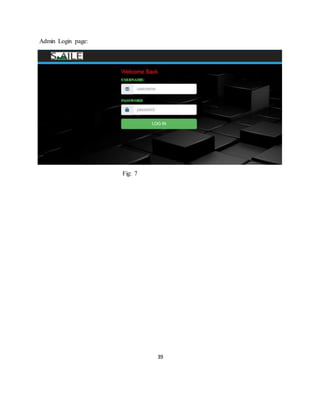
Admin Login page:
Fig: 7
40
7.1 Dashboard
7.1.1 Coding of Dashboard:
<?php
require_once("include/session.php");
require_once("include/function.php");
require_once("include/db.php");
?>
<?php confirm_login();?>
<!DOCTYPE html PUBLIC "-//W3C//DTD XHTML 1.0 Transitional//EN"
"http://www.w3.org/TR/xhtml1/DTD/xhtml1-transitional.dtd">
<html xmlns="http://www.w3.org/1999/xhtml">
<head>
<meta http-equiv="Content-Type" content="text/html; charset=utf-8" />
<link rel="stylesheet" href="https://cdnjs.cloudflare.com/ajax/libs/font-awesome/4.7.0/css/font-
<title>dashboard
</title>
<link rel="stylesheet" href="css/bootstrap.min.
css" >
<script src="js/jquery-3.3.1.min.js"></script>
<script src="js/bootstrap.min.js"></script>
<link rel="stylesheet" href="css/adminstyle.css" >
</head>
<body>
<div style="height:10px; background:#27aae1;"></div>
<nav class="navbar navbar-inverse "role="navigation">
41
<div class="container
<div class="navbar-header">
<button type="button" class="navbar-toggle collapsed " data-toggle="collapse" data-
target="#collapse">
<!--toggle ke liye!-->
<span class="sr-only">TOggle Navigation</span>
<span class="icon-bar"></span>
</button>
<a class="navbar-brand"> <img style="margin-top:-6px;" src="image/cover.jpg"
width="139" height="33" width:100; height:30; "> </a>
</div>
<!--navbar header!-->
<div class="collapse navbar-collapse" id="collapse">
<ul class="nav navbar-nav">
<h2 align="right" style="color:#27aae1;">Admin :- <?php echo
$_SESSION['username'];?></h2>
</ul>
</div> <!--collapse navbar-collapse wala !-->
</div>
<!--container div!-->
</nav> <!--navigation wala!-->
<div class="line" style="height:10px; background:#27aae1;"></div>
<div class="container-fluid">
<div class="row">
<div class="col-sm-2">
42
&nbsp;
&nbsp;
&nbsp;
<ul id="side_menu" class="nav nav-pills nav-stacked">
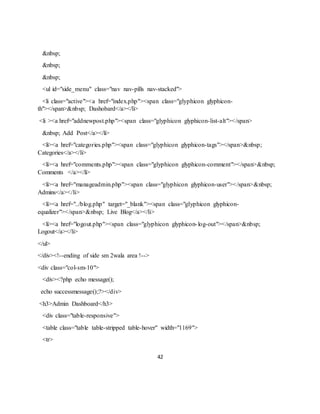
<li class="active"><a href="index.php"><span class="glyphicon glyphicon-
th"></span>&nbsp; Dashobard</a></li>
<li ><a href="addnewpost.php"><span class="glyphicon glyphicon-list-alt"></span>
&nbsp; Add Post</a></li>
<li><a href="categories.php"><span class="glyphicon glyphicon-tags"></span>&nbsp;
Categories</a></li>
<li><a href="comments.php"><span class="glyphicon glyphicon-comment"></span>&nbsp;
Comments </a></li>
<li><a href="manageadmin.php"><span class="glyphicon glyphicon-user"></span>&nbsp;
Admins</a></li>
<li><a href="../blog.php" target="_blank"><span class="glyphicon glyphicon-
equalizer"></span>&nbsp; Live Blog</a></li>
<li><a href="logout.php"><span class="glyphicon glyphicon-log-out"></span>&nbsp;
Logout</a></li>
</ul>
</div><!--ending of side sm 2wala area !-->
<div class="col-sm-10">
<div><?php echo message();
echo successmessage();?></div>
<h3>Admin Dashboard</h3>
<div class="table-responsive">
<table class="table table-stripped table-hover" width="1169">
<tr>
43
<th width="51">No</th>
<th width="105">Post Title</th>
<th width="180">Date & Time</th>
<th width="112">Author</th>
<th width="148">Category</th>
<th width="98">Banner</th>
<th width="118">Comment</th>
<th width="212">Action</th>
<th width="105">Details</th>
</tr>
<?php
global $con;
$query="select * from admin order by datetime desc";
$execute=mysqli_query($con,$query);
$srno=0;
while($data=mysqli_fetch_array($execute)){
$id= $data['id'];
$date=$data['datetime'];
$title=$data['title'];
$category=$data['category'];
$admin=$data['author'];
$image=$data['image'];
$post=$data['post'];
$srno++;
?>
44
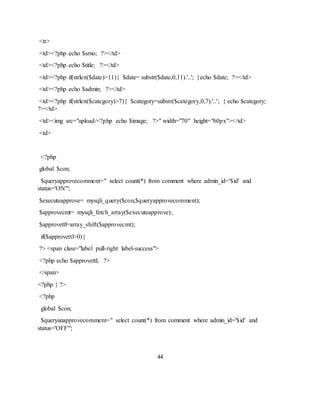
<tr>
<td><?php echo $srno; ?></td>
<td><?php echo $title; ?></td>
<td><?php if(strlen($date)>11){ $date= substr($date,0,11).'..'; }echo $date; ?></td>
<td><?php echo $admin; ?></td>
<td><?php if(strlen($category)>7){ $category=substr($category,0,7).'..'; } echo $category;
?></td>
<td><img src="upload/<?php echo $image; ?>" width="70" height="60px"></td>
<td>
<?php
global $con;
$queryapprovecomment=" select count(*) from comment where admin_id='$id' and
status='ON'";
$executeapprove= mysqli_query($con,$queryapprovecomment);
$approvecmt= mysqli_fetch_array($executeapprove);
$approvettl=array_shift($approvecmt);
if($approvettl>0){
?> <span class="label pull-right label-success">
<?php echo $approvettl; ?>
</span>
<?php } ?>
<?php
global $con;
$queryunapprovecomment=" select count(*) from comment where admin_id='$id' and
status='OFF'";
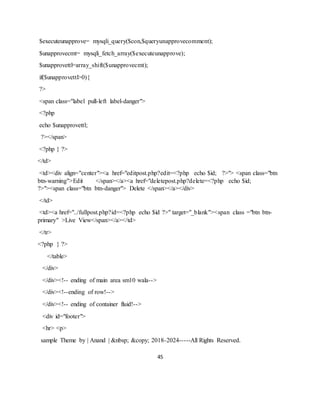
45
$executeunapprove= mysqli_query($con,$queryunapprovecomment);
$unapprovecmt= mysqli_fetch_array($executeunapprove);
$unapprovettl=array_shift($unapprovecmt);
if($unapprovettl>0){
?>
<span class="label pull-left label-danger">
<?php
echo $unapprovettl;
?></span>
<?php } ?>
</td>
<td><div align="center"><a href="editpost.php?edit=<?php echo $id; ?>"> <span class="btn
btn-warning">Edit </span></a><a href="deletepost.php?delete=<?php echo $id;
?>"><span class="btn btn-danger"> Delete </span></a></div>
</td>
<td><a href="../fullpost.php?id=<?php echo $id ?>" target="_blank"><span class ="btn btn-
primary" >Live View</span></a></td>
</tr>
<?php } ?>
</table>
</div>
</div><!-- ending of main area sm10 wala-->
</div><!--ending of row!-->
</div><!-- ending of container fluid!-->
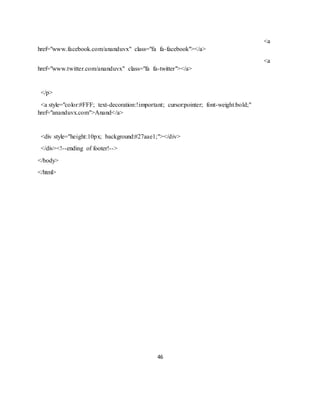
<div id="footer">
<hr> <p>
sample Theme by | Anand | &nbsp; &copy; 2018-2024-----All Rights Reserved.
46
<a
href="www.facebook.com/ananduvx" class="fa fa-facebook"></a>
<a
href="www.twitter.com/ananduvx" class="fa fa-twitter"></a>
</p>
<a style="color:#FFF; text-decoration:!important; cursor:pointer; font-weight:bold;"
href="ananduvx.com">Anand</a>
<div style="height:10px; background:#27aae1;"></div>
</div><!--ending of footer!-->
</body>
</html>
47
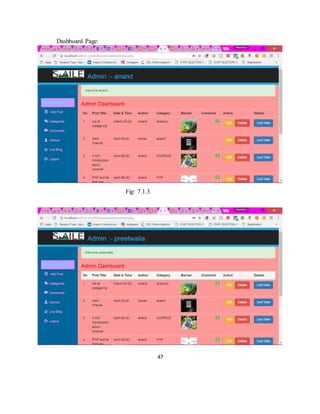
Dashboard Page:
Fig: 7.1.3
48
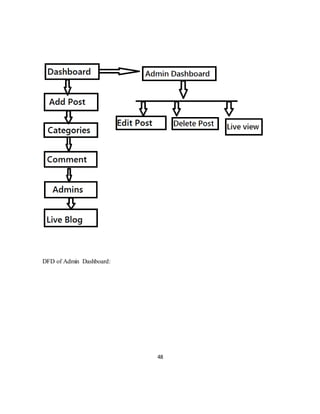
DFD of Admin Dashboard:
49
7.2 Add Post
7.2.1 Codeing ofAdd post
<?php
require_once("include/db.php");
require_once("include/session.php");
require_once("include/function.php");
?>
<?php confirm_login();?>
<?php
if(isset($_POST["submit"]))
{
$title=$_POST["titl"];
$cat=$_POST["cat"];
$Image=$_FILES["Image"]["name"];
$post=$_POST["post"];
$target="upload/".basename($_FILES["Image"]["name"
]);
date_default_timezone_set("Asia/kolkata");
$currenttime=time();
$datetime=strftime("%B-%d-%Y %H:%M:%S",$currenttime); //more at
php.net/manual/en/function.date.php//
$datetime;
$admin=$_SESSION['username'];
50
//more at http://php.net/manual/en/timezones.php
if(empty($title))
{
$_SESSION["ERROR MESSAGE"]= "Title Can't be
Blank";
redirect_to("addnewpost.php");
}
elseif(strlen($title)<3)
{
$_SESSION["ERROR MESSAGE"]= "Please Enter
More Than 3 Character";
redirect_to("addnewpost.php");
}
else
{
global $con;
$query="insert into admin
values('','$datetime','$title','$cat','$admin','$Image','$post')";
$execute=mysqli_query($con,$query);
move_uploaded_file($_FILES["Image"]["tmp_name"],$
target);
if($execute)
{
51
$_SESSION["SUCCESS MESSAGE"]= "Post
added successfully";
redirect_to("addnewpost.php");
}
else{
$_SESSION["ERROR MESSAGE"]=
"Something went wrong";
redirect_to("addnewpost.php");
}
}
}
?>
<!DOCTYPE html PUBLIC "-//W3C//DTD XHTML 1.0 Transitional//EN"
"http://www.w3.org/TR/xhtml1/DTD/xhtml1-transitional.dtd">
<html xmlns="http://www.w3.org/1999/xhtml">
<head>
<meta http-equiv="Content-Type" content="text/html; charset=utf-8" />
<title>ADD POST</title>
<link rel="stylesheet" href="css/bootstrap.min.css" >
<link rel="stylesheet" href="https://cdnjs.cloudflare.com/ajax/libs/font-awesome/4.7.0/css/font-
awesome.min.css">
<script src="js/jquery-3.3.1.min.js"></script>
<script src="js/bootstrap.min.js"></script>
<link rel="stylesheet" href="css/adminstyle.css" >
</head>
52
<body>
<div style="height:10px; background:#27aae1;"></div>
<nav class="navbar navbar-inverse "role="navigation">
<div class="container">
<div class="navbar-header">
<button type="button" class="navbar-toggle collapsed " data-toggle="collapse" data-
target="#collapse">
<!--toggle ke liye!-->
<span class="sr-only">TOggle Navigation</span>
<span class="icon-bar"></span>
</button>
<a class="navbar-brand"> <img style="margin-top:-6px;" src="image/cover.jpg"
width="139" height="33" width:100; height:30; "> </a>
</div>
<!--navbar header!-->
<div class="collapse navbar-collapse" id="collapse">
<ul class="nav navbar-nav">
<h2 align="right" style="color:#27aae1;">Admin :- <?php echo
$_SESSION['username'];?></h2>
</ul>
</div> <!--collapse navbar-collapse wala !-->
</div>
<!--container div!-->
</nav> <!--navigation wala!-->
53
<div class="line" style="height:10px; background:#27aae1;"></div>
<div class="container-fluid">
<div class="row">
<div class="col-sm-2">
&nbsp;
&nbsp;
&nbsp;
<br>
&nbsp;
&nbsp;
<ul id="side_menu" class="nav nav-pills nav-stacked">
<li><a href="index.php"><span class="glyphicon glyphicon-th"></span>&nbsp;
Dashobard</a></li>
<li class="active" ><a href="addnewpost.php"><span class="glyphicon glyphicon-list-
alt"></span>
&nbsp; Add Post</a></li>
<li><a href="categories.php"><span class="glyphicon glyphicon-tags"></span>&nbsp;
Categories</a></li>
<li><a href="comments.php"><span class="glyphicon glyphicon-comment"></span>&nbsp;
Comments</a></li>
<li><a href="manageadmin.php"><span class="glyphicon glyphicon-user"></span>&nbsp;
Admins</a></li>
<li><a href="../blog.php" target="_blank"><span class="glyphicon glyphicon-
equalizer"></span>&nbsp; Live Blog</a></li>
<li><a href="logout.php"><span class="glyphicon glyphicon-log-out"></span>&nbsp;
Logout</a></li>
</ul>
</div><!--ending of side sm 2wala area !-->
54
<div class="col-sm-10">
<h3>ADD NEW POST</h3>
<?php echo message();
echo successmessage(); ?>
<div>
<form id="form1" name="form1" method="post" action="addnewpost.php"
enctype="multipart/form-data">
<fieldset>
<div class="form-group">
<label for="title"><span class="fieldinfo">TITLE:</span></label>
<input class="form-control" type="text" name="titl" id="title" placeholder="TITLE"/>
</div>
<div class="form-group">
<label for="categoriesname"><span class="fieldinfo">CATEGORY:</span></label>
<select class="form-control" name="cat" id="categoriesname" >
<?php
global $con;
$que="select * from adminpanel order by datetime desc ";
$exe=mysqli_query($con,$que);
while($data=mysqli_fetch_array($exe)){
$create=$data['name'];
$id=$data['id'];
?>
<option>
<?php
55
echo $create;
?>
</option>
<?php }?>
</select>
</div>
<div class="form-group">
<label for="imageselect"><span class="fieldinfo">SELECT IMAGE:</span></label>
<input class="form-control" type="file" name="Image" id="Image" >
</div>
<div class="form-group">
<label for="postarea"><span class="fieldinfo">POST :</span></label>
<textarea class="form-control" name="post" id="postarea" ></textarea>
</div>
<input class="btn btn-success btn-block" type="submit" name="submit" value="ADD NEW
POST"/>
</fieldset>
</form>
</div><!--ending of form wala div!-->
</div><!-- ending of main area sm10 wala-->
</div><!--ending of row!-->
</div><!-- ending of container fluid!-->
56
<br />
<?php include'../footer.php'; ?>
</body>
</html>
57
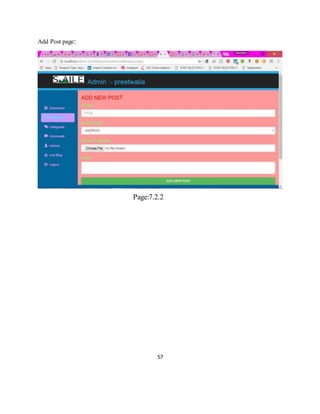
Add Post page:
Page:7.2.2
58
7.3 Categories
7.3.1 Codeing ofcategories
<?php
require_once("include/db.php");
require_once("include/session.php");
require_once("include/function.php");
?>
<?php confirm_login();?>
<?php
if(isset($_POST["submit"]))
{
$title=$_POST["titl"];
$cat=$_POST["cat"];
$Image=$_FILES["Image"]["name"];
$post=$_POST["post"];
$target="upload/".basename($_FILES["Image"]["name"]);
date_default_timezone_set("Asia/kolkata");
$currenttime=time();
$datetime=strftime("%B-%d-%Y %H:%M:%S",$currenttime); //more at
php.net/manual/en/function.date.php//
$datetime;
59
$admin=$_SESSION['username'];
//more at http://php.net/manual/en/timezones.php
if(empty($title))
{
$_SESSION["ERROR MESSAGE"]= "Title Can't be
Blank";
redirect_to("addnewpost.php");
}
elseif(strlen($title)<3)
{
$_SESSION["ERROR MESSAGE"]= "Please Enter More
Than 3 Character";
redirect_to("addnewpost.php");
}
else
{
global $con;
$query="insert into admin
values('','$datetime','$title','$cat','$admin','$Image','$post')";
$execute=mysqli_query($con,$query);
move_uploaded_file($_FILES["Image"]["tmp_name"],$target);
if($execute)
{ $_SESSION["SUCCESS MESSAGE"]= "Post added successfully";
redirect_to("addnewpost.php");
60
}
else{
$_SESSION["ERROR MESSAGE"]= "Something
went wrong";
redirect_to("addnewpost.php");
}
}
}
?
<!DOCTYPE html PUBLIC "-//W3C//DTD XHTML 1.0 Transitional//EN"
"http://www.w3.org/TR/xhtml1/DTD/xhtml1-transitional.dtd">
<html xmlns="http://www.w3.org/1999/xhtml">
<head>
<meta http-equiv="Content-Type" content="text/html; charset=utf-8" />
<title>ADD POST</title>
<link rel="stylesheet" href="css/bootstrap.min.css" >
<link rel="stylesheet" href="https://cdnjs.cloudflare.com/ajax/libs/font-awesome/4.7.0/css/font-
awesome.min.css">
<script src="js/jquery-3.3.1.min.js"></script>
<script src="js/bootstrap.min.js"></script>
<link rel="stylesheet" href="css/adminstyle.css" >
</head>
<body>
<div style="height:10px; background:#27aae1;"></div>
<nav class="navbar navbar-inverse "role="navigation">
61
<div class="container">
<div class="navbar-header">
<button type="button" class="navbar-toggle collapsed " data-toggle="collapse" data-
target="#collapse">
<!--toggle ke liye!-->
<span class="sr-only">TOggle Navigation</span>
<span class="icon-bar"></span>
</button>
<a class="navbar-brand"> <img style="margin-top:-6px;" src="image/cover.jpg"
width="139" height="33" width:100; height:30; "> </a>
</div>
<!--navbar header!-->
<div class="collapse navbar-collapse" id="collapse">
<ul class="nav navbar-nav">
<h2 align="right" style="color:#27aae1;">Admin :- <?php echo
$_SESSION['username'];?></h2>
</ul>
</div> <!--collapse navbar-collapse wala !-->
</div>
<!--container div!-->
</nav> <!--navigation wala!-->
<div class="container-fluid">
62
<div class="row">
<div class="col-sm-2">
&nbsp;
&nbsp;
&nbsp;
<br>
<br>
&nbsp;
&nbsp;
<ul id="side_menu" class="nav nav-pills nav-stacked">
<li><a href="index.php"><span class="glyphicon glyphicon-th"></span>&nbsp;
Dashobard</a></li>
<li class="active" ><a href="addnewpost.php"><span class="glyphicon glyphicon-list-
alt"></span>
&nbsp; Add Post</a></li>
<li><a href="categories.php"><span class="glyphicon glyphicon-tags"></span>&nbsp;
Categories</a></li>
<li><a href="comments.php"><span class="glyphicon glyphicon-comment"></span>&nbsp;
Comments</a></li>
<li><a href="manageadmin.php"><span class="glyphicon glyphicon-user"></span>&nbsp;
Admins</a></li>
<li><a href="../blog.php" target="_blank"><span class="glyphicon glyphicon-
equalizer"></span>&nbsp; Live Blog</a></li>
<li><a href="logout.php"><span class="glyphicon glyphicon-log-out"></span>&nbsp;
Logout</a></li>
</div><!--ending of side sm 2wala area !->
<div class="col-sm-10">
63
<h3>ADD NEW POST</h3>
<?php echo message();
echo successmessage(); ?>
<div>
<form id="form1" name="form1" method="post" action="addnewpost.php"
enctype="multipart/form-data">
<fieldset>
<div class="form-group">
<label for="title"><span class="fieldinfo">TITLE:</span></label>
<input class="form-control" type="text" name="titl" id="title" placeholder="TITLE"/>
</div>
<div class="form-group">
<label for="categoriesname"><span class="fieldinfo">CATEGORY:</span></label>
<select class="form-control" name="cat" id="categoriesname" >
<?php
global $con;
$que="select * from adminpanel order by datetime desc ";
$exe=mysqli_query($con,$que);
while($data=mysqli_fetch_array($exe)){
$create=$data['name'];
$id=$data['id'];
?>
<option>
<?php
echo $create;
64
?>
</option>
<?php }?>
</select>
</div>
<div class="form-group">
<label for="imageselect"><span class="fieldinfo">SELECT IMAGE:</span></label>
<input class="form-control" type="file" name="Image" id="Image" >
</div>
<div class="form-group">
<label for="postarea"><span class="fieldinfo">POST :</span></label>
<textarea class="form-control" name="post" id="postarea" ></textarea>
</div>
<input class="btn btn-success btn-block" type="submit" name="submit" value="ADD NEW
POST"/>
</fieldset>
</form>
</div><!--ending of form wala div!-->
</div><!-- ending of main area sm10 wala-->
</div><!--ending of row!-->
</div><!-- ending of container fluid!-->
<br />
<?php include'../footer.php'; ?>
</body>
</html>
65
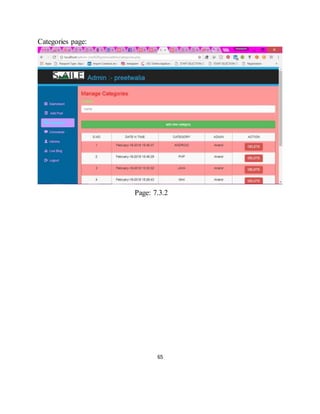
Categories page:
Page: 7.3.2
66
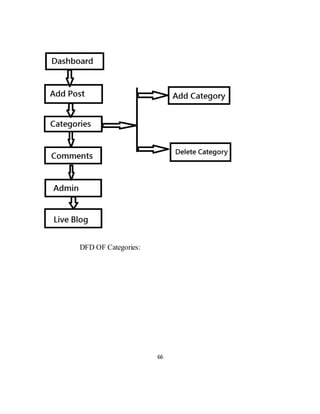
DFD OF Categories:
67
7.4 Comment page
7.4.1 Coding of comment page:
<?php
require_once("include/session.php");
require_once("include/function.php");
require_once("include/db.php");
?>
<?php confirm_login();?>
<!DOCTYPE html PUBLIC "-//W3C//DTD XHTML 1.0 Transitional//EN"
"http://www.w3.org/TR/xhtml1/DTD/xhtml1-transitional.dtd">
<html xmlns="http://www.w3.org/1999/xhtml">
<head>
<meta http-equiv="Content-Type" content="text/html; charset=utf-8" />
<title>comments</title>
<link rel="stylesheet" href="css/bootstrap.min.
css" >
<link rel="stylesheet" href="https://cdnjs.cloudflare.com/ajax/libs/font-awesome/4.7.0/css/font-
awesome.min.css">
<script src="js/jquery-3.3.1.min.js"></script>
<script src="js/bootstrap.min.js"></script>
<link rel="stylesheet" href="css/adminstyle.css" >
</head>
<body>
<div style="height:10px; background:#27aae1;"></div>
<nav class="navbar navbar-inverse "role="navigation">
<div class="container">
<div class="navbar-header">
68
<button type="button" class="navbar-toggle collapsed " data-toggle="collapse" data-
target="#collapse">
<!--toggle ke liye!-->
<span class="sr-only">TOggle Navigation</span>
<span class="icon-bar"></span>
</button>
<a class="navbar-brand" > <img style="margin-top:-6px;" src="image/cover.jpg"
width="139" height="33" width:100; height:30; "> </a>
</div>
<!--navbar header!-->
<ul class="nav navbar-nav">
<h2 align="right" style="color:#27aae1;">Admin :- <?php echo
$_SESSION['username'];?></h2>
</ul>
</div> <!--collapse navbar-collapse wala !-->
</div>
<!--container div!-->
</nav> <!--navigation wala!-->
<div class="line" style="height:10px; background:#27aae1;"></div>
<div class="container-fluid">
<div class="row">
<div class="col-sm-2">
&nbsp;
&nbsp;
&nbsp;<ul id="side_menu" class="nav nav-pills nav-stacked">
69
<li ><a href="index.php"><span class="glyphicon glyphicon-th"></span>&nbsp;
Dashobard</a></li>
<li ><a href="addnewpost.php"><span class="glyphicon glyphicon-list-alt"></span>
&nbsp; Add Post</a></li>
<li><a href="categories.php"><span class="glyphicon glyphicon-tags"></span>&nbsp;
Categories</a></li>
<li class="active"><a href="comments.php"><span class="glyphicon glyphicon-
comment"></span>&nbsp; Comments</a></li>
<li><a href="manageadmin.php"><span class="glyphicon glyphicon-user"></span>&nbsp;
Admins</a></li>
<li><a href="../blog.php" target="_blank"><span class="glyphicon glyphicon-
equalizer"></span>&nbsp; Live Blog</a></li>
<li><a href="logout.php"><span class="glyphicon glyphicon-log-out"></span>&nbsp;
Logout</a></li>
</ul>
</div><!--ending of side sm 2wala area !-
<div class="col-sm-10">
<div><?php echo message();
echo successmessage();?></div>
<h3> Unapproved Comments:</h3>
<div class="table-responsive">
<table class="table table-stripped table-hover" width="1101">
<tr>
<th width="54">No</th>
<th width="132">Name</th>
70
<th width="132">Date</th>
<th>Comment</th>
<th>Dishapprove _by</th>
<th>Approve</th>
<th colspan="2">Delete</th>
<th colspan="2">Details
<div align="center"></div> </th>
</tr>
<?php
global $con;
$query="select * from comment where status='OFF'";
$execute=mysqli_query($con,$query);
$srno=0;
while($data=mysqli_fetch_array($execute)){
$id= $data['id'];
$date=$data['datetime'];
$name=$data['name'];
$comment=$data['comment'];
$commentpostid =$data['admin_id'];
$admin=$data['approved_by'];
$srno++;
?>
<tr>
<td><?php echo $srno; ?></td>
<td><?php echo $name; ?></td>
71
<td><?php if(strlen($date)>11){ $date= substr($date,0,11).'..'; }echo $date; ?></td>
<td width="140"><?php if(strlen($comment)>11){ $date= substr($date,0,11).'..'; } echo
$comment; ?></td>
<td width="141"><?php echo $admin; ?></td>
<td width="139"><a href="approve.php?approve=<?php echo $id; ?>"><span class="btn btn-
success">Approve</span></a></td>
<th colspan="2"><ahref="delete.php?delete=<?php echo $id; ?>"><span
class="btnbtn-danger">Delete</span></a></th>
<th width="136"><a href="../fullpost.php?id=<?php echo $commentpostid; ?>"
target="_blank"><span class="btn btn-primary">Live preview </span></a></th>
</tr>
<?php } ?>
<h3> Approved Comments:</h3>
<div class="table-responsive">
<table class="table table-stripped table-hover" width="1101">
<tr>
<th width="54">No</th>
<th width="132">Name</th>
<th width="146">Date</th>
<th width="154">Comment</th>
<th width="154">Approved By</th>
<th width="153">Disapprove</th>
<th colspan="2">Delete</th>
<th colspan="2">Details
<div align="center"></div> </th>
</tr>
72
<?php
global $con;
$query="select * from comment where status='ON'";
$execute=mysqli_query($con,$query);
$srno=0;
while($data=mysqli_fetch_array($execute)){
$id= $data['id'];
$date=$data['datetime'];
$name=$data['name'];
$comment=$data['comment'];
$commentpostid =$data['admin_id'];
$admin=$data['approved_by'];
$srno++;
?>
<tr>
<td><?php echo $srno; ?></td>
<td><?php echo $name; ?></td>
<td><?php if(strlen($date)>11){ $date= substr($date,0,11).'..'; }echo $date; ?></td>
<th> <?php if(strlen($comment)>11){ $date= substr($date,0,11).'..'; } echo $comment; ?></th>
<th><?php echo $admin; ?></th>
<th><a href="disapprove.php?disapprove=<?php echo $id; ?>"><span class="btn btn-
success">Dishapprove</span></a></th>
<th colspan="2"><a href="delete.php?delete=<?php echo $id; ?>"><span class="btn btn-
danger">Delete</span></a></th>
<th width="136"><a href="../fullpost.php?id=<?php echo $commentpostid; ?>"
target="_blank"><span class="btn btn-primary">Live preview </span></a></th>
</tr>
73
<?php } ?>
</table>
</div>
</div><!-- ending of main area sm10 wala-->
</div><!--ending of row!-->
</div><!-- ending of container fluid!-->
<?php include'../footer.php'; ?>
</body>
</html>
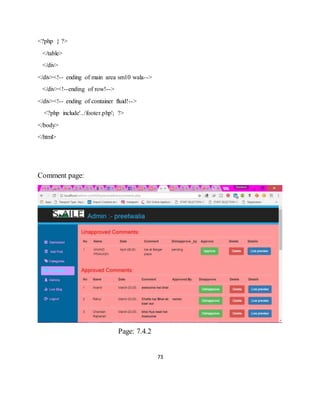
Comment page:
Page: 7.4.2
74
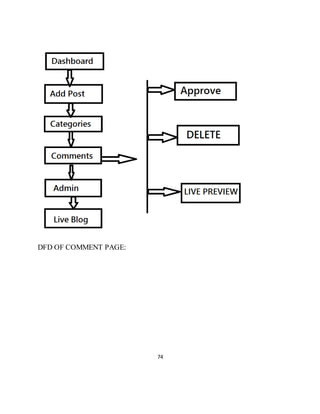
DFD OF COMMENT PAGE:
75
7.5 Add Admin Page
7.5.1 Coding of Add Admin:
<?php
require_once("include/db.php");
require_once("include/session.php");
require_once("include/function.php");
?>
<?php confirm_login();?>
<?php
if(isset($_POST["submit"]))
{
$name=$_POST["username"];
$password=$_POST["password"];
$confirmpassword=$_POST["confirmpassword"];
date_default_timezone_set("Asia/kolkata");
$currenttime=time();
$datetime=strftime("%B-%d-%Y %H:%M:%S",$currenttime); //more at
php.net/manual/en/function.date.php//
$datetime;
$admin="Anand";
//more at http://php.net/manual/en/timezones.php
if(empty($name)||empty($password)||empty($confirmpassword))
{
$_SESSION["ERROR MESSAGE"]= "All field must be filled";
redirect_to("manageadmin.php");
76
}
elseif(strlen($password)<3)
{
$_SESSION["ERROR MESSAGE"]= "Password must be More Than 3 Character";
redirect_to("manageadmin.php");
}
elseif($password!==$confirmpassword)
{
$_SESSION["ERROR MESSAGE"]= "Password must be equal";
redirect_to("manageadmin.php");
}
else
{
global $con;
$query="insert into registration values('','$datetime','$name','$password','$admin')";
$execute=mysqli_query($con,$query);
if($execute)
{
$_SESSION["SUCCESS MESSAGE"]= "Admin added successfully";
redirect_to("manageadmin.php");
}
77
else{
$_SESSION["ERROR MESSAGE"]= "oops Something went wrong";
redirect_to("manageadmin.php");
}}}
?> <!DOCTYPE html PUBLIC "-//W3C//DTD XHTML 1.0 Transitional//EN"
"http://www.w3.org/TR/xhtml1/DTD/xhtml1-transitional.dtd">
<html xmlns="http://www.w3.org/1999/xhtml">
<head>
<meta http-equiv="Content-Type" content="text/html; charset=utf-8" />
<title>Manage Admin</title>
<link rel="stylesheet" href="css/bootstrap.min.css" >
<link rel="stylesheet" href="https://cdnjs.cloudflare.com/ajax/libs/font-awesome/4.7.0/css/font-
awesome.min.css">
<script src="js/jquery-3.3.1.min.js"></script>
<script src="js/bootstrap.min.js"></script>
<link rel="stylesheet" href="css/adminstyle.css" >
</head><body>
<div style="height:10px; background:#27aae1;"></div>
<nav class="navbar navbar-inverse "role="navigation">
<div class="container">
<div class="navbar-header">
<button type="button" class="navbar-toggle collapsed " data-toggle="collapse" data-
target="#collapse">
<!--toggle ke liye!-->
<span class="sr-only">TOggle Navigation</span>
<span class="icon-bar"></span>
78
<span class="icon-bar"></span>
</button>
<a class="navbar-brand" > <img style="margin-top:-6px;" src="image/cover.jpg"
width="139" height="33" width:100; height:30; "> </a>
</div>
<!--navbar header!-->
<div class="collapse navbar-collapse" id="collapse">
<ul class="nav navbar-nav">
<h2 align="right" style="color:#27aae1;">Admin :- <?php echo
$_SESSION['username'];?></h2> </ul>
</div> <!--collapse navbar-collapse wala !-->
</div>
<!--container div!-->
</nav> <!--navigation wala!-->
<div class="container-fluid">
<div class="row">
<div class="col-sm-2">
&nbsp;
&nbsp;
&nbsp;
<br>
&nbsp;
<ul id="side_menu" class="nav nav-pills nav-stacked">
<li><a href="index.php"><span class="glyphicon glyphicon-th"></span>&nbsp;
Dashobard</a></li>
<li><a href="addnewpost.php"><span class="glyphicon glyphicon-list-alt"></span>
&nbsp; Add Post</a></li>
79
<li><a href="categories.php"><span class="glyphicon glyphicon-tags"></span>&nbsp;
Categories</a></li>
<li><a href="comments.php"><span class="glyphicon glyphicon-comment"></span>&nbsp;
Comments</a></li>
<li class="active"><a href="manageadmin.php"><span class="glyphicon glyphicon-
user"></span>&nbsp; Admins</a></li>
<li><a href="../blog.php" target="_blank"><span class="glyphicon glyphicon-
equalizer"></span>&nbsp; Live Blog</a></li>
<li><a href="logout.php"><span class="glyphicon glyphicon-log-out"></span>&nbsp;
Logout</a></li>
</ul>
</div><!--ending of side sm 2wala area !-->
<div class="col-sm-10">
<h3>ADD NEW ADMIN</h3>
<?php echo message();
echo successmessage(); ?>
<div>
<form id="form1" name="form1" method="post" action="manageadmin.php"
enctype="multipart/form-data">
<fieldset>
<div class="form-group">
<label for="USERNAME"><span class="fieldinfo">Username:</span></label>
<input class="form-control" type="text" name="username" id="username"
placeholder="username"/>
</div>
<div class="form-group">
<label for="password"><span class="fieldinfo">Password</span></label>
<input class="form-control" name="password" id="password" type="password"
placeholder="password" >
80
<div class="form-group">
<label for="Confirm-password"><span class="fieldinfo">Confirm-Password</span></label>
<input class="form-control" name="confirmpassword" id="password" type="password"
placeholder="Confirm password" >
</div>
<p>
<input class="btn btn-success btn-block" type="submit" name="submit" value="ADD NEW
Admin"/>
</p>
<p>&nbsp; </p>
</fieldset>
</form>
</div><!--ending of form wala div!-->
<div class="table-responsive">
<table class="table table-striped table-hover" width="406" border="" align="center">
<tr>
<td width="69"><div align="center">S.NO</div></td>
<td width="107"><div align="center">DATE N TIME</div></td>
<td width="106"><div align="center">Admin name</div></td>
<td width="47"><div align="center">Added by</div></td>
<td width="47"><div align="center">ACTION</div></td>
</tr>
<?php
global $con;
$que="select * from registration order by datetime desc ";
$exe=mysqli_query($con,$que);
$ssno=0;
81
while($data=mysqli_fetch_array($exe)){
$name=$data['username'];
$added=$data['added by'];
$date =$data['datetime'];
$id=$data['id'];
$ssno++;
?>
<tr>
<td width="69"><div align="center"><?php echo $ssno; ?></div></td>
<td width="107"><div align="center"><?php echo $date; ?></div></td>
<td width="106"><div align="center"><?php echo $name; ?></div></td>
<td width="47"><div align="center"><?php echo $added; ?></div></td>
<td width="47"><div align="center"><a href="deleteadmin.php?deleteadmin=<?php echo $id;
?>"><span class="btn btn-danger">DELETE</span></a></div></td>
</tr>
<?php } ?>
</table>
</div><!--ending of table div!-->
</div><!-- ending of main area sm10 wala-->
</div><!--ending of row!-->
</div><!-- ending of container fluid!-->
<br />
<?php include'../footer.php'; ?></html>
82
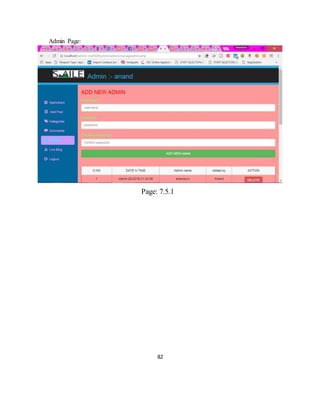
Admin Page:
Page: 7.5.1
83
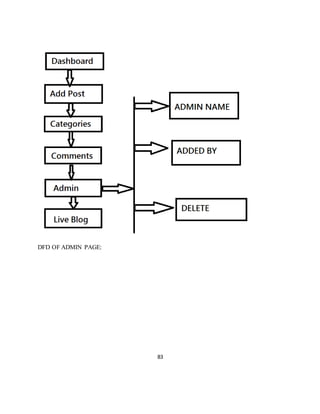
DFD OF ADMIN PAGE:
84
Full post page
Codeing of full post:
<?php
require_once("include/db.php");
require_once("include/session.php");
require_once("include/function.php");
?>
<?php
if(isset($_POST["submit"]))
{
$name=$_POST["name"];
$email=$_POST["email"];
$comment=$_POST["comment"];
$getidpost=$_GET['id'];
date_default_timezone_set("Asia/kolkata");
$currenttime=time();
$datetime=strftime("%B-%d-%Y %H:%M:%S",$currenttime); //more at
php.net/manual/en/function.date.php//
$datetime;
//more at http://php.net/manual/en/timezones.php
if(empty($name)||empty($email)||empty($comment))
85
{
$_SESSION["ERROR MESSAGE"]= "fields Can't be Blank";
}
elseif(strlen($name)<3||strlen($email)<3)
{
$_SESSION["ERROR MESSAGE"]= "either name or mail you
entered is less Than 3 Character";
}
elseif(strlen($comment)>300)
{
$_SESSION["ERROR MESSAGE"]= "comments must be less than
300 character";
}
else
{ $postidfromurl=$_GET['id'];
global $con;
$query="insert into comment
values('','$datetime','$name','$email','$comment','pending','OFF','$postidfromurl')";
$execute=mysqli_query($con,$query);
if($execute)
{ $_SESSION["SUCCESS MESSAGE"]= "Comment added successfully";
redirect_to("fullpost.php?id= {$getidpost}");
}
else{
86
$_SESSION["ERROR MESSAGE"]= "Something went
wrong"; redirect_to("fullpost.php?id={$getidpost}");
}
}
}
?>
<!DOCTYPE html PUBLIC "-//W3C//DTD XHTML 1.0 Transitional//EN"
"http://www.w3.org/TR/xhtml1/DTD/xhtml1-transitional.dtd">
<html xmlns="http://www.w3.org/1999/xhtml">
<head>
<meta http-equiv="Content-Type" content="text/html; charset=utf-8" />
<title>full blog post</title>
<link rel="stylesheet" href="css/bootstrap.min.css" >
<link rel="stylesheet" href="https://cdnjs.cloudflare.com/ajax/libs/font-awesome/4.7.0/css/font-
awesome.min.css">
<script src="js/jquery-3.3.1.min.js"></script>
<script src="js/bootstrap.min.js"></script>
<link rel="stylesheet" href="css/publicstyle.css" >
</head>
<body background="admin/image/Picture1.jpg" style="font-family: "Raleway", sans-serif;">
<div style="height:10px; background:#27aae1;"></div>
<nav class="navbar navbar-inverse "role="navigation">
<div class="container">
<div class="navbar-header">
<button type="button" class="navbar-toggle collapsed " data-toggle="collapse" data-
target="#collapse">
<!--toggle ke liye!-->
<span class="sr-only">TOggle Navigation</span>
87
<span class="icon-bar"></span>
</button>
<a class="navbar-brand" href="index.php"> <img style="margin-top:-6px;"
src="admin/image/cover.jpg" width="139" height="33" width:100; height:30; "> </a>
</div>
<!--navbar header!-->
<div class="collapse navbar-collapse" id="collapse">
<ul class="nav navbar-nav">
<li class="active"><a href="blog.php">Blog</a></li>
<li><a href="services.php">Services</a></li>
<li><a href="contactus.php">Contact us</a></li>
<li></li>
</ul>
<form action="blog.php" class="navbar-form navbar-right">
<div class="form-group">
<input name="search" type="text" class="form-control" placeholder="search" >
</div>
<button class="btn btn-deafult" name="searchbutton">GO </button>
</form>
</div> <!--collapse navbar-collapse wala !-->
</div>
<!--container div!-->
</nav> <!--navigation wala!-->
<div class="line" style="height:10px; background:#27aae1;"></div>
<div class="container">
88
<div class="blog-header">
<h3>
Hello Bloggers </h3>
</div> <!--blog header!-->
<div class="row">
<div class="col-sm-12">
<?php
global $con;
if(isset($_GET['searchbutton'])){
$search=$_GET['search'];
$query= "select * from admin where datetime like '%$search%'
or title like '%$search%'
or category like '%$search%'
or post like '%$search%'
";
}
else{
$getidpost=$_GET['id'];
$query="select * from admin where id='$getidpost' order by datetime desc";}
$execute=mysqli_query($con,$query); while($data=mysqli_fetch_array($execute)){
$id= $data['id'];
$date=$data['datetime'];
$title=$data['title'];
$category=$data['category'];
$admin=$data['author'];
89
$image=$data['image'];
$post=$data['post'];
?> <div class="blogpost thumbnail">
<img class="img-responsive img-rounded" src="admin/upload/<?php echo $image; ?>" >
</div>
<div class="caption">
<h1 id="heading"><?php echo htmlentities($title); ?></h1>
<p class="description">Category:<?php echo htmlentities($category); ?>
Published on: <?php echo htmlentities($date); ?></p>
<p class="post"><?php echo htmlentities($post); ?></p> </div>
<?php }
?>
<?php echo message();
echo successmessage(); ?>
<p>
<span class="fieldinfo">Comments:-</span></p>
<?php
global $con;
$getidpost=$_GET['id'];
$view_query= "select * from comment where admin_id='$getidpost' and status='ON'";
$execute=mysqli_query($con,$view_query);
while($datag=mysqli_fetch_array($execute)){
$nameg= $datag['name'];
$date=$datag['datetime'];
$commentg=$datag['comment'];?>
90
<div class="commentblock"><img class="pull-left" style="margin-left:10px; "
src="admin/image/comment.png" width="65px" height="73px">
<p class="comment-info" style="margin-left:90px;"><?php echo $nameg; ?></p>
<p class="comment" style="margin-left:90px; margin-top:-10px; "><?php echo $commentg;
?></p>
<p class="description" style="margin-left:90px; margin-top:-10px;"><?php echo
$date; ?></p>
</div>
<?php
}?><p>
<span class="fieldinfo">Share Your Thought About This Post:-</span></p><div>
<form id="form1" name="form1" method="post" action="fullpost.php?id=<?php echo
$getidpost; ?>" enctype="multipart/form-data">
<background="admin/image/about-img.jpg" > <fieldset>
<div class="form-group">
<label for="Name"><span class="fieldinfo">Name</span></label>
<input class="form-control" type="/^[a-zA-Z ]*$/" name="name" id="name"
placeholder="name"/>
</div><fieldset>
<div class="form-group">
<label for="email"><span class="fieldinfo">Email:</span></label>
<input class="form-control" type=""/^([a-z0-9+_-]+)(.[a-z0-9+_-]+)*@([a-z0-9-]+.)+[a-
z]{2,6}$/ix"" name="email" id="title" placeholder="email"/>
</div>
<div class="form-group">
<label for="comment"><span class="fieldinfo">Comment :</span></label>
<textarea class="form-control" name="comment" id="comment" placeholder="your
comment.." ></textarea>
</div>
91
<input class="btn btn-primary " type="submit" name="submit" value="submit"/>
</fieldset>
</img>
</form>
</div>
</div><!--sm-10-wala!-->
</div><!-- this div is for row !-->
</div><!-- this div for the body part of main class container!-->
<?php include ‘footer.php’; ?> <a
</body>
</html>
92
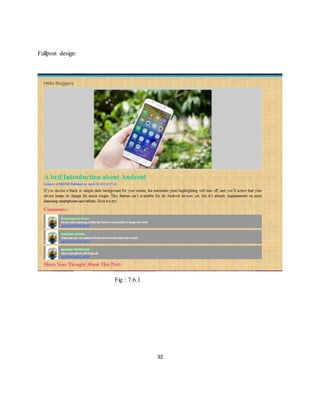
Fullpost design:
Fig : 7.6.1
93
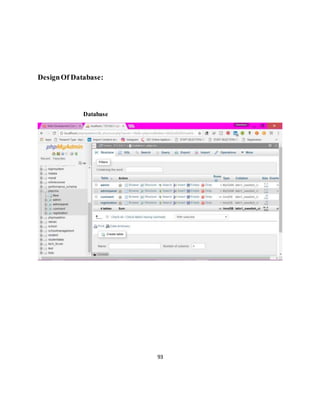
DesignOf Database:
Database
94
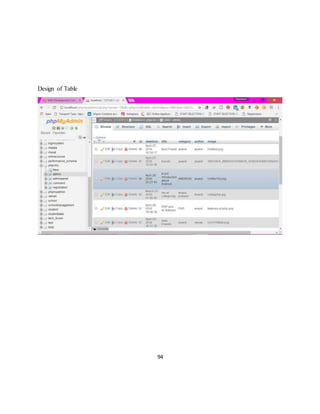
Design of Table
95
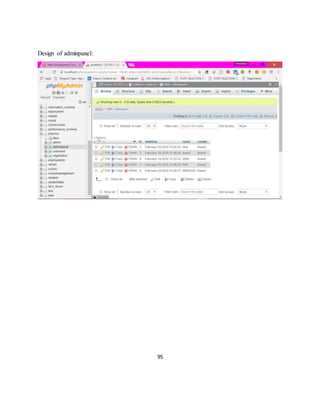
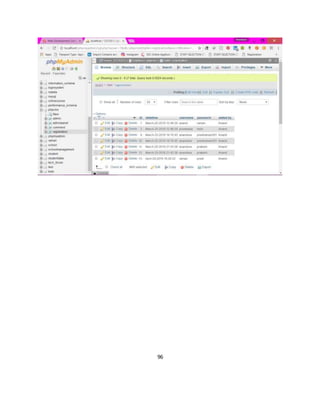
Design of adminpanel:
96
97
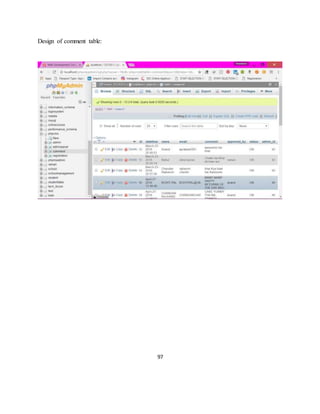
Design of comment table:
98
Chapter 9
FUTURE SCOPE OF THE PROJECT
In addition to the emails, we can send contact information on the counsellor mobile phone in the
form of message .then it will become more secure and easy to give quick reply.
We have to add the user login .
We have to add the more interesting news or articles.
We have to add the online free submission of the particular blog.
We can add one more page to celebrate and wishing upcoming birthday of our Bloggers.
We can send email to a large number of people and can also store the information of the bloggers
in the database.
We can enhance the look of the website using more css code.
99
CONCLUSIONS
Now, we can conclude our project. This project is divided into modules.
Each module is working fine and plays an important role.
The website is totally dynamic, we can easily update our data of the Blog.
Local host functionality allows the viewers to see the full website or information about the
CONTANT MANAGEMENT SYSTEM (CMS).
The authorise person can easily delete and update in all the important section.
After submitting the contact from and registration from the receiver will receive the information,
personal information in database.
After coming of the main admin authoriser person can see it and contact the person and convey
the message to that person.
100
BIBLIOGRAPHY
WEBSITES REFERRED:-
 https://stackoverflow.com/documentation/php/topics
 https://www.w3schools.com/php/default.asp
 http://www.phpgang.com
 www.google.com
BOOKS REFERRED:-
TITLE The Complete Referencephp
AUTHOR StevenHolzner

CONTENT MANAGEMENT SYSTEM

  • 1.
    1 CHAPTER 1 INTRODUCTION OFPHP What is PHP? The PHP Hypertext Preprocessor (PHP) is a programming language that allows web developers to create dynamic content that interacts with databases. PHP is basically used for developing web based software applications. It is a widely-used, open source scripting language and executed on the server.PHP started out as a small open source project that evolved as more and more people found out how useful it was. Rasmus Lerdorf unleashed the first version of PHP way back in 1994.  PHP is a server side scripting language that is embedded in HTML. It is used to manage dynamic content, databases, session tracking, even build entire e-commerce sites.  It is integrated with a number of popular databases, including MySQL, PostgreSQL, Oracle, Sybase, Informix, and Microsoft SQL Server.  PHP is pleasingly zippy in its execution, especially when compiled as an Apache module on the Unix side. The MySQL server, once started, executes even very complex queries with huge result sets in record-setting time.  PHP supports a large number of major protocols such as POP3, IMAP, and LDAP. PHP4 added support for Java and distributed object architectures (COM and CORBA), making n-tier development a possibility for the first time.  PHP is forgiving: PHP language tries to be as forgiving as possible.  PHP Syntax is C-Like. Why PHP?  PHP runs on various platforms (Windows, Linux, Unix, Mac OS X, etc.)  PHP is compatible with almost all servers used today (Apache, IIS, etc.)
  • 2.
    2  PHP supportsa wide range of databases  PHP is free. Download it from the official PHP resource: www.php.net  PHP is easy to learn and runs efficiently on the server side. Installation What Do I Need? 1. Browser 2. Server ( Wampserver , Xampp) 3. Editor (Dreamweaver, notepad++,notepad ) Set Up PHP on Your Own PC 1. Step 1: download the files. Download the latest PHP 5 ZIP package from www.php.net/downloads.php. ... 2. Step 2: extract the files. ... 3. Step 3: configure php.ini. ... 4. Step 4: add C:php to the path environment variable. ... 5. Step 5: configure PHP as an A 6. pache module. ... 7. Step 6: test a PHP file.
  • 3.
    3 CHAPTER 2 INTRODUCTION OFTHE PROJECT 1.1 The Definition of a CMS A web site's "content" is a combination of different components: text, graphics, images, scripts, included files such as Flash animations, audio/video streams or downloadable files. All of these may be components of one page, included in an HTML page using links or sometimes integrated in the HTML page itself. But even the text shown in the HTML page itself is regarded as "content". Content management systems organize and classify these components by dividing the content from the layout. In more concrete terms, the content is stored in content files, the layout is stored in layout files (i.e. document templates). Using this approach, a CMS provides the means for treating content and layout in separate ways. This also allows using the same content in different documents and formatted for different media ("crossmedia publishing"); think of an HTML page as it shows in the browser and the printer-friendly display of the same page, for example. A content management system is a software package specifically designed to manage a website. It is installed by the web designers, but intended to be used by you. First off, it provides you with a simple, non-technical way of updating your content. This is typically (but not always) done via a web-based interface that works much like Word does. Just point-and-click, type in the new words, and hit save. The site is instantly updated. Equally easy is adding new pages, deleting old ones, or restructuring the site to match your new business model. The index page or the Blog page of this website consists of the images that user wants to upload and manage on his website which consists of its category ,time when its uploaded and the and other user can comments on his site too .
  • 4.
    4 CHAPTER 3 REQUIREMENTS, FEASIBILITYAND SCOPE 3.1 SOFTWAREREQUIREMNETS  Browser  Server(Wampserver ,XAMPP)  PHP  Database (MySQL suggested)  Editor(Notepad, Notepad++,Dreamweaver) 3.2 HARWARE REQUIREMENTS  Minimum 350MB Hard Disk spacefor installation.  4GB HD spacerequired for a typical live system with 1000-2000 events.  Recommended minimum CPU - Pentium 4, 3.2GHz.  Recommended 1GB RAM for a Central Server with 3 Nodes.  Network card. 3.3 FEASIBILITY AND SCOPE  This project is feasible as all modules are working on the local server or wamp server.  This project can be used to develop any educational website. This website can be used to promote the school and colleges on web.  The mail containing the order information reaches the to the responsible person within a second.  After receiving the mail the school staff can contact the person who has fill the contact from and mail can be send to the mailer person.
  • 5.
    5 CHAPTER 4 Introduction tobootstrap  Bootstrap is a sleek, intuitive, and powerful mobile first front-end framework for faster and easier web development.  It uses HTML,CSS and Javascript. History  Bootstrap was developed by Mark Otto and Jacob Thornton at Twitter.  Mobile first approach: Since Bootstrap 3, the framework consists of Mobile first styles Throught the entire library instead of in separate files.  Browser Support: It is supported by all popular browsers..  Easy to get started: With just the knowledge of HTML and CSS anyone can get started With bootstrap. Also the bootstap also the bootstrap official site has a good documentation.  Responsive design: Bootstrap's responsive CSS adjusts to Desktops, Tablets and Mobiles.  Provides a clean and uniform solution for building an interface for developers.  It contains beautiful and functional built-in components which are easy to customize.  Scaffolding: Bootstrap provides a basic structure with Grid System, link styles, background.  CSS: Bootstrap comes with feature of global CSS settings, fundamental HTML elements  Components: Bootstrap contains over a dozen reusable components built to provide dropdowns, navigation, alerts, popovers, and much more.  JavaScript Plugins: Bootstrap contains over a dozen custom jQuery plugins. You can easily include them all, or one by one. This is covered in details in the section Bootstrap Plugins.  Customize: You can customize Bootstrap's components, LESS variables, and jQuery plugins to get your very own version.
  • 6.
    6 CHAPTER 5 CODING, DESIGNAND DATA FLOW DIGRAM 5.1 Include Folder 5.1.1 Database Connection: <?php $con= mysqli_connect("localhost","root","","phpcms"); ?> 5.1.2 Functions:- <?php require_once("include/db.php"); require_once("include/session.php"); require_once("include/function.php"); ?> <?php function redirect_to($newlocation){ header("Location:".$newlocation); exit; } function login_attempt($username, $password){ global $con; $query="select * from registration where username='$username' and password='$password'"; $execute=mysqli_query($con,$query);
  • 7.
    7 if($admin=mysqli_fetch_assoc($execute)){ return $admin; } else return null; } functionlogin(){ if(isset($_SESSION['id'])){ return true; } } function confirm_login(){ if(!login()){ $_SESSION["ERROR MESSAGE"]= "Log in required!"; redirect_to('adminlogin.php'); } } ?> 5.1.3 Sessions:-
  • 8.
    8 <?php session_start(); function message(){ if(isset($_SESSION["ERROR MESSAGE"])){ $output="<divclass="alert alert-danger">" ; $output.=htmlentities($_SESSION["ERROR MESSAGE"]); $output.="</div>"; $_SESSION["ERROR MESSAGE"]=null; return $output; } } function successmessage(){ if(isset($_SESSION["SUCCESS MESSAGE"])){ $output="<div class="alert alert-success">" ; $output.=htmlentities($_SESSION["SUCCESS MESSAGE"]); $output.="</div>"; $_SESSION["SUCCESS MESSAGE"]=null; return $output; } } ?>
  • 9.
    9 CHAPTER 6: PUBLIC PAGE:- HOME Codingof home page:- <?php require_once("include/db.php"); require_once("include/session.php"); require_once("include/function.php"); ?> <!DOCTYPE html PUBLIC "-//W3C//DTD XHTML 1.0 Transitional//EN" "http://www.w3.org/TR/xhtml1/DTD/xhtml1-transitional.dtd"> <html xmlns="http://www.w3.org/1999/xhtml"> <head> <meta charset="utf-8"> <meta http-equiv="X-UA-Compatible" content="IE=edge"> <meta name="viewport" content="width=device-width, initial-scale=1"> <meta name="description" content=""> <meta name="author" content=""> <title>Content Management System</title> <link href="css/half-slider.css" rel="stylesheet"> <meta http-equiv="Content-Type" content="text/html; charset=utf-8" />
  • 10.
    10 <link rel="stylesheet" href="https://cdnjs.cloudflare.com/ajax/libs/font- awesome/4.7.0/css/font-awesome.min.css"> <linkrel="stylesheet" href="css/bootstrap.min.css" > <script src="js/jquery-3.3.1.min.js"></script> <script src="js/bootstrap.min.js"></script> <link rel="stylesheet" href="css/publicstyle.css" > </head> <bodybackground="admin/image/Picture1.jpg" style="font-family: "Raleway", sans-serif;"> <?php include 'header.php'; ?> <header id="myCarousel" class="carouselslide"> <!-- Indicators --> <ol class="carousel-indicators"> <li data-target="#myCarousel" data-slide-to="0" class="active"></li> <li data-target="#myCarousel" data-slide-to="1"></li> <li data-target="#myCarousel" data-slide-to="2"></li> </ol> <!-- Wrapper for Slides --> <div class="carousel-inner"> <div class="item active"> <!-- Set the second background image using inline CSS below. -->
  • 11.
    11 <div class="fill" style="background-image:url('admin/image/black- b.jpg');"></div> <divclass="carousel-caption"> </div> </div> <div class="item"> <!-- Set the third background image using inline CSS below. --> <div class="fill" style="background- image:url('admin/image/blo.jpg');"></div> <div class="carousel-caption"> </div> </div> </div> <!-- Controls --> <a class="left carousel-control" href="#myCarousel" data-slide="prev"> <spanclass="icon-prev"></span> </a> <a class="right carousel-control" href="#myCarousel" data-slide="next"> <spanclass="icon-next"></span>
  • 12.
    12 </a> </header> <!-- Page Content--> <div class="container"> <div class="row"> <div class="col-lg-12"> <h1 align="center">Welcome To Online Content Management System</h1> <p><img src="admin/image/blogging-b7.jpg" width="50%" height="50%" align="left"> <img src="admin/image/blogg.jpg" width="50%" height="40%" align="right"> </p></div> </div> <hr> <!-- Footer --> <?php include'footer.php'; ?> </div> <!-- /.container --> <!-- jQuery –!> <script src="js/jquery.js"></script>
  • 13.
    13 <!-- Bootstrap CoreJavaScript --> <scriptsrc="js/bootstrap.min.js"></script> <!-- Script to Activate the Carousel --> <script> $('.carousel').carousel({ interval: 500 //changes the speed })</script></body></html>
  • 14.
  • 15.
    15 6.1 Header Page 6.1.1CODING <?php require_once("include/db.php"); require_once("include/session.php"); require_once("include/function.php"); ?> <!DOCTYPE html PUBLIC "-//W3C//DTD XHTML 1.0 Transitional//EN" "http://www.w3.org/TR/xhtml1/DTD/xhtml1-transitional.dtd"> <html xmlns="http://www.w3.org/1999/xhtml"> <head><meta http-equiv="Content-Type" content="text/html; charset=utf-8" /> <title>blog</title> <link rel="stylesheet" href="css/bootstrap.min.css" > <script src="js/jquery-3.3.1.min.js"></script> <script src="js/bootstrap.min.js"></script> <link rel="stylesheet" href="css/publicstyle.css" > </head> <body style="background-color:#09F;"> <div style="height:10px; background:#27aae1;"></div> <nav class="navbar navbar-inverse "role="navigation"> <div class="container"> <div class="navbar-header"> <button type="button" class="navbar-toggle collapsed " data-toggle="collapse" data- target="#collapse"> <!--toggle ke liye!--> <span class="sr-only">TOggle Navigation</span>
  • 16.
    16 <span class="icon-bar"></span><span class="icon-bar"></span> <spanclass="icon-bar"></span> </button><a class="navbar-brand" href="blog.php"> <img style="margin-top:-6px;" src="image/cover.jpg" width="139" height="33" width:100; height:30; "> </a> </div> <!--navbar header!--><div class="collapse navbar-collapse" id="collapse"> <ul class="nav navbar-nav"> <li class="active"><a href="blog.php">Blog</a></li> <li><a href="services.php">Services</a></li> <li><a href="contactus.php">Contact us</a></li> </ul> <form action="blog.php" class="navbar-form navbar-right"> <div class="form-group"> <input name="search" type="text" class="form-control" placeholder="Search" > </div> <button class="btn btn-deafult" name="searchbutton"><span class="fa fa- search">GO</span> </button> </form> </div> <!--collapse navbar-collapse wala !--> </div> <!--container div!--> </nav> <!--navigation wala!--> <div class="line" style="height:10px; background:#27aae1;"></div> <div class="blog-header"> <h3> <div class="col-sm-offset-1 col-sm-3" > </div><!--div of sm 3 wala!--> </div><!-- this div is for row --!> </div><!-- this div for the body part of main class container!--> </body></html>
  • 17.
  • 18.
    18 6.2 Footer 6.2.1 Codingof footerpage:- <!DOCTYPE html PUBLIC "-//W3C//DTD XHTML 1.0 Transitional//EN" "http://www.w3.org/TR/xhtml1/DTD/xhtml1-transitional.dtd"> <html xmlns="http://www.w3.org/1999/xhtml"> <head> <meta http-equiv="Content-Type" content="text/html; charset=utf-8" /> <title>blog</title> <link rel="stylesheet" href="css/bootstrap.min.css" > <script src="js/jquery-3.3.1.min.js"></script> <script src="js/bootstrap.min.js"></script> <link rel="stylesheet" href="css/publicstyle.css" > </head> <body> <div id="footer"> <hr> <p> Simple CMS in cooperation With| Ramanpreet & Anand | &nbsp; &copy; 2018-2024-----All Rights Reserved. <a href="https://www.facebook.com/Ananduvx" class="fa fa-facebook"></a> <a href="https://www.twitter.com/ananduvx" class="fa fa-twitter"></a> </p> <hr> <div style="height:10px; background:#27aae1;"></div> </div><!--ending of footer!--> </body> </html>
  • 19.
  • 20.
    20 6.3 Blog Coding ofBlog page:- <?php require_once("include/db.php"); require_once("include/session.php"); require_once("include/function.php"); ?> <!DOCTYPE html PUBLIC "-//W3C//DTD XHTML 1.0 Transitional//EN" "http://www.w3.org/TR/xhtml1/DTD/xhtml1-transitional.dtd"> <html xmlns="http://www.w3.org/1999/xhtml"> <head> <meta http-equiv="Content-Type" content="text/html; charset=utf-8" /> <title>blog</title> <link rel="stylesheet" href="https://cdnjs.cloudflare.com/ajax/libs/font- awesome/4.7.0/css/font-awesome.min.css"> <link rel="stylesheet" href="css/bootstrap.min.css" > <script src="js/jquery-3.3.1.min.js"></script> <script src="js/bootstrap.min.js"></script> <link rel="stylesheet" href="css/publicstyle.css" > </head><bodybackground="admin/image/Picture1.jpg" style="font-family: "Raleway", sans-serif;">
  • 21.
    21 <div style="height:10px; background:#27aae1;"></div> <navclass="navbar navbar-inverse "role="navigation"> <div class="container"> <div class="navbar-header"> <button type="button" class="navbar-toggle collapsed " data- toggle="collapse" data-target="#collapse"> <!--toggle ke liye!--> <span class="sr-only">TOggle Navigation</span> <span class="icon-bar"></span> <span class="icon-bar"></span> <span class="icon-bar"></span> </button> <a class="navbar-brand" href="index.php"> <img style="margin-top:-6px;" src="admin/image/cover.jpg" width="139" height="33" width:100; height:30; "> </a> </div> <!--navbar header!--> <div class="collapse navbar-collapse" id="collapse"> <ul class="nav navbar-nav"> <li class="active"><a href="blog.php">Blog</a></li
  • 22.
    22 <li><a href="services.php">Services</a></li> <li><a href="contactus.php">Contactus</a></li> </ul> <formaction="blog.php" class="navbar-form navbar-right"> <div class="form-group"> <input name="search" type="text" class="form-control" placeholder="Search" > </div> <button class="btnbtn-deafult glyphicon glyphicon-search" name="searchbutton"></button> </form> </div> <!--collapse navbar-collapse wala !--> </div> <!--container div!--> </nav> <!--navigation wala!--> <div class="line" style="height:10px; background:#27aae1;"></div> <div class="container"> <div class="blog-header"> <h3> Blogs </h3> <?php echo message();
  • 23.
    23 echo successmessage();?> </div> <!--blogheader!--> <div class="rowcontent"> <div class="col-sm-6" > <?php global $con; if(isset($_GET['searchbutton'])){ $search=$_GET['search']; $query= "select * from admin where datetime like '%$search%' or title like '%$search%' or category like '%$search%' or postlike '%$search%' "; } else{ $query="select * from admin order by datetime desc"; } $execute=mysqli_query($con,$query); while($data=mysqli_fetch_array($execute)){ $id= $data['id']; $date=$data['datetime'];
  • 24.
    24 $title=$data['title']; $category=$data['category']; $admin=$data['author']; $image=$data['image']; $post=$data['post']; ?> <div class="blogpostthumbnail"> <img class="img-responsiveimg-rounded" src="admin/upload/<?php echo $image; ?>" > <div class="caption"> <h1 id="heading"><?php echo htmlentities($title); ?></h1> <p class="description">Category:<?php echo htmlentities($category); ?> Published on: <?php echo htmlentities($date); ?></p> <p class="post"><?php if(strlen($post)>5){ $post=substr($post,0,200)."..."; } echo htmlentities($post); ?></p> </div> <a href="fullpost.php?id=<?php echo $id; ?>" ><spanclass="btnbtn-info">Read more &rsaquo;&rsaquo;</span></a>
  • 25.
    25 </div> </p> </div><!--sm-7-wala!--> <div class="col-sm-6" > <?php }?> </div><!--div of sm 3 wala!--> </div><!-- this div is for row !--> </div><!-- this div for the bodypart of main class container!--> <?php include'footer.php';?> </body> </html>
  • 26.
  • 27.
    27 6.4 SearchButton 6.4.1 Code: <formaction="blog.php" class="navbar-form navbar-right"> <div class="form-group"> <input name="search" type="text" class="form-control" placeholder="Search" > </div> <button class="btn btn-deafult glyphicon glyphicon-search" name="searchbutton"></button> </form>
  • 28.
    28 6.4.2 ServicesPage Code <!DOCTYPE htmlPUBLIC "-//W3C//DTD XHTML 1.0 Transitional//EN" "http://www.w3.org/TR/xhtml1/DTD/xhtml1-transitional.dtd"> <html xmlns="http://www.w3.org/1999/xhtml"> <head> <meta http-equiv="Content-Type" content="text/html; charset=utf-8" /> <title>blog</title> <link rel="stylesheet" href="css/bootstrap.min.css" > <link rel="stylesheet" href="https://cdnjs.cloudflare.com/ajax/libs/font-awesome/4.7.0/css/font- awesome.min.css"> <script src="js/jquery-3.3.1.min.js"></script> <script src="js/bootstrap.min.js"></script> <link rel="stylesheet" href="css/publicstyle.css" > </head> <body background="admin/image/Picture1.jpg" style="font-family: "Raleway", sans-serif;"> <div style="height:10px; background:#27aae1;"></div> <nav class="navbar navbar-inverse "role="navigation"> <div class="container"> <div class="navbar-header"> <button type="button" class="navbar-toggle collapsed " data-toggle="collapse" data- target="#collapse"> <!--toggle ke liye!--> <span class="sr-only">TOggle Navigation</span> <span class="icon-bar"></span> <span class="icon-bar"></span> <span class="icon-bar"></span>
  • 29.
    29 </button> <a class="navbar-brand" href="index.php"><img style="margin-top:-6px;" src="admin/image/cover.jpg" width="139" height="33" width:100; height:30; "> </a> </div> <!--navbar header!--> <div class="collapse navbar-collapse" id="collapse"> <ul class="nav navbar-nav"> <li ><a href="blog.php">Blog</a></li> <li class="active"><a href="services.php">Services</a></li> <li ><a href="contactus.php">Contact us</a></li> </ul> <form action="blog.php" class="navbar-form navbar-right"> <div class="form-group"> <input name="search" type="text" class="form-control" placeholder="Search" > </div> <button class="btn btn-deafult glyphicon glyphicon-search" name="searchbutton"></button> </form> </div> <!--collapse navbar-collapse wala !--> </div> <!--container div!--> </nav> <!--navigation wala!--> <div class="line" style="height:10px; background:#27aae1;"></div> <div class="container"> <div class="blog-header"> </div> <!--blog header!-->
  • 30.
    30 <div class="row"> <div class="col-sm-12"> <h2align="center">What we collect</h2> <p align="center">We may collect the following information:</p> <ul > <li type="disc"> <div>name and full name</div> </li> <li type="disc"> <div>contact information including email address</div> </li> <li type="disc"> <div>demographic information such as postcode, preferences </div> </li> <li type="disc"> <div>other information relevant to customer surveys and/or offers</div> </li> </ul> <h2 align="center">What we do with the information we gather</h2> <p align="center">We require this information to understand your needs and provide you with a better service, and in particular for the following reasons:</p> <ul> <li type="disc"> <div>Internal record keeping.</div> </li>
  • 31.
    31 <li type="disc"> <div>We mayuse the information to improve our technical discussion service.</div> </li> </ul> <h2 align="center">Security</h2> <p align="justify">We are committed to ensuring that your information is secure. In order to prevent unauthorised access or disclosure we have put in place suitable physical, electronic and managerial procedures to safeguard and secure the information we collect online.</p> <h2 align="center">How we use cookies</h2> <p align="center">A cookie is a small file which asks permission to be placed on your computer’s hard drive. Once you agree, the file is added and the cookie helps analyse web traffic or lets you know when you visit a particular site. Cookies allow web applications to respond to you as an individual. The web application can tailor its operations to your needs, likes and dislikes by gathering and remembering information about your preferences.We use traffic log cookies to identify which pages are being used. This helps us analyse data about webpage traffic and improve our website in order to tailor it to customer needs. We only use this information for statistical analysis purposes and then the data is removed from the system.Overall, cookies help us provide you with a better website, by enabling us to monitor which pages you find useful and which you do not. A cookie in no way gives us access to your computer or any information about you, other than the data you choose to share with us.You can choose to accept or decline cookies. Most web browsers automatically accept cookies, but you can usually modify your browser setting to decline cookies if you prefer. This may prevent you from taking full advantage of the website.</p> <h2 align="center">Controlling your personal information</h2> <p align="center">You may choose to restrict the collection or use of your personal information in the following ways:</p> <ul> <li type="disc"> <div>whenever you are asked to fill in a form on the website, look for the box that you can click to indicate that you do not want the information to be used by anybody for direct marketing purposes</div> </li> <li type="disc">
  • 32.
    32 <div>if you havepreviously agreed to us using your personal information for direct asking question answer purpose, you may change your mind at any time by <strong>writing to us</strong><strong>.</strong></div> </li> </ul> <p align="center">We will not sell, distribute or lease your personal information to third parties unless we have your permission or are required by law to do so. We may use your personal information to send you promotional information about third parties which we think you may find interesting if you tell us that you wish this to happen.You may request details of personal information which we hold about you under the Data Protection Act . A small fee will be payable. If you would like a copy of the information held on you please <a href="contactus.php"><strong>contact us.</strong></a>If you believe that any information we are holding on you is incorrect or incomplete, please write to or email us as soon as possible, at the above address. We will promptly correct any information found to be incorrect.</p> <h2 align="center">Privacy Policy</h2> <p align="center">This privacy policy sets out how <b>Technical Discussion Forum</b> uses and protects any information that you give TDF when you use this website. TDF is committed to ensuring that your privacy is protected. Should we ask you to provide certain information by which you can be identified when using this website, then you can be assured that it will only be used in accordance with this privacy statement. TDF may change this policy from time to time by updating this page. You should check this page from time to time to ensure that you are happy with any changes. This policy is effective from 31th of March, 2012.</p> </div> </div><!-- this div is for row !--> </div><!-- this div for the body part of main class container!--> <?php include'footer.php'; ?> </body> </html>
  • 33.
  • 34.
    34 Admin Login Coding ofAdmin login page: <?php require_once("include/db.php"); require_once("include/session.php"); require_once("include/function.php"); ?> <?php if(isset($_POST["submit"])) { $name=$_POST["username"]; $password=$_POST["password"]; //more at http://php.net/manual/en/timezones.php if(empty($name)||empty($password)) { $_SESSION["ERROR MESSAGE"]= "All field must be filled"; redirect_to("adminlogin.php"); } else
  • 35.
  • 36.
    36 ?> <!DOCTYPE html PUBLIC"-//W3C//DTD XHTML 1.0 Transitional//EN" "http://www.w3.org/TR/xhtml1/DTD/xhtml1-transitional.dtd"> <html xmlns="http://www.w3.org/1999/xhtml"> <head> <meta http-equiv="Content-Type" content="text/html; charset=utf-8" /> <title>LOG IN</title> <link rel="stylesheet" href="https://cdnjs.cloudflare.com/ajax/libs/font-awesome/4.7.0/css/font- awesome.min.css"> <link rel="stylesheet" href="css/bootstrap.min.css" > <script src="js/jquery-3.3.1.min.js"></script> <script src="js/bootstrap.min.js"></script> <link rel="stylesheet" href="css/adminstyle.css" > </head> <body background="image/black.jpg" style="font-family: "Raleway", sans-serif;"> <div style="height:10px; background:#27aae1;"></div> <nav class="navbar navbar-inverse "role="navigation"> <div class="container"> <div class="navbar-header">
  • 37.
    37 <button type="button" class="navbar-togglecollapsed " data-toggle="collapse" data- target="#collapse"> <!--toggle ke liye!--> <span class="sr-only">TOggle Navigation</span> <span class="icon-bar"></span> <span class="icon-bar"></span> <span class="icon-bar"></span> </button> <a class="navbar-brand" href="../index.php"> <img style="margin-top:-6px;" src="image/cover.jpg" width="139" height="33" width:100; height:30; "> </a> </div> <!--navbar header!--> </div> <!--container div!--> </nav> <!--navigation wala!--> <div class="line" style="height:10px; background:#27aae1;"></div> <div class="container-fluid"> <div class="row"> <div class="col-sm-offset-4 col-sm-4"> <h3>Welcome Back</h3> <?php echo message(); echo successmessage(); ?> <div> <form id="form1" name="form1" method="post" action="adminlogin.php" enctype="multipart/form-data">
  • 38.
    38 <fieldset> <div class="form-group"> <label for="USERNAME"><spanclass="fieldinfo">USERNAME:</span></label> <div class="input-group input-group-lg"> <span class="input-group-addon"> <span class="glyphicon glyphicon-envelope text-info"> </span> </span> <input class="form-control" type="text" name="username" id="username" placeholder="username"/> </div> </div> <div class="form-group"> <label for="password"><span class="fieldinfo">PASSWORD</span></label> <div class="input-group input-group-lg"> <span class="input-group-addon"> <span class="glyphicon glyphicon-lock text-info"> </span> </span> <input class="form-control" name="password" id="password" type="password" placeholder="password" ></div></div> <p> <input class="btn btn-success btn-block btn-lg" type="submit" name="submit" value="LOG IN"/></p> <p>&nbsp; </p></fieldset></form> </div><!--ending of form wala div!--> </div><!--ending of row!--></div><!-- ending of container fluid!--> <br><?php include'../footer.php'; ?></body> </html>
  • 39.
  • 40.
    40 7.1 Dashboard 7.1.1 Codingof Dashboard: <?php require_once("include/session.php"); require_once("include/function.php"); require_once("include/db.php"); ?> <?php confirm_login();?> <!DOCTYPE html PUBLIC "-//W3C//DTD XHTML 1.0 Transitional//EN" "http://www.w3.org/TR/xhtml1/DTD/xhtml1-transitional.dtd"> <html xmlns="http://www.w3.org/1999/xhtml"> <head> <meta http-equiv="Content-Type" content="text/html; charset=utf-8" /> <link rel="stylesheet" href="https://cdnjs.cloudflare.com/ajax/libs/font-awesome/4.7.0/css/font- <title>dashboard </title> <link rel="stylesheet" href="css/bootstrap.min. css" > <script src="js/jquery-3.3.1.min.js"></script> <script src="js/bootstrap.min.js"></script> <link rel="stylesheet" href="css/adminstyle.css" > </head> <body> <div style="height:10px; background:#27aae1;"></div> <nav class="navbar navbar-inverse "role="navigation">
  • 41.
    41 <div class="container <div class="navbar-header"> <buttontype="button" class="navbar-toggle collapsed " data-toggle="collapse" data- target="#collapse"> <!--toggle ke liye!--> <span class="sr-only">TOggle Navigation</span> <span class="icon-bar"></span> <span class="icon-bar"></span> <span class="icon-bar"></span> </button> <a class="navbar-brand"> <img style="margin-top:-6px;" src="image/cover.jpg" width="139" height="33" width:100; height:30; "> </a> </div> <!--navbar header!--> <div class="collapse navbar-collapse" id="collapse"> <ul class="nav navbar-nav"> <h2 align="right" style="color:#27aae1;">Admin :- <?php echo $_SESSION['username'];?></h2> </ul> </div> <!--collapse navbar-collapse wala !--> </div> <!--container div!--> </nav> <!--navigation wala!--> <div class="line" style="height:10px; background:#27aae1;"></div> <div class="container-fluid"> <div class="row"> <div class="col-sm-2">
  • 42.
    42 &nbsp; &nbsp; &nbsp; <ul id="side_menu" class="navnav-pills nav-stacked"> <li class="active"><a href="index.php"><span class="glyphicon glyphicon- th"></span>&nbsp; Dashobard</a></li> <li ><a href="addnewpost.php"><span class="glyphicon glyphicon-list-alt"></span> &nbsp; Add Post</a></li> <li><a href="categories.php"><span class="glyphicon glyphicon-tags"></span>&nbsp; Categories</a></li> <li><a href="comments.php"><span class="glyphicon glyphicon-comment"></span>&nbsp; Comments </a></li> <li><a href="manageadmin.php"><span class="glyphicon glyphicon-user"></span>&nbsp; Admins</a></li> <li><a href="../blog.php" target="_blank"><span class="glyphicon glyphicon- equalizer"></span>&nbsp; Live Blog</a></li> <li><a href="logout.php"><span class="glyphicon glyphicon-log-out"></span>&nbsp; Logout</a></li> </ul> </div><!--ending of side sm 2wala area !--> <div class="col-sm-10"> <div><?php echo message(); echo successmessage();?></div> <h3>Admin Dashboard</h3> <div class="table-responsive"> <table class="table table-stripped table-hover" width="1169"> <tr>
  • 43.
    43 <th width="51">No</th> <th width="105">PostTitle</th> <th width="180">Date & Time</th> <th width="112">Author</th> <th width="148">Category</th> <th width="98">Banner</th> <th width="118">Comment</th> <th width="212">Action</th> <th width="105">Details</th> </tr> <?php global $con; $query="select * from admin order by datetime desc"; $execute=mysqli_query($con,$query); $srno=0; while($data=mysqli_fetch_array($execute)){ $id= $data['id']; $date=$data['datetime']; $title=$data['title']; $category=$data['category']; $admin=$data['author']; $image=$data['image']; $post=$data['post']; $srno++; ?>
  • 44.
    44 <tr> <td><?php echo $srno;?></td> <td><?php echo $title; ?></td> <td><?php if(strlen($date)>11){ $date= substr($date,0,11).'..'; }echo $date; ?></td> <td><?php echo $admin; ?></td> <td><?php if(strlen($category)>7){ $category=substr($category,0,7).'..'; } echo $category; ?></td> <td><img src="upload/<?php echo $image; ?>" width="70" height="60px"></td> <td> <?php global $con; $queryapprovecomment=" select count(*) from comment where admin_id='$id' and status='ON'"; $executeapprove= mysqli_query($con,$queryapprovecomment); $approvecmt= mysqli_fetch_array($executeapprove); $approvettl=array_shift($approvecmt); if($approvettl>0){ ?> <span class="label pull-right label-success"> <?php echo $approvettl; ?> </span> <?php } ?> <?php global $con; $queryunapprovecomment=" select count(*) from comment where admin_id='$id' and status='OFF'";
  • 45.
    45 $executeunapprove= mysqli_query($con,$queryunapprovecomment); $unapprovecmt= mysqli_fetch_array($executeunapprove); $unapprovettl=array_shift($unapprovecmt); if($unapprovettl>0){ ?> <spanclass="label pull-left label-danger"> <?php echo $unapprovettl; ?></span> <?php } ?> </td> <td><div align="center"><a href="editpost.php?edit=<?php echo $id; ?>"> <span class="btn btn-warning">Edit </span></a><a href="deletepost.php?delete=<?php echo $id; ?>"><span class="btn btn-danger"> Delete </span></a></div> </td> <td><a href="../fullpost.php?id=<?php echo $id ?>" target="_blank"><span class ="btn btn- primary" >Live View</span></a></td> </tr> <?php } ?> </table> </div> </div><!-- ending of main area sm10 wala--> </div><!--ending of row!--> </div><!-- ending of container fluid!--> <div id="footer"> <hr> <p> sample Theme by | Anand | &nbsp; &copy; 2018-2024-----All Rights Reserved.
  • 46.
    46 <a href="www.facebook.com/ananduvx" class="fa fa-facebook"></a> <a href="www.twitter.com/ananduvx"class="fa fa-twitter"></a> </p> <a style="color:#FFF; text-decoration:!important; cursor:pointer; font-weight:bold;" href="ananduvx.com">Anand</a> <div style="height:10px; background:#27aae1;"></div> </div><!--ending of footer!--> </body> </html>
  • 47.
  • 48.
    48 DFD of AdminDashboard:
  • 49.
    49 7.2 Add Post 7.2.1Codeing ofAdd post <?php require_once("include/db.php"); require_once("include/session.php"); require_once("include/function.php"); ?> <?php confirm_login();?> <?php if(isset($_POST["submit"])) { $title=$_POST["titl"]; $cat=$_POST["cat"]; $Image=$_FILES["Image"]["name"]; $post=$_POST["post"]; $target="upload/".basename($_FILES["Image"]["name" ]); date_default_timezone_set("Asia/kolkata"); $currenttime=time(); $datetime=strftime("%B-%d-%Y %H:%M:%S",$currenttime); //more at php.net/manual/en/function.date.php// $datetime; $admin=$_SESSION['username'];
  • 50.
    50 //more at http://php.net/manual/en/timezones.php if(empty($title)) { $_SESSION["ERRORMESSAGE"]= "Title Can't be Blank"; redirect_to("addnewpost.php"); } elseif(strlen($title)<3) { $_SESSION["ERROR MESSAGE"]= "Please Enter More Than 3 Character"; redirect_to("addnewpost.php"); } else { global $con; $query="insert into admin values('','$datetime','$title','$cat','$admin','$Image','$post')"; $execute=mysqli_query($con,$query); move_uploaded_file($_FILES["Image"]["tmp_name"],$ target); if($execute) {
  • 51.
    51 $_SESSION["SUCCESS MESSAGE"]= "Post addedsuccessfully"; redirect_to("addnewpost.php"); } else{ $_SESSION["ERROR MESSAGE"]= "Something went wrong"; redirect_to("addnewpost.php"); } } } ?> <!DOCTYPE html PUBLIC "-//W3C//DTD XHTML 1.0 Transitional//EN" "http://www.w3.org/TR/xhtml1/DTD/xhtml1-transitional.dtd"> <html xmlns="http://www.w3.org/1999/xhtml"> <head> <meta http-equiv="Content-Type" content="text/html; charset=utf-8" /> <title>ADD POST</title> <link rel="stylesheet" href="css/bootstrap.min.css" > <link rel="stylesheet" href="https://cdnjs.cloudflare.com/ajax/libs/font-awesome/4.7.0/css/font- awesome.min.css"> <script src="js/jquery-3.3.1.min.js"></script> <script src="js/bootstrap.min.js"></script> <link rel="stylesheet" href="css/adminstyle.css" > </head>
  • 52.
    52 <body> <div style="height:10px; background:#27aae1;"></div> <navclass="navbar navbar-inverse "role="navigation"> <div class="container"> <div class="navbar-header"> <button type="button" class="navbar-toggle collapsed " data-toggle="collapse" data- target="#collapse"> <!--toggle ke liye!--> <span class="sr-only">TOggle Navigation</span> <span class="icon-bar"></span> <span class="icon-bar"></span> <span class="icon-bar"></span> </button> <a class="navbar-brand"> <img style="margin-top:-6px;" src="image/cover.jpg" width="139" height="33" width:100; height:30; "> </a> </div> <!--navbar header!--> <div class="collapse navbar-collapse" id="collapse"> <ul class="nav navbar-nav"> <h2 align="right" style="color:#27aae1;">Admin :- <?php echo $_SESSION['username'];?></h2> </ul> </div> <!--collapse navbar-collapse wala !--> </div> <!--container div!--> </nav> <!--navigation wala!-->
  • 53.
    53 <div class="line" style="height:10px;background:#27aae1;"></div> <div class="container-fluid"> <div class="row"> <div class="col-sm-2"> &nbsp; &nbsp; &nbsp; <br> &nbsp; &nbsp; <ul id="side_menu" class="nav nav-pills nav-stacked"> <li><a href="index.php"><span class="glyphicon glyphicon-th"></span>&nbsp; Dashobard</a></li> <li class="active" ><a href="addnewpost.php"><span class="glyphicon glyphicon-list- alt"></span> &nbsp; Add Post</a></li> <li><a href="categories.php"><span class="glyphicon glyphicon-tags"></span>&nbsp; Categories</a></li> <li><a href="comments.php"><span class="glyphicon glyphicon-comment"></span>&nbsp; Comments</a></li> <li><a href="manageadmin.php"><span class="glyphicon glyphicon-user"></span>&nbsp; Admins</a></li> <li><a href="../blog.php" target="_blank"><span class="glyphicon glyphicon- equalizer"></span>&nbsp; Live Blog</a></li> <li><a href="logout.php"><span class="glyphicon glyphicon-log-out"></span>&nbsp; Logout</a></li> </ul> </div><!--ending of side sm 2wala area !-->
  • 54.
    54 <div class="col-sm-10"> <h3>ADD NEWPOST</h3> <?php echo message(); echo successmessage(); ?> <div> <form id="form1" name="form1" method="post" action="addnewpost.php" enctype="multipart/form-data"> <fieldset> <div class="form-group"> <label for="title"><span class="fieldinfo">TITLE:</span></label> <input class="form-control" type="text" name="titl" id="title" placeholder="TITLE"/> </div> <div class="form-group"> <label for="categoriesname"><span class="fieldinfo">CATEGORY:</span></label> <select class="form-control" name="cat" id="categoriesname" > <?php global $con; $que="select * from adminpanel order by datetime desc "; $exe=mysqli_query($con,$que); while($data=mysqli_fetch_array($exe)){ $create=$data['name']; $id=$data['id']; ?> <option> <?php
  • 55.
    55 echo $create; ?> </option> <?php }?> </select> </div> <divclass="form-group"> <label for="imageselect"><span class="fieldinfo">SELECT IMAGE:</span></label> <input class="form-control" type="file" name="Image" id="Image" > </div> <div class="form-group"> <label for="postarea"><span class="fieldinfo">POST :</span></label> <textarea class="form-control" name="post" id="postarea" ></textarea> </div> <input class="btn btn-success btn-block" type="submit" name="submit" value="ADD NEW POST"/> </fieldset> </form> </div><!--ending of form wala div!--> </div><!-- ending of main area sm10 wala--> </div><!--ending of row!--> </div><!-- ending of container fluid!-->
  • 56.
  • 57.
  • 58.
    58 7.3 Categories 7.3.1 Codeingofcategories <?php require_once("include/db.php"); require_once("include/session.php"); require_once("include/function.php"); ?> <?php confirm_login();?> <?php if(isset($_POST["submit"])) { $title=$_POST["titl"]; $cat=$_POST["cat"]; $Image=$_FILES["Image"]["name"]; $post=$_POST["post"]; $target="upload/".basename($_FILES["Image"]["name"]); date_default_timezone_set("Asia/kolkata"); $currenttime=time(); $datetime=strftime("%B-%d-%Y %H:%M:%S",$currenttime); //more at php.net/manual/en/function.date.php// $datetime;
  • 59.
    59 $admin=$_SESSION['username']; //more at http://php.net/manual/en/timezones.php if(empty($title)) { $_SESSION["ERRORMESSAGE"]= "Title Can't be Blank"; redirect_to("addnewpost.php"); } elseif(strlen($title)<3) { $_SESSION["ERROR MESSAGE"]= "Please Enter More Than 3 Character"; redirect_to("addnewpost.php"); } else { global $con; $query="insert into admin values('','$datetime','$title','$cat','$admin','$Image','$post')"; $execute=mysqli_query($con,$query); move_uploaded_file($_FILES["Image"]["tmp_name"],$target); if($execute) { $_SESSION["SUCCESS MESSAGE"]= "Post added successfully"; redirect_to("addnewpost.php");
  • 60.
    60 } else{ $_SESSION["ERROR MESSAGE"]= "Something wentwrong"; redirect_to("addnewpost.php"); } } } ? <!DOCTYPE html PUBLIC "-//W3C//DTD XHTML 1.0 Transitional//EN" "http://www.w3.org/TR/xhtml1/DTD/xhtml1-transitional.dtd"> <html xmlns="http://www.w3.org/1999/xhtml"> <head> <meta http-equiv="Content-Type" content="text/html; charset=utf-8" /> <title>ADD POST</title> <link rel="stylesheet" href="css/bootstrap.min.css" > <link rel="stylesheet" href="https://cdnjs.cloudflare.com/ajax/libs/font-awesome/4.7.0/css/font- awesome.min.css"> <script src="js/jquery-3.3.1.min.js"></script> <script src="js/bootstrap.min.js"></script> <link rel="stylesheet" href="css/adminstyle.css" > </head> <body> <div style="height:10px; background:#27aae1;"></div> <nav class="navbar navbar-inverse "role="navigation">
  • 61.
    61 <div class="container"> <div class="navbar-header"> <buttontype="button" class="navbar-toggle collapsed " data-toggle="collapse" data- target="#collapse"> <!--toggle ke liye!--> <span class="sr-only">TOggle Navigation</span> <span class="icon-bar"></span> <span class="icon-bar"></span> <span class="icon-bar"></span> </button> <a class="navbar-brand"> <img style="margin-top:-6px;" src="image/cover.jpg" width="139" height="33" width:100; height:30; "> </a> </div> <!--navbar header!--> <div class="collapse navbar-collapse" id="collapse"> <ul class="nav navbar-nav"> <h2 align="right" style="color:#27aae1;">Admin :- <?php echo $_SESSION['username'];?></h2> </ul> </div> <!--collapse navbar-collapse wala !--> </div> <!--container div!--> </nav> <!--navigation wala!--> <div class="container-fluid">
  • 62.
    62 <div class="row"> <div class="col-sm-2"> &nbsp; &nbsp; &nbsp; <br> <br> &nbsp; &nbsp; <ulid="side_menu" class="nav nav-pills nav-stacked"> <li><a href="index.php"><span class="glyphicon glyphicon-th"></span>&nbsp; Dashobard</a></li> <li class="active" ><a href="addnewpost.php"><span class="glyphicon glyphicon-list- alt"></span> &nbsp; Add Post</a></li> <li><a href="categories.php"><span class="glyphicon glyphicon-tags"></span>&nbsp; Categories</a></li> <li><a href="comments.php"><span class="glyphicon glyphicon-comment"></span>&nbsp; Comments</a></li> <li><a href="manageadmin.php"><span class="glyphicon glyphicon-user"></span>&nbsp; Admins</a></li> <li><a href="../blog.php" target="_blank"><span class="glyphicon glyphicon- equalizer"></span>&nbsp; Live Blog</a></li> <li><a href="logout.php"><span class="glyphicon glyphicon-log-out"></span>&nbsp; Logout</a></li> </div><!--ending of side sm 2wala area !-> <div class="col-sm-10">
  • 63.
    63 <h3>ADD NEW POST</h3> <?phpecho message(); echo successmessage(); ?> <div> <form id="form1" name="form1" method="post" action="addnewpost.php" enctype="multipart/form-data"> <fieldset> <div class="form-group"> <label for="title"><span class="fieldinfo">TITLE:</span></label> <input class="form-control" type="text" name="titl" id="title" placeholder="TITLE"/> </div> <div class="form-group"> <label for="categoriesname"><span class="fieldinfo">CATEGORY:</span></label> <select class="form-control" name="cat" id="categoriesname" > <?php global $con; $que="select * from adminpanel order by datetime desc "; $exe=mysqli_query($con,$que); while($data=mysqli_fetch_array($exe)){ $create=$data['name']; $id=$data['id']; ?> <option> <?php echo $create;
  • 64.
    64 ?> </option> <?php }?> </select> </div> <div class="form-group"> <labelfor="imageselect"><span class="fieldinfo">SELECT IMAGE:</span></label> <input class="form-control" type="file" name="Image" id="Image" > </div> <div class="form-group"> <label for="postarea"><span class="fieldinfo">POST :</span></label> <textarea class="form-control" name="post" id="postarea" ></textarea> </div> <input class="btn btn-success btn-block" type="submit" name="submit" value="ADD NEW POST"/> </fieldset> </form> </div><!--ending of form wala div!--> </div><!-- ending of main area sm10 wala--> </div><!--ending of row!--> </div><!-- ending of container fluid!--> <br /> <?php include'../footer.php'; ?> </body> </html>
  • 65.
  • 66.
  • 67.
    67 7.4 Comment page 7.4.1Coding of comment page: <?php require_once("include/session.php"); require_once("include/function.php"); require_once("include/db.php"); ?> <?php confirm_login();?> <!DOCTYPE html PUBLIC "-//W3C//DTD XHTML 1.0 Transitional//EN" "http://www.w3.org/TR/xhtml1/DTD/xhtml1-transitional.dtd"> <html xmlns="http://www.w3.org/1999/xhtml"> <head> <meta http-equiv="Content-Type" content="text/html; charset=utf-8" /> <title>comments</title> <link rel="stylesheet" href="css/bootstrap.min. css" > <link rel="stylesheet" href="https://cdnjs.cloudflare.com/ajax/libs/font-awesome/4.7.0/css/font- awesome.min.css"> <script src="js/jquery-3.3.1.min.js"></script> <script src="js/bootstrap.min.js"></script> <link rel="stylesheet" href="css/adminstyle.css" > </head> <body> <div style="height:10px; background:#27aae1;"></div> <nav class="navbar navbar-inverse "role="navigation"> <div class="container"> <div class="navbar-header">
  • 68.
    68 <button type="button" class="navbar-togglecollapsed " data-toggle="collapse" data- target="#collapse"> <!--toggle ke liye!--> <span class="sr-only">TOggle Navigation</span> <span class="icon-bar"></span> <span class="icon-bar"></span> <span class="icon-bar"></span> </button> <a class="navbar-brand" > <img style="margin-top:-6px;" src="image/cover.jpg" width="139" height="33" width:100; height:30; "> </a> </div> <!--navbar header!--> <ul class="nav navbar-nav"> <h2 align="right" style="color:#27aae1;">Admin :- <?php echo $_SESSION['username'];?></h2> </ul> </div> <!--collapse navbar-collapse wala !--> </div> <!--container div!--> </nav> <!--navigation wala!--> <div class="line" style="height:10px; background:#27aae1;"></div> <div class="container-fluid"> <div class="row"> <div class="col-sm-2"> &nbsp; &nbsp; &nbsp;<ul id="side_menu" class="nav nav-pills nav-stacked">
  • 69.
    69 <li ><a href="index.php"><spanclass="glyphicon glyphicon-th"></span>&nbsp; Dashobard</a></li> <li ><a href="addnewpost.php"><span class="glyphicon glyphicon-list-alt"></span> &nbsp; Add Post</a></li> <li><a href="categories.php"><span class="glyphicon glyphicon-tags"></span>&nbsp; Categories</a></li> <li class="active"><a href="comments.php"><span class="glyphicon glyphicon- comment"></span>&nbsp; Comments</a></li> <li><a href="manageadmin.php"><span class="glyphicon glyphicon-user"></span>&nbsp; Admins</a></li> <li><a href="../blog.php" target="_blank"><span class="glyphicon glyphicon- equalizer"></span>&nbsp; Live Blog</a></li> <li><a href="logout.php"><span class="glyphicon glyphicon-log-out"></span>&nbsp; Logout</a></li> </ul> </div><!--ending of side sm 2wala area !- <div class="col-sm-10"> <div><?php echo message(); echo successmessage();?></div> <h3> Unapproved Comments:</h3> <div class="table-responsive"> <table class="table table-stripped table-hover" width="1101"> <tr> <th width="54">No</th> <th width="132">Name</th>
  • 70.
    70 <th width="132">Date</th> <th>Comment</th> <th>Dishapprove _by</th> <th>Approve</th> <thcolspan="2">Delete</th> <th colspan="2">Details <div align="center"></div> </th> </tr> <?php global $con; $query="select * from comment where status='OFF'"; $execute=mysqli_query($con,$query); $srno=0; while($data=mysqli_fetch_array($execute)){ $id= $data['id']; $date=$data['datetime']; $name=$data['name']; $comment=$data['comment']; $commentpostid =$data['admin_id']; $admin=$data['approved_by']; $srno++; ?> <tr> <td><?php echo $srno; ?></td> <td><?php echo $name; ?></td>
  • 71.
    71 <td><?php if(strlen($date)>11){ $date=substr($date,0,11).'..'; }echo $date; ?></td> <td width="140"><?php if(strlen($comment)>11){ $date= substr($date,0,11).'..'; } echo $comment; ?></td> <td width="141"><?php echo $admin; ?></td> <td width="139"><a href="approve.php?approve=<?php echo $id; ?>"><span class="btn btn- success">Approve</span></a></td> <th colspan="2"><ahref="delete.php?delete=<?php echo $id; ?>"><span class="btnbtn-danger">Delete</span></a></th> <th width="136"><a href="../fullpost.php?id=<?php echo $commentpostid; ?>" target="_blank"><span class="btn btn-primary">Live preview </span></a></th> </tr> <?php } ?> <h3> Approved Comments:</h3> <div class="table-responsive"> <table class="table table-stripped table-hover" width="1101"> <tr> <th width="54">No</th> <th width="132">Name</th> <th width="146">Date</th> <th width="154">Comment</th> <th width="154">Approved By</th> <th width="153">Disapprove</th> <th colspan="2">Delete</th> <th colspan="2">Details <div align="center"></div> </th> </tr>
  • 72.
    72 <?php global $con; $query="select *from comment where status='ON'"; $execute=mysqli_query($con,$query); $srno=0; while($data=mysqli_fetch_array($execute)){ $id= $data['id']; $date=$data['datetime']; $name=$data['name']; $comment=$data['comment']; $commentpostid =$data['admin_id']; $admin=$data['approved_by']; $srno++; ?> <tr> <td><?php echo $srno; ?></td> <td><?php echo $name; ?></td> <td><?php if(strlen($date)>11){ $date= substr($date,0,11).'..'; }echo $date; ?></td> <th> <?php if(strlen($comment)>11){ $date= substr($date,0,11).'..'; } echo $comment; ?></th> <th><?php echo $admin; ?></th> <th><a href="disapprove.php?disapprove=<?php echo $id; ?>"><span class="btn btn- success">Dishapprove</span></a></th> <th colspan="2"><a href="delete.php?delete=<?php echo $id; ?>"><span class="btn btn- danger">Delete</span></a></th> <th width="136"><a href="../fullpost.php?id=<?php echo $commentpostid; ?>" target="_blank"><span class="btn btn-primary">Live preview </span></a></th> </tr>
  • 73.
    73 <?php } ?> </table> </div> </div><!--ending of main area sm10 wala--> </div><!--ending of row!--> </div><!-- ending of container fluid!--> <?php include'../footer.php'; ?> </body> </html> Comment page: Page: 7.4.2
  • 74.
  • 75.
    75 7.5 Add AdminPage 7.5.1 Coding of Add Admin: <?php require_once("include/db.php"); require_once("include/session.php"); require_once("include/function.php"); ?> <?php confirm_login();?> <?php if(isset($_POST["submit"])) { $name=$_POST["username"]; $password=$_POST["password"]; $confirmpassword=$_POST["confirmpassword"]; date_default_timezone_set("Asia/kolkata"); $currenttime=time(); $datetime=strftime("%B-%d-%Y %H:%M:%S",$currenttime); //more at php.net/manual/en/function.date.php// $datetime; $admin="Anand"; //more at http://php.net/manual/en/timezones.php if(empty($name)||empty($password)||empty($confirmpassword)) { $_SESSION["ERROR MESSAGE"]= "All field must be filled"; redirect_to("manageadmin.php");
  • 76.
    76 } elseif(strlen($password)<3) { $_SESSION["ERROR MESSAGE"]= "Passwordmust be More Than 3 Character"; redirect_to("manageadmin.php"); } elseif($password!==$confirmpassword) { $_SESSION["ERROR MESSAGE"]= "Password must be equal"; redirect_to("manageadmin.php"); } else { global $con; $query="insert into registration values('','$datetime','$name','$password','$admin')"; $execute=mysqli_query($con,$query); if($execute) { $_SESSION["SUCCESS MESSAGE"]= "Admin added successfully"; redirect_to("manageadmin.php"); }
  • 77.
    77 else{ $_SESSION["ERROR MESSAGE"]= "oopsSomething went wrong"; redirect_to("manageadmin.php"); }}} ?> <!DOCTYPE html PUBLIC "-//W3C//DTD XHTML 1.0 Transitional//EN" "http://www.w3.org/TR/xhtml1/DTD/xhtml1-transitional.dtd"> <html xmlns="http://www.w3.org/1999/xhtml"> <head> <meta http-equiv="Content-Type" content="text/html; charset=utf-8" /> <title>Manage Admin</title> <link rel="stylesheet" href="css/bootstrap.min.css" > <link rel="stylesheet" href="https://cdnjs.cloudflare.com/ajax/libs/font-awesome/4.7.0/css/font- awesome.min.css"> <script src="js/jquery-3.3.1.min.js"></script> <script src="js/bootstrap.min.js"></script> <link rel="stylesheet" href="css/adminstyle.css" > </head><body> <div style="height:10px; background:#27aae1;"></div> <nav class="navbar navbar-inverse "role="navigation"> <div class="container"> <div class="navbar-header"> <button type="button" class="navbar-toggle collapsed " data-toggle="collapse" data- target="#collapse"> <!--toggle ke liye!--> <span class="sr-only">TOggle Navigation</span> <span class="icon-bar"></span> <span class="icon-bar"></span>
  • 78.
    78 <span class="icon-bar"></span> </button> <a class="navbar-brand"> <img style="margin-top:-6px;" src="image/cover.jpg" width="139" height="33" width:100; height:30; "> </a> </div> <!--navbar header!--> <div class="collapse navbar-collapse" id="collapse"> <ul class="nav navbar-nav"> <h2 align="right" style="color:#27aae1;">Admin :- <?php echo $_SESSION['username'];?></h2> </ul> </div> <!--collapse navbar-collapse wala !--> </div> <!--container div!--> </nav> <!--navigation wala!--> <div class="container-fluid"> <div class="row"> <div class="col-sm-2"> &nbsp; &nbsp; &nbsp; <br> &nbsp; <ul id="side_menu" class="nav nav-pills nav-stacked"> <li><a href="index.php"><span class="glyphicon glyphicon-th"></span>&nbsp; Dashobard</a></li> <li><a href="addnewpost.php"><span class="glyphicon glyphicon-list-alt"></span> &nbsp; Add Post</a></li>
  • 79.
    79 <li><a href="categories.php"><span class="glyphiconglyphicon-tags"></span>&nbsp; Categories</a></li> <li><a href="comments.php"><span class="glyphicon glyphicon-comment"></span>&nbsp; Comments</a></li> <li class="active"><a href="manageadmin.php"><span class="glyphicon glyphicon- user"></span>&nbsp; Admins</a></li> <li><a href="../blog.php" target="_blank"><span class="glyphicon glyphicon- equalizer"></span>&nbsp; Live Blog</a></li> <li><a href="logout.php"><span class="glyphicon glyphicon-log-out"></span>&nbsp; Logout</a></li> </ul> </div><!--ending of side sm 2wala area !--> <div class="col-sm-10"> <h3>ADD NEW ADMIN</h3> <?php echo message(); echo successmessage(); ?> <div> <form id="form1" name="form1" method="post" action="manageadmin.php" enctype="multipart/form-data"> <fieldset> <div class="form-group"> <label for="USERNAME"><span class="fieldinfo">Username:</span></label> <input class="form-control" type="text" name="username" id="username" placeholder="username"/> </div> <div class="form-group"> <label for="password"><span class="fieldinfo">Password</span></label> <input class="form-control" name="password" id="password" type="password" placeholder="password" >
  • 80.
    80 <div class="form-group"> <label for="Confirm-password"><spanclass="fieldinfo">Confirm-Password</span></label> <input class="form-control" name="confirmpassword" id="password" type="password" placeholder="Confirm password" > </div> <p> <input class="btn btn-success btn-block" type="submit" name="submit" value="ADD NEW Admin"/> </p> <p>&nbsp; </p> </fieldset> </form> </div><!--ending of form wala div!--> <div class="table-responsive"> <table class="table table-striped table-hover" width="406" border="" align="center"> <tr> <td width="69"><div align="center">S.NO</div></td> <td width="107"><div align="center">DATE N TIME</div></td> <td width="106"><div align="center">Admin name</div></td> <td width="47"><div align="center">Added by</div></td> <td width="47"><div align="center">ACTION</div></td> </tr> <?php global $con; $que="select * from registration order by datetime desc "; $exe=mysqli_query($con,$que); $ssno=0;
  • 81.
    81 while($data=mysqli_fetch_array($exe)){ $name=$data['username']; $added=$data['added by']; $date =$data['datetime']; $id=$data['id']; $ssno++; ?> <tr> <tdwidth="69"><div align="center"><?php echo $ssno; ?></div></td> <td width="107"><div align="center"><?php echo $date; ?></div></td> <td width="106"><div align="center"><?php echo $name; ?></div></td> <td width="47"><div align="center"><?php echo $added; ?></div></td> <td width="47"><div align="center"><a href="deleteadmin.php?deleteadmin=<?php echo $id; ?>"><span class="btn btn-danger">DELETE</span></a></div></td> </tr> <?php } ?> </table> </div><!--ending of table div!--> </div><!-- ending of main area sm10 wala--> </div><!--ending of row!--> </div><!-- ending of container fluid!--> <br /> <?php include'../footer.php'; ?></html>
  • 82.
  • 83.
  • 84.
    84 Full post page Codeingof full post: <?php require_once("include/db.php"); require_once("include/session.php"); require_once("include/function.php"); ?> <?php if(isset($_POST["submit"])) { $name=$_POST["name"]; $email=$_POST["email"]; $comment=$_POST["comment"]; $getidpost=$_GET['id']; date_default_timezone_set("Asia/kolkata"); $currenttime=time(); $datetime=strftime("%B-%d-%Y %H:%M:%S",$currenttime); //more at php.net/manual/en/function.date.php// $datetime; //more at http://php.net/manual/en/timezones.php if(empty($name)||empty($email)||empty($comment))
  • 85.
    85 { $_SESSION["ERROR MESSAGE"]= "fieldsCan't be Blank"; } elseif(strlen($name)<3||strlen($email)<3) { $_SESSION["ERROR MESSAGE"]= "either name or mail you entered is less Than 3 Character"; } elseif(strlen($comment)>300) { $_SESSION["ERROR MESSAGE"]= "comments must be less than 300 character"; } else { $postidfromurl=$_GET['id']; global $con; $query="insert into comment values('','$datetime','$name','$email','$comment','pending','OFF','$postidfromurl')"; $execute=mysqli_query($con,$query); if($execute) { $_SESSION["SUCCESS MESSAGE"]= "Comment added successfully"; redirect_to("fullpost.php?id= {$getidpost}"); } else{
  • 86.
    86 $_SESSION["ERROR MESSAGE"]= "Somethingwent wrong"; redirect_to("fullpost.php?id={$getidpost}"); } } } ?> <!DOCTYPE html PUBLIC "-//W3C//DTD XHTML 1.0 Transitional//EN" "http://www.w3.org/TR/xhtml1/DTD/xhtml1-transitional.dtd"> <html xmlns="http://www.w3.org/1999/xhtml"> <head> <meta http-equiv="Content-Type" content="text/html; charset=utf-8" /> <title>full blog post</title> <link rel="stylesheet" href="css/bootstrap.min.css" > <link rel="stylesheet" href="https://cdnjs.cloudflare.com/ajax/libs/font-awesome/4.7.0/css/font- awesome.min.css"> <script src="js/jquery-3.3.1.min.js"></script> <script src="js/bootstrap.min.js"></script> <link rel="stylesheet" href="css/publicstyle.css" > </head> <body background="admin/image/Picture1.jpg" style="font-family: "Raleway", sans-serif;"> <div style="height:10px; background:#27aae1;"></div> <nav class="navbar navbar-inverse "role="navigation"> <div class="container"> <div class="navbar-header"> <button type="button" class="navbar-toggle collapsed " data-toggle="collapse" data- target="#collapse"> <!--toggle ke liye!--> <span class="sr-only">TOggle Navigation</span>
  • 87.
    87 <span class="icon-bar"></span> <span class="icon-bar"></span> <spanclass="icon-bar"></span> </button> <a class="navbar-brand" href="index.php"> <img style="margin-top:-6px;" src="admin/image/cover.jpg" width="139" height="33" width:100; height:30; "> </a> </div> <!--navbar header!--> <div class="collapse navbar-collapse" id="collapse"> <ul class="nav navbar-nav"> <li class="active"><a href="blog.php">Blog</a></li> <li><a href="services.php">Services</a></li> <li><a href="contactus.php">Contact us</a></li> <li></li> </ul> <form action="blog.php" class="navbar-form navbar-right"> <div class="form-group"> <input name="search" type="text" class="form-control" placeholder="search" > </div> <button class="btn btn-deafult" name="searchbutton">GO </button> </form> </div> <!--collapse navbar-collapse wala !--> </div> <!--container div!--> </nav> <!--navigation wala!--> <div class="line" style="height:10px; background:#27aae1;"></div> <div class="container">
  • 88.
    88 <div class="blog-header"> <h3> Hello Bloggers</h3> </div> <!--blog header!--> <div class="row"> <div class="col-sm-12"> <?php global $con; if(isset($_GET['searchbutton'])){ $search=$_GET['search']; $query= "select * from admin where datetime like '%$search%' or title like '%$search%' or category like '%$search%' or post like '%$search%' "; } else{ $getidpost=$_GET['id']; $query="select * from admin where id='$getidpost' order by datetime desc";} $execute=mysqli_query($con,$query); while($data=mysqli_fetch_array($execute)){ $id= $data['id']; $date=$data['datetime']; $title=$data['title']; $category=$data['category']; $admin=$data['author'];
  • 89.
    89 $image=$data['image']; $post=$data['post']; ?> <div class="blogpostthumbnail"> <img class="img-responsive img-rounded" src="admin/upload/<?php echo $image; ?>" > </div> <div class="caption"> <h1 id="heading"><?php echo htmlentities($title); ?></h1> <p class="description">Category:<?php echo htmlentities($category); ?> Published on: <?php echo htmlentities($date); ?></p> <p class="post"><?php echo htmlentities($post); ?></p> </div> <?php } ?> <?php echo message(); echo successmessage(); ?> <p> <span class="fieldinfo">Comments:-</span></p> <?php global $con; $getidpost=$_GET['id']; $view_query= "select * from comment where admin_id='$getidpost' and status='ON'"; $execute=mysqli_query($con,$view_query); while($datag=mysqli_fetch_array($execute)){ $nameg= $datag['name']; $date=$datag['datetime']; $commentg=$datag['comment'];?>
  • 90.
    90 <div class="commentblock"><img class="pull-left"style="margin-left:10px; " src="admin/image/comment.png" width="65px" height="73px"> <p class="comment-info" style="margin-left:90px;"><?php echo $nameg; ?></p> <p class="comment" style="margin-left:90px; margin-top:-10px; "><?php echo $commentg; ?></p> <p class="description" style="margin-left:90px; margin-top:-10px;"><?php echo $date; ?></p> </div> <?php }?><p> <span class="fieldinfo">Share Your Thought About This Post:-</span></p><div> <form id="form1" name="form1" method="post" action="fullpost.php?id=<?php echo $getidpost; ?>" enctype="multipart/form-data"> <background="admin/image/about-img.jpg" > <fieldset> <div class="form-group"> <label for="Name"><span class="fieldinfo">Name</span></label> <input class="form-control" type="/^[a-zA-Z ]*$/" name="name" id="name" placeholder="name"/> </div><fieldset> <div class="form-group"> <label for="email"><span class="fieldinfo">Email:</span></label> <input class="form-control" type=""/^([a-z0-9+_-]+)(.[a-z0-9+_-]+)*@([a-z0-9-]+.)+[a- z]{2,6}$/ix"" name="email" id="title" placeholder="email"/> </div> <div class="form-group"> <label for="comment"><span class="fieldinfo">Comment :</span></label> <textarea class="form-control" name="comment" id="comment" placeholder="your comment.." ></textarea> </div>
  • 91.
    91 <input class="btn btn-primary" type="submit" name="submit" value="submit"/> </fieldset> </img> </form> </div> </div><!--sm-10-wala!--> </div><!-- this div is for row !--> </div><!-- this div for the body part of main class container!--> <?php include ‘footer.php’; ?> <a </body> </html>
  • 92.
  • 93.
  • 94.
  • 95.
  • 96.
  • 97.
  • 98.
    98 Chapter 9 FUTURE SCOPEOF THE PROJECT In addition to the emails, we can send contact information on the counsellor mobile phone in the form of message .then it will become more secure and easy to give quick reply. We have to add the user login . We have to add the more interesting news or articles. We have to add the online free submission of the particular blog. We can add one more page to celebrate and wishing upcoming birthday of our Bloggers. We can send email to a large number of people and can also store the information of the bloggers in the database. We can enhance the look of the website using more css code.
  • 99.
    99 CONCLUSIONS Now, we canconclude our project. This project is divided into modules. Each module is working fine and plays an important role. The website is totally dynamic, we can easily update our data of the Blog. Local host functionality allows the viewers to see the full website or information about the CONTANT MANAGEMENT SYSTEM (CMS). The authorise person can easily delete and update in all the important section. After submitting the contact from and registration from the receiver will receive the information, personal information in database. After coming of the main admin authoriser person can see it and contact the person and convey the message to that person.
  • 100.
    100 BIBLIOGRAPHY WEBSITES REFERRED:-  https://stackoverflow.com/documentation/php/topics https://www.w3schools.com/php/default.asp  http://www.phpgang.com  www.google.com BOOKS REFERRED:- TITLE The Complete Referencephp AUTHOR StevenHolzner