Mobile hybrid development with WordPress

     Saturday November 24th, 2012
             Bologna, Italy
WordPress.com Reader
‱   WordPress.com has introduced a blog reader feature
    that’s a cross between Google Reader and reader
    apps like Flipboard. Through it you can keep track of
    blogs from WordPress.com, but also other places.
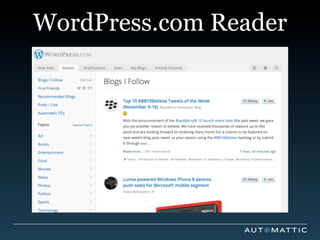
WordPress.com Reader
‱ The reader displays all the posts across
  all the blogs you follow in the order they
  were published, with the most recent
  content appearing at the top. You’ll see
  an excerpt of the introduction to each
  post, the ïŹrst image in the post, and
  thumbnails of any other images that the
  post contains.
WordPress.com Reader


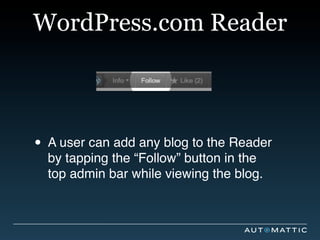
‱ A user can add any blog to the Reader
  by tapping the “Follow” button in the
  top admin bar while viewing the blog.
Introducing the mobile Reader
‱   Read posts from blogs you’re following on
    WordPress.com right in the mobile apps,
    with the addition of social actions, such as
    ‘like’, ‘reblog’, ‘in-line commenting’, and
    more.

‱   We wanted to add this new feature on all of
    our mobile apps (Android, iOS, BlackBerry,
    Windows Phone), trying to reuse the same
    codebase as much as possible.
Requirements
‱   The content should be available as soon as
    the user clicks on the button. No lags, no
    long loading time. (If your app takes too long
    loading data, the user will probably switch to
    another task).

‱   Access device native features such as
    sounds, native pull-to-refresh, blog
    preferences stored in the app.

‱   Native or Hybrid ? -> We tried the Hybrid way
Hybrid Mobile Apps
‱   A hybrid app is a native, downloadable app, that runs
    all or some of its UI in an embedded browser
    component.

‱   HTML / CSS / JavaScript.

‱   Hybrid apps can access device features such as ïŹle-
    system, cameras and geolocation services.

‱   Frameworks, such as the open source project
    ‘Apache Cordova’, make the development of hybrid
    apps portable across devices, and allow developer to
    access native device features from one common JS
    API.
Loading the Reader
‱   Clients authenticate on startup and keep track of the WP
    auth cookie. ( An alternative way is to use the
    WordPress.com login form and the redirect_to parameter,
    but it’s slower ).

‱   The target of the redirect ( The URL of the Reader ) is
    something like https://wordpress.com/reader/mobile/v2/

‱   We’ve added a ïŹlter on ‘page_template’, and the server
    outputs a simple HTML5 page.

‱   The home page is a template that loads the required CSS
    and JS ïŹles.

‱   Ajax calls to load the content of the reader. Those calls
    will start when the home page is fully loaded on the client.
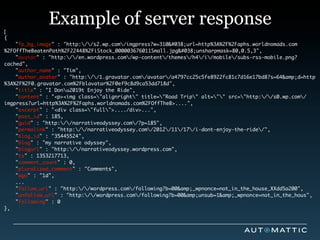
[
              Example of server response
{
	   "fp_bg_image" : "http://s2.wp.com/imgpress?w=310&url=http%3A%2F%2Faphs.worldnomads.com
%2FOffTheBeatenPath%2F22448%2FiStock_000003676011Small.jpg&unsharpmask=80,0.5,3",
	   "avatar" : "http://en.wordpress.com/wp-content/themes/h4/i/mobile/subs-rss-mobile.png?
cached",
	   "author_name" : "Tim",
	   "author_avatar" : "http://1.gravatar.com/avatar/a4797cc25c5fe8922fc81c7d16e17bd8?s=64&d=http
%3A%2F%2F0.gravatar.com%2Fblavatar%2F0ef9c8d9ca53dd718d",
	   "title" : "I Donu2019t Enjoy the Ride",
	   "content" : "<p><img class="alignright" title="Road Trip" alt="" src="http://s0.wp.com/
imgpress?url=http%3A%2F%2Faphs.worldnomads.com%2FOffTheB>....",
	   "excerpt" : "<div class="full">..../div>...",
	   "post_id" : 185,
	   "guid" : "http://narrativeodyssey.com/?p=185",
	   "permalink" : "http://narrativeodyssey.com/2012/11/17/i-dont-enjoy-the-ride/",
	   "blog_id" : "35445524",
	   "blog" : "my narrative odyssey",
	   "blogurl" : "http://narrativeodyssey.wordpress.com",
	   "ts" : 1353217713,
	   "comment_count" : 0,
	   "pluralized_comment" : "Comments",
	   "ago" : "1d",
    ...
	   "follow_url" : "http://wordpress.com/following?b=00&amp;_wpnonce=not_in_the_house_XXdd5a200",
	   "unfollow_url" : "http://wordpress.com/following?b=00&amp;unsub=1&amp;_wpnonce=not_in_the_hous",
	   "following" : 0
},
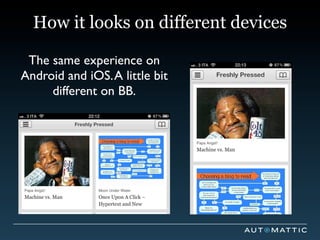
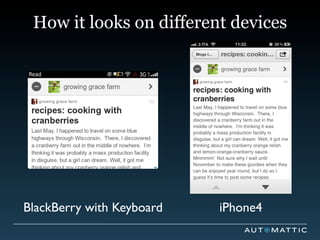
How it looks on different devices

 The same experience on
Android and iOS. A little bit
     different on BB.
How it looks on different devices


BlackBerry with Keyboard   iPhone4
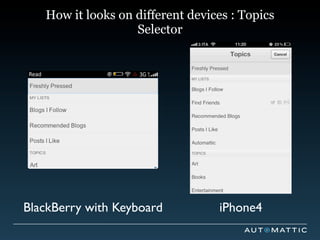
How it looks on different devices : Topics
                   Selector


BlackBerry with Keyboard          iPhone4
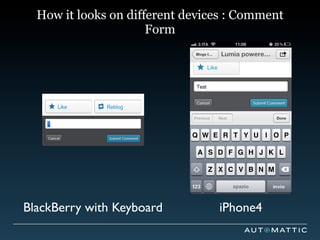
How it looks on different devices : Comment
                      Form


BlackBerry with Keyboard         iPhone4
JS Libraries used
‱ FitVids.js - A lightweight, easy-to-use
  jQuery plugin for ïŹ‚uid width video
  embeds.

‱ {{ mustache }} - Templating
‱ Two internal libraries for UA detection
  and capabilities detection.
Communication between JS and Native code

   ‱ We’ve written a “bridge” that simplies the
     communication between the JS layer and
     the native code (and vice versa).

   ‱ The bridge also adds some security
     checks to prevent malicious pages from
     executing native methods.
Issues found
‱   Excessive stuttering when scrolling the posts list with
    images on it (Old versions of Android).

‱   On the iPhone4 there were issues scrolling the lists
    due to missing optimizations for the UIWebView, and
    the absence of the Nitro JS Engine.

‱   We did a lot of optimizations, but the scrolling is fast
    on iPhone 4S, not on the iPhone4.

‱   BlackBerry 7 browser is very slow at rendering
    complex pages.

‱   Windows Phone 7 doesn’t support HTML5 so we
    skipped that platform for now.
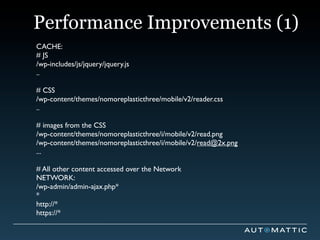
Performance Improvements (1)
CACHE:
# JS
/wp-includes/js/jquery/jquery.js
..

# CSS
/wp-content/themes/nomoreplasticthree/mobile/v2/reader.css
..

# images from the CSS
/wp-content/themes/nomoreplasticthree/i/mobile/v2/read.png
/wp-content/themes/nomoreplasticthree/i/mobile/v2/read@2x.png
...

# All other content accessed over the Network
NETWORK:
/wp-admin/admin-ajax.php*
*
http://*
https://*
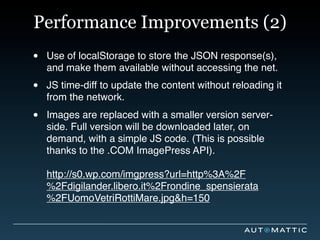
Performance Improvements (2)
‱   Use of localStorage to store the JSON response(s),
    and make them available without accessing the net.

‱   JS time-diff to update the content without reloading it
    from the network.

‱   Images are replaced with a smaller version server-
    side. Full version will be downloaded later, on
    demand, with a simple JS code. (This is possible
    thanks to the .COM ImagePress API).

    http://s0.wp.com/imgpress?url=http%3A%2F
    %2Fdigilander.libero.it%2Frondine_spensierata
    %2FUomoVetriRottiMare.jpg&h=150
The Future: REST API + Native
  ‱ REST API opens access to posts,
    comments, follow, like and more.

  ‱ http://developer.wordpress.com
  ‱ Available on WordPress.com, and on
    Jetpack powered sites.

  ‱ Should be available in WordPress Core
    in the future.
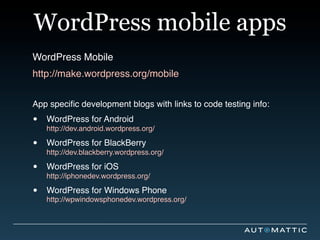
WordPress mobile apps
WordPress Mobile
http://make.wordpress.org/mobile


App speciïŹc development blogs with links to code testing info:

‱   WordPress for Android
    http://dev.android.wordpress.org/

‱   WordPress for BlackBerry
    http://dev.blackberry.wordpress.org/

‱   WordPress for iOS
    http://iphonedev.wordpress.org/

‱   WordPress for Windows Phone
    http://wpwindowsphonedev.wordpress.org/
Thanks ! Questions ?
Danilo Ercoli
Mobile Wrangler
http://daniloercoli.wordpress.com
http://twitter.com/daniloercoli
Mobile Hybrid Development with WordPress

Mobile Hybrid Development with WordPress

  • 1.
    Mobile hybrid developmentwith WordPress Saturday November 24th, 2012 Bologna, Italy
  • 2.
    WordPress.com Reader ‱ WordPress.com has introduced a blog reader feature that’s a cross between Google Reader and reader apps like Flipboard. Through it you can keep track of blogs from WordPress.com, but also other places.
  • 3.
    WordPress.com Reader ‱ Thereader displays all the posts across all the blogs you follow in the order they were published, with the most recent content appearing at the top. You’ll see an excerpt of the introduction to each post, the ïŹrst image in the post, and thumbnails of any other images that the post contains.
  • 4.
  • 5.
    WordPress.com Reader ‱ Auser can add any blog to the Reader by tapping the “Follow” button in the top admin bar while viewing the blog.
  • 6.
    Introducing the mobileReader ‱ Read posts from blogs you’re following on WordPress.com right in the mobile apps, with the addition of social actions, such as ‘like’, ‘reblog’, ‘in-line commenting’, and more. ‱ We wanted to add this new feature on all of our mobile apps (Android, iOS, BlackBerry, Windows Phone), trying to reuse the same codebase as much as possible.
  • 7.
    Requirements ‱ The content should be available as soon as the user clicks on the button. No lags, no long loading time. (If your app takes too long loading data, the user will probably switch to another task). ‱ Access device native features such as sounds, native pull-to-refresh, blog preferences stored in the app. ‱ Native or Hybrid ? -> We tried the Hybrid way
  • 8.
    Hybrid Mobile Apps ‱ A hybrid app is a native, downloadable app, that runs all or some of its UI in an embedded browser component. ‱ HTML / CSS / JavaScript. ‱ Hybrid apps can access device features such as ïŹle- system, cameras and geolocation services. ‱ Frameworks, such as the open source project ‘Apache Cordova’, make the development of hybrid apps portable across devices, and allow developer to access native device features from one common JS API.
  • 9.
    Loading the Reader ‱ Clients authenticate on startup and keep track of the WP auth cookie. ( An alternative way is to use the WordPress.com login form and the redirect_to parameter, but it’s slower ). ‱ The target of the redirect ( The URL of the Reader ) is something like https://wordpress.com/reader/mobile/v2/ ‱ We’ve added a ïŹlter on ‘page_template’, and the server outputs a simple HTML5 page. ‱ The home page is a template that loads the required CSS and JS ïŹles. ‱ Ajax calls to load the content of the reader. Those calls will start when the home page is fully loaded on the client.
  • 10.
    [ Example of server response { "fp_bg_image" : "http://s2.wp.com/imgpress?w=310&#038;url=http%3A%2F%2Faphs.worldnomads.com %2FOffTheBeatenPath%2F22448%2FiStock_000003676011Small.jpg&#038;unsharpmask=80,0.5,3", "avatar" : "http://en.wordpress.com/wp-content/themes/h4/i/mobile/subs-rss-mobile.png? cached", "author_name" : "Tim", "author_avatar" : "http://1.gravatar.com/avatar/a4797cc25c5fe8922fc81c7d16e17bd8?s=64&amp;d=http %3A%2F%2F0.gravatar.com%2Fblavatar%2F0ef9c8d9ca53dd718d", "title" : "I Donu2019t Enjoy the Ride", "content" : "<p><img class="alignright" title="Road Trip" alt="" src="http://s0.wp.com/ imgpress?url=http%3A%2F%2Faphs.worldnomads.com%2FOffTheB>....", "excerpt" : "<div class="full">..../div>...", "post_id" : 185, "guid" : "http://narrativeodyssey.com/?p=185", "permalink" : "http://narrativeodyssey.com/2012/11/17/i-dont-enjoy-the-ride/", "blog_id" : "35445524", "blog" : "my narrative odyssey", "blogurl" : "http://narrativeodyssey.wordpress.com", "ts" : 1353217713, "comment_count" : 0, "pluralized_comment" : "Comments", "ago" : "1d", ... "follow_url" : "http://wordpress.com/following?b=00&amp;_wpnonce=not_in_the_house_XXdd5a200", "unfollow_url" : "http://wordpress.com/following?b=00&amp;unsub=1&amp;_wpnonce=not_in_the_hous", "following" : 0 },
  • 11.
    How it lookson different devices The same experience on Android and iOS. A little bit different on BB.
  • 12.
    How it lookson different devices BlackBerry with Keyboard iPhone4
  • 13.
    How it lookson different devices : Topics Selector BlackBerry with Keyboard iPhone4
  • 14.
    How it lookson different devices : Comment Form BlackBerry with Keyboard iPhone4
  • 15.
    JS Libraries used ‱FitVids.js - A lightweight, easy-to-use jQuery plugin for ïŹ‚uid width video embeds. ‱ {{ mustache }} - Templating ‱ Two internal libraries for UA detection and capabilities detection.
  • 16.
    Communication between JSand Native code ‱ We’ve written a “bridge” that simplies the communication between the JS layer and the native code (and vice versa). ‱ The bridge also adds some security checks to prevent malicious pages from executing native methods.
  • 17.
    Issues found ‱ Excessive stuttering when scrolling the posts list with images on it (Old versions of Android). ‱ On the iPhone4 there were issues scrolling the lists due to missing optimizations for the UIWebView, and the absence of the Nitro JS Engine. ‱ We did a lot of optimizations, but the scrolling is fast on iPhone 4S, not on the iPhone4. ‱ BlackBerry 7 browser is very slow at rendering complex pages. ‱ Windows Phone 7 doesn’t support HTML5 so we skipped that platform for now.
  • 18.
    Performance Improvements (1) CACHE: #JS /wp-includes/js/jquery/jquery.js .. # CSS /wp-content/themes/nomoreplasticthree/mobile/v2/reader.css .. # images from the CSS /wp-content/themes/nomoreplasticthree/i/mobile/v2/read.png /wp-content/themes/nomoreplasticthree/i/mobile/v2/read@2x.png ... # All other content accessed over the Network NETWORK: /wp-admin/admin-ajax.php* * http://* https://*
  • 19.
    Performance Improvements (2) ‱ Use of localStorage to store the JSON response(s), and make them available without accessing the net. ‱ JS time-diff to update the content without reloading it from the network. ‱ Images are replaced with a smaller version server- side. Full version will be downloaded later, on demand, with a simple JS code. (This is possible thanks to the .COM ImagePress API). http://s0.wp.com/imgpress?url=http%3A%2F %2Fdigilander.libero.it%2Frondine_spensierata %2FUomoVetriRottiMare.jpg&h=150
  • 20.
    The Future: RESTAPI + Native ‱ REST API opens access to posts, comments, follow, like and more. ‱ http://developer.wordpress.com ‱ Available on WordPress.com, and on Jetpack powered sites. ‱ Should be available in WordPress Core in the future.
  • 21.
    WordPress mobile apps WordPressMobile http://make.wordpress.org/mobile App speciïŹc development blogs with links to code testing info: ‱ WordPress for Android http://dev.android.wordpress.org/ ‱ WordPress for BlackBerry http://dev.blackberry.wordpress.org/ ‱ WordPress for iOS http://iphonedev.wordpress.org/ ‱ WordPress for Windows Phone http://wpwindowsphonedev.wordpress.org/
  • 22.
    Thanks ! Questions? Danilo Ercoli Mobile Wrangler http://daniloercoli.wordpress.com http://twitter.com/daniloercoli