How EDH was contained! 
Containerisation and Deis
A New World Order 
The ‘what’ and ‘why’ of 
Containers 
Layers of the 
Infrastructure Stack 
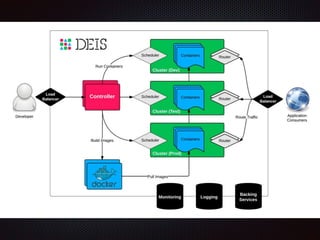
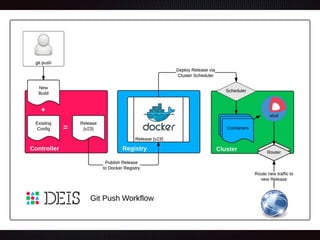
Deis components 
Future Steps 
Demo and Examples
What are Containers? 
Linux Containers (LXC) 
OS level virtualization method for running multiple 
Linux systems on a single host. 
Resource isolation - CPU, memory, block I/O, 
network, etc. (cgroups) 
Does not require starting any virtual machines
So, why containers? 
• Application Packaging 
• Bundle code and dependencies 
• Run anywhere* 
• The 12 Factor App 
• Simpler for Operations 
• Consistency 
• Application Centric View 
• Continuous Delivery 
• Run same artifact in all environments
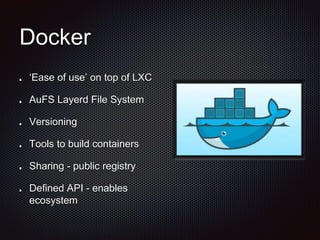
Docker 
‘Ease of use’ on top of LXC 
AuFS Layerd File System 
Versioning 
Tools to build containers 
Sharing - public registry 
Defined API - enables 
ecosystem
12-Factor Apps + Docker 
Methodology for building 
services 
Processes 
Port binding 
Dev/prod parity 
Concurrency 
Logs 
Admin processes
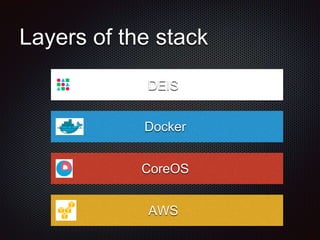
Layers of the stack 
DEIS 
Docker 
CoreOS 
AWS
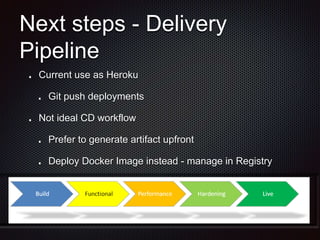
Next steps - Delivery 
Pipeline 
Current use as Heroku 
Git push deployments 
Not ideal CD workflow 
Prefer to generate artifact upfront 
Deploy Docker Image instead - manage in Registry
Next Steps - something else? 
Deis 
Thin layer on solid tech 
Immature, but convenient 
abstraction for now 
Exciting things are happening 
Kubernetes (Google) 
Panamax (Century Link) 
Mesos (Apache)
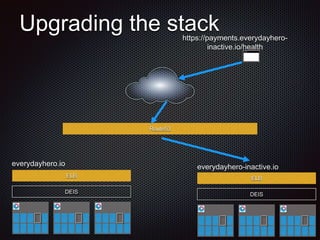
everydayhero-inactive.io 
ELB 
DEIS 
Upgrading the stack 
Route53 
ELB 
DEIS 
https://payments.everydayhero-inactive. 
io/health 
everydayhero.io
DEMO

Containerisation and DEIS

  • 1.
    How EDH wascontained! Containerisation and Deis
  • 2.
    A New WorldOrder The ‘what’ and ‘why’ of Containers Layers of the Infrastructure Stack Deis components Future Steps Demo and Examples
  • 3.
    What are Containers? Linux Containers (LXC) OS level virtualization method for running multiple Linux systems on a single host. Resource isolation - CPU, memory, block I/O, network, etc. (cgroups) Does not require starting any virtual machines
  • 4.
    So, why containers? • Application Packaging • Bundle code and dependencies • Run anywhere* • The 12 Factor App • Simpler for Operations • Consistency • Application Centric View • Continuous Delivery • Run same artifact in all environments
  • 5.
    Docker ‘Ease ofuse’ on top of LXC AuFS Layerd File System Versioning Tools to build containers Sharing - public registry Defined API - enables ecosystem
  • 6.
    12-Factor Apps +Docker Methodology for building services Processes Port binding Dev/prod parity Concurrency Logs Admin processes
  • 7.
    Layers of thestack DEIS Docker CoreOS AWS
  • 10.
    Next steps -Delivery Pipeline Current use as Heroku Git push deployments Not ideal CD workflow Prefer to generate artifact upfront Deploy Docker Image instead - manage in Registry
  • 11.
    Next Steps -something else? Deis Thin layer on solid tech Immature, but convenient abstraction for now Exciting things are happening Kubernetes (Google) Panamax (Century Link) Mesos (Apache)
  • 12.
    everydayhero-inactive.io ELB DEIS Upgrading the stack Route53 ELB DEIS https://payments.everydayhero-inactive. io/health everydayhero.io
  • 13.

Editor's Notes

  • #2 Our new infrastructure Move from Physical data centre in Sydney, to AWS Adopting new ways to deploy scalable apps and infrastructure Goal: Everyone should understand basics of our infrastructure and how interact with it.
  • #4 Uses features built into Linux Kernel Not new technology - similar to FreeBSD Jails (2000), chroot Jails Difference to VMs - No overhead - managed as standard processes. Can run 1000s of containers on a laptop VMs emulate hardware - heavy weight, large overhead Cons: Less Isolated - can affect other containers - but can be managed. Linux only (for now) - requires VM to run on Mac, Windows.
  • #5 Resource utilisation vs AMIs
  • #6 Entire OS + app wrapped in image
  • #7 Scale apps independently from infrastructure nodes Contract with the underlying operating system, offering maximum portability between execution environments; Suitable for deployment on modern cloud platforms, obviating the need for servers and systems administration; Minimize divergence between development and production, enabling continuous deployment for maximum agility; And can scale up without significant changes to tooling, architecture, or development practices. I. Codebase One codebase tracked in revision control, many deploys II. Dependencies Explicitly declare and isolate dependencies III. Config Store config in the environment IV. Backing Services Treat backing services as attached resources V. Build, release, run Strictly separate build and run stages VI. Processes Execute the app as one or more stateless processes VII. Port binding Export services via port binding VIII. Concurrency Scale out via the process model IX. Disposability Maximize robustness with fast startup and graceful shutdown X. Dev/prod parity Keep development, staging, and production as similar as possible XI. Logs Treat logs as event streams XII. Admin processes Run admin/management tasks as one-off processes
  • #8 CoreOS: Linux Distro specifically for deploying Docker - No package manager, Docker is the package mechanism Build for clusters - Manages services deployed across many nodes - Re-scheduling services from failed nodes - New/recovered nodes join the base cluster - Scale infrastructure nodes independently from apps
  • #9 Controller The controller component is a RESTful API server written with Django and Celery. Command-line clients interact with this component. Database The database component is a PostgreSQL server used to store durable platform state. Backups and WAL logs are pushed to Store. Cache The cache component uses Redis to: Store work queue data for Celery Cache sessions and synchronize locks for Django Store recent log data for the Controller Builder The builder component uses a Git server to process Application builds. The builder: Receives incoming git push requests over SSH Authenticates the user via SSH key fingerprint Authorizes the user’s access to write to the Git repository Builds a new Docker image from the updated git repository Adds the latest Config to the resulting Docker image Pushes the new Docker image to the platform’s Registry Creates a new Release on the Controller Once a new Release is generated, a new set of containers is deployed across the platform automatically. Registry The registry component hosts Docker images on behalf of the platform. Image data is stored by Store. Log Server The log server component uses rsyslog to aggregate log data from across the platform. This data can then be queried by the Controller. Router The router component uses Nginx to route traffic to application containers. Store The store component uses Ceph to store data for Deis components which need to store state (namely Registry and Database).
  • #11 Currently, Deis builds container internal to an environment, “compilation” step happens multiple times Buildstep outside environments
  • #12 Docker is without doubt the future of app deployment At Google - Everything is containers Built their own, Switching to Docker Kubernetes orchestration layer Deis is a convenient workflow for the “Heroku-like” experience
  • #13 Active/Inactive - is our current process given the breaking changes happening in deis. They are actively discussing and develop better strategies for upgrading both deis and CoreOS.
  • #14 fleetclt list-units fleetctl journal -f <service> deis login deis config:set deis apps:info deis ps:scale git push