Download free for 30 days
Sign in
Upload
Language (EN)
Support
Business
Mobile
Social Media
Marketing
Technology
Art & Photos
Career
Design
Education
Presentations & Public Speaking
Government & Nonprofit
Healthcare
Internet
Law
Leadership & Management
Automotive
Engineering
Software
Recruiting & HR
Retail
Sales
Services
Science
Small Business & Entrepreneurship
Food
Environment
Economy & Finance
Data & Analytics
Investor Relations
Sports
Spiritual
News & Politics
Travel
Self Improvement
Real Estate
Entertainment & Humor
Health & Medicine
Devices & Hardware
Lifestyle
Change Language
Language
English
Español
Português
Français
Deutsche
Cancel
Save
Submit search
EN
Uploaded by
lukecat1987
PPTX, PDF
32 views
Configuration Tips and Troubleshooting HCM.pptx
Configuration Tips and Troubleshooting HCM.pptx
Recruiting & HR
◦
Read more
0
Save
Share
Embed
Embed presentation
Download
Download to read offline
1
/ 15
2
/ 15
Most read
3
/ 15
4
/ 15
5
/ 15
6
/ 15
Most read
7
/ 15
8
/ 15
9
/ 15
10
/ 15
11
/ 15
12
/ 15
13
/ 15
14
/ 15
15
/ 15
More Related Content
PDF
Oracle Absence Management Fast Formulas (Oracle HCM Cloud).pdf
by
rtlonlinetrainingdem
PDF
17 define workforce records
by
mohamed refaei
PDF
C_THR12_67 Exam Real Practice Test For Solution Experts
by
SEO
PDF
Oracle ame complete setup
by
rahul chowdary
PDF
Ebs 122 cum_rcd_hcm
by
phr123
DOCX
Absence management in oracle HRMS
by
Rajiv reddy
TXT
Cv bank pa
by
Vijaya_varma
TXT
Cv bank pa
by
gayathri166
Oracle Absence Management Fast Formulas (Oracle HCM Cloud).pdf
by
rtlonlinetrainingdem
17 define workforce records
by
mohamed refaei
C_THR12_67 Exam Real Practice Test For Solution Experts
by
SEO
Oracle ame complete setup
by
rahul chowdary
Ebs 122 cum_rcd_hcm
by
phr123
Absence management in oracle HRMS
by
Rajiv reddy
Cv bank pa
by
Vijaya_varma
Cv bank pa
by
gayathri166
Similar to Configuration Tips and Troubleshooting HCM.pptx
PPTX
Hamida ali al shabani
by
HamidaAlshabani
PDF
CustomOTBISecurityv1.pdf
by
Krishnamraju Kottapalli
PDF
User hook implemantation sample example
by
Ashish Harbhajanka
PPTX
Absences planning training final
by
SentricTraining
PPSX
hrms payroll software Delhi ..9999052481
by
Savvy HRMS
PPTX
267113946-SAP-HR-Time-Management-ppt.pptx
by
AnanthaJiwaji
PDF
Overtime Module
by
autisimclinic
PDF
C_THR94_2305 Certification Exam Advance Your HR Skills | Prepare and Succeed
by
Aliza Oscar
PPT
5.11 lowry
by
muhamad nawawi
PDF
SAP SuccessFactors Advanced Employee Central Online training - empowerittrain...
by
EmpowerIT Trainings
DOC
Operational analysis questionnaire otl
by
Feras Ahmad
DOCX
Time mgt class room material
by
Gunna Prasanna
PPTX
Quick Preview: SuccessFactors Q3 - EC & Platform
by
Christoph Pohl
PDF
SAP SuccessFactors Employee Central Time Management Certification Online trai...
by
EmpowerIT Trainings
PDF
Uae absence whitepaper
by
Srinivasan Narayanan
PPTX
Sap SF Advanced Employee Central Time Management Training in Hyderabad.pptx
by
EmpowerIT Trainings
DOCX
SAP Success factors Advanced Employee Central Online Training Institute in Hy...
by
EmpowerIT Trainings
PDF
SAP SF Advanced EC Time Management Online Training in Hyderabad - empowerittr...
by
EmpowerIT Trainings
PDF
1 z0 416 -demo
by
dd859987
PDF
Q4 2019 EC & Platform Quick Review by Deloitte Germany
by
Christoph Pohl
Hamida ali al shabani
by
HamidaAlshabani
CustomOTBISecurityv1.pdf
by
Krishnamraju Kottapalli
User hook implemantation sample example
by
Ashish Harbhajanka
Absences planning training final
by
SentricTraining
hrms payroll software Delhi ..9999052481
by
Savvy HRMS
267113946-SAP-HR-Time-Management-ppt.pptx
by
AnanthaJiwaji
Overtime Module
by
autisimclinic
C_THR94_2305 Certification Exam Advance Your HR Skills | Prepare and Succeed
by
Aliza Oscar
5.11 lowry
by
muhamad nawawi
SAP SuccessFactors Advanced Employee Central Online training - empowerittrain...
by
EmpowerIT Trainings
Operational analysis questionnaire otl
by
Feras Ahmad
Time mgt class room material
by
Gunna Prasanna
Quick Preview: SuccessFactors Q3 - EC & Platform
by
Christoph Pohl
SAP SuccessFactors Employee Central Time Management Certification Online trai...
by
EmpowerIT Trainings
Uae absence whitepaper
by
Srinivasan Narayanan
Sap SF Advanced Employee Central Time Management Training in Hyderabad.pptx
by
EmpowerIT Trainings
SAP Success factors Advanced Employee Central Online Training Institute in Hy...
by
EmpowerIT Trainings
SAP SF Advanced EC Time Management Online Training in Hyderabad - empowerittr...
by
EmpowerIT Trainings
1 z0 416 -demo
by
dd859987
Q4 2019 EC & Platform Quick Review by Deloitte Germany
by
Christoph Pohl
Configuration Tips and Troubleshooting HCM.pptx
1.
Copyright © 2022,
Oracle and/or its affiliates. All rights reserved. 1 Configuration Tips and Troubleshooting Luke Yang
2.
Copyright © 2022,
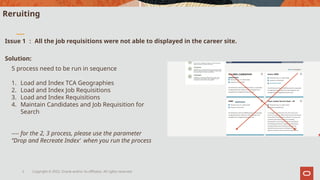
Oracle and/or its affiliates. All rights reserved. 2 Reruiting Issue 1 : All the job requisitions were not able to displayed in the career site. 5 process need to be run in sequence 1. Load and Index TCA Geographies 2. Load and Index Job Requisitions 3. Load and Index Requisitions 4. Maintain Candidates and Job Requisition for Search ---- for the 2, 3 process, please use the parameter ‘’Drop and Recreate Index‘ when you run the process Solution:
3.
Copyright © 2022,
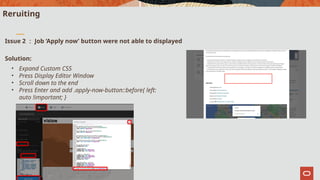
Oracle and/or its affiliates. All rights reserved. 3 Reruiting Issue 2 : Job ‘Apply now’ button were not able to displayed Solution: • Expand Custom CSS • Press Display Editor Window • Scroll down to the end • Press Enter and add .apply-now-button::before{ left: auto !important; }
4.
Copyright © 2022,
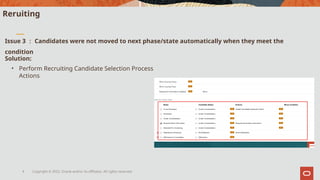
Oracle and/or its affiliates. All rights reserved. 4 Reruiting Issue 3 : Candidates were not moved to next phase/state automatically when they meet the condition Solution: • Perform Recruiting Candidate Selection Process Actions
5.
Copyright © 2022,
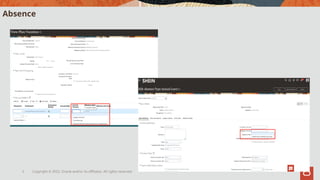
Oracle and/or its affiliates. All rights reserved. 5 Absence
6.
Copyright © 2022,
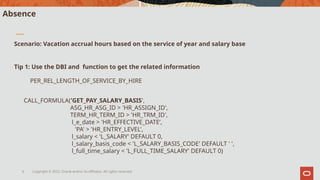
Oracle and/or its affiliates. All rights reserved. 6 Absence Scenario: Vacation accrual hours based on the service of year and salary base Tip 1: Use the DBI and function to get the related information PER_REL_LENGTH_OF_SERVICE_BY_HIRE CALL_FORMULA('GET_PAY_SALARY_BASIS', ASG_HR_ASG_ID > 'HR_ASSIGN_ID', TERM_HR_TERM_ID > 'HR_TRM_ID', l_e_date > 'HR_EFFECTIVE_DATE’, 'PA' > 'HR_ENTRY_LEVEL', l_salary < 'L_SALARY' DEFAULT 0, l_salary_basis_code < 'L_SALARY_BASIS_CODE' DEFAULT ' ', l_full_time_salary < 'L_FULL_TIME_SALARY' DEFAULT 0)
7.
Copyright © 2022,
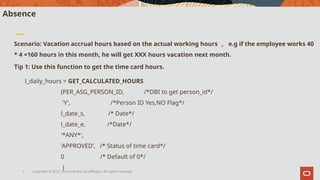
Oracle and/or its affiliates. All rights reserved. 7 Absence l_daily_hours = GET_CALCULATED_HOURS (PER_ASG_PERSON_ID, /*DBI to get person_id*/ 'Y', /*Person ID Yes,NO Flag*/ l_date_s, /* Date*/ l_date_e, /*Date*/ '*ANY*', 'APPROVED’, /* Status of time card*/ 0 /* Default of 0*/ ) Scenario: Vacation accrual hours based on the actual working hours , e.g if the employee works 40 * 4 =160 hours in this month, he will get XXX hours vacation next month. Tip 1: Use this function to get the time card hours.
8.
Copyright © 2022,
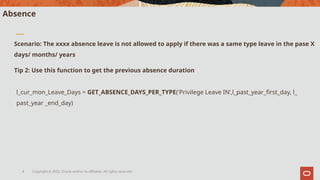
Oracle and/or its affiliates. All rights reserved. 8 Absence l_cur_mon_Leave_Days = GET_ABSENCE_DAYS_PER_TYPE('Privilege Leave IN’,l_past_year_first_day, l_ past_year _end_day) Scenario: The xxxx absence leave is not allowed to apply if there was a same type leave in the pase X days/ months/ years Tip 2: Use this function to get the previous absence duration
9.
Copyright © 2022,
Oracle and/or its affiliates. All rights reserved. 9 Absence formula.zip
10.
Copyright © 2022,
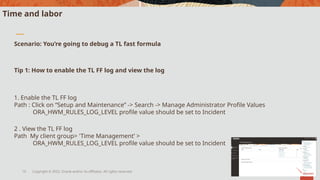
Oracle and/or its affiliates. All rights reserved. 10 Time and labor Scenario: You’re going to debug a TL fast formula Tip 1: How to enable the TL FF log and view the log 1. Enable the TL FF log Path : Click on “Setup and Maintenance” -> Search -> Manage Administrator Profile Values ORA_HWM_RULES_LOG_LEVEL profile value should be set to Incident 2 . View the TL FF log Path My client group> 'Time Management’ > ORA_HWM_RULES_LOG_LEVEL profile value should be set to Incident
11.
Copyright © 2022,
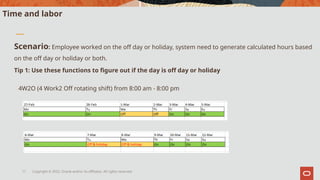
Oracle and/or its affiliates. All rights reserved. 11 Time and labor Scenario: Employee worked on the off day or holiday, system need to generate calculated hours based on the off day or holiday or both. Tip 1: Use these functions to figure out if the day is off day or holiday 4W2O (4 Work2 Off rotating shift) from 8:00 am - 8:00 pm
12.
Copyright © 2022,
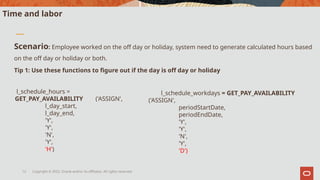
Oracle and/or its affiliates. All rights reserved. 12 Time and labor Scenario: Employee worked on the off day or holiday, system need to generate calculated hours based on the off day or holiday or both. Tip 1: Use these functions to figure out if the day is off day or holiday l_schedule_hours = GET_PAY_AVAILABILITY ('ASSIGN', l_day_start, l_day_end, 'Y', 'Y', 'N', 'Y', 'H') l_schedule_workdays = GET_PAY_AVAILABILITY ('ASSIGN', periodStartDate, periodEndDate, 'Y', 'Y', 'N', 'Y', 'D')
13.
Copyright © 2022,
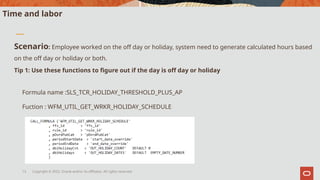
Oracle and/or its affiliates. All rights reserved. 13 Time and labor Scenario: Employee worked on the off day or holiday, system need to generate calculated hours based on the off day or holiday or both. Tip 1: Use these functions to figure out if the day is off day or holiday Formula name :SLS_TCR_HOLIDAY_THRESHOLD_PLUS_AP Fuction : WFM_UTIL_GET_WRKR_HOLIDAY_SCHEDULE
14.
Copyright © 2022,
Oracle and/or its affiliates. All rights reserved. 14 Absence TL FF.zip
Editor's Notes
#5
Two types of FF used frequently.
#6
TL in their BOM TL NOT in their BOM
#7
TL in their BOM TL NOT in their BOM
#8
TL in their BOM TL NOT in their BOM
#9
TL in their BOM TL NOT in their BOM
#10
TL in their BOM TL NOT in their BOM
#11
TL in their BOM TL NOT in their BOM
#12
TL in their BOM TL NOT in their BOM
#13
TL in their BOM TL NOT in their BOM
#14
TL in their BOM TL NOT in their BOM
Download