Vladimir `vovcia' Mitiouchev
Hacking embedded with* OpenWrt
*using
Kraków, 2017
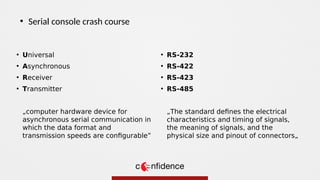
• Universal
• Asynchronous
• Receiver
• Transmitter
„computer hardware device for
asynchronous serial communication in
which the data format and
transmission speeds are configurable”
●
Serial console crash course
• RS-232
• RS-422
• RS-423
• RS-485
„The standard defines the electrical
characteristics and timing of signals,
the meaning of signals, and the
physical size and pinout of connectors„
●
Serial console crash course
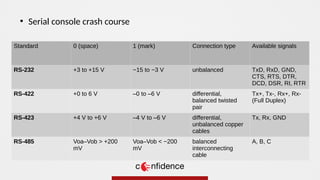
Standard 0 (space) 1 (mark) Connection type Available signals
RS-232 +3 to +15 V −15 to −3 V unbalanced TxD, RxD, GND,
CTS, RTS, DTR,
DCD, DSR, RI, RTR
RS-422 +0 to 6 V –0 to –6 V differential,
balanced twisted
pair
Tx+, Tx-, Rx+, Rx-
(Full Duplex)
RS-423 +4 V to +6 V –4 V to –6 V differential,
unbalanced copper
cables
Tx, Rx, GND
RS-485 Voa–Vob > +200
mV
Voa–Vob < −200
mV
balanced
interconnecting
cable
A, B, C
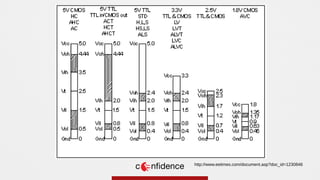
http://www.eetimes.com/document.asp?doc_id=1230846
Logic
Level
Converter
https://learn.sparkfun.com/tutorials/using-the-logic-level-converter
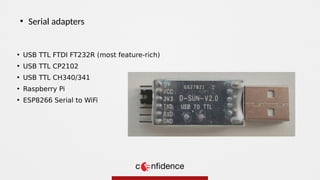
• USB TTL FTDI FT232R (most feature-rich)
• USB TTL CP2102
• USB TTL CH340/341
• Raspberry Pi
• ESP8266 Serial to WiFi
●
Serial adapters
●
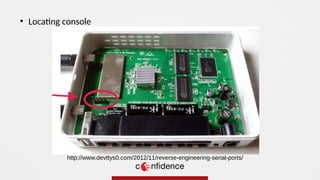
Locating console
http://www.devttys0.com/2012/11/reverse-engineering-serial-ports/
●
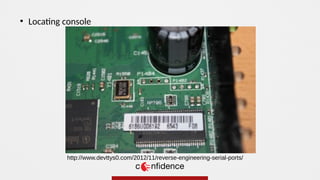
Locating console
http://www.devttys0.com/2012/11/reverse-engineering-serial-ports/
●
TX to RX
●
RX to TX
●
GND to GND
●
NC / 5V / 3.3V – do Not Connect
●
https://code.google.com/archive/p/baudrate/
„Baudrate is a tool to help quickly identify the baud rate of an unknown
serial device. It displays received data from a serial device while allowing
the user to change the baud rate of their host system's serial port on the
fly.”
●
# picocom -b 115200 /dev/ttyUSB0
●
Connecting console
●
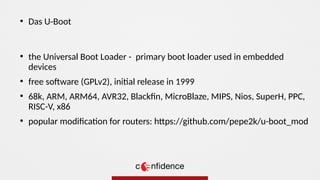
the Universal Boot Loader - primary boot loader used in embedded
devices
●
free software (GPLv2), initial release in 1999
●
68k, ARM, ARM64, AVR32, Blackfin, MicroBlaze, MIPS, Nios, SuperH, PPC,
RISC-V, x86
●
popular modification for routers: https://github.com/pepe2k/u-boot_mod
●
Das U-Boot
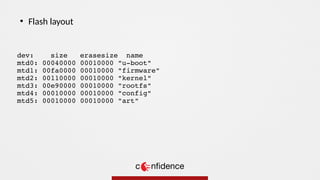
dev: size erasesize name
mtd0: 00040000 00010000 "u-boot"
mtd1: 00fa0000 00010000 "firmware"
mtd2: 00110000 00010000 "kernel"
mtd3: 00e90000 00010000 "rootfs"
mtd4: 00010000 00010000 "config"
mtd5: 00010000 00010000 "art"
●
Flash layout
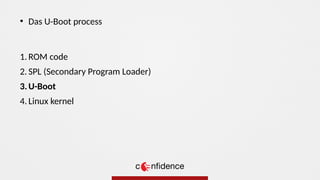
1. ROM code
2. SPL (Secondary Program Loader)
3.U-Boot
4. Linux kernel
●
Das U-Boot process
U-Boot 2011.09-rc1-00000-gf75abad-dirty (Oct 21 2013 - 18:44:22) Allwinner Technology
CPU: SUNXI Family
Board: A20-Cubietruck
DRAM: 2 GiB
NAND: NB1 : enter NFB_Init
[NAND] nand driver(b) version: 0x2, 0x12, data: 20130526
[NAND] set nand_good_block_ratio 912
NB1 : nand phy init ok
NB1 : init ok
3200 MiB
Using default environment
In: serial
Out: serial
Err: serial
--------fastboot partitions--------
-total partitions:3-
-name- -start- -size-
bootloader : 8000 20000
rootfs : 28000 600000
UDISK : 628000 18000
-----------------------------------
no misc partition is found
Hit any key to stop autoboot: 0
sun7i#
●
Das U-Boot
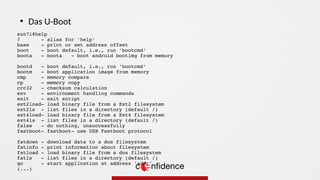
sun7i#help
? - alias for 'help'
base - print or set address offset
boot - boot default, i.e., run 'bootcmd'
boota - boota - boot android bootimg from memory
bootd - boot default, i.e., run 'bootcmd'
bootm - boot application image from memory
cmp - memory compare
cp - memory copy
crc32 - checksum calculation
env - environment handling commands
exit - exit script
ext2load- load binary file from a Ext2 filesystem
ext2ls - list files in a directory (default /)
ext4load- load binary file from a Ext4 filesystem
ext4ls - list files in a directory (default /)
false - do nothing, unsuccessfully
fastboot- fastboot- use USB Fastboot protocol
fatdown - download data to a dos filesystem
fatinfo - print information about filesystem
fatload - load binary file from a dos filesystem
fatls - list files in a directory (default /)
go - start application at address 'addr'
(...)
●
Das U-Boot
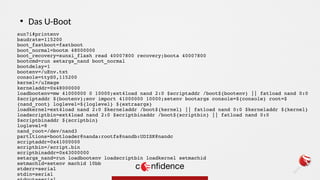
sun7i#printenv
baudrate=115200
boot_fastboot=fastboot
boot_normal=bootm 48000000
boot_recovery=sunxi_flash read 40007800 recovery;boota 40007800
bootcmd=run setargs_nand boot_normal
bootdelay=1
bootenv=/uEnv.txt
console=ttyS0,115200
kernel=/uImage
kerneladdr=0x48000000
loadbootenv=mw 41000000 0 10000;ext4load nand 2:0 $scriptaddr /boot${bootenv} || fatload nand 0:0
$scriptaddr ${bootenv};env import 41000000 10000;setenv bootargs console=${console} root=$
{nand_root} loglevel=${loglevel} ${extraargs}
loadkernel=ext4load nand 2:0 $kerneladdr /boot${kernel} || fatload nand 0:0 $kerneladdr ${kernel}
loadscriptbin=ext4load nand 2:0 $scriptbinaddr /boot${scriptbin} || fatload nand 0:0
$scriptbinaddr ${scriptbin}
loglevel=8
nand_root=/dev/nand3
partitions=bootloader@nanda:rootfs@nandb:UDISK@nandc
scriptaddr=0x41000000
scriptbin=/script.bin
scriptbinaddr=0x43000000
setargs_nand=run loadbootenv loadscriptbin loadkernel setmachid
setmachid=setenv machid 10bb
stderr=serial
stdin=serial
●
Das U-Boot
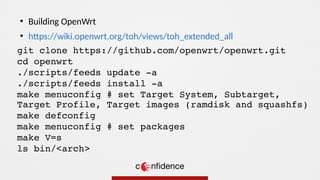
git clone https://github.com/openwrt/openwrt.git
cd openwrt
./scripts/feeds update -a
./scripts/feeds install -a
make menuconfig # set Target System, Subtarget,
Target Profile, Target images (ramdisk and squashfs)
make defconfig
make menuconfig # set packages
make V=s
ls bin/<arch>
●
Building OpenWrt
●
https://wiki.openwrt.org/toh/views/toh_extended_all
●
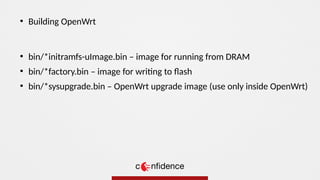
bin/*initramfs-uImage.bin – image for running from DRAM
●
bin/*factory.bin – image for writing to flash
●
bin/*sysupgrade.bin – OpenWrt upgrade image (use only inside OpenWrt)
●
Building OpenWrt
●
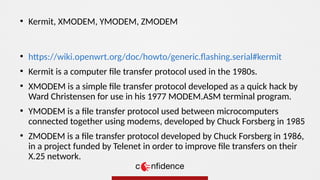
https://wiki.openwrt.org/doc/howto/generic.flashing.serial#kermit
●
Kermit is a computer file transfer protocol used in the 1980s.
●
XMODEM is a simple file transfer protocol developed as a quick hack by
Ward Christensen for use in his 1977 MODEM.ASM terminal program.
●
YMODEM is a file transfer protocol used between microcomputers
connected together using modems, developed by Chuck Forsberg in 1985
●
ZMODEM is a file transfer protocol developed by Chuck Forsberg in 1986,
in a project funded by Telenet in order to improve file transfers on their
X.25 network.
●
Kermit, XMODEM, YMODEM, ZMODEM
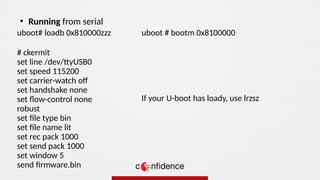
uboot# loadb 0x810000zzz
# ckermit
set line /dev/ttyUSB0
set speed 115200
set carrier-watch of
set handshake none
set flow-control none
robust
set file type bin
set file name lit
set rec pack 1000
set send pack 1000
set window 5
send firmware.bin
●
Running from serial
uboot # bootm 0x8100000
If your U-boot has loady, use lrzsz
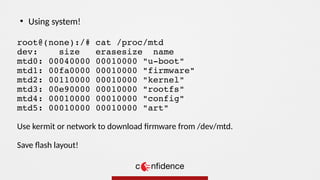
root@(none):/# cat /proc/mtd
dev: size erasesize name
mtd0: 00040000 00010000 "u-boot"
mtd1: 00fa0000 00010000 "firmware"
mtd2: 00110000 00010000 "kernel"
mtd3: 00e90000 00010000 "rootfs"
mtd4: 00010000 00010000 "config"
mtd5: 00010000 00010000 "art"
Use kermit or network to download firmware from /dev/mtd.
Save flash layout!
●
Using system!
●
https://github.com/devttys0/binwalk
●
Binwalk is a fast, easy to use tool for analyzing, reverse engineering, and
extracting firmware images.
●
Extract files:
$ binwalk -e firmware.bin
●
Entropy analysis:
$ binwalk -E firmware.bin
●
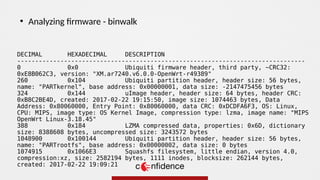
Analyzing firmware - binwalk
DECIMAL HEXADECIMAL DESCRIPTION
--------------------------------------------------------------------------------
0 0x0 Ubiquiti firmware header, third party, ~CRC32:
0xE8B062C3, version: "XM.ar7240.v6.0.0-OpenWrt-r49389"
260 0x104 Ubiquiti partition header, header size: 56 bytes,
name: "PARTkernel", base address: 0x00000001, data size: -2147475456 bytes
324 0x144 uImage header, header size: 64 bytes, header CRC:
0xB8C2BE4D, created: 2017-02-22 19:15:50, image size: 1074463 bytes, Data
Address: 0x80060000, Entry Point: 0x80060000, data CRC: 0xDCDFA6F3, OS: Linux,
CPU: MIPS, image type: OS Kernel Image, compression type: lzma, image name: "MIPS
OpenWrt Linux-3.18.45"
388 0x184 LZMA compressed data, properties: 0x6D, dictionary
size: 8388608 bytes, uncompressed size: 3243572 bytes
1048900 0x100144 Ubiquiti partition header, header size: 56 bytes,
name: "PARTrootfs", base address: 0x00000002, data size: 0 bytes
1074915 0x1066E3 Squashfs filesystem, little endian, version 4.0,
compression:xz, size: 2582194 bytes, 1111 inodes, blocksize: 262144 bytes,
created: 2017-02-22 19:09:21
●
Analyzing firmware - binwalk
●
https://github.com/devttys0/sasquatch
●
The sasquatch project is a set of patches to the standard unsquashfs utility
(part of squashfs-tools) that attempts to add support for as many hacked-
up vendor-specific SquashFS implementations as possible.
●
Analyzing firmware - sasquatch
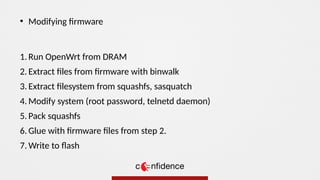
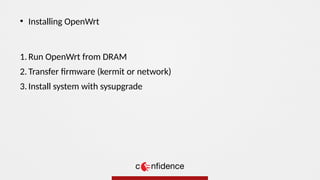
1. Run OpenWrt from DRAM
2. Extract files from firmware with binwalk
3. Extract filesystem from squashfs, sasquatch
4. Modify system (root password, telnetd daemon)
5. Pack squashfs
6. Glue with firmware files from step 2.
7. Write to flash
●
Modifying firmware
1. Run OpenWrt from DRAM
2. Transfer firmware (kermit or network)
3. Install system with sysupgrade
●
Installing OpenWrt
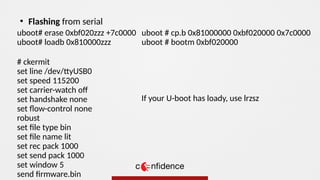
uboot# erase 0xbf020zzz +7c0000
uboot# loadb 0x810000zzz
# ckermit
set line /dev/ttyUSB0
set speed 115200
set carrier-watch of
set handshake none
set flow-control none
robust
set file type bin
set file name lit
set rec pack 1000
set send pack 1000
set window 5
send firmware.bin
●
Flashing from serial
uboot # cp.b 0x81000000 0xbf020000 0x7c0000
uboot # bootm 0xbf020000
If your U-boot has loady, use lrzsz
●
https://wiki.openwrt.org/doc/howto/generic.debrick#write_flash_chip_b
y_usb
●
https://wiki.openwrt.org/doc/hardware/port.jtag
●
https://wiki.openwrt.org/doc/recipes/debrick.ath79.using.jtag
●
vovcia [at] gmail.com
●
Where to go now?
Q&A

CONFidence 2017: Hacking embedded with OpenWrt (Vladimir Mitiouchev)

  • 1.
    Vladimir `vovcia' Mitiouchev Hackingembedded with* OpenWrt *using Kraków, 2017
  • 2.
    • Universal • Asynchronous •Receiver • Transmitter „computer hardware device for asynchronous serial communication in which the data format and transmission speeds are configurable” ● Serial console crash course • RS-232 • RS-422 • RS-423 • RS-485 „The standard defines the electrical characteristics and timing of signals, the meaning of signals, and the physical size and pinout of connectors„
  • 3.
    ● Serial console crashcourse Standard 0 (space) 1 (mark) Connection type Available signals RS-232 +3 to +15 V −15 to −3 V unbalanced TxD, RxD, GND, CTS, RTS, DTR, DCD, DSR, RI, RTR RS-422 +0 to 6 V –0 to –6 V differential, balanced twisted pair Tx+, Tx-, Rx+, Rx- (Full Duplex) RS-423 +4 V to +6 V –4 V to –6 V differential, unbalanced copper cables Tx, Rx, GND RS-485 Voa–Vob > +200 mV Voa–Vob < −200 mV balanced interconnecting cable A, B, C
  • 4.
  • 5.
  • 6.
    • USB TTLFTDI FT232R (most feature-rich) • USB TTL CP2102 • USB TTL CH340/341 • Raspberry Pi • ESP8266 Serial to WiFi ● Serial adapters
  • 7.
  • 8.
  • 9.
    ● TX to RX ● RXto TX ● GND to GND ● NC / 5V / 3.3V – do Not Connect ● https://code.google.com/archive/p/baudrate/ „Baudrate is a tool to help quickly identify the baud rate of an unknown serial device. It displays received data from a serial device while allowing the user to change the baud rate of their host system's serial port on the fly.” ● # picocom -b 115200 /dev/ttyUSB0 ● Connecting console
  • 10.
    ● the Universal BootLoader - primary boot loader used in embedded devices ● free software (GPLv2), initial release in 1999 ● 68k, ARM, ARM64, AVR32, Blackfin, MicroBlaze, MIPS, Nios, SuperH, PPC, RISC-V, x86 ● popular modification for routers: https://github.com/pepe2k/u-boot_mod ● Das U-Boot
  • 11.
    dev: size erasesizename mtd0: 00040000 00010000 "u-boot" mtd1: 00fa0000 00010000 "firmware" mtd2: 00110000 00010000 "kernel" mtd3: 00e90000 00010000 "rootfs" mtd4: 00010000 00010000 "config" mtd5: 00010000 00010000 "art" ● Flash layout
  • 12.
    1. ROM code 2.SPL (Secondary Program Loader) 3.U-Boot 4. Linux kernel ● Das U-Boot process
  • 13.
    U-Boot 2011.09-rc1-00000-gf75abad-dirty (Oct21 2013 - 18:44:22) Allwinner Technology CPU: SUNXI Family Board: A20-Cubietruck DRAM: 2 GiB NAND: NB1 : enter NFB_Init [NAND] nand driver(b) version: 0x2, 0x12, data: 20130526 [NAND] set nand_good_block_ratio 912 NB1 : nand phy init ok NB1 : init ok 3200 MiB Using default environment In: serial Out: serial Err: serial --------fastboot partitions-------- -total partitions:3- -name- -start- -size- bootloader : 8000 20000 rootfs : 28000 600000 UDISK : 628000 18000 ----------------------------------- no misc partition is found Hit any key to stop autoboot: 0 sun7i# ● Das U-Boot
  • 14.
    sun7i#help ? - aliasfor 'help' base - print or set address offset boot - boot default, i.e., run 'bootcmd' boota - boota - boot android bootimg from memory bootd - boot default, i.e., run 'bootcmd' bootm - boot application image from memory cmp - memory compare cp - memory copy crc32 - checksum calculation env - environment handling commands exit - exit script ext2load- load binary file from a Ext2 filesystem ext2ls - list files in a directory (default /) ext4load- load binary file from a Ext4 filesystem ext4ls - list files in a directory (default /) false - do nothing, unsuccessfully fastboot- fastboot- use USB Fastboot protocol fatdown - download data to a dos filesystem fatinfo - print information about filesystem fatload - load binary file from a dos filesystem fatls - list files in a directory (default /) go - start application at address 'addr' (...) ● Das U-Boot
  • 15.
    sun7i#printenv baudrate=115200 boot_fastboot=fastboot boot_normal=bootm 48000000 boot_recovery=sunxi_flash read40007800 recovery;boota 40007800 bootcmd=run setargs_nand boot_normal bootdelay=1 bootenv=/uEnv.txt console=ttyS0,115200 kernel=/uImage kerneladdr=0x48000000 loadbootenv=mw 41000000 0 10000;ext4load nand 2:0 $scriptaddr /boot${bootenv} || fatload nand 0:0 $scriptaddr ${bootenv};env import 41000000 10000;setenv bootargs console=${console} root=$ {nand_root} loglevel=${loglevel} ${extraargs} loadkernel=ext4load nand 2:0 $kerneladdr /boot${kernel} || fatload nand 0:0 $kerneladdr ${kernel} loadscriptbin=ext4load nand 2:0 $scriptbinaddr /boot${scriptbin} || fatload nand 0:0 $scriptbinaddr ${scriptbin} loglevel=8 nand_root=/dev/nand3 partitions=bootloader@nanda:rootfs@nandb:UDISK@nandc scriptaddr=0x41000000 scriptbin=/script.bin scriptbinaddr=0x43000000 setargs_nand=run loadbootenv loadscriptbin loadkernel setmachid setmachid=setenv machid 10bb stderr=serial stdin=serial ● Das U-Boot
  • 16.
    git clone https://github.com/openwrt/openwrt.git cdopenwrt ./scripts/feeds update -a ./scripts/feeds install -a make menuconfig # set Target System, Subtarget, Target Profile, Target images (ramdisk and squashfs) make defconfig make menuconfig # set packages make V=s ls bin/<arch> ● Building OpenWrt ● https://wiki.openwrt.org/toh/views/toh_extended_all
  • 17.
    ● bin/*initramfs-uImage.bin – imagefor running from DRAM ● bin/*factory.bin – image for writing to flash ● bin/*sysupgrade.bin – OpenWrt upgrade image (use only inside OpenWrt) ● Building OpenWrt
  • 18.
    ● https://wiki.openwrt.org/doc/howto/generic.flashing.serial#kermit ● Kermit is acomputer file transfer protocol used in the 1980s. ● XMODEM is a simple file transfer protocol developed as a quick hack by Ward Christensen for use in his 1977 MODEM.ASM terminal program. ● YMODEM is a file transfer protocol used between microcomputers connected together using modems, developed by Chuck Forsberg in 1985 ● ZMODEM is a file transfer protocol developed by Chuck Forsberg in 1986, in a project funded by Telenet in order to improve file transfers on their X.25 network. ● Kermit, XMODEM, YMODEM, ZMODEM
  • 19.
    uboot# loadb 0x810000zzz #ckermit set line /dev/ttyUSB0 set speed 115200 set carrier-watch of set handshake none set flow-control none robust set file type bin set file name lit set rec pack 1000 set send pack 1000 set window 5 send firmware.bin ● Running from serial uboot # bootm 0x8100000 If your U-boot has loady, use lrzsz
  • 20.
    root@(none):/# cat /proc/mtd dev:size erasesize name mtd0: 00040000 00010000 "u-boot" mtd1: 00fa0000 00010000 "firmware" mtd2: 00110000 00010000 "kernel" mtd3: 00e90000 00010000 "rootfs" mtd4: 00010000 00010000 "config" mtd5: 00010000 00010000 "art" Use kermit or network to download firmware from /dev/mtd. Save flash layout! ● Using system!
  • 21.
    ● https://github.com/devttys0/binwalk ● Binwalk is afast, easy to use tool for analyzing, reverse engineering, and extracting firmware images. ● Extract files: $ binwalk -e firmware.bin ● Entropy analysis: $ binwalk -E firmware.bin ● Analyzing firmware - binwalk
  • 22.
    DECIMAL HEXADECIMAL DESCRIPTION -------------------------------------------------------------------------------- 00x0 Ubiquiti firmware header, third party, ~CRC32: 0xE8B062C3, version: "XM.ar7240.v6.0.0-OpenWrt-r49389" 260 0x104 Ubiquiti partition header, header size: 56 bytes, name: "PARTkernel", base address: 0x00000001, data size: -2147475456 bytes 324 0x144 uImage header, header size: 64 bytes, header CRC: 0xB8C2BE4D, created: 2017-02-22 19:15:50, image size: 1074463 bytes, Data Address: 0x80060000, Entry Point: 0x80060000, data CRC: 0xDCDFA6F3, OS: Linux, CPU: MIPS, image type: OS Kernel Image, compression type: lzma, image name: "MIPS OpenWrt Linux-3.18.45" 388 0x184 LZMA compressed data, properties: 0x6D, dictionary size: 8388608 bytes, uncompressed size: 3243572 bytes 1048900 0x100144 Ubiquiti partition header, header size: 56 bytes, name: "PARTrootfs", base address: 0x00000002, data size: 0 bytes 1074915 0x1066E3 Squashfs filesystem, little endian, version 4.0, compression:xz, size: 2582194 bytes, 1111 inodes, blocksize: 262144 bytes, created: 2017-02-22 19:09:21 ● Analyzing firmware - binwalk
  • 23.
    ● https://github.com/devttys0/sasquatch ● The sasquatch projectis a set of patches to the standard unsquashfs utility (part of squashfs-tools) that attempts to add support for as many hacked- up vendor-specific SquashFS implementations as possible. ● Analyzing firmware - sasquatch
  • 24.
    1. Run OpenWrtfrom DRAM 2. Extract files from firmware with binwalk 3. Extract filesystem from squashfs, sasquatch 4. Modify system (root password, telnetd daemon) 5. Pack squashfs 6. Glue with firmware files from step 2. 7. Write to flash ● Modifying firmware
  • 25.
    1. Run OpenWrtfrom DRAM 2. Transfer firmware (kermit or network) 3. Install system with sysupgrade ● Installing OpenWrt
  • 26.
    uboot# erase 0xbf020zzz+7c0000 uboot# loadb 0x810000zzz # ckermit set line /dev/ttyUSB0 set speed 115200 set carrier-watch of set handshake none set flow-control none robust set file type bin set file name lit set rec pack 1000 set send pack 1000 set window 5 send firmware.bin ● Flashing from serial uboot # cp.b 0x81000000 0xbf020000 0x7c0000 uboot # bootm 0xbf020000 If your U-boot has loady, use lrzsz
  • 27.
  • 28.