ProxySQL
2016.08.20 / DB Arch. / 이충현 / Eddie
Index
01. ProxySQL?
02. ProxySQL Install & Startup
03. ProxySQL Schema Setting
04. ProxySQL Test(Function & BenchMark)
01. ProxySQL?
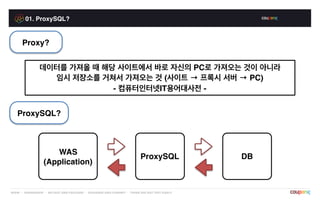
Proxy?
데이터를 가져올 때 해당 사이트에서 바로 자신의 PC로 가져오는 것이 아니라
임시 저장소를 거쳐서 가져오는 것 (사이트 → 프록시 서버 → PC)
- 컴퓨터인터넷IT용어대사전 -
ProxySQL?
WAS
(Application)
ProxySQL DB
01. ProxySQL?
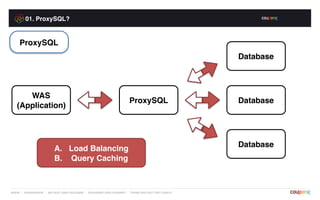
WAS
(Application)
ProxySQL
Database
Database
Database
A. Load Balancing
B. Query Caching
ProxySQL
01. ProxySQL?
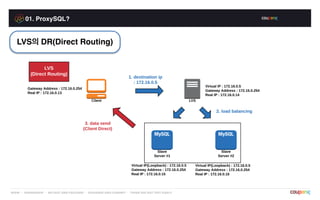
LVS의 DR(Direct Routing)
01. ProxySQL?
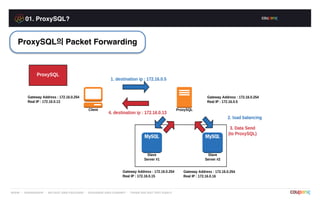
ProxySQL의 Packet Forwarding
01. ProxySQL?
ProxySQL의 Packet Forwarding
1. 2.
3.
4.
5.6.
[client] tcpdump -n "src host 10.255.19.172 and dst port 8001" -i eth0 -X[proxysql] tcpdump -n "src host 10.255.19.172 and dst port 8001" -i eth0 -X[proxysql] tcpdump -n "dst port 3306" -i eth0 -X[proxysql] tcpdump -n "src port 3306" -i eth0 -X[proxysql] tcpdump -n "src port 8001 and dst host 10.255.19.172" -i eth0 -X[client] tcpdump -n "src host 10.210.122.194 and src port 8001" -i eth0 -X
01. ProxySQL?
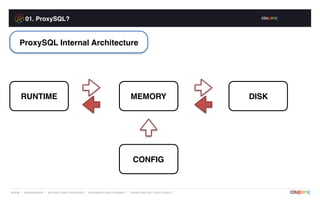
RUNTIME
ProxySQL Internal Architecture
MEMORY DISK
CONFIG
02. ProxySQL Install & Startup
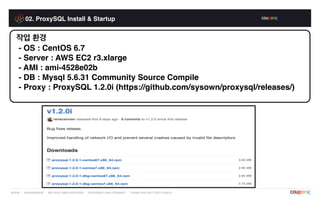
작업 환경
- OS : CentOS 6.7
- Server : AWS EC2 r3.xlarge
- AMI : ami-4528e02b
- DB : Mysql 5.6.31 Community Source Compile
- Proxy : ProxySQL 1.2.0i (https://github.com/sysown/proxysql/releases/)
02. ProxySQL Install & Startup
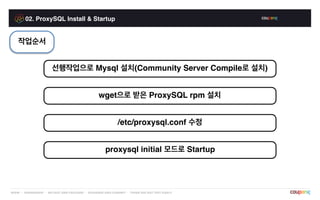
선행작업으로 Mysql 설치(Community Server Compile로 설치)
wget으로 받은 ProxySQL rpm 설치
작업순서
/etc/proxysql.conf 수정
proxysql initial 모드로 Startup
02. ProxySQL Install & Startup
ProxySQL rpm Setup
rpm -ivh ./proxysql-1.2.0-1-centos67.x86_64.rpm
Preparing... ########################################### [100%]
1:proxysql ########################################### [100%]
02. ProxySQL Install & Startup
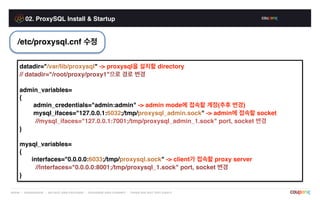
/etc/proxysql.cnf 수정
datadir="/var/lib/proxysql" -> proxysql을 설치할 directory
// datadir="/root/proxy/proxy1"으로 경로 변경
admin_variables=
{
admin_credentials="admin:admin" -> admin mode에 접속할 계정(추후 변경)
mysql_ifaces="127.0.0.1:6032;/tmp/proxysql_admin.sock" -> admin에 접속할 socket
//mysql_ifaces="127.0.0.1:7001;/tmp/proxysql_admin_1.sock" port, socket 변경
}
mysql_variables=
{
interfaces="0.0.0.0:6033;/tmp/proxysql.sock" -> client가 접속할 proxy server
//interfaces="0.0.0.0:8001;/tmp/proxysql_1.sock" port, socket 변경
}
02. ProxySQL Install & Startup
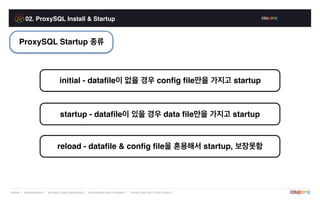
ProxySQL Startup 종류
initial - datafile이 없을 경우 config file만을 가지고 startup
startup - datafile이 있을 경우 data file만을 가지고 startup
reload - datafile & config file을 혼용해서 startup, 보장못함
02. ProxySQL Install & Startup
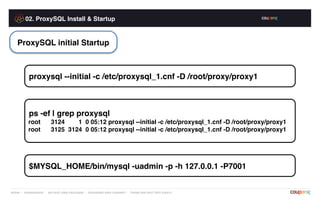
proxysql --initial -c /etc/proxysql_1.cnf -D /root/proxy/proxy1
ProxySQL initial Startup
ps -ef | grep proxysql
root 3124 1 0 05:12 proxysql --initial -c /etc/proxysql_1.cnf -D /root/proxy/proxy1
root 3125 3124 0 05:12 proxysql --initial -c /etc/proxysql_1.cnf -D /root/proxy/proxy1
$MYSQL_HOME/bin/mysql -uadmin -p -h 127.0.0.1 -P7001
03. ProxySQL Schema Setting
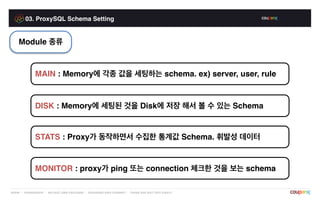
Module 종류
DISK : Memory에 세팅된 것을 Disk에 저장 해서 볼 수 있는 Schema
MAIN : Memory에 각종 값을 세팅하는 schema. ex) server, user, rule
STATS : Proxy가 동작하면서 수집한 통계값 Schema. 휘발성 데이터
MONITOR : proxy가 ping 또는 connection 체크한 것을 보는 schema
03. ProxySQL Schema Setting
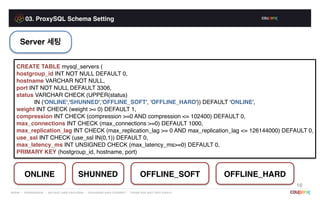
Server 세팅
CREATE TABLE mysql_servers (
hostgroup_id INT NOT NULL DEFAULT 0,
hostname VARCHAR NOT NULL,
port INT NOT NULL DEFAULT 3306,
status VARCHAR CHECK (UPPER(status)
IN ('ONLINE','SHUNNED','OFFLINE_SOFT', 'OFFLINE_HARD')) DEFAULT 'ONLINE',
weight INT CHECK (weight >= 0) DEFAULT 1,
compression INT CHECK (compression >=0 AND compression <= 102400) DEFAULT 0,
max_connections INT CHECK (max_connections >=0) DEFAULT 1000,
max_replication_lag INT CHECK (max_replication_lag >= 0 AND max_replication_lag <= 126144000) DEFAULT 0,
use_ssl INT CHECK (use_ssl IN(0,1)) DEFAULT 0,
max_latency_ms INT UNSIGNED CHECK (max_latency_ms>=0) DEFAULT 0,
PRIMARY KEY (hostgroup_id, hostname, port)
16
ONLINE SHUNNED OFFLINE_SOFT OFFLINE_HARD
03. ProxySQL Schema Setting
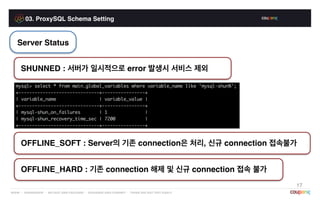
Server Status
17
SHUNNED : 서버가 일시적으로 error 발생시 서비스 제외
OFFLINE_SOFT : Server의 기존 connection은 처리, 신규 connection 접속불가
OFFLINE_HARD : 기존 connection 해제 및 신규 connection 접속 불가
03. ProxySQL Schema Setting
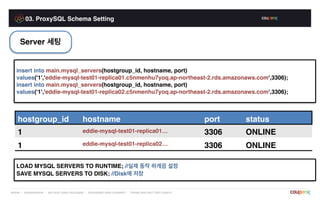
Server 세팅
insert into main.mysql_servers(hostgroup_id, hostname, port)
values('1','eddie-mysql-test01-replica01.c5nmenhu7yoq.ap-northeast-2.rds.amazonaws.com',3306);
insert into main.mysql_servers(hostgroup_id, hostname, port)
values('1','eddie-mysql-test01-replica02.c5nmenhu7yoq.ap-northeast-2.rds.amazonaws.com',3306);
hostgroup_id hostname port status
1 eddie-mysql-test01-replica01… 3306 ONLINE
1 eddie-mysql-test01-replica02… 3306 ONLINE
LOAD MYSQL SERVERS TO RUNTIME; //실제 동작 하게끔 설정
SAVE MYSQL SERVERS TO DISK; //Disk에 저장
03. ProxySQL Schema Setting
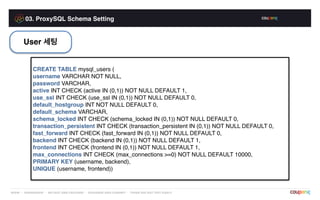
User 세팅
CREATE TABLE mysql_users (
username VARCHAR NOT NULL,
password VARCHAR,
active INT CHECK (active IN (0,1)) NOT NULL DEFAULT 1,
use_ssl INT CHECK (use_ssl IN (0,1)) NOT NULL DEFAULT 0,
default_hostgroup INT NOT NULL DEFAULT 0,
default_schema VARCHAR,
schema_locked INT CHECK (schema_locked IN (0,1)) NOT NULL DEFAULT 0,
transaction_persistent INT CHECK (transaction_persistent IN (0,1)) NOT NULL DEFAULT 0,
fast_forward INT CHECK (fast_forward IN (0,1)) NOT NULL DEFAULT 0,
backend INT CHECK (backend IN (0,1)) NOT NULL DEFAULT 1,
frontend INT CHECK (frontend IN (0,1)) NOT NULL DEFAULT 1,
max_connections INT CHECK (max_connections >=0) NOT NULL DEFAULT 10000,
PRIMARY KEY (username, backend),
UNIQUE (username, frontend))
03. ProxySQL Schema Setting
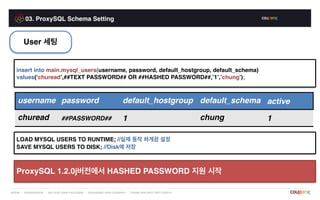
User 세팅
insert into main.mysql_users(username, password, default_hostgroup, default_schema)
values(‘churead’,##TEXT PASSWORD## OR ##HASHED PASSWORD##,’1’,’chung’);
username password default_hostgroup default_schema active
churead ##PASSWORD## 1 chung 1
LOAD MYSQL USERS TO RUNTIME; //실제 동작 하게끔 설정
SAVE MYSQL USERS TO DISK; //Disk에 저장
ProxySQL 1.2.0j버전에서 HASHED PASSWORD 지원 시작
03. ProxySQL Schema Setting
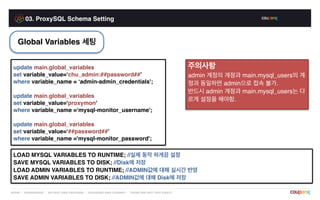
Global Variables 세팅
update main.global_variables
set variable_value=‘chu_admin:##password##’
where variable_name = ‘admin-admin_credentials';
update main.global_variables
set variable_value='proxymon'
where variable_name =‘mysql-monitor_username';
update main.global_variables
set variable_value=‘##password##’
where variable_name ='mysql-monitor_password';
LOAD MYSQL VARIABLES TO RUNTIME; //실제 동작 하게끔 설정
SAVE MYSQL VARIABLES TO DISK; //Disk에 저장
LOAD ADMIN VARIABLES TO RUNTIME; //ADMIN값에 대해 실시간 반영
SAVE ADMIN VARIABLES TO DISK; //ADMIN값에 대해 Disk에 저장
주의사항
admin 계정의 계정과 main.mysql_users의 계
정과 동일하면 admin으로 접속 불가.
반드시 admin 계정과 main.mysql_users는 다
르게 설정을 해야함.
03. ProxySQL Schema Setting
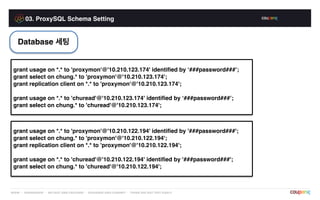
Database 세팅
grant usage on *.* to 'proxymon'@'10.210.123.174' identified by ‘###password###’;
grant select on chung.* to 'proxymon'@'10.210.123.174';
grant replication client on *.* to 'proxymon'@'10.210.123.174';
grant usage on *.* to 'churead'@'10.210.123.174' identified by ‘###password###’;
grant select on chung.* to 'churead'@'10.210.123.174';
grant usage on *.* to 'proxymon'@'10.210.122.194' identified by '###password###';
grant select on chung.* to 'proxymon'@'10.210.122.194';
grant replication client on *.* to 'proxymon'@'10.210.122.194';
grant usage on *.* to 'churead'@'10.210.122.194' identified by '###password###';
grant select on chung.* to 'churead'@'10.210.122.194';
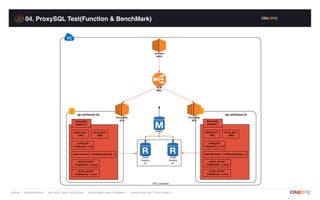
04. ProxySQL Test(Function & BenchMark)
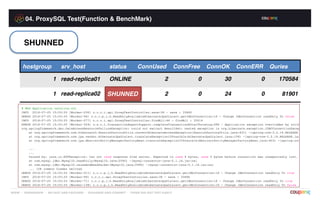
SHUNNED
hostgroup srv_host status ConnUsed ConnFree ConnOK ConnERR Quries
1 read-replica01 ONLINE 2 0 30 0 170584
1 read-replica02 ONLINE 2 0 24 0 81901SHUNNED
04. ProxySQL Test(Function & BenchMark)
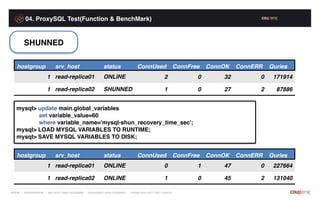
SHUNNED
hostgroup srv_host status ConnUsed ConnFree ConnOK ConnERR Quries
1 read-replica01 ONLINE 2 0 32 0 171914
1 read-replica02 SHUNNED 1 0 27 2 87886
mysql> update main.global_variables
set variable_value=60
where variable_name='mysql-shun_recovery_time_sec';
mysql> LOAD MYSQL VARIABLES TO RUNTIME;
mysql> SAVE MYSQL VARIABLES TO DISK;
hostgroup srv_host status ConnUsed ConnFree ConnOK ConnERR Quries
1 read-replica01 ONLINE 0 1 47 0 227664
1 read-replica02 ONLINE 1 0 45 2 131040
04. ProxySQL Test(Function & BenchMark)
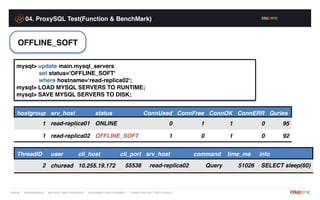
OFFLINE_SOFT
mysql> update main.mysql_servers
set status='OFFLINE_SOFT'
where hostname=‘read-replica02';
mysql> LOAD MYSQL SERVERS TO RUNTIME;
mysql> SAVE MYSQL SERVERS TO DISK;
hostgroup srv_host status ConnUsed ConnFree ConnOK ConnERR Quries
1 read-replica01 ONLINE 0 1 1 0 95
1 read-replica02 OFFLINE_SOFT 1 0 1 0 92
ThreadID user cli_host cli_port srv_host command time_ms info
2 churead 10.255.19.172 55538 read-replica02 Query 51026 SELECT sleep(60)
04. ProxySQL Test(Function & BenchMark)
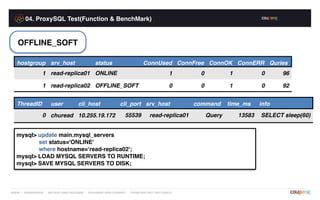
OFFLINE_SOFT
hostgroup srv_host status ConnUsed ConnFree ConnOK ConnERR Quries
1 read-replica01 ONLINE 1 0 1 0 96
1 read-replica02 OFFLINE_SOFT 0 0 1 0 92
ThreadID user cli_host cli_port srv_host command time_ms info
0 churead 10.255.19.172 55539 read-replica01 Query 13583 SELECT sleep(60)
mysql> update main.mysql_servers
set status='ONLINE'
where hostname=‘read-replica02';
mysql> LOAD MYSQL SERVERS TO RUNTIME;
mysql> SAVE MYSQL SERVERS TO DISK;
04. ProxySQL Test(Function & BenchMark)
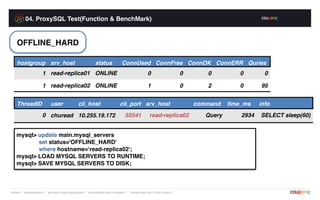
OFFLINE_HARD
hostgroup srv_host status ConnUsed ConnFree ConnOK ConnERR Quries
1 read-replica01 ONLINE 0 0 0 0 0
1 read-replica02 ONLINE 1 0 2 0 95
ThreadID user cli_host cli_port srv_host command time_ms info
0 churead 10.255.19.172 55541 read-replica02 Query 2934 SELECT sleep(60)
mysql> update main.mysql_servers
set status='OFFLINE_HARD'
where hostname=‘read-replica02';
mysql> LOAD MYSQL SERVERS TO RUNTIME;
mysql> SAVE MYSQL SERVERS TO DISK;
04. ProxySQL Test(Function & BenchMark)
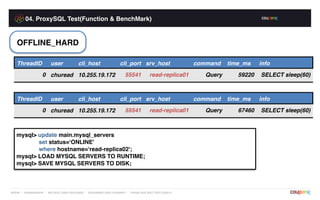
OFFLINE_HARD
ThreadID user cli_host cli_port srv_host command time_ms info
0 churead 10.255.19.172 55541 read-replica01 Query 59220 SELECT sleep(60)
ThreadID user cli_host cli_port srv_host command time_ms info
0 churead 10.255.19.172 55541 read-replica01 Query 67460 SELECT sleep(60)
mysql> update main.mysql_servers
set status=‘ONLINE'
where hostname=‘read-replica02';
mysql> LOAD MYSQL SERVERS TO RUNTIME;
mysql> SAVE MYSQL SERVERS TO DISK;
04. ProxySQL Test(Function & BenchMark)
PASSWORD 1.2.0i
mysql> update main.mysql_users
set password='##HASHED PASSWD##'
where username='churead';
mysql> LOAD MYSQL USERS TO RUNTIME;
mysql> SAVE MYSQL USERS TO DISK;
[root@percona-test-db01-mv ~]# python chung.py
….
NameError: name 'mysql' is not defined
mysql> update main.mysql_users
set password='##TEXT PASSWD##'
where username='churead';
mysql> LOAD MYSQL USERS TO RUNTIME;
mysql> SAVE MYSQL USERS TO DISK;
[root@percona-test-db01-mv ~]# python chung.py
[ 1 ] Database : 0
[ 2 ] Database : 0
04. ProxySQL Test(Function & BenchMark)
PASSWORD 1.2.0j
mysql> update main.mysql_users
set password='##HASHED PASSWD##'
where username='churead';
mysql> LOAD MYSQL USERS TO RUNTIME;
mysql> SAVE MYSQL USERS TO DISK;
[root@percona-test-db01-mv ~]# python chung.py
[ 1 ] Database : 0
[ 2 ] Database : 0
mysql> update main.mysql_users
set password='##TEXT PASSWD##'
where username='churead';
mysql> LOAD MYSQL USERS TO RUNTIME;
mysql> SAVE MYSQL USERS TO DISK;
[root@percona-test-db01-mv ~]# python chung.py
[ 1 ] Database : 0
[ 2 ] Database : 0
04. ProxySQL Test(Function & BenchMark)
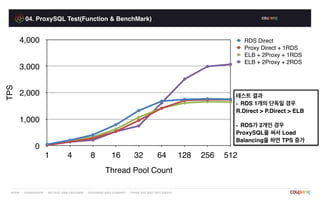
TPS
0
1,000
2,000
3,000
4,000
Thread Pool Count
1 4 8 16 32 64 128 256 512
RDS Direct
Proxy Direct + 1RDS
ELB + 2Proxy + 1RDS
ELB + 2Proxy + 2RDS
테스트 결과
- RDS 1개의 단독일 경우
R.Direct > P.Direct > ELB
- RDS가 2개인 경우
ProxySQL을 써서 Load
Balancing을 하면 TPS 증가
04. ProxySQL Test(Function & BenchMark)
HAProxy
mysql> select host, user, password from mysql.user where user='haproxy';
| host | user | password |
+--------------+---------+----------+
| 10.210.122.9 | haproxy | |
[root@localhost ~]# /Mysql/mysql/bin/mysql -uhaproxy -p -h 10.210.122.9 -P3307 -e "select version();"
Enter password:
| version() |
+-----------+
| 5.6.29 |
# HA Proxy 서버의 tcpdump
[root@localhost ~]# tcpdump -n "src port 3306" -i eth0 -s 65535 -l -w - | strings
mysql_native_password
4d~@
5.6.29
04. ProxySQL Test(Function & BenchMark)
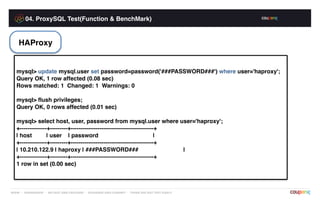
HAProxy
mysql> update mysql.user set password=password('###PASSWORD###') where user='haproxy';
Query OK, 1 row affected (0.08 sec)
Rows matched: 1 Changed: 1 Warnings: 0
mysql> flush privileges;
Query OK, 0 rows affected (0.01 sec)
mysql> select host, user, password from mysql.user where user='haproxy';
+--------------+---------+-------------------------------------------+
| host | user | password |
+--------------+---------+-------------------------------------------+
| 10.210.122.9 | haproxy | ###PASSWORD### |
+--------------+---------+-------------------------------------------+
1 row in set (0.00 sec)
04. ProxySQL Test(Function & BenchMark)
HAProxy
# Client 역할인 Linux 서버
# 패스워드를 정상적으로 입력해도 접속이 되지 않습니다.
[root@localhost ~]# /Mysql/mysql/bin/mysql -uhaproxy -p -h 10.210.122.9 -P3307 -e "select version();"
Enter password:
ERROR 2013 (HY000): Lost connection to MySQL server at 'reading initial communication packet',
system error: 2
# HA Proxy 서버의 tcpdump
# 아래의 명령어는 현재 자신의 3306으로 출발한 eth0의 모든 패킷을 캡쳐시키는 모습
[root@localhost ~]# tcpdump -n "src port 3306" -i eth0 -s 65535 -l -w - | strings
Access denied for user 'haproxy'@'10.210.122.9' (using password: NO)
q Sv
4(,@
5.6.29
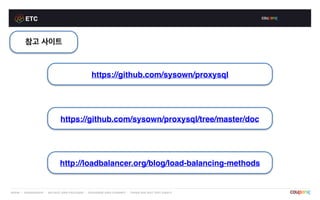
ETC
참고 사이트
https://github.com/sysown/proxysql
https://github.com/sysown/proxysql/tree/master/doc
http://loadbalancer.org/blog/load-balancing-methods
Q&A
Q & A
Thank You !

Intro ProxySQL

  • 1.
    ProxySQL 2016.08.20 / DBArch. / 이충현 / Eddie
  • 2.
    Index 01. ProxySQL? 02. ProxySQLInstall & Startup 03. ProxySQL Schema Setting 04. ProxySQL Test(Function & BenchMark)
  • 3.
    01. ProxySQL? Proxy? 데이터를 가져올때 해당 사이트에서 바로 자신의 PC로 가져오는 것이 아니라 임시 저장소를 거쳐서 가져오는 것 (사이트 → 프록시 서버 → PC) - 컴퓨터인터넷IT용어대사전 - ProxySQL? WAS (Application) ProxySQL DB
  • 4.
  • 5.
  • 6.
  • 7.
    01. ProxySQL? ProxySQL의 PacketForwarding 1. 2. 3. 4. 5.6. [client] tcpdump -n "src host 10.255.19.172 and dst port 8001" -i eth0 -X[proxysql] tcpdump -n "src host 10.255.19.172 and dst port 8001" -i eth0 -X[proxysql] tcpdump -n "dst port 3306" -i eth0 -X[proxysql] tcpdump -n "src port 3306" -i eth0 -X[proxysql] tcpdump -n "src port 8001 and dst host 10.255.19.172" -i eth0 -X[client] tcpdump -n "src host 10.210.122.194 and src port 8001" -i eth0 -X
  • 8.
    01. ProxySQL? RUNTIME ProxySQL InternalArchitecture MEMORY DISK CONFIG
  • 9.
    02. ProxySQL Install& Startup 작업 환경 - OS : CentOS 6.7 - Server : AWS EC2 r3.xlarge - AMI : ami-4528e02b - DB : Mysql 5.6.31 Community Source Compile - Proxy : ProxySQL 1.2.0i (https://github.com/sysown/proxysql/releases/)
  • 10.
    02. ProxySQL Install& Startup 선행작업으로 Mysql 설치(Community Server Compile로 설치) wget으로 받은 ProxySQL rpm 설치 작업순서 /etc/proxysql.conf 수정 proxysql initial 모드로 Startup
  • 11.
    02. ProxySQL Install& Startup ProxySQL rpm Setup rpm -ivh ./proxysql-1.2.0-1-centos67.x86_64.rpm Preparing... ########################################### [100%] 1:proxysql ########################################### [100%]
  • 12.
    02. ProxySQL Install& Startup /etc/proxysql.cnf 수정 datadir="/var/lib/proxysql" -> proxysql을 설치할 directory // datadir="/root/proxy/proxy1"으로 경로 변경 admin_variables= { admin_credentials="admin:admin" -> admin mode에 접속할 계정(추후 변경) mysql_ifaces="127.0.0.1:6032;/tmp/proxysql_admin.sock" -> admin에 접속할 socket //mysql_ifaces="127.0.0.1:7001;/tmp/proxysql_admin_1.sock" port, socket 변경 } mysql_variables= { interfaces="0.0.0.0:6033;/tmp/proxysql.sock" -> client가 접속할 proxy server //interfaces="0.0.0.0:8001;/tmp/proxysql_1.sock" port, socket 변경 }
  • 13.
    02. ProxySQL Install& Startup ProxySQL Startup 종류 initial - datafile이 없을 경우 config file만을 가지고 startup startup - datafile이 있을 경우 data file만을 가지고 startup reload - datafile & config file을 혼용해서 startup, 보장못함
  • 14.
    02. ProxySQL Install& Startup proxysql --initial -c /etc/proxysql_1.cnf -D /root/proxy/proxy1 ProxySQL initial Startup ps -ef | grep proxysql root 3124 1 0 05:12 proxysql --initial -c /etc/proxysql_1.cnf -D /root/proxy/proxy1 root 3125 3124 0 05:12 proxysql --initial -c /etc/proxysql_1.cnf -D /root/proxy/proxy1 $MYSQL_HOME/bin/mysql -uadmin -p -h 127.0.0.1 -P7001
  • 15.
    03. ProxySQL SchemaSetting Module 종류 DISK : Memory에 세팅된 것을 Disk에 저장 해서 볼 수 있는 Schema MAIN : Memory에 각종 값을 세팅하는 schema. ex) server, user, rule STATS : Proxy가 동작하면서 수집한 통계값 Schema. 휘발성 데이터 MONITOR : proxy가 ping 또는 connection 체크한 것을 보는 schema
  • 16.
    03. ProxySQL SchemaSetting Server 세팅 CREATE TABLE mysql_servers ( hostgroup_id INT NOT NULL DEFAULT 0, hostname VARCHAR NOT NULL, port INT NOT NULL DEFAULT 3306, status VARCHAR CHECK (UPPER(status) IN ('ONLINE','SHUNNED','OFFLINE_SOFT', 'OFFLINE_HARD')) DEFAULT 'ONLINE', weight INT CHECK (weight >= 0) DEFAULT 1, compression INT CHECK (compression >=0 AND compression <= 102400) DEFAULT 0, max_connections INT CHECK (max_connections >=0) DEFAULT 1000, max_replication_lag INT CHECK (max_replication_lag >= 0 AND max_replication_lag <= 126144000) DEFAULT 0, use_ssl INT CHECK (use_ssl IN(0,1)) DEFAULT 0, max_latency_ms INT UNSIGNED CHECK (max_latency_ms>=0) DEFAULT 0, PRIMARY KEY (hostgroup_id, hostname, port) 16 ONLINE SHUNNED OFFLINE_SOFT OFFLINE_HARD
  • 17.
    03. ProxySQL SchemaSetting Server Status 17 SHUNNED : 서버가 일시적으로 error 발생시 서비스 제외 OFFLINE_SOFT : Server의 기존 connection은 처리, 신규 connection 접속불가 OFFLINE_HARD : 기존 connection 해제 및 신규 connection 접속 불가
  • 18.
    03. ProxySQL SchemaSetting Server 세팅 insert into main.mysql_servers(hostgroup_id, hostname, port) values('1','eddie-mysql-test01-replica01.c5nmenhu7yoq.ap-northeast-2.rds.amazonaws.com',3306); insert into main.mysql_servers(hostgroup_id, hostname, port) values('1','eddie-mysql-test01-replica02.c5nmenhu7yoq.ap-northeast-2.rds.amazonaws.com',3306); hostgroup_id hostname port status 1 eddie-mysql-test01-replica01… 3306 ONLINE 1 eddie-mysql-test01-replica02… 3306 ONLINE LOAD MYSQL SERVERS TO RUNTIME; //실제 동작 하게끔 설정 SAVE MYSQL SERVERS TO DISK; //Disk에 저장
  • 19.
    03. ProxySQL SchemaSetting User 세팅 CREATE TABLE mysql_users ( username VARCHAR NOT NULL, password VARCHAR, active INT CHECK (active IN (0,1)) NOT NULL DEFAULT 1, use_ssl INT CHECK (use_ssl IN (0,1)) NOT NULL DEFAULT 0, default_hostgroup INT NOT NULL DEFAULT 0, default_schema VARCHAR, schema_locked INT CHECK (schema_locked IN (0,1)) NOT NULL DEFAULT 0, transaction_persistent INT CHECK (transaction_persistent IN (0,1)) NOT NULL DEFAULT 0, fast_forward INT CHECK (fast_forward IN (0,1)) NOT NULL DEFAULT 0, backend INT CHECK (backend IN (0,1)) NOT NULL DEFAULT 1, frontend INT CHECK (frontend IN (0,1)) NOT NULL DEFAULT 1, max_connections INT CHECK (max_connections >=0) NOT NULL DEFAULT 10000, PRIMARY KEY (username, backend), UNIQUE (username, frontend))
  • 20.
    03. ProxySQL SchemaSetting User 세팅 insert into main.mysql_users(username, password, default_hostgroup, default_schema) values(‘churead’,##TEXT PASSWORD## OR ##HASHED PASSWORD##,’1’,’chung’); username password default_hostgroup default_schema active churead ##PASSWORD## 1 chung 1 LOAD MYSQL USERS TO RUNTIME; //실제 동작 하게끔 설정 SAVE MYSQL USERS TO DISK; //Disk에 저장 ProxySQL 1.2.0j버전에서 HASHED PASSWORD 지원 시작
  • 21.
    03. ProxySQL SchemaSetting Global Variables 세팅 update main.global_variables set variable_value=‘chu_admin:##password##’ where variable_name = ‘admin-admin_credentials'; update main.global_variables set variable_value='proxymon' where variable_name =‘mysql-monitor_username'; update main.global_variables set variable_value=‘##password##’ where variable_name ='mysql-monitor_password'; LOAD MYSQL VARIABLES TO RUNTIME; //실제 동작 하게끔 설정 SAVE MYSQL VARIABLES TO DISK; //Disk에 저장 LOAD ADMIN VARIABLES TO RUNTIME; //ADMIN값에 대해 실시간 반영 SAVE ADMIN VARIABLES TO DISK; //ADMIN값에 대해 Disk에 저장 주의사항 admin 계정의 계정과 main.mysql_users의 계 정과 동일하면 admin으로 접속 불가. 반드시 admin 계정과 main.mysql_users는 다 르게 설정을 해야함.
  • 22.
    03. ProxySQL SchemaSetting Database 세팅 grant usage on *.* to 'proxymon'@'10.210.123.174' identified by ‘###password###’; grant select on chung.* to 'proxymon'@'10.210.123.174'; grant replication client on *.* to 'proxymon'@'10.210.123.174'; grant usage on *.* to 'churead'@'10.210.123.174' identified by ‘###password###’; grant select on chung.* to 'churead'@'10.210.123.174'; grant usage on *.* to 'proxymon'@'10.210.122.194' identified by '###password###'; grant select on chung.* to 'proxymon'@'10.210.122.194'; grant replication client on *.* to 'proxymon'@'10.210.122.194'; grant usage on *.* to 'churead'@'10.210.122.194' identified by '###password###'; grant select on chung.* to 'churead'@'10.210.122.194';
  • 23.
  • 24.
    04. ProxySQL Test(Function& BenchMark) SHUNNED hostgroup srv_host status ConnUsed ConnFree ConnOK ConnERR Quries 1 read-replica01 ONLINE 2 0 30 0 170584 1 read-replica02 ONLINE 2 0 24 0 81901SHUNNED
  • 25.
    04. ProxySQL Test(Function& BenchMark) SHUNNED hostgroup srv_host status ConnUsed ConnFree ConnOK ConnERR Quries 1 read-replica01 ONLINE 2 0 32 0 171914 1 read-replica02 SHUNNED 1 0 27 2 87886 mysql> update main.global_variables set variable_value=60 where variable_name='mysql-shun_recovery_time_sec'; mysql> LOAD MYSQL VARIABLES TO RUNTIME; mysql> SAVE MYSQL VARIABLES TO DISK; hostgroup srv_host status ConnUsed ConnFree ConnOK ConnERR Quries 1 read-replica01 ONLINE 0 1 47 0 227664 1 read-replica02 ONLINE 1 0 45 2 131040
  • 26.
    04. ProxySQL Test(Function& BenchMark) OFFLINE_SOFT mysql> update main.mysql_servers set status='OFFLINE_SOFT' where hostname=‘read-replica02'; mysql> LOAD MYSQL SERVERS TO RUNTIME; mysql> SAVE MYSQL SERVERS TO DISK; hostgroup srv_host status ConnUsed ConnFree ConnOK ConnERR Quries 1 read-replica01 ONLINE 0 1 1 0 95 1 read-replica02 OFFLINE_SOFT 1 0 1 0 92 ThreadID user cli_host cli_port srv_host command time_ms info 2 churead 10.255.19.172 55538 read-replica02 Query 51026 SELECT sleep(60)
  • 27.
    04. ProxySQL Test(Function& BenchMark) OFFLINE_SOFT hostgroup srv_host status ConnUsed ConnFree ConnOK ConnERR Quries 1 read-replica01 ONLINE 1 0 1 0 96 1 read-replica02 OFFLINE_SOFT 0 0 1 0 92 ThreadID user cli_host cli_port srv_host command time_ms info 0 churead 10.255.19.172 55539 read-replica01 Query 13583 SELECT sleep(60) mysql> update main.mysql_servers set status='ONLINE' where hostname=‘read-replica02'; mysql> LOAD MYSQL SERVERS TO RUNTIME; mysql> SAVE MYSQL SERVERS TO DISK;
  • 28.
    04. ProxySQL Test(Function& BenchMark) OFFLINE_HARD hostgroup srv_host status ConnUsed ConnFree ConnOK ConnERR Quries 1 read-replica01 ONLINE 0 0 0 0 0 1 read-replica02 ONLINE 1 0 2 0 95 ThreadID user cli_host cli_port srv_host command time_ms info 0 churead 10.255.19.172 55541 read-replica02 Query 2934 SELECT sleep(60) mysql> update main.mysql_servers set status='OFFLINE_HARD' where hostname=‘read-replica02'; mysql> LOAD MYSQL SERVERS TO RUNTIME; mysql> SAVE MYSQL SERVERS TO DISK;
  • 29.
    04. ProxySQL Test(Function& BenchMark) OFFLINE_HARD ThreadID user cli_host cli_port srv_host command time_ms info 0 churead 10.255.19.172 55541 read-replica01 Query 59220 SELECT sleep(60) ThreadID user cli_host cli_port srv_host command time_ms info 0 churead 10.255.19.172 55541 read-replica01 Query 67460 SELECT sleep(60) mysql> update main.mysql_servers set status=‘ONLINE' where hostname=‘read-replica02'; mysql> LOAD MYSQL SERVERS TO RUNTIME; mysql> SAVE MYSQL SERVERS TO DISK;
  • 30.
    04. ProxySQL Test(Function& BenchMark) PASSWORD 1.2.0i mysql> update main.mysql_users set password='##HASHED PASSWD##' where username='churead'; mysql> LOAD MYSQL USERS TO RUNTIME; mysql> SAVE MYSQL USERS TO DISK; [root@percona-test-db01-mv ~]# python chung.py …. NameError: name 'mysql' is not defined mysql> update main.mysql_users set password='##TEXT PASSWD##' where username='churead'; mysql> LOAD MYSQL USERS TO RUNTIME; mysql> SAVE MYSQL USERS TO DISK; [root@percona-test-db01-mv ~]# python chung.py [ 1 ] Database : 0 [ 2 ] Database : 0
  • 31.
    04. ProxySQL Test(Function& BenchMark) PASSWORD 1.2.0j mysql> update main.mysql_users set password='##HASHED PASSWD##' where username='churead'; mysql> LOAD MYSQL USERS TO RUNTIME; mysql> SAVE MYSQL USERS TO DISK; [root@percona-test-db01-mv ~]# python chung.py [ 1 ] Database : 0 [ 2 ] Database : 0 mysql> update main.mysql_users set password='##TEXT PASSWD##' where username='churead'; mysql> LOAD MYSQL USERS TO RUNTIME; mysql> SAVE MYSQL USERS TO DISK; [root@percona-test-db01-mv ~]# python chung.py [ 1 ] Database : 0 [ 2 ] Database : 0
  • 32.
    04. ProxySQL Test(Function& BenchMark) TPS 0 1,000 2,000 3,000 4,000 Thread Pool Count 1 4 8 16 32 64 128 256 512 RDS Direct Proxy Direct + 1RDS ELB + 2Proxy + 1RDS ELB + 2Proxy + 2RDS 테스트 결과 - RDS 1개의 단독일 경우 R.Direct > P.Direct > ELB - RDS가 2개인 경우 ProxySQL을 써서 Load Balancing을 하면 TPS 증가
  • 33.
    04. ProxySQL Test(Function& BenchMark) HAProxy mysql> select host, user, password from mysql.user where user='haproxy'; | host | user | password | +--------------+---------+----------+ | 10.210.122.9 | haproxy | | [root@localhost ~]# /Mysql/mysql/bin/mysql -uhaproxy -p -h 10.210.122.9 -P3307 -e "select version();" Enter password: | version() | +-----------+ | 5.6.29 | # HA Proxy 서버의 tcpdump [root@localhost ~]# tcpdump -n "src port 3306" -i eth0 -s 65535 -l -w - | strings mysql_native_password 4d~@ 5.6.29
  • 34.
    04. ProxySQL Test(Function& BenchMark) HAProxy mysql> update mysql.user set password=password('###PASSWORD###') where user='haproxy'; Query OK, 1 row affected (0.08 sec) Rows matched: 1 Changed: 1 Warnings: 0 mysql> flush privileges; Query OK, 0 rows affected (0.01 sec) mysql> select host, user, password from mysql.user where user='haproxy'; +--------------+---------+-------------------------------------------+ | host | user | password | +--------------+---------+-------------------------------------------+ | 10.210.122.9 | haproxy | ###PASSWORD### | +--------------+---------+-------------------------------------------+ 1 row in set (0.00 sec)
  • 35.
    04. ProxySQL Test(Function& BenchMark) HAProxy # Client 역할인 Linux 서버 # 패스워드를 정상적으로 입력해도 접속이 되지 않습니다. [root@localhost ~]# /Mysql/mysql/bin/mysql -uhaproxy -p -h 10.210.122.9 -P3307 -e "select version();" Enter password: ERROR 2013 (HY000): Lost connection to MySQL server at 'reading initial communication packet', system error: 2 # HA Proxy 서버의 tcpdump # 아래의 명령어는 현재 자신의 3306으로 출발한 eth0의 모든 패킷을 캡쳐시키는 모습 [root@localhost ~]# tcpdump -n "src port 3306" -i eth0 -s 65535 -l -w - | strings Access denied for user 'haproxy'@'10.210.122.9' (using password: NO) q Sv 4(,@ 5.6.29
  • 36.
  • 37.
  • 38.