Silicon Valley F# User Group
Writing code that scales to a large number of cores
is much easier in the functional style compared to
using the typical imperative approach…
Agenda
Concurrency & Terminology
Event & Reactive Programming
Asynchronous Workflows
Actor Model
Actor Design Patterns
Threading & Parallel Programming
GPGPU Programming
About me – Riccardo Terrell
¨  Originally from Italy. I moved here ~8 years ago
¨  +/- 15 years in professional programming
n  C++/VB à Java à .Net C# à C# & F# à ??
¨  Organizer of the DC F# User Group
¨  Software Architect at Microsoft R&D
¨  Passionate in Technology, believer in polyglot programming as a
mechanism in finding the right tool for the job
¨  Love to cook… Italian food!
¨  Husband and owner of two gorgeous pugs J
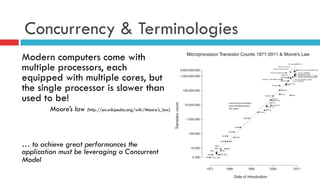
Concurrency & Terminologies
Modern computers come with
multiple processors, each
equipped with multiple cores, but
the single processor is slower than
used to be!
Moore’s law (http://en.wikipedia.org/wiki/Moore's_law)
… to achieve great performances the
application must be leveraging a Concurrent
Model
Concurrency & Terminologies
¤  Concurrency is Everywhere
n  Server-side programming for the web or cloud
n  Building a responsive graphical user interface
n  Building a new interactive client application
n  Performing and compute I/O intensive activity
All to attain better performance!
Concurrency & Terminology
Concurrency is the notion of multiple things happening at the same time.
¤  Concurrent: programs with multiple threads of execution, each typically
executing different code
¤  Parallel: one or more threads executing simultaneously in order to speed up
execution
¤  Asynchronous: programs perform I/O requests that don't complete
immediately but that are fulfilled at a later time and where the program
issuing the request has to do meaningful work in the meantime
¤  Reactive programming is writing applications in such a way that they respond
to events as they occur in real time.
Concurrency jams to avoid!
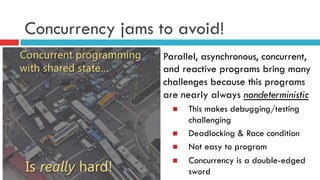
Parallel, asynchronous, concurrent,
and reactive programs bring many
challenges because this programs
are nearly always nondeterministic
n  This makes debugging/testing
challenging
n  Deadlocking & Race condition
n  Not easy to program
n  Concurrency is a double-edged
sword
F# can Help!
F# advances in concurrency programming
¤  Immutability, we don't have to protect the "shared state”
¤  A function call never changes data, it only returns new data
n  Side effect free functions
n  Referential Transparency
¤  Higher-order function and Lazy Evaluation (not explicit)
¤  Asynchronous Workflow
¤  Actor-Based concurrency model – MP (Isolation)
Event &
Reactive model
Event & Reactive Programming in F#
¤  Events are used to notify that something happened in the
application, is something you can listen to by registering a
callback with the event
¤  Events are first class composable entities much like object and
functions, I can pass them as arguments to functions and returned
as results
¤  Events use combinators to take an existing event and transform it
into a new event-stream in a compositional way
¤  Event-Streams can be treats as a collection
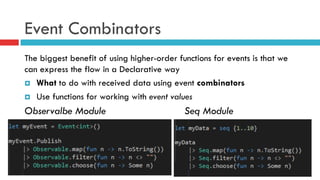
Event Combinators
The biggest benefit of using higher-order functions for events is that we
can express the flow in a Declarative way
¤  What to do with received data using event combinators
¤  Use functions for working with event values
Observalbe Module Seq Module
Event map & filter & add
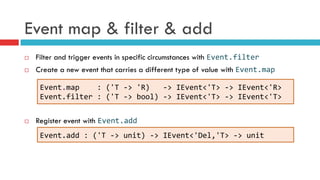
¨  Filter and trigger events in specific circumstances with Event.filter	
  
¨  Create a new event that carries a different type of value with Event.map	
  
¨  Register event with Event.add
Event.map	


  :	
  ('T	
  -­‐>	
  'R)	
  	
  	
  -­‐>	
  IEvent<'T>	
  -­‐>	
  IEvent<'R>	
  
Event.filter	
  :	
  ('T	
  -­‐>	
  bool)	
  -­‐>	
  IEvent<'T>	
  -­‐>	
  IEvent<'T>	
  
Event.add	
  :	
  ('T	
  -­‐>	
  unit)	
  -­‐>	
  IEvent<'Del,'T>	
  -­‐>	
  unit	
  
Event merge & scan
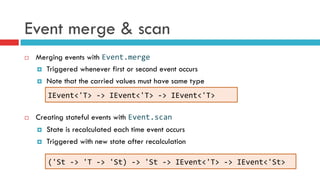
¨  Merging events with Event.merge
¤  Triggered whenever first or second event occurs
¤  Note that the carried values must have same type
¨  Creating stateful events with Event.scan
¤  State is recalculated each time event occurs
¤  Triggered with new state after recalculation	
  
IEvent<'T>	
  -­‐>	
  IEvent<'T>	
  -­‐>	
  IEvent<'T>	
  
('St	
  -­‐>	
  'T	
  -­‐>	
  'St)	
  -­‐>	
  'St	
  -­‐>	
  IEvent<'T>	
  -­‐>	
  IEvent<'St>	
  
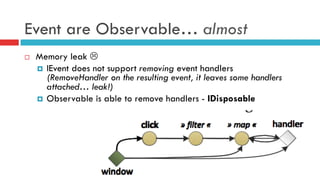
Event are Observable… almost
¨  Memory leak L
¤  IEvent does not support removing event handlers
(RemoveHandler on the resulting event, it leaves some handlers
attached… leak!)
¤  Observable is able to remove handlers - IDisposable
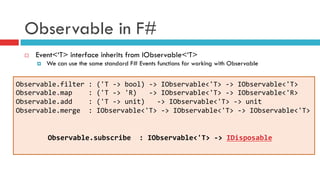
Observable in F#
¨  Event<‘T> interface inherits from IObservable<‘T>
¤  We can use the same standard F# Events functions for working with Observable
Observable.filter	
  :	
  ('T	
  -­‐>	
  bool)	
  -­‐>	
  IObservable<'T>	
  -­‐>	
  IObservable<'T>	
  
Observable.map	


  :	
  ('T	
  -­‐>	
  'R)	
  	
  	
  -­‐>	
  IObservable<'T>	
  -­‐>	
  IObservable<'R>	
  
Observable.add	


  :	
  ('T	
  -­‐>	
  unit)	
  	
  	
  -­‐>	
  IObservable<'T>	
  -­‐>	
  unit	
  
Observable.merge	
  	
  :	
  IObservable<'T>	
  -­‐>	
  IObservable<'T>	
  -­‐>	
  IObservable<'T>	


  Observable.subscribe	
  	
  :	
  IObservable<'T>	
  -­‐>	
  IDisposable	


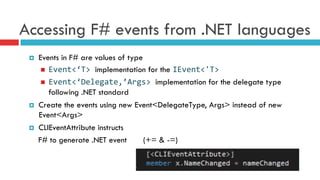
Accessing F# events from .NET languages
¤  Events in F# are values of type
n  Event<‘T>	
  implementation for the IEvent<'T>	
  
n  Event<‘Delegate,’Args>	
  implementation for the delegate type
following .NET standard
¤  Create the events using new Event<DelegateType, Args> instead of new
Event<Args>
¤  CLIEventAttribute instructs
F# to generate .NET event (+= & -=)
ASYNC
Asynchronous Workflows
¤  Software is often I/O-bound, it provides notable
performance benefits
n  Connecting to the Database
n  Leveraging web services
n  Working with data on disk
¤  Network and disk speeds increasing slower
¤  Not Easy to predict when the operation will complete (no-
deterministic)
Classic Asynchronous programming
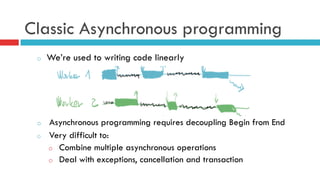
o  We’re used to writing code linearly
o  Asynchronous programming requires decoupling Begin from End
o  Very difficult to:
o  Combine multiple asynchronous operations
o  Deal with exceptions, cancellation and transaction
Synchronous Programming
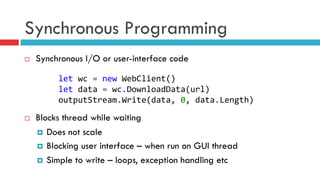
¨  Synchronous I/O or user-interface code
¨  Blocks thread while waiting
¤  Does not scale
¤  Blocking user interface – when run on GUI thread
¤  Simple to write – loops, exception handling etc
let	
  wc	
  =	
  new	
  WebClient()	
  
let	
  data	
  =	
  wc.DownloadData(url)	
  
outputStream.Write(data,	
  0,	
  data.Length)	
  
Classic Asynchronous Programming
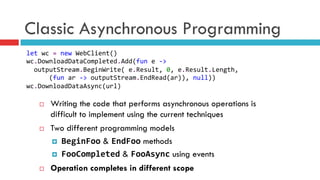
¨  Writing the code that performs asynchronous operations is
difficult to implement using the current techniques
¨  Two different programming models
¤  BeginFoo & EndFoo methods
¤  FooCompleted & FooAsync using events
¨  Operation completes in different scope
let	
  wc	
  =	
  new	
  WebClient()	
  
wc.DownloadDataCompleted.Add(fun	
  e	
  -­‐>	


  outputStream.BeginWrite(	
  e.Result,	
  0,	
  e.Result.Length,	


  (fun	
  ar	
  -­‐>	
  outputStream.EndRead(ar)),	
  null))	
  
wc.DownloadDataAsync(url)	
  
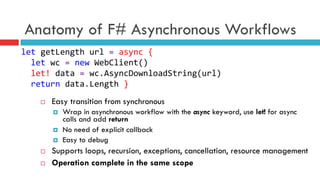
Anatomy of F# Asynchronous Workflows
¨  Easy transition from synchronous
¤  Wrap in asynchronous workflow with the async keyword, use let! for async
calls and add return
¤  No need of explicit callback
¤  Easy to debug
¨  Supports loops, recursion, exceptions, cancellation, resource management
¨  Operation complete in the same scope
let	
  getLength	
  url	
  =	
  async	
  {	


  let	
  wc	
  =	
  new	
  WebClient()	


  let!	
  data	
  =	
  wc.AsyncDownloadString(url)	


  return	
  data.Length	
  }	
  
Anatomy of Asynchronous Workflows
let	
  openFileAsynchronous	
  =	


  async	
  {	
  use	
  	
  fs	
  =	
  new	
  	
  FileStream(@"C:Program	
  Files...,	
  …)	


  let	
  	
  data	
  =	
  Array.create	
  (int	
  fs.Length)	
  0uy	


  let!	
  	
  bytesRead	
  =	
  fs.AsyncRead(data,	
  0,	
  data.Length)	


  do	
  	
  printfn	
  "Read	
  Bytes:	
  %i,	
  First	
  bytes	
  were:	


  %i	
  %i	
  %i	
  ..."	
  bytesRead	
  data.[1]	
  data.[2]	
  data.[3]	
  }	
  
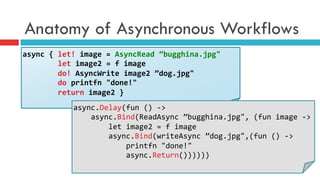
¤  Async defines a block of code we would like to run asynchronously
¤  We use let! instead of let
n  let! binds asynchronously, the computation in the async block waits until the let!
completes
n  While it is waiting it does not block
n  No program or OS thread is blocked
Anatomy of Asynchronous Workflows
async	
  {	
  let!	
  image	
  =	
  AsyncRead	
  ”bugghina.jpg"	


  let	
  image2	
  =	
  f	
  image	


  do!	
  AsyncWrite	
  image2	
  ”dog.jpg"	


  do	
  printfn	
  "done!"	


  return	
  image2	
  }	
  
async.Delay(fun	
  ()	
  -­‐>	


  async.Bind(ReadAsync	
  ”bugghina.jpg",	
  (fun	
  image	
  -­‐>	


  let	
  image2	
  =	
  f	
  image	


  async.Bind(writeAsync	
  ”dog.jpg",(fun	
  ()	
  -­‐>	


  printfn	
  "done!"	


  async.Return())))))	
  
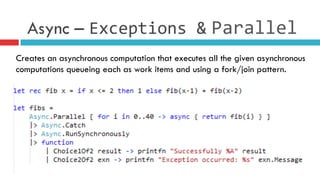
Async – Exceptions	
  & Parallel	
  
Creates an asynchronous computation that executes all the given asynchronous
computations queueing each as work items and using a fork/join pattern.
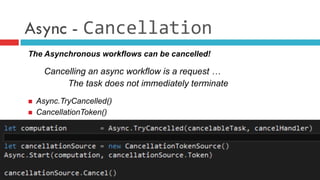
Async - Cancellation
The Asynchronous workflows can be cancelled!
Cancelling an async workflow is a request …
The task does not immediately terminate
n  Async.TryCancelled()
n  CancellationToken()
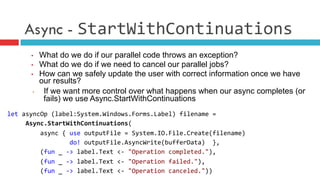
Async - StartWithContinuations
•  What do we do if our parallel code throws an exception?
•  What do we do if we need to cancel our parallel jobs?
•  How can we safely update the user with correct information once we have
our results?
•  If we want more control over what happens when our async completes (or
fails) we use Async.StartWithContinuations
let	
  asyncOp	
  (label:System.Windows.Forms.Label)	
  filename	
  =	


  Async.StartWithContinuations(	


  async	
  {	
  use	
  outputFile	
  =	
  System.IO.File.Create(filename)	


  do!	
  outputFile.AsyncWrite(bufferData)	
  	
  },	


  (fun	
  _	
  -­‐>	
  label.Text	
  <-­‐	
  "Operation	
  completed."),	


  (fun	
  _	
  -­‐>	
  label.Text	
  <-­‐	
  "Operation	
  failed."),	


  (fun	
  _	
  -­‐>	
  label.Text	
  <-­‐	
  "Operation	
  canceled."))	
  
Async – Limitations
Executing code in parallel there are numerous factors to take into account
¨  No in control of the number of processor cores run simultaneally
¨  Processor cache coherency
¨  It doesn’t consider the existing CPU workload
¨  There is no throttling of executing threads to ensure an optimal usage
¨  For CPU-level parallelism, use the .NET Task Parallel Library
Actor Model
What are F# Agents?
The Actor model is a model of concurrent computation
using actors which is characterized by dynamic creation
of actors, inclusion of actor addresses in messages, and
interaction only through direct asynchronous message
passing with no restriction on message arrival order.
[Wikipedia]
What are F# Agents?
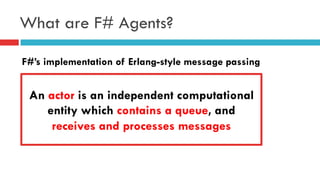
F#’s implementation of Erlang-style message passing
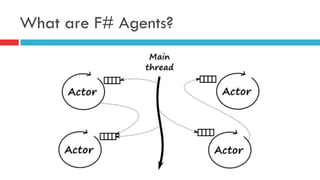
An actor is an independent computational
entity which contains a queue, and
receives and processes messages
What are F# Agents?
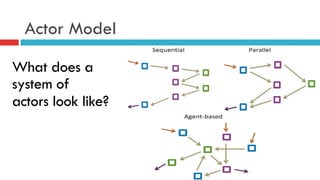
Actor Model
What does a
system of
actors look like?
How does an Agent look?
What does a
system of
actors look
like?
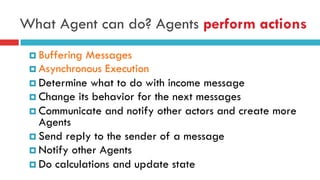
What Agent can do? Agents perform actions
¤ Buffering Messages
¤ Asynchronous Execution
¤ Determine what to do with income message
¤ Change its behavior for the next messages
¤ Communicate and notify other actors and create more
Agents
¤ Send reply to the sender of a message
¤ Notify other Agents
¤ Do calculations and update state
Mutable and Immutable state
¨  Mutable state
¤  Accessed from the body
¤  Used in loops or recursion
¤  Mutable variables (ref)
¤  Fast mutable collections
¨  Immutable state
¤  Passed as an argument
¤  Using recursion (return!)
¤  Immutable types
¤  Can be returned from Agent
Agent.Start(fun	
  agent	
  -­‐>	


  let	
  rec	
  loop	
  names	
  =	
  async	
  {	


  let!	
  name	
  =	
  agent.Receive()	


  return!	
  loop	
  (name::names)	
  }	
  
	
  loop	
  [])	
  
Agent.Start(fun	
  agent	
  -­‐>	
  async	
  {	


  let	
  names	
  =	
  ResizeArray<_>()	


  while	
  true	
  do	


  let!	
  name	
  =	
  agent.Receive()	


  names.Add(name)	
  })	
  
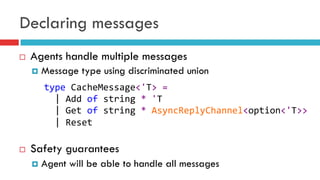
Declaring messages
¨  Agents handle multiple messages
¤  Message type using discriminated union
¨  Safety guarantees
¤  Agent will be able to handle all messages
type	
  CacheMessage<'T>	
  =	


  |	
  Add	
  of	
  string	
  *	
  'T	


  |	
  Get	
  of	
  string	
  *	
  AsyncReplyChannel<option<'T>>	


  |	
  Reset	


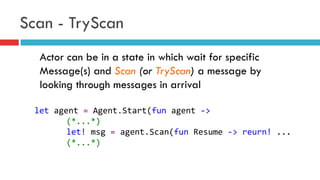
Scan - TryScan
Actor can be in a state in which wait for specific
Message(s) and Scan (or TryScan) a message by
looking through messages in arrival
let	
  agent	
  =	
  Agent.Start(fun	
  agent	
  -­‐>	


  (*...*)	
  
	
  let!	
  msg	
  =	
  agent.Scan(fun	
  Resume	
  -­‐>	
  reurn!	
  ...	
  
	
  (*...*)	


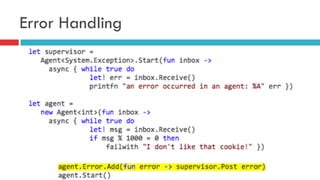
Error Handling
Agent Patterns
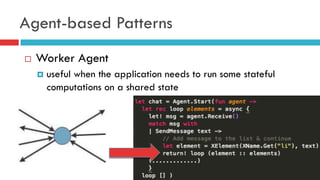
Agent-based Patterns
¨  Worker Agent
¤  useful when the application needs to run some stateful
computations on a shared state
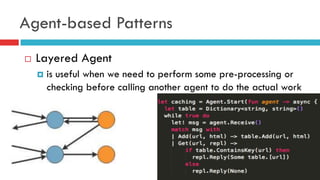
Agent-based Patterns
¨  Layered Agent
¤  is useful when we need to perform some pre-processing or
checking before calling another agent to do the actual work
Agent-based Patterns
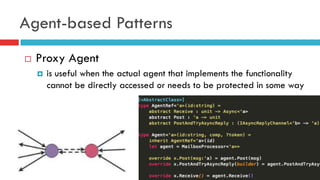
¨  Proxy Agent
¤  is useful when the actual agent that implements the functionality
cannot be directly accessed or needs to be protected in some way
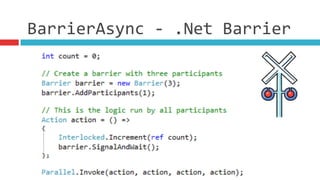
BarrierAsync	
  -­‐	
  .Net	
  Barrier	
  
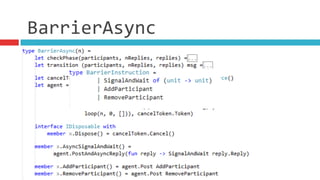
BarrierAsync	
  
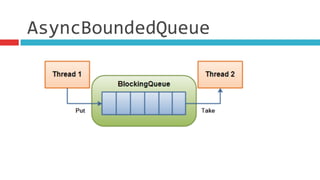
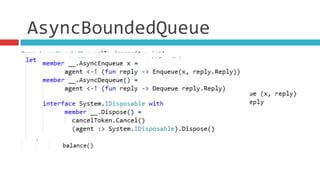
AsyncBoundedQueue
AsyncBoundedQueue
Pipeline Processing
¨  Pipeline according to Wikipedia:
¤  A pipeline is a set of data processing elements connected in
series, so that the output of one element is the input of the
next one. The elements of a pipeline are often executed in
parallel or in time-sliced fashion; in that case, some amount
of buffer storage is often inserted between elements
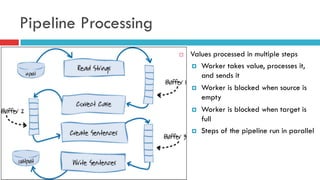
Pipeline Processing
¨  Values processed in multiple steps
¤  Worker takes value, processes it,
and sends it
¤  Worker is blocked when source is
empty
¤  Worker is blocked when target is
full
¤  Steps of the pipeline run in parallel
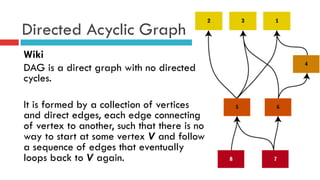
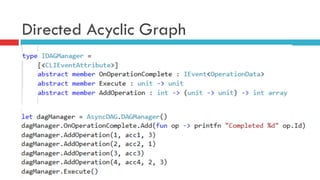
Directed Acyclic Graph
Wiki
DAG is a direct graph with no directed
cycles.
It is formed by a collection of vertices
and direct edges, each edge connecting
of vertex to another, such that there is no
way to start at some vertex V and follow
a sequence of edges that eventually
loops back to V again.
Directed Acyclic Graph
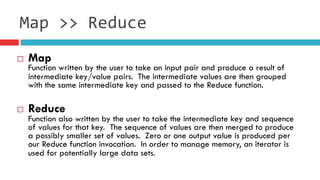
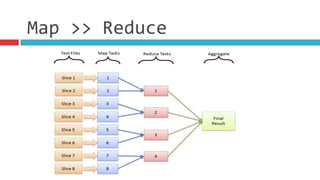
¨  Map
Function written by the user to take an input pair and produce a result of
intermediate key/value pairs.  The intermediate values are then grouped
with the same intermediate key and passed to the Reduce function.
¨  Reduce
Function also written by the user to take the intermediate key and sequence
of values for that key.  The sequence of values are then merged to produce
a possibly smaller set of values.  Zero or one output value is produced per
our Reduce function invocation.  In order to manage memory, an iterator is
used for potentially large data sets.
Map	
  >>	
  Reduce
Map	
  >>	
  Reduce
Map	
  >>	
  Reduce
THREADING
Threading
Is the smallest unit of processing that can be scheduled by an
Operation System…
http://en.wikipedia.ork/wiki/Thread_(computing)
¤  Threads share the memory heap
¤  Threads can communicate by writing to this shared memory
¤  Each Thread receives its own stack space ~1 Mb
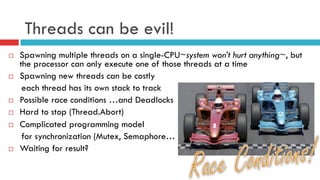
Threads can be evil!
¨  Spawning multiple threads on a single-CPU~system won’t hurt anything~, but
the processor can only execute one of those threads at a time
¨  Spawning new threads can be costly
each thread has its own stack to track
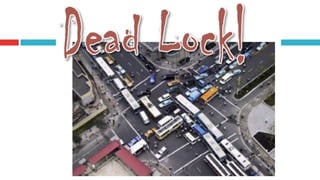
¨  Possible race conditions …and Deadlocks
¨  Hard to stop (Thread.Abort)
¨  Complicated programming model
for synchronization (Mutex, Semaphore…)
¨  Waiting for result?
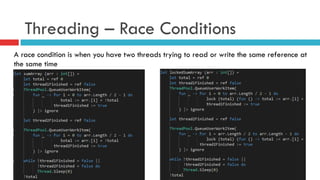
Threading – Race Conditions
A race condition is when you have two threads trying to read or write the same reference at
the same time
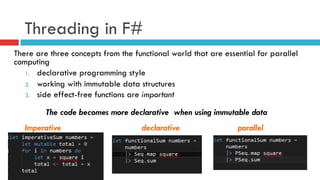
Threading in F#
There are three concepts from the functional world that are essential for parallel
computing
1.  declarative programming style
2.  working with immutable data structures
3.  side effect-free functions are important
The code becomes more declarative when using immutable data
Imperative declarative parallel
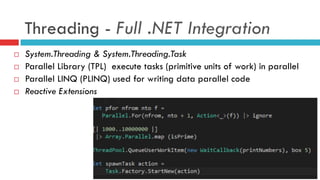
Threading - Full .NET Integration
¨  System.Threading & System.Threading.Task
¨  Parallel Library (TPL) execute tasks (primitive units of work) in parallel
¨  Parallel LINQ (PLINQ) used for writing data parallel code
¨  Reactive Extensions
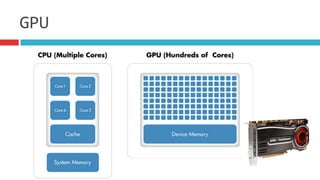
GPU
¨  Wikipedia defines GPU as follows
¤  A graphics processing unit (GPU), is a specialized electronic circuit designed to rapidly
manipulate and alter memory to accelerate the building of images in a frame buffer
intended for output to a display. Modern GPUs are very efficient at manipulating
computer graphics, and their highly parallel structure makes them more effective than
general-purpose CPUs for algorithms where processing of large blocks of data is done
in parallel. In a personal computer
¨  Wikipedia defines GPGPU as follows
¤  General-purpose computing on graphics processing units (GPGPU) is the means of using a
graphics processing unit (GPU), which typically handles computation only for computer
graphics, to perform computation in applications traditionally handled by the central
processing unit (CPU). Additionally, the use of multiple graphics cards in one computer, or
large numbers of graphics chips, further parallelizes the already parallel nature of
graphics processing.
GPU
GPU
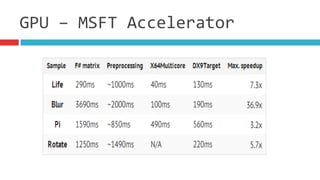
¨  Microsoft Accelerator
¤  The project Microsoft Research Accelerator is a .Net
library for developing array-based computations and
executing them in parallel on multi-core CPU or more
interestingly, using GPU shaders
¤  Accelerator handles all the details of parallelizing and
running the computation on the selected target
processor, including GPUs and multicore CPUs
GPU	
  –	
  MSFT	
  Accelerator
GPU	
  –	
  Accelerator	
  Usage
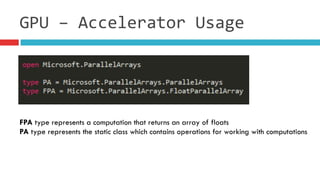
FPA type represents a computation that returns an array of floats
PA type represents the static class which contains operations for working with computations
GPU	
  –	
  Accelerator	
  Usage
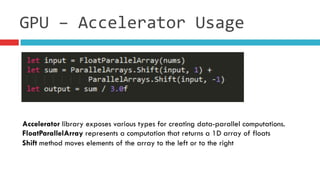
Accelerator library exposes various types for creating data-parallel computations.
FloatParallelArray represents a computation that returns a 1D array of floats
Shift method moves elements of the array to the left or to the right
GPU	
  –	
  Accelerator	
  Usage
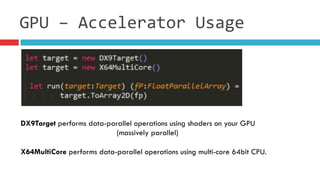
DX9Target performs data-parallel operations using shaders on your GPU
(massively parallel)
X64MultiCore performs data-parallel operations using multi-core 64bit CPU.
GPU	
  –	
  MSFT	
  Accelerator
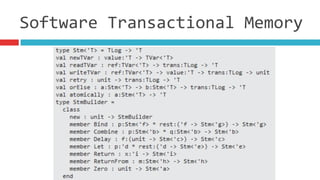
Stm
Software	
  Transactional	
  Memory
Software	
  Transactional	
  Memory
Software	
  Transactional	
  Memory
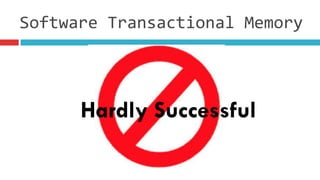
Hardly Successful
Summary
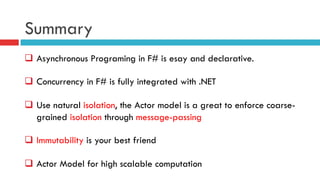
q  Asynchronous Programing in F# is esay and declarative.
q  Concurrency in F# is fully integrated with .NET
q  Use natural isolation, the Actor model is a great to enforce coarse-
grained isolation through message-passing
q  Immutability is your best friend
q  Actor Model for high scalable computation
Q & A ?
The tools we use have a profound (and devious!) influence on our thinking
habits, and, therefore, on our thinking abilities.
-- Edsger Dijkstra
github.com/DCFsharp
meetup.com/DC-fsharp/
@DCFsharp
rterrell@microsoft.com

Concurrecny inf sharp

  • 1.
    Silicon Valley F#User Group Writing code that scales to a large number of cores is much easier in the functional style compared to using the typical imperative approach…
  • 2.
    Agenda Concurrency & Terminology Event& Reactive Programming Asynchronous Workflows Actor Model Actor Design Patterns Threading & Parallel Programming GPGPU Programming
  • 3.
    About me –Riccardo Terrell ¨  Originally from Italy. I moved here ~8 years ago ¨  +/- 15 years in professional programming n  C++/VB à Java à .Net C# à C# & F# à ?? ¨  Organizer of the DC F# User Group ¨  Software Architect at Microsoft R&D ¨  Passionate in Technology, believer in polyglot programming as a mechanism in finding the right tool for the job ¨  Love to cook… Italian food! ¨  Husband and owner of two gorgeous pugs J
  • 4.
    Concurrency & Terminologies Moderncomputers come with multiple processors, each equipped with multiple cores, but the single processor is slower than used to be! Moore’s law (http://en.wikipedia.org/wiki/Moore's_law) … to achieve great performances the application must be leveraging a Concurrent Model
  • 5.
    Concurrency & Terminologies ¤ Concurrency is Everywhere n  Server-side programming for the web or cloud n  Building a responsive graphical user interface n  Building a new interactive client application n  Performing and compute I/O intensive activity All to attain better performance!
  • 6.
    Concurrency & Terminology Concurrencyis the notion of multiple things happening at the same time. ¤  Concurrent: programs with multiple threads of execution, each typically executing different code ¤  Parallel: one or more threads executing simultaneously in order to speed up execution ¤  Asynchronous: programs perform I/O requests that don't complete immediately but that are fulfilled at a later time and where the program issuing the request has to do meaningful work in the meantime ¤  Reactive programming is writing applications in such a way that they respond to events as they occur in real time.
  • 7.
    Concurrency jams toavoid! Parallel, asynchronous, concurrent, and reactive programs bring many challenges because this programs are nearly always nondeterministic n  This makes debugging/testing challenging n  Deadlocking & Race condition n  Not easy to program n  Concurrency is a double-edged sword
  • 8.
    F# can Help! F#advances in concurrency programming ¤  Immutability, we don't have to protect the "shared state” ¤  A function call never changes data, it only returns new data n  Side effect free functions n  Referential Transparency ¤  Higher-order function and Lazy Evaluation (not explicit) ¤  Asynchronous Workflow ¤  Actor-Based concurrency model – MP (Isolation)
  • 9.
  • 10.
    Event & ReactiveProgramming in F# ¤  Events are used to notify that something happened in the application, is something you can listen to by registering a callback with the event ¤  Events are first class composable entities much like object and functions, I can pass them as arguments to functions and returned as results ¤  Events use combinators to take an existing event and transform it into a new event-stream in a compositional way ¤  Event-Streams can be treats as a collection
  • 11.
    Event Combinators The biggestbenefit of using higher-order functions for events is that we can express the flow in a Declarative way ¤  What to do with received data using event combinators ¤  Use functions for working with event values Observalbe Module Seq Module
  • 12.
    Event map &filter & add ¨  Filter and trigger events in specific circumstances with Event.filter   ¨  Create a new event that carries a different type of value with Event.map   ¨  Register event with Event.add Event.map        :  ('T  -­‐>  'R)      -­‐>  IEvent<'T>  -­‐>  IEvent<'R>   Event.filter  :  ('T  -­‐>  bool)  -­‐>  IEvent<'T>  -­‐>  IEvent<'T>   Event.add  :  ('T  -­‐>  unit)  -­‐>  IEvent<'Del,'T>  -­‐>  unit  
  • 13.
    Event merge &scan ¨  Merging events with Event.merge ¤  Triggered whenever first or second event occurs ¤  Note that the carried values must have same type ¨  Creating stateful events with Event.scan ¤  State is recalculated each time event occurs ¤  Triggered with new state after recalculation   IEvent<'T>  -­‐>  IEvent<'T>  -­‐>  IEvent<'T>   ('St  -­‐>  'T  -­‐>  'St)  -­‐>  'St  -­‐>  IEvent<'T>  -­‐>  IEvent<'St>  
  • 14.
    Event are Observable…almost ¨  Memory leak L ¤  IEvent does not support removing event handlers (RemoveHandler on the resulting event, it leaves some handlers attached… leak!) ¤  Observable is able to remove handlers - IDisposable
  • 15.
    Observable in F# ¨ Event<‘T> interface inherits from IObservable<‘T> ¤  We can use the same standard F# Events functions for working with Observable Observable.filter  :  ('T  -­‐>  bool)  -­‐>  IObservable<'T>  -­‐>  IObservable<'T>   Observable.map        :  ('T  -­‐>  'R)      -­‐>  IObservable<'T>  -­‐>  IObservable<'R>   Observable.add        :  ('T  -­‐>  unit)      -­‐>  IObservable<'T>  -­‐>  unit   Observable.merge    :  IObservable<'T>  -­‐>  IObservable<'T>  -­‐>  IObservable<'T>        Observable.subscribe    :  IObservable<'T>  -­‐>  IDisposable    
  • 16.
    Accessing F# eventsfrom .NET languages ¤  Events in F# are values of type n  Event<‘T>  implementation for the IEvent<'T>   n  Event<‘Delegate,’Args>  implementation for the delegate type following .NET standard ¤  Create the events using new Event<DelegateType, Args> instead of new Event<Args> ¤  CLIEventAttribute instructs F# to generate .NET event (+= & -=)
  • 17.
  • 18.
    Asynchronous Workflows ¤  Softwareis often I/O-bound, it provides notable performance benefits n  Connecting to the Database n  Leveraging web services n  Working with data on disk ¤  Network and disk speeds increasing slower ¤  Not Easy to predict when the operation will complete (no- deterministic)
  • 19.
    Classic Asynchronous programming o We’re used to writing code linearly o  Asynchronous programming requires decoupling Begin from End o  Very difficult to: o  Combine multiple asynchronous operations o  Deal with exceptions, cancellation and transaction
  • 20.
    Synchronous Programming ¨  SynchronousI/O or user-interface code ¨  Blocks thread while waiting ¤  Does not scale ¤  Blocking user interface – when run on GUI thread ¤  Simple to write – loops, exception handling etc let  wc  =  new  WebClient()   let  data  =  wc.DownloadData(url)   outputStream.Write(data,  0,  data.Length)  
  • 21.
    Classic Asynchronous Programming ¨ Writing the code that performs asynchronous operations is difficult to implement using the current techniques ¨  Two different programming models ¤  BeginFoo & EndFoo methods ¤  FooCompleted & FooAsync using events ¨  Operation completes in different scope let  wc  =  new  WebClient()   wc.DownloadDataCompleted.Add(fun  e  -­‐>      outputStream.BeginWrite(  e.Result,  0,  e.Result.Length,                (fun  ar  -­‐>  outputStream.EndRead(ar)),  null))   wc.DownloadDataAsync(url)  
  • 22.
    Anatomy of F#Asynchronous Workflows ¨  Easy transition from synchronous ¤  Wrap in asynchronous workflow with the async keyword, use let! for async calls and add return ¤  No need of explicit callback ¤  Easy to debug ¨  Supports loops, recursion, exceptions, cancellation, resource management ¨  Operation complete in the same scope let  getLength  url  =  async  {      let  wc  =  new  WebClient()      let!  data  =  wc.AsyncDownloadString(url)      return  data.Length  }  
  • 23.
    Anatomy of AsynchronousWorkflows let  openFileAsynchronous  =          async  {  use    fs  =  new    FileStream(@"C:Program  Files...,  …)                let    data  =  Array.create  (int  fs.Length)  0uy                let!    bytesRead  =  fs.AsyncRead(data,  0,  data.Length)                do    printfn  "Read  Bytes:  %i,  First  bytes  were:                        %i  %i  %i  ..."  bytesRead  data.[1]  data.[2]  data.[3]  }   ¤  Async defines a block of code we would like to run asynchronously ¤  We use let! instead of let n  let! binds asynchronously, the computation in the async block waits until the let! completes n  While it is waiting it does not block n  No program or OS thread is blocked
  • 24.
    Anatomy of AsynchronousWorkflows async  {  let!  image  =  AsyncRead  ”bugghina.jpg"                  let  image2  =  f  image                  do!  AsyncWrite  image2  ”dog.jpg"                  do  printfn  "done!"                    return  image2  }   async.Delay(fun  ()  -­‐>            async.Bind(ReadAsync  ”bugghina.jpg",  (fun  image  -­‐>                  let  image2  =  f  image                  async.Bind(writeAsync  ”dog.jpg",(fun  ()  -­‐>                          printfn  "done!"                          async.Return())))))  
  • 25.
    Async – Exceptions  & Parallel   Creates an asynchronous computation that executes all the given asynchronous computations queueing each as work items and using a fork/join pattern.
  • 26.
    Async - Cancellation TheAsynchronous workflows can be cancelled! Cancelling an async workflow is a request … The task does not immediately terminate n  Async.TryCancelled() n  CancellationToken()
  • 27.
    Async - StartWithContinuations • What do we do if our parallel code throws an exception? •  What do we do if we need to cancel our parallel jobs? •  How can we safely update the user with correct information once we have our results? •  If we want more control over what happens when our async completes (or fails) we use Async.StartWithContinuations let  asyncOp  (label:System.Windows.Forms.Label)  filename  =            Async.StartWithContinuations(                    async  {  use  outputFile  =  System.IO.File.Create(filename)                                    do!  outputFile.AsyncWrite(bufferData)    },                    (fun  _  -­‐>  label.Text  <-­‐  "Operation  completed."),                    (fun  _  -­‐>  label.Text  <-­‐  "Operation  failed."),                    (fun  _  -­‐>  label.Text  <-­‐  "Operation  canceled."))  
  • 28.
    Async – Limitations Executingcode in parallel there are numerous factors to take into account ¨  No in control of the number of processor cores run simultaneally ¨  Processor cache coherency ¨  It doesn’t consider the existing CPU workload ¨  There is no throttling of executing threads to ensure an optimal usage ¨  For CPU-level parallelism, use the .NET Task Parallel Library
  • 29.
  • 30.
    What are F#Agents? The Actor model is a model of concurrent computation using actors which is characterized by dynamic creation of actors, inclusion of actor addresses in messages, and interaction only through direct asynchronous message passing with no restriction on message arrival order. [Wikipedia]
  • 31.
    What are F#Agents? F#’s implementation of Erlang-style message passing An actor is an independent computational entity which contains a queue, and receives and processes messages
  • 32.
    What are F#Agents?
  • 33.
    Actor Model What doesa system of actors look like?
  • 34.
    How does anAgent look? What does a system of actors look like?
  • 35.
    What Agent cando? Agents perform actions ¤ Buffering Messages ¤ Asynchronous Execution ¤ Determine what to do with income message ¤ Change its behavior for the next messages ¤ Communicate and notify other actors and create more Agents ¤ Send reply to the sender of a message ¤ Notify other Agents ¤ Do calculations and update state
  • 36.
    Mutable and Immutablestate ¨  Mutable state ¤  Accessed from the body ¤  Used in loops or recursion ¤  Mutable variables (ref) ¤  Fast mutable collections ¨  Immutable state ¤  Passed as an argument ¤  Using recursion (return!) ¤  Immutable types ¤  Can be returned from Agent Agent.Start(fun  agent  -­‐>        let  rec  loop  names  =  async  {          let!  name  =  agent.Receive()          return!  loop  (name::names)  }    loop  [])   Agent.Start(fun  agent  -­‐>  async  {      let  names  =  ResizeArray<_>()      while  true  do          let!  name  =  agent.Receive()          names.Add(name)  })  
  • 37.
    Declaring messages ¨  Agentshandle multiple messages ¤  Message type using discriminated union ¨  Safety guarantees ¤  Agent will be able to handle all messages type  CacheMessage<'T>  =      |  Add  of  string  *  'T      |  Get  of  string  *  AsyncReplyChannel<option<'T>>      |  Reset    
  • 38.
    Scan - TryScan Actorcan be in a state in which wait for specific Message(s) and Scan (or TryScan) a message by looking through messages in arrival let  agent  =  Agent.Start(fun  agent  -­‐>      (*...*)    let!  msg  =  agent.Scan(fun  Resume  -­‐>  reurn!  ...    (*...*)    
  • 39.
  • 40.
  • 41.
    Agent-based Patterns ¨  WorkerAgent ¤  useful when the application needs to run some stateful computations on a shared state
  • 42.
    Agent-based Patterns ¨  LayeredAgent ¤  is useful when we need to perform some pre-processing or checking before calling another agent to do the actual work
  • 43.
    Agent-based Patterns ¨  ProxyAgent ¤  is useful when the actual agent that implements the functionality cannot be directly accessed or needs to be protected in some way
  • 44.
  • 45.
  • 46.
  • 47.
  • 48.
    Pipeline Processing ¨  Pipelineaccording to Wikipedia: ¤  A pipeline is a set of data processing elements connected in series, so that the output of one element is the input of the next one. The elements of a pipeline are often executed in parallel or in time-sliced fashion; in that case, some amount of buffer storage is often inserted between elements
  • 49.
    Pipeline Processing ¨  Valuesprocessed in multiple steps ¤  Worker takes value, processes it, and sends it ¤  Worker is blocked when source is empty ¤  Worker is blocked when target is full ¤  Steps of the pipeline run in parallel
  • 50.
    Directed Acyclic Graph Wiki DAGis a direct graph with no directed cycles. It is formed by a collection of vertices and direct edges, each edge connecting of vertex to another, such that there is no way to start at some vertex V and follow a sequence of edges that eventually loops back to V again.
  • 51.
  • 52.
    ¨  Map Function writtenby the user to take an input pair and produce a result of intermediate key/value pairs.  The intermediate values are then grouped with the same intermediate key and passed to the Reduce function. ¨  Reduce Function also written by the user to take the intermediate key and sequence of values for that key.  The sequence of values are then merged to produce a possibly smaller set of values.  Zero or one output value is produced per our Reduce function invocation.  In order to manage memory, an iterator is used for potentially large data sets. Map  >>  Reduce
  • 53.
  • 54.
  • 55.
  • 56.
    Threading Is the smallestunit of processing that can be scheduled by an Operation System… http://en.wikipedia.ork/wiki/Thread_(computing) ¤  Threads share the memory heap ¤  Threads can communicate by writing to this shared memory ¤  Each Thread receives its own stack space ~1 Mb
  • 57.
    Threads can beevil! ¨  Spawning multiple threads on a single-CPU~system won’t hurt anything~, but the processor can only execute one of those threads at a time ¨  Spawning new threads can be costly each thread has its own stack to track ¨  Possible race conditions …and Deadlocks ¨  Hard to stop (Thread.Abort) ¨  Complicated programming model for synchronization (Mutex, Semaphore…) ¨  Waiting for result?
  • 58.
    Threading – RaceConditions A race condition is when you have two threads trying to read or write the same reference at the same time
  • 60.
    Threading in F# Thereare three concepts from the functional world that are essential for parallel computing 1.  declarative programming style 2.  working with immutable data structures 3.  side effect-free functions are important The code becomes more declarative when using immutable data Imperative declarative parallel
  • 61.
    Threading - Full.NET Integration ¨  System.Threading & System.Threading.Task ¨  Parallel Library (TPL) execute tasks (primitive units of work) in parallel ¨  Parallel LINQ (PLINQ) used for writing data parallel code ¨  Reactive Extensions
  • 62.
  • 63.
    ¨  Wikipedia definesGPU as follows ¤  A graphics processing unit (GPU), is a specialized electronic circuit designed to rapidly manipulate and alter memory to accelerate the building of images in a frame buffer intended for output to a display. Modern GPUs are very efficient at manipulating computer graphics, and their highly parallel structure makes them more effective than general-purpose CPUs for algorithms where processing of large blocks of data is done in parallel. In a personal computer ¨  Wikipedia defines GPGPU as follows ¤  General-purpose computing on graphics processing units (GPGPU) is the means of using a graphics processing unit (GPU), which typically handles computation only for computer graphics, to perform computation in applications traditionally handled by the central processing unit (CPU). Additionally, the use of multiple graphics cards in one computer, or large numbers of graphics chips, further parallelizes the already parallel nature of graphics processing. GPU
  • 64.
  • 65.
    ¨  Microsoft Accelerator ¤ The project Microsoft Research Accelerator is a .Net library for developing array-based computations and executing them in parallel on multi-core CPU or more interestingly, using GPU shaders ¤  Accelerator handles all the details of parallelizing and running the computation on the selected target processor, including GPUs and multicore CPUs GPU  –  MSFT  Accelerator
  • 66.
    GPU  –  Accelerator  Usage FPA type represents a computation that returns an array of floats PA type represents the static class which contains operations for working with computations
  • 67.
    GPU  –  Accelerator  Usage Accelerator library exposes various types for creating data-parallel computations. FloatParallelArray represents a computation that returns a 1D array of floats Shift method moves elements of the array to the left or to the right
  • 68.
    GPU  –  Accelerator  Usage DX9Target performs data-parallel operations using shaders on your GPU (massively parallel) X64MultiCore performs data-parallel operations using multi-core 64bit CPU.
  • 69.
    GPU  –  MSFT  Accelerator
  • 70.
  • 71.
  • 72.
  • 73.
  • 74.
    Summary q  Asynchronous Programingin F# is esay and declarative. q  Concurrency in F# is fully integrated with .NET q  Use natural isolation, the Actor model is a great to enforce coarse- grained isolation through message-passing q  Immutability is your best friend q  Actor Model for high scalable computation
  • 75.
    Q & A? The tools we use have a profound (and devious!) influence on our thinking habits, and, therefore, on our thinking abilities. -- Edsger Dijkstra
  • 76.