COMPUTER ORGANIZATION
AND
ASSEMBLY LANGUAGE
LECTURE. 1
INSTRUCTOR: PROF. MUHAMMAD AHMED
INTRODUCTION ABOUT COMPUTER ORGANIZATION
Computer organization refers to the structural design
and operational methods of a computer system. It define
how hardware components interact and function
together to execute instructions and process data
efficiently. Understanding computer organization is
essential for grasping how computers work at a
fundamental level.
KEY COMPONENTS OF COMPUTER ORGANIZATION
1.Central Processing Unit (CPU)
2.Memory
3.Input/Output (I/O) Systems
4.Bus Systems
5.Instruction Set Architecture (ISA)
COMPONENTS:
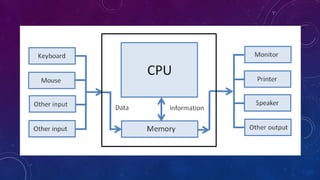
Central Processing Unit (CPU):
The brain of the computer, responsible for executing instructions and processing
data. It includes the arithmetic logic unit (ALU), control unit, and registers.
Memory:
This includes both volatile memory (like RAM) and non-volatile storage (like hard
drives and SSDs). Memory organization impacts speed and efficiency in data
retrieval.
Input/Output (I/O) Systems:
These facilitate communication between the computer and external devices,
such as keyboards, mice, printers, and networks.
COMPONENTS:
Bus Systems:
The pathways that transfer data between the CPU, memory,
and I/O devices, ensuring smooth communication and data
flow.
Instruction Set Architecture (ISA):
This defines the set of instructions that the CPU can
execute, serving as the interface between hardware and
software.
1. CPU ORGANIZATION
• CPU controls the Computer
• The CPU will fetch, decode and execute
instructions.
• The CPU has three internal sections: register
section, ALU and Control Unit
REGISTER SECTION IN CPU
• Includes collection of registers and a bus.
• Processor’s instruction set architecture are found in
this section.
• Non accessible registers by the programmer. These
are to be used for registers to latch the address
being accessed and a temp storage register.
ARITHMETIC/LOGIC UNIT (ALU) IN CPU
•Performs most Arithmetic and logical
operations.
•Retrieves and stores its information
with the register section of the CPU.
2. MEMORY ORGANIZATION
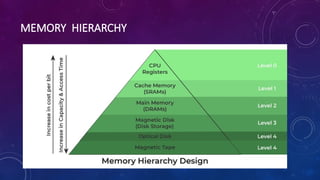
Memory Hierarchy
• Main Memory
• Auxiliary Memory
• Associative Memory
• Cache Memory
• Virtual Memory
• Memory Management Hardware`
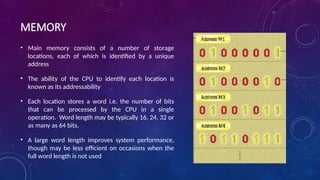
MEMORY
• Main memory consists of a number of storage
locations, each of which is identified by a unique
address
• The ability of the CPU to identify each location is
known as its addressability
• Each location stores a word i.e. the number of bits
that can be processed by the CPU in a single
operation. Word length may be typically 16, 24, 32 or
as many as 64 bits.
• A large word length improves system performance,
though may be less efficient on occasions when the
full word length is not used
MEMORY HIERARCHY
MEMORY SUBSYSTEM
• 2 Types of Memory:
• ROM : Read Only Memory
• Program that is loaded into memory and cannot be changed
also retains its data even without power.
• RAM : Random Access Memory
• Also called read/write memory. This type of memory can
have a program loaded and then reloaded. It also loses its
data with no power.
DIFFERENT ROM CHIPS
• Masked ROM :
• ROM that is programmed with data when fabricated. Data will not change once installed.
Hardwired.
• Programmable ROM (PROM) :
• Capable of being programmed by the user with a ROM programmer. Not hardwired.
• Erasable PROM (EPROM) :
• Much like the PROM this EPROM can be programmed and then erased by light.
• EEPROM :
• Another form of EPROM but is reprogammable electrically.
DIFFERENT RAM CHIPS
• Dynamic RAM (DRAM) :
• Leaky capacitors. Caps are charged and slowly leak until they are
refreshed to there original data locations. Ex. Computer RAM
• Static RAM (SRAM) :
• Much like a register. The contents stay valid and does not have to be
refreshed. SRAM is faster than DRAM but cost more Ex. Cache
• Each RAM chip has 2^n * m. n address inputs and m
bidirectional data pins
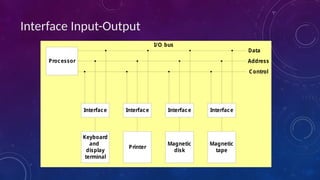
3. INPUT-OUTPUT ORGANIZATION
• 1 Peripheral Devices
• I/O Subsystem
• Provides an efficient mode of communication between the central
system and the outside environment
• Peripheral (or I/O Device)
• Input or Output devices attached to the computer
• 2 Input-Output Interface
• 1) A conversion of signal values may be required
MECHANISM OF DATA TRANSFER
• Transfer
• Synchronous Data Transfer
• All data transfers occur simultaneously during the occurrence of a
clock pulse
• Registers in the interface share a common clock with CPU registers
• Asynchronous Data Transfer
• Internal timing in each unit (CPU and Interface) is independent
• Each unit uses its own private clock for internal registers
Interface Input-Output
Interface
Keyboard
and
display
terminal
Interface
Magnetic
tape
Interface
Magnetic
disk
Interface
Printer
Processor
Data
Control
Address
I/O bus
4. EACH OF THESE COMPONENTS ARE CONNECTED
THROUGH BUSES.
BUS - Physically a set of wires. The components of
the Computer are connected to these buses.
• Address Bus
• Data Bus
• Control Bus
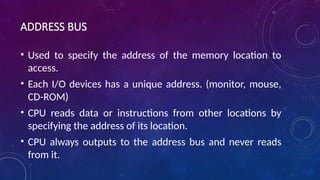
ADDRESS BUS
• Used to specify the address of the memory location to
access.
• Each I/O devices has a unique address. (monitor, mouse,
CD-ROM)
• CPU reads data or instructions from other locations by
specifying the address of its location.
• CPU always outputs to the address bus and never reads
from it.
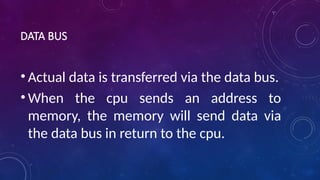
DATA BUS
• Actual data is transferred via the data bus.
• When the cpu sends an address to
memory, the memory will send data via
the data bus in return to the cpu.
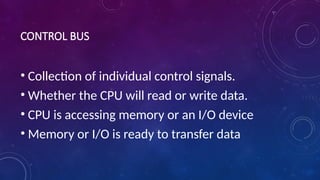
CONTROL BUS
• Collection of individual control signals.
• Whether the CPU will read or write data.
• CPU is accessing memory or an I/O device
• Memory or I/O is ready to transfer data
I/O BUS OR LOCAL BUS
• In today’s computers the I/O controller will have an
extra bus called the I/O bus.
• The I/O bus will be used to access all other I/O
devices connected to the system.
• Example: PCI bus
5. INSTRUCTION SET ARCHITECTURE (ISA)
• Procedure the CPU goes through to process an
instruction.
• 1. Fetch - get instruction
• 2. Decode - interoperate the instruction
• 3. Execute - run the instruction.
INTRODUCTION ABOUT ASSEMBLY LANGUAGE
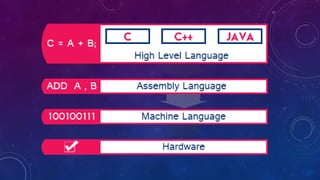
Assembly language is a low-level language that helps to
communicate directly with computer hardware. It uses
mnemonics to represent the operations that a processor
has to do. Which is an intermediate language between high-
level languages like C++ and the binary language. It uses
hexadecimal and binary values, and it is readable by
humans.
HOW ASSEMBLY LANGUAGE WORKS?
• Assembly languages contain mnemonic codes that specify what the processor
should do. The mnemonic code that was written by the programmer was
converted into machine language (binary language) for execution. An
assembler is used to convert assembly code into machine language. That
machine code is stored in an executable file for the sake of execution.
• It enables the programmer to communicate directly with the hardware such
as registers, memory locations, input/output devices or any other hardware
components. Which could help the programmer to directly control hardware
components and to manage the resources in an efficient manner.
HOW TO EXECUTE ASSEMBLY LANGUAGE?
• Write assembly code: Open any text editor in device and write the mnemonic codes in it and
save the file with a proper extension according to your assembler. Extension can
be .asm, .s, .asmx.
• Assembling the code: Convert your code to machine language using an assembler.
• Generating object file: It will generate an object file corresponding to your code. It will have
an extension .obj.
• Linking and creating executables: Our assembly language might contain multiple source
codes. And we have to link them to libraries to make it executable. We can use a linker like lk
for this purpose.
• Running program: After creating an executable file we can run it as usual. It will depend on
the software that how to run the program.
COMPONENTS OF ASSEMBLY LANGUAGE
• Registers: Registers are the fast memory locations situated inside the
processor. Which helps ALU to perform arithmetic operations and temporary
storing of data. Example: Ax (Accumulator), Bx, Cx.
• Command: An instruction in assembly code known as a command informs the
assembler what to do. Assembly language instructions typically employ self-
descriptive abbreviations to make the vocabulary simple, as “ADD” for
addition and “MOV” for data movement.
• Instructions: Instructions are the mnemonic codes that we give to the
processor to perform specific tasks like LOAD, ADDITION, MOVE. Example:
ADD
• Labels: It is a symbolic name/identifier given to indicate a particular location
or address in the assembly code. Example: FIRST to indicate starting of
execution part of code.
COMPONENTS OF ASSEMBLY LANGUAGE
• Mnemonic: A mnemonic is an acronym for an assembly language instruction or a name given
to a machine function. Each mnemonic in assembly corresponds to a specific machine
instruction. Add is an illustration of one of these machine commands. CMP, Mul, and Lea are
among further instances.
• Macro: Macros are the program codes that can be used anywhere in the program through
calling it once we define it. And it is often embedded with assemblers and compilers. We
should define it using a directive %macro. Example: %macro ADD_TWO_NUMBERS 2
add eax, %1
add eax, %2
%endmacro
• Operands: These are the data or values that we are given through instruction to perform
some operation on it. Example: In ADD R1,R2 ; R1 and R2 are operands.
• Opcode: These are the mnemonic codes that specify to the processor which operation has to
be done. Example: ADD means Addition.
KEY FEATURES OF ASSEMBLY LANGUAGE:
• Symbolic Representation
• Direct Hardware Manipulation
• Efficiency
• Architecture-Specific
COMPARISON OF
LOW LEVEL AND HIGH LEVEL LANGUAGES
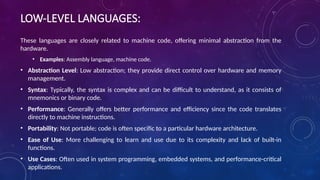
LOW-LEVEL LANGUAGES:
These languages are closely related to machine code, offering minimal abstraction from the
hardware.
• Examples: Assembly language, machine code.
• Abstraction Level: Low abstraction; they provide direct control over hardware and memory
management.
• Syntax: Typically, the syntax is complex and can be difficult to understand, as it consists of
mnemonics or binary code.
• Performance: Generally offers better performance and efficiency since the code translates
directly to machine instructions.
• Portability: Not portable; code is often specific to a particular hardware architecture.
• Ease of Use: More challenging to learn and use due to its complexity and lack of built-in
functions.
• Use Cases: Often used in system programming, embedded systems, and performance-critical
applications.
HIGH-LEVEL LANGUAGES
These languages are designed to be more user-friendly and abstract away hardware details.
• Examples: Python, Java, C++, Ruby.
• Abstraction Level: High abstraction; they provide a greater level of abstraction from the
hardware.
• Syntax: More readable and easier to understand, resembling human languages and
mathematical notation.
• Performance: May be less efficient compared to low-level languages due to the overhead of
abstraction and interpretation.
• Portability: Highly portable; code can often run on different hardware architectures with
minimal modification.
• Ease of Use: Easier to learn and use, with extensive libraries and frameworks that simplify
complex tasks.
• Use Cases: Commonly used for application development, web development, data analysis,
and scripting.
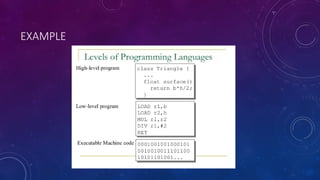
EXAMPLE
THANK YOU

Computer Organization and Assembly language.pptx

  • 1.
    COMPUTER ORGANIZATION AND ASSEMBLY LANGUAGE LECTURE.1 INSTRUCTOR: PROF. MUHAMMAD AHMED
  • 2.
    INTRODUCTION ABOUT COMPUTERORGANIZATION Computer organization refers to the structural design and operational methods of a computer system. It define how hardware components interact and function together to execute instructions and process data efficiently. Understanding computer organization is essential for grasping how computers work at a fundamental level.
  • 3.
    KEY COMPONENTS OFCOMPUTER ORGANIZATION 1.Central Processing Unit (CPU) 2.Memory 3.Input/Output (I/O) Systems 4.Bus Systems 5.Instruction Set Architecture (ISA)
  • 5.
    COMPONENTS: Central Processing Unit(CPU): The brain of the computer, responsible for executing instructions and processing data. It includes the arithmetic logic unit (ALU), control unit, and registers. Memory: This includes both volatile memory (like RAM) and non-volatile storage (like hard drives and SSDs). Memory organization impacts speed and efficiency in data retrieval. Input/Output (I/O) Systems: These facilitate communication between the computer and external devices, such as keyboards, mice, printers, and networks.
  • 6.
    COMPONENTS: Bus Systems: The pathwaysthat transfer data between the CPU, memory, and I/O devices, ensuring smooth communication and data flow. Instruction Set Architecture (ISA): This defines the set of instructions that the CPU can execute, serving as the interface between hardware and software.
  • 7.
    1. CPU ORGANIZATION •CPU controls the Computer • The CPU will fetch, decode and execute instructions. • The CPU has three internal sections: register section, ALU and Control Unit
  • 8.
    REGISTER SECTION INCPU • Includes collection of registers and a bus. • Processor’s instruction set architecture are found in this section. • Non accessible registers by the programmer. These are to be used for registers to latch the address being accessed and a temp storage register.
  • 9.
    ARITHMETIC/LOGIC UNIT (ALU)IN CPU •Performs most Arithmetic and logical operations. •Retrieves and stores its information with the register section of the CPU.
  • 10.
    2. MEMORY ORGANIZATION MemoryHierarchy • Main Memory • Auxiliary Memory • Associative Memory • Cache Memory • Virtual Memory • Memory Management Hardware`
  • 11.
    MEMORY • Main memoryconsists of a number of storage locations, each of which is identified by a unique address • The ability of the CPU to identify each location is known as its addressability • Each location stores a word i.e. the number of bits that can be processed by the CPU in a single operation. Word length may be typically 16, 24, 32 or as many as 64 bits. • A large word length improves system performance, though may be less efficient on occasions when the full word length is not used
  • 12.
  • 13.
    MEMORY SUBSYSTEM • 2Types of Memory: • ROM : Read Only Memory • Program that is loaded into memory and cannot be changed also retains its data even without power. • RAM : Random Access Memory • Also called read/write memory. This type of memory can have a program loaded and then reloaded. It also loses its data with no power.
  • 14.
    DIFFERENT ROM CHIPS •Masked ROM : • ROM that is programmed with data when fabricated. Data will not change once installed. Hardwired. • Programmable ROM (PROM) : • Capable of being programmed by the user with a ROM programmer. Not hardwired. • Erasable PROM (EPROM) : • Much like the PROM this EPROM can be programmed and then erased by light. • EEPROM : • Another form of EPROM but is reprogammable electrically.
  • 15.
    DIFFERENT RAM CHIPS •Dynamic RAM (DRAM) : • Leaky capacitors. Caps are charged and slowly leak until they are refreshed to there original data locations. Ex. Computer RAM • Static RAM (SRAM) : • Much like a register. The contents stay valid and does not have to be refreshed. SRAM is faster than DRAM but cost more Ex. Cache • Each RAM chip has 2^n * m. n address inputs and m bidirectional data pins
  • 16.
    3. INPUT-OUTPUT ORGANIZATION •1 Peripheral Devices • I/O Subsystem • Provides an efficient mode of communication between the central system and the outside environment • Peripheral (or I/O Device) • Input or Output devices attached to the computer • 2 Input-Output Interface • 1) A conversion of signal values may be required
  • 17.
    MECHANISM OF DATATRANSFER • Transfer • Synchronous Data Transfer • All data transfers occur simultaneously during the occurrence of a clock pulse • Registers in the interface share a common clock with CPU registers • Asynchronous Data Transfer • Internal timing in each unit (CPU and Interface) is independent • Each unit uses its own private clock for internal registers
  • 18.
  • 19.
    4. EACH OFTHESE COMPONENTS ARE CONNECTED THROUGH BUSES. BUS - Physically a set of wires. The components of the Computer are connected to these buses. • Address Bus • Data Bus • Control Bus
  • 20.
    ADDRESS BUS • Usedto specify the address of the memory location to access. • Each I/O devices has a unique address. (monitor, mouse, CD-ROM) • CPU reads data or instructions from other locations by specifying the address of its location. • CPU always outputs to the address bus and never reads from it.
  • 21.
    DATA BUS • Actualdata is transferred via the data bus. • When the cpu sends an address to memory, the memory will send data via the data bus in return to the cpu.
  • 22.
    CONTROL BUS • Collectionof individual control signals. • Whether the CPU will read or write data. • CPU is accessing memory or an I/O device • Memory or I/O is ready to transfer data
  • 23.
    I/O BUS ORLOCAL BUS • In today’s computers the I/O controller will have an extra bus called the I/O bus. • The I/O bus will be used to access all other I/O devices connected to the system. • Example: PCI bus
  • 24.
    5. INSTRUCTION SETARCHITECTURE (ISA) • Procedure the CPU goes through to process an instruction. • 1. Fetch - get instruction • 2. Decode - interoperate the instruction • 3. Execute - run the instruction.
  • 25.
    INTRODUCTION ABOUT ASSEMBLYLANGUAGE Assembly language is a low-level language that helps to communicate directly with computer hardware. It uses mnemonics to represent the operations that a processor has to do. Which is an intermediate language between high- level languages like C++ and the binary language. It uses hexadecimal and binary values, and it is readable by humans.
  • 26.
    HOW ASSEMBLY LANGUAGEWORKS? • Assembly languages contain mnemonic codes that specify what the processor should do. The mnemonic code that was written by the programmer was converted into machine language (binary language) for execution. An assembler is used to convert assembly code into machine language. That machine code is stored in an executable file for the sake of execution. • It enables the programmer to communicate directly with the hardware such as registers, memory locations, input/output devices or any other hardware components. Which could help the programmer to directly control hardware components and to manage the resources in an efficient manner.
  • 27.
    HOW TO EXECUTEASSEMBLY LANGUAGE? • Write assembly code: Open any text editor in device and write the mnemonic codes in it and save the file with a proper extension according to your assembler. Extension can be .asm, .s, .asmx. • Assembling the code: Convert your code to machine language using an assembler. • Generating object file: It will generate an object file corresponding to your code. It will have an extension .obj. • Linking and creating executables: Our assembly language might contain multiple source codes. And we have to link them to libraries to make it executable. We can use a linker like lk for this purpose. • Running program: After creating an executable file we can run it as usual. It will depend on the software that how to run the program.
  • 28.
    COMPONENTS OF ASSEMBLYLANGUAGE • Registers: Registers are the fast memory locations situated inside the processor. Which helps ALU to perform arithmetic operations and temporary storing of data. Example: Ax (Accumulator), Bx, Cx. • Command: An instruction in assembly code known as a command informs the assembler what to do. Assembly language instructions typically employ self- descriptive abbreviations to make the vocabulary simple, as “ADD” for addition and “MOV” for data movement. • Instructions: Instructions are the mnemonic codes that we give to the processor to perform specific tasks like LOAD, ADDITION, MOVE. Example: ADD • Labels: It is a symbolic name/identifier given to indicate a particular location or address in the assembly code. Example: FIRST to indicate starting of execution part of code.
  • 29.
    COMPONENTS OF ASSEMBLYLANGUAGE • Mnemonic: A mnemonic is an acronym for an assembly language instruction or a name given to a machine function. Each mnemonic in assembly corresponds to a specific machine instruction. Add is an illustration of one of these machine commands. CMP, Mul, and Lea are among further instances. • Macro: Macros are the program codes that can be used anywhere in the program through calling it once we define it. And it is often embedded with assemblers and compilers. We should define it using a directive %macro. Example: %macro ADD_TWO_NUMBERS 2 add eax, %1 add eax, %2 %endmacro • Operands: These are the data or values that we are given through instruction to perform some operation on it. Example: In ADD R1,R2 ; R1 and R2 are operands. • Opcode: These are the mnemonic codes that specify to the processor which operation has to be done. Example: ADD means Addition.
  • 30.
    KEY FEATURES OFASSEMBLY LANGUAGE: • Symbolic Representation • Direct Hardware Manipulation • Efficiency • Architecture-Specific
  • 31.
    COMPARISON OF LOW LEVELAND HIGH LEVEL LANGUAGES
  • 32.
    LOW-LEVEL LANGUAGES: These languagesare closely related to machine code, offering minimal abstraction from the hardware. • Examples: Assembly language, machine code. • Abstraction Level: Low abstraction; they provide direct control over hardware and memory management. • Syntax: Typically, the syntax is complex and can be difficult to understand, as it consists of mnemonics or binary code. • Performance: Generally offers better performance and efficiency since the code translates directly to machine instructions. • Portability: Not portable; code is often specific to a particular hardware architecture. • Ease of Use: More challenging to learn and use due to its complexity and lack of built-in functions. • Use Cases: Often used in system programming, embedded systems, and performance-critical applications.
  • 33.
    HIGH-LEVEL LANGUAGES These languagesare designed to be more user-friendly and abstract away hardware details. • Examples: Python, Java, C++, Ruby. • Abstraction Level: High abstraction; they provide a greater level of abstraction from the hardware. • Syntax: More readable and easier to understand, resembling human languages and mathematical notation. • Performance: May be less efficient compared to low-level languages due to the overhead of abstraction and interpretation. • Portability: Highly portable; code can often run on different hardware architectures with minimal modification. • Ease of Use: Easier to learn and use, with extensive libraries and frameworks that simplify complex tasks. • Use Cases: Commonly used for application development, web development, data analysis, and scripting.
  • 34.
  • 36.