What is NumberSystem ?
A number system is a method to represent
numbers mathematically.
It can use arithmetic operations to represent
every number uniquely.
To represent a number, it requires a base or
radix.
2.
Types of NumberSystem
• There are four common types of number
systems based on the radix or base of the number :
• Decimal number system or Base 10 number system
• Binary number system or Base 2 number system
• Octal number system or Base 8 number system
• Hexadecimal number system or Base 16 number
system
3.
Number System ConversionMethods
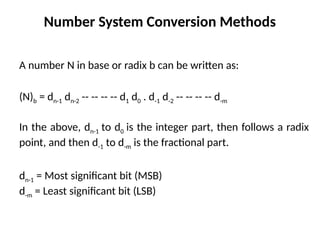
A number N in base or radix b can be written as:
(N)b = dn-1 dn-2 -- -- -- -- d1 d0 . d-1 d-2 -- -- -- -- d-m
In the above, dn-1 to d0 is the integer part, then follows a radix
point, and then d-1 to d-m is the fractional part.
dn-1 = Most significant bit (MSB)
d-m = Least significant bit (LSB)
4.
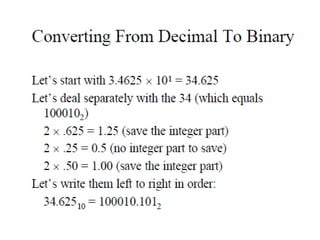
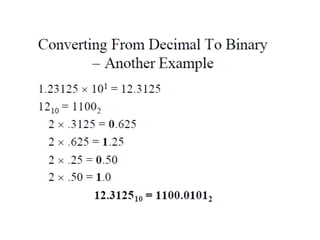
Decimal to BinaryNumber System
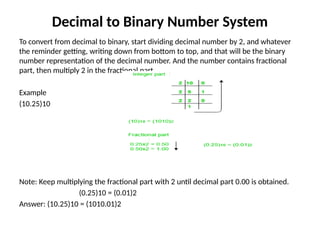
To convert from decimal to binary, start dividing decimal number by 2, and whatever
the reminder getting, writing down from bottom to top, and that will be the binary
number representation of the decimal number. And the number contains fractional
part, then multiply 2 in the fractional part.
Example
(10.25)10
Note: Keep multiplying the fractional part with 2 until decimal part 0.00 is obtained.
(0.25)10 = (0.01)2
Answer: (10.25)10 = (1010.01)2
5.
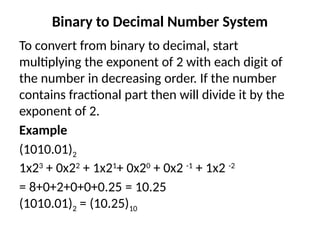
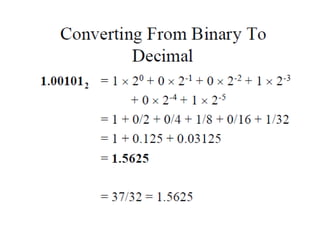
Binary to DecimalNumber System
To convert from binary to decimal, start
multiplying the exponent of 2 with each digit of
the number in decreasing order. If the number
contains fractional part then will divide it by the
exponent of 2.
Example
(1010.01)2
1x23
+ 0x22
+ 1x21
+ 0x20
+ 0x2 -1
+ 1x2 -2
= 8+0+2+0+0+0.25 = 10.25
(1010.01)2 = (10.25)10
6.
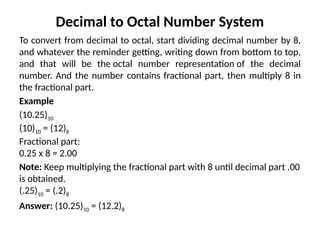
Decimal to OctalNumber System
To convert from decimal to octal, start dividing decimal number by 8,
and whatever the reminder getting, writing down from bottom to top,
and that will be the octal number representation of the decimal
number. And the number contains fractional part, then multiply 8 in
the fractional part.
Example
(10.25)10
(10)10 = (12)8
Fractional part:
0.25 x 8 = 2.00
Note: Keep multiplying the fractional part with 8 until decimal part .00
is obtained.
(.25)10 = (.2)8
Answer: (10.25)10 = (12.2)8
7.
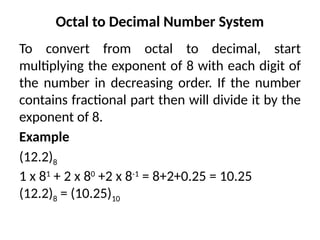
Octal to DecimalNumber System
To convert from octal to decimal, start
multiplying the exponent of 8 with each digit of
the number in decreasing order. If the number
contains fractional part then will divide it by the
exponent of 8.
Example
(12.2)8
1 x 81
+ 2 x 80
+2 x 8-1
= 8+2+0.25 = 10.25
(12.2)8 = (10.25)10
8.
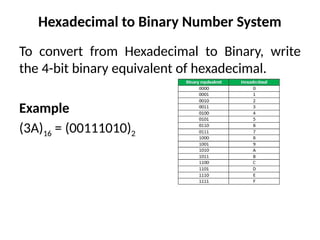
Hexadecimal to BinaryNumber System
To convert from Hexadecimal to Binary, write
the 4-bit binary equivalent of hexadecimal.
Example
(3A)16 = (00111010)2
9.
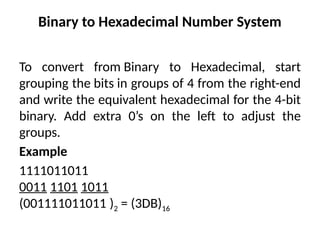
Binary to HexadecimalNumber System
To convert from Binary to Hexadecimal, start
grouping the bits in groups of 4 from the right-end
and write the equivalent hexadecimal for the 4-bit
binary. Add extra 0’s on the left to adjust the
groups.
Example
1111011011
0011 1101 1011
(001111011011 )2 = (3DB)16
10.
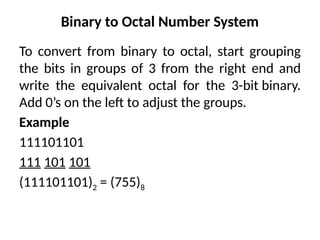
Binary to OctalNumber System
To convert from binary to octal, start grouping
the bits in groups of 3 from the right end and
write the equivalent octal for the 3-bit binary.
Add 0’s on the left to adjust the groups.
Example
111101101
111 101 101
(111101101)2 = (755)8
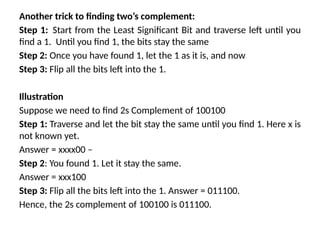
Another trick tofinding two’s complement:
Step 1: Start from the Least Significant Bit and traverse left until you
find a 1. Until you find 1, the bits stay the same
Step 2: Once you have found 1, let the 1 as it is, and now
Step 3: Flip all the bits left into the 1.
Illustration
Suppose we need to find 2s Complement of 100100
Step 1: Traverse and let the bit stay the same until you find 1. Here x is
not known yet.
Answer = xxxx00 –
Step 2: You found 1. Let it stay the same.
Answer = xxx100
Step 3: Flip all the bits left into the 1. Answer = 011100.
Hence, the 2s complement of 100100 is 011100.
13.
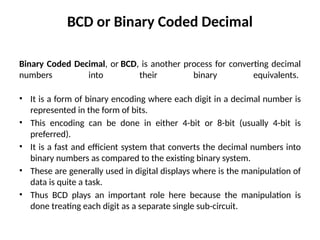
BCD or BinaryCoded Decimal
Binary Coded Decimal, or BCD, is another process for converting decimal
numbers into their binary equivalents.
• It is a form of binary encoding where each digit in a decimal number is
represented in the form of bits.
• This encoding can be done in either 4-bit or 8-bit (usually 4-bit is
preferred).
• It is a fast and efficient system that converts the decimal numbers into
binary numbers as compared to the existing binary system.
• These are generally used in digital displays where is the manipulation of
data is quite a task.
• Thus BCD plays an important role here because the manipulation is
done treating each digit as a separate single sub-circuit.
14.
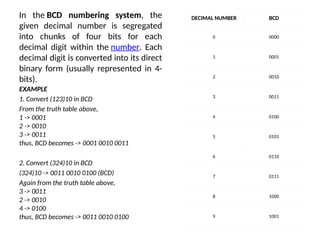
In the BCDnumbering system, the
given decimal number is segregated
into chunks of four bits for each
decimal digit within the number. Each
decimal digit is converted into its direct
binary form (usually represented in 4-
bits).
DECIMAL NUMBER BCD
0 0000
1 0001
2 0010
3 0011
4 0100
5 0101
6 0110
7 0111
8 1000
9 1001
EXAMPLE
1. Convert (123)10 in BCD
From the truth table above,
1 -> 0001
2 -> 0010
3 -> 0011
thus, BCD becomes -> 0001 0010 0011
2. Convert (324)10 in BCD
(324)10 -> 0011 0010 0100 (BCD)
Again from the truth table above,
3 -> 0011
2 -> 0010
4 -> 0100
thus, BCD becomes -> 0011 0010 0100
15.
1’s and 2’scomplement of a Binary Number
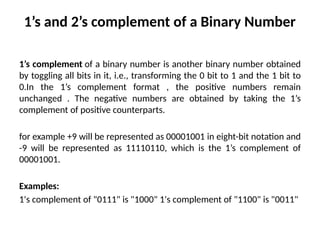
1’s complement of a binary number is another binary number obtained
by toggling all bits in it, i.e., transforming the 0 bit to 1 and the 1 bit to
0.In the 1’s complement format , the positive numbers remain
unchanged . The negative numbers are obtained by taking the 1’s
complement of positive counterparts.
for example +9 will be represented as 00001001 in eight-bit notation and
-9 will be represented as 11110110, which is the 1’s complement of
00001001.
Examples:
1's complement of "0111" is "1000" 1's complement of "1100" is "0011"
16.
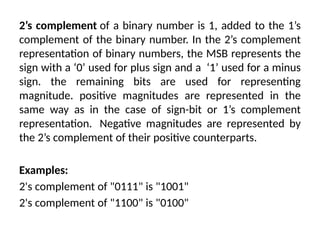
2’s complement ofa binary number is 1, added to the 1’s
complement of the binary number. In the 2’s complement
representation of binary numbers, the MSB represents the
sign with a ‘0’ used for plus sign and a ‘1’ used for a minus
sign. the remaining bits are used for representing
magnitude. positive magnitudes are represented in the
same way as in the case of sign-bit or 1’s complement
representation. Negative magnitudes are represented by
the 2’s complement of their positive counterparts.
Examples:
2's complement of "0111" is "1001"
2's complement of "1100" is "0100"
17.
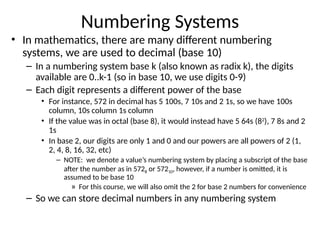
Numbering Systems
• Inmathematics, there are many different numbering
systems, we are used to decimal (base 10)
– In a numbering system base k (also known as radix k), the digits
available are 0..k-1 (so in base 10, we use digits 0-9)
– Each digit represents a different power of the base
• For instance, 572 in decimal has 5 100s, 7 10s and 2 1s, so we have 100s
column, 10s column 1s column
• If the value was in octal (base 8), it would instead have 5 64s (82
), 7 8s and 2
1s
• In base 2, our digits are only 1 and 0 and our powers are all powers of 2 (1,
2, 4, 8, 16, 32, etc)
– NOTE: we denote a value’s numbering system by placing a subscript of the base
after the number as in 5728 or 57210, however, if a number is omitted, it is
assumed to be base 10
» For this course, we will also omit the 2 for base 2 numbers for convenience
– So we can store decimal numbers in any numbering system
19.
Conversions
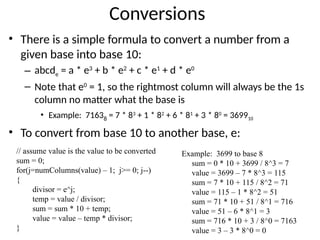
• There isa simple formula to convert a number from a
given base into base 10:
– abcde = a * e3
+ b * e2
+ c * e1
+ d * e0
– Note that e0
= 1, so the rightmost column will always be the 1s
column no matter what the base is
• Example: 71638 = 7 * 83
+ 1 * 82
+ 6 * 81
+ 3 * 80
= 369910
• To convert from base 10 to another base, e:
// assume value is the value to be converted
sum = 0;
for(j=numColumns(value) – 1; j>= 0; j--)
{
divisor = e^j;
temp = value / divisor;
sum = sum * 10 + temp;
value = value – temp * divisor;
}
Example: 3699 to base 8
sum = 0 * 10 + 3699 / 8^3 = 7
value = 3699 – 7 * 8^3 = 115
sum = 7 * 10 + 115 / 8^2 = 71
value = 115 – 1 * 8^2 = 51
sum = 71 * 10 + 51 / 8^1 = 716
value = 51 – 6 * 8^1 = 3
sum = 716 * 10 + 3 / 8^0 = 7163
value = 3 – 3 * 8^0 = 0
20.
Binary
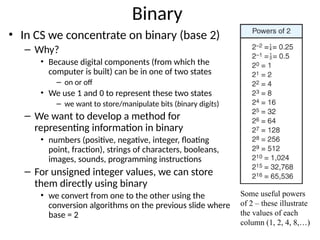
• In CSwe concentrate on binary (base 2)
– Why?
• Because digital components (from which the
computer is built) can be in one of two states
– on or off
• We use 1 and 0 to represent these two states
– we want to store/manipulate bits (binary digits)
– We want to develop a method for
representing information in binary
• numbers (positive, negative, integer, floating
point, fraction), strings of characters, booleans,
images, sounds, programming instructions
– For unsigned integer values, we can store
them directly using binary
• we convert from one to the other using the
conversion algorithms on the previous slide where
base = 2
Some useful powers
of 2 – these illustrate
the values of each
column (1, 2, 4, 8,…)
21.
Binary Conversions
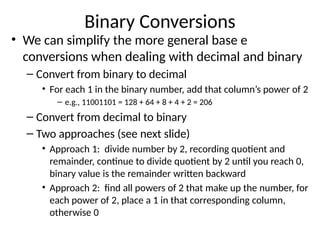
• Wecan simplify the more general base e
conversions when dealing with decimal and binary
– Convert from binary to decimal
• For each 1 in the binary number, add that column’s power of 2
– e.g., 11001101 = 128 + 64 + 8 + 4 + 2 = 206
– Convert from decimal to binary
– Two approaches (see next slide)
• Approach 1: divide number by 2, recording quotient and
remainder, continue to divide quotient by 2 until you reach 0,
binary value is the remainder written backward
• Approach 2: find all powers of 2 that make up the number, for
each power of 2, place a 1 in that corresponding column,
otherwise 0
22.
Decimal Binary
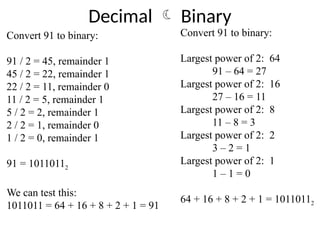
Convert91 to binary:
91 / 2 = 45, remainder 1
45 / 2 = 22, remainder 1
22 / 2 = 11, remainder 0
11 / 2 = 5, remainder 1
5 / 2 = 2, remainder 1
2 / 2 = 1, remainder 0
1 / 2 = 0, remainder 1
91 = 10110112
We can test this:
1011011 = 64 + 16 + 8 + 2 + 1 = 91
Convert 91 to binary:
Largest power of 2: 64
91 – 64 = 27
Largest power of 2: 16
27 – 16 = 11
Largest power of 2: 8
11 – 8 = 3
Largest power of 2: 2
3 – 2 = 1
Largest power of 2: 1
1 – 1 = 0
64 + 16 + 8 + 2 + 1 = 10110112
23.
Abbreviations
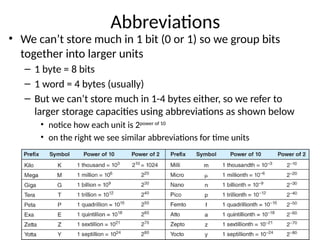
• We can’tstore much in 1 bit (0 or 1) so we group bits
together into larger units
– 1 byte = 8 bits
– 1 word = 4 bytes (usually)
– But we can’t store much in 1-4 bytes either, so we refer to
larger storage capacities using abbreviations as shown below
• notice how each unit is 2power of 10
• on the right we see similar abbreviations for time units
24.
Some Decimal andBinary Numbers
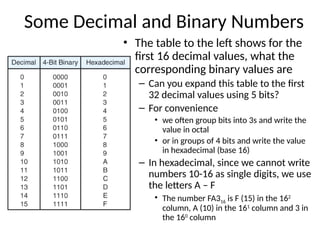
• The table to the left shows for the
first 16 decimal values, what the
corresponding binary values are
– Can you expand this table to the first
32 decimal values using 5 bits?
– For convenience
• we often group bits into 3s and write the
value in octal
• or in groups of 4 bits and write the value
in hexadecimal (base 16)
– In hexadecimal, since we cannot write
numbers 10-16 as single digits, we use
the letters A – F
• The number FA316 is F (15) in the 162
column, A (10) in the 161
column and 3 in
the 160
column
25.
Binary Coded Decimal(BCD)
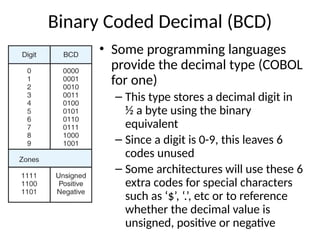
• Some programming languages
provide the decimal type (COBOL
for one)
– This type stores a decimal digit in
½ a byte using the binary
equivalent
– Since a digit is 0-9, this leaves 6
codes unused
– Some architectures will use these 6
extra codes for special characters
such as ‘$’, ‘.’, etc or to reference
whether the decimal value is
unsigned, positive or negative
26.
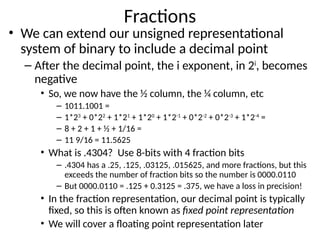
Fractions
• We canextend our unsigned representational
system of binary to include a decimal point
– After the decimal point, the i exponent, in 2i
, becomes
negative
• So, we now have the ½ column, the ¼ column, etc
– 1011.1001 =
– 1*23
+ 0*22
+ 1*21
+ 1*20
+ 1*2-1
+ 0*2-2
+ 0*2-3
+ 1*2-4
=
– 8 + 2 + 1 + ½ + 1/16 =
– 11 9/16 = 11.5625
• What is .4304? Use 8-bits with 4 fraction bits
– .4304 has a .25, .125, .03125, .015625, and more fractions, but this
exceeds the number of fraction bits so the number is 0000.0110
– But 0000.0110 = .125 + 0.3125 = .375, we have a loss in precision!
• In the fraction representation, our decimal point is typically
fixed, so this is often known as fixed point representation
• We will cover a floating point representation later
27.
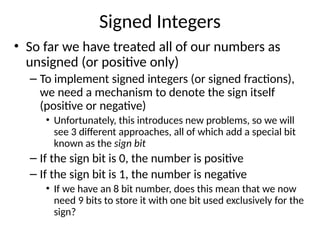
Signed Integers
• Sofar we have treated all of our numbers as
unsigned (or positive only)
– To implement signed integers (or signed fractions),
we need a mechanism to denote the sign itself
(positive or negative)
• Unfortunately, this introduces new problems, so we will
see 3 different approaches, all of which add a special bit
known as the sign bit
– If the sign bit is 0, the number is positive
– If the sign bit is 1, the number is negative
• If we have an 8 bit number, does this mean that we now
need 9 bits to store it with one bit used exclusively for the
sign?
28.
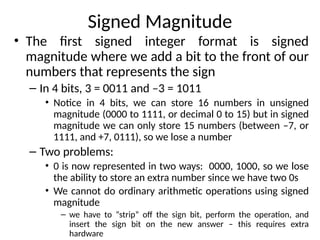
Signed Magnitude
• Thefirst signed integer format is signed
magnitude where we add a bit to the front of our
numbers that represents the sign
– In 4 bits, 3 = 0011 and –3 = 1011
• Notice in 4 bits, we can store 16 numbers in unsigned
magnitude (0000 to 1111, or decimal 0 to 15) but in signed
magnitude we can only store 15 numbers (between –7, or
1111, and +7, 0111), so we lose a number
– Two problems:
• 0 is now represented in two ways: 0000, 1000, so we lose
the ability to store an extra number since we have two 0s
• We cannot do ordinary arithmetic operations using signed
magnitude
– we have to “strip” off the sign bit, perform the operation, and
insert the sign bit on the new answer – this requires extra
hardware
29.
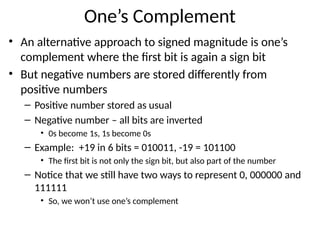
One’s Complement
• Analternative approach to signed magnitude is one’s
complement where the first bit is again a sign bit
• But negative numbers are stored differently from
positive numbers
– Positive number stored as usual
– Negative number – all bits are inverted
• 0s become 1s, 1s become 0s
– Example: +19 in 6 bits = 010011, -19 = 101100
• The first bit is not only the sign bit, but also part of the number
– Notice that we still have two ways to represent 0, 000000 and
111111
• So, we won’t use one’s complement
30.
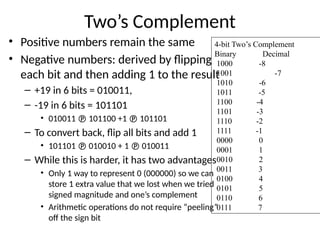
Two’s Complement
• Positivenumbers remain the same
• Negative numbers: derived by flipping
each bit and then adding 1 to the result
– +19 in 6 bits = 010011,
– -19 in 6 bits = 101101
• 010011 101100 +1 101101
– To convert back, flip all bits and add 1
• 101101 010010 + 1 010011
– While this is harder, it has two advantages
• Only 1 way to represent 0 (000000) so we can
store 1 extra value that we lost when we tried
signed magnitude and one’s complement
• Arithmetic operations do not require “peeling”
off the sign bit
4-bit Two’s Complement
Binary Decimal
1000 -8
1001 -7
1010 -6
1011 -5
1100 -4
1101 -3
1110 -2
1111 -1
0000 0
0001 1
0010 2
0011 3
0100 4
0101 5
0110 6
0111 7
31.
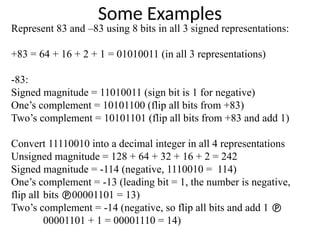
Some Examples
Represent 83and –83 using 8 bits in all 3 signed representations:
+83 = 64 + 16 + 2 + 1 = 01010011 (in all 3 representations)
-83:
Signed magnitude = 11010011 (sign bit is 1 for negative)
One’s complement = 10101100 (flip all bits from +83)
Two’s complement = 10101101 (flip all bits from +83 and add 1)
Convert 11110010 into a decimal integer in all 4 representations
Unsigned magnitude = 128 + 64 + 32 + 16 + 2 = 242
Signed magnitude = -114 (negative, 1110010 = 114)
One’s complement = -13 (leading bit = 1, the number is negative,
flip all bits 00001101 = 13)
Two’s complement = -14 (negative, so flip all bits and add 1
00001101 + 1 = 00001110 = 14)
32.
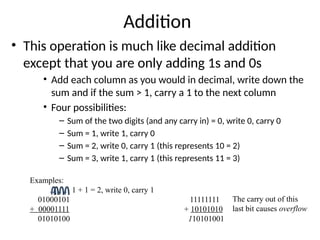
Addition
• This operationis much like decimal addition
except that you are only adding 1s and 0s
• Add each column as you would in decimal, write down the
sum and if the sum > 1, carry a 1 to the next column
• Four possibilities:
– Sum of the two digits (and any carry in) = 0, write 0, carry 0
– Sum = 1, write 1, carry 0
– Sum = 2, write 0, carry 1 (this represents 10 = 2)
– Sum = 3, write 1, carry 1 (this represents 11 = 3)
Examples:
1 + 1 = 2, write 0, carry 1
01000101 11111111
+ 00001111 + 10101010
01010100 110101001
The carry out of this
last bit causes overflow
33.
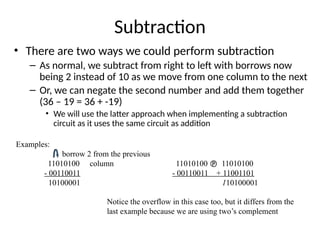
Subtraction
• There aretwo ways we could perform subtraction
– As normal, we subtract from right to left with borrows now
being 2 instead of 10 as we move from one column to the next
– Or, we can negate the second number and add them together
(36 – 19 = 36 + -19)
• We will use the latter approach when implementing a subtraction
circuit as it uses the same circuit as addition
Examples:
borrow 2 from the previous
11010100 column 11010100 11010100
- 00110011 - 00110011 + 11001101
10100001 110100001
Notice the overflow in this case too, but it differs from the
last example because we are using two’s complement
34.
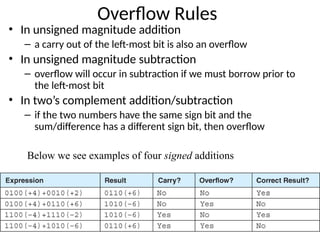
Overflow Rules
• Inunsigned magnitude addition
– a carry out of the left-most bit is also an overflow
• In unsigned magnitude subtraction
– overflow will occur in subtraction if we must borrow prior to
the left-most bit
• In two’s complement addition/subtraction
– if the two numbers have the same sign bit and the
sum/difference has a different sign bit, then overflow
Below we see examples of four signed additions
35.
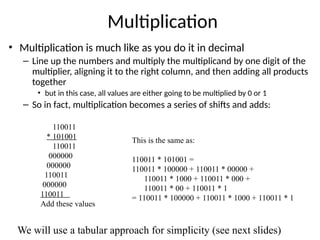
Multiplication
• Multiplication ismuch like as you do it in decimal
– Line up the numbers and multiply the multiplicand by one digit of the
multiplier, aligning it to the right column, and then adding all products
together
• but in this case, all values are either going to be multiplied by 0 or 1
– So in fact, multiplication becomes a series of shifts and adds:
110011
* 101001
110011
000000
000000
110011
000000
110011
Add these values
This is the same as:
110011 * 101001 =
110011 * 100000 + 110011 * 00000 +
110011 * 1000 + 110011 * 000 +
110011 * 00 + 110011 * 1
= 110011 * 100000 + 110011 * 1000 + 110011 * 1
We will use a tabular approach for simplicity (see next slides)
36.
Multiplication
Algorithm
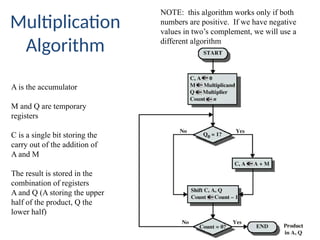
A is theaccumulator
M and Q are temporary
registers
C is a single bit storing the
carry out of the addition of
A and M
The result is stored in the
combination of registers
A and Q (A storing the upper
half of the product, Q the
lower half)
NOTE: this algorithm works only if both
numbers are positive. If we have negative
values in two’s complement, we will use a
different algorithm
37.
Example
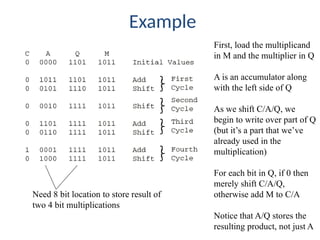
First, load themultiplicand
in M and the multiplier in Q
A is an accumulator along
with the left side of Q
As we shift C/A/Q, we
begin to write over part of Q
(but it’s a part that we’ve
already used in the
multiplication)
For each bit in Q, if 0 then
merely shift C/A/Q,
otherwise add M to C/A
Notice that A/Q stores the
resulting product, not just A
Need 8 bit location to store result of
two 4 bit multiplications
38.
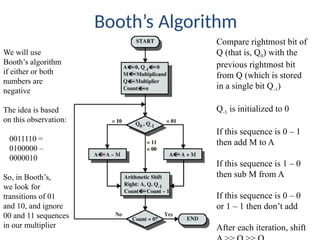
Booth’s Algorithm
Compare rightmostbit of
Q (that is, Q0) with the
previous rightmost bit
from Q (which is stored
in a single bit Q-1)
Q-1 is initialized to 0
If this sequence is 0 – 1
then add M to A
If this sequence is 1 – 0
then sub M from A
If this sequence is 0 – 0
or 1 – 1 then don’t add
After each iteration, shift
We will use
Booth’s algorithm
if either or both
numbers are
negative
The idea is based
on this observation:
0011110 =
0100000 –
0000010
So, in Booth’s,
we look for
transitions of 01
and 10, and ignore
00 and 11 sequences
in our multiplier
39.
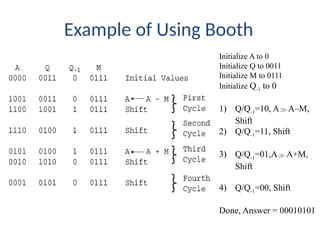
Example of UsingBooth
Initialize A to 0
Initialize Q to 0011
Initialize M to 0111
Initialize Q-1 to 0
1) Q/Q-1=10, AA–M,
Shift
2) Q/Q-1=11, Shift
3) Q/Q-1=01,AA+M,
Shift
4) Q/Q-1=00, Shift
Done, Answer = 00010101
#20 Notice that by using an negative exponent, we have fractions of powers of 2
2^-2 = 1/(2^2) = ¼
2^-4 = 1/(2^4) = 1/16
2^-6 = 1/(2^6) = 1/64
Etc.
We will use fractions later.
#21 The conversion from base e to base 10 can be done very easily as follows:
Write down the number
Above each digit, write the power of the base over it from right to left
for instance, in octal you have 1, 8, 64, 512, etc
Multiply the digit by the power and add these together:
512 64 8 1 = 512 * 7 + 64 * 1 + 8 * 6 + 1 * 3 = 3699
7 1 6 3
In binary, is simplified because each digit is a 0 or 1, so you are only adding the powers of 2 up whose associated digit is a 1.
64 32 16 8 4 2 1 = 64 + 32 + 8 + 2 + 1 = 107
1 1 0 1 0 1 1
The opposite conversion is more awkward, but if we are dealing with binary, then simply subtract powers of 2 from the number until you reach 0.
107 – 64 = 43, 43 – 32 = 11, 11 – 8 = 3, 3 – 2 = 1, 1 – 1 = 0, so 107 = 64 + 32 + 8 + 2 + 1 or 1101011
The book covers a division method for converting from decimal to binary that is also simple. I find the subtraction approach most easy though.
We won’t be converting any other bases except binary and decimal so these are the only ones you need to worry about.
#24 We will use hexadecimal later in the semester, but its merely for convenience so that we don’t have to deal with too many 1s and 0s. Here are some more examples
3871 in decimal 2048 + 1024 + 512 + 256 + 16 + 8 + 4 + 2 + 1 111100011111 F1F in hexadecimal and 7437 in octal
676 in decimal 512 + 128 + 32 + 4 1010100100 2A4 in hexadecimal (we have to add 2 leading 0s to really have 0010 1010 0100) and 1244 in octal (we have to again add 2 leading 0s giving us 001 010 100 100)
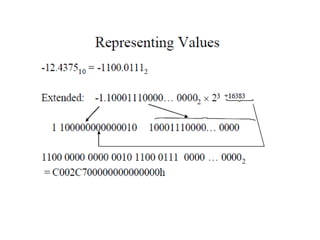
#25 While BCD is convenient in terms of translating from binary to decimal or decimal to binary, it sacrificing range. The largest number we can store in 1 byte in BCD is 10011001, or 99. In binary, this number is really 128 + 16 + 8 + 1 = 153. The largest number we can store in 1 byte normally is 11111111 = 255. So BCD is less efficient.
BCD is seldom used and we will ignore it.
#26 What is the largest and smallest values that we could store in our 8 bit fixed point notation?
Largest: 1111.1111 = 15 15/16 = 15.9375.
Smallest: 0000.0001 = 1/16 = 0.0625.
If our number is not some sum of powers of 2, we lose precision. We also lose precision if we need a fraction smaller than .0625 or a whole portion larger than 15. Of course, a true fixed-point notation these days would probably be 32 bits long giving us plenty of room for adequate precision. We would still lose precision though for very large or very small numbers.
#28 Note: the number of bits is dictated by the type of variable declared. The sign bit will always be the leftmost bit for that size. For instance, imagine that we wanted to store -59 in a byte, then we would use 8 bits and our number is 10111011.
What is the largest negative that could be stored in 1 byte? 11111111 = -(64 + 32 + 16 + 8 + 4 + 2 + 1) = -127. What is the largest positive for 1 byte? 01111111 = +127.
#29 Here are some 8-bit examples:
78 = 64 + 8 + 4 + 2 = 01001110
-78 = -(01001110) = 10110001 (flip all bits)
99 = 64 + 32 + 2 + 1 = 01100011
-99 = 10011100
11110000 = -(00001111) = -(8 + 4 + 2 + 1) = -15
10000000 = -(01111111) = -127
11111111 = -(00000000) = -0, or 0
00000000 = +0 or 0
So we have 2 ways of storing 0, just like in signed magnitude. With 8 bits, we should be able to store 256 (2^8) different values, but in 1’s complement (and signed magnitude), we can only store 255 (-127 to +127 with two versions of 0)
#30 Two’s complement is harder but worthwhile since we can store 256 different values in 8 bits.
Aside from the conversion technique shown above, a shortcut method is to convert the number right-to-left by copying each bit exactly as it is through the first 1 bit, and then flip all remaining bits after the first 1.
11110100 starting right to left, copy down all bits through the first 1 giving us …100, now flip all remaining bits (11110 becomes 00001) giving us 00001100.
Let’s check to make sure this was done properly by using the other approach: 11110100 flip all bits giving 00001011 and add 1, 00001011 + 1 = 00001100, so it worked!
Convert 01011010 copy all bits through the first 1 …10, now flip all remaining bits (010110 becomes 101001) 10100110.
Confirm this by trying the other way: 01011010 10100101 + 1 = 10100110
#33 I strongly suggest for subtraction that you convert the second number to its 2’s complement opposite and add them. Its far easier (in my opinion).
Also, always check your work.
#35 We won’t use the approach above. See the next slide.
#36 Sadly, there are missing from the above figure. Here’s another version of the algorithm:
C is a single bit, A, M and Q are n-bit registers where n is the number of bits of both numbers being multiplied.
C 0, A 0, M Multiplicand, Q Multiplier, n number of bits
while(n>0) {
if Q0 == 1
C, A A + M (that is, add A and M and place the sum in A, with any
carry out moved into the C bit)
Shift C, A and Q together one bit to the right
n--
}
The product is the combined A and Q registers.
#37 Here is a longer example, 101100 * 101010, using this tabular approach. More examples can be found on the website.
#38 Again, we are missing the above. Here is a more complete description of the algorithm:
We no longer have a C bit (we don’t care about carry outs from 2’s complement additions). We have a Q-1 bit (that old Q0 bit). We also perform an ARITHMETIC right shift rather than just a right shift. An arithmetic right shift not only shifts each bit to the right one position, but the sign bit remains. So for instance, 11100011 is 01110001 in an ordinary right shift, but is 11110001 in an arithmetic right shift. If the leftmost bit is a 0, it remains a 0 and is shifted over (so 0111 becomes 0011) but if it is a 1, it remains and is shifted over (so 1001 becomes 1100). This allows the number to retain its sign.
Initialize A to 0, Q-1 to 0, M to the multiplicand and Q to the multiplier, and n to the number of bits
while(n>0) {
if Q0==0 and Q-1==1 then AA+M
else if Q0==1 and Q-1==0 then AA-M // NOTE: I will use AA+(-M) for convenience
Arithmetic right shift A,Q,Q-1
n--
}
The product is stored in A and Q combined.
To remember this, consider that Q0Q-1 is 01 means we go from 0 to 1, we are adding, and if Q0Q-1 is 10, then we go from 1 to 0, we are subtracting.
#39 The above example is not much help because A and Q are positive and so either algorithm would have worked. Here is a better example. More examples are on the website. We will do 1001 * 0101. For convenience, I will use –M to subtract M from A as needed. -M = 1011.