
Computer Network
RAJAT
Definition
A network is a group of interconnected
computers. They share resources such as
electronic mail, bulletin boards, and
access to unique database. They can be
thought of as information highways for
data.
Data Communication System
E
L
E
M
E
N
T
S
 Transmitter
 Transmission Medium
 Receivers
 Hardware
 Communication Network
 Communication software
 Data Communication provider
 Communication protocol
Network Topology
 The term topology in the context of
communication’s network refers to the way in
which the end points or the stations of the
networks are linked together. It determines the
path that may be used between any pair of
station of the network.
Types of Topologies
Bus Topology
Star Topology
Ring Topology
Mesh Topology
Tree Topology
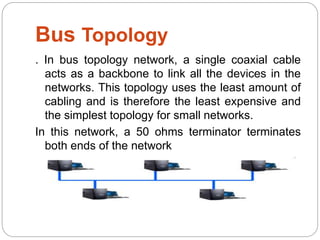
Bus Topology
. In bus topology network, a single coaxial cable
acts as a backbone to link all the devices in the
networks. This topology uses the least amount of
cabling and is therefore the least expensive and
the simplest topology for small networks.
In this network, a 50 ohms terminator terminates
both ends of the network
A bus topology consists of a single central
cable to which all computers and other
devices connect. A bus topology is also
known as a bus network.
Bus Topology
Advantages Disadvantages
 Help to reducing the
number of physical
line.
 Addition of new
computer to the
network is easy.
 All computer in the
network must have
good communication
and decision making
capability
 If the communication
line fails the whole
system breaks down.
Ring Topology
 In Ring topology network , all the computers are
connected in closed loop. Each computer on the ring
topology network acts as a repeater. It transmit data by
passing a token around the network. If the token is free , a
computer waiting to send data takes it, attaches the data
and the destination’s address to the token , and send it .
When the token reaches its destination computer, the data
is removed.
Ring Topology
Advantages Disadvantages
 This network works
well where there is no
central-site computer
system
 If a link between any
two computers breaks
down, or if one of the
computers breaks
down , alternate
routing is possible.
 The ring network
requires more
complicates control
software than star
network.
 if one computer fails,
the entire network will
go down.
Star topology
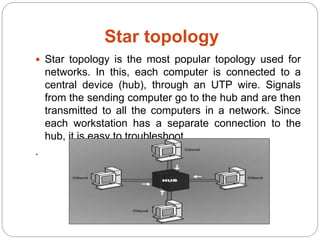
 Star topology is the most popular topology used for
networks. In this, each computer is connected to a
central device (hub), through an UTP wire. Signals
from the sending computer go to the hub and are then
transmitted to all the computers in a network. Since
each workstation has a separate connection to the
hub, it is easy to troubleshoot
.
Star Topology
Advantages Disadvantages
 Star topology has
minimal line cost
because only n-1
lines are required for
connecting n nodes.
 If any of the local
computers fails, the
remaining portion of
the network is
unaffected.
 The system crucially
depends on central
node. If the host
computer fails the
entire network fails.
 If traffic between the
workstations is high ,
an undue burden is
places on the central
node.
Mesh Topology
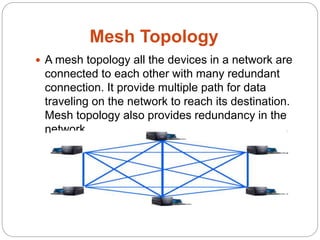
 A mesh topology all the devices in a network are
connected to each other with many redundant
connection. It provide multiple path for data
traveling on the network to reach its destination.
Mesh topology also provides redundancy in the
network.
Mesh topology
Advantages Disadvantages
 This type of network
is very reliable, as any
link breakdown will
affect only
communication
between the
connected computers.
 Communication is
very fast between any
two nodes.
 It is the most
expensive network
from the point of view
of link cost . if there
are N nodes in the
network, n(n-1)/2 links
are required. Hence,
the cost of linking the
system grows with the
square of the number
of nodes.
Tree Topology
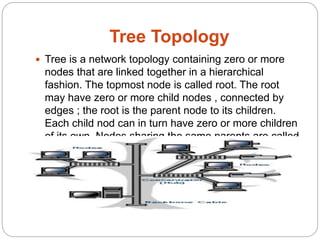
 Tree is a network topology containing zero or more
nodes that are linked together in a hierarchical
fashion. The topmost node is called root. The root
may have zero or more child nodes , connected by
edges ; the root is the parent node to its children.
Each child nod can in turn have zero or more children
of its own. Nodes sharing the same parents are called
siblings.
Tree Topology
Advantages Disadvantages
 Point-to point wiring
for individual
segments.
 Supported by several
hardware and
software companies.
 If the backbone line
breaks, the entire
segment goes down.
 More difficult to
configure and wire
than other topologies.
Computer Networks
A
D
V
A
N
T
A
G
E
S
 Resource Sharing
 High Reliability
 Saving Money
 Scalability
 Communication Medium
 Increased Productivity
Computer Network
D
I
S
A
D
V
A
N
T
A
G
E
S
 Crashes
 Data Security
 Privacy
THANK YOU

Computer network

  • 1.
  • 2.
    Definition A network isa group of interconnected computers. They share resources such as electronic mail, bulletin boards, and access to unique database. They can be thought of as information highways for data.
  • 3.
    Data Communication System E L E M E N T S Transmitter  Transmission Medium  Receivers  Hardware  Communication Network  Communication software  Data Communication provider  Communication protocol
  • 4.
    Network Topology  Theterm topology in the context of communication’s network refers to the way in which the end points or the stations of the networks are linked together. It determines the path that may be used between any pair of station of the network.
  • 5.
    Types of Topologies BusTopology Star Topology Ring Topology Mesh Topology Tree Topology
  • 6.
    Bus Topology . Inbus topology network, a single coaxial cable acts as a backbone to link all the devices in the networks. This topology uses the least amount of cabling and is therefore the least expensive and the simplest topology for small networks. In this network, a 50 ohms terminator terminates both ends of the network A bus topology consists of a single central cable to which all computers and other devices connect. A bus topology is also known as a bus network.
  • 7.
    Bus Topology Advantages Disadvantages Help to reducing the number of physical line.  Addition of new computer to the network is easy.  All computer in the network must have good communication and decision making capability  If the communication line fails the whole system breaks down.
  • 8.
    Ring Topology  InRing topology network , all the computers are connected in closed loop. Each computer on the ring topology network acts as a repeater. It transmit data by passing a token around the network. If the token is free , a computer waiting to send data takes it, attaches the data and the destination’s address to the token , and send it . When the token reaches its destination computer, the data is removed.
  • 9.
    Ring Topology Advantages Disadvantages This network works well where there is no central-site computer system  If a link between any two computers breaks down, or if one of the computers breaks down , alternate routing is possible.  The ring network requires more complicates control software than star network.  if one computer fails, the entire network will go down.
  • 10.
    Star topology  Startopology is the most popular topology used for networks. In this, each computer is connected to a central device (hub), through an UTP wire. Signals from the sending computer go to the hub and are then transmitted to all the computers in a network. Since each workstation has a separate connection to the hub, it is easy to troubleshoot .
  • 11.
    Star Topology Advantages Disadvantages Star topology has minimal line cost because only n-1 lines are required for connecting n nodes.  If any of the local computers fails, the remaining portion of the network is unaffected.  The system crucially depends on central node. If the host computer fails the entire network fails.  If traffic between the workstations is high , an undue burden is places on the central node.
  • 12.
    Mesh Topology  Amesh topology all the devices in a network are connected to each other with many redundant connection. It provide multiple path for data traveling on the network to reach its destination. Mesh topology also provides redundancy in the network.
  • 13.
    Mesh topology Advantages Disadvantages This type of network is very reliable, as any link breakdown will affect only communication between the connected computers.  Communication is very fast between any two nodes.  It is the most expensive network from the point of view of link cost . if there are N nodes in the network, n(n-1)/2 links are required. Hence, the cost of linking the system grows with the square of the number of nodes.
  • 14.
    Tree Topology  Treeis a network topology containing zero or more nodes that are linked together in a hierarchical fashion. The topmost node is called root. The root may have zero or more child nodes , connected by edges ; the root is the parent node to its children. Each child nod can in turn have zero or more children of its own. Nodes sharing the same parents are called siblings.
  • 15.
    Tree Topology Advantages Disadvantages Point-to point wiring for individual segments.  Supported by several hardware and software companies.  If the backbone line breaks, the entire segment goes down.  More difficult to configure and wire than other topologies.
  • 16.
    Computer Networks A D V A N T A G E S  ResourceSharing  High Reliability  Saving Money  Scalability  Communication Medium  Increased Productivity
  • 17.
  • 18.