COMPUTER APPLICATIONS IN
BUSINESS
Frequency Distribution


Payroll Accounting


TOPICS:
PRESENTED BY:


Ashtha(273)


Mannat(292) Fatima(279)


SUBMITTED TO:


Mrs. Laxmi
OVERVIEW
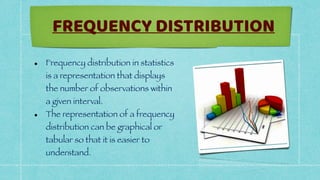
• Frequency distribution in statistics
is a representation that displays
the number of observations within
a given interval.


• The representation of a frequency
distribution can be graphical or
tabular so that it is easier to
understand.
FREQUENCY DISTRIBUTION
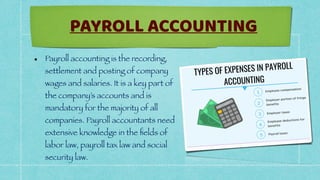
• Payroll accounting is the recording,
settlement and posting of company
wages and salaries. It is a key part of
the company’s accounts and is
mandatory for the majority of all
companies. Payroll accountants need
extensive knowledge in the
fi
elds of
labor law, payroll tax law and social
security law.
PAYROLL ACCOUNTING
FUNCTIONS USED IN
FREQUENCY DISTRIBUTION
AND PAYROLL ACCOUNTING
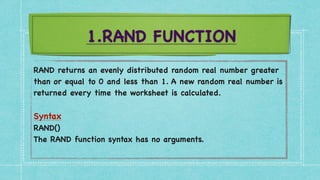
1.RAND FUNCTION
RAND returns an evenly distributed random real number greater
than or equal to 0 and less than 1. A new random real number is
returned every time the worksheet is calculated
.

Synta
x

RAND(
)

The RAND function syntax has no arguments
.
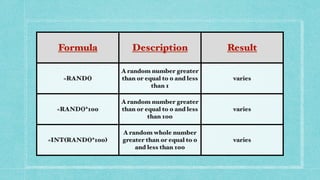
Formula Description Result
=RAND()
A random number greater
than or equal to 0 and less
than 1
varies
=RAND()*100
A random number greater
than or equal to 0 and less
than 100
varies
=INT(RAND()*100)
A random whole number
greater than or equal to 0
and less than 100
varies
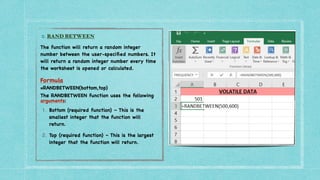
2. RAND BETWEEN


The function will return a random integer
number between the user-speci
fi
ed numbers. It
will return a random integer number every time
the worksheet is opened or calculated
.

Formula
=RANDBETWEEN(bottom,top)
The RANDBETWEEN function uses the following
arguments:
1. Bottom (required function) – This is the
smallest integer that the function will
return.
2. Top (required function) – This is the largest
integer that the function will return.
 
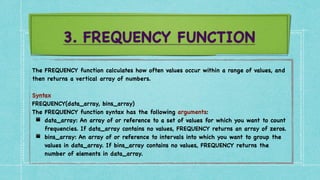
3. FREQUENCY FUNCTION
The FREQUENCY function calculates how often values occur within a range of values, and
then returns a vertical array of numbers.
 

Syntax
FREQUENCY(data_array, bins_array
)

The FREQUENCY function syntax has the following arguments
:

▪ data_array: An array of or reference to a set of values for which you want to count
frequencies. If data_array contains no values, FREQUENCY returns an array of zeros
.

▪ bins_array: An array of or reference to intervals into which you want to group the
values in data_array. If bins_array contains no values, FREQUENCY returns the
number of elements in data_array.
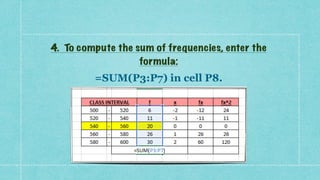
4. To compute the sum of frequencies, enter the
formula:


=SUM(P3:P7) in cell P8.
5. To compute the value of mean and standard deviation
from actual data and grouped data, apply the following
steps:
Based on actual data


• AVERAGE-The mean or the statistical mean is essentially means average value and can be
calculated by adding data points in a setand then dividing the total, by the number of points
.

Synta
x

=AVERAGE( array of numbers
)

Step
s

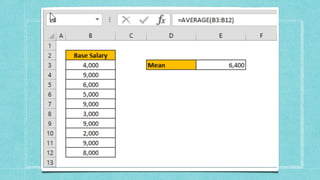
1. Begin by creating the formula =AVERAGE
(

2. Select your data range that contains the values (for ex. B3:B12
)

3. Finish the formula with ) and press the Enter key
.
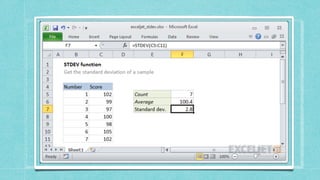
• STANDARD DEVIATION- Standard deviation measures
how much variance there is in a set of numbers
compared to the average (mean) of the numbers.
 

Syntax
 

=STDEV.P(number1, [number2], ...
)

Arguments
 

• number1 - First number or reference in the sample
.

• number2 - [optional] Second number or reference.
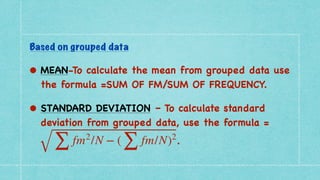
Based on grouped data


• MEAN-To calculate the mean from grouped data use
the formula =SUM OF FM/SUM OF FREQUENCY
.

• STANDARD DEVIATION – To calculate standard
deviation from grouped data, use the formula =
.
∑
fm2
/N − (
∑
fm/N)2
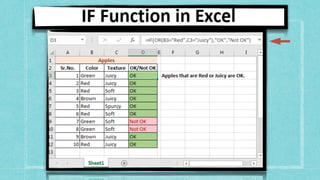
6. IF FUNCTION
The IF function runs a logical test and returns one value for a TRUE result, and
another for a FALSE result
.

Syntax
 

=IF (logical_test, [value_if_true], [value_if_false]
)

Arguments
 

• logical_test - A value or logical expression that can be evaluated as TRUE or FALSE
.

• value_if_true - [optional] The value to return when logical_test evaluates to TRUE
.

• value_if_false - [optional] The value to return when logical_test evaluates to
FALSE.
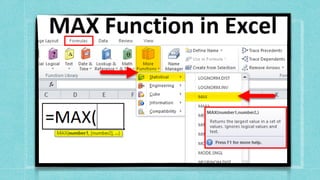
2. MAX FUNCTION
The Excel MAX function returns the largest numeric value in a range of
values. The MAX function ignores empty cells, the logical values TRUE and
FALSE, and text values
.

Syntax
 

=MAX (number1, [number2], ...
)

Arguments
 

• number1 - Number, reference to numeric value, or range that contains
numeric values
.

• number2 - [optional] Number, reference to numeric value, or range that
contains numeric values.
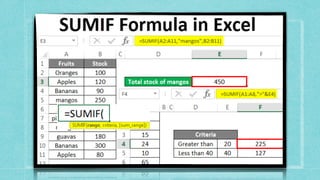
1. SUMIF FUNCTION
You use the SUMIF function to sum the values in a range that meet criteria that you
specify
.

Syntax
 

The syntax for the SUMIF function in Microsoft Excel is
:

SUMIF( range, criteria, [sum_range]
)

Arguments
 

range: The range of cells that you want to apply the criteria against
.

criteria: The criteria used to determine which cells to add
.

sum_range: Optional. It is the range of cells to sum together. If this parameter is omitted, it uses
range as the sum_range.
HOW TO MAKE FREQUENCY DISTRIBUTION IN
MS EXCEL?
Frequency Distribution in excel is
simple and easy to use. Let’s understand
the working of Excel Frequency
Distribution by an example.
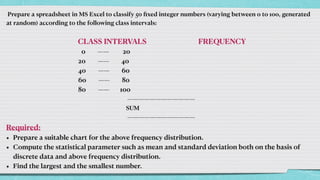
Prepare a spreadsheet in MS Excel to classify 50
fi
xed integer numbers (varying between 0 to 100, generated
at random) according to the following class intervals:


CLASS INTERVALS FREQUENCY


0 —— 20


20 —— 40


40 —— 60


60 —— 80


80 —— 100


————————————


SUM


————————————


Required:


• Prepare a suitable chart for the above frequency distribution.


• Compute the statistical parameter such as mean and standard deviation both on the basis of
discrete data and above frequency distribution.


• Find the largest and the smallest number.
HOW TO DO PAYROLL ACCOUNTING IN MS
EXCEL?
PAYROLL ACCOUNTING in excel is very
simple and easy to use. Let’s understand
the working of Excel Payroll accounting
by an example.
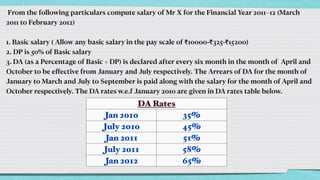
From the following particulars compute salary of Mr X for the Financial Year 2011–12 (March
2011 to February 2012)


1. Basic salary ( Allow any basic salary in the pay scale of ₹10000-₹325-₹15200)


2. DP is 50% of Basic salary


3. DA (as a Percentage of Basic + DP) is declared after every six month in the month of April and
October to be e
ff
ective from January and July respectively. The Arrears of DA for the month of
January to March and July to September is paid along with the salary for the month of April and
October respectively. The DA rates w.e.f January 2010 are given in DA rates table below.
DA Rates
Jan 2010 35%
July 2010 45%
Jan 2011 51%
July 2011 58%
Jan 2012 65%
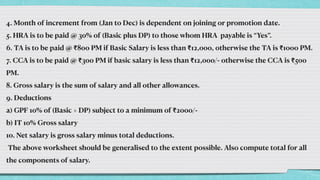
4. Month of increment from (Jan to Dec) is dependent on joining or promotion date.


5. HRA is to be paid @ 30% of (Basic plus DP) to those whom HRA payable is “Yes”.


6. TA is to be paid @ ₹800 PM if Basic Salary is less than ₹12,000, otherwise the TA is ₹1000 PM.


7. CCA is to be paid @ ₹300 PM if basic salary is less than ₹12,000/- otherwise the CCA is ₹500
PM.


8. Gross salary is the sum of salary and all other allowances.


9. Deductions


a) GPF 10% of (Basic + DP) subject to a minimum of ₹2000/-


b) IT 10% Gross salary


10. Net salary is gross salary minus total deductions.


The above worksheet should be generalised to the extent possible. Also compute total for all
the components of salary.
THANK YOU

Computer Applications in Business

  • 1.
    COMPUTER APPLICATIONS IN BUSINESS FrequencyDistribution Payroll Accounting TOPICS:
  • 2.
  • 3.
  • 4.
    • Frequency distributionin statistics is a representation that displays the number of observations within a given interval. • The representation of a frequency distribution can be graphical or tabular so that it is easier to understand. FREQUENCY DISTRIBUTION
  • 5.
    • Payroll accountingis the recording, settlement and posting of company wages and salaries. It is a key part of the company’s accounts and is mandatory for the majority of all companies. Payroll accountants need extensive knowledge in the fi elds of labor law, payroll tax law and social security law. PAYROLL ACCOUNTING
  • 6.
    FUNCTIONS USED IN FREQUENCYDISTRIBUTION AND PAYROLL ACCOUNTING
  • 7.
    1.RAND FUNCTION RAND returnsan evenly distributed random real number greater than or equal to 0 and less than 1. A new random real number is returned every time the worksheet is calculated . Synta x RAND( ) The RAND function syntax has no arguments .
  • 8.
    Formula Description Result =RAND() Arandom number greater than or equal to 0 and less than 1 varies =RAND()*100 A random number greater than or equal to 0 and less than 100 varies =INT(RAND()*100) A random whole number greater than or equal to 0 and less than 100 varies
  • 9.
    2. RAND BETWEEN Thefunction will return a random integer number between the user-speci fi ed numbers. It will return a random integer number every time the worksheet is opened or calculated . Formula =RANDBETWEEN(bottom,top) The RANDBETWEEN function uses the following arguments: 1. Bottom (required function) – This is the smallest integer that the function will return. 2. Top (required function) – This is the largest integer that the function will return.  
  • 10.
    3. FREQUENCY FUNCTION TheFREQUENCY function calculates how often values occur within a range of values, and then returns a vertical array of numbers. Syntax FREQUENCY(data_array, bins_array ) The FREQUENCY function syntax has the following arguments : ▪ data_array: An array of or reference to a set of values for which you want to count frequencies. If data_array contains no values, FREQUENCY returns an array of zeros . ▪ bins_array: An array of or reference to intervals into which you want to group the values in data_array. If bins_array contains no values, FREQUENCY returns the number of elements in data_array.
  • 12.
    4. To computethe sum of frequencies, enter the formula: =SUM(P3:P7) in cell P8.
  • 13.
    5. To computethe value of mean and standard deviation from actual data and grouped data, apply the following steps: Based on actual data • AVERAGE-The mean or the statistical mean is essentially means average value and can be calculated by adding data points in a setand then dividing the total, by the number of points . Synta x =AVERAGE( array of numbers ) Step s 1. Begin by creating the formula =AVERAGE ( 2. Select your data range that contains the values (for ex. B3:B12 ) 3. Finish the formula with ) and press the Enter key .
  • 15.
    • STANDARD DEVIATION-Standard deviation measures how much variance there is in a set of numbers compared to the average (mean) of the numbers.   Syntax   =STDEV.P(number1, [number2], ... ) Arguments   • number1 - First number or reference in the sample . • number2 - [optional] Second number or reference.
  • 17.
    Based on groupeddata • MEAN-To calculate the mean from grouped data use the formula =SUM OF FM/SUM OF FREQUENCY . • STANDARD DEVIATION – To calculate standard deviation from grouped data, use the formula = . ∑ fm2 /N − ( ∑ fm/N)2
  • 18.
    6. IF FUNCTION TheIF function runs a logical test and returns one value for a TRUE result, and another for a FALSE result . Syntax   =IF (logical_test, [value_if_true], [value_if_false] ) Arguments   • logical_test - A value or logical expression that can be evaluated as TRUE or FALSE . • value_if_true - [optional] The value to return when logical_test evaluates to TRUE . • value_if_false - [optional] The value to return when logical_test evaluates to FALSE.
  • 20.
    2. MAX FUNCTION TheExcel MAX function returns the largest numeric value in a range of values. The MAX function ignores empty cells, the logical values TRUE and FALSE, and text values . Syntax   =MAX (number1, [number2], ... ) Arguments   • number1 - Number, reference to numeric value, or range that contains numeric values . • number2 - [optional] Number, reference to numeric value, or range that contains numeric values.
  • 22.
    1. SUMIF FUNCTION Youuse the SUMIF function to sum the values in a range that meet criteria that you specify . Syntax   The syntax for the SUMIF function in Microsoft Excel is : SUMIF( range, criteria, [sum_range] ) Arguments   range: The range of cells that you want to apply the criteria against . criteria: The criteria used to determine which cells to add . sum_range: Optional. It is the range of cells to sum together. If this parameter is omitted, it uses range as the sum_range.
  • 24.
    HOW TO MAKEFREQUENCY DISTRIBUTION IN MS EXCEL? Frequency Distribution in excel is simple and easy to use. Let’s understand the working of Excel Frequency Distribution by an example.
  • 25.
    Prepare a spreadsheetin MS Excel to classify 50 fi xed integer numbers (varying between 0 to 100, generated at random) according to the following class intervals: CLASS INTERVALS FREQUENCY 0 —— 20 20 —— 40 40 —— 60 60 —— 80 80 —— 100 ———————————— SUM ———————————— Required: • Prepare a suitable chart for the above frequency distribution. • Compute the statistical parameter such as mean and standard deviation both on the basis of discrete data and above frequency distribution. • Find the largest and the smallest number.
  • 26.
    HOW TO DOPAYROLL ACCOUNTING IN MS EXCEL? PAYROLL ACCOUNTING in excel is very simple and easy to use. Let’s understand the working of Excel Payroll accounting by an example.
  • 27.
    From the followingparticulars compute salary of Mr X for the Financial Year 2011–12 (March 2011 to February 2012) 1. Basic salary ( Allow any basic salary in the pay scale of ₹10000-₹325-₹15200) 2. DP is 50% of Basic salary 3. DA (as a Percentage of Basic + DP) is declared after every six month in the month of April and October to be e ff ective from January and July respectively. The Arrears of DA for the month of January to March and July to September is paid along with the salary for the month of April and October respectively. The DA rates w.e.f January 2010 are given in DA rates table below. DA Rates Jan 2010 35% July 2010 45% Jan 2011 51% July 2011 58% Jan 2012 65%
  • 28.
    4. Month ofincrement from (Jan to Dec) is dependent on joining or promotion date. 5. HRA is to be paid @ 30% of (Basic plus DP) to those whom HRA payable is “Yes”. 6. TA is to be paid @ ₹800 PM if Basic Salary is less than ₹12,000, otherwise the TA is ₹1000 PM. 7. CCA is to be paid @ ₹300 PM if basic salary is less than ₹12,000/- otherwise the CCA is ₹500 PM. 8. Gross salary is the sum of salary and all other allowances. 9. Deductions a) GPF 10% of (Basic + DP) subject to a minimum of ₹2000/- b) IT 10% Gross salary 10. Net salary is gross salary minus total deductions. The above worksheet should be generalised to the extent possible. Also compute total for all the components of salary.
  • 29.