Data Visualization
Python matplotlib vs R ggplot2
Gaetan Lion, January 19, 2022
Introduction
A month ago I released a presentation “Is Tom Brady the greatest quarterback?”
https://www.slidesfinder.com/gaetan/is-tom-brady-the-greatest-quarterback-powerpoint-
presentation/4520.aspx
I decided to revisit this football stats data to compare the data visualization capabilities of R ggplot2
package vs. Python matplotlib & seaborn packages.
I focused on the number of touch downs over time for the 7 different quarterbacks included in this data
set.
And, I compare the two software using different types of graphs, including:
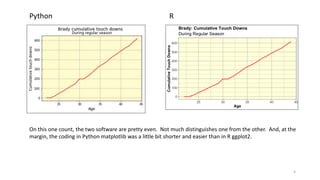
1) Time series graph of a single variable (the number of touch downs for one single quarterback);
2) Time series graph of multiple variables (including all 7 quarterbacks); and
3) Facet graphs when you generate a separate graph for each of the quarterbacks.
2
Time series graph for a single variable
3
4
Python R
On this one count, the two software are pretty even. Not much distinguishes one from the other. And, at the
margin, the coding in Python matplotlib was a little bit shorter and easier than in R ggplot2.
Time series graph for several variables
5
6
Python R
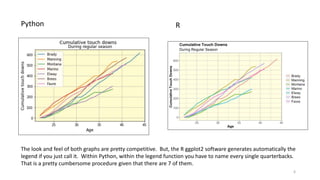
The look and feel of both graphs are pretty competitive. But, the R ggplot2 software generates automatically the
legend if you just call it. Within Python, within the legend function you have to name every single quarterbacks.
That is a pretty cumbersome procedure given that there are 7 of them.
7
Facet graphs
That’s where there is a huge difference between the two software. It was quite easy to do such facet
graphs in R. And, as you will see they were really pretty effective in conveying disaggregated
visualized data information.
In Python doing the equivalent graphs proved nearly impossible at my basic skill set level. This was
despite spending days in searching, googling, YouTubing on how to do those in Python. Every single
example I saw pretty much catered to scatter plots type graphs, not time series graphs. After a ton of
nearly random iterations, I was able to generate what are by comparison with R, extremely poor facet
graphs. I am sure one with much superior coding skills could generate beautiful Python facet time
series graphs. But, be warned. That is not an easy task. In this case, I clearly prefer R over Python.
8
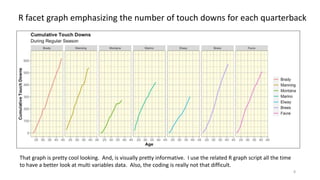
R facet graph emphasizing the number of touch downs for each quarterback
That graph is pretty cool looking. And, is visually pretty informative. I use the related R graph script all the time
to have a better look at multi variables data. Also, the coding is really not that difficult.
9
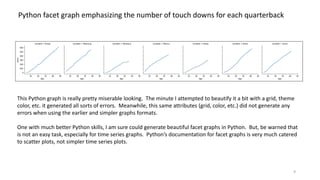
Python facet graph emphasizing the number of touch downs for each quarterback
This Python graph is really pretty miserable looking. The minute I attempted to beautify it a bit with a grid, theme
color, etc. it generated all sorts of errors. Meanwhile, this same attributes (grid, color, etc.) did not generate any
errors when using the earlier and simpler graphs formats.
One with much better Python skills, I am sure could generate beautiful facet graphs in Python. But, be warned that
is not an easy task, especially for time series graphs. Python’s documentation for facet graphs is very much catered
to scatter plots, not simpler time series plots.
10
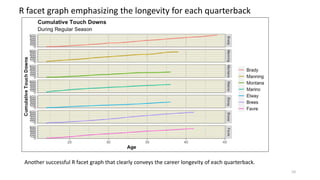
R facet graph emphasizing the longevity for each quarterback
Another successful R facet graph that clearly conveys the career longevity of each quarterback.
11
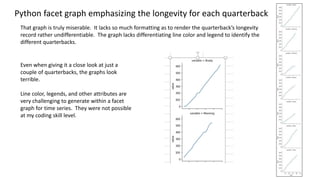
Python facet graph emphasizing the longevity for each quarterback
That graph is truly miserable. It lacks so much formatting as to render the quarterback’s longevity
record rather undifferentiable. The graph lacks differentiating line color and legend to identify the
different quarterbacks.
Even when giving it a close look at just a
couple of quarterbacks, the graphs look
terrible.
Line color, legends, and other attributes are
very challenging to generate within a facet
graph for time series. They were not possible
at my coding skill level.

Comparing R vs. Python for data visualization

  • 1.
    Data Visualization Python matplotlibvs R ggplot2 Gaetan Lion, January 19, 2022
  • 2.
    Introduction A month agoI released a presentation “Is Tom Brady the greatest quarterback?” https://www.slidesfinder.com/gaetan/is-tom-brady-the-greatest-quarterback-powerpoint- presentation/4520.aspx I decided to revisit this football stats data to compare the data visualization capabilities of R ggplot2 package vs. Python matplotlib & seaborn packages. I focused on the number of touch downs over time for the 7 different quarterbacks included in this data set. And, I compare the two software using different types of graphs, including: 1) Time series graph of a single variable (the number of touch downs for one single quarterback); 2) Time series graph of multiple variables (including all 7 quarterbacks); and 3) Facet graphs when you generate a separate graph for each of the quarterbacks. 2
  • 3.
    Time series graphfor a single variable 3
  • 4.
    4 Python R On thisone count, the two software are pretty even. Not much distinguishes one from the other. And, at the margin, the coding in Python matplotlib was a little bit shorter and easier than in R ggplot2.
  • 5.
    Time series graphfor several variables 5
  • 6.
    6 Python R The lookand feel of both graphs are pretty competitive. But, the R ggplot2 software generates automatically the legend if you just call it. Within Python, within the legend function you have to name every single quarterbacks. That is a pretty cumbersome procedure given that there are 7 of them.
  • 7.
    7 Facet graphs That’s wherethere is a huge difference between the two software. It was quite easy to do such facet graphs in R. And, as you will see they were really pretty effective in conveying disaggregated visualized data information. In Python doing the equivalent graphs proved nearly impossible at my basic skill set level. This was despite spending days in searching, googling, YouTubing on how to do those in Python. Every single example I saw pretty much catered to scatter plots type graphs, not time series graphs. After a ton of nearly random iterations, I was able to generate what are by comparison with R, extremely poor facet graphs. I am sure one with much superior coding skills could generate beautiful Python facet time series graphs. But, be warned. That is not an easy task. In this case, I clearly prefer R over Python.
  • 8.
    8 R facet graphemphasizing the number of touch downs for each quarterback That graph is pretty cool looking. And, is visually pretty informative. I use the related R graph script all the time to have a better look at multi variables data. Also, the coding is really not that difficult.
  • 9.
    9 Python facet graphemphasizing the number of touch downs for each quarterback This Python graph is really pretty miserable looking. The minute I attempted to beautify it a bit with a grid, theme color, etc. it generated all sorts of errors. Meanwhile, this same attributes (grid, color, etc.) did not generate any errors when using the earlier and simpler graphs formats. One with much better Python skills, I am sure could generate beautiful facet graphs in Python. But, be warned that is not an easy task, especially for time series graphs. Python’s documentation for facet graphs is very much catered to scatter plots, not simpler time series plots.
  • 10.
    10 R facet graphemphasizing the longevity for each quarterback Another successful R facet graph that clearly conveys the career longevity of each quarterback.
  • 11.
    11 Python facet graphemphasizing the longevity for each quarterback That graph is truly miserable. It lacks so much formatting as to render the quarterback’s longevity record rather undifferentiable. The graph lacks differentiating line color and legend to identify the different quarterbacks. Even when giving it a close look at just a couple of quarterbacks, the graphs look terrible. Line color, legends, and other attributes are very challenging to generate within a facet graph for time series. They were not possible at my coding skill level.