Tips and Tricks
for Data Visualization
in Python
#seaborn
by
Jacqueline Carvalho
Seaborn is a library for making attractive and
informative statistical graphics in Python. It is
built on top of matplotlib and integrated with the
PyData stack, including support for numpy and
pandas data structures and statistical routines.
FacetGrid
Matplotlib is a Python 2D plotting library
which produces publication quality figures in
a variety of hardcopy formats and interactive
environments across platforms. Matplotlib
can be used in Python scripts, the Python
and IPython shells, the Jupyter notebook,
web application servers, and four graphical
user interface toolkits.
matplotlib.pyplot is a collection of command
style functions that make matplotlib work like
MATLAB. Each pyplot function makes some
change to a figure: e.g., creates a figure,
creates a plotting area in a figure, plots some
lines in a plotting area, decorates the plot with
labels, etc.
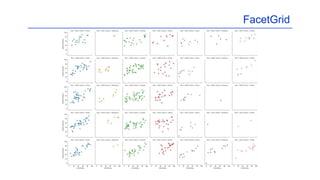
The FacetGrid is an object that links
a Pandas DataFrame to a matplotlib
figure with a particular structure.
In particular, FacetGrid is used to
draw plots with multiple Axes where
each Axes shows the same
relationship conditioned on different
levels of some variable. It’s possible
to condition on up to three variables
by assigning variables to the rows
and columns of the grid and using
different colors for the plot elements.
hue allows to choose which logic of
colors the grid will follow. For
example: if you choose ‘genre’, it
means that all the data related to that
genre will have the same color; if you
choose ‘year’, it means that all the
data related to the same year will
have the same color.
FacetGrid
Kdeplot
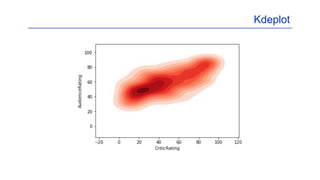
Kdeplot fits and plots a
univariate or bivariate kernel
density estimate.
If True, shade in the area
under the KDE curve, or
draw with filled contours
when data is bivariate.
The determination whether to issue a warning message is controlled by the warning filter,
which is a sequence of matching rules and actions. Rules can be added to the filter by
calling filterwarnings() and reset to its default state by calling resetwarnings().
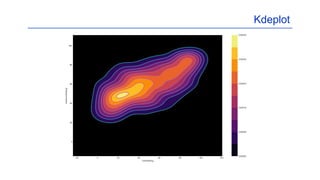
The colormap or cmap is
used to map normalized
data values to RGBA (red,
green, blue, alpha) colors.
Kdeplot
Kdeplot
cbar. If True and drawing a
bivariate KDE plot, add a
colorbar.
If True, shade the lowest contour of a bivariate KDE plot. Not relevant when drawing a
univariate plot or when shade=False. Setting this to False can be useful when you want
multiple densities on the same Axes.
Subplots. This utility wrapper
makes it convenient to create
common layouts of subplots,
including the enclosing figure
object, in a single call.
Kdeplot
Jointplot
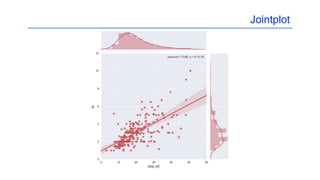
Jointplot function provides a
convenient interface to the
JointGrid class, with several
canned plot kinds. This is
intended to be a fairly lightweight
wrapper; if you need more
flexibility, you should use
JointGrid directly.
Kind defines which plot to
draw. It may be:
Scatter,
Reg,
Resid,
Kde or
hex.
xlim and ylim define the axis
limits before plotting.
Set aesthetic parameters in one step
to the background of the chart. The
style may be darkgrid, whitegrid, dark,
white or ticks
Jointplot
Heatmap
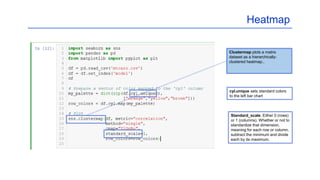
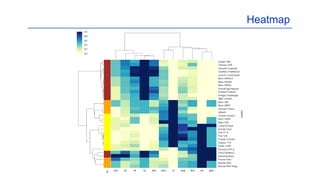
Clustermap plots a matrix
dataset as a hierarchically-
clustered heatmap..
Standard_scale. Either 0 (rows)
or 1 (columns). Whether or not to
standardize that dimension,
meaning for each row or column,
subtract the minimum and divide
each by its maximum.
cyl.unique sets standard colors
to the left bar chart
Heatmap
Source
https://seaborn.pydata.org/
https://matplotlib.org/
https://www.superdatascience.com/python/
https://python-graph-gallery.com/
Data
https://github.com/DSJacq/Visualization
July 2018

Tips and Tricks for Data Visualization in Python

  • 1.
    Tips and Tricks forData Visualization in Python #seaborn by Jacqueline Carvalho
  • 2.
    Seaborn is alibrary for making attractive and informative statistical graphics in Python. It is built on top of matplotlib and integrated with the PyData stack, including support for numpy and pandas data structures and statistical routines.
  • 3.
    FacetGrid Matplotlib is aPython 2D plotting library which produces publication quality figures in a variety of hardcopy formats and interactive environments across platforms. Matplotlib can be used in Python scripts, the Python and IPython shells, the Jupyter notebook, web application servers, and four graphical user interface toolkits. matplotlib.pyplot is a collection of command style functions that make matplotlib work like MATLAB. Each pyplot function makes some change to a figure: e.g., creates a figure, creates a plotting area in a figure, plots some lines in a plotting area, decorates the plot with labels, etc. The FacetGrid is an object that links a Pandas DataFrame to a matplotlib figure with a particular structure. In particular, FacetGrid is used to draw plots with multiple Axes where each Axes shows the same relationship conditioned on different levels of some variable. It’s possible to condition on up to three variables by assigning variables to the rows and columns of the grid and using different colors for the plot elements. hue allows to choose which logic of colors the grid will follow. For example: if you choose ‘genre’, it means that all the data related to that genre will have the same color; if you choose ‘year’, it means that all the data related to the same year will have the same color.
  • 4.
  • 5.
    Kdeplot Kdeplot fits andplots a univariate or bivariate kernel density estimate. If True, shade in the area under the KDE curve, or draw with filled contours when data is bivariate. The determination whether to issue a warning message is controlled by the warning filter, which is a sequence of matching rules and actions. Rules can be added to the filter by calling filterwarnings() and reset to its default state by calling resetwarnings(). The colormap or cmap is used to map normalized data values to RGBA (red, green, blue, alpha) colors.
  • 6.
  • 7.
    Kdeplot cbar. If Trueand drawing a bivariate KDE plot, add a colorbar. If True, shade the lowest contour of a bivariate KDE plot. Not relevant when drawing a univariate plot or when shade=False. Setting this to False can be useful when you want multiple densities on the same Axes. Subplots. This utility wrapper makes it convenient to create common layouts of subplots, including the enclosing figure object, in a single call.
  • 8.
  • 9.
    Jointplot Jointplot function providesa convenient interface to the JointGrid class, with several canned plot kinds. This is intended to be a fairly lightweight wrapper; if you need more flexibility, you should use JointGrid directly. Kind defines which plot to draw. It may be: Scatter, Reg, Resid, Kde or hex. xlim and ylim define the axis limits before plotting. Set aesthetic parameters in one step to the background of the chart. The style may be darkgrid, whitegrid, dark, white or ticks
  • 10.
  • 11.
    Heatmap Clustermap plots amatrix dataset as a hierarchically- clustered heatmap.. Standard_scale. Either 0 (rows) or 1 (columns). Whether or not to standardize that dimension, meaning for each row or column, subtract the minimum and divide each by its maximum. cyl.unique sets standard colors to the left bar chart
  • 12.
  • 13.